
Managing access in multi-cloud environments can be complex, but integrating IAM (Identity and Access Management) with RBAC (Role-Based Access Control) simplifies and secures operations. Here's the key takeaway: IAM centralises identity management, while RBAC assigns permissions based on job roles. Together, they enable consistent policies, reduce risks, and streamline access across platforms like AWS, Azure, and GCP.
Key Points:
- IAM: Centralises authentication and identity lifecycle management.
- RBAC: Simplifies authorisation by assigning permissions to roles instead of individuals.
- Workload Identity Federation: Eliminates static credentials for cross-cloud service communication.
- Hub-and-Spoke Model: Uses a central Identity Provider (IdP) for unified authentication across clouds.
- Least Privilege Principle: Grants only necessary permissions, reducing risks of over-provisioning.
Why It Matters:
- Cyberattacks often target identities - 32% of breaches stem from account takeovers.
- Each cloud provider (AWS, Azure, GCP) has unique IAM/RBAC implementations, but shared principles ensure security and efficiency.
By combining IAM and RBAC, organisations can secure multi-cloud setups, automate access, and minimise risks from over-provisioned permissions or static credentials.
Multi-Cloud Security Playbook 🚀 Azure AWS GCP
Need help optimizing your cloud costs?
Get expert advice on how to reduce your cloud expenses without sacrificing performance.
IAM and RBAC: Core Concepts and How They Differ
::: @figure 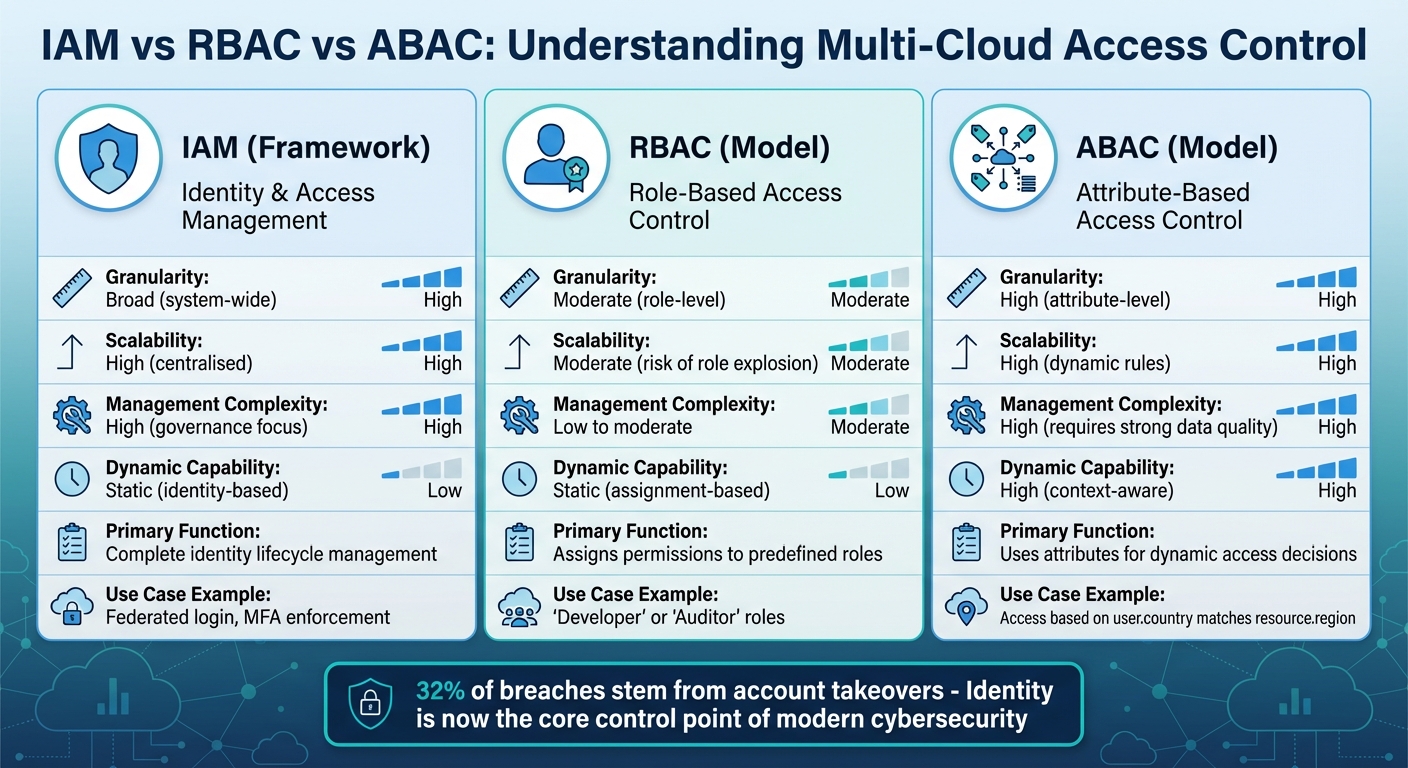 {IAM vs RBAC vs ABAC: Multi-Cloud Access Control Comparison}
:::
{IAM vs RBAC vs ABAC: Multi-Cloud Access Control Comparison}
:::
To tackle multi-cloud access challenges effectively, it's important to grasp the fundamentals of Identity and Access Management (IAM) and Role-Based Access Control (RBAC).
Identity and Access Management (IAM) acts as the overarching security framework for your cloud environment. It handles everything from identity provisioning and authentication to authorisation and auditing [5][6]. Think of it as the control centre for managing the identity lifecycle across your cloud infrastructure.
Role-Based Access Control (RBAC), on the other hand, is a specific authorisation model within IAM. Instead of assigning permissions to individuals, RBAC uses predefined roles linked to job functions. For example, rather than granting Sarah direct access to billing data, you assign her to a Finance Analyst
role. If she moves to another department, you simply reassign her to a different role - streamlining the access management process.
In a multi-cloud setup, IAM and RBAC complement each other. IAM centralises authentication through a single Identity Provider (IdP), while RBAC handles authorisation within each platform. A user logs in once via the IdP and then assumes a specific role - whether in AWS, Azure, or GCP - to carry out tasks [3][2]. This setup ensures consistent security policies like multi-factor authentication (MFA) across all platforms [3].
Cyberattacks increasingly target identities, with stolen credentials becoming a primary entry point. A staggering 71% year-over-year increase in attacks involving stolen credentials highlights this trend, and 32% of initial breaches now stem from valid account takeovers [6]. Bryan Clark, Senior Technology Advocate at IBM, emphasises:
Identity and access management (IAM) is now the core control point of modern cybersecurity[6].
How IAM, RBAC, and ABAC Differ
IAM serves as the overarching framework, while RBAC and Attribute-Based Access Control (ABAC) represent different approaches to authorisation. RBAC assigns access based on roles like Database Administrator
or Support Engineer.
This makes it simple to manage, but it can lead to role explosion
as organisations create numerous overlapping roles [4].
By contrast, ABAC uses attributes tied to users or resources to grant access. For instance, instead of creating separate roles for UK Finance Analyst
and US Finance Analyst
, you could write a single policy: Allow access to billing data where user.country matches resource.region.
This dynamic approach scales well but requires accurate data and strong governance [5][6].
Many organisations combine these models. RBAC provides baseline permissions, while ABAC adds context-aware controls. For example, RBAC might allow a developer to access production systems, but ABAC could restrict that access to specific hours and enforce MFA for sensitive actions.
| Factor | IAM (Framework) | RBAC (Model) | ABAC (Model) |
|---|---|---|---|
| Granularity | Broad (system-wide) | Moderate (role-level) | High (attribute-level) |
| Scalability | High (centralised) | Moderate (risk of role explosion) | High (dynamic rules) |
| Management Complexity | High (governance focus) | Low to moderate | High (requires strong data quality) |
| Dynamic Capability | Static (identity-based) | Static (assignment-based) | High (context-aware) |
Comparison Table: IAM vs RBAC
To clarify the distinction, here's a side-by-side comparison of IAM and RBAC. IAM provides the strategic framework, managing all identities - human and machine - while RBAC focuses on operational efficiency by assigning permissions via roles.
| Aspect | IAM | RBAC |
|---|---|---|
| Scope | Complete identity lifecycle (provisioning, authentication, authorisation, auditing) | Authorisation model within IAM |
| Primary Function | Establishes who can authenticate and serves as a central identity source | Determines what authenticated users can do based on roles |
| Implementation Level | Strategic, organisation-wide | Operational, platform-specific |
| Typical Use | Federated login, MFA enforcement, identity federation across clouds | Assigning Developeror Auditorroles with specific permissions |
| Cloud Provider Examples | Okta, Entra ID, AWS IAM (as IdP) | AWS IAM Roles, Azure's built-in roles, GCP custom roles [2] |
| Key Strength | Single source of truth for identity [3] | Simplifies permission management through role assignment |
Each cloud provider implements these principles differently. AWS uses JSON-based policies for identities and resources, Azure applies RBAC assignments at various levels, and GCP employs allow-only policies within its resource hierarchy [2]. Despite these variations, the core idea remains consistent: IAM handles authentication, and RBAC manages authorisation.
How to Integrate IAM and RBAC in Multi-Cloud Architectures
Managing identities across platforms like AWS, Azure, and GCP can be tricky because each provider has its own unique model. This often leads to identity sprawl, where managing permissions and access becomes overwhelming. A practical solution is to set up a centralised system that treats identity as the single source of truth while still working seamlessly with each cloud provider's setup.
The key lies in using a combination of a hub-and-spoke model for user authentication and workload identity federation for service-to-service communication. This approach manages both human and service identities effectively, avoiding long-lived credentials - a common cause of credential leaks [7]. Research indicates that organisations often grant two to three times more permissions than needed [3], making centralised control even more important.
Hub-and-Spoke Model for IAM Integration
The hub-and-spoke model revolves around a central Identity Provider (IdP) - such as Entra ID, Okta, or Google Workspace - which acts as the hub. Users authenticate once through this central IdP and receive temporary credentials to access roles in the cloud spokes
(AWS, Azure, GCP). This setup allows for a single control point to enforce security policies, like multi-factor authentication, across all platforms.
Technically, this system relies on identity federation. SAML 2.0 is commonly used for legacy enterprise apps, but OpenID Connect (OIDC) is gaining popularity for newer implementations. OIDC is lightweight, uses JSON instead of XML, and supports machine-to-machine authentication, making it ideal for modern apps and APIs.
When a user logs into the central IdP, they are authenticated and issued a federated identity token. This token lets them assume specific roles in different cloud platforms without needing separate passwords. Plus, disabling their account at the IdP immediately cuts off access everywhere. Once user authentication is sorted, the next step is securing service-to-service communication across clouds.
North/South and East/West Identity Management
Understanding how identity flows work is crucial in multi-cloud environments.
- North/South identity management focuses on user access. It handles how internal identity systems connect to cloud platforms, mainly through federation. Users authenticate via the central IdP and then transition into specific cloud environments using SAML or OIDC.
- East/West identity management deals with secure communication between services in different clouds. For example, an AWS Lambda function might need access to data in a GCP Cloud Storage bucket. Here, dynamic credential management becomes essential.
The CloudToolStack Team highlights the importance of this approach:
Workload identity federation eliminates the need for long-lived API keys, access keys, or service account keys. If you are still using static credentials for cross-cloud access, migrate to federated identity immediately[7].
This model allows services to exchange native identity tokens for short-lived credentials in other clouds. For instance, an AWS IAM role can authenticate to GCP using workload identity federation with an AWS provider, while a GCP service account can access AWS resources through an OIDC provider tied to Google accounts. This eliminates static credentials, reducing security risks.
Here are some common cross-cloud trust patterns:
| Pattern | Source Platform | Target Platform | Mechanism |
|---|---|---|---|
| AWS to GCP | AWS IAM Role | GCP Resources | GCP Workload Identity Federation (AWS provider) |
| GCP to AWS | GCP Service Account | AWS Resources | AWS OIDC provider (accounts.google.com) |
| Azure to AWS | Azure Managed Identity | AWS Resources | AWS OIDC provider (Entra ID) |
| AWS to Azure | AWS IAM Role | Azure Resources | Entra ID federated credentials |
| Kubernetes | Any K8s cluster | All Clouds | OIDC (IRSA, Workload Identity, AAD WI) |
The main difference is that North/South management focuses on user-to-cloud access using single sign-on and federation, while East/West management secures service-to-service communication through workload identity federation. By unifying these approaches under a centralised identity strategy, you can ensure consistent security policies across all cloud platforms.
For further guidance on implementing these strategies, Hokstad Consulting's team can assist in streamlining your multi-cloud identity management.
Step-by-Step Guide: Implementing RBAC Across Multi-Cloud Platforms
Once identity federation is in place, the next step is to build a consistent RBAC (Role-Based Access Control) framework that works across AWS, Azure, and GCP. The aim is to define roles once and map them effectively to each provider's native constructs, all while ensuring least privilege access remains intact.
Defining and Standardising Global Roles
Start by creating a provider-neutral role catalogue. Use standardised names that focus on business responsibilities rather than specific cloud services. For example, roles like app-reader, network-admin, or security-auditor align with broader organisational needs rather than being tied to individual platforms. This approach views RBAC as part of your architecture, not just a configuration task.
To ensure consistency, adopt a recognised control framework such as the Cloud Security Alliance Cloud Controls Matrix (CSA CCM) or CIS Benchmarks. Additionally, establish a RACI matrix (Responsible, Accountable, Consulted, Informed) to clarify IAM ownership across security, DevOps, and business teams. This helps avoid the all-too-common scenario where no one assumes full responsibility for identity management, leading to permission sprawl.
Introduce strict naming conventions for roles and resource tags, such as ROLE_APP-NAME_ENV_REGION. This simplifies auditing and enables automated policy enforcement. It’s also important to separate Cloud Resource Level access (managing the cloud platform) from Application/Kubernetes Level access (managing workloads). Once roles are defined, translate them into the specific frameworks of each cloud provider.
Mapping Roles to Cloud-Specific Permissions
The next step is to map global roles to each provider’s permissions while adhering to the principle of least privilege. Each cloud platform handles this differently:
- AWS: Use IAM roles and policies, often with assume-role patterns.
- Azure: Assign roles at various hierarchy levels.
- GCP: Use predefined and custom roles, sometimes with conditions.
Begin with zero permissions and grant only what’s absolutely necessary. Avoid overly broad permissions like s3:*. Start with read-only access and escalate to higher privileges only when specific tasks require it. For sensitive admin roles, use Just-In-Time (JIT) access to provide temporary permissions instead of permanent ones.
A practical example: In June 2025, Cockroach Labs implemented a zero-default-admin policy for its SRE and Platform teams across AWS, Azure, and GCP. Engineers were given read-only credentials by default for cloud consoles and Kubernetes clusters. When administrative access was needed during incidents, it was requested through the Lumos autonomous identity platform for a limited time. This approach eliminated permanent high-level access, significantly reducing risks of accidental or malicious changes [1].
Here’s how global roles can be mapped to each cloud provider:
| Global Role | AWS Mapping | Azure Mapping | GCP Mapping |
|---|---|---|---|
| Cloud-Viewer |
ViewOnlyAccess managed policy |
Reader built-in role |
roles/viewer predefined role |
| Network-Admin |
NetworkAdministrator policy |
Network Contributor role |
roles/compute.networkAdmin |
| Security-Auditor |
SecurityAudit managed policy |
Security Reader role |
roles/iam.securityReviewer |
| K8s-Reader |
eks:DescribeCluster + K8s ClusterRole
|
AKS Cluster User + K8s ClusterRole
|
container.clusters.getCredentials |
Automating Management with Tools
With global roles defined and mapped, managing RBAC manually across multiple clouds becomes impractical. Automation tools can simplify and streamline this process.
HashiCorp Vault: Centralises access control using ACL policies to govern client behaviour across distributed infrastructure. Write policies in either HashiCorp Configuration Language (HCL) or JSON, version-control them, and automate deployment via CLI or API. For example, Vault’s
-output-policyflag can auto-generate HCL paths and capabilities, whilevault policy fmtensures consistent formatting and prevents errors during automated deployments.Microsoft Defender for Cloud: Its Unified RBAC system can group multicloud resources (e.g., AWS accounts, GCP projects, Azure subscriptions) into logical
Cloud Scopes
likeFinance-Prod
. This allows permissions to be applied at scale rather than per account. Automate user provisioning and de-provisioning using SCIM (System for Cross-domain Identity Management) to sync your central IdP with cloud platforms like AWS Identity Center.Open Policy Agent (OPA) and HashiCorp Sentinel: These tools enforce global guardrails, such as preventing public S3 buckets, during the CI/CD process.
As Vishal Jaishankar from Cockroach Labs explains:
By applying a consistent RBAC strategy, however, we can ensure a secure and scalable foundation that keeps engineers productive without sacrificing operational safety[1].
For organisations needing expert help in implementing these strategies, Hokstad Consulting offers services to streamline RBAC policy management and optimise operational efficiency.
Cloud Provider-Specific RBAC Configurations
After aligning global roles with cloud-specific permissions, the next step is to dive into how individual platforms handle Role-Based Access Control (RBAC). AWS, Azure, and GCP each have their own technical methods, but the core security principles remain consistent. Proper configuration is essential, as poorly managed Identity and Access Management (IAM) is a leading cause of cloud security issues [12].
AWS IAM Roles and Policy Configurations
AWS manages RBAC through JSON policy documents, which define key elements like Effect (Allow/Deny), Action (e.g., s3:GetObject), Resource (ARN), and Condition (e.g., requiring MFA or specific IPs). There are seven types of policies in AWS: identity-based, resource-based, permissions boundaries, Service Control Policies (SCPs), resource control policies (RCPs) for Organisations, ACLs, and session policies [8].
For cross-cloud integrations, AWS supports Workload Identity Federation, allowing external services - like GCP service accounts or GitHub Actions workflows - to exchange their tokens for temporary AWS credentials using sts:AssumeRoleWithWebIdentity [2]. For instance, Google Kubernetes Engine (GKE) can manage AWS resources through a Google-managed service agent that assumes an AWS IAM role via OpenID Connect (OIDC). The trust policy for this setup permits accounts.google.com:sub to invoke sts:AssumeRoleWithWebIdentity [10][11].
Every IAM role must include a trust policy, specifying which external principals (accounts, federated users, or services) can assume the role. For cross-account or cross-cloud roles, always include an ExternalId in the trust policy to mitigate confused deputy
attacks [9][12].
To apply organisation-wide restrictions, AWS Organisations offers Service Control Policies (SCPs). These policies act as guardrails, limiting the maximum permissions across all accounts, regardless of individual IAM configurations. For example, you could block actions outside specific regions or prevent the deletion of CloudTrail logs. Additionally, AWS IAM Access Analyzer can review CloudTrail logs and generate fine-grained policies based on actual access patterns, ensuring a true least-privilege approach [8][12].
Azure, on the other hand, uses a hierarchical RBAC structure for its configurations.
Azure Entra ID and RBAC Setup
Azure RBAC is structured hierarchically: Management Groups → Subscriptions → Resource Groups → Resources. Permissions cascade downward, meaning a role assigned at the subscription level applies to all nested resources [2].
Configuring Azure RBAC involves identifying security principals (users, groups, service principals, or managed identities), choosing from over 400 built-in roles, or creating custom roles, and defining the scope of permissions (management group, subscription, resource group, or individual resource) [13][14].
In 2026, Google Cloud detailed a framework for granting GKE permissions to manage Azure resources. This approach involves creating three custom roles:
- A Subscription Scoped Role for managing role assignments.
- A Cluster Resource Group Scoped Role for handling virtual machines, disks, and networking.
- A VNet Resource Group Scoped Role for virtual network integration.
These roles are assigned to an Azure Service Principal linked to the GKE application [16].
Azure subscriptions have a limit of 4,000 role assignments, while management groups are capped at 500 [13]. To manage permissions efficiently and stay within these limits, assign roles to groups instead of individual users [14]. When automating RBAC using scripts (via PowerShell or CLI), it's best to use the unique Role ID rather than the Role Name, as names may change (e.g., when a Preview
role is finalised) [14][15]. To minimise risks, Microsoft advises limiting the number of subscription owners to a maximum of 3 [14].
Following Azure's hierarchical model, GCP offers an allow-only approach to IAM.
GCP IAM and Custom Role Definition
GCP's IAM operates on an allow-only policy model, structured around its resource hierarchy: Organisation → Folders → Projects → Resources [2]. Permissions are formatted as SERVICE.RESOURCE.VERB (e.g., compute.instances.stop), which must be aligned with equivalent actions in other clouds for multi-cloud setups [18].
When predefined roles are too broad, custom roles can be created to include only the permissions necessary for specific tasks [12][18]. Use predefined roles as templates to identify which permissions are typically granted together. GCP limits custom roles to 300 per organisation and 300 per project, with a maximum of 3,000 permissions per role [17][18].
Custom roles at the project level cannot include permissions that apply only to the organisation or folder levels (e.g., resourcemanager.organizations.get) [17][18]. Unlike predefined roles, custom roles do not automatically update when new permissions are added to a service, so administrators must manually update them to support new features [18]. If a custom role is deleted, its ID cannot be reused within the same project or organisation for 44 days until the deletion is fully processed [18].
To enhance security, remove primitive roles like Owner
, Editor
, and Viewer
from production environments [12]. Instead, use IAM Conditions to restrict access based on attributes such as request time, resource tags, or IP addresses. This enables GCP access policies to align with contextual rules used in AWS and Azure [12][4]. Regularly review IAM Recommender suggestions to identify and remove unused permissions from custom roles [12][2]. For external integrations, use workload identity federation to exchange external tokens for temporary GCP access tokens, avoiding the use of long-lived service account keys [12][2].
Best Practices for Multi-Cloud Access Control Governance
After setting up cloud-specific RBAC configurations, maintaining secure and efficient access control across multiple platforms demands consistent governance. A key element of this process is centralised identity management. Using a single Identity Provider (IdP) like Entra ID, Okta, or Google Workspace with protocols such as SAML 2.0 or OIDC simplifies and unifies access governance [3].
To enforce the Principle of Least Privilege (PoLP), grant only the permissions users truly need. Avoid using wildcards in policies and instead apply resource-specific permissions [3][4]. David Galiata, Security Engineering Director at Spacelift, highlights the importance of this approach:
Identity is the new perimeter. In cloud environments, network boundaries are porous and dynamic, which makes identity the primary control plane[20].
This shift from network-based controls to an identity-focused strategy strengthens security in multi-cloud environments.
Incorporate Policy-as-Code tools like OPA or HashiCorp Sentinel to establish consistent security rules within CI/CD pipelines. Automating user provisioning and de-provisioning is also essential to comply with GDPR and UK audit standards. For privileged access, adopt Just-In-Time (JIT) models using tools like Azure PIM or AWS STS. These provide temporary, time-limited elevated permissions, reducing reliance on permanent privileged accounts [19]. Together, these practices build a strong foundation for secure and compliant multi-cloud governance.
Automated Access Reviews and Auditing
Once RBAC configurations are in place, regular access reviews are critical for maintaining control over permissions. Without these reviews, users can accumulate unnecessary permissions over time, a phenomenon known as privilege creep.
To combat this, deploy cloud-native automated tools for continuous monitoring:
- AWS IAM Access Analyzer: Identifies external or unused access.
- Azure Access Reviews: Conducts periodic checks on entitlements.
- GCP IAM Recommender: Suggests adjustments to align permissions with actual usage.
For standard users, schedule quarterly reviews, while high-privilege roles should undergo monthly assessments to ensure tighter control.
Centralising audit logs from tools like AWS CloudTrail, Azure Activity Logs, and GCP Audit Logs into a SIEM platform (e.g. Splunk, Microsoft Sentinel, Datadog) creates a unified audit trail. To streamline task ownership, establish a RACI matrix that clearly defines who approves privileged roles and who handles technical implementation. Consistent tagging (e.g. owner, env, data_class) across cloud platforms further simplifies automated auditing and cost tracking.
Using Multi-Factor Authentication (MFA) and Contextual Policies
MFA is one of the most effective ways to prevent account takeovers [3]. However, not all MFA methods offer the same level of security. For privileged admin accounts, prioritise phishing-resistant methods such as FIDO2 security keys or Yubikeys. For general users, standard MFA options like Microsoft Authenticator or Google Prompt are suitable. Avoid SMS-based MFA for high-privilege roles, as it is vulnerable to SIM-swapping attacks.
Contextual policies add another layer of security by considering factors like device health, location, and time before granting access. For example, you can:
- Restrict admin access to the UK or EU to comply with GDPR.
- Limit privileged actions to standard business hours, with emergency bypass options.
- Check device posture to ensure corporate-managed devices are encrypted and have up-to-date antivirus software.
| Category | Examples / Tools | Contextual Factors for Policies |
|---|---|---|
| MFA Tools | Duo Security, Yubikey (FIDO2), Microsoft Authenticator, Okta Verify, Google Prompt | Location: Restrict access to specific regions (e.g. UK/EU for GDPR compliance). |
| Identity Providers | Okta, Azure AD (Entra ID), Google Workspace, Ping Identity | Device Posture: Verify if the device is corporate-managed, encrypted, or has antivirus. |
| Authentication Protocols | SAML 2.0, OIDC, FIDO2, OAuth 2.0 |
Risk Score: Trigger MFA or block access based on impossible travelor leaked credentials. |
| Access Methods | Just-In-Time (JIT), Passwordless, Certificate-based | Time of Day: Limit admin access to business hours unless an emergency bypass is required. |
Conclusion
Integrating IAM and RBAC into multi-cloud setups isn't just a good idea - it's a necessity for maintaining unified security and ensuring least-privilege access. By centralising identity management with a single IdP and enabling federated access across platforms like AWS, Azure, and GCP, organisations can transition from outdated manual privilege assignments to automated, just-in-time access models. This approach also ensures compliance with UK standards such as GDPR, ISO 27001, and PCI DSS.
Using tools like OPA or HashiCorp Sentinel to manage governance rules as Policy-as-Code reduces the risk of human error and guarantees consistent enforcement across all environments. Meanwhile, Workload Identity Federation removes the need for static credentials, significantly lowering the risks tied to long-lived access keys.
To maintain control, implement standardised global roles that map to specific cloud permissions, and automate lifecycle management to avoid outdated or unused accounts. Regular access reviews - ideally every quarter - and centralised SIEM logging are key to keeping privilege creep in check.
Governance plays an equally important role alongside technical controls. Clear accountability, defined through a RACI matrix, combined with contextual policies and robust MFA, helps establish a layered, defence-first security approach. Together, these practices form a strong foundation for securing multi-cloud environments effectively.
FAQs
When should I use RBAC vs ABAC in multi-cloud?
In multi-cloud environments, RBAC (Role-Based Access Control) works well when access can be managed by assigning roles to users. It's especially useful for straightforward, role-focused tasks like handling Kubernetes permissions. On the other hand, ABAC (Attribute-Based Access Control) is a better fit for more detailed and dynamic access needs. It uses attributes like user details or resource tags, making it ideal for complex setups that require flexible policies to meet compliance and security demands across various cloud platforms.
How do I set up workload identity federation between clouds?
To set up workload identity federation across multiple clouds, you'll need to establish trust relationships that allow workloads to authenticate without relying on long-term credentials. Here's how you can do it:
- Set up external identity providers: Configure providers like AWS or Azure to issue tokens for authentication.
- Create a workload identity pool and provider in Google Cloud IAM: This step enables Google Cloud to recognise and verify tokens from the external providers.
- Assign roles to federated identities: Grant the necessary permissions to these identities so they can securely access resources.
By following these steps, you can ensure secure and smooth access across cloud environments, aligning with best practices for multi-cloud security.
How can I stop role explosion across AWS, Azure and GCP?
Centralising identity and access management is key to preventing role overload in AWS, Azure, and GCP. Using automation tools and policy-as-code frameworks like Open Policy Agent (OPA) ensures consistent enforcement of access policies while cutting down on manual intervention.
Another effective approach is adopting a unified identity federation model, such as SAML or OIDC, to enable single sign-on (SSO). This method streamlines authentication across all cloud platforms, helping to keep role sprawl under control and improving overall management efficiency.