Cloud SLAs define the service standards between you and your provider, covering uptime, performance metrics, and support processes. But they often include hidden risks, like narrow downtime definitions or complex credit claims, that can impact your business. Here's what you need to know:
- Downtime Definitions: Some SLAs exclude partial outages or brief disruptions.
- Service Credits: Credits (5%-25% of fees) require active claims and rarely cover full downtime costs.
- Shared Responsibility: Vendors guarantee uptime only if your setup meets their standards.
- Support Tiers: 24/7 support is often limited to critical issues on higher-paid plans.
- Performance Metrics: Uptime guarantees (e.g., 99.9% vs. 99.99%) can mean hours vs. minutes of downtime annually.
- Exclusions & Penalties: SLAs may exclude maintenance or third-party failures, and financial penalties often cap at 50% of contract value.
Why it matters: SLAs are not just technical documents - they impact your business continuity and finances. Regular reviews, clear documentation, and proactive monitoring are essential to ensure your SLA works for you. Always verify definitions, exclusions, and enforcement terms before signing.
Service Scope and Coverage
Vendor and Client Responsibilities
Cloud SLAs operate on a shared responsibility model, meaning the vendor's guarantees only hold if your configuration aligns with their standards. While the vendor ensures infrastructure uptime and offers support, you're tasked with building resilient systems, implementing retry mechanisms, and configuring services correctly. For instance, some SLAs demand specific deployment setups - like using SSDs or ensuring redundancy - for coverage to apply. If your architecture doesn't meet these SLA-eligible
criteria, you could find yourself without protection when issues arise.
This shared model extends to incident management. Vendors typically exclude downtime caused by customer misconfigurations, third-party software issues, or quota breaches from their SLA metrics. To claim credits, you'll need thorough documentation, including independent logs with timestamps, error codes, and retry evidence. Most vendors require these claims within a tight 30 to 60-day window. It's also worth noting that vendors won't notify you of SLA breaches - it’s up to you to monitor and act.
To avoid surprises, confirm your setup aligns with the vendor's requirements by following a detailed checklist.
Service Scope Verification Checklist
To maintain SLA coverage, review these critical points:
Understand what qualifies as a
valid request.
Coverage often applies only to requests that meet specific schemas or size limits. Requests that are malformed or exceed quotas are usually excluded from uptime calculations [1]. Additionally, availability percentages can vary depending on whether the vendor uses time-based metrics (tracking uptime over intervals) or request-based metrics (measuring the ratio of successful responses to total valid requests) [1].Check regional coverage. Ensure the SLA explicitly covers services in the UK or EU regions. Global averages can obscure local data centre outages. Ask for historical uptime records for UK data centres to verify the service aligns with your latency and data residency needs, particularly under the UK Data Protection Act 2018 and UK GDPR.
Review feature exclusions. SLAs often exclude
Preview
,Beta
, orUnsupported
features from coverage [1]. If you're using newer features, confirm they’re included in the SLA before deploying them in production. Similarly, check whether scheduled maintenance is excluded from uptime metrics and whether the vendor offers maintenance-free periods during your peak business hours.
Service Level Agreement In Cloud Computing | SLA Management | Types of SLA | Life Cycle of SLA
Support Availability and Response Times
::: @figure 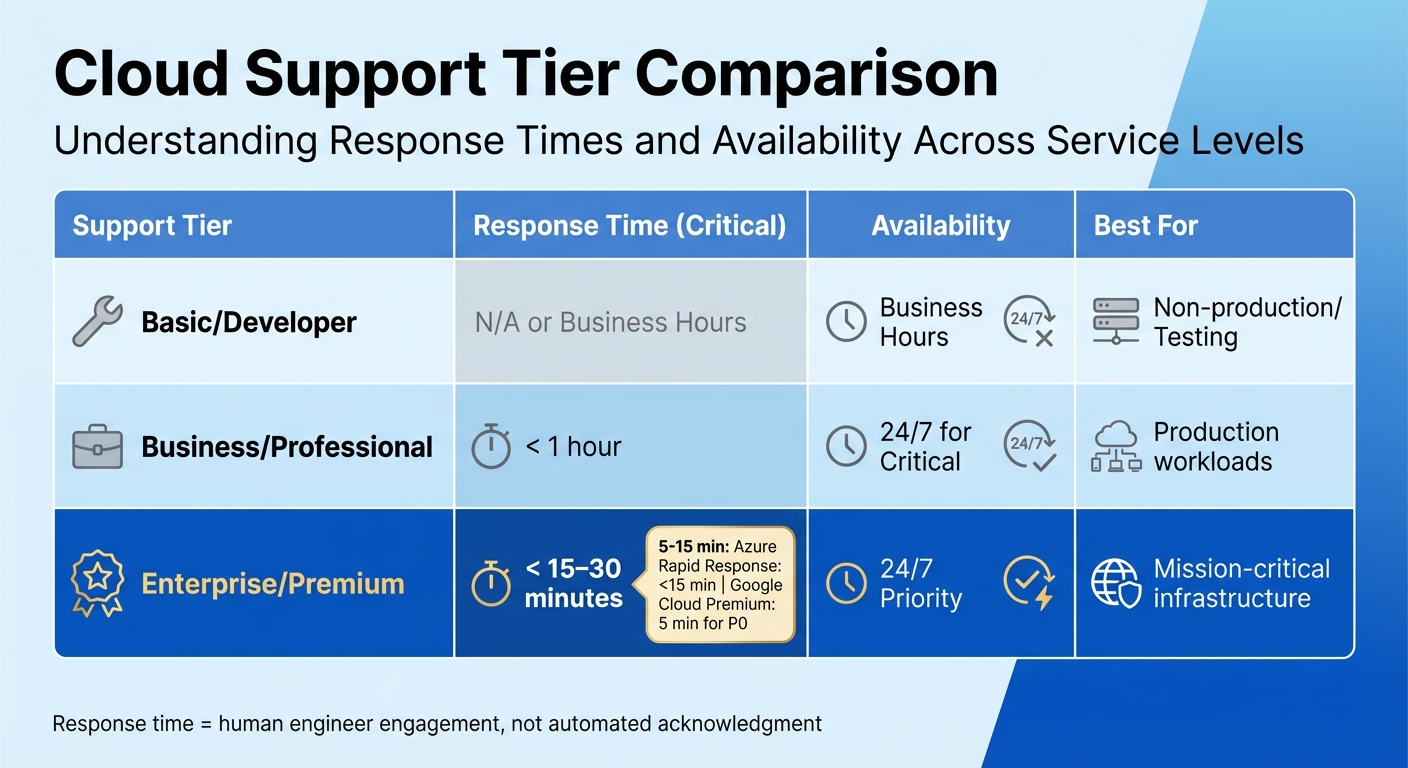 {Cloud Support Tier Comparison: Response Times and Availability}
:::
{Cloud Support Tier Comparison: Response Times and Availability}
:::
Support Availability Assessment
Most vendors reserve 24/7 support for critical incidents, but only on higher-paid tiers. For example, Azure's Standard tier and Google Cloud's Enhanced tier provide round-the-clock support exclusively for 'Severity A' or 'P1' issues. Lower-severity cases, however, are limited to local business hours [4][5]. This means if you encounter a non-critical issue at 02:00 on a Saturday, you might have to wait until the following Monday morning for assistance.
Language support is another factor to consider. While 24/7 assistance is typically available in English, other languages - like Spanish, French, or German - are usually restricted to local business hours [4][5]. These business hours vary by region; for example, North America often operates between 06:00 and 18:00 Pacific Time, while other regions follow a 09:00 to 17:00 schedule [4][5]. Additionally, support may be unavailable during regional holidays unless your contract explicitly includes full 24/7 coverage [5].
For critical, round-the-clock support, vendors often require your team to be continuously available to collaborate with their engineers until the issue is resolved. If your team cannot maintain this level of engagement, the vendor might downgrade the incident's priority, which could significantly delay the resolution process [4][6].
Now, let’s look at how response times differ across support tiers.
Response Time Guarantees
Response times can vary widely depending on your chosen support tier and the severity of the incident. For example, Azure's Rapid Response offers an initial response time of under 15 minutes for Severity A issues, while Google Cloud Premium promises a 5-minute response for P0 (mission-critical) cases [4][6]. It's important to note that these response times refer to the interval between ticket submission and engagement by a human engineer - not an automated acknowledgement.
| Support Tier | Response Time (Critical) | Availability | Best For |
|---|---|---|---|
| Basic/Developer | N/A or Business Hours | Business Hours | Non-production/Testing |
| Business/Professional | < 1 hour | 24/7 for Critical | Production workloads |
| Enterprise/Premium | < 15–30 minutes | 24/7 Priority | Mission-critical infrastructure |
When reviewing service-level agreements (SLAs), make sure they specify how frequently updates will be provided during active incidents. For critical issues, updates every 30–60 minutes are a common industry standard. Also, confirm that response time
refers to engagement by a human engineer rather than an automated system. Keep in mind that resolution time - the duration required to fully restore service - is a separate metric and generally does not carry the same financial penalties [4][5].
Performance Metrics and Service Reliability
Key Performance Indicators to Evaluate
When it comes to uptime, even small differences can have a big impact. For example, a 99.9% uptime guarantee allows for up to 8.77 hours of downtime annually, while 99.99% uptime reduces that to just 52.6 minutes per year [1]. For systems that are critical to operations, these differences can directly affect business continuity and revenue.
It's also important to understand how downtime is defined. Some vendors only count outages if all requests fail for at least one minute [1]. This makes it essential to review the SLA carefully to see how failures are measured - whether by time intervals or by the ratio of successful to total valid requests. A request-based approach is typically more precise, as it captures brief but frequent failures that might be overlooked with time-based tracking [1].
Latency and error rates are also key indicators of service quality. Use 99th percentile latency values and calculate error rates based on valid requests to get a clearer picture of performance [1].
To ensure these metrics are met in practice, use the SLA Performance Verification Checklist below.
SLA Performance Verification Checklist
This checklist helps you evaluate whether SLA promises hold up in real-world conditions:
First-contact resolution rate: Leading providers resolve at least 70% of issues during the first interaction [7]. This reduces the need for escalations and improves efficiency. Regularly request reports - monthly or quarterly - that detail ticket volumes, average response times, and SLA compliance rates to keep track of this metric [7].
Backup and recovery guarantees: Look for backup success rates above 99% and ensure the SLA includes regular recovery testing, not just backup creation [7]. It's not enough to create backups; they must be restorable. Also, verify that the SLA measures
valid requests
that adhere to documented schemas. This ensures that user errors don’t unfairly affect the vendor's performance data [1].
Some SLAs also include specific conditions, such as requiring SSD storage instead of HDDs for certain uptime guarantees to apply [1]. These details are crucial to understanding the full scope of what the SLA covers.
Financial Penalties and Breach Consequences
Financial Penalties Evaluation
When cloud providers fail to meet their SLA commitments, service credits are the most common form of compensation. These credits typically range from 5% to 25% of your monthly fees, depending on how severe the breach is [3]. For instance, AWS offers a 10% credit if EC2 Multi-AZ availability drops below 99.99%, and this escalates to a 100% credit if availability dips below 95% [8][3]. Microsoft Azure follows a similar pattern for its Virtual Machines [3].
But here's the catch: these credits barely scratch the surface of the actual costs incurred during downtime. IT outages can cost large enterprises anywhere from £4,200 to £6,750 per minute, with major incidents quickly escalating to £225,000 to £300,000 per hour [8][9]. Last year alone, 73% of organisations experienced outages costing over £75,000 [3]. Adding to the challenge, service credit caps are often limited to 30% to 50% of the annual contract value [8][9].
Service credits are typically a percentage of the monthly service fee for the affected service... Credits don't cover lost revenue, customer attrition, or reputational damage.- Microsoft [1]
In cases of repeated breaches, termination rights become a key safeguard. Many SLAs allow businesses to exit contracts without penalties if breaches occur for three consecutive months [8][9]. Some agreements even include service extensions, which provide additional subscription time as compensation [9][10].
However, there’s a catch: claims must be submitted within 30–60 days of the billing month, or the remedy is forfeited [8][9]. To strengthen your case, ensure you document evidence like timestamps, error codes, and logs, alongside prior configuration checks [1].
Now that we’ve covered penalties and termination options, let’s dive into how these remedies are enforced.
Enforcement Mechanisms
Clear enforcement terms are essential to protect your operations, especially since providers rarely offer compensation willingly. Shockingly, half of the SLAs reviewed are effectively unenforceable due to vague language or excessive exclusions [11]. Phrases like reasonable endeavours
or targets
are red flags - they often signal non-binding aspirations rather than enforceable commitments [11].
Suppliers often refer to service levels as 'targets', which suggests they are aspirational rather than contractual. This is a red flag.- Hans Schumann, Legal Director, Cripps [11]
Scrutinise how downtime is defined. Some SLAs only account for complete unavailability, ignoring issues like degraded performance [8]. Others exclude scenarios such as scheduled maintenance, emergency downtime, or outages caused by third-party providers [11]. For example, if your SaaS provider blames a failure on AWS, you might end up without any recourse.
For critical systems, consider negotiating revenue-linked penalties. Use a formula that factors in the actual business impact, such as:
(Vendor contribution %) × (Downtime minutes) × (Revenue per minute) × (Penalty multiplier) [12].
Additionally, demand audit rights for forensic logs, ensuring they are retained for at least 90 days. Agree on joint post-mortems within 10 business days to determine the root cause and assign responsibility [12].
If you can't measure a vendor's contribution to failure, you can't enforce a fair penalty.- Megastorage.Cloud [12]
This level of enforcement highlights the importance of meticulously reviewing SLAs, as discussed in earlier sections.
Transparency and Reporting Standards
Monitoring and Real-Time Reporting
Transparent monitoring plays a critical role in real-time SLA validation. Without proper visibility into provider performance, making informed decisions becomes nearly impossible. The monitoring tools offered by your vendor should directly correspond to the metrics outlined in your SLA. For instance, if your SLA focuses on request success rates, the dashboard should track HTTP response codes for the relevant endpoints. However, external monitoring from multiple regions is crucial to identify localised issues that vendor tools might overlook[1][15]. Tools like CloudWatch or Azure Monitor, while useful, typically provide global or regional health reports rather than specific user experience data[15]. This can lead to situations where a status page shows operational
even as users encounter timeouts.
It's also important to confirm that the provider's method of measuring uptime - whether based on time intervals or request-based ratios - matches the SLA metrics. For example, DigitalOcean publishes average resolution times for its support tiers, which range from 4 to 48 hours. In contrast, AWS only provides initial response targets without detailing resolution timeframes[13]. Opt for providers that deliver real-time dashboards or automated reporting systems to verify SLA compliance consistently[14]. Such detailed reporting is invaluable when investigating incidents.
Incident Reporting and Post-Mortems
Accurate and thorough incident reporting strengthens SLA accountability and speeds up issue resolution. Most vendors supply monthly aggregated reports on uptime and performance metrics[1]. To bolster your position in case of a breach, keep independent logs of timestamps, error codes, and retry attempts. Additionally, request detailed incident reports that outline the root causes of failures and any corrective actions taken[1]. This not only ensures transparency but also helps prevent similar issues in the future.
SLA Review and Update Processes
SLA Review Policies Checklist
Regularly reviewing your SLA is essential to keep pace with your organisation's changing needs. As your business grows - whether through expanding into new regions, migrating workloads, or introducing new services - your SLA must adapt accordingly. Establish a formal review schedule that considers these key changes, and pay close attention to any exclusions, such as planned maintenance periods or overlooked API endpoints[1].
When reviewing, check if the SLA still aligns with your internal Service Level Objectives (SLOs). While SLOs are internal targets, often stricter, the SLA represents a contractual obligation with potential financial implications. For instance, if your business now needs 99.99% availability but your provider only offers 99.9%, you may need to renegotiate the SLA or implement additional redundancy measures. Be cautious not to simply combine SLA percentages from different services to estimate overall availability - this approach overlooks unique service definitions and interdependencies[1].
Change Management Processes
After completing an SLA review, formalising any changes is critical. Document every update to maintain a clear audit trail and minimise misunderstandings. Engage front-line staff during this process to ensure response and resolution targets are realistic[2]. These team members, who manage incidents day-to-day, can flag impractical commitments early, helping you avoid agreeing to terms your organisation can't consistently meet.
Ensure any updated SLA metrics follow the SMART criteria - Specific, Measurable, Achievable, Relevant, and Time-bound[2]. For instance, if your provider introduces new services or expands to additional locations, confirm these updates are either included in the existing SLA or require separate agreements. Additionally, maintain stricter internal SLOs as a buffer. This allows your team to manage potential issues proactively, reducing the risk of breaching the SLA and incurring financial penalties.
Conclusion
Taking a checklist-based approach helps you dig deeper into cloud support SLAs, moving beyond the surface-level metrics. As Microsoft highlights, A service-level agreement (SLA) is one of the most commonly referenced documents in cloud architecture, but it's also one of the most frequently misunderstood
[1]. A key takeaway is understanding how your provider defines critical terms like downtime
and valid requests.
Narrow definitions or sweeping exclusions can drastically limit the actual coverage you receive. Remember, SLAs are engineering signals, not strict availability guarantees
[1], so it's wise to set stricter internal Service Level Objectives (SLOs) than the vendor's promises to build a safety margin.
When reviewing any SLA, focus on clear definitions and exclusions. Broad exclusions, such as those for third-party failures or planned maintenance, could leave your business vulnerable at critical moments.
It's also essential to keep detailed logs that include timestamps, error codes, and retry attempts to support any claims of SLA breaches [1]. Since service credits usually aren't issued automatically, this evidence is vital for holding your provider accountable.
Beyond tracking breaches, make it a habit to review and update your SLA regularly. Treat it as a dynamic document that evolves with your organisation's needs. Whether you're expanding into new regions, migrating workloads, or launching new services, regular reviews ensure your SLA remains relevant and aligned with your goals.
A well-maintained SLA forms the backbone of reliable cloud operations and ensures your vendor meets their commitments. By following this checklist, you can improve support response times and strengthen vendor accountability.
FAQs
What counts as “downtime” in a cloud SLA?
In the context of a cloud SLA, downtime
refers to any period when the service is either unavailable or doesn't meet the agreed performance benchmarks. This can include service outages that violate uptime commitments, delays in receiving support, or interruptions that hinder regular operations.
What evidence do I need to claim service credits?
To request service credits, you'll need to demonstrate that an SLA (Service Level Agreement) breach occurred. This could include evidence like missed response times or unfulfilled uptime commitments. Make sure to keep thorough records of incidents and all related communications with the vendor to back up your claim effectively.
How do I check if “24/7 support” really applies to me?
To determine whether 24/7 support
truly applies to you, take a close look at the support terms outlined in the SLA. Pay attention to details like guaranteed response and resolution times, escalation processes, and whether the coverage is comprehensive or limited to certain tiers or issue severities. Make sure the SLA matches your business's operational hours and critical requirements. It's also essential to confirm that the vendor's promises align with your expectations for handling incidents and providing round-the-clock availability.