
If I had to sum this up in one line: hybrid cloud SSO works when I map identity first, match each app to the right sign-in standard, and test failure before rollout.
Most firms now run hybrid IT, with 73–76% using a mix of on-site and cloud systems. That setup often leads to split logins, too many directories, weak policy control, and high support cost. With password resets making up 20–50% of helpdesk calls and costing about US$70 each, I can see why SSO is worth getting right.
If you want the short version, I’d focus on these points:
- List every identity source: Active Directory, Entra ID, HR systems, guest users, contractors, and service accounts.
- Map every app and dependency: note protocols, stored credentials, group lookups, and trust links.
- Use the right protocol for each app: SAML for older browser-based apps, OIDC for modern web, mobile, and APIs, and OAuth 2.0 for delegated access.
- Keep trust settings tight: track certificates, issuer URLs, endpoints, signing keys, and claim rules.
- Apply access policy in one place: MFA, conditional access, role-based access, and SCIM provisioning should sit around the IdP.
- Roll out in phases: start with 5–10% of users, keep rollback ready, and cut over only after a full working week of stable sign-ins.
- Plan for failure: central log monitoring, failover tests, and at least one locked-down break-glass account outside the main IdP.
Here’s the simple way I’d think about it: don’t start with tools. Start with who signs in, where their identity lives, what each app expects, and what breaks if a claim or username changes.
A small comparison helps show the protocol split:
| Protocol | Best use | Common fit |
|---|---|---|
| SAML 2.0 | Browser SSO | Older enterprise apps and many SaaS tools |
| OpenID Connect | User sign-in for modern apps | Web apps, mobile apps, APIs |
| OAuth 2.0 | Delegated access | API access between services |
The main point: I wouldn’t try to force one sign-in method across the whole estate. I’d use a mixed model, keep policy central, and treat resilience as part of the build from day one.
::: @figure 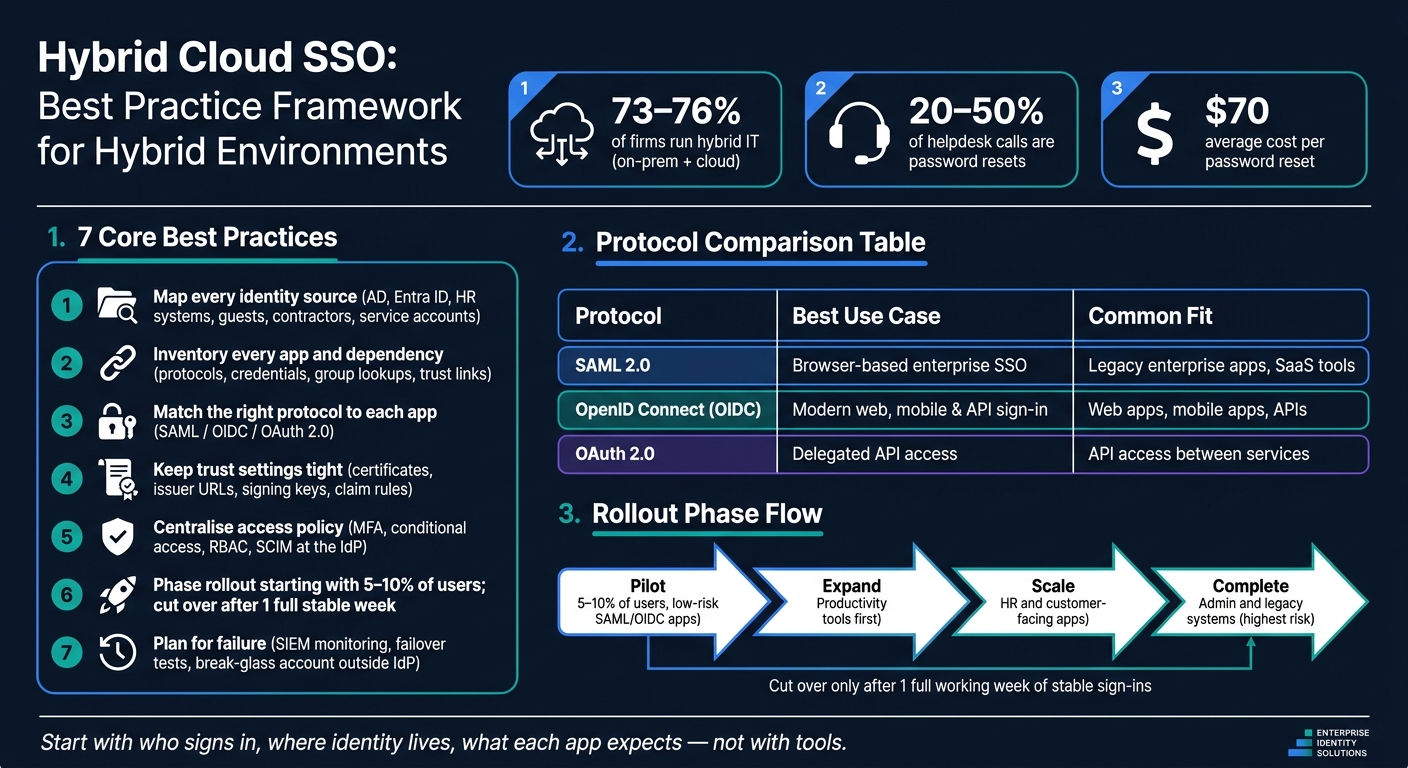 {Hybrid Cloud SSO Rollout: 7-Step Best Practice Framework}
:::
{Hybrid Cloud SSO Rollout: 7-Step Best Practice Framework}
:::
Single Sign On (SSO) - How it Works!
Need help optimizing your cloud costs?
Get expert advice on how to reduce your cloud expenses without sacrificing performance.
Assess identity sources and application inventory
With federation set as the base layer, the next step is to check the identity estate in detail. Before you configure anything, map every authoritative identity source. Write down where identities are created, which system owns each attribute, and which platform kicks off deprovisioning.
Map directories, tenants, and trust relationships
For each user group, identify one authoritative source for lifecycle, attributes, and access. In a hybrid setup, that usually means an on-premises directory like Active Directory, a cloud identity provider such as Microsoft Entra ID, and an HR system that handles joiner, mover, and leaver data. If partner or customer identity stores sit inside the sign-in flow, include them as well. When ownership is fuzzy, stale accounts and duplicate identities show up fast.
Don’t stop at employee accounts. Inventory guest users, contractors, and service accounts as separate groups. They often follow different lifecycle and governance rules. Service accounts, in particular, may skip interactive SSO but still depend on credentials, certificates, or managed identities. Record where these identities live, who approves them, how long they stay valid, and whether MFA and conditional access policies cover them.
Before rollout, check for duplicate usernames, stale accounts, disabled accounts that still exist, inconsistent attributes, and missing immutable IDs. If email addresses or UPN values don’t match between on-premises and cloud systems, provisioning can become unreliable. It also makes conditional access and RBAC rules harder to manage.
Document every trust relationship - the direct output of the federation layer - including SAML, AD FS, cross-tenant, B2B guest, and older claims-based trusts. Note whether each trust is one-way or bidirectional, which certificates are in use, how claim mappings work, and when those certificates expire. Hidden or undocumented trust links can create security blind spots and unexpected sign-in paths.[2]
Classify applications by protocol and migration effort
Once identity sources are mapped, classify applications by protocol and migration effort. Use discovery logs, not just what an application owner says, to confirm what employees use and how each application handles authentication.[1]
A simple readiness matrix helps you plan migration by risk and effort:
| Application type | Identity dependency | Protocol support | Migration complexity |
|---|---|---|---|
| Legacy on-premises enterprise app | Active Directory, domain services | Kerberos, LDAP, sometimes SAML via federation | High |
| Modern cloud-native app | Cloud IdP, modern token services | OpenID Connect, OAuth 2.0 | Low to medium |
| SaaS business app | External IdP, federation trust | SAML, OIDC | Medium |
| Custom internal app or API | App-specific auth or token handling | OIDC, custom auth, sometimes LDAP | Medium to high |
Keep an eye out for hidden integration work that owners often miss at the start. Common examples include:
- Batch jobs using stored credentials
- ERP or ITSM platforms that read group membership
- Scheduled tasks tied to a set username format
- API integrations that use service principals
A change to a username format, domain, or claim value can quietly break those downstream links. That’s why this inventory matters so much: it shapes migration order and exposes dependencies before cutover.
Choose the right SSO protocol mix
Use the application matrix from the previous section to assign each app a protocol. In most hybrid estates, a mixed protocol model is the sane option. If you try to force one protocol across legacy on-premises systems, modern cloud services, and SaaS tools, you often end up with more moving parts, not fewer.
The aim is simple: match each application to the protocol that suits its architecture, then keep identity policy and claim design aligned across the estate. Use the inventory to assign one protocol per application, and write down why that choice was made.
Use SAML for legacy enterprise web applications
SAML 2.0 fits browser-based legacy and SaaS applications that already use federation and a standard enterprise IdP flow. Use SAML when a partner or federation standard calls for it.
In plain terms, if an application is browser-based, mature, and already has a working SAML integration, it often makes sense to leave it on SAML and spend migration effort elsewhere. Use SAML only where the app or partner already depends on it.
Use OpenID Connect for modern apps and APIs
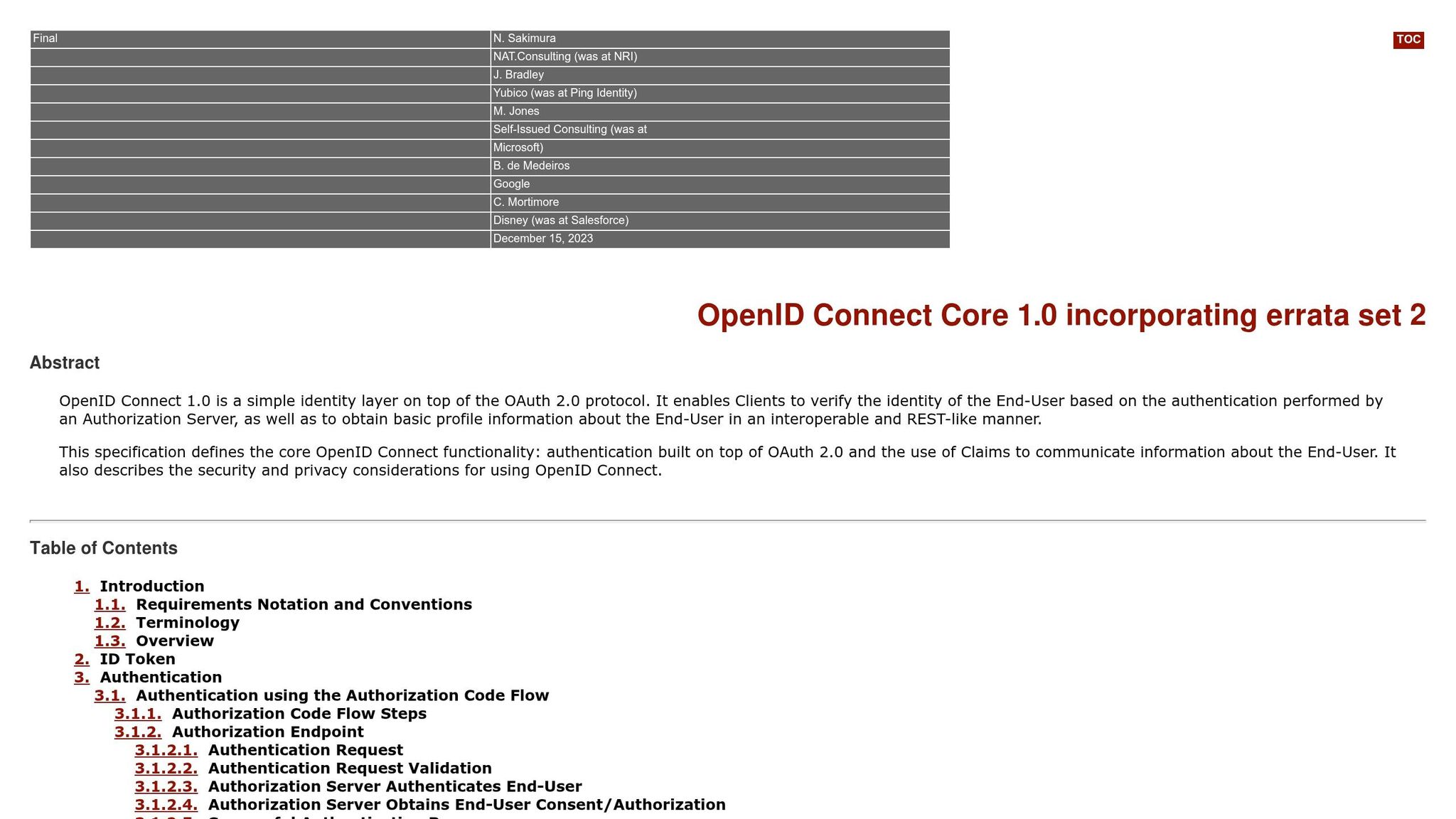
For modern web applications, single-page applications, mobile apps, and API-driven services, OpenID Connect (OIDC) is usually the better starting point. It uses JSON-based tokens, fits neatly with modern development frameworks, and works well for mobile and API use cases.
OAuth 2.0 authorises access. OIDC authenticates the user. If you need both user sign-in and API access, use OIDC for authentication and OAuth 2.0 access tokens for downstream resource calls. Treat OIDC as the default for new builds, then map claims and scopes in a consistent way.
Protocol comparison table for hybrid estates
| Feature | SAML 2.0 | OpenID Connect (OIDC) | OAuth 2.0 |
|---|---|---|---|
| Primary use case | Enterprise web SSO, legacy apps | Modern web, mobile, and APIs | Delegated authorisation |
| Typical artefacts | XML assertions | ID token, access token, refresh token | Access token, refresh token |
| Best fit | Browser-based enterprise federation | Web, mobile, and API-connected services | API access delegation |
Document one protocol choice per application and keep claims aligned across the estate. Record each application's chosen protocol, issuer, claims, and fallback path before defining trust and access controls. Next, define trusts, certificates, claims, and provisioning rules for the chosen protocol mix.
Design trust, provisioning, and access controls
After you’ve chosen the right protocols, the next job is to lock down each trust link and automate access control. At this stage, the focus moves to trust, claims, and enforcement. Every trust setting, claim rule, and provisioning flow should tie back to your application inventory. If it doesn’t, you’re flying blind.
These four control areas shape whether hybrid SSO stays secure and workable day to day.
Set up trust, certificates, and claim mapping correctly
Every federation relationship between an IdP and a service provider relies on metadata, certificates, and trust rules. For SAML, import the IdP’s XML metadata into each application. For OIDC, use the IdP discovery endpoint. For every application in your inventory, record the issuer URL, endpoints, and signing keys.
Certificates need the same level of care. Keep a central inventory of all signing and encryption certificates across on-premises and cloud IdPs. Where you can, automate rotation. But don’t make changes in live systems first and hope for the best. Rehearse certificate rotation in a non-production environment before touching production. And treat certificate expiry as a top operational priority.
Once the trust is in place, define which claims each application will receive. Keep this tight. Map claims to the minimum attributes each protocol and application actually needs. Under UK GDPR, send only the attributes required for authentication, authorisation, and audit. For the primary SSO key, use an immutable identifier rather than an email address or UPN.
Apply MFA, conditional access, RBAC, and SCIM
Next comes policy enforcement across the estate. These controls work best as a set, not in isolation.
Enforce MFA at the IdP so it applies across every application. For older applications sitting behind AD FS or an access proxy, require MFA before the IdP issues a token. You can also use step-up MFA based on risk, such as logins from unfamiliar locations or outside normal working hours.
Use conditional access to check device state, location, and risk signals before access is granted. For authorisation, centralise it through job-based roles. Define roles in Active Directory, sync them to your cloud IdP, and let applications read those roles from token claims. Then use SCIM to push joiner, mover, and leaver changes from the authoritative source, which removes the manual access revocation step.
| Control | Primary purpose in hybrid SSO | Example in a UK organisation |
|---|---|---|
| MFA | Strengthen authentication beyond passwords | Staff accessing payroll in the cloud must use MFA |
| Conditional access | Enforce context-aware access based on device, location, and risk | Remote logins from home require a compliant device and MFA |
| RBAC | Centralise authorisation through job-based roles | Only the Finance Managerrole can approve large invoices |
| SCIM provisioning | Automate account lifecycle across SaaS and cloud apps | Leavers automatically lose access to collaboration tools |
One more thing: don’t overlook break-glass access. Keep at least one non-federated, MFA-protected break-glass account outside the primary IdP. Lock it down, document who can use it, and test it on a regular basis. If your IdP goes down or a policy change locks everyone out, this account can be the difference between a bad day and a full-blown outage.
Roll out, maintain resilience, and plan recovery
Roll out in phases with controlled cutover
With trusts, claims, and access controls set, the next step is rollout and recovery.
Don’t switch the whole organisation to hybrid SSO in one go. After you’ve mapped identity sources and protocols, start with a controlled pilot covering 5–10% of users and a small set of lower-risk applications that support SAML or OIDC natively. Include both remote staff and office-based teams. That way, you can spot friction early, before it hits everyone.
Once the pilot is steady, roll out in this order: productivity tools first, then HR and customer-facing apps, and only after that administrative and legacy systems, where setup mistakes are more likely. Use the pilot findings to decide which app groups are ready to move next. Keep both identity providers running in parallel, route users by group or application, and cut over only after one full working week of steady sign-ins and normal support volumes.
Before full cutover, map out the rollback path. Document the current federation settings, claims, and endpoints, and set a rollback threshold in the change plan.
Monitor logs, plan failover, and test break-glass access
The March 2021 Azure AD outage made one thing painfully clear: a single identity-plane failure can knock out SSO across many services, and application redundancy on its own won’t make up for an identity-plane failure. [3][4][5]
Once rollout is live, monitoring becomes your main control point. Send SSO and IdP logs - sign-ins, access decisions, and protocol errors - to a central SIEM or log management platform. Set baselines for failed sign-in rates by application, normal MFA challenge rates, and usual admin sign-in patterns. Then alert on anything that drifts from those baselines. It also helps to match SSO telemetry with network and application metrics, so you can tell whether an issue is local or part of a broader IdP problem. [9][10]
Monitoring is only useful if failover is ready when you need it. Run IdPs in highly available setups - multiple federation servers behind load balancers on-premises, plus multi-region deployments for cloud IdPs - with health checks and automated failover so single-node faults don’t turn into manual recovery jobs. Test break-glass access in every recovery drill.
Run resilience and recovery drills every year, or twice a year if identity is business-critical. Add targeted tests after major changes, such as a new IdP or a large application migration. Set clear success criteria, such as restoring SSO within 30–60 minutes. After each drill, update the runbooks, access rules, and failover steps. [6][7][8]
Conclusion: core best practices for hybrid cloud SSO
Hybrid SSO works best when rollout, monitoring, failover, and recovery are built into the design from the start, not bolted on later.
FAQs
How do I choose between SAML, OIDC and OAuth 2.0?
Choose the protocol that fits your setup and the way people actually sign in.
SAML 2.0 is still the go-to standard for enterprise, web-based SSO. It makes sense if you're dealing with legacy systems or working under strict regulatory requirements. In those cases, SAML often feels like the safer, more familiar option.
OIDC tends to fit better with cloud-native applications, mobile platforms and API-driven systems. It’s lighter, more modern in day-to-day use, and often easier to work with in setups built around apps and services rather than old-school enterprise software.
One point matters more than people expect: use OAuth 2.0 for delegated authorisation, not user authentication. That line can get blurry in practice, but they’re not the same job.
In plenty of organisations, this isn’t an either-or choice. They use both SAML and OIDC to cover different needs across their stack.
What usually breaks during a hybrid SSO rollout?
Most hybrid SSO rollouts fail בגלל small configuration gaps, not app code bugs.
Two of the biggest troublemakers are certificate drift and clock skew. If a certificate no longer matches what the other side expects, trust can fail. And if system clocks are out by even a small amount, assertions may be rejected.
Other common snags include:
- typos in Entity IDs
- mismatched attribute names
- incorrect Assertion Consumer Service URLs
- missed protocol-specific requirements, such as mandatory attributes or correctly parsed XML
That’s why hybrid SSO setup often feels less like software development and more like precision wiring. One small mismatch, and the whole login flow can fall over.
How should I test SSO failure and recovery?
Use specialised SAML tracing tools to spot metadata or assertion errors before they hit production. Set up monitoring to log both successful and failed sign-in attempts across your cloud platforms.
It also helps to test failure cases on purpose. Check things like certificate expiry and connectivity dropouts so you know failover will work when you need it. For recovery, treat security settings as code. That makes it much easier to roll back to a known-good state without scrambling under pressure. And for users, self-service reset options can save a lot of time and cut down support tickets.