Policy-as-Code (PaC) transforms compliance, security, and governance rules into machine-readable code, automating multi-cloud compliance processes. By integrating tools like Terraform and Open Policy Agent (OPA), organisations can enforce policies directly within CI/CD pipelines, ensuring issues are caught early - before deployment. This approach simplifies managing provider-specific configurations across AWS, Azure, and GCP.
Key Takeaways:
- Core Tools: Use Terraform for infrastructure provisioning and OPA with Rego for policy enforcement.
- Automation: Embed policy checks in CI/CD pipelines to validate compliance during the planning phase.
- Multi-Cloud Setup: Address differences in cloud providers (e.g., AWS tags vs GCP labels) and use remote state backends for Terraform.
- Advanced Techniques: Implement federated policies for consistency across teams and explore AI-driven recommendations for improved compliance.
Example Use Case: Enforce encryption on AWS S3 buckets by writing Rego policies to validate Terraform plans.
This automation reduces manual effort, strengthens security, and ensures regulatory compliance across cloud environments.
Policy as Code Automation for Multi-Cloud Security
Prerequisites for Implementing Policy-as-Code
To automate compliance across multiple cloud providers, you need a solid foundation of tools and infrastructure. Policy-as-Code relies heavily on Infrastructure-as-Code (IaC) to define and validate infrastructure. As noted in the Open Policy Agent (OPA) documentation:
Terraform defines the desired state of your infrastructure... Open Policy Agent (OPA) evaluates that desired state against a set of policies[5].
Start by setting up CI/CD pipelines and version control systems. Platforms like Git allow you to version and peer-review both infrastructure and policy code. Meanwhile, CI/CD tools such as GitHub Actions enable proactive compliance checks by validating infrastructure plans during the planning phase, before they are deployed. This shift-left
approach ensures compliance issues are caught early, reducing risks and saving time.
Required Tools and Frameworks
The essential stack for Policy-as-Code includes Terraform for provisioning infrastructure and Open Policy Agent (OPA) with Rego for policy enforcement. Terraform helps define infrastructure across providers like AWS, Azure, and GCP, while OPA evaluates these configurations against compliance rules.
To integrate these tools into your workflow, Conftest is used for running OPA policies against configuration files. Terraform plans can be converted into JSON format using the command terraform show -json tfplan.binary > tfplan.json, enabling OPA to analyse complex hierarchical data.
| Component | Tool/Framework | Purpose |
|---|---|---|
| Provisioning | Terraform | Defines infrastructure as code across providers |
| Policy Engine | Open Policy Agent (OPA) | Evaluates configurations against compliance rules |
| Policy Language | Rego | Declarative language for writing policies |
| Testing/Utility | Conftest | Runs OPA policies against configuration files |
| Automation | GitHub Actions | Orchestrates CI/CD workflows and policy checks |
| VCS | Git (GitHub/GitLab) | Stores and versions infrastructure and policies |
Multi-Cloud Setup Requirements
Before enforcing policies, you must configure authentication and identity management for each cloud provider. Here’s a breakdown:
- AWS: Use IAM Roles or Access Keys.
- Azure: Set up Managed Identities or Service Principals.
- GCP: Use Service Accounts.
For added security, consider using OpenID Connect (OIDC) to avoid the risks associated with long-lived credentials.
Another key consideration is the differences in terminology between providers. For instance, AWS and Azure use tags
for resource metadata, while GCP refers to them as labels
. Additionally, you’ll need to initialise remote state backends (e.g., S3, Azure Blob Storage, or Google Cloud Storage) for Terraform to manage state effectively.
Finally, ensure that provider-specific APIs required for advanced integrations are enabled. This includes services like AWS Security Hub, Azure Policy, and Google Cloud Security Command Centre, which may be essential for implementing more sophisticated compliance checks.
Step-by-Step Guide to Automating Compliance with Policy-as-Code
::: @figure 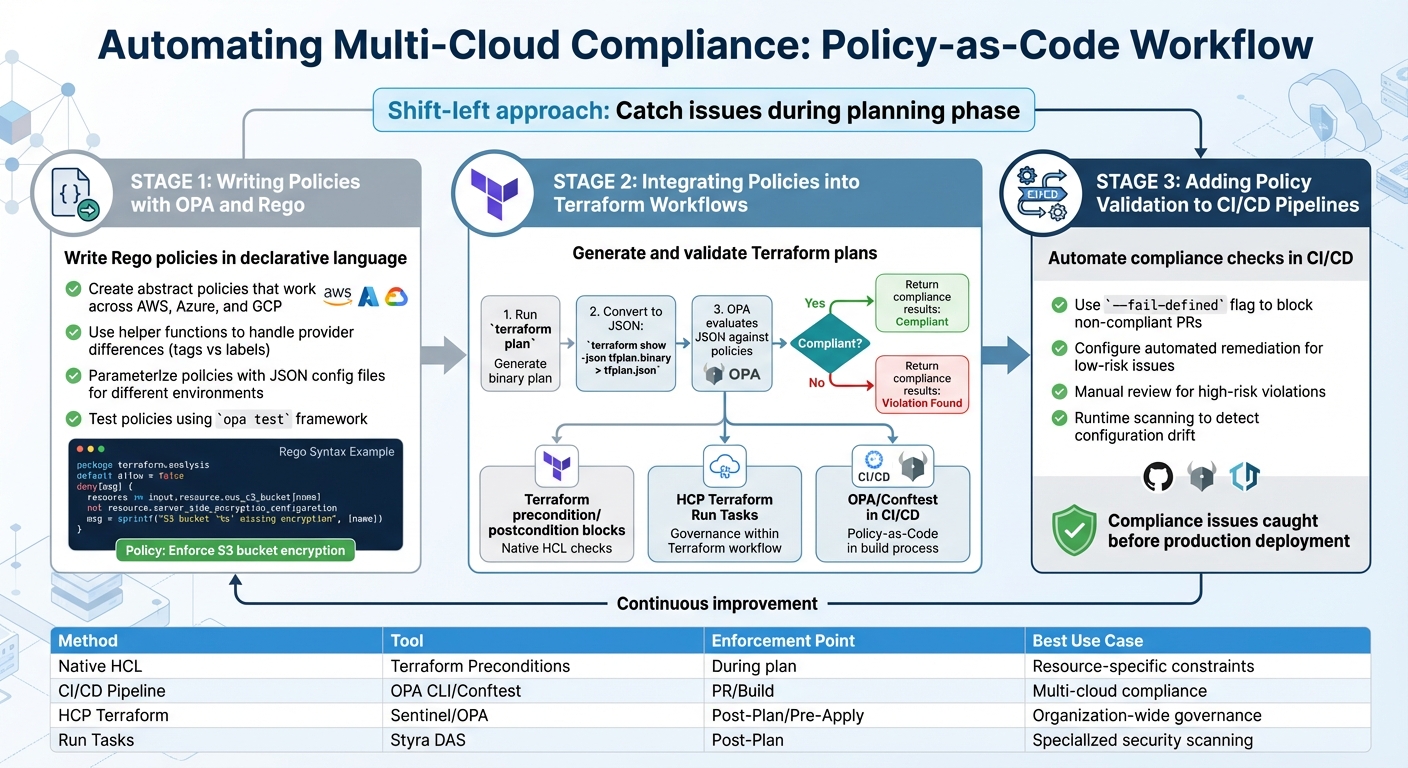 {Policy-as-Code Implementation Workflow for Multi-Cloud Compliance}
:::
{Policy-as-Code Implementation Workflow for Multi-Cloud Compliance}
:::
With your multi-cloud environment and toolchain set up, it's time to automate compliance using Policy-as-Code. This involves writing policies, integrating them with Terraform, and validating them in your CI/CD pipelines. The aim? To catch compliance issues before infrastructure changes make it to production.
Writing Policies with OPA and Rego
Rego, the declarative language of Open Policy Agent (OPA), is your tool for defining compliance rules. It allows you to create a single, abstract policy that works across different cloud providers. For instance, AWS and Azure use tags for resource metadata, while GCP uses labels. By using a helper function in Rego, you can write one logical policy to handle all three providers seamlessly [1].
To manage different environments, parameterise policies and use separate JSON configuration files. This approach keeps your code clean and avoids duplication across development, staging, and production environments [3].
Here’s an example policy for enforcing encryption on AWS S3 buckets. It examines resource_changes in the Terraform plan JSON, identifies aws_s3_bucket resources, and checks if server_side_encryption_configuration is included in the after state:
package terraform.s3_encryption

deny[msg] {
    resource := input.resource_changes[_]
    resource.type == "aws_s3_bucket"
    not resource.change.after.server_side_encryption_configuration
    msg := sprintf("S3 bucket '%s' must have encryption enabled", [resource.address])
}
For more complex Terraform plans, the walk keyword can help traverse nested modules. OPA also provides a robust testing framework (opa test) that lets you write unit tests in Rego to validate your policies against mock data before they’re deployed in CI/CD pipelines [5].
Another advanced technique is blast radius scoring. This method assigns scores to different actions in a Terraform plan, such as 100 points for a delete operation and 10 for a create. If a plan’s score exceeds a set threshold, it can be flagged for manual review instead of automatic approval. This is particularly helpful for identifying risks early in multi-cloud environments [1].
Once your policies are ready, you can integrate them into Terraform workflows to enforce compliance.
Integrating Policies into Terraform Workflows
Start by generating a Terraform plan, converting it to JSON, and evaluating it with OPA. As the OPA documentation explains:
OPA decouples policy decision-making from policy enforcement. When your software needs to make policy decisions it queries OPA and supplies structured data (e.g., JSON) as input.[4]
The latest versions of OPA simplify this process with terraform.parse_plan(), which directly ingests binary plans, removing the need for extra conversion steps [5].
There are three main integration points for policies:
- Resource-level: Use Terraform
preconditionandpostconditionblocks within your HCL code. - Workflow-level: Leverage HCP Terraform
Run Tasks
to integrate tools like Styra DAS between the plan and apply stages. - Pipeline-level: Add OPA or Conftest checks to CI/CD pipelines [6][7].
For those using HCP Terraform, the Free Edition supports one run task integration for up to ten workspaces and one policy set with up to five policies [6][7][8]. Upgrading to Standard or Premium tiers allows for linking policy sets to version control repositories and creating multiple policy versions via API, without the five-policy limit [7][8].
With policies embedded in your Terraform workflows, the next step is to extend compliance checks into your CI/CD pipelines.
Adding Policy Validation to CI/CD Pipelines
Integrating policy checks into CI/CD pipelines ensures that non-compliant changes are caught early, preventing them from reaching production. This automation reduces manual review workloads, minimises errors, and strengthens security.
Use flags like --fail-defined with OPA to return a non-zero exit code for policy violations. This blocks non-compliant pull requests from being merged or deployed [5].
A real-world example of this approach is AGL Energy, Australia’s largest private renewable energy developer. They use Terraform Enterprise and Sentinel policy-as-code in a GitOps workflow to enforce security guardrails and compliance during infrastructure deployment [9]. This demonstrates how policy validation can scale effectively in complex, multi-cloud environments.
For lower-risk issues, such as missing cost-centre tags, pipelines can be configured for automated remediation. Reserve manual reviews for high-risk security violations [1]. Establishing a Cloud Centre of Excellence (CCoE) ensures a unified governance framework across all cloud providers [1].
| Integration Method | Tooling | Enforcement Point | Best Use Case |
|---|---|---|---|
| Native HCL | Terraform Preconditions | During terraform plan
|
Resource-specific constraints (e.g., instance size) |
| CI/CD Pipeline | OPA CLI / Conftest | Pull Request / Build | Multi-cloud compliance and security guardrails |
| HCP Terraform | Sentinel / OPA Policy Sets | Post-Plan / Pre-Apply | Organisation-wide governance and audit trails |
| Run Tasks | Styra DAS / Third-party | Post-Plan | Integrating specialised security or cost scanners |
Finally, implement regular runtime scanning to detect configuration drift. This ensures that manual changes made directly in cloud consoles don’t bypass your original IaC policy checks [1].
Advanced Techniques for Multi-Cloud Policy Enforcement
Managing compliance across multiple cloud accounts, regions, and teams requires more than just single-team governance. Federated architectures offer a way to maintain consistent compliance while removing bottlenecks. These advanced methods build on earlier policy automation efforts, extending compliance across a variety of cloud environments.
Scaling with Policy Federation
Once you’ve established basic policy automation, federated architectures allow you to enforce consistent rules across platforms like AWS, Azure, and GCP. For example, you can create a universal storage policy to standardise access controls across providers. This eliminates the need to write separate rules for AWS S3 ACLs, Azure Storage policies, and GCP bucket IAM bindings [1]. Centralised governance also helps avoid the chaos of using too many tools [1].
For businesses with multiple teams or divisions, adopting governance-as-a-service patterns can be particularly effective. These patterns support multi-tenant architectures, enabling individual teams to customise policies within centrally defined guardrails. This is especially useful for AI/ML workloads, where compliance for MLOps must scale across distributed teams [10][2].
When implementing federated policies at scale, it’s a good idea to start in an audit or soft-enforcement
mode. This allows you to gather data and adjust thresholds before transitioning to a hard-deny
mode [1].
Once policy enforcement is scaled, organisations can take it a step further by incorporating AI-driven optimisation to enhance compliance efforts.
AI-Driven Policy Optimisation Recommendations
AI tools are reshaping how policies are enforced. Instead of relying solely on static rules, AI-driven governance uses models to evaluate complex cloud configurations, identify risks that traditional checks might overlook, and suggest policy improvements [10]. For AI/ML workflows, embedding automated model validation and bias detection into CI/CD pipelines ensures responsible deployment at scale [10]. These frameworks can even include ethical guardrails to manage tasks like autonomous decision-making and memory management for AI agents [10].
AI tools also offer continuous monitoring of infrastructure and models, detecting drift and triggering automated responses or policy updates when thresholds are breached [10]. This proactive approach is particularly important in multi-cloud environments, where traditional siloed security models often fall short. The industry is shifting towards horizontal, application-focused security approaches that align better with agile cloud development [10].
For organisations looking to implement these advanced techniques, partnering with an experienced provider like Hokstad Consulting can help create a scalable and effective multi-cloud compliance strategy.
Common Challenges and Troubleshooting Tips
Even with thorough preparation, implementing policy-as-code can come with its fair share of challenges. Building on the earlier integration steps, this section covers practical troubleshooting tips to help address common problems faced during policy enforcement. Two frequent issues include debugging Rego policies and resolving CI/CD pipeline failures caused by policy validation. Tackling these efficiently ensures your compliance automation stays on track.
Debugging Rego Policies
One of the most frequent errors in Rego policies is the undefined
result, which is different from false
. This happens when OPA (Open Policy Agent) can't find any variable assignments that satisfy all the conditions in a query. Instead of returning a boolean value, it produces an undefined result. To avoid this, you can use the default keyword in your policies (e.g., default allow := false) to provide a fallback decision, even when input data is incomplete. Additionally, if you need to express logical OR conditions, define multiple rules with the same name. Keep in mind that within a single rule body, expressions separated by newlines or semicolons are joined by a logical AND.
When a policy doesn't behave as expected, tools like opa eval can help. Use the -i (input) and -d (data) flags to test policies against specific JSON plan files manually. For more detailed debugging, run opa test --var-values to view the exact variable values at the point of failure. It's also a good idea to create a dedicated test suite that includes both compliant and non-compliant JSON samples. This ensures your policies can reliably detect violations before they reach the shared pipeline.
Once you've resolved policy issues, the next step is addressing CI/CD pipeline failures to maintain seamless compliance automation.
Fixing CI/CD Pipeline Failures
Policy engines like OPA and Conftest use non-zero exit codes to indicate policy violations, which can cause CI/CD pipelines to fail. To troubleshoot these failures, start by ensuring that Terraform plans are converted to JSON, as OPA cannot process binary plan files.
A common source of unexpected failures is unknown values
in Terraform plans. These are attributes that are only determined during the apply phase. If your policies attempt to validate such attributes at the plan stage, they may fail or produce inaccurate results. To prevent this, write policies that account for these missing values, reducing the risk of false negatives.
To improve feedback, use the sprintf function in Rego to generate dynamic and descriptive violation messages. These messages can include the resource address and the specific reason for failure, making it easier for developers to pinpoint and resolve issues. During the early stages of policy implementation, consider using continue-on-error: true in your CI/CD steps (such as GitHub Actions). This allows violations to be reported without blocking deployments, giving teams time to adapt to new rules. For example, a GitHub Actions workflow designed for multi-cloud validation used this approach with terraform plan, ensuring that policy checks could still run and provide insights, even when plans contained errors.
| Troubleshooting Tool | Primary Use Case | Benefit for CI/CD |
|---|---|---|
opa test --var-values |
Identifying logic flaws in Rego | Displays exact variable values at failure points |
default keyword |
Preventing undefinedresults |
Ensures a stable boolean or data output for every query |
sprintf function |
Generating custom error messages | Provides clear, actionable feedback in CI logs |
continue-on-error |
Non-blocking policy enforcement | Offers visibility into violations without halting deployments |
Conclusion
Policy-as-Code shifts multi-cloud compliance from tedious manual tasks to an automated process that seamlessly integrates into development workflows. By leveraging tools like Open Policy Agent, Terraform, and CI/CD pipelines, organisations gain a centralised framework to enforce security, cost, and regulatory standards across AWS, Azure, and GCP. This approach catches potential issues early, during the planning phase, before any resources are provisioned [5].
This forward-thinking method changes the game. Instead of uncovering compliance violations weeks or months after deployment, policy checks flag problems during the initial stages. Version-controlled policies not only create a clear audit trail for regulatory purposes but also allow for quick updates and iterations.
Beyond compliance, Policy-as-Code offers practical benefits that improve operations. Automating tagging standards ensures precise cost tracking, while policies that prevent oversized instances or schedule shutdowns for idle resources help cut cloud expenses. Parameterised policies allow a single rule to adapt across development, staging, and production environments, reducing redundancy and simplifying maintenance.
To maximise these benefits, treat policies as core components of your codebase: define controls, use parameters to make rules flexible, and automate the collection of audit evidence. Establishing a Cloud Centre of Excellence can further standardise tools and governance across the organisation. With these practices in place, your multi-cloud infrastructure can self-regulate, enabling teams to dedicate their time to innovation rather than manual compliance checks.
For expert advice and customised solutions on implementing Policy-as-Code in your multi-cloud setup, visit Hokstad Consulting.
FAQs
What are the benefits of using Policy-as-Code for multi-cloud compliance?
Policy-as-Code streamlines compliance efforts by integrating governance rules directly into code, making it easier to manage and enforce policies across various cloud platforms. This approach ensures that policies are applied consistently, allowing for continuous monitoring, testing, and updates to align with regulatory and security standards.
By automating these tasks, organisations can minimise human errors, enhance operational efficiency, and maintain a secure, compliant setup across diverse cloud environments. It also makes scaling more manageable, enabling businesses to adjust to evolving needs and effectively handle the complexities of multi-cloud infrastructures.
What are the key tools needed to implement Policy-as-Code in multi-cloud environments?
To apply Policy-as-Code effectively in multi-cloud setups, you’ll need tools that can automate, enforce, and manage policies consistently across platforms.
A policy engine like Open Policy Agent (OPA) plays a key role here. It allows you to write and enforce machine-readable policies, making automated compliance checks and real-time decisions possible. For those working with Infrastructure as Code (IaC), tools like Terraform Sentinel ensure that resource provisioning adheres to organisational policies.
When it comes to cloud-specific governance, platforms such as Cloud Custodian streamline compliance tasks across multiple providers. On the other hand, native tools like Azure Policy and AWS Config Rules enable you to define and enforce policies directly within their respective ecosystems. These tools often integrate with CI/CD pipelines, ensuring your environment remains secure and compliant as it evolves.
By leveraging policy engines, cloud-native tools, and IaC integrations, you can establish a strong governance framework that automates compliance and safeguards your cloud infrastructure.
How does AI improve compliance in multi-cloud environments?
AI simplifies compliance management in multi-cloud environments by automating policy enforcement and maintaining consistent governance across various platforms. Through Policy-as-Code, AI handles tasks such as testing, updating, and enforcing policies, cutting down on manual errors and ensuring regulatory requirements are met.
On top of that, AI offers real-time monitoring and gathers evidence, allowing organisations to spot and resolve compliance issues before they escalate. This proactive method not only saves time but also boosts efficiency in managing complex cloud setups.