
Role-Based Access Control (RBAC) is a method to manage access to cloud resources based on roles rather than individual users. This approach enhances security, reduces risks like data breaches, and simplifies compliance with regulations such as UK GDPR. Implementing RBAC involves five key steps:
- Assess Requirements: Identify assets, user types (e.g., employees, systems), and compliance needs. Conduct a gap analysis and inventory your cloud resources.
- Define Roles: Use the
default deny
principle and assign permissions based on business functions. Avoid overly broad roles and use tools to refine permissions over time. - Assign Users/Groups: Assign roles to groups rather than individuals for scalability. Use identity providers (e.g., Microsoft Entra ID, Okta) for centralised management.
- Test Policies: Deploy and test access with tools like AWS IAM Policy Simulator or Azure RBAC portal. Refine permissions based on real usage data.
- Monitor and Audit: Regularly review roles and permissions to prevent
permission creep
. Use tools like AWS CloudTrail or Azure Monitor for continuous oversight.
::: @figure 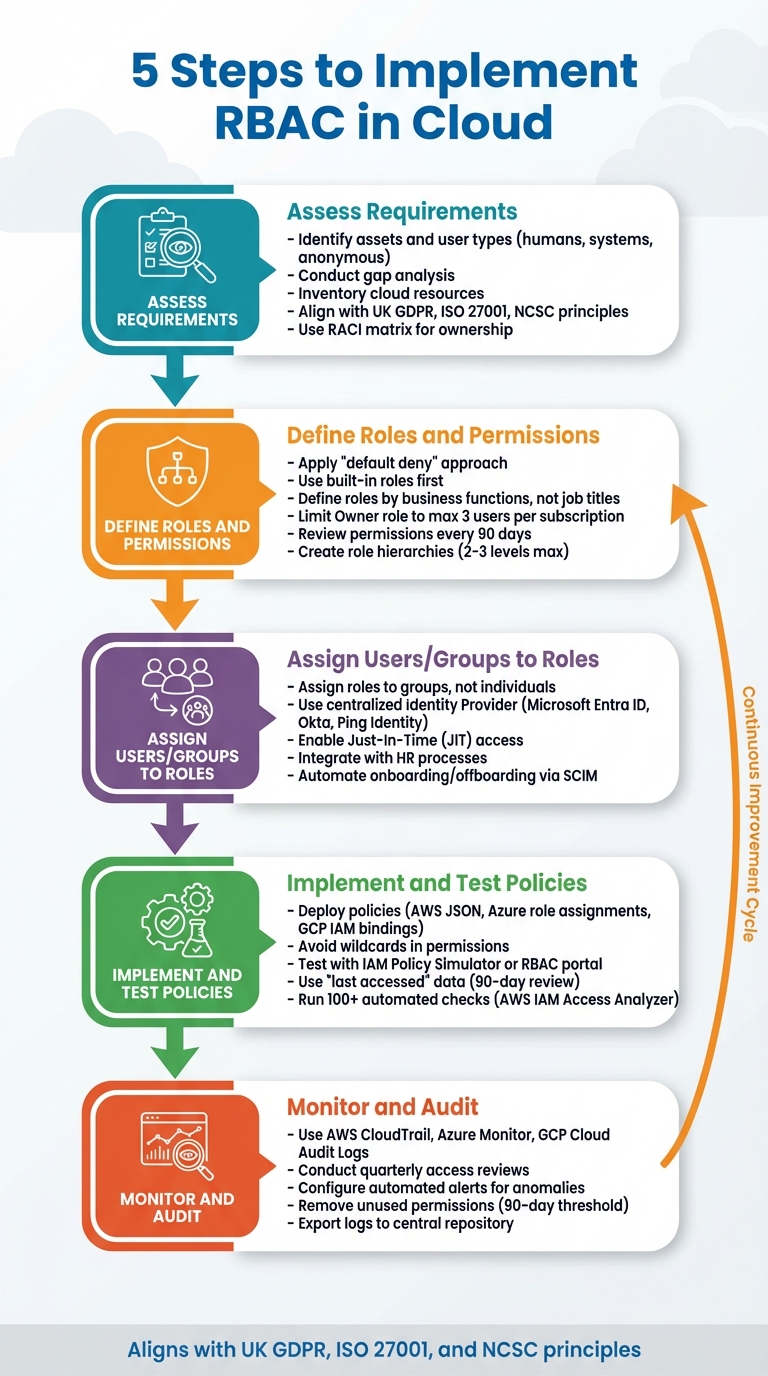 {5 Steps to Implement RBAC in Cloud Infrastructure}
:::
{5 Steps to Implement RBAC in Cloud Infrastructure}
:::
Cloud Project | Implementing RBAC in AWS
Step 1: Assess Your Organisation's Requirements
Before assigning roles, take a step back to evaluate what your organisation needs. Start by identifying your assets and classifying the types of identities involved: humans (like employees, contractors, and administrators), systems (such as workload identities, managed identities, and API keys), and anonymous entities (like public-facing services). This process helps you determine what needs protection and why.
Link your findings to recognised frameworks like UK GDPR, ISO 27001, and NCSC principles. For industries with stricter regulations, such as finance and healthcare, additional standards apply. For instance, financial organisations must meet FCA and PRA requirements, while healthcare providers should adhere to NHS Digital guidelines. Conduct a gap analysis to understand where your current setup might fall short before defining roles.
Make a clear distinction between control plane permissions (which deal with creating or modifying resources) and data plane permissions (which govern access to data). Use a RACI matrix to establish clear ownership and responsibilities. This approach helps prevent identity sprawl and limits the risk of unauthorised admin accounts. A thorough assessment like this forms the foundation for properly cataloguing your cloud resources.
Inventory Your Cloud Resources and Services
Create a detailed list of all your cloud services, data assets, and how users access them. This inventory will highlight the areas that need protection and help you define the scope of each role. Tools like AWS IAM Access Analyzer or Google Cloud Policy Intelligence can assist by identifying unused accounts and permissions that are too broad [3][8].
Make sure your inventory includes the resource hierarchy - management groups, subscriptions, resource groups, and individual resources. This structure matters because RBAC permissions are inherited; for instance, a role assigned at the subscription level applies automatically to all resource groups and resources within it. To simplify future audits, tag resources using standard naming conventions that reflect their function, environment, and region (e.g., ROLE_APP-PAYMENTS_PROD_UK_SUPPORT). With a clear resource map, you can adjust your strategy to align with UK compliance and regulatory standards.
Align with UK Compliance Requirements
Ensure your data storage and processing abide by UK GDPR by keeping data within the UK or European data centres [6]. Your RBAC setup should enforce data minimisation, granting users access only to the data necessary for their role - nothing more.
Striking the right balance between security and usability is key to avoiding Shadow IT
[6]. Start by using the built-in roles provided by your cloud platform (like Security Reader
or Contributor
) before creating custom roles. This approach ensures compatibility and reduces the effort needed for ongoing maintenance [7].
Step 2: Define Roles and Permissions
When defining roles and permissions, stick to a default deny
approach - this means access is granted only when absolutely necessary, rather than allowing broad permissions by default [9]. This approach aligns with the principle of least privilege, ensuring users have just enough access to perform their tasks.
Leverage built-in roles whenever possible, and only create custom roles if the built-in ones don’t meet your needs [1]. For example, Azure offers roles like Owner, Contributor, and Reader [1], while AWS provides job-function roles such as Database Administrator and Data Scientist [10].
It’s better to define roles based on business functions rather than job titles. For instance, a role named Customer Data Management
is more adaptable than Sales Manager
as it remains relevant even if organisational structures change [13]. Assign permissions to groups rather than individual users to simplify management and auditing [5].
To minimise risk, security best practices suggest limiting the Owner role to no more than three users per subscription [5]. For privileged tasks, use temporary access through Just-In-Time (JIT) access mechanisms [9], which narrow the window of opportunity for potential attackers. Tools like AWS CloudTrail, IAM Access Analyzer, or Azure Access Reviews can help identify unused permissions, allowing you to remove dormant ones [10][11][12]. AWS recommends reviewing activity over a 90-day period to refine broad policies into precise least-privilege policies [11]. By carefully mapping out roles, you set the groundwork for seamless role assignment in the next steps.
Create Role Hierarchies and Set Permissions
Role hierarchies allow for permission inheritance, where permissions assigned at higher levels automatically apply to all subordinate resources [16]. For example, in Azure, permissions flow from Management Group → Subscription → Resource Group → Resource [16]. This structure makes it easier to manage access since you can adjust permissions at the group or role level instead of tweaking individual accounts [15].
Keep hierarchies simple - limit inheritance to 2–3 levels to avoid unnecessary complexity [13]. A common escalation path might move from Read-Only
to Standard
to Admin
roles, providing a logical progression for granting higher access [13]. When creating custom roles, avoid using wildcards (*) for permissions. Instead, explicitly define Actions and DataActions to prevent unintended access as new features are introduced [5].
| Role | Business Need | Scope | Example Permissions |
|---|---|---|---|
| Admin / Owner | Full access to manage resources, governance, and billing | Subscription or Management Group |
* (Full Access), IAM Management |
| Developer | Build and deploy applications in specific environments | Resource Group or Project level |
Contributor, S3:PutObject, EC2:StartInstances
|
| Auditor / Reader | Review billing, usage, and security compliance reports | Subscription or Account level |
Reader, ListAllMyBuckets, SecurityAudit
|
| DB Administrator | Manage database instances and performance tuning | Resource level (e.g., RDS or SQL DB) |
DBDataAPI, DescribeDBInstances
|
Use permission boundaries to cap the maximum permissions a role can grant, preventing users from escalating their own privileges [10]. Be mindful of Azure’s limits, which allow up to 4,000 role assignments per subscription and 500 per management group [16]. With roles clearly defined, the focus shifts to documentation and ongoing reviews to maintain security and compliance.
Document and Review Your Roles
Thorough documentation of roles and permissions is critical for governance and operational clarity. Record not only the permissions but also the rationale behind each role, along with any changes made during reviews. This supports compliance and simplifies audits [2]. Clearly distinguish between human identities (managed through identity providers) and machine identities (service roles), as each requires a different approach to lifecycle management [3].
Roles should reflect business functions, not job titles or features.- Mathew Pregasen, Technical Writer, Oso [13]
Create a job role matrix to visualise roles and their specific access levels across your cloud environment [10]. This helps ensure a clear separation of duties and provides non-technical stakeholders with an easy way to understand the permission structure. Group permissions into straightforward categories like List, Read, Write, and Permissions management [14].
Review your roles every 90 days to avoid permission creep
[2]. Use last accessed
timestamps to identify and remove unused permissions effectively [3][14]. When scaling back permissions to enforce least privilege, communicate clearly that these adjustments reflect system maturity, not individual performance [13]. A practical method involves cloning an existing broad role, tailoring it for specific teams, and then removing unnecessary permissions over a 90-day period [2]. This ensures a secure and well-maintained permission structure.
Step 3: Assign Users or Groups to Roles
Once you've defined your roles, the next step is to assign them. Rather than assigning roles directly to individuals, it's more effective to assign them to groups [5][8]. This method not only ensures scalability but also helps you stay within platform limits. For example, Azure imposes a cap on the number of role assignments per subscription, which makes group-based assignments a necessity for larger organisations [5].
Assigning roles to groups instead of users also helps minimise the number of role assignments, which has a limit of role assignments per subscription.- Microsoft Azure Documentation [5]
Using a centralised Identity Provider (IdP) like Microsoft Entra ID, Okta, or Ping Identity allows you to manage identities across all cloud services from a central location [3][18]. This approach creates a single source of truth and ensures access can be revoked immediately when an employee leaves. For roles with elevated privileges, access should be tightly controlled - Azure, for instance, recommends having no more than three subscription owners to minimise risks in case of a compromised account [5].
Just-In-Time access is another key feature to enable. Tools like Microsoft Entra PIM or Google Cloud's conditional role bindings allow you to grant temporary, time-limited access that automatically expires. This significantly reduces the window of opportunity for potential attackers [5][8]. If you operate a hybrid setup, consider federating your on-premises Active Directory with your cloud provider. This allows users to authenticate seamlessly with their corporate credentials across both environments [20].
Finally, integrate your cloud access provisioning with your HR processes [3][13]. When employees join, transfer, or leave, their access should automatically adjust or be revoked. This integration ensures there are no orphaned
accounts with unnecessary permissions, maintaining a secure and compliant environment. This streamlined approach also lays the groundwork for efficient lifecycle management, which ties into the automation steps below.
Automate User Onboarding and Offboarding
To automate access management, use SCIM to synchronise user and group data between your IdP and cloud platforms [18]. SCIM ensures that when someone is added to a group in your IdP, they gain the corresponding cloud access instantly - and when they leave, their access is just as quickly revoked.
By integrating your identity provider with IAM Identity Center using SCIM, you can automatically synchronise user and group information, helping to validate that access privileges are granted, modified, or revoked based on changes in your organisation's authoritative identity source.- AWS [18]
Create security groups based on environment and scope of access (e.g., AI-Developer-Dev, AI-Developer-Prod) to maintain clear audit trails [1]. For temporary projects, use group membership expiration features to ensure users are automatically removed after a set period [8]. When automating role assignments, always use the Role ID instead of the Role Name to avoid potential mismatches [5].
Regularly review permissions with automated tools like Microsoft Entra ID Access Reviews, AWS IAM Access Analyzer, or Google Cloud Policy Intelligence. These tools can help identify and remove unused permissions, keeping your access policies lean and effective [1][8][12]. Apply the same unified principles across your hybrid environment to maintain consistent access management.
Manage RBAC in Hybrid Environments
For hybrid environments, federate your on-premises directory with your cloud provider to enable single sign-on and unified access management [20]. This ensures a consistent identity across your entire system and simplifies compliance with UK data protection laws.
For workloads outside the cloud, such as on-premises servers, use tools like AWS IAM Roles Anywhere or X.509 certificates to issue temporary credentials instead of long-term access keys [12]. This reduces the risk of credential exposure. In Google Cloud, administrators can allow users to impersonate a service account for specific tasks, rather than granting permanent elevated access. This creates a clear audit trail of who used privileged access [8].
| Feature | AWS Implementation | Azure Implementation | Google Cloud Implementation |
|---|---|---|---|
| Automated Provisioning | IAM Identity Center via SCIM [18] | Microsoft Entra ID [1] | Cloud Identity [8] |
| Temporary Access | IAM Identity Center Permission Sets [18] | Entra Privileged Identity Management (PIM) [5] | Conditional Role Bindings [8] |
| Detect Unused Access | IAM Access Analyzer [12] | Microsoft Defender for Cloud [5] | Policy Intelligence / IAM Recommender [8] |
| Hybrid Integration | IAM Roles Anywhere / Systems Manager Hybrid Activations [12] | Microsoft Entra ID Federation [1] | Cloud Identity Federation [8] |
It's crucial to maintain a clear distinction between human and machine identities, ensuring each follows its own lifecycle management processes. This approach keeps your hybrid environment secure, auditable, and well-organised [3].
Step 4: Implement and Test RBAC Policies
With your roles and group assignments in place, it's time to deploy your Role-Based Access Control (RBAC) policies. Each cloud provider has its own specific format for implementing these policies. For example, AWS uses JSON with elements like Effect, Action, Resource, and Condition [14]. Azure employs role assignments that include built-in and custom roles, along with Attribute-Based Access Control (ABAC) conditions [19]. Meanwhile, GCP relies on IAM bindings and conditional role bindings for temporary access [8]. To fine-tune access, you can duplicate broad roles into team-specific versions and adjust permissions as needed [2].
Configure and Deploy Your Policies
Begin with managed roles provided by your cloud provider for standard job functions. As your needs become more specific, transition to custom policies for greater control. When crafting custom roles, avoid using wildcards in Actions and DataActions. Instead, explicitly list each permission to prevent unintended access [5]. AWS IAM Access Analyzer can help streamline this process by reviewing your CloudTrail logs and generating fine-grained policy templates based on actual usage [14][17].
The principle of least privilege states that identities should only be permitted to perform the smallest set of actions necessary to fulfil a specific task.- AWS Well-Architected Framework [10]
Incorporate conditions into your policies to enhance security. For instance, you might require Multi-Factor Authentication (MFA) for sensitive tasks or restrict access based on resource tags that align with a user’s team or project [12][21]. If managing access across multiple accounts or subscriptions, remember that resource-based policies (like S3 bucket policies) can grant cross-account access. However, the principal also needs a matching identity-based policy for this to work [14].
Test Access Scenarios
Once your policies are deployed, it's essential to test them thoroughly. Start by running controlled tests with a small group of users. Tools like the AWS IAM Policy Simulator or GCP Policy Simulator can help verify API permissions [10][4]. AWS IAM Access Analyzer can also perform over 100 automated checks to detect JSON syntax errors or overly permissive statements [14]. On Azure, you can use the RBAC portal or PowerShell to validate role assignments and ensure they are scoped correctly.
Create test identities with different tag combinations to confirm that deny
logic is functioning as intended. For example, in AWS, the Switch Role
feature in the Management Console allows you to test access from the perspective of a specific IAM role. Additionally, reviewing service logs - such as AWS's CloudTrail or GCP's Cloud Audit Logs - can help you compare intended permissions with actual API usage.
Fix Issues and Refine Policies
When access is denied, investigate explicit Deny statements [14][22]. Use last accessed
data to identify permissions that have not been used in the past 90 days, and remove them [2].
GCP's IAM Recommender leverages machine learning to suggest adjustments for IAM bindings, while Azure’s Access Reviews can automate the removal of unnecessary permissions. If access has been over-provisioned, narrow its scope by moving role assignments from broad levels (like Management Groups or Subscriptions) to more specific ones (such as Resource Groups or individual resources) [5][1]. Azure also recommends limiting the number of subscription owners to a maximum of three [5]. For privileged roles, tools like Microsoft Entra Privileged Identity Management (PIM) can provide time-restricted access and maintain clear audit trails [5]. Finally, ensure you continuously monitor and refine these policies to maintain secure and effective access management.
Step 5: Monitor and Audit Your RBAC Implementation
Rolling out RBAC policies is just the beginning - keeping them effective requires ongoing attention. As your organisation changes, permissions that were once necessary can become outdated. Without regular checks, you risk a build-up of unnecessary privileges, leaving users with access they no longer need or use [18]. To tackle this, it's crucial to set up tools that continuously monitor and validate access.
Set Up Continuous Monitoring
Cloud-native tools like AWS CloudTrail, Azure Monitor, and GCP Cloud Audit Logs are excellent for keeping track of every API call and user action in your environment. These tools ensure detailed event tracking and help confirm that users operate within their authorised boundaries [24]. By comparing current activity against established baselines, real-time monitoring can flag unusual behaviour as it happens [25].
Identity is always the primary perimeter.- Microsoft Azure Well-Architected Framework [25]
Audit trails are critical for tracing every action, which helps prevent denial of actions and exposes weak or missing authentication protocols [25]. Additionally, credential reports generated regularly can provide insights into the status of passwords, access keys, and MFA devices. These reports can highlight credentials that haven't been used recently, enabling you to address potential vulnerabilities [23].
Schedule Regular Audits
While real-time monitoring is essential, periodic audits are just as important. Conduct quarterly access reviews to clean up unused roles and permissions, making use of last accessed
data to identify privileges that haven't been used in the past three months [1][24][3]. Audits are especially important during key lifecycle events, such as onboarding, internal job changes, and offboarding, as these transitions can lead to permission creep if not carefully managed [18][10].
To minimise risks, restrict the number of super-users or subscription Owners
to no more than three. This reduces the potential impact of a compromised administrative account [5]. Regularly review IAM role trust policies and identity providers (SAML/OIDC) to ensure that only authorised external entities can assume roles [23]. Tools like Microsoft Entra ID Access Reviews, AWS IAM Access Analyzer, and Google Cloud Policy Analyzer can simplify and automate these certification processes [10].
Configure Automated Alerts for Anomalies
Once monitoring and auditing are in place, automated alerts can take your RBAC implementation to the next level. Behaviour analytics can scan activity logs for unusual events and notify you in real time [25]. Employ strategies like Just-In-Time (JIT) and Just-Enough-Access (JEA) to grant temporary elevated privileges only when needed [25].
For example, Microsoft Entra Privileged Identity Management (PIM) offers reports and alerts for privileged account activity, while Microsoft Defender for Cloud monitors subscription-level risks, such as too many owner assignments [5]. Similarly, GCP IAM Recommender uses machine learning to flag unused permissions and inactive service accounts [8]. To ensure long-term visibility, export audit logs to a central repository like Amazon S3 or Google BigQuery for deeper analysis and retention [8][26].
Conclusion
Setting up Role-Based Access Control (RBAC) in your cloud environment is a critical step towards safeguarding resources while maintaining smooth operations. By working through these five steps - evaluating your needs, defining roles, assigning identities, implementing policies, and ongoing monitoring - you establish a security structure that can grow and adapt alongside your organisation.
This approach not only strengthens security but also enhances operational flexibility. It's vital to align RBAC with your business objectives and adhere to UK compliance standards. Whether it's meeting GDPR requirements or managing access across complex hybrid setups, your RBAC strategy should balance regulatory compliance with practical operational needs. Start with a least privilege
approach, using group-based assignments and tightly scoped policies for better control [1].
For UK organisations, Hokstad Consulting offers expert guidance in areas like DevOps transformation, cloud cost management, and strategic migrations. Their adaptable engagement options - whether hourly consulting or ongoing support - can help you implement RBAC effectively while optimising your cloud environment. With a focus on cutting cloud costs by 30–50% and streamlining deployment cycles, they provide the expertise needed to create secure, scalable cloud solutions tailored to your business.
FAQs
How does RBAC improve security and ensure compliance in cloud environments?
Role-Based Access Control (RBAC) enhances security by applying the principle of least-privilege access. This means users are granted only the permissions they need to carry out their specific duties, reducing the chances of unauthorised access and shrinking potential attack surfaces.
RBAC also plays a key role in meeting compliance standards such as GDPR and ISO 27001. It achieves this by offering clear audit trails and controlling access to sensitive information. By tailoring permissions to specific roles, organisations can align with regulatory demands while maintaining a secure and well-managed cloud environment.
What are the best practices for assigning roles and permissions in RBAC for cloud environments?
When setting up roles and permissions in a cloud-based RBAC model, stick to the principle of least privilege. This means granting users, services, or groups only the access they absolutely need to complete their tasks - nothing more. Use roles that are specific to namespaces wherever possible, and reserve cluster-wide roles for tasks that genuinely require them. Be cautious when binding these roles to avoid unintentionally granting excessive permissions. Avoid using wildcard permissions (*), as they can inadvertently allow access to future resources or actions. Instead, define the exact resources and actions required for each role.
Assign roles with clear, descriptive names that reflect their function, such as billing-viewer-uk. To simplify management, link permissions to identity-provider groups rather than individual users - this makes updates much easier down the line. Make it a habit to audit and review permissions regularly, ideally every quarter, to identify outdated access or roles with excessive permissions. Keep a detailed record of each role's purpose, maintain a version-controlled policy repository, and enforce proper change management processes. These steps will help ensure your RBAC implementation is both secure and tailored to your organisation's specific needs.
What are the best practices for monitoring and auditing RBAC in cloud environments?
To keep a close eye on and audit RBAC in cloud environments, start by turning on the activity logs provided by your cloud platform. These logs help you track changes, like updates to roles or assignments. Automating regular exports of role assignments using scripts or CLI tools is a smart move - it allows you to spot trends and flag anything unusual over time. For roles with elevated privileges, use privileged identity management (PIM) to enforce time-limited access and schedule regular reviews to ensure permissions remain appropriate.
Gather all audit data into a secure logging or SIEM platform. This makes analysis more straightforward and helps you stay compliant with UK regulations like GDPR and ISO 27001. Set up alerts to catch unusual changes, such as edits to privileged roles, and make it a habit to review permissions frequently. Remove any access that’s no longer needed or seems excessive. Keep a detailed record of your findings and any actions taken in a secure, version-controlled repository. This ensures a clear audit trail, supporting governance and compliance efforts.