
Moving to the cloud isn't just about technology - it’s about preparation. Many organisations rush into cloud migration without assessing their readiness, leading to delays, cost overruns, and operational headaches.
The key? A Cloud Readiness Gap Analysis. This process evaluates your infrastructure, applications, processes, and skills to identify and fix gaps before migration begins. Here’s what you’ll learn:
- Why cloud readiness is critical for cost savings, scalability, and smooth transitions.
- How to define clear migration goals aligned with business and technical needs.
- Steps to assess your current IT environment, from infrastructure to workflows.
- Methods to prioritise and address gaps in skills, security, and legacy systems.
- How to create a roadmap to guide your migration effectively.
Organisations that perform readiness checks upfront avoid common pitfalls and achieve faster, more efficient cloud adoption. If you're planning a migration, this guide will help you identify gaps and build a solid foundation for success.
::: @figure 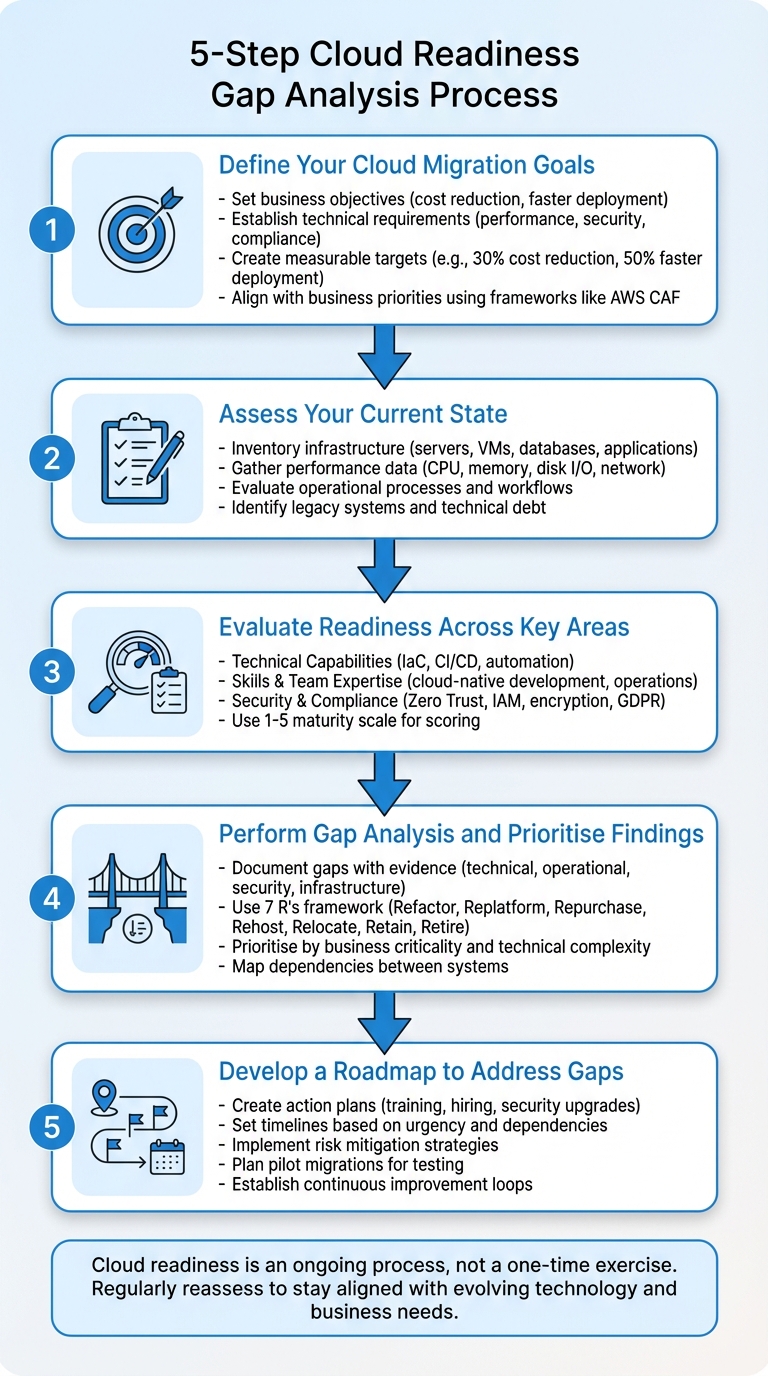 {5-Step Cloud Readiness Gap Analysis Process}
:::
{5-Step Cloud Readiness Gap Analysis Process}
:::
#2 Cloud Assessment: 4 Dimensions to Consider when Assessing IT for the Cloud
Step 1: Define Your Cloud Migration Goals
Setting clear goals is the first and most critical step in any cloud migration process. Without a well-defined direction, you risk wasting resources - time, money, and effort. A strong business case is essential. It should outline your current objectives, weigh the pros and cons, and establish measurable success criteria. These objectives act as a roadmap, helping you identify gaps in your current capabilities and ensuring your migration efforts align with your needs [3].
Your goals should cover both business and technical requirements. On the business side, this might involve reducing costs, simplifying infrastructure management to free up developers for innovation, and accelerating deployment cycles to get products to market faster [3][4]. On the technical front, goals could include maintaining or exceeding current performance levels, ensuring security compliance with standards like GDPR or SOC 2, and transitioning from monolithic architectures to more agile solutions like microservices or containers [4][6].
Setting Measurable Objectives
Concrete, measurable targets are key to tracking progress. For instance, you might aim to cut hosting costs by 30% or reduce deployment times by 50% [3][8]. A real-world example is Ghost(Pro), which migrated to DigitalOcean to enable on-demand scaling - a clear technical objective that supported their growth [4].
Establish technical baselines for metrics like CPU utilisation, memory usage, disk I/O, and network throughput. Define your Recovery Point Objectives (RPOs), Recovery Time Objectives (RTOs), and cost models to ensure the migration meets your performance and resilience needs [6]. Tools like Total Cost of Ownership (TCO) calculators and rightsizing reports can help model cost differences between reserved and on-demand instances [4]. Additionally, many cloud providers offer promotional credits - such as £150 for 60 days - which can help offset initial migration costs [4].
Aligning Objectives with Business Priorities
Your migration goals should support broader business outcomes, not just IT-specific preferences [11]. Achieving this requires collaboration between teams - such as infrastructure, security, application, and operations - to ensure everyone is aligned on the objectives and timeline [7]. Frameworks like the AWS Cloud Adoption Framework (CAF), which includes a Business
perspective, can help ensure the migration supports strategic business goals [2][8].
Link your workloads to strategic outcomes. For example, if cost reduction is your main driver, focus on TCO analysis and resource optimisation. If operational resilience is the priority, work towards meeting SLAs and business continuity metrics. For agility and innovation, measure success by reduced deployment times and higher release frequency [3][7]. As Wanclouds aptly puts it:
Migrating from on prem to the cloud isn't just a technical upgrade - it's a business transformation[10].
Treat your cloud adoption strategy as a dynamic document that evolves as your organisation's cloud usage grows [9]. With clear, measurable goals that align with your broader business objectives, you'll be well-prepared to assess your current state and plan the next steps effectively.
Step 2: Assess Your Current State
After setting your migration goals, the next logical step is to take a detailed inventory of your current IT environment. This means understanding exactly what you have in place - your infrastructure, processes, and capabilities. As the Microsoft Cloud Adoption Framework explains:
A comprehensive workload inventory is the foundation of a solid cloud adoption plan... You can't make decisions about how or whether to migrate a system if you don't know it exists or understand its characteristics.[12]
Without a clear picture of your starting point, you're essentially making decisions in the dark, which can lead to missed opportunities or costly mistakes.
Infrastructure and Application Assessment
Start by creating a complete catalogue of your technical assets. This includes everything from physical servers and virtual machines to cloud services, applications, databases, code repositories, and network equipment. The goal isn't just to list these assets but to understand how they perform and how they're configured.
For each component, gather performance data like CPU usage, memory consumption, disk I/O, and network throughput during both normal and peak activity. Also, document configuration details such as operating system versions, storage types (e.g., SSD or HDD), and any specific hardware requirements. This information will help you allocate the right resources in the cloud.
Automated tools like Azure Migrate or AWS Discovery Service can speed up this process and minimise errors. However, these tools might miss some dependencies, especially in highly secure environments. To fill in the gaps, talk to workload owners to identify undocumented integrations or unique requirements.
You should also categorise your applications based on their cloud readiness. Some may be ready to move immediately, while others might need adjustments or even significant overhauls before they can be migrated.
Finally, evaluate your operational processes to ensure they are compatible with cloud-based workflows.
Process and Workflow Evaluation
While your infrastructure assessment focuses on what you have, examining your processes reveals how your organisation operates. Look at your workflows, deployment methods, and data management practices to identify any inefficiencies or areas that need to adapt for the cloud.
Using a maturity model can help benchmark your processes. At the most basic level (Level 1), processes are often reactive and undocumented, relying heavily on individual effort. At the highest level (Level 5), processes are automated, standardised, and continuously improved. Understanding where you fall on this spectrum will highlight what needs to change for a successful migration.
A helpful way to think about this is the pets versus cattle
analogy. Traditional infrastructure often treats servers like pets
- unique systems that require individual attention and care. In contrast, cloud-ready environments treat servers as cattle
- standardised, interchangeable components that can be automated and scaled easily. As the Connectivity Matters Blog explains:
Mature organisations move from allowing every application to be unique ('pets') to treating infrastructure as standardised, replaceable components ('cattle').[1]
If your current approach still leans towards pets
, it's time to pivot towards standardisation and automation.
Don't forget to map out both internal and external dependencies. This will help prevent integration issues during the migration process. Also, document operational constraints such as maintenance windows and service-level agreements (SLAs).
Once you've assessed your workflows, the next step is to address any legacy systems that could complicate your migration.
Identifying Legacy Systems
Building on your infrastructure and process evaluations, it's important to identify legacy systems that might pose challenges during migration. These older systems can introduce unexpected delays if not addressed early. They may lack vendor support, rely on outdated hardware, or depend on hard-coded IP addresses that won't translate well to the cloud.
Assessment tools can help flag systems that are unsupported, deprecated, or nearing the end of their lifecycle. Legacy systems often require modernisation before migration. For example, one public sector organisation identified significant gaps in its readiness and chose to spend two to four years modernising its on-premise systems before moving to the cloud [1].
Legacy systems also carry technical debt, which can lead to budget overruns and delays if not managed carefully. Decide whether to remediate, replace, or take a migrate first, modernise later
approach. For large-scale migrations with significant technical debt, a lift-and-shift strategy can be a practical first step. This allows you to exit ageing data centres quickly and take advantage of cloud scalability for modernisation down the line [7].
Finally, create a risk register to document potential challenges - technical, operational, or organisational - for each legacy workload. Include mitigation strategies and assign responsibilities to ensure these risks are managed effectively.
Step 3: Evaluate Readiness Across Key Areas
Once you've mapped out your current state, it's time to dig deeper into specific areas crucial for cloud success. As the Connectivity Matters Blog puts it:
Cloud readiness exists on a scale rather than as a yes/no state. You don't need to reach the highest level in all areas before starting your cloud journey, but you should understand your current position and develop plans to address gaps.[1]
Think of this step as a health check across three main dimensions: your technical capabilities, your team's expertise, and your security posture. Each area will reveal gaps that need attention before moving forward.
Technical Capabilities
Technical readiness isn't just about having the right tools or infrastructure - it's about how well your systems and processes are prepared for cloud-native operations. Ask yourself: how often does your team deploy updates? Are you using Infrastructure as Code (IaC)? Do your CI/CD pipelines support automated testing and deployment? If you're still manually configuring servers, that's a clear sign of a gap.
Take stock of operational metrics like SLAs, RPOs, and RTOs for your critical workloads [6]. These benchmarks will help shape your failover strategies and guide your choice of cloud services.
To measure progress, consider scoring your technical capabilities on a 1–5 scale across key areas. This approach not only quantifies your readiness but also helps track improvements over time [11].
Skills and Team Expertise
Even the best tools won't deliver results without skilled people behind them. Often, your team's knowledge and experience are the biggest hurdles to cloud readiness. Evaluate their practical abilities in cloud-native development, automation, and modern operational practices [1].
Break this assessment into three categories: adoption fundamentals (governance, security, networking), environment management (operations, monitoring), and cloud-native development (containers, microservices, AI). For instance, can your developers deploy containerised applications? Do your operations staff effectively use Infrastructure as Code? Is your security team proficient in managing identity-aware access controls?
Use the same 1–5 scale to assess team maturity. At Level 1, you might rely heavily on a few key individuals with critical knowledge. By Level 5, you'd have a culture of continuous learning, automated workflows, and regular knowledge sharing [1]. Don't just rely on automated assessments - interview team members and workload owners to uncover skill gaps or hidden expertise that might not be documented [6][7].
Security and Compliance
Security is one area where gaps can lead to serious consequences, from migration delays to significant risks for your organisation. The shared responsibility model defines the line between what your cloud provider secures and what remains your responsibility [3][11]. Many organisations underestimate their ongoing security obligations in the cloud.
A shift to the cloud often involves moving from traditional perimeter-based security to a Zero Trust model. This approach requires explicit verification for every access request, regardless of its origin [1]. As the Connectivity Matters Blog explains:
Successful organisations use cloud adoption to modernise their security approach. I recommend moving from traditional perimeter-based security to zero trust models, aligning security changes with your cloud goals.[1]
Start by evaluating your Identity and Access Management (IAM) practices. Are you enforcing multifactor authentication (MFA) across all critical systems? How frequently do you review access permissions? Weaknesses in these areas can create significant vulnerabilities [14]. Also, assess your data protection measures - are you encrypting data at rest and in transit? Do you have clear policies for data lifecycle management and backups?
For organisations in regulated industries, ensure compliance with frameworks like GDPR, especially for data crossing regional boundaries [14]. A risk register can help track potential issues. Document each gap, assign a probability and impact score, and designate a risk owner to handle mitigation [14].
If your plans include AI, don't overlook risks like biased decision-making from language models. Regular red-teaming exercises can help identify and address these issues [14].
| Risk Category | Potential Gap/Risk Description | Recommended Mitigation Strategy |
|---|---|---|
| Regulatory Compliance | Non-compliance with sensitive data requirements | Use automated monitoring and compliance reporting tools [14] |
| Identity Security | Unauthorised access to cloud services | Enforce MFA and conduct monthly access reviews [14] |
| Data Security | Loss of data due to improper encryption | Apply encryption in transit/at rest; establish lifecycle policies [14] |
| Resource Management | Misconfiguration leading to data exposure | Use IaC and enforce tagging policies [14] |
| AI Security | Biased decisions or unrepresentative training data | Use content filtering and conduct monthly red-teaming [14] |
Step 4: Perform Gap Analysis and Prioritise Findings
Now that you've assessed your current state, it's time to perform a gap analysis. This step is all about identifying the areas that need attention and creating a focused plan to address them. Think of it as building a roadmap to tackle the most pressing issues before moving forward.
Documenting Gaps
Start by categorising your findings into four main areas: technical skills, operational processes, security & compliance, and infrastructure readiness. Make sure to back up each identified gap with concrete evidence. For instance, if there's a lack of expertise in containerisation, support this with data showing how many team members are skilled in deploying containerised applications versus how many are required.
Metrics can provide a clear picture of where the gaps lie. For example, if provisioning an environment takes three days manually, that's a clear process gap. Similarly, infrequent deployments might reveal problems with your continuous integration and delivery (CI/CD) practices.
Automated tools like Azure Migrate and AWS Migration Hub can help identify overlooked assets. These tools can also analyse your code for compatibility issues and uncover shadow IT
- systems that are undocumented but still in use, which could cause complications during migration.
While automated tools are helpful, they aren't perfect. Validate their findings with input from stakeholders to uncover undocumented dependencies. For migrations that span several months, it's a good idea to refresh your discovery data periodically to stay updated on your environment.
Once all gaps are documented, rank them by their impact on business operations to streamline your next steps.
Prioritising Gaps Based on Impact
Not all gaps are created equal. Some can derail your entire migration if left unaddressed, while others are less critical and can be resolved later. The key is to prioritise based on two factors: business criticality and technical complexity. This ensures you're focusing on what matters most and tackling the toughest challenges first.
Dependency mapping is a crucial part of this process. By identifying which applications rely on specific databases, services, or other components, you'll be able to prioritise gaps in interconnected systems. Addressing these early can prevent delays later in the migration.
The 7 R's framework - Refactor, Replatform, Repurchase, Rehost, Relocate, Retain, and Retire - can help you categorise workloads and determine which gaps to tackle first. For instance, refactoring a legacy monolithic application will likely require more preparation than rehosting a simpler workload. Similarly, addressing security gaps involving sensitive data or compliance requirements like GDPR should take precedence to avoid potential breaches or legal issues.
Here’s an example of how prioritisation can lead to success: In October 2025, TrustMark completed a cloud migration of 53 services and 5 pipelines to Azure DevOps in just 20 days. By identifying and addressing gaps in resource allocation, they cut 39% of App Services and 33% of Databases, resulting in a 72% reduction in subscription costs [5].
Start small with a pilot project involving non-critical workloads. This will allow you to test your prioritisation and remediation strategies, making adjustments as needed. Once you’ve addressed the documented gaps, present your findings in a structured format for a joint review with business and IT stakeholders. This step is essential to secure their buy-in for your roadmap.
| Gap Category | Prioritisation Criteria | Supporting Evidence Needed |
|---|---|---|
| Infrastructure | Compatibility, Age, Capacity | Hardware inventory, server utilisation reports, network bandwidth logs [15][17] |
| Applications | Complexity, Dependencies, Licensing | Architecture diagrams, software version lists, licence agreements [15][16] |
| Security | Compliance, Vulnerability Level | Audit results, penetration test reports, data sensitivity classifications [15][17] |
| People/Skills | Expertise Gaps, Training Needs | Skills matrix, team interviews, resource allocation charts [15][18] |
| Processes | Operational Readiness, Workflow Impact | ITSM process reviews, DevOps maturity assessments, disaster recovery plans [15][18] |
Step 5: Develop a Roadmap to Address Gaps
Once you've identified and prioritised the gaps in your migration strategy, the next step is to turn those insights into a clear and actionable roadmap. This roadmap should include specific steps, realistic timelines, and clearly assigned responsibilities. Without a structured plan, even the most thorough gap analysis can lose momentum before migration efforts begin.
Action Plans and Recommendations
To address gaps effectively, focus on areas like technical skills, security, processes, and infrastructure. For skills gaps, options include hiring new talent, launching comprehensive training programmes, or bringing in external experts to fill immediate knowledge gaps [1][19]. Upskilling your team with certifications or targeted training can also help close these gaps efficiently.
When dealing with technical gaps, decide on the right operating model for your organisation: centralised (a single team manages all cloud resources), shared management (platform teams support workload teams), or decentralised (teams operate autonomously) [20]. Ensuring standardised architectural governance is crucial for managing resources seamlessly.
Security upgrades are another key focus. Migration offers the chance to move from traditional perimeter-based security to a Zero Trust model, which verifies every access request explicitly [1]. This shift strengthens your overall security posture.
To categorise workloads and determine the best migration paths, use the 7 R's framework. For large-scale migrations, consider a migrate first, modernise later
approach. This strategy allows you to handle technical debt while still benefiting from cloud scalability in the long term [7].
Prioritisation and Timeline
Organise your remediation efforts based on urgency and resources, ensuring that critical issues are addressed promptly. Start with quick wins that offer significant business value with minimal migration effort [19].
Use dependency maps to group interconnected systems into migration waves. For instance, systems with direct dependencies and low latency requirements should migrate together, while those with occasional interactions can move separately [19][21]. Align your migration schedule with business activities to avoid disrupting key periods like financial year-end, product launches, or holiday seasons [19]. External deadlines, such as expiring data centre leases or contract renewals, may also dictate immediate priorities [21].
| Prioritisation Factor | Description | Impact on Timeline |
|---|---|---|
| Business Criticality | Affects revenue or operations | High-value items move early for ROI or later for risk mitigation |
| Cloud Readiness | Complexity and legacy status |
Easy winsmove early to build team confidence |
| Dependencies | System interconnections | Determines migration waves (components moving together) |
| Strategic Alignment | Links to business goals | Aligns migration with corporate milestones |
| Urgency | External deadlines (e.g., leases) | Forces immediate prioritisation regardless of complexity |
Risk Mitigation Strategies
Every identified gap comes with risks that could jeopardise your migration. Maintain a risk register to document each risk, including its ID, category (e.g., Security, Cost, or Operations), probability, impact, and assigned owner [14][6].
To manage risks, consider four strategies: mitigate (reduce impact or likelihood), accept (acknowledge the risk without action), avoid (adjust plans to bypass the risk), or transfer (delegate risk to a third party) [14]. Use a risk matrix to prioritise based on probability and impact, ensuring that high-impact risks are addressed even if they are less likely to occur [14].
For technical challenges like outdated systems or unsupported software, create dedicated teams to resolve these issues before migration begins [23]. Common tasks include upgrading unsupported operating systems, updating drivers, or replacing hardcoded IP addresses with DNS-based solutions [22].
Planning for rollbacks is essential. Define clear failure criteria - such as failed health checks or high error rates - and integrate automated rollback steps into CI/CD pipelines. This allows you to revert to previous versions quickly if post-migration checks reveal problems, minimising downtime [19].
Pilot migrations of simpler, non-production workloads can help test your roadmap. These trials provide valuable insights into time requirements, potential issues, and team readiness before tackling critical systems [13][19]. Additionally, use historical performance data to right-size cloud resources, balancing the risks of overprovisioning and underprovisioning [13].
For systems that cannot migrate immediately, use API gateways or data synchronisation to maintain connectivity between on-premises and cloud environments during the transition [19]. Choose the right data migration method based on your needs: ExpressRoute for high-security, high-speed transfers; VPN for secure transfers; Azure Data Box for large offline data volumes; or the public internet for non-sensitive data [19].
If you need expert guidance to create a detailed and effective roadmap, Hokstad Consulting (https://hokstadconsulting.com) offers services in cloud migration strategy, DevOps transformation, and cost optimisation.
Conclusion: Continuous Improvement for Long-Term Success
Key Takeaways
Identifying gaps in cloud readiness isn’t a one-and-done task - it’s an evolving process that grows with your business and technology. The approach involves several key steps: defining migration goals, assessing current infrastructure and processes, evaluating technical capabilities and team skills, documenting and prioritising gaps, and crafting a roadmap with actionable plans and risk management strategies.
Cloud readiness operates on a maturity scale rather than being a binary yes-or-no state. You don’t need to perfect every area before beginning your cloud journey. However, knowing where you currently stand and addressing critical gaps in a structured way is essential [1]. Incorporating feedback loops after migration ensures workloads and configurations are continuously refined [24]. As NashTech points out:
The assessment is not a one-time exercise but an ongoing process. As technology evolves, it is essential to periodically reassess your organisation's readiness to stay aligned with industry best practices and emerging trends[24].
For extended migration projects, it’s crucial to refresh discovery data periodically [7]. This iterative process allows businesses to move from reactive, unstructured methods to optimised systems where innovation becomes a regular part of operations [1]. The groundwork you lay today in identifying and addressing gaps will enable flexibility and adaptability in the future.
The Role of Expert Guidance
To navigate these ongoing improvements, many organisations turn to external experts for support. Professionals can assist with comprehensive assessments, migration planning, and staff training while offering an objective view to avoid budget overruns or accumulating technical debt [16][1].
Hokstad Consulting (https://hokstadconsulting.com) provides expert guidance to bridge cloud readiness gaps and shape your long-term cloud strategy. With a focus on DevOps transformation, strategic cloud migration, and cloud cost management, they deliver customised solutions for complex challenges. Whether it’s establishing governance frameworks, standardising architectural patterns, or implementing continuous optimisation, Hokstad Consulting ensures your cloud strategy remains aligned with evolving business goals and industry standards.
FAQs
What should I assess first to check cloud readiness?
To determine if your organisation is ready for the cloud, begin by assessing your infrastructure, applications, and internal processes. A detailed cloud readiness assessment is crucial for spotting any gaps or areas that need attention. Pay particular attention to critical areas such as infrastructure, applications, security, compliance, and organisational capabilities. This process provides a clear picture of where you stand now and sets the stage for a smooth and effective cloud migration.
How do I prioritise readiness gaps before migrating?
Begin by performing a cloud readiness assessment to uncover any gaps in your organisation's infrastructure, processes, or skill sets. Pay close attention to areas like data security, compliance requirements, and your team's technical capabilities. This will help you pinpoint the most pressing weaknesses that need attention before moving forward.
Once you've identified these gaps, categorise your workloads. Consider factors like data sensitivity, business importance, and potential risks. From there, prioritise critical issues - such as security vulnerabilities or outdated systems - and tackle them through a phased approach. This strategy helps reduce disruptions and sets the stage for a smoother cloud migration.
When should we modernise legacy systems versus lift-and-shift?
When deciding between modernising legacy systems and a lift-and-shift approach, it's essential to consider your organisation's objectives and the specific needs of your applications.
The lift-and-shift method is quicker and requires fewer changes to your existing systems. However, this simplicity can come at a cost - it often results in higher expenses over time and limits the ability to fully leverage the benefits of the cloud.
On the other hand, modernisation tackles outdated architectures and resolves integration challenges. This approach opens the door to cloud-native benefits such as improved scalability and better cost management. It's particularly suited for critical applications or when the goal is to achieve long-term optimisation in the cloud.