
I use iteration limits to stop agent loops - not to guarantee a spending limit. To control costs, I set separate iteration, token and £ budgets, then check the shared budget before every model or tool call.
I start with 20–50 representative tasks, including failed runs, and use their costs and completion quality to set limits. My approach is simple:
- Measure the whole task: include model calls, tools, retries and child agents.
- Set tested limits: leave room for longer valid tasks and final responses.
- Enforce one shared budget: reserve funds before calls so parallel agents cannot spend the same money.
- Stop cleanly: return completed work and explain why the run ended.
- Review the results: change limits based on cost and task quality.
For example, a £1.00 budget, minus a £0.20 reserve, allows 8 iterations at £0.10 each - but only if that estimate holds. My rule: treat the cap as a ceiling, not a target.
::: @figure 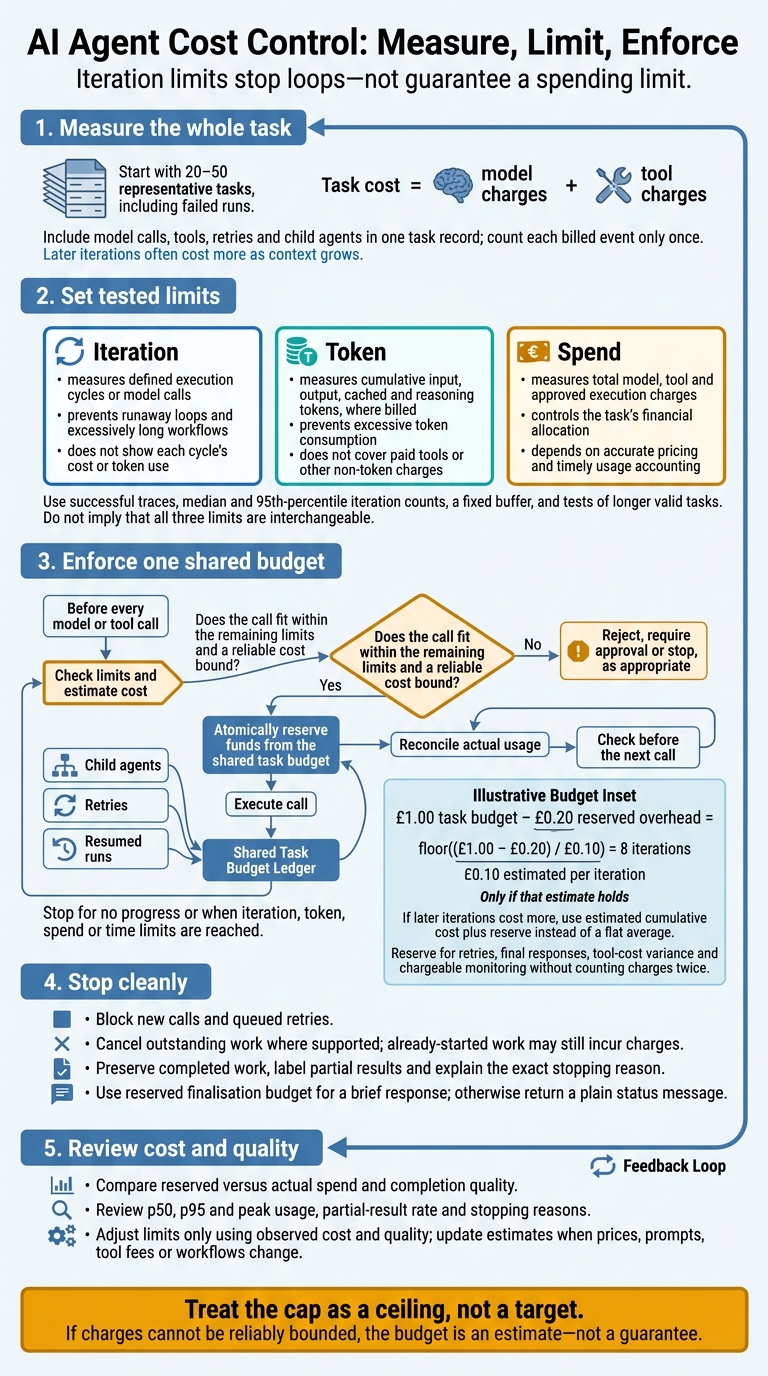 {AI Agent Cost Control: Measure, Limit, Enforce}
:::
{AI Agent Cost Control: Measure, Limit, Enforce}
:::
Why AI Agents Get Stuck in Loops - Stop Conditions Explained #AgenticAI #AIAgents
1. Estimate Model and Tool Costs
Once you’ve defined the iteration scope, measure the actual cost of each run. Use those figures to set iteration caps against spend. Record tasks in a consistent format so you can compare like-for-like runs.
Use prompt caching to avoid paying again for static context, such as system prompts, file content and tool definitions. Link child-agent work and sub-tasks to the same task record: parallel calls can soon increase token use.[4]
Calculate Total Task Cost
Task cost = model charges + tool charges. Add both charges for each iteration. Later iterations often cost more because the context grows, even if the output stays the same length.
Track Costs Across Iterations
Record each iteration’s spend and keep a running total. This lets you compare runs on the same basis and choose budget-based limits. In the table below, Mᵢ means model charges for iteration i, and Tᵢ means tool charges.
| Cost field | Calculation | Cost pattern | Value to record |
|---|---|---|---|
| Per-iteration model cost | Mᵢ = model charges for iteration i | Rises as context grows | Actual Mᵢ in £ |
| Tool charges | Tᵢ = sum of billed tool calls or usage units | Per-call or usage-based fees | Actual Tᵢ in £ |
| Total task cost so far | Sum of M₁ through Mᵢ plus T₁ through Tᵢ | Increases with each billed call, including child-agent work | Running total in £ |
Recording checklist: Record the task ID, iteration, model call, input and output tokens, tool usage, retries and child-agent work. Count each billed event only once in the task total.
2. Choose Iteration, Token and Spend Limits
Use the task-cost totals from the previous step to turn measured spend into hard limits.
Base Iteration Caps on Successful Runs
Set the cap using successful traces for each task class. Add separate tool-call, retry, time and depth limits only where they affect the task. Stop early if repeated failures or identical actions show no progress.[3][7][8]
Find the median and 95th-percentile iteration counts. Set a cap above the high-percentile requirement, add a fixed buffer, then test it against longer valid tasks. Give routine tasks tighter limits. Allow unusually difficult tasks a higher tested cap only with an approved budget and escalation path. Assess changes by completion quality and cost per successful task, not spend alone.[6]
Keep loop control separate from token and spend control.
Keep Token and Spend Budgets Separate
Iteration caps stop loops. Token caps stop prompt growth. Spend caps prevent financial overruns. Set cumulative token and monetary ceilings for the whole task, including retries and delegated work.[3][5]
Specify how input, output, cached and reasoning tokens count where billed, without counting them twice. These limits address different risks: large prompts can consume tokens fast, while tools can consume money fast. A task’s token budget is separate from the model’s per-request context window.[3][5]
| Limit | What it measures | What it prevents | Main blind spot |
|---|---|---|---|
| Iteration | Defined execution cycles or model calls | Runaway loops and excessively long workflows | Does not show the cost or token use of each cycle |
| Token | Cumulative input, output, cached and reasoning tokens, where billed | Excessive token consumption | Does not cover paid tools or other non-token charges |
| Spend | Total model, tool and approved execution charges | Exceeding the task’s financial allocation | Depends on accurate pricing and timely usage accounting |
Once these ceilings are set, calculate the highest iteration cap the budget can support.
Calculate an Iteration Cap Within Budget
Illustrative calculation: With a £1.00 task budget, £0.20 reserved overhead and £0.10 estimated per iteration, the affordable cap is floor((£1.00 − £0.20) / £0.10) = 8 iterations. If later iterations cost more, choose the largest cap whose estimated cumulative cost plus reserve fits within £1.00, rather than relying on a flat average.[3][9]
Reserve budget for retries, final response generation, tool-cost variance and chargeable monitoring. Count each charge once: if planned model calls already include the final response, do not reserve for it again. Treat the affordable cap as a ceiling, not a target.
Limit-selection checklist:
- Define stop rules for no progress and how to handle partial results.
- Review how often limits are triggered.
3. Enforce Budgets During Execution
Once limits are set, enforce them in the orchestration layer before every call.
Check the Shared Budget Before Each Call
Before each model or tool call, check and reserve budget. Estimate input tokens from the current prompt, history, retrieved documents and tool results. Cap output tokens and apply current model prices.
Reserve budget atomically so parallel branches cannot spend the same allocation. Reconcile actual usage afterwards and return unused budget to the shared pool. Use a shared ledger to keep child agents, retries and resumed runs within one task budget.[3][11][10][12]
If you cannot reliably bound a charge, treat the budget as an estimate, not a guarantee. Limit context, tool-result size, execution time and retries. Require approval or reject work whose cost cannot fit within a reliable bound. Stop when iteration, token, spend or time limits are reached, or when an error prevents recovery. If a limit trips, stop cleanly and return completed work.[11][9][3][13]
Stop Safely and Return Partial Results
When a limit or error stops execution, preserve completed outputs and close the run without starting new work. Block new calls and queued retries, and cancel outstanding work where supported. Work already started may still incur charges, so reconcile usage after cancellation.
Report the exact reason for stopping and clearly label partial results. Use any reserved finalisation budget for a brief response. Otherwise, return a plain status message. Retry with less context or a lower-cost model only if the remaining budget covers the full attempt; otherwise, escalate.[10][15][12][2]
Deployment checklist: Test normal, difficult, failed, adversarial and concurrent workloads, including unexpectedly large tool results. Verify zero-budget rejection, atomic reservations, retry accounting, oversized-output handling and cancellation. Check that resumed runs and duplicate callbacks neither reset budgets nor create duplicate charges. Use synthetic prices to verify known £ limits.[10][12][15]
Review Limits Against Cost and Quality
After each run, compare actual usage with the reserved budget and adjust caps using traces from completed runs. Log elapsed time, the reason for stopping, and reserved versus actual spend. Track the partial-result rate, and review p50, p95 and peak usage alongside completion quality.
Check runs that hit their caps for limits set too low, poor task decomposition, oversized tool output or loops. Reduce caps when extra iterations add no measurable value. Increase them only when quality improves and the budget covers higher p95 and peak usage. Update estimates when prices, prompts, tool fees or workflows change, and use runtime logs to set the next limits.[3][14]
Conclusion: Combine Limits for Cost Control
Measure task costs, set caps, then enforce them. Use iteration caps to control loops, token caps to limit prompt growth, and spend caps to control the total billed cost.
After each run, compare actual spend with completion quality. Then increase, decrease or keep budgets based on the results. Aim for predictable spend and acceptable task completion. Without accurate accounting and limits you can enforce, a budget is only an estimate - not a control.
For AI strategy and custom agent implementation, Hokstad Consulting can help.
FAQs
How do I set budgets without historical cost data?
Start with unit economics and infrastructure-as-code governance. Define workload units, such as cost per 1,000 inferences or per training epoch, so you can track efficiency rather than total spend alone. Set hard resource caps, including maximum replica counts or GPU instances, to keep costs from spiralling during initial deployment.
Use simulation modes to estimate costs before going live. Set automated alerts at 70% and 90% of your monthly budget in pounds (£) to spot budget drift early.
How can I budget for unpredictable tool charges?
Track costs per agent task or workflow, not just tokens or spend caps. Set alerts at 70% and 90% of your monthly budget in pounds (£).
Queue tool calls and give each target a dead-letter queue for messages that exceed retry limits. Check calls against strict schemas and policies. Pause high-risk actions for human approval before they incur costs, and save workflow states to prevent duplicate charges when workflows restart.
How do I know if iteration caps hurt quality?
Monitor quality signals alongside technical metrics [1]. Track task completion rates and user feedback to check whether agents stop before completing complex requests. Check faithfulness and groundedness, too: outputs should match the source data and make sense [1].
If silent classifier shifts or retrieval errors increase, your iteration caps may be too restrictive for the task’s complexity [1].