
Federated Kubernetes simplifies managing workloads across multiple clusters in hybrid cloud environments. Instead of relying on a single cluster, it treats multiple clusters as one system, distributing workloads based on factors like cost, latency, and compliance. This approach enhances resilience by isolating failures to individual clusters and supports cross-cluster failover for better disaster recovery. However, it introduces complexity with cross-cluster networking and configuration management. Single-cluster setups, while simpler, struggle with scalability and resilience in hybrid environments. Choose federation when compliance, cross-region failover, or workload distribution across clouds is essential.
1. Federated Kubernetes in Hybrid Cloud
Scheduling Scope
In a typical single-cluster Kubernetes setup, the scheduler is limited to assigning pods to nodes within a single administrative boundary. Federated Kubernetes takes this concept further by expanding the scheduling scope to the cluster level. This means it treats your on-premises data centre and public cloud clusters as one cohesive fleet [1]. A global scheduler determines the best cluster based on factors like capacity, cost, or compliance, while the local kube-scheduler handles the node-level assignments within the chosen cluster [2]. Despite these changes, developers can continue using standard Kubernetes YAML files, as the federation layer works seamlessly without altering their workflows.
Federation also introduces detailed placement policies, which are key to optimising how workloads are distributed across clusters.
Placement Policies
Tools such as Karmada use PropagationPolicies to simplify workload placement. These policies allow platform teams to define placement rules while developers stick to writing standard YAML configurations [1].
The federation layer is entirely in the PropagationPolicy, managed by platform teams.- The Kubernetes Visual Handbook [1]
Cluster selection can be done in two ways: explicitly naming specific clusters or dynamically using label-based selectors that determine clusters at runtime. Federation also supports advanced replica distribution. For instance, you could assign three replicas to a UK-based cluster and one to an Asia-Pacific cluster. Administrators can even set minimum and maximum replica limits for each region. Additionally, Per-cluster Overrides allow for field-level customisation, such as deploying a different container image in an EU cluster to comply with data residency rules, without duplicating the entire workload definition [7][8].
These placement policies not only optimise workload distribution but also improve system resilience.
Workload Resilience
Federation significantly reduces the impact of outages, ensuring that if one cluster fails, others can continue to operate independently [1]. It supports three key failover patterns:
| Pattern | How It Works | Best For |
|---|---|---|
| Active-Active | All clusters handle live traffic via a global load balancer | Maximum resilience and low latency |
| Active-Passive | A standby cluster is kept on hand and activated during failover | Simpler state management |
| Regional Affinity | Users connect to the nearest healthy cluster, with failover to the next closest cluster if needed | Balancing compliance and performance |
Tools like Admiralty add another layer of flexibility by enabling overflow scheduling. For example, if an on-premises cluster runs out of capacity, pods can automatically shift to a cloud cluster without the application noticing the change [1]. This capability, often referred to as burst-to-cloud
, is particularly helpful for managing sudden workload spikes.
Operational Complexity
While federated scheduling provides greater flexibility, it does come with added complexity. Managing multiple etcd instances, API servers, and cross-cluster networking can increase the operational workload [1]. Networking challenges, in particular, are addressed by solutions like Cilium ClusterMesh, Submariner, and Istio Multi-Cluster, though each requires careful configuration [1][7].
Another challenge is configuration drift. A workload that runs perfectly in one cluster might encounter issues in another due to differences in CNI plugins or admission policies. Adopting GitOps practices with tools like ArgoCD ApplicationSets can help maintain consistency across clusters by generating tailored configurations for each one [1].
Need help optimizing your cloud costs?
Get expert advice on how to reduce your cloud expenses without sacrificing performance.
2. Single-Cluster Kubernetes Scheduling
Scheduling Scope
The default kube-scheduler is designed to function within a single cluster, assigning new pods to the most suitable node available in that cluster’s environment [11]. However, it operates without any awareness of other clusters, regions, or cloud providers.
This approach works well in straightforward setups but creates challenges in hybrid environments. As Radoslav Furnadzhiev, Mitko Shopov, and Nikolay Kakanakov from the Technical University of Sofia explain:
Traditional Kubernetes schedulers prioritize resource allocation based on CPU and memory constraints, without explicitly considering the underlying network topology or the interdependencies among distributed application components.[4]
In practice, this means the scheduler might place a pod on a node deemed available
without considering its geographic distance or latency to dependent services. This narrow focus highlights the need for alternative strategies in hybrid and multi-cluster environments.
Placement Policies
Kubernetes uses a structured two-step process for pod placement: Filtering (identifying nodes that meet resource and policy requirements) and Scoring (ranking those nodes to select the best fit) [11]. Within a single cluster, several placement controls are available:
| Policy Type | Mechanism | Primary Impact |
|---|---|---|
| nodeSelector | Label matching | Controls node placement |
| Node Affinity | Expressive label rules | Matches pods to nodes |
| Inter-pod Affinity/Anti-affinity | Pod label matching | Co-locates or spreads related services |
| Topology Spread Constraints |
maxSkew across domains |
Ensures balanced distribution |
| Taints and Tolerations | Key-value-effect taints | Excludes or dedicates nodes |
Among these, Node Affinity offers more flexibility than the simpler nodeSelector, as it supports both mandatory requirements and optional preferences, along with advanced matching operators [13]. However, some features, like inter-pod affinity and anti-affinity, can become computationally demanding in clusters with hundreds of nodes [13].
While these tools provide flexibility within a single cluster, they fall short when workloads require cross-cluster resilience, which is essential for hybrid or multi-cloud setups.
Workload Resilience
Single-cluster resilience is achieved through Pod Topology Spread Constraints, which distribute replicas across failure domains, such as nodes, zones, or regions. The maxSkew field is used to limit imbalances between these domains [12]. For the control plane, resilience is ensured by replicating components like the API server, etcd, and scheduler across at least three failure zones [14].
These methods work effectively within a single region but cannot extend across multiple regions or cloud providers. A single cluster simply isn’t designed to span such boundaries [6].
Operational Complexity
Though the Kubernetes scheduling framework is extensible - with hooks like PreFilter, Filter, Score, and Bind - the default approach prioritises immediate resource availability over global, long-term efficiency [4][10].
The default Kubernetes scheduler only considers current optimal node selection. This approach often results in a locally optimal solution rather than a globally optimal one.- Radoslav Furnadzhiev, Mitko Shopov, and Nikolay Kakanakov [4]
This localised focus becomes a limitation in hybrid cloud scenarios, where global efficiency is critical. Kubernetes v1.36 (2026) introduced Topology-Aware Scheduling (TAS) in alpha to address some of these issues. TAS ensures pod groups are placed within specific topology domains to reduce latency [9]. While this is a step forward, it remains confined to single-cluster environments, leaving federated scheduling to address the broader challenges.
CERN experiences with Multi Cloud, Federated Kubernetes

Pros and Cons
::: @figure 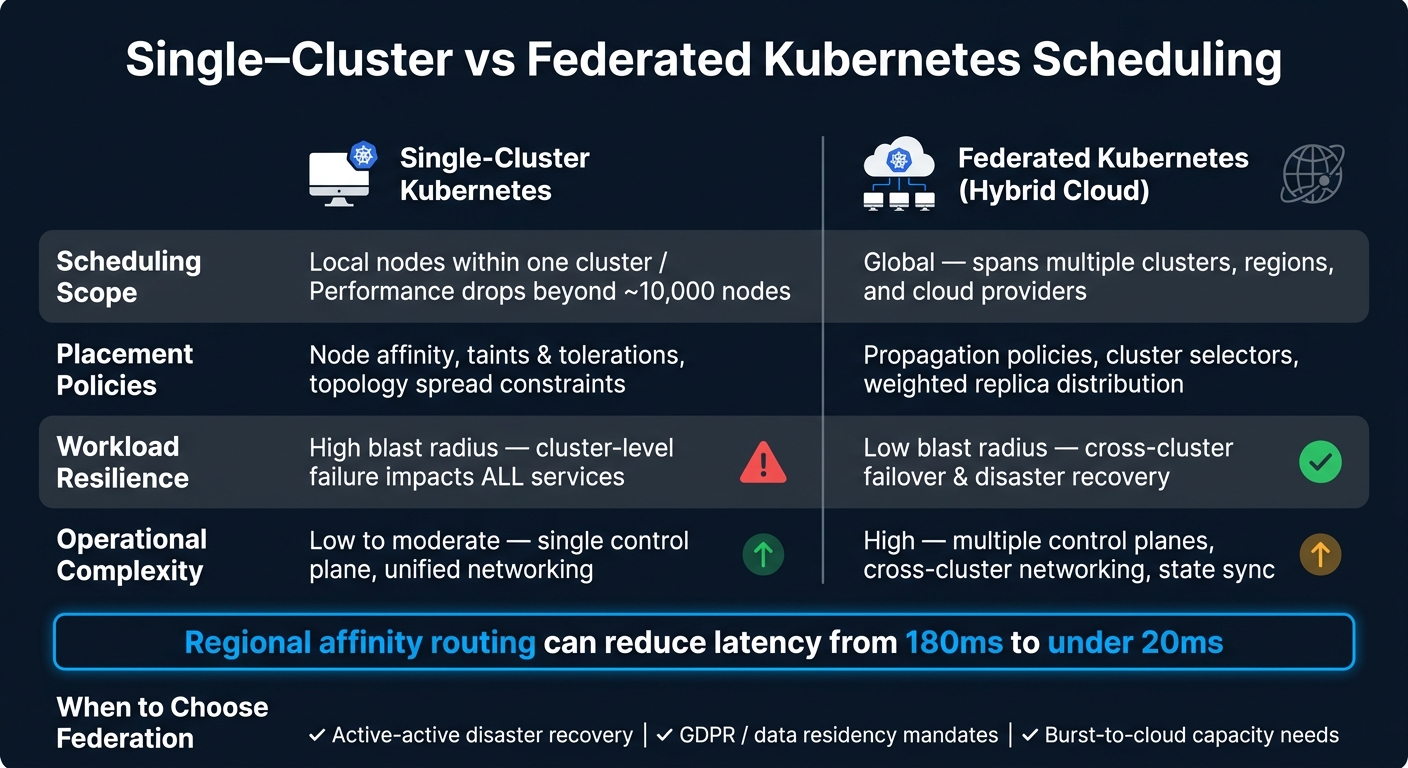 {Single-Cluster vs Federated Kubernetes: Hybrid Cloud Scheduling Compared}
:::
{Single-Cluster vs Federated Kubernetes: Hybrid Cloud Scheduling Compared}
:::
Each approach caters to specific needs and comes with its own advantages and challenges. The table below highlights the key differences across the four dimensions discussed in this article:
| Feature | Single-Cluster Kubernetes | Federated Kubernetes (Hybrid Cloud) |
|---|---|---|
| Scheduling Scope | Local nodes within one cluster; performance drops beyond ~10,000 nodes [1] | Global; spans multiple clusters, regions, and cloud providers [3][1] |
| Placement Policies | Node affinity, taints, and tolerations | Propagation policies, cluster selectors, and weighted replica distribution [1][8] |
| Workload Resilience | High blast radius; a cluster-level failure impacts all services [1] | Low blast radius; supports cross-cluster failover and disaster recovery [3][1] |
| Operational Complexity | Low to moderate; single control plane and unified networking | High; involves multiple control planes, cross-cluster networking, and state synchronisation [3][5] |
This breakdown sets the stage for understanding how these approaches impact operations.
In a single-cluster setup, risks like etcd corruption or a failed control plane upgrade can bring down all services simultaneously. This makes the resilience benefits of federation stand out. Federated Kubernetes not only isolates failures across clusters but also supports data sovereignty by design. This means workloads can be placed in specific jurisdictions to meet GDPR or other regulatory requirements without resorting to complex workarounds [1].
That said, federation is not without its downsides. Managing cross-cluster networking, synchronising secrets, and aligning cloud IAM policies adds a layer of complexity [3][5]. As The Kubernetes Visual Handbook explains:
Multi-cluster federation allows you to manage these clusters as a single logical entity while maintaining the isolation benefits of separate clusters.[1]
While federated Kubernetes provides unified management and regulatory advantages, it comes with significant operational overhead. For organisations that haven't yet reached limits in scaling, compliance, or resilience, a single, well-optimised cluster remains a simpler and more cost-effective option. Federation justifies its complexity only when the business case - such as cross-region failover, burst-to-cloud capacity, or regulatory data placement - makes it necessary. These factors help organisations decide which approach aligns best with their goals.
Conclusion
Choosing between single-cluster and federated Kubernetes scheduling should always align with your organisation's specific needs. As Osama Mustafa, Technology Geek, aptly states:
A single‐cloud EKS or OKE setup will outperform a poorly-run multicloud one every time. Adopt federation only after simpler configurations have proven insufficient.[16]
For small to mid-sized teams, starting with a single, well-managed cluster supported by reliable GitOps tooling is often the most practical choice. Federation, while powerful, brings added complexity and should only be considered when there are clear, unavoidable requirements.
Federation becomes relevant when addressing critical needs such as active-active disaster recovery, strict data residency mandates like GDPR, or reducing latency for users spread across different regions. For instance, studies show that regional affinity routing can slash latency from over 180 ms to under 20 ms [15], which is a game-changer for user-facing applications. If you decide to adopt federation, start with independent clusters managed via a unified GitOps tool. This approach provides a solid foundation before transitioning to a full federation engine like Karmada or KubeFed. Also, keep a close eye on cross-cluster traffic to avoid unexpected egress costs, which can quietly undermine any cost-saving goals [16].
When scaling demands or compliance requirements push you towards federation, seeking expert advice can be invaluable. For organisations aiming to refine their cloud strategies and optimise deployments, Hokstad Consulting offers tailored guidance to help you navigate these complexities effectively.
FAQs
Do I actually need Kubernetes federation for my hybrid cloud?
Kubernetes federation comes in handy when you need to manage multiple clusters as one cohesive unit to address particular operational or business goals. It supports fault isolation, ensures compliance with data residency regulations like GDPR, and improves performance by deploying workloads closer to end-users to minimise latency. That said, it introduces additional layers of complexity, such as handling cross-cluster networking, service discovery, and upgrades. This approach is especially beneficial for hybrid cloud environments.
How do federated placement policies work without changing my YAML?
Federated placement policies let you manage resource distribution without altering your workload YAML files. This is possible because the federation layer separates the resource definitions from the distribution logic. Platform teams handle these policies using APIs such as PropagationPolicy or ClusterResourcePlacement, which function as overlays. These policies guide how deployments, services, or namespaces are allocated across hybrid infrastructure. This approach ensures your manifests stay standard and portable while the federation control plane takes care of automating multi-cluster placement.
What are the biggest hidden costs of multi-cluster federation?
Managing multiple clusters often brings hidden costs that can stretch resources thin. One major issue is the operational complexity it introduces. Tasks like handling cross-cluster networking, service discovery, syncing secrets, and coordinating upgrades can pile up, putting extra pressure on DevOps teams and increasing maintenance efforts.
Another challenge comes from inefficiencies such as node pool fragmentation, unused resources, and idle infrastructure. Without a centralised view, troubleshooting becomes more difficult, configuration inconsistencies are more likely, and manual audits can lead to errors. These factors not only consume time but also add to overall expenses.