
If an AI agent touches money, access, or production systems, I would not let it run on prompts alone. I’d put an orchestrator in the middle to store state, route each step, pause for sign-off, retry with limits, and log every decision.
In plain terms, this article says one thing: single-agent flows are fine for small jobs, but multi-step business work needs event-driven control. That means I’d split work by type:
- Synchronous calls for fast, direct actions
- Queues for background jobs
- Durable workflows for long-running steps, approvals, and cross-service work
It also sets out the controls I’d expect before go-live:
- Validate tool calls against schemas and policy
- Issue short-lived, service-scoped credentials
- Stop high-risk actions at a human review gate
- Save workflow state before approval pauses
- Make handlers idempotent to deal with duplicates
- Use bounded retries, jitter, circuit breakers, and DLQs
- Track events with correlation IDs, logs, metrics, and traces
- Test duplicate and failed events before production
- Watch cost across model use, compute, retries, and review time
A few numbers stand out. The article points to p95 latency over 500 ms, error rate above 1%, approval delays over 4 hours, and spend over 110% of budget as sample alert points. For UK teams, it also calls for UK-based clusters, immutable audit logs, GDPR-aligned record handling, and budget alerts at 70% and 90% of monthly limits in £GBP.
If I had to boil it down even more, it’s this:
- Low-risk work can run with post-action audit
- Medium-risk work needs thresholds and evidence
- High-risk work needs human sign-off
- Critical work needs dual authorisation and full audit records
Here’s the core difference the article makes clear:
| Work type | Best use | State | Failure handling | Audit trail |
|---|---|---|---|---|
| Synchronous call | Simple tool action | Short-lived | Immediate error | Low |
| Queued work | Background task | Basic | Retry via queue | Medium |
| Durable workflow | Multi-step business process | Saved between steps | Recovery plus compensating action | High |
So, if you want AI agents to work inside a business without losing control, the answer is simple: route work by risk, save state, gate sensitive actions, and design for failure from day one.
How task routing and tool execution work in practice
From incoming event to completed workflow state
Once an event comes in, the orchestrator sends it down a defined path: an agent, an API, a queue, or a workflow step. It keeps moving the work along that path until it hits a terminal state.
This matters because the route shouldn't be improvised on the fly. Each one should already spell out whether it needs approval, what happens if something fails, and how recovery works. That way, the system isn't guessing halfway through the job.
Schema-first tool design for safer agent actions
Before a tool call reaches an enterprise API, validate it against the schema and policy. Then issue short-lived, service-scoped credentials for execution.
That does two simple but important things. It keeps the agent inside clear boundaries, and it leaves a clean audit trail at each step. In plain terms, the agent can only do what the tool definition and policy allow.
Routing methods for control, scale and governance
Routing can be based on event type, risk, service health, and business owner. Those signals help decide where the work should go and whether it should move straight through or pause first.
High-risk routes should stop at a review gate before execution. That's the point where human oversight steps in, instead of letting a sensitive action run unchecked.
Event-Driven & Multi-Agent Architectures for Gen AI Workflows | Mary Grygleski, AI By the Bay 2025
Approvals, human review and business controls
::: @figure 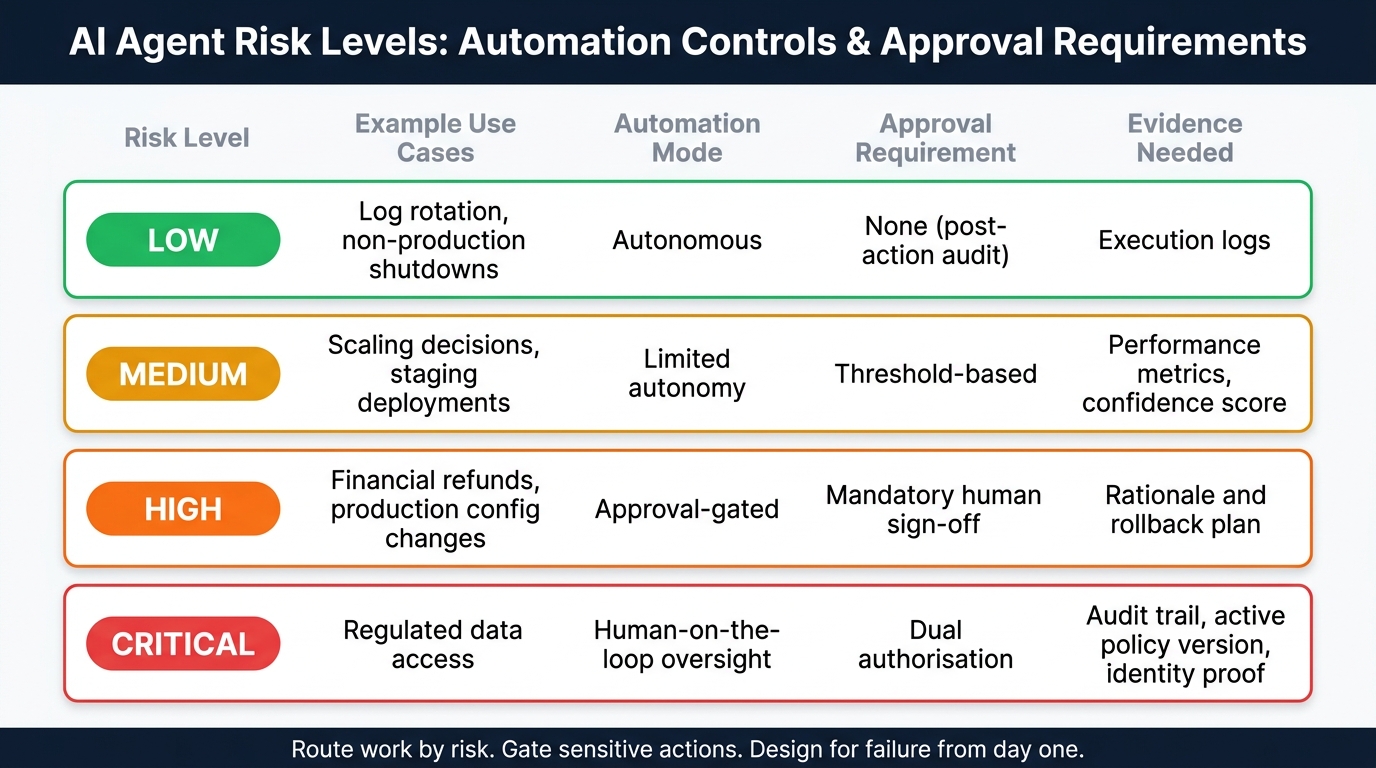 {AI Agent Risk Levels: Automation Controls & Approval Requirements}
:::
{AI Agent Risk Levels: Automation Controls & Approval Requirements}
:::
Where to place approval steps in business workflows
When routing flags a sensitive action, the workflow should stop at an approval gate. If the action has a big business impact or can’t be easily undone, a person should check it before anything happens.
That’s the right setup for things like financial refunds, production configuration changes, and access to regulated data. By contrast, lower-risk jobs such as log rotation or non-production shutdowns can run on their own. A simple rule works well here: if the action is regulated or hard to reverse, require explicit authorisation.
How a controlled review step should operate
When a workflow pauses for review, its state needs to be saved so the event chain can continue cleanly afterwards. One common pattern is to use a webhook to mark the task as awaiting review. Durable workflow platforms with versioned policies are a good fit for this model [1][2].
The reviewer should be able to inspect the paused task and see what’s about to happen before making a decision. The system also needs to record who reviewed it, what decision they made, and which policy version was active at the time.
If the reviewer approves the task, the workflow should continue from the saved state rather than starting from scratch. Once approval is logged, the workflow can move into failure handling and recovery logic.
Guardrails for safe automation at different risk levels
A useful way to think about automation is as a routing policy. Low-risk paths can run automatically. Higher-risk paths should pause and wait for review.
No matter the risk level, execution should stay isolated. Run agents in sandboxed environments with least-privilege credentials, and use explicit allow-lists for tools and files [1][2]. Controls should also exist at the platform layer, where tool requests are intercepted and permissions are checked before any enterprise API is called [1].
| Risk Level | Automation Mode | Approval Requirement | Evidence Needed |
|---|---|---|---|
| Low (e.g. log rotation, non-production shutdowns) | Autonomous | None (post-action audit) | Execution logs |
| Medium (e.g. scaling decisions, staging deployments) | Limited autonomy | Threshold-based | Performance metrics, confidence score |
| High (e.g. financial refunds, production config changes) | Approval-gated | Mandatory human sign-off | Rationale and rollback plan |
| Critical (e.g. regulated data access) | Human-on-the-loop oversight | Dual authorisation | Audit trail, active policy version, identity proof |
Failure recovery, observability and cost control
Failure paths and recovery patterns to design upfront
Once routed work starts running, the big danger is partial failure across services.
That means one step works, another times out, a third half-finishes, and now you're left with a mess: duplicate calls, missing updates, or side effects you didn't mean to keep. So this work needs designing before go-live, not after the first incident.
Plan for time-outs, duplicates, reprocessing, downstream failures and partial side effects from the start.
Retries should always be bounded. Use exponential back-off with jitter to spread load, and put a hard cap on retry attempts. Every queue target should have a dead-letter queue (DLQ) so messages that burn through their retries are caught and reviewed, instead of looping forever and pushing up cost.
Handlers also need to be idempotent. If the same event turns up twice, the result should match processing it once. No duplicate model calls. No repeated side effects.
Circuit breakers help here too. If a downstream service is struggling, they stop more calls from piling in and turning a bad situation into a chain reaction. And if a later step fails after an external change has already happened, run a compensating action to reverse it or flag it for follow-up.
Observability for audit, debugging and service levels
Once recovery paths are in place, you need instrumentation that shows when they fire and why.
Use metrics, events, logs and traces (MELT) to track what happened, where things stalled and what caused the issue.
Carry a correlation ID in every event so logs, spans and audit records stay linked across asynchronous hops. Structured logs should be machine-readable JSON with fixed fields such as event ID, timestamp, trace ID and agent decision context. Also, watch p95 and p99 latency. Averages can look fine while the slowest requests are quietly causing trouble.
The table below sums up the key metrics to instrument and example thresholds worth alerting on:
| Metric Category | What to Measure | Example Alert Threshold |
|---|---|---|
| Latency | Ingestion-to-invocation latency | p95 > 500ms |
| Errors | DLQ growth, retry rate | Error rate > 1% |
| Saturation | Queue depth, connection pool, token quota | Connection pool > 70% |
| Cost | Cost per workflow, token usage per agent | Spend > 110% of budget |
| Governance | Approval time, review delay | Approval stalled > 4 hours |
For UK organisations, audit records must be kept in line with GDPR and data residency rules. Keep event processing in UK-based clusters and maintain immutable logs to support compliance. Use OpenTelemetry as a vendor-neutral standard for exporting traces. It helps avoid lock-in and keeps instrumentation consistent across your stack.
A practical rollout sequence for UK organisations
With recovery and observability set, roll out in a clear order.
Start by defining the business event, the expected outcome and the exception path before implementation. Map dependencies and failure paths before writing any code.
Build idempotency in early. Retrofitting it later is painful and often messy. Before promoting to production, test duplicate events and failed events on purpose, not just the happy path.
Then measure total workflow cost across model use, compute, retries and human review time. Set budget alerts at 70% and 90% of monthly limits, reported in £GBP.
Only roll out once duplicate-event tests and failure-path tests pass.
Conclusion: Building reliable AI-agent workflows with event-driven orchestration
Event-driven orchestration helps AI agents pass work between tools, approvals and services without losing control of state, audit trails or recovery. But that only holds up when the controls live in the platform itself, not just in the prompt.
Platform-level controls such as sandboxing and policy enforcement give you a firmer base than prompts alone [1]. With that base in place, it makes sense to start with one low-risk workflow, then widen use step by step.
Before any workflow runs with less human review, the approval points, monitoring and operating controls - shaped through the routing, approval and recovery patterns covered above - need to be in place already.
If you’re putting that base together now, specialist help can cut the path to production. Hokstad Consulting can design and build production-ready AI-agent systems that are reliable and auditable.
FAQs
When do AI agents need an orchestrator?
AI agents need an orchestrator once they move past simple tasks and into complex, multi-step workflows that run across distributed systems.
At that point, the agent isn't just doing one job. It has to interpret intent, pick the right tools, take action across different services, deal with dependencies and failures, keep track of state, enforce policy, and bring in human approval when manual oversight stops being practical at scale.
How do approval gates work in practice?
Approval gates act like checkpoints. They make sure a person signs off, or an automated check passes, before anything moves forward.
In day-to-day use, that might mean dual authorisation for major production changes. Or it could mean a mandatory review after automated testing in staging. The idea is simple: don’t let a change go live just because a system can push it.
With Policy Enforcement Points and a central Policy Decision Point, each request is checked against real-time context. That can include things like a user’s location or the sensitivity of the data involved. So only verified events can trigger changes, while emergency break-glass controls remain available when they’re needed.
Why is idempotency important for AI workflows?
Idempotency matters in AI workflows because it makes sure an operation leads to the same result whether it runs once or several times.
In event-driven systems, that’s a big deal. Retries happen. Messages get delivered twice. Jobs can restart. Without idempotency, those moments can lead to duplicate actions, damaged resources, and messy state changes.
For autonomous systems handling complex, multi-step tasks, idempotency adds a layer of safety. It helps the system recover from retries without doing the same thing twice or drifting into an inconsistent state.