
Hybrid cloud systems combine public clouds, private clouds, and on-premises infrastructure into a single environment. While they offer flexibility and scalability, designing them efficiently is key to reducing energy use and costs. Here's a quick breakdown of how to achieve this:
- Conduct an Energy Audit: Measure resource usage and identify inefficiencies like idle resources, over-provisioning, and inefficient data transfers.
- Optimise Architectures: Use dynamic task offloading, consolidate workloads, and choose managed services in regions with lower carbon intensity.
- Upgrade Hardware and Cooling: Switch to energy-efficient hardware like hyperconverged systems and adopt advanced cooling solutions to cut power consumption.
- Monitor and Automate: Implement real-time monitoring and auto-scaling to ensure resources match demand without waste.
Efficient hybrid cloud systems save money, reduce electricity use, and align with sustainability goals. Start with an audit, optimise workloads, and use automation to maintain efficiency over time.
::: @figure 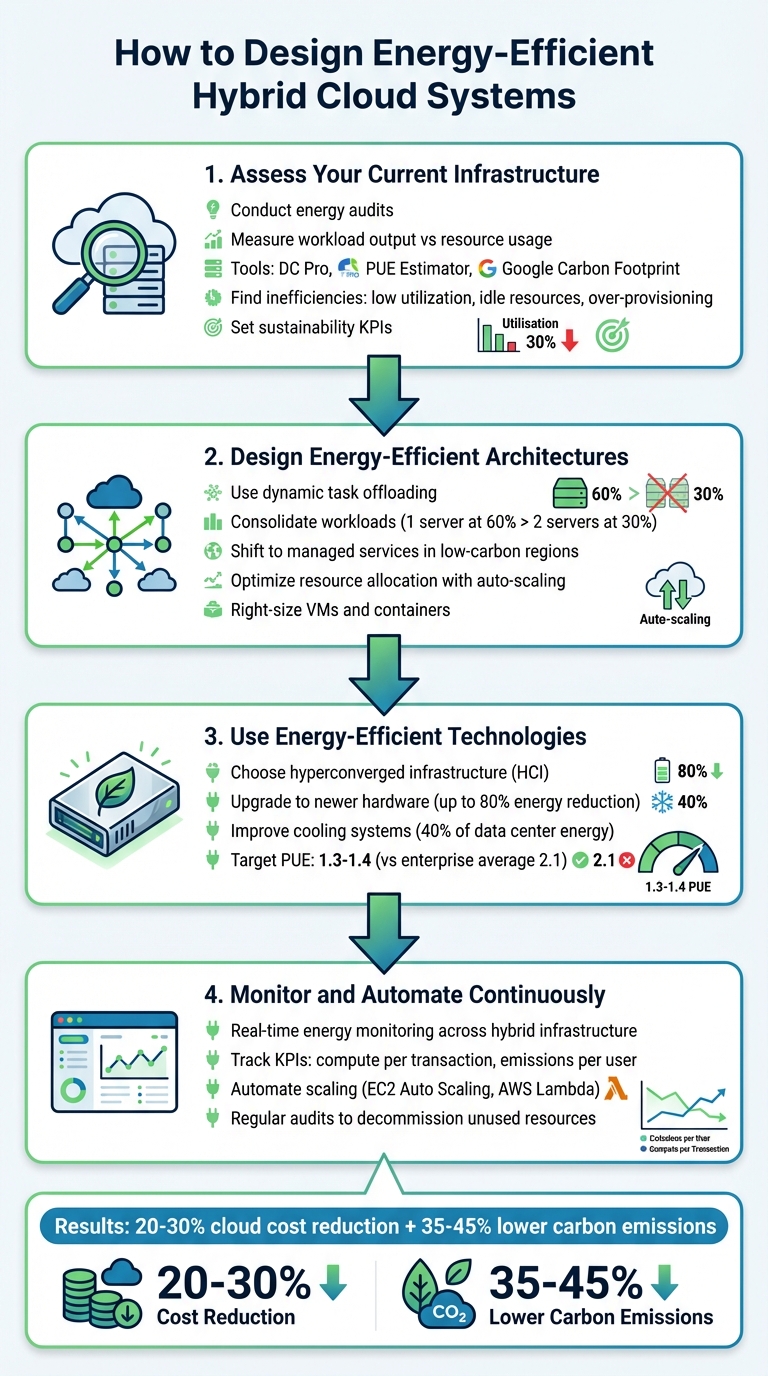 {4-Step Guide to Designing Energy-Efficient Hybrid Cloud Systems}
:::
{4-Step Guide to Designing Energy-Efficient Hybrid Cloud Systems}
:::
Step 1: Assess Your Current Infrastructure
How to Conduct an Energy Audit
To understand how efficiently your infrastructure is operating, measure workload output against resource usage. Instead of just looking at the total power consumption, focus on metrics like compute resources used per transaction or per user. This method uncovers whether your systems are running cost-effectively or wasting resources [7].
For on-premises setups, tools like DC Pro and the PUE Estimator can help analyse the energy use of your physical infrastructure [9]. These tools examine everything from transformers and UPS systems to servers and storage, pinpointing areas where energy is being lost. The IT Efficiency Tool goes a step further by focusing on server, network, and storage equipment to identify consumption at a core level [9].
In cloud environments, dashboards such as Google's Carbon Footprint tool can identify workloads with high emissions [4]. For hybrid environments, real-time IoT telemetry combined with AI can monitor energy usage across all systems [6]. Enabling advanced monitoring metrics - beyond default settings - can also enhance auto-scaling features, ensuring capacity matches actual demand [1].
Review resources and emissions per workload unit.- AWS Well-Architected Framework [7]
Set sustainability KPIs early in the process. Goals like compute resources per transaction
can help you measure whether your efficiency efforts are keeping up with business growth [7]. When choosing cloud regions, consider carbon intensity alongside latency and cost. Some regions operate on cleaner energy grids, which can significantly reduce emissions [4].
This audit is essential for identifying inefficiencies and setting the stage for optimisation.
Find Common Inefficiencies
The findings from your audit will reveal areas that need immediate attention to improve efficiency.
One frequent issue is low resource utilisation. For instance, running two servers at 30% capacity uses more energy than running a single server at 60% because each server consumes a baseline amount of power just to stay operational [7][2]. This problem is particularly pronounced in hybrid setups where workloads are not consolidated effectively.
Idle resources are another major source of waste. These include compute instances, storage volumes, and network connections that remain powered on without performing any useful tasks. In cloud environments, look for unused virtual machines or over-provisioned machine types [4]. Also, review your data storage practices - data that's rarely accessed but stored in high-energy hot
storage tiers could be moved to more energy-efficient cold
storage [7].
Legacy architectures can also create inefficiencies, especially when used in cloud settings. Traditional capacity planning, which involves provisioning for peak loads that rarely occur, often leads to over-provisioning. Modern demand planning methods are more efficient, but many organisations still cling to outdated practices. As the Scottish Government's digital standards point out: Over-provisioning resources is an immediate and avoidable waste of your budget
[1].
In hybrid environments, inefficient data transfer paths can drain energy unnecessarily. For example, using internet-based VPNs for high-volume production traffic between on-premises and cloud systems consumes more energy per unit of data than dedicated connectivity options. Additionally, inactive VPN tunnels and unused connections generate unnecessary overhead [8]. Conduct regular audits to identify and decommission these inactive resources - small changes here can lead to significant energy savings across larger infrastructures.
Step 2: Design Energy-Efficient Architectures
Use Dynamic Task Offloading
After identifying inefficiencies during your audit, the next step is to optimise how workloads are distributed across your hybrid setup. Dynamic task offloading involves assigning each workload to the most suitable location - whether that's a public cloud region, a local zone, or on-premises infrastructure - based on factors like latency, data residency rules, and available resources [5].
Consolidating workloads is another way to boost efficiency. For instance, running a single server at 60% capacity uses less energy than operating two servers at 30% each, due to fixed baseline power consumption [7][2]. A great example of this is Dropbox. In November 2020, they implemented a hybrid cloud strategy with AWS to support their massive user base of over 500 million. By creating unified tools for managing resources across both on-premises and cloud environments, they took advantage of AWS's scalability while optimising their global infrastructure footprint [10].
Another smart move is shifting workloads to managed services, such as serverless containers. Public cloud providers like Microsoft, AWS, and Google are already optimising their infrastructure to meet carbon-neutral or carbon-negative goals, making this an effective way to reduce your organisation’s carbon footprint [1]. When using public cloud services, prioritise regions powered by renewable energy or with lower carbon intensity [4].
Using or developing services that run lean and scale on-demand reduces the cost and environmental impact of running the service.- Digital Scotland Service Standards [1]
Before moving workloads, tools like AWS Compute Optimizer or Google Cloud's rightsizing recommendations can help ensure virtual machines and containers aren’t over-provisioned [5][4]. Start with flexible, internet-based connections such as VPNs to gauge baseline bandwidth needs before committing to fixed-capacity options like Direct Connect [8]. For high-bandwidth production traffic, dedicated connections are typically more energy-efficient than internet-based VPNs [8].
Once workloads are offloaded, it’s essential to continuously align resources with demand to maintain efficiency.
Optimise Resource Allocation
The combination of dynamic offloading and continuous right-sizing is key to building an energy-efficient architecture. Right-sizing ensures that virtual machines, containers, and hosts are matched to actual workloads, eliminating wasted resources and unnecessary energy use [7][5].
Auto-scaling is a powerful tool for adjusting capacity in real-time [1]. By designing services to scale automatically, you can maintain high resource utilisation without over-provisioning, which helps avoid the energy costs of idle resources [1][7]. To track progress, establish sustainability KPIs early - such as emissions or resource usage per transaction or user - to monitor performance and identify areas for improvement [7][2].
Data-driven tools like AWS Compute Optimizer and Amazon CloudWatch can provide insights into resource utilisation and offer right-sizing recommendations [5]. Additionally, automated lifecycle policies can move less frequently accessed data into cold storage, reducing the energy demands of storage systems [7]. In hybrid environments with limited bandwidth, prioritisation techniques can ensure critical traffic is transmitted first, while less urgent data, such as replication traffic, is queued [8].
| Connectivity Option | Energy/Cost Efficiency Context | Best Use Case |
|---|---|---|
| AWS Site-to-Site VPN | Lower upfront cost; internet-based | Testing phase or non-critical workloads [8] |
| AWS Direct Connect | Lower data transfer cost per GB; dedicated | High-bandwidth production traffic [8] |
| Managed Services | High efficiency via provider-side optimisation | Serverless containers or automated storage [7] |
| On-Premises (Outposts) | High control; requires precise matching | Latency or data residency requirements [5] |
Instead of waiting for major overhauls, make small, incremental updates to live services to improve efficiency over time [1]. This approach helps you quickly adapt to changing demand while maintaining optimal resource utilisation across your hybrid infrastructure.
Step 3: Use Energy-Efficient Technologies
Choose Energy-Efficient Hardware
Opt for hardware that operates efficiently at scale, such as hyperconverged infrastructure (HCI). HCI combines servers, storage, and networking into software-defined nodes, eliminating inefficiencies found in older systems. This setup enables automated provisioning and scaling, avoiding the energy drain caused by overprovisioning [12].
The age of your hardware plays a major role in energy efficiency. Public cloud providers often utilise newer technology, which can reduce energy consumption by up to 80% compared to older, on-premises data centres [11]. Switching to cloud infrastructure can also lower carbon emissions by 35–45% when compared to traditional IT setups [11]. Interestingly, in conventional data centres, only 10% of energy is used for actual computation, while the remaining 90% is wasted during idle periods [12].
For on-premises systems, prioritise equipment that maintains high performance even under heavy workloads. A great example of this is the Holcim Group, a global leader in building materials, which adopted hyperconverged infrastructure. Francisco Javier Mollá, I&O Global Manager of Service Delivery for EMEA at Holcim Group, highlighted the benefits:
One of the key advantages is simplicity, as we now manage all the clusters from a single console, and we are capable of automating critical activities such as loading security patches[12].
Once you've optimised your hardware, the next step is focusing on energy reduction through advanced cooling solutions.
Improve Cooling Systems
After upgrading hardware, addressing cooling systems is essential for reducing energy consumption. Cooling alone accounts for about 40% of a data centre's energy use [12], making it a critical area to refine. The average Power Usage Effectiveness (PUE) for European enterprises stands at 2.1, while cloud data centres aim for far more efficient values, typically between 1.3 and 1.4 [12]. Achieving these lower PUE levels requires a combination of smart design and advanced technologies.
For hybrid cloud setups, consider how cooling efficiency can be maximised. Large-scale cloud providers often achieve efficiencies that individual businesses cannot match, so moving suitable workloads to managed services can significantly reduce cooling demands [7]. For on-premises systems, simple measures like better building insulation can cut heating and cooling costs by as much as 40% [12].
Innovative cooling technologies can also make a huge difference. For instance, in 2024/2025, the Old Oak and Park Royal Development Corporation in London received £36 million in government funding to build a heat network. This network will use waste heat from local data centres to provide low-carbon heating for over 10,000 homes and 250,000m² of commercial space [3]. Similarly, Siemens Energy developed a closed-loop cooling system using small gas and steam turbines in a combined cycle. This system achieves over 90% efficiency by repurposing waste heat for district heating [3].
When selecting a cooling system, it’s essential to balance energy savings with water usage. For example, a 100MW data centre relying on traditional evaporative cooling can consume up to 760 million litres of water annually [3]. In water-scarce regions, such as the Oxford-Cambridge corridor, air cooling might be a better option, even if it uses more energy [3]. These cooling strategies, combined with earlier steps, help create a highly efficient hybrid cloud environment.
Step 4: Monitor and Automate Continuously
Monitor Energy Usage in Real Time
Once you've optimised hardware and cooling, the next step is to ensure your system stays energy-efficient over time. Real-time monitoring plays a key role here. By integrating on-premises systems with cloud-native tools, you can track energy consumption across your hybrid infrastructure and eliminate any blind spots in your monitoring setup [8][13]. This kind of immediate visibility helps you spot inefficiencies without waiting for delayed billing reports.
To measure efficiency effectively, establish Key Performance Indicators (KPIs) that link productive output - like transactions or active users - to total energy impact [7][2]. For instance, tracking compute power used per transaction can reveal whether your efficiency improves as your system scales. These KPIs allow you to benchmark performance against baseline energy consumption.
For physical infrastructure, combining IoT sensors with machine learning analysis can help detect patterns and automatically trigger efficiency improvements [6]. Tools like Amazon Athena can handle complex queries, while platforms such as Amazon QuickSight offer real-time dashboards to visualise performance across multi-cloud environments [8][13]. This continuous monitoring complements earlier design and audit efforts by providing actionable, up-to-the-minute data.
Automate Scaling and Optimisation
Dynamic auto-scaling is another essential step in maintaining energy efficiency. By automatically adjusting capacity to meet demand, you can avoid over-provisioning and reduce waste [1][7]. For example, EC2 Auto Scaling ensures that idle infrastructure doesn't consume unnecessary energy [1][7].
Services like AWS Lambda and AWS Glue take this further by scaling down to zero when not in use, using power only during active processing [6][7]. This not only helps cut costs but also aligns energy usage with actual demand. Automated lifecycle policies can also shift rarely accessed data into cold storage, which typically relies on less energy-intensive hardware [7][2].
Using or developing services that run lean and scale on-demand reduces the cost and environmental impact of running the service[1].
Lastly, it's important to conduct regular audits to identify and decommission unused resources, such as inactive VPN connections. This prevents unnecessary energy consumption and ensures your system remains efficient [8]. Continuous automation connects today's energy-saving efforts with tomorrow's scalability.
Conclusion
Key Takeaways
Creating energy-efficient hybrid cloud systems requires balancing performance with sustainability. Start by conducting detailed energy audits to establish your current energy usage and pinpoint inefficiencies. Once you have this baseline, focus on maximising resource utilisation - fewer servers running at higher efficiency consume less energy compared to multiple underutilised servers due to baseline power demands [7]. Leverage public cloud regions for elastic demand, and reserve local zones or outposts only when specific needs like low latency or data residency make it necessary [5].
Using managed services such as AWS Fargate can further reduce your hardware footprint by sharing infrastructure across multiple users [7]. Pair this with continuous monitoring and automation to ensure your system adjusts dynamically to workload demands. Track sustainability metrics, such as carbon emissions per transaction, to measure progress and identify areas for improvement [7][2]. As highlighted by the FinOps Foundation, this approach maximises the business value of cloud, enables timely data-driven decision making, and creates financial accountability.
The benefits aren't just environmental. Businesses adopting these strategies often see a 20–30% reduction in cloud costs, with some achieving even greater savings through AI-powered optimisation. Energy efficiency and cost savings go hand in hand.
Next Steps for Your Business
To put these insights into action, start by evaluating your hybrid cloud environment with an energy audit. Tools like the Migration Evaluator can provide a clear picture of actual resource usage [5]. Identify opportunities to consolidate workloads and use automation to eliminate waste.
If you're looking to accelerate this process, expert help can make a big difference. Hokstad Consulting specialises in cloud cost engineering and DevOps transformation, helping businesses cut cloud expenses by 30–50% while improving energy efficiency. Their services include strategic cloud migration, ongoing optimisation, and tailored automation, ensuring your system aligns with both performance and sustainability goals. With flexible engagement models, you'll only pay for the value delivered. Visit Hokstad Consulting to learn more about designing and maintaining energy-efficient hybrid cloud systems.
Optimizing Data Centers: Energy Efficiency & Cloud Repatriation Strategies
FAQs
How can I perform an energy audit for my hybrid cloud system?
Kicking off an energy audit for your hybrid cloud setup begins with defining the scope and objectives. Start by identifying all workloads across your public cloud, private cloud, and on-premises environments. Then, set specific sustainability goals, like cutting energy consumption by a set percentage within a defined timeframe.
The next step is to collect baseline data. Use monitoring tools to track metrics such as CPU, memory, storage, and network usage. By analysing this data, you can measure the energy intensity of each workload and pinpoint inefficiencies, such as under-utilised resources or idle instances. From there, focus on actions like right-sizing instances, consolidating storage, or shifting workloads to more energy-efficient regions. Don’t forget to estimate the potential savings - not just in energy, but also in costs.
Once you've identified the necessary changes, implement them and keep a close eye on the results through continuous monitoring. If you need help automating tasks or interpreting data, expert services like Hokstad Consulting can simplify the process and support ongoing improvements.
What are the advantages of using managed services in a hybrid cloud setup?
Managed services take the hassle out of managing hybrid cloud environments by handling key tasks like design, deployment, monitoring, and fine-tuning of both public and private cloud systems. By outsourcing everyday operations - such as patch management, capacity planning, and incident response - businesses can shift their focus to strategic priorities while keeping their infrastructure running smoothly and efficiently.
For UK organisations, the advantages are clear:
- Cost control and predictability – With pay-as-you-go models and proactive cost management, businesses can cut unnecessary expenses and potentially reduce overall costs by as much as 30%.
- Energy efficiency – Resources scale automatically based on demand, avoiding over-provisioning and cutting down on wasted energy.
- Improved security and reliability – Round-the-clock monitoring and incident handling help minimise downtime and reduce the need for extra hardware.
With managed services, businesses can simplify their operations, cut costs, and create a more energy-conscious hybrid cloud setup that aligns with both sustainability and financial goals.
How does automation enhance energy efficiency in hybrid cloud systems?
Automation plays a key role in making hybrid cloud systems more energy-efficient by ensuring resources are active only when they're needed and used at their best capacity. Take automated scheduling, for instance - it can prioritise tasks based on deadlines and energy consumption, helping servers operate at their most efficient levels. Similarly, consolidating virtual machines onto fewer servers allows underused hosts to be powered down, cutting down overall energy use.
Dynamic scaling and automated right-sizing take this a step further by continuously monitoring metrics like CPU usage, memory, and network activity. These tools can adjust instance sizes or scale capacity up or down in real time to match demand. For organisations in the UK, integrating such automation into DevOps workflows - like using infrastructure-as-code to automatically shut down idle resources - can significantly lower electricity usage. The result? Real cost savings in pounds (£) and more sustainable cloud operations. Plus, these practices help businesses stay aligned with local regulations while keeping their operations efficient and eco-conscious.