When signing a Cloud Service Level Agreement (SLA), you need to ensure it works for your business. Here are the key areas to focus on:
- Service Availability: What are the uptime guarantees? Understand downtime limits, exclusions (e.g., maintenance), and how outages are calculated. Check if service credits are capped and whether they cover your potential losses.
- Support and Response: How quickly will issues be addressed? Look into response times for different severity levels and available support channels (e.g., 24/7 chat, phone).
- Data Security: Does the provider encrypt data at rest and in transit? Verify compliance with UK GDPR, ISO 27001, and other applicable standards. Ensure backup and disaster recovery plans are robust.
- Costs and Scalability: Are there hidden charges (e.g., data transfer fees)? Make sure pricing is transparent and allows flexibility for scaling.
- Termination Terms: What happens if you need to exit the contract? Ensure provisions for data return, certified deletion, and vendor support during migration.
- Monitoring and Reporting: What tools are provided to track performance? Confirm how metrics like latency and error rates are defined and reported.
Service Level Agreement In Cloud Computing | SLA Management | Types of SLA | Life Cycle of SLA
Questions About Service Availability
::: @figure 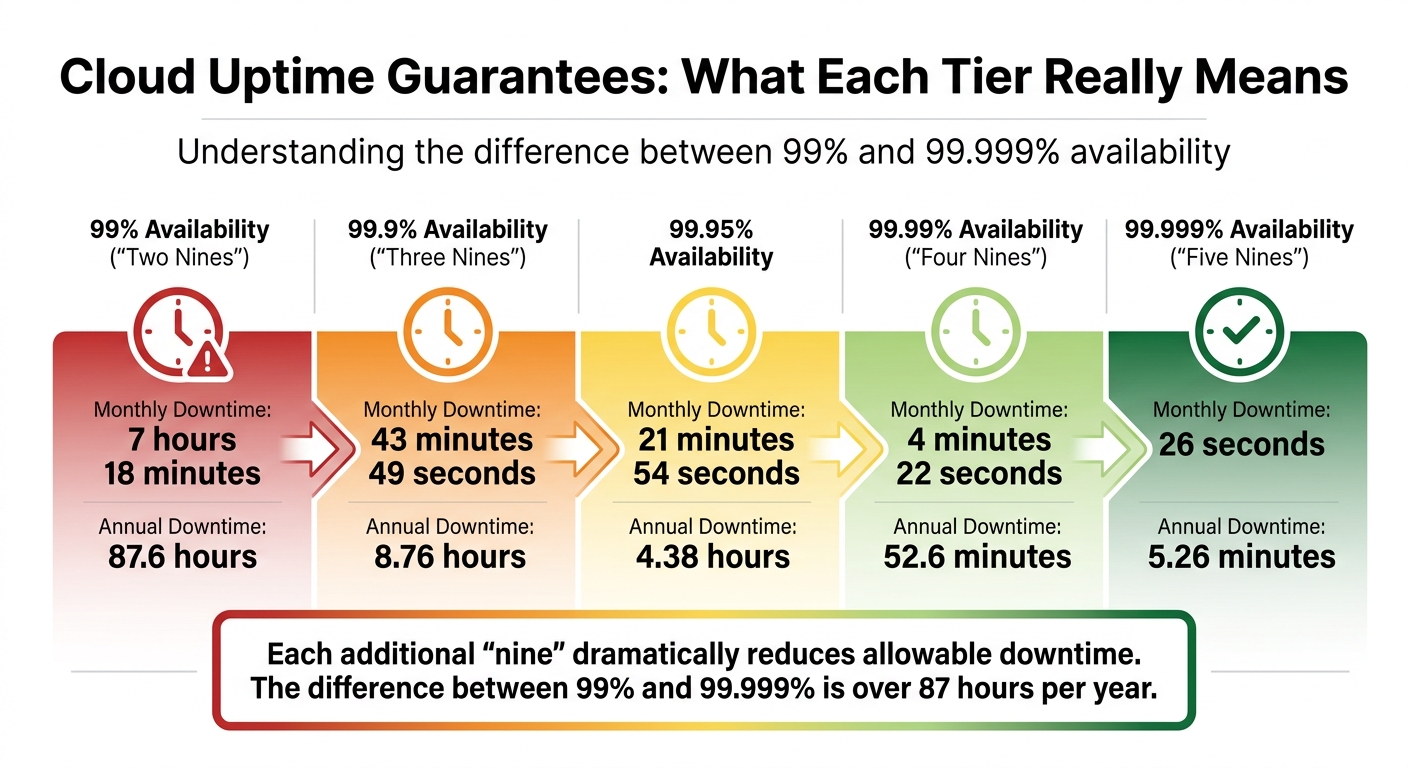 {Cloud Service Uptime Guarantees: Downtime Allowances by Availability Tier}
:::
{Cloud Service Uptime Guarantees: Downtime Allowances by Availability Tier}
:::
Service availability is a big deal - just a few minutes of downtime can disrupt transactions, block customers, and even tarnish your reputation. That’s why uptime guarantees are a cornerstone of any Service Level Agreement (SLA).
What Are the Uptime Guarantees?
Cloud providers usually offer uptime guarantees that range from 99% (two nines
) to 99.999% (five nines
). Each extra nine means a dramatic reduction in allowable downtime.
| Availability Tier | Monthly Downtime Allowance | Annual Downtime Allowance |
|---|---|---|
| 99% | 7 hours 18 minutes | 87.6 hours |
99.9% (Three Nines) |
43 minutes 49 seconds | 8.76 hours |
| 99.95% | 21 minutes 54 seconds | 4.38 hours |
99.99% (Four Nines) |
4 minutes 22 seconds | 52.6 minutes |
99.999% (Five Nines) |
26 seconds | 5.26 minutes |
It’s important to note that these availability figures are usually based on the provider’s internal systems, not necessarily the experience of your users. For example, some providers calculate uptime by looking at the ratio of successful responses to valid requests. But if valid requests
are narrowly defined, this could hide problems that your users are actually facing.
Your SLA eligibility can also depend on how you configure the service. For instance, Google Cloud offers 99.99% uptime for multi-zonal virtual machines (VMs) but only 99.5% for single-zone setups. Some providers might also require you to use specific storage options or implement retry mechanisms to qualify for full SLA coverage.
If your application depends on multiple services, you need to calculate the combined availability. For example, if your app relies on three services with SLAs of 99.95%, 99.95%, and 99.99%, the overall availability drops to about 99.89% [2].
Also, take a close look at how the provider defines downtime and what’s excluded. Scheduled maintenance, emergency fixes, or failures from third-party providers might not count as downtime. To get the full picture, use independent monitoring tools to track uptime from your users’ perspective. Don’t forget: service credits aren’t automatically applied. You’ll need to document outages and file a claim - usually within 30 days.
Next up, let’s dive into what happens when these uptime promises aren’t kept.
What Happens When Availability Standards Fail?
When uptime falls short, the usual remedy is service credits - essentially a percentage of your monthly fee that’s applied to future invoices. These credits are often scaled based on the severity of the downtime. For example:
- If uptime drops between 99.0% and 99.9%, you might get a credit of around 10%.
- If it falls between 95.0% and 99.0%, the credit could increase to about 25%.
- For uptime below 95%, credits might go up to 50% [3].
However, most providers cap these credits at 50% of your monthly fee, no matter how much the downtime costs you. Let’s say your service costs £10,000 per month, and an outage causes £500,000 in lost revenue. Even then, the maximum compensation you’d receive is £5,000. Many contracts include an exclusive remedy
clause, meaning these credits are your only option - you can’t pursue additional damages for lost revenue or data.
Since compensation isn’t automatic, it’s up to you to monitor outages, log timestamps and error codes, and file claims within the 30-day window. As Morten Andersen, Co-Founder of Redress Compliance, points out:
The 30-day notification requirement for SLA claims is the single biggest missed opportunity we see. By the time engineering teams have written up the incident and procurement has been notified, the window has passed.[3]
To protect yourself, negotiate better terms. Ask for longer claim periods - 60 or even 90 days. Push for higher credit caps if the service is critical to your operations. And, for extra peace of mind, include a termination-for-cause clause if uptime falls below 99.0% for two months in a row.
Questions About Support and Incident Response
A dependable SLA isn’t just about uptime guarantees - it’s also about having responsive and accessible support to keep your operations running smoothly. The quality and speed of support can determine whether an issue remains a small inconvenience or escalates into a major disruption. It's crucial to evaluate a vendor's support commitments with the same scrutiny as their uptime guarantees. Here, we’ll explore key support metrics and incident management channels to help you assess your options thoroughly.
What Are the Response and Resolution Times?
Cloud providers typically classify incidents by their severity - Critical, Urgent, High, Low - each with its own response time target. Response time refers to how quickly an engineer begins addressing your ticket after submission, while resolution time is the total time it takes to fix the issue completely [4].
For example, AWS Unified Operations support aims for a response time of under 5 minutes for critical outages [4]. However, this level of service comes with a hefty price tag - starting at £50,000 per month or 10% of your monthly charges [4]. If that’s out of reach, mid-tier options like AWS Business Support+ (from £29 per month or 9% of charges) offer a 30-minute response time for critical issues [4].
It’s worth noting that most major cloud providers, including AWS, don’t guarantee resolution times due to the complexity of troubleshooting [4]. Instead, some providers publish average resolution targets. For instance, DigitalOcean reports average resolution times of 4 hours for its Standard support and 16 hours for its Developer tier [4]. This gives you a better sense of what to expect, even though these are averages, not guarantees.
| Severity Level | Definition | Response Targets |
|---|---|---|
| Critical | Business-critical system down; severe impact | ≤ 5–15 minutes [4] |
| Urgent | Production system down; customers impacted | ≤ 1 hour [4] |
| High | Production system impaired; increased latency | ≤ 4 hours [4] |
| Normal | Non-critical component degraded | ≤ 12 hours [4] |
| Low | General guidance; no production impact | ≤ 24 hours [4] |
As Jess Lulka, Content Marketing Manager at DigitalOcean, puts it:
Response time refers to the duration between when an IT ticket or support request is submitted and when someone begins working on your request.[4]
Before committing to a service, make sure you understand how severity levels are defined. Some providers may require you to provide evidence to justify the severity classification of your issue [1].
What Support Channels Are Available?
The support channels offered by cloud providers often depend on your subscription tier. Basic plans usually restrict you to self-service options like documentation and forums. In contrast, business-tier plans may include email, phone, and live chat support, often with 24/7 availability for critical issues [5]. Premium tiers go even further, offering perks like dedicated Technical Account Managers (TAMs), Slack integrations, and priority escalation paths [5].
For instance, DigitalOcean’s Premium support plan (£999 per month) includes a designated TAM and Slack access with 30-minute response times [5]. Similarly, AWS Enterprise support (starting at £5,000 per month) provides priority access to senior engineers and other high-level benefits [5].
It’s also essential to understand escalation procedures. Who handles unresolved issues? What happens if your TAM isn’t available? Ensure the SLA outlines clear escalation timelines rather than vague commitments like as soon as possible.
Testing these channels during a trial phase can help confirm whether the provider’s promises hold up in practice.
Questions About Data Security, Compliance, and Disaster Recovery
When it comes to cloud data, safeguarding security and ensuring compliance are non-negotiable. A solid Service Level Agreement (SLA) should clearly outline how your data is protected, the regulatory standards the vendor adheres to, and the steps taken if disaster strikes. These factors are crucial for protecting customer data, meeting legal requirements, and ensuring your business runs smoothly - even in challenging situations.
How Is Data Secured and Encrypted?
Data encryption is one of the most critical aspects of security. Ensure your vendor encrypts data both at rest and in transit. For data at rest, AES-256 encryption is the gold standard, providing strong protection even if physical infrastructure is compromised [6]. For data in transit, check that the provider uses TLS 1.2 or higher, which guards against man-in-the-middle attacks [6][7].
Another vital aspect is key management. Ideally, you should have the option to manage encryption keys via a Key Management Service (KMS). This gives you greater control over your data, which is particularly important for UK businesses handling sensitive information [6]. Additionally, ensure the vendor implements Role-Based Access Control (RBAC) and Multi-Factor Authentication (MFA) to restrict access to authorised personnel only [6][7].
Some providers go further by offering data masking and tokenisation, which replace sensitive data with non-sensitive substitutes or tokens. These measures ensure that even if data is intercepted, it remains unusable to unauthorised parties [8]. Always confirm that these security measures are explicitly stated in the SLA.
Finally, check the vendor's certifications to ensure they meet UK regulatory requirements.
What Compliance Certifications Does the Vendor Hold?
Compliance with UK regulations is essential. Start by confirming the vendor adheres to UK GDPR and the Data Protection Act 2018. Beyond these, look for certifications like ISO/IEC 27001:2022, which ensures robust information security management, and SOC 2 Type II reports, which assess the effectiveness of security controls over a longer period.
The Information Commissioner's Office (ICO) highlights the importance of secure data processing:
A key principle of the UK GDPR is that you process personal data securely by means of 'appropriate technical and organisational measures' – this is the 'security principle'.
For industry-specific needs, additional certifications may be required. Healthcare organisations, for instance, should ensure compliance with NHS Digital's Data Security and Protection Toolkit, while financial firms need to meet FCA standards and adhere to the Senior Managers and Certification Regime (SMCR). If your business handles payment card data, PCI DSS certification is essential.
It's also important to verify that these certifications cover all services and data centres relevant to your business. For example, an ISO 27001 certification might apply only to specific services or locations. Ensure the SLA includes provisions for immediate breach notification, a requirement under UK GDPR to notify the ICO within 72 hours of certain breaches. To avoid accidental GDPR violations, confirm that the vendor stores data exclusively in UK-based data centres.
What Are the Backup and Disaster Recovery Plans?
While strong security and compliance measures are vital, having a robust disaster recovery plan is equally important. Unfortunately, many SLAs fall short in this area. For instance, some agreements, like Google Cloud Storage's SLA, may guarantee API availability but exclude responsibility for data integrity or loss [3]. This can leave businesses vulnerable to extended downtime or unrecoverable data loss.
To mitigate these risks, ask about the vendor's Recovery Time Objectives (RTO) and Recovery Point Objectives (RPO). These metrics define how quickly systems can be restored and how much data might be lost during an incident. High-availability configurations can significantly improve these outcomes. For example, Cloud SQL offers a 99.95% SLA for high-availability setups, whereas non-HA configurations drop to 99.9%, potentially adding over four hours of downtime annually [3].
Geographic redundancy is another critical consideration. Ensure backups are distributed across multiple UK or EEA locations to comply with UK GDPR and protect against regional disruptions. Before committing, test the vendor's disaster recovery procedures to identify any weaknesses. Some businesses also negotiate termination-for-cause clauses, allowing them to exit the contract if the vendor fails to meet agreed recovery standards, such as maintaining 99.0% uptime over a specified period [3].
Questions About Costs, Scalability, and Termination
When it comes to cloud SLAs, understanding the financial aspects is just as crucial as grasping the technical details. A poorly designed pricing structure or rigid termination terms can leave your business stuck with rising costs or make switching providers a logistical nightmare. Before you commit, take a close look at how costs are calculated, how scalability is handled, and what happens when the agreement comes to an end.
How Are Costs and Scalability Managed?
Cloud pricing models vary widely - whether it's pay-as-you-go, reserved instances, savings plans, or spot instances. Watch out for hidden charges, such as fees for data transfer, storage operations, or premium support. It's also wise to specify GBP pricing to avoid surprises from fluctuating exchange rates.
Hidden expenses like data egress, API calls, and idle resources (often called zombie
resources) can inflate costs without you noticing. To keep expenses in check, conduct regular audits, implement a consistent tagging strategy, and negotiate rate caps (typically limiting annual increases to 3–5%).
Scalability is another key factor. Your SLA should allow adjustments to minimum usage commitments, ideally on a quarterly basis with 30 days' notice. Horizontal scaling (adding more instances) generally results in linear cost increases but may bring additional networking or load balancer fees. On the other hand, vertical scaling (upgrading the capacity of existing resources) can lead to steeper cost increases as performance limits are reached. Negotiate access to additional resources at pre-agreed rates and include provisions to redistribute spending across services without losing volume discounts.
Demand itemised billing that breaks down costs for core services, data transfers, and API usage. This transparency helps you pinpoint hidden cost drivers. Quarterly usage audits can also identify zombie
resources - those that sit idle for over two weeks - so you can adjust scaling policies accordingly. Finally, a consistent tagging system will help track costs by project, team, or department, giving you better control over scaling expenses.
While cost control and scalability are vital, it's just as important to understand the terms for ending your SLA.
What Happens When the SLA Ends?
Termination terms in your SLA are critical to avoid vendor lock-in and ensure a smooth transition. Look for provisions that include a 30–60 day notice period and a 30–90 day transition phase where the vendor supports your migration. Make sure the agreement specifies that data will be returned in standard formats and that certified data deletion will be provided, along with compliance evidence to meet UK GDPR standards. A termination-for-cause clause is also essential to protect your business from repeated performance failures.
Your SLA should clearly distinguish between an outage
and scheduled maintenance
to prevent vendors from disguising downtime that could trigger termination rights. Additionally, request full system configurations and customisation records as part of the exit process. Ensure the vendor provides complete documentation to avoid the costly and time-consuming task of reverse-engineering your infrastructure.
For businesses looking to ensure their cloud SLAs are both flexible and cost-effective, professional advice - such as that offered by Hokstad Consulting - can be invaluable.
Questions About Monitoring, Reporting, and Performance Metrics
Keeping track of performance is key to holding your vendor accountable. Without proper monitoring, it's impossible to confirm if SLA promises are being met. Effective monitoring ensures SLA guarantees aren't just theoretical but measurable in real time. Before you commit to a vendor, make sure you know what monitoring tools you'll have access to and how performance will be tracked and reported.
What Monitoring and Reporting Tools Are Provided?
Most cloud providers offer tools like observability APIs and web interfaces to provide access to real-time metrics and logs. For example, Google Cloud offers the Cloud Logging API and Cloud Monitoring API [9]. Additionally, platforms like New Relic SLM let you define Service Level Indicators (SLIs) and Service Level Objectives (SLOs). These tools help track metrics like error budgets and burn rates. A New Relic feature, for instance, can alert you when a service uses 2% of its SLO error budget in just one hour, a situation known as a fast burn rate
[10].
It's worth noting that while technical monitoring happens in real time, SLA compliance is usually evaluated retrospectively over the billing period [1]. Providers typically issue compliance reports monthly, aggregating data over the entire period. This means a brief outage might not qualify for a service credit if the overall uptime percentage for the month remains high [1][3]. Moreover, most providers won't notify you if SLA violations occur - you'll need to spot issues yourself and file claims [1][3].
If real-time updates are important for your team, ask if the vendor's tools support webhooks for instant alerts in platforms like Slack or Teams [12]. For larger accounts, you might also negotiate for the vendor's account team to send monthly SLA performance reports directly, rather than relying solely on self-service dashboards [3].
After identifying the monitoring tools, it’s crucial to understand how the performance data will be interpreted.
How Are Performance Metrics Defined?
The way performance is measured can significantly impact whether an outage counts against your SLA. For instance, time-based measurement evaluates if a service was up
during specific intervals, while request-based measurement focuses on the ratio of successful responses to total valid requests [1]. Each method can paint a different picture of an outage's impact, so it's important to clarify this before signing.
Key metrics to define include latency, throughput, and error rates. For SLAs with high uptime guarantees (e.g., 99.95% or above), monitoring intervals as short as 30 seconds are necessary for accurate reporting [11]. It's also essential to specify thresholds - does an issue need to last five continuous minutes to count as a failure, or will a single timeout suffice? [1]
Be aware of limitations in SLA remedies. Most agreements include an exclusive remedy
clause, meaning service credits are the only compensation for failures. For example, Google Cloud's SLA specifies that if uptime drops below 95.0% in a month, the maximum credit you can receive is 50% of the affected service's monthly bill [9]. Understanding these metrics and restrictions ensures you're better prepared to manage performance issues when they arise.
Conclusion
A cloud SLA should clearly outline key elements like uptime guarantees, response times, security protocols, compliance requirements, cost structures, and performance metrics. These specifics are essential to safeguard your business, especially if your internal cloud expertise is limited.
If your organisation lacks in-house cloud specialists, seeking expert advice can make a significant difference. Ensure your SLA terms align with your operational needs and risk tolerance. Ask about monitoring tools, escalation procedures, and termination clauses. Confirm whether metrics are based on time or requests and establish what constitutes an SLA breach. These details are critical in determining whether your agreement genuinely protects your business or leaves you vulnerable during outages.
Hokstad Consulting specialises in cloud cost engineering and DevOps services, helping businesses streamline their cloud infrastructure while cutting expenses by 30–50%. Their team can analyse your SLA, pinpoint cost inefficiencies, and design cloud solutions tailored to your needs - whether you're using public, private, hybrid, or managed hosting environments. With their expertise, you can ensure your SLA provides the protection your operations require.
Instead of accepting standard SLA terms without question, consider working with professionals who can negotiate on your behalf. By asking the right questions and relying on expert guidance, you can avoid unexpected costs and maintain operational stability.
Take a closer look at your SLA now to prevent future challenges and unnecessary expenses.
FAQs
How do I calculate my app’s combined SLA across multiple cloud services?
To figure out your app's combined SLA, you need to assess how its services are linked: serial (dependent) or parallel (redundant).
For serial systems, simply multiply the SLA percentages of each service involved. For instance, if two services each have an SLA of 99.9%, the combined SLA is calculated as 99.9% × 99.9%, resulting in 99.8%.
For parallel systems, the calculation is a bit trickier. It involves working out the probability of all components failing simultaneously, which requires a more detailed probability formula.
This approach ensures the combined SLA is a true reflection of your app's specific setup.
What evidence do I need to claim SLA credits (and by when)?
To request SLA credits, you need to file a support request within the allowed time frame - usually 90 days for Azure or 120 days for Microsoft services. Make sure your claim is submitted before the deadline, as late submissions won't be accepted. Always refer to your specific SLA agreement for the precise terms and deadlines.
How can I reduce vendor lock-in before signing the SLA?
If you're looking to minimise vendor lock-in, it's all about planning for flexibility and portability from the start. Here are some essential strategies to help you maintain control over your cloud environment:
Negotiate clear exit clauses: Make sure your contract includes detailed termination terms. This should cover how data will be returned and in what format, as well as any certifications for data deletion.
Secure data ownership and export rights: Confirm that you retain full ownership of your data. Ensure the agreement outlines your right to export data and specifies how it will be handled when you part ways.
Steer clear of long-term lock-ins: Opt for flexible renewal terms rather than being tied into lengthy agreements. This gives you more options if your needs or the market change.
Evaluate technical portability: Check whether the provider supports open standards and ensure their platform is compatible with widely used systems. This makes it easier to move your data or applications elsewhere if needed.
By taking these steps, you can reduce risks and keep your options open, giving you greater control over your cloud strategy.