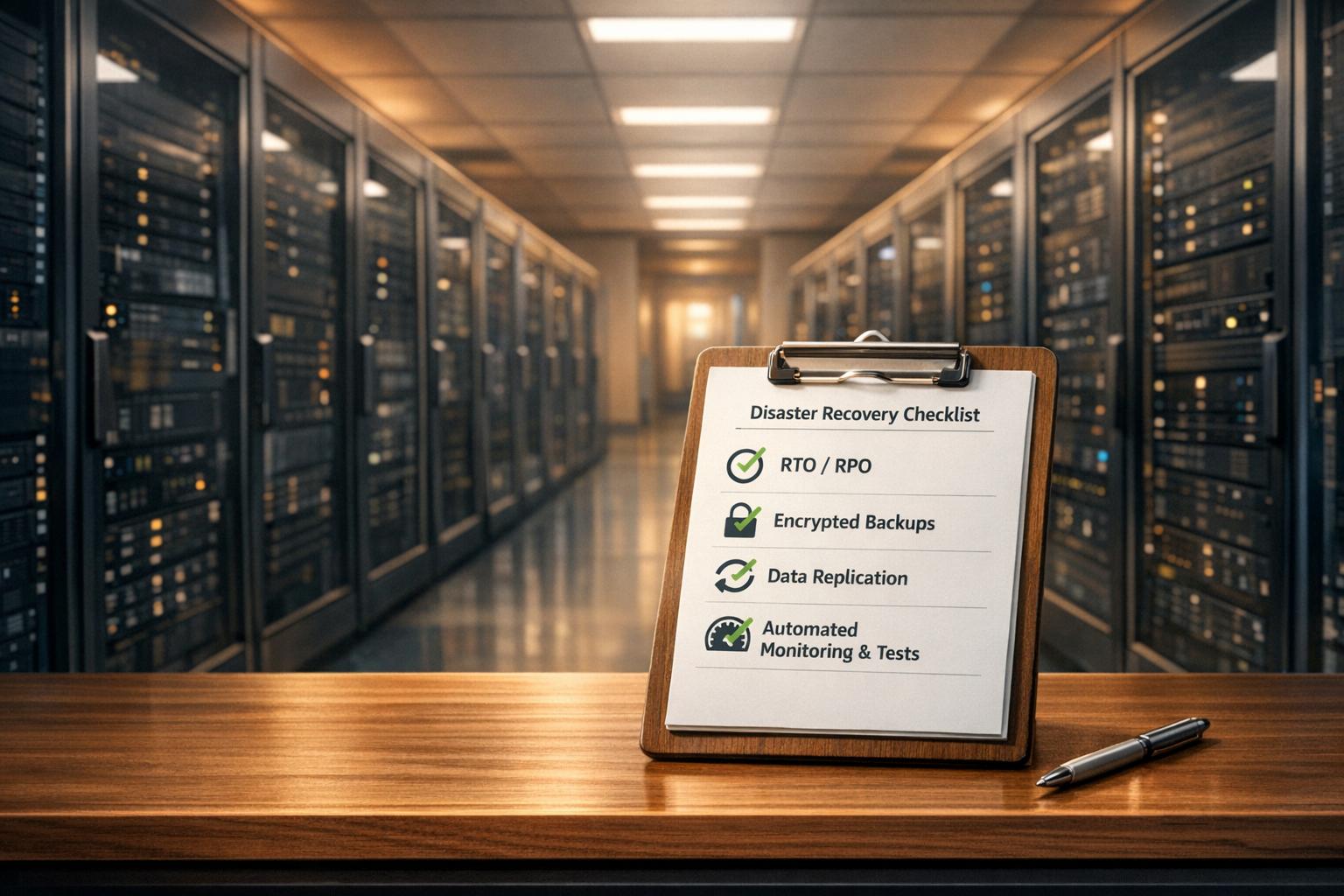
When it comes to disaster recovery, publicly traded companies must meet Sarbanes-Oxley (SOX) compliance standards to ensure financial data remains secure, accurate, and accessible. Failing to comply can result in severe penalties, including fines of up to £4 million. The key requirements focus on internal controls, data recovery objectives, and testing protocols. Here's what you need to know:
- Key Metrics: Define Recovery Time Objective (RTO) and Recovery Point Objective (RPO) to minimise downtime and data loss.
- Documentation: Maintain detailed recovery plans, including roles, procedures, and approval processes.
- Backups: Use the 3-2-1 backup rule and ensure encryption for data in transit and at rest.
- Testing: Conduct regular drills to validate recovery processes and compliance.
- Automation: Implement tools for monitoring, replication, and recovery to meet SOX standards efficiently.
- Integration: Align recovery plans with access controls, change management, and hardware redundancy to ensure audit readiness.
A well-structured disaster recovery plan not only satisfies SOX compliance but also safeguards your business against financial and operational risks. Regular updates and testing ensure your systems are prepared for disruptions while maintaining the integrity of financial reporting.
::: @figure 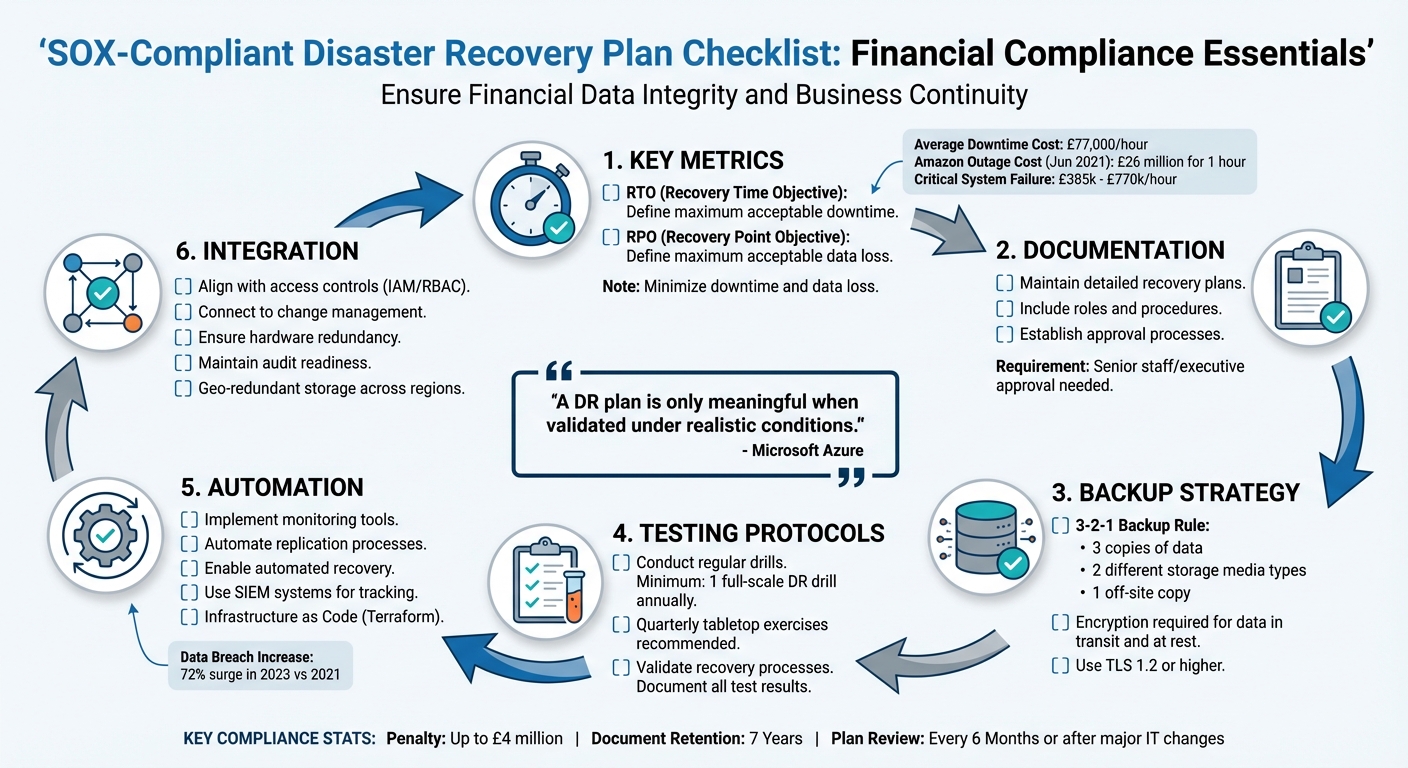 {SOX-Compliant Disaster Recovery Plan Implementation Checklist}
:::
{SOX-Compliant Disaster Recovery Plan Implementation Checklist}
:::
Data Backup & Recovery Controls Explained | IT Audit & SOX Control Testing | Big 4 Guide
SOX-Compliant Disaster Recovery Plan Checklist
Creating a disaster recovery plan that complies with SOX regulations involves documenting your IT infrastructure and establishing formal recovery procedures in line with SOX requirements [6]. Below, we’ll break down the essential components to help ensure financial data remains accurate, accessible, and secure during disruptions.
Define and Document RTOs and RPOs
Start with a Business Impact Analysis (BIA) to assess how interruptions could disrupt critical financial operations [18, 20]. This process helps calculate potential losses, such as idle worker wages, lost revenue, or regulatory penalties [3]. For context, a one-hour outage at Amazon in June 2021 led to an estimated loss of around £26 million [3].
Classify systems based on their recovery speed and acceptable data loss, aligning recovery budgets with their importance to the business [12, 19]. Don’t forget to account for dependencies - if a key financial system relies on another application, both systems must have compatible recovery objectives to ensure smooth restoration [18, 10].
SOX compliance also requires formally documenting RTO (Recovery Time Objective) and RPO (Recovery Point Objective) targets, recovery steps, and assigned roles. These documents should be approved by senior staff or executive sponsors [18, 9, 21]. Clearly defining these metrics in measurable terms - like seconds, minutes, or hours - ensures they’re audit-ready [19, 20].
Once these metrics are established, they pave the way for detailed recovery procedures.
Create Detailed Recovery Playbooks
Develop comprehensive recovery playbooks tailored to your IT environment. These step-by-step guides should include activation criteria, such as specific thresholds like system failures or ransomware detection, that trigger the disaster recovery plan [18, 19]. Keep these playbooks secure, with offline copies available to ensure accessibility during outages [12, 19].
Update the playbooks regularly, especially after system changes, tests, or incidents. Treat the failback process as a separate, validated step to ensure a smooth return to normal operations [12, 19].
Set Up Automated Backups and Replication
To meet SOX requirements, establish a reliable backup strategy. A good rule of thumb is the 3-2-1 backup method: maintain three copies of your data on two different types of storage media, with at least one copy stored off-site [7]. For high-priority financial data, use synchronous replication across availability zones to avoid data loss. For lower-priority data, asynchronous replication across regions can help reduce latency [4].
Leverage cloud-native tools like AWS Elastic Disaster Recovery or Azure Site Recovery to automate recovery processes [9, 12]. Automate monitoring for backup status, replication health, and latency to quickly identify issues that could compromise financial reporting [18, 19]. Using declarative and idempotent scripts for recovery ensures consistency and reliability during emergencies [4].
Encrypt Backups and Data in Transit and at Rest
Ensure all financial data is encrypted both in transit and at rest using TLS 1.2 or higher. Perform automated integrity checks after restoration to confirm data accuracy [12, 19]. Disaster recovery assets, such as credentials, certificates, and scripts, should also be securely replicated across regions [4].
Additionally, replicate IAM (Identity and Access Management) and RBAC (Role-Based Access Control) configurations to maintain consistent security across systems [12, 19].
With these security measures in place, regular testing becomes the next critical step.
Establish Testing Protocols
Routine testing is essential to validate compliance and identify weaknesses before a disaster strikes. SOX compliance requires periodic testing of network and file integrity, as well as regular restoration tests to ensure backup procedures function as intended [14, 16]. Conduct at least one full-scale disaster recovery drill annually, and supplement it with quarterly tabletop exercises or game days
to evaluate team performance under pressure [12, 18].
A DR plan is only meaningful when validated under realistic conditions.- Microsoft Azure [4]
Testing not only confirms that recovery procedures align with documented RTOs and RPOs but also provides evidence for auditors. Be sure to document all test results and any corrective actions to demonstrate your compliance efforts [15, 16].
Aligning Disaster Recovery with Other SOX Controls
Integrating disaster recovery with SOX compliance is essential. Under Sections 302 and 404, CEOs and CFOs are required to certify internal controls, making it crucial to document and track every change to maintain audit integrity [10][1][9]. Below are actionable steps to align recovery operations with access, communication, and hardware controls.
Establish Communication and Crisis Protocols
Create clear communication protocols to guide decision-making and ensure information flows smoothly during crises [4][12]. Set up war rooms
and predefined escalation paths to provide real-time updates on recovery efforts and financial impacts to finance teams, senior leaders, and auditors [4][12]. This transparency not only ensures accountability but also helps fulfil regulatory obligations even in challenging times.
Connect Recovery Plans to Access and Change Controls
Ensure your disaster recovery (DR) operations mirror production IAM (Identity and Access Management) and RBAC (Role-Based Access Control) settings. This approach segregates DR backup management from data restoration tasks, reducing the risk of fraud during emergencies [5][9]. Log all access to recovery systems and document any emergency changes through standard change management processes once the crisis is resolved [1][2][9].
Change Management: Documenting and controlling any changes made to financial systems, ensuring that updates do not compromise data accuracy or security.- Andrew Dennis, Senior Content/Growth Manager, Lumos [9]
Maintain Data Availability and Hardware Redundancy
Beyond access and change controls, ensure continuous data availability by strengthening hardware redundancy. SOX mandates uninterrupted access to financial data for reporting and audits. To achieve this, implement geo-redundant storage across multiple regions to protect against large-scale disasters while ensuring long-term data availability [11]. Zone redundancy helps mitigate data centre outages, while local redundancy addresses hardware issues with minimal latency [11]. Tools like Terraform can be employed to maintain consistent configurations across redundant resources, reducing the risk of configuration drift that could lead to audit issues [11]. Additionally, systems should be capable of generating on-demand reports to demonstrate continuous financial data availability to auditors.
Need help optimizing your cloud costs?
Get expert advice on how to reduce your cloud expenses without sacrificing performance.
Monitoring, Automation, and Continuous Improvement
Maintaining SOX compliance in disaster recovery requires a shift from manual checks to automated, continuous oversight. While traditional manual testing often happens just once a year, automation enables far more frequent validation, sometimes even in real time [13]. This approach not only ensures compliance but also catches potential issues early, preventing them from becoming costly audit findings. Automated processes also align seamlessly with broader disaster recovery strategies.
Automate Monitoring and Alerting
Using automation tools can significantly enhance real-time monitoring and alerting capabilities. For instance, SIEM systems can track replication lag, backup success rates, and resource health on an ongoing basis [13]. Azure Monitor can provide real-time metrics and alerts, while orchestration platforms like Logic Apps can distribute notifications across Teams, Slack, or ITSM systems [13]. Continuous Control Monitoring (CCM) tools add another layer by keeping an eye on financial transactions, identifying potential violations, and assessing the associated risks [14].
Automated disaster recovery also delivers big improvements to your recovery time objectives (RTOs). Manual failover processes that take hours can be compressed to minutes when the right automation is in place- Synextra [13]
Infrastructure as Code (IaC) tools, such as Terraform, play a critical role in ensuring your disaster recovery environment remains consistent. By automating the recreation of environments, they eliminate configuration drift, which could otherwise lead to compliance issues [13]. Automation doesn’t stop there - post-failover validation can also be automated to confirm services are functioning and data is accessible before declaring recovery complete. Plus, every automated action during a failover generates a detailed audit trail, an essential requirement for external compliance audits [13].
While automation is key, it should be paired with regular audits to maintain long-term compliance.
Conduct Regular Audits and Policy Enforcement
Disaster recovery plans should be revisited and updated at least every six months or after any major IT changes [4][12]. SOX compliance testing generally follows a structured process involving four stages: an initial assessment, mid-year interim testing, year-end testing, and final validation by independent external auditors [14]. After every disaster recovery drill or real incident, it’s crucial to conduct a lessons-learned review. Key areas to audit include rotation schedules, patch management, and adherence to recovery policies [4][8]. Regular reviews like these ensure that compliance remains intact and that your disaster recovery strategy evolves with changing needs.
How Hokstad Consulting Supports SOX Compliance in Disaster Recovery

Hokstad Consulting brings its expertise in DevOps transformation, cloud cost management, and managed hosting to craft disaster recovery plans that align with SOX requirements. By relying on automation, they ensure backups stick to predetermined schedules and retention policies, reducing the risk of non-compliance [7]. Using tools like Terraform for Infrastructure as Code, they tackle configuration drift - a common issue where disaster recovery setups don't match production environments [13]. These efforts create a solid foundation for reliable and compliant recovery operations.
Their hybrid cloud and multi-region infrastructure provide the hardware redundancy SOX demands. This setup allows for seamless failover between data centres, cutting down on downtime costs, which can average £77,000 per hour. For critical system failures, these costs can soar to between £385,000 and £770,000 per hour [15].
To meet SOX Section 404 requirements, Hokstad Consulting employs automated monitoring and event logging to maintain detailed audit trails. These logs track data access and changes, offering clear evidence for external audits [2]. Additionally, their DevOps processes ensure that every system change, including those made during disaster recovery, is documented, authorised, and retained for the mandated seven years [16].
By embracing cloud migration and zero-downtime capabilities, Hokstad Consulting transforms disaster recovery testing. Instead of relying on annual manual tests, they implement continuous automated validation. At the same time, they enforce least-privilege access controls during incidents, ensuring security remains intact [16]. This approach is increasingly important as data breaches have surged by 72% in 2023 compared to 2021 [16], highlighting the need for security-focused recovery plans.
Hokstad Consulting offers flexible engagement models, including consulting services, retainer support, and a no savings, no fee
option, making SOX-compliant disaster recovery accessible for businesses of all sizes. Whether it’s conducting cloud cost audits, setting up automated failover systems, or providing ongoing infrastructure monitoring, their comprehensive approach strengthens every component of a SOX-compliant disaster recovery strategy.
Conclusion
A SOX-compliant disaster recovery plan does more than tick regulatory boxes - it ensures your financial systems can endure disruptions while safeguarding data integrity. As Tommie W. Singleton, Ph.D., from ISACA, points out: The principles of backup and recovery suggest that the most important step is to provide a full test of the BCP/DRP at some regular interval to ensure that it actually works
[18]. Without clear procedures and consistent testing, auditors might question the effectiveness of your controls.
The consequences of system failures highlight the importance of preparation. Setting clear RTOs (Recovery Time Objectives) and RPOs (Recovery Point Objectives), encrypting sensitive data, and implementing automated monitoring are key steps to staying compliant and maintaining financial stability. Testing plays a crucial role in this process - it reveals whether your recovery plans are practical or just theoretical. Many organisations uncover unexpected issues during drills, such as backups that seem fine but fail when recovery is attempted [17][4].
Seeking expert advice can make this process far more manageable. Professionals can help align technical recovery measures with broader operational needs, ensuring no critical aspect is overlooked [15]. With the right guidance, disaster recovery evolves from being a regulatory requirement to becoming a strategic advantage.
Think of your disaster recovery plan as a living document that grows with your organisation. Review it every six months or after any major changes [4]. Regular updates not only keep you prepared for audits but also strengthen your resilience in financial reporting and business continuity. This proactive approach turns compliance into a foundation for long-term stability.
FAQs
What are the essential metrics for ensuring SOX compliance in disaster recovery plans?
To align disaster recovery plans with SOX compliance, it's essential to zero in on a few critical metrics like maintaining up-to-date data backups, establishing redundant safeguards, and setting clear recovery goals. These goals typically include:
- Recovery Time Objectives (RTO): The longest acceptable period to restore operations after a disruption.
- Recovery Point Objectives (RPO): The maximum allowable duration of data loss resulting from an incident.
Focusing on these metrics helps organisations reduce downtime, limit data loss, and stay compliant with SOX requirements.
How does automation improve a SOX-compliant disaster recovery plan?
Automation plays a key role in making a disaster recovery (DR) plan that complies with SOX regulations more efficient and dependable. By automating responses to system failures, organisations can achieve faster recovery times while reducing the likelihood of human errors. Automated systems can swiftly execute pre-set recovery actions, like switching to backup systems or alternative data centres, ensuring minimal downtime and meeting recovery time objectives (RTO). This speed and precision are especially valuable during high-stress situations, where manual actions might lead to delays or mistakes.
Automation also enables continuous testing and validation of recovery procedures, ensuring they remain effective and align with SOX compliance standards. Regular automated tests can uncover and address potential vulnerabilities before they escalate into actual disasters. Moreover, by maintaining consistent and repeatable recovery processes, automation helps organisations meet SOX’s stringent documentation and control requirements. This not only enhances the reliability of disaster recovery plans but also ensures they are well-prepared to handle unexpected challenges.
Why is regular testing important for ensuring SOX compliance in disaster recovery plans?
Regular testing plays a key role in maintaining SOX compliance within disaster recovery plans. It ensures your organisation is equipped to handle unexpected disruptions effectively. By testing, you can confirm the reliability of your recovery strategies, uncover any vulnerabilities, and prepare your team to tackle real-life challenges confidently.
On top of that, regular testing serves as proof of compliance with regulatory standards. It provides auditors with clear evidence that your organisation has strong measures to protect vital systems and data. This not only keeps you compliant but also strengthens your business's ability to bounce back from disruptions.