
Managing multi-cloud environments is complex but necessary for UK organisations balancing security, compliance, and costs. A cloud-native governance framework automates policies, enforces controls, and integrates guardrails into workflows, ensuring consistency across platforms like AWS and Azure.
Here’s a quick breakdown of the steps:
- Set Governance Principles: Define rules for identity, data security, compliance, cost, and operations. Assign clear roles and responsibilities using tools like RACI matrices.
- Assess Your Current Setup: Inventory all cloud resources, identify risks, and baseline costs. Use tools like AWS Config and Azure Resource Graph to find inefficiencies.
- Design Governance Architecture: Build secure landing zones, implement policy as code, and align rules with native tools like Azure Policy and AWS Config.
- Integrate into DevOps Workflows: Automate checks in CI/CD pipelines with tools like Checkov, standardise modules, and enforce cost-aware practices.
- Monitor and Improve: Use continuous monitoring tools, track key metrics, and update policies regularly to meet evolving needs.
::: @figure 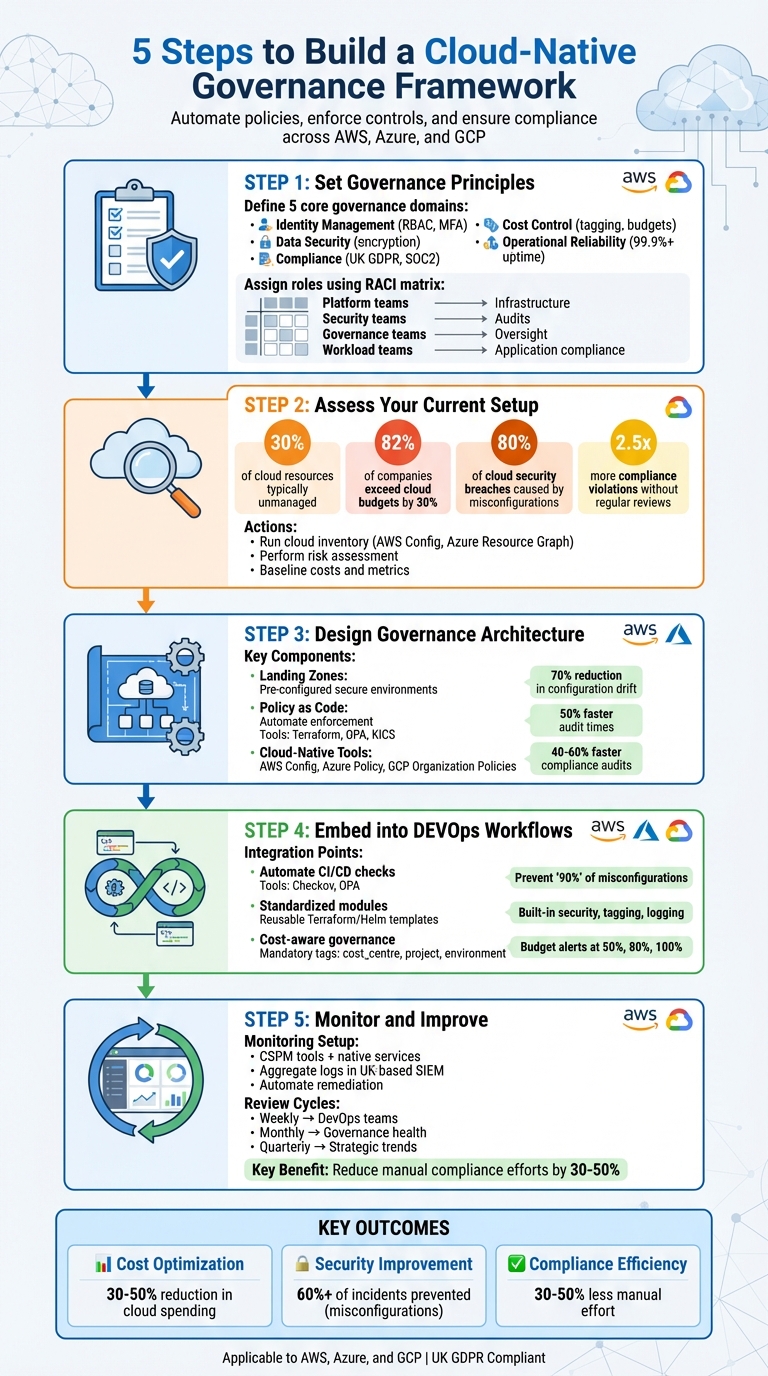 {5 Steps to Build a Cloud-Native Governance Framework}
:::
{5 Steps to Build a Cloud-Native Governance Framework}
:::
How to implement shared responsibility in cloud platforms: Governance at scale - Dharani Vijayakumar
Step 1: Set Your Governance Principles
Start by establishing core governance principles that align with your regulatory requirements, risk tolerance, and business objectives. These principles should translate into actionable rules that guide your organisation's operations. Bring together key teams - IT, security, finance, and compliance - to ensure every angle is considered right from the start. Once these principles are in place, organise your policies by defining specific governance domains.
Identify Governance Domains
To maintain comprehensive oversight, focus on five key governance domains:
- Identity management: Control who has access to your resources using role-based access control (RBAC), multi-factor authentication (MFA), and least-privilege principles.
- Data security: Enforce encryption for data at rest and in transit, alongside robust data classification standards.
- Compliance: Stay aligned with regulations like UK GDPR or SOC2 by conducting continuous scans and audits.
- Cost control: Use tagging for cost centres, set spending limits, and enable budget alerts - essential for UK organisations managing costs in GBP.
- Operational reliability: Define service level agreements (SLAs) for uptime (typically above 99.9%) and set clear performance metrics.
For example, a financial services firm might set a monthly cost review threshold of £50,000 per subscription to balance budget control with operational flexibility.
Define Roles and Responsibilities
Clear roles and responsibilities are crucial to avoid confusion and ensure policies are effectively implemented and enforced. Use a RACI matrix to assign accountability:
- Platform teams: Manage infrastructure provisioning and enforce policy inheritance.
- Security teams: Define control objectives, carry out audits, and ensure compliance checks.
- Cloud governance teams: Provide oversight but do not directly enforce policies.
- Workload teams: Ensure application-specific compliance within the boundaries set by platform policies.
An inheritance model works well here, allowing higher-level policies to cascade automatically to all subscriptions, which reduces manual effort. For instance, platform teams can implement technical controls, while security teams remain responsible for conducting quarterly risk scans using tools like AWS Config. Once roles are assigned, formalise them through detailed policy categories.
Set Policy Categories
Convert governance domains into enforceable rules by documenting policy categories. These categories might include:
- Identity requirements: Enforce least-privilege access, require MFA for privileged accounts, and specify approved authentication methods.
- Data protection standards: Define encryption protocols, data residency rules (vital for UK GDPR compliance), and retention periods.
- Operational benchmarks: Establish tagging conventions, approved service catalogues, naming conventions, and uptime targets.
For instance, a policy might state: All production workloads must tag resources with cost-centre, environment, and owner fields at provisioning time.
This approach ensures accurate cost allocation and accountability across your cloud environment.
Store these policies in a central repository for easy access, and review them quarterly or whenever regulations change. Companies like Hokstad Consulting, which specialise in DevOps transformation and cloud cost management, often assist UK organisations in creating these frameworks. They also help automate enforcement across platforms like AWS and Azure, ensuring consistency and compliance.
Step 2: Assess Your Current Multi-Cloud Environment
To manage your multi-cloud environment effectively, you need a clear and thorough inventory. This process uncovers hidden resources (often referred to as shadow IT), security weaknesses, and unnecessary costs that may be flying under the radar. Studies show that during initial scans, organisations typically find up to 30% of their cloud resources are unmanaged. Additionally, 82% of companies report exceeding their cloud budgets by an average of 30% [2][3]. Once your governance principles are in place, it’s time to evaluate your current setup and identify inefficiencies and gaps.
Run a Cloud Inventory and Discovery
Begin by listing all cloud accounts and resources across platforms like AWS, Azure, GCP, and any private cloud solutions you use. Leverage built-in tools such as AWS Config, Azure Resource Graph, and GCP Cloud Asset Inventory to identify active resources, their configurations, tags, and ownership [3][6]. Export this information into a central configuration management database (CMDB) or asset registry, formatted with a standardised schema. This schema should include details like environment type (production or non-production), cost centres, and data locations [2][7].
To uncover shadow IT, compare the data from your cloud providers with financial records. Techniques like scanning public DNS records, SSL certificates, and IP ranges linked to your organisation can reveal externally accessible workloads that central IT may not be aware of [3]. Consolidate all findings to ensure your policies are applied consistently across the board.
Perform a Risk and Compliance Assessment
Check for misconfigurations, overly permissive access, exposed endpoints, and unencrypted data. Misconfigurations alone account for 80% of cloud security breaches, making this a critical step [3]. Use tools like KICS or Open Policy Agent to analyse your Infrastructure as Code for compliance issues. Map any risks you find to established control frameworks [1][3].
If you’re operating in the UK, ensure compliance with UK GDPR, the Data Protection Act 2018, and relevant EU regulations when handling EU residents' data. Pay particular attention to data residency rules, mechanisms for data transfer (such as Standard Contractual Clauses), and logging of processing activities [7]. Research shows that multi-cloud setups face 2.5 times more compliance violations without regular reviews, so prioritise your findings based on their potential business impact and likelihood [6]. For organisations in regulated industries - like financial services under FCA and PRA guidelines or healthcare under NHS and DSPT standards - make sure all sector-specific requirements are met across your cloud providers [7]. Once risks are identified, you can move on to benchmarking your costs and operational performance.
Baseline Costs and Operational Metrics
Set clear baselines for your monthly cloud expenses, broken down by provider, account, and major applications or business units. Consolidate this cost data in a centralised data warehouse, using standardised exchange rates when needed. To go beyond gross expenditure, track unit economics such as cost per transaction, per user, or per environment. Also, measure unallocated spending by checking the coverage of mandatory tagging (e.g., tagging resources with owner, cost centre, and environment) [2][7].
Operational metrics are just as important as financial ones. Establish baselines for indicators like deployment frequency (how often applications are deployed to production each week), lead time for changes (time from code commit to production), and change failure rate (percentage of changes that result in incidents) [3]. For system reliability, monitor metrics like mean time to detect (MTTD) and mean time to resolve (MTTR) incidents, as well as the number of Sev1/Sev2 incidents each month [3][4]. These figures will help you evaluate whether your governance efforts are improving both stability and delivery speed over time.
Step 3: Design Your Cloud-Native Governance Architecture
Now that your assessment is complete, it’s time to design an architecture that integrates governance directly into your multi-cloud setup. This involves creating foundational elements like landing zones, automating enforcement with policy as code, and aligning your governance rules with cloud-native tools across AWS, Azure, and GCP. These steps ensure policy automation and governance tools are seamlessly embedded into your infrastructure.
Define Your Multi-Cloud Architecture
Start by setting up landing zones - pre-configured, secure environments tailored to your needs. For instance, Azure landing zones use hierarchical management groups to enforce policy inheritance. This means rules applied at the top level automatically cascade down to subscriptions and resource groups. By doing so, configuration drift is significantly reduced. In fact, enterprises using Azure landing zones have seen a 70% drop in drift by leveraging hierarchical policy inheritance and Infrastructure as Code templates [6].
Centralised identity management is another cornerstone of your architecture. Tools like Azure Entra ID or AWS IAM Identity Center provide unified access control, enforcing RBAC (Role-Based Access Control) and MFA (Multi-Factor Authentication) to safeguard against unauthorised access [2]. For consistent auditing, use logging tools such as AWS CloudTrail, Azure Monitor, or Google Cloud Logging to aggregate data across your entire environment [1][3]. This layered approach ensures governance is embedded across infrastructure, platform, and application layers [2].
Implement Policy as Code
Once your architecture is in place, automating policy enforcement is the next step. Policy as code turns governance rules into declarative formats that can be versioned, tested, and automated. For example, Terraform modules can include compliance checks like enforcing encryption defaults, reducing the risk of misconfigurations before they reach production. Tools like Open Policy Agent (OPA) take this further by using the Rego language to create custom policies that scan Infrastructure as Code during CI/CD pipelines, catching violations early [1][6]. A financial services firm using Terraform modules with OPA across AWS and Azure managed to cut audit times by 50% by automating HIPAA-compliant encryption checks [1].
Store these policies in Git to enable tracking, peer reviews, and rollbacks. Scanners like KICS and OPA can be integrated into CI/CD pipelines using platforms like GitHub Actions. These tools validate tagging, naming conventions, and resource constraints by analysing Terraform Plan outputs [1][6]. Terraform Plan acts as a safety net, identifying compliance issues before deployment [1]. This approach ensures consistency across cloud providers and prevents problems from escalating into production [1][4].
Map Policies to Cloud-Native Tools
To enforce governance effectively across multiple clouds, leverage native tools like AWS Config, Azure Policy, and Google Cloud’s Organization Policies. AWS Config, for example, continuously monitors resource configurations, comparing them against predefined rules for tagging and encryption. It even offers automated remediation. Organisations using AWS Config have reported 40–60% faster compliance audits thanks to continuous monitoring and automation, which also reduces manual effort [1][3].
Similarly, Azure Policy applies governance at the management group level, enforcing standards such as RBAC and cost quotas across subscriptions through inheritance [6]. On Google Cloud, Organization Policies can restrict services (e.g., blocking public IP addresses) and integrate with tools like Forseti for audits [3].
To ensure policies are effective, align them with specific governance domains: use least-privilege IAM configurations for security, enforce tagging for cost management, and implement approval workflows for compliance [2][3]. Industry benchmarks show that OPA-integrated pipelines can prevent up to 90% of misconfigurations before deployment [1]. Regularly reviewing and updating your policies ensures they stay aligned with changing regulations and business priorities [2].
Need help optimizing your cloud costs?
Get expert advice on how to reduce your cloud expenses without sacrificing performance.
Step 4: Embed Governance into DevOps Workflows
Once your governance principles and architecture are in place, the next step is weaving these controls into your DevOps workflows. This ensures that security, cost, and regulatory measures are applied automatically, creating self-service guardrails. These allow developers to work efficiently while staying within well-defined boundaries [1][2][3].
Automate Policy Checks in CI/CD Pipelines
To catch misconfigurations early, integrate tools like Checkov and Open Policy Agent (OPA) into your CI/CD pipelines. For example, Checkov can scan Terraform, CloudFormation, Kubernetes manifests, or ARM/Bicep templates with every commit. If it detects critical issues - like public S3 buckets, missing encryption, or overly permissive security groups - it can fail the pipeline, preventing these problems from reaching production [1][3]. You can even extend Checkov with custom policies tailored to your organisation, such as requiring cost_centre and data_classification tags [1][3].
OPA adds another layer of control by using Rego policies. These can evaluate Infrastructure as Code configurations during deployment. For Kubernetes, OPA integrates with Gatekeeper to block non-compliant deployments. For broader CI/CD use, you can apply Rego policies to Terraform plans or pipeline metadata to determine if a deployment meets your standards [1][6]. To keep things manageable, categorise findings into severity levels - blockers versus warnings - so developers can prioritise effectively. Running policies locally through pre-commit hooks can help catch issues before they even reach the pipeline [1][6].
Store these policies in Git to enable version control, peer reviews, and easy rollbacks. Tools like KICS and OPA can also integrate with platforms like GitHub Actions to validate resource constraints, tagging, and naming conventions by analysing Terraform Plan outputs [1][6]. Terraform Plan itself acts as a safeguard, highlighting compliance issues before deployment, ensuring problems don’t escalate into production [1].
By combining automated checks with standardised modules, you can further simplify and secure resource deployment.
Use Standardised Modules and Templates
Develop a central module catalogue containing reusable Terraform modules or Helm charts for common components like VPCs, databases, storage buckets, and Kubernetes clusters. These modules should include built-in security measures, tagging, and logging by default. For instance, you can enforce encryption, set minimum TLS versions, centralise logging, and apply mandatory tags such as cost centre, owner, application, environment, and data classification [1][3][4]. Simplify these modules by exposing only essential parameters, reducing the risk of misconfiguration [1][3].
Store these modules in a shared Git repository with versioning, changelogs, and automated tests. Enforce their use by adding CI pipeline checks that verify approved module sources [1][3]. This ensures that best practices for security, cost control, and operations are embedded once and reused across all projects. Examples of common templates include landing zones for cloud providers, web application stacks with load balancers and WAFs, and data platform patterns with standardised encryption and access controls [6][2][3]. For UK organisations, templates often include region restrictions, integration with corporate identity systems, and mandatory connections to centralised SIEM or observability platforms [3][5].
While secure templates are critical, managing cloud costs effectively is equally important.
Implement Cost-Aware Governance
Introduce cost allocation tags such as cost_centre, project, environment, and owner, and enforce their use through IaC modules and CI checks. These tags ensure that every resource can be traced back to a business unit or client [3][4]. Configure billing tools to use GBP (£) and convert as needed. Set monthly or quarterly budgets for each cost centre and environment, and establish guardrails like automated alerts when spending hits 50%, 80%, or 100% of the allocated budget [3][4].
Leverage cloud providers’ cost-anomaly detection services to monitor typical spending patterns and flag unusual spikes at the account, service, or tag level [3][7]. Integrate these alerts with incident-management tools so on-call engineers can investigate promptly. Where possible, automate responses - like shutting down idle non-production clusters over weekends or blocking the creation of high-risk resources that exceed predefined thresholds [3][5]. For UK organisations, this is especially important to prevent overspending, which could breach public-sector or contract limits [3][5].
Hokstad Consulting offers a cost-engineering approach that combines rigorous tagging practices, architecture reviews, and automated CI/CD checks. This helps UK organisations reduce waste, monitor spending in real time, and maintain financial accountability - all without slowing down development.
Step 5: Monitor, Operate, and Improve Continuously
Creating your governance framework is just the start. To maintain its effectiveness, you need to keep an eye on things, review regularly, and adjust to new services. This helps you avoid policy drift and stay ahead of emerging risks. By building on your established architecture and workflows, continuous monitoring ensures compliance and performance remain on track.
Set Up Continuous Monitoring
Leverage tools like CSPM and native services - AWS Config, Azure Policy, and Google Cloud Policy Controller - to catch misconfigurations or unauthorised manual changes. Aggregate logs from AWS CloudTrail, Azure Monitor, and GCP Cloud Logging into a UK-based SIEM system. Make sure alerts are tied to clear escalation procedures that align with UK working hours and on-call schedules.
Set up alerts for critical issues, such as new internet-facing services or failed compliance checks on production systems. Automate straightforward fixes - like adding missing tags or shutting down non-compliant resources - to save time and reduce manual intervention.
Define Metrics and Review Cycles
Track key metrics like security (e.g. high misconfiguration counts, Mean Time to Detect [MTTD], Mean Time to Resolve [MTTR]), compliance, operational performance, and costs (in GBP). Set up a schedule for reviews:
- Weekly: DevOps teams assess immediate issues.
- Monthly: Evaluate overall governance health.
- Quarterly: Analyse strategic trends.
Document decisions in a change log, assigning owners and deadlines to ensure steady progress.
Adapt the Framework Over Time
Use insights from regular reviews and metrics to fine-tune your framework. As covered earlier, integrating policy as code and automated controls helps create a flexible and responsive governance system.
Introduce a formal policy lifecycle that includes proposal, impact assessment, approval, implementation, and communication. When new cloud services or regulatory updates - like changes to UK GDPR - arise, update policies in a central register. Communicate these changes through release notes and team training sessions. AI-powered tools, like those from Hokstad Consulting, can help analyse logs and configurations, flag high-risk changes, and reduce the need for manual reviews.
Conclusion
Creating a cloud-native governance framework is an ongoing process that reshapes how organisations handle security, compliance, and costs across multi-cloud environments. By focusing on clear governance principles, evaluating your current systems, implementing policy-as-code, integrating controls into DevOps workflows, and maintaining continuous monitoring, you can establish a system that is automated, repeatable, and auditable. This approach doesn’t just ensure compliance - it enables secure innovation without unnecessary roadblocks, improving both efficiency and accountability.
Organisations that adopt automated policy enforcement and centralised monitoring can significantly reduce manual compliance efforts by 30–50%, while addressing the primary cause of cloud security incidents: misconfigurations, which account for over 60% of cases. With consistent governance, unpredictable cloud bills transform into optimised, manageable spending in GBP. For organisations in the UK, dealing with UK GDPR, industry-specific regulations, and the complexities of AWS, Azure, and GCP, a robust governance framework provides the evidence and controls required by auditors and regulators.
If your teams are struggling with fragmented policies, rising cloud costs, or lengthy compliance reviews, start small but strategically. Focus on a high-impact area like identity and access management or cost control. Pilot policy-as-code initiatives and integrate CI/CD checks into your workflows. Establish a quarterly review cycle to adjust and improve your framework as new services and regulations come into play.
Hokstad Consulting specialises in helping UK organisations design and implement governance frameworks tailored to multi-cloud environments. Their DevOps transformation services embed automated checks and Infrastructure as Code standards into pipelines, while their cloud cost engineering expertise can reduce cloud spending by 30–50% through strategies like right-sizing and tagging. Whether you need help assessing your current setup, codifying policies, or continuously improving governance with AI-driven insights, Hokstad Consulting offers the expertise to turn these steps into tangible improvements in security, compliance, and cost management. Regularly revisiting and refining these steps ensures your framework stays effective as your organisation evolves.
FAQs
How does a cloud-native governance framework help manage costs in multi-cloud environments?
A cloud-native governance framework is a powerful tool for managing costs in multi-cloud setups. It works by offering better visibility and control over how resources are used. This ensures that resources are allocated wisely, minimising waste and avoiding over-provisioning.
By automating compliance and security policies, businesses can uncover ways to save money and simplify their operations. This method can lead to a dramatic reduction in cloud expenses - often by as much as 30% to 50% - all while keeping security and compliance standards intact.
What are the main advantages of embedding governance into DevOps processes?
Integrating governance into DevOps processes offers a range of advantages that can greatly enhance operations. For starters, it bolsters compliance and security, helping organisations manage risks effectively, even in complex multi-cloud setups. This proactive approach ensures that security measures are built into the workflow from the ground up.
Another key benefit is the improvement in automation. By embedding governance, organisations can create consistent workflows, which not only reduce the likelihood of manual errors but also streamline processes, making them more efficient.
Governance also plays a role in speeding up deployment cycles, allowing teams to deliver applications and updates more quickly. On top of that, it helps manage cloud costs more effectively, ensuring resources are allocated wisely without compromising on operational quality.
How does continuous monitoring improve cloud security and ensure compliance?
Continuous monitoring is essential for bolstering cloud security and ensuring compliance. By providing real-time insights into system activities, it helps spot vulnerabilities, detect potential threats early, and ensures your cloud environment consistently aligns with established policies and standards.
This approach reduces response times to security incidents and keeps your systems audit-ready. In multi-cloud environments, continuous monitoring improves governance, strengthens security measures, and promotes long-term compliance while enhancing operational efficiency.