
CDN capacity planning is essential to avoid performance failures and manage costs effectively. Here's what you need to know:
- Why it matters: Poor planning leads to outages during traffic spikes, financial overruns, and user dissatisfaction. For example, a 10-second page load can increase user abandonment by 123%.
- Key steps: Analyse historical traffic, use forecasting models like ARIMA or Prophet, and monitor metrics such as cache hit ratios and latency.
- Tools to use: Platforms like Cloudflare and Google Cloud provide analytics, while multi-CDN strategies improve reliability and reduce risks.
- Actionable strategies: Allocate resources by region, implement load balancing, negotiate provider quotas, and monitor real-time metrics to adjust capacity on the fly.
Proper planning ensures your CDN performs reliably during peak demand, reduces costs, and keeps users happy. Let’s dive into the details.
Optimizing Content Delivery Network Design
Analysing Historical Traffic Data
Historical traffic data is the backbone of effective capacity planning. Collecting data over a period of 12–18 months allows you to account for seasonal changes and identify growth trends.
Key Metrics to Monitor
To understand peak demand, measure bandwidth and throughput at both average and 95th percentile levels [6]. Additionally, monitor the peak-to-average ratio to determine if you need extra capacity buffers.
Request rates are another crucial metric, as they provide insight into traffic at edge nodes. Evaluate the cache hit ratio (CHR) and byte hit ratio (BHR) to gauge the efficiency of your CDN cache. The CHR can be calculated using the formula:
(TCP_HIT / (TCP_HIT + TCP_MISS)) × 100 [10].
A low CHR might signal misconfigurations or an excess of dynamic content, both of which can impact performance.
Specialised tools are invaluable for diving deeper into these metrics and uncovering actionable insights.
Tools for Data Analysis
CDN analytics dashboards like Cloudflare Cache Analytics, Google Cloud Monitoring, and Azure CDN (via Edgio) provide built-in visualisations for metrics such as requests, data transfer, and cache performance [9][11][12]. These tools, however, come with varying data retention periods. For example:
- Cloudflare Pro retains data for 7 days, while Business and Enterprise tiers extend this to 30 days [11].
- Edgio's Core Reports offer an impressive retention period of up to 18 months [10].
For more detailed analysis, you can stream raw logs to platforms like Azure Log Analytics or Google Cloud Logging, and export them to data warehouses such as BigQuery for tracking trends over multiple months [8][13]. As Nawaz Dhandala aptly puts it:
Running Cloud CDN without logging is like driving blind. You know content is being served, but you have no idea whether it is coming from cache or hitting your origin every time[13].
To enable seasonal trend analysis, configure log sinks to store data for 12–18 months [11][13]. Filtering cache misses by content type and monitoring origin shield performance can help identify the split between edge node and origin traffic [8][11].
These steps provide a solid foundation for accurate forecasting and better demand planning.
Forecasting Future Demand
::: @figure 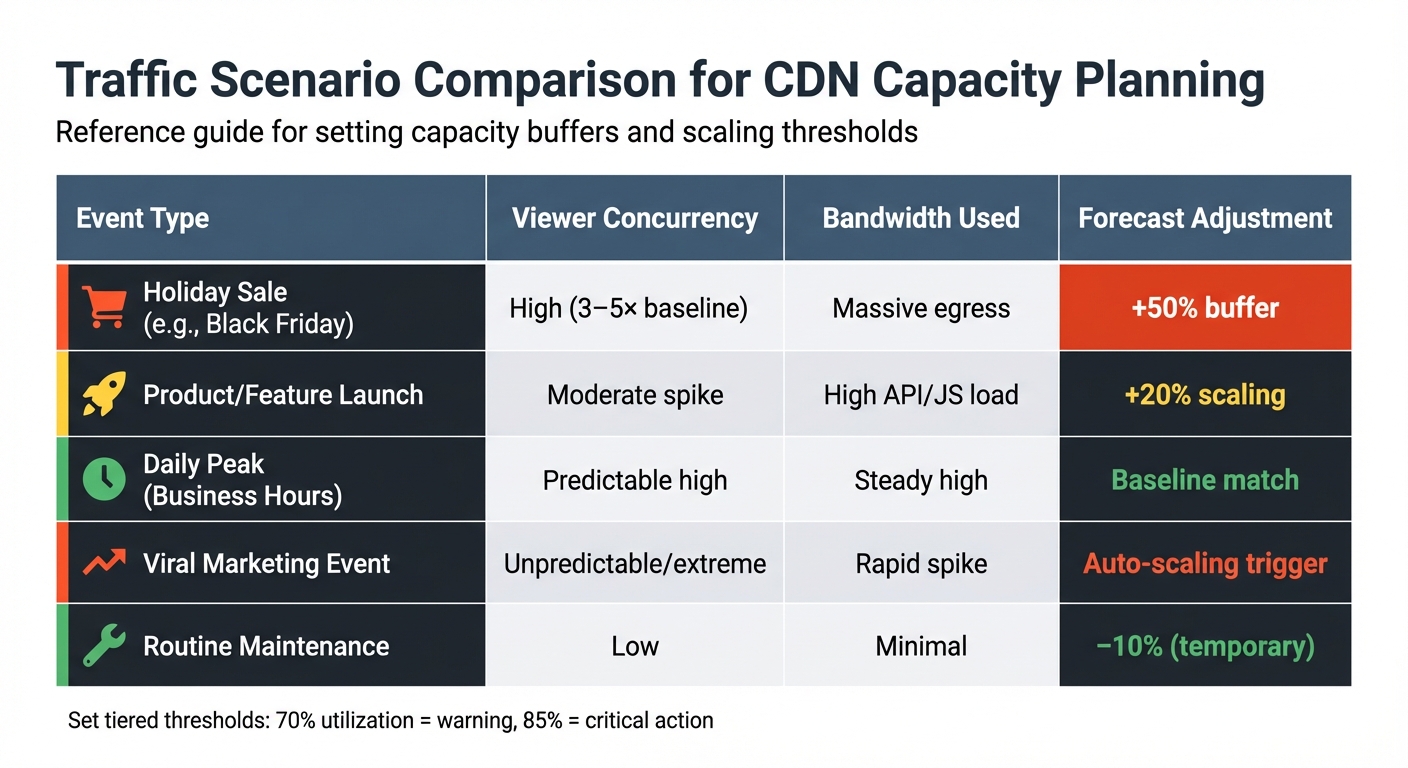 {CDN Traffic Scenarios and Capacity Planning Guide}
:::
{CDN Traffic Scenarios and Capacity Planning Guide}
:::
Once you've collected historical data, forecasting turns that information into decisions about capacity. Nawaz Dhandala from OneUptime explains:
Capacity planning is not about guessing. It is about using data to predict the future with confidence. Forecasting models transform historical metrics into actionable infrastructure decisions[15].
Recognising Seasonal Patterns
Traffic patterns are rarely linear. Analysing time series data by breaking it into trends, seasonality, cycles, and noise is key [15].
Recurring events often follow predictable cycles. For instance, daily peaks, like the 08:00 rush during business hours, weekly fluctuations with lower weekend traffic, or annual surges during holiday shopping seasons, all demand attention [14][15]. Events like Black Friday can cause sharp traffic increases, while product launches may result in moderate but critical API and JavaScript loads [1]. Recognising these patterns ensures you're not caught off guard during high-demand periods.
Using Predictive Models
The right forecasting model depends on the traffic patterns you're dealing with. For steady, predictable growth - where traffic rises by a consistent amount each month - linear regression is often sufficient [14].
For more complex scenarios, two methods are particularly effective:
- ARIMA (AutoRegressive Integrated Moving Average): This statistical model relies on past data and forecast errors to predict future trends. It works best with stationary data, so adjustments may be needed before applying it [15].
- Prophet: Designed to handle multiple seasonal patterns and holidays, Prophet is particularly effective for data with recurring cycles [15].
In addition to statistical models, incorporate business-specific insights into your forecasts. Events like feature launches, marketing campaigns, or regulatory changes can cause sudden traffic spikes rather than gradual increases [1]. For example, a major feature release might consistently lead to a 5% rise in traffic [1].
Combine these forecasting approaches to define capacity buffers and scaling thresholds. A reference table summarising variations can help guide these adjustments.
Traffic Scenario Comparison Table
A reference table of past peak events can highlight patterns and help set appropriate capacity buffers:
| Event Type | Viewer Concurrency | Bandwidth Used | Forecast Adjustment |
|---|---|---|---|
| Holiday Sale (e.g., Black Friday) | High (3–5× baseline) | Massive egress | +50% buffer |
| Product/Feature Launch | Moderate spike | High API/JS load | +20% scaling |
| Daily Peak (Business Hours) | Predictable high | Steady high | Baseline match |
| Viral Marketing Event | Unpredictable/extreme | Rapid spike | Auto-scaling trigger |
| Routine Maintenance | Low | Minimal | −10% (temporary) |
Set tiered thresholds to respond effectively: for instance, a 70% utilisation warning for investigation and an 85% critical threshold for immediate action [14]. Use forecast-based alerts to trigger scaling when a metric is projected to exceed a threshold within 24 hours, rather than reacting after the fact [16].
Implementing Capacity Allocation Strategies
Capacity allocation is about finding the right balance between resource distribution and cost efficiency.
Regional Resource Scaling
Traffic demand doesn't stay consistent across regions. For instance, a global platform might aim for a sub-200 ms p95 TTFB (Time to First Byte) in high-priority markets like the UK and North America, while tolerating slightly higher latency in areas with lower traffic demand[17].
To optimise performance, consider origin shielding and tiered caching. These techniques can consolidate edge requests and cut origin bandwidth usage by up to 50% for less frequently accessed content[5][2][3].
Focus on allocating more edge capacity in regions with heavy traffic and lower bandwidth costs, such as North America and Europe. This approach helps maximise efficiency and keeps costs manageable[5].
Once resources are aligned regionally, the next step is ensuring smooth load distribution.
Load Balancing Techniques
Load balancing is key to handling unpredictable workloads. Techniques like least connections routing and weighted load balancing help distribute traffic effectively. Weighted load balancing, in particular, takes into account each server's capacity and performance metrics, making it ideal for heterogeneous infrastructures[19].
Anycast routing is another powerful tool. It automatically directs users to the nearest or best-performing edge server, reducing latency significantly[18]. For deployments spanning multiple regions, Global Server Load Balancing (GSLB) can distribute traffic across data centres, boosting both reliability and performance.
To handle sudden traffic surges without overloading your system, implement stale-while-revalidate policies. This allows your CDN to serve slightly outdated content while fetching updated versions from the origin, ensuring a smooth user experience[5][2].
Together, these techniques maintain performance and reliability, even during traffic spikes.
Setting Provider Quotas
For high-traffic websites, CDN bandwidth can account for up to 80% of infrastructure costs[5][3]. To manage expenses, negotiate capacity commitments, such as a minimum of 500 TB per month, to reduce per-gigabyte costs. Additionally, normalise cache keys by removing irrelevant query parameters. This improves cache hit ratios and reduces the load on your origin servers[5][4].
Achieving a 90% cache hit ratio can lead to bandwidth cost savings of up to 85%[4]. These measures not only optimise performance but also make your infrastructure spending more efficient.
Monitoring and Adjusting in Real-Time
Managing capacity allocation effectively requires constant vigilance. Without real-time monitoring, potential problems can slip through the cracks, leading to user dissatisfaction or unnecessary costs.
Key Metrics to Track
To stay on top of performance, focus on tracking the Four Golden Signals: latency, traffic, error rates, and saturation [20]. When evaluating latency, go beyond averages. Instead, prioritise metrics like Time to First Byte (TTFB) and P95 and P99 latencies, as these highlight the slowest requests [6][20][7]. Here's why it matters: even a 100 ms delay in page load time can lower conversion rates by 7% [6][21].
Another critical metric is the Cache Hit Ratio (CHR), which should ideally range between 85% and 95% or higher [20][21]. A mere 1% improvement in CHR can substantially cut the traffic load on origin servers, especially at scale [6]. To complement CHR, keep an eye on the Byte Hit Ratio (BHR) for a clearer picture of your content delivery efficiency.
Watch your HTTP status codes closely. Unusual spikes in 502 or 504 errors could signal routing or configuration issues [21]. Aim to keep the edge 5xx error rate below 0.25% within any five-minute window [22].
DNS performance is another area that demands attention. By regularly monitoring DNS resolution times and failure rates across regions, you can catch routing problems before they escalate [20].
| Metric | Warning Threshold | Critical Threshold |
|---|---|---|
| Edge 5xx Error Rate | N/A | > 0.25% in 5-min window [22] |
| DNS Resolution | > 200 ms | > 500 ms [20] |
| Rebuffering Ratio | N/A | > 0.6% (Live) / > 1% (VOD) [22] |
Real-Time Alerting and Automation
Once you've identified the key metrics, the next step is acting on them in real time. Relying on static thresholds can lead to false alarms, so consider using SLO-driven alerts. For instance, set alerts to trigger only if P95 latency exceeds 250 ms for more than two minutes [23]. This approach reduces unnecessary noise while ensuring critical issues are addressed quickly.
Dynamic baselining is another powerful tool. By comparing current metrics to the same period last week, you can account for seasonal or time-based fluctuations [22]. Additionally, leveraging AI-driven anomaly detection can reduce false-positive alerts by 43% to 50% [22].
To avoid overwhelming your team with excessive notifications, correlate related alerts into unified incidents [20]. Considering that downtime costs can reach an average of £4,480 per minute [23], timely and actionable alerts are essential.
For more complex scenarios, self-healing workflows can be a game-changer. For instance, automated scripts can roll back deployments if they cause a spike in 5xx errors [23]. These workflows ensure problems are addressed before they snowball. Synthetic probes, deployed across multiple geographic locations, can also help verify that DNS and routing are directing users to the nearest healthy edge node, even during periods of low traffic [20][22][23].
Lastly, adopt canary testing by routing a small portion (1%–5%) of traffic to a new configuration. This allows you to validate performance and stability before rolling out changes to the broader audience [7][2].
Integrating Multi-CDN for Better Resilience
After refining how you allocate capacity, adding multiple CDN providers into the mix can significantly reduce risks and ensure consistent performance, even under fluctuating loads. Relying on a single CDN provider leaves your infrastructure vulnerable to outages and performance issues. A multi-CDN strategy spreads the risk across several providers, improving uptime from 99.9% (about 8.76 hours of downtime annually) to 99.999% (less than 5.26 minutes of downtime annually) [31]. On top of that, intelligent CDN routing can speed up response times by 40% and lower costs by 15–30% [31]. By combining this with capacity allocation strategies, multi-CDN integration strengthens resilience and optimises performance.
Traffic Steering Across Providers
Effective traffic steering is vital to maintaining capacity planning across multiple CDNs. This involves setting up a filter chain to evaluate requests based on compliance, provider health, performance, cost, and contractual agreements [24].
Here are the three main traffic steering methods:
DNS-Based Steering: This method relies on your authoritative DNS server to direct traffic to the best CDN endpoint based on real-time conditions. While simple to implement, it can be affected by TTL caching limitations [24][26].
Layer 7 Steering: Operating at the application layer, this approach inspects HTTP headers, cookies, and URL paths for precise routing decisions. It’s ideal for API calls, video-on-demand, and personalised content but comes with added complexity and overhead [26][27].
Client-Side Steering: This method uses an SDK or JavaScript embedded in the client application to measure real-time performance, allowing dynamic CDN switching during active sessions. It’s particularly useful for video streaming and mobile apps, though it requires control over client-side code [24][26].
| Steering Method | Layer | Best Use Case | Limitation |
|---|---|---|---|
| DNS-Based | Network (L3/L4) | General web traffic, bots | Limited by TTL caching [24][26] |
| Layer 7 | Application (L7) | API, VOD, personalised content | Higher complexity/overhead [26][27] |
| Client-Side | Application (L7) | Video players, mobile apps | Requires control of client code [24][26] |
To make these methods work effectively, real-time data plays a critical role. Use Real User Monitoring (RUM) to gather insights from actual user experiences, synthetic probes for baseline performance checks, and direct health checks to monitor provider status [24][29]. When introducing a new CDN provider, start small - route 5–10% of traffic from a specific region and assess metrics like Time to First Byte (TTFB) and error rates. Gradually increase traffic allocation as performance stabilises [24][25].
Another often-overlooked practice is cache warming. Routinely route 5–10% of traffic to backup providers to keep their caches active. This prevents a sudden influx of requests from overwhelming your origin during a failover event [25][28].
Failover Testing and DNS Configurations
To complement real-time alert systems, proper DNS configuration ensures a faster failover process when performance drops. Set TTL values for active hostnames between 30 and 60 seconds to balance rapid failover needs with DNS resolver load [24][27].
Health checks are essential - whether HTTP, HTTPS, or TCP - to verify endpoints return valid status codes (2xx or 3xx) and expected content. If a provider fails to meet SLAs for uptime or response times, automated traffic redirection should kick in immediately, minimising the need for manual intervention.
You’ll also need to decide between active-active and active-passive configurations. In an active-active setup, all providers share the load continuously, using weighted routing for instant redistribution. In contrast, active-passive configurations activate a secondary provider only if the primary one fails.
Regular testing is key. Schedule quarterly failover tests to ensure DNS resolution correctly switches to backup providers [24]. Simulate failures - whether through manual service stops or chaos engineering techniques - to validate your processes. As Michael Dorosh, Senior Research Director at Gartner, aptly put it:
Whatever you're doing in technology, it's only as good as the single points of failure[30].
Finally, implement a cooldown period of around five minutes when steering traffic or scaling resources. This prevents instability caused by rapid oscillations, often referred to as flapping
, between providers. Monitoring metrics like Mean Time to Repair (MTTR) and Mean Time Between Failures (MTBF) can help you evaluate the effectiveness of your failover configurations and DNS redirection speeds.
Expert Support for CDN Optimisation
Handling CDN capacity planning internally can stretch your team thin, especially when juggling traffic forecasting, cost management, and performance goals. This is where specialist consulting services step in, offering the expertise needed to tackle these challenges without the need to build capabilities from the ground up. These experts can simplify capacity planning while seamlessly integrating with the forecasting and real-time adjustment strategies mentioned earlier.
For example, Hokstad Consulting provides bespoke solutions ranging from DevOps transformation and cloud cost management to strategic cloud migration and custom automation. Their process involves conducting thorough traffic audits and using predictive analytics to identify inefficiencies in bandwidth, latency, and requests per second. This helps establish precise capacity baselines. With these insights, businesses can refine their resource allocation and demand forecasting strategies. For companies operating across public, private, hybrid, or managed hosting environments, this level of analysis can lead to cost reductions of 30–50% through smarter resource use and automated scaling.
Consultants also apply AI-driven models and anomaly detection to anticipate demand surges, enabling proactive scaling that balances performance and budget needs. They optimise regional scaling, load balancing, and provider quotas while employing techniques like smart routing and origin shielding to distribute traffic efficiently across global edge locations.
Another key area of expertise is real-time monitoring. Consultants implement tools and automation to track critical metrics like cache hit ratios and latency. They also set up real-time alerts to address issues quickly, reducing the need for manual intervention while ensuring peak performance. For businesses exploring multi-CDN setups, specialists can configure DNS orchestration and failover testing, allowing seamless provider switching during traffic spikes. This not only boosts uptime but also keeps costs under control.
Many consulting services start with a free consultation, offering an assessment of your CDN infrastructure and defining key performance indicators such as uptime (e.g., above 99.99%) and cost per GB served. They then implement phased optimisation plans tailored to your business needs. This structured approach ensures that your capacity planning evolves with your growth while maintaining governance processes that adapt to shifting priorities. These expert-led strategies work hand-in-hand with the best practices discussed earlier, keeping your CDN efficient and reliable.
Conclusion
Planning CDN capacity effectively begins with a deep dive into traffic patterns and preparing for future growth. By studying historical usage trends and analysing growth data, you can forecast both short- and long-term requirements with precision. This approach helps pinpoint potential bottlenecks before they disrupt user experiences [1]. Incorporating predictive models can also reveal seasonal trends and prepare your infrastructure for spikes caused by campaigns, product launches, or viral moments.
Real-time monitoring plays a crucial role in maintaining CDN performance. Keeping an eye on metrics like cache hit ratios, latency, and bandwidth usage allows you to make quick adjustments to capacity, ensuring smooth operations without unnecessary spending. Automating alerts and scaling processes reduces manual workload, keeping costs in check while ensuring consistent uptime. These operational tweaks work hand-in-hand with robust architectural decisions.
Adding a multi-CDN strategy enhances reliability even further. As Smart Web Spaces notes, Redundancy is not the same as resilience - you must automate failover, warm caches and keep security in sync
[32]. Using multiple providers in an active-active configuration minimises risks from regional congestion or configuration errors. Traffic steering logic ensures requests are routed to the most efficient network for each location, improving overall performance.
Proactive capacity planning doesn’t just support scalability - it also improves user experience by reducing latency. Optimising content delivery, such as adopting modern image formats like WebP or AVIF to cut bandwidth usage by 30–50% [5], adds even more value. By blending historical analysis, forecasting, real-time responsiveness, and multi-provider strategies, you can build a CDN setup that scales seamlessly while keeping expenses under control.
FAQs
How much extra CDN capacity should I keep as a buffer?
Hokstad Consulting advises keeping a buffer of 20-30% of your total CDN capacity to accommodate unexpected traffic surges. This approach helps ensure your system can handle sudden increases in demand without compromising performance. While the precise buffer size depends on your specific workload and traffic trends, this range offers a practical balance between managing costs and maintaining reliability.
Which forecasting model should I use for my traffic patterns?
Machine learning models such as ARIMA and Prophet are excellent tools for predicting traffic patterns. They rely on historical data, seasonal trends, and growth patterns to produce precise forecasts.
In addition, AI-powered What-If models are particularly useful for simulating future scenarios. These models help anticipate fluctuations, like sudden spikes or seasonal variations, making them invaluable for planning.
According to Hokstad Consulting, these methods significantly enhance capacity planning, often reducing forecast errors to less than 7%.
When does a multi-CDN setup become worth it?
A multi-CDN setup becomes a smart choice when a single provider can't guarantee steady coverage, experiences outages, or has difficulty managing sudden surges in traffic. This approach boosts reliability, speed, and accessibility, making it especially useful for businesses that demand high uptime and dependable global content delivery.