
If I had to boil this down to one line: AWS gives me the most policy control, Azure gives me the clearest people-and-governance path, and GCP gives me the cleanest resource-permission model.
IAM is one of the first cloud choices that can go wrong. In the source article, cloud spend in the UK hit £10.5 billion in 2024, and IAM mistakes were linked to 45% of cloud breaches, with 34% tied to access that was too broad. So if I’m planning a migration, I’d want to settle a few things early:
- Who gets access: users, groups, roles, and machine identities
- How access is granted: policies, RBAC assignments, or IAM bindings
- How short-lived access works: role assumption, managed identities, or service accounts
- How extra checks work: MFA, device state, IP limits, time rules, and risk-based checks
- What gets logged: sign-ins, role changes, policy edits, and workload activity
- How reviews happen: built-in review tools or log-led review processes
Here’s the short version in plain English:
- AWS is best when I want deep control over API permissions, cross-account access, and policy rules.
- Azure is best when I want cloud access tied closely to Microsoft Entra ID, device rules, and formal access reviews.
- GCP is best when I want a simpler model built around roles + bindings + project hierarchy.
::: @figure 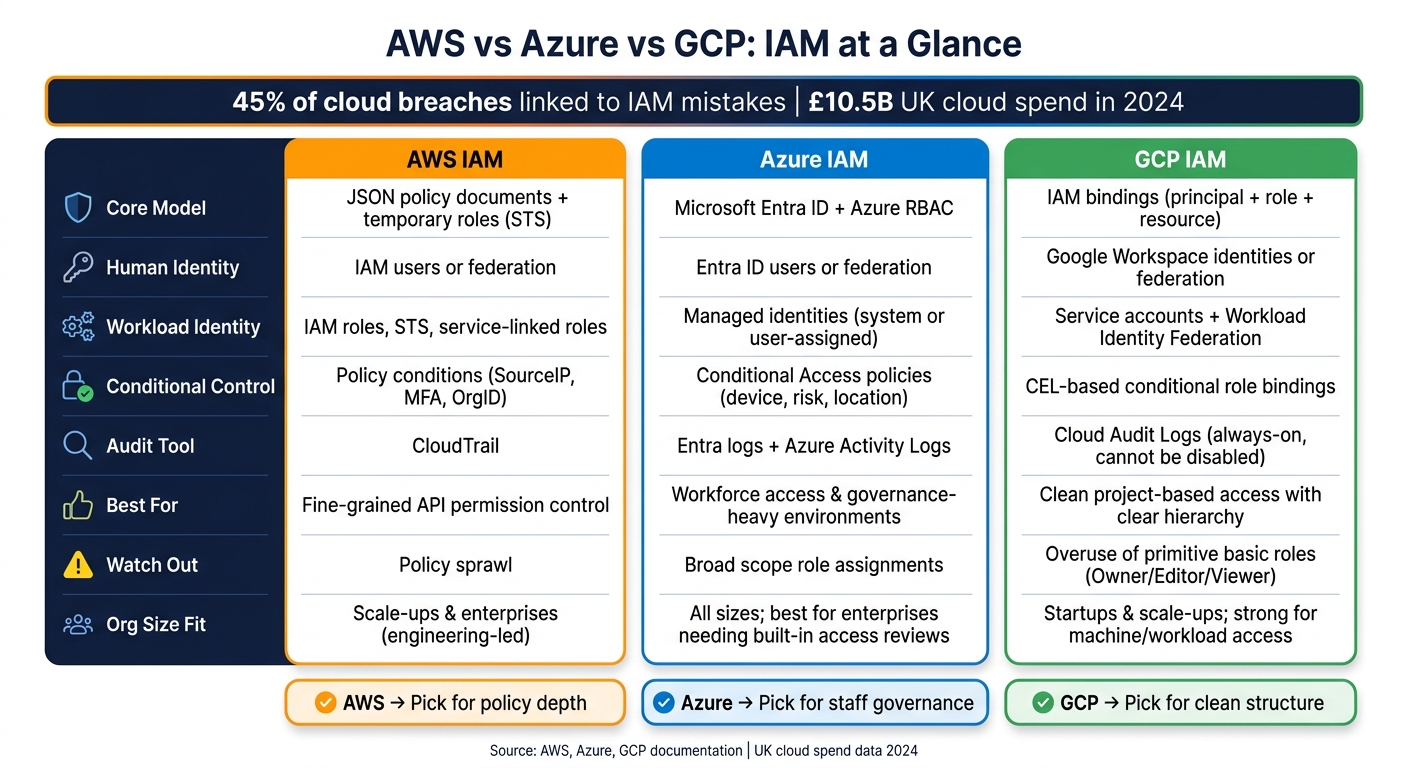 {AWS vs Azure vs GCP IAM Feature Comparison 2024}
:::
{AWS vs Azure vs GCP IAM Feature Comparison 2024}
:::
Cloud Provider IAM Similarities and Differences (AWS, Azure & GCP)
Quick Comparison
| Area | AWS | Azure | GCP |
|---|---|---|---|
| Main IAM model | JSON policies and temporary roles | Entra ID + Azure RBAC | IAM bindings between principals and roles |
| Human identity | IAM users or federation | Entra ID users or federation | Google identities or federation |
| Group model | IAM groups | Entra ID groups | Google Groups as principals |
| Workload identity | IAM roles, STS, service-linked roles | Managed identities | Service accounts, Workload Identity Federation |
| Conditional control | Policy conditions | Conditional Access | Conditional IAM bindings |
| Best suited to | Fine-grained cloud permission control | Workforce access and review-heavy governance | Clean project-based access structure |
| Audit focus | CloudTrail | Entra logs + Azure activity logs | Cloud Audit Logs |
| Watch-out | Policy sprawl | Broad scope assignments | Overuse of basic roles |
If you’re choosing between them, I’d keep it simple: pick AWS for policy depth, Azure for governance around staff access, and GCP for a cleaner permission layout. The rest of the article then explains how that plays out in day-to-day cloud design.
Core IAM models: users, groups, roles, policies, and service identities
The big split between AWS, Azure, and GCP comes down to where identity lives and how access is granted. Put simply, permissions attach in different places: to policies, directory roles, or bindings.
| Feature | AWS | Azure | GCP |
|---|---|---|---|
| Users | IAM users and federated identities | Microsoft Entra ID users and federated identities | Google Workspace identities and federated principals |
| Groups | IAM groups for users | Microsoft Entra ID groups for users and administration | Google Groups commonly used as IAM principals |
| Roles | IAM roles assumed temporarily | Azure RBAC roles assigned at scope | Predefined and custom IAM roles granted through bindings |
| Policies | JSON identity-based and resource-based policies | Azure RBAC roles at scope | IAM policies made up of bindings between principals and roles |
| Service identities | IAM roles for workloads and AWS service-linked roles | Managed identities for Azure resources | Service accounts for workloads and automation |
AWS IAM: policies and temporary roles
AWS IAM uses JSON policy documents to set which actions are allowed or denied, on which resources, and under which conditions. Those policies can attach to an identity, such as a user, group, or role, or straight to a resource like an S3 bucket or KMS key. Effective access is worked out from the combined set of allows across identity-based and resource-based policies, with any explicit deny overriding them.[17][18]
In AWS, roles are the main way both people and workloads get access. Instead of handing out long-lived credentials, teams usually rely on temporary role assumption, often through AWS STS. That means access is short-lived by default, which is exactly what you want in practice. For UK organisations, the safer pattern is to avoid long-lived IAM users and access keys wherever possible. Human access should usually come through federation with an identity provider such as Microsoft Entra ID, so staff assume roles instead of sitting on static credentials.[13][16]
AWS also creates service-linked roles for some services. In those cases, the service manages the role permissions rather than an admin editing them directly in IAM.[12][13]
That policy-led model looks quite different from Azure’s directory-led setup.
Azure IAM: Entra ID, RBAC, and managed identities
Azure is centred on the directory. Microsoft Entra ID stores users, groups, and directory-wide roles. Access to Azure resources then flows through Azure RBAC, where a role definition is assigned to a security principal, such as a user, group, service principal, or managed identity, at a given scope.[4][9]
This scope hierarchy - management group, subscription, resource group, resource - is one of Azure’s strongest ideas, but it’s also where teams can trip up. A role assignment at subscription level flows down to every resource group and resource under it.[4][6] That’s why broad assignments, such as Contributor at subscription scope, so often lead to over-privilege. The safer rule is simple: assign roles at the lowest scope that still does the job. Keep management group and subscription scope for central governance and billing roles.
For workload identity, managed identities cut down credential sprawl. A system-assigned or user-assigned managed identity is backed by Entra ID and can sign in to downstream services like Key Vault, Storage, and SQL Database without storing credentials in code or config files.[3][5][7] On AKS, AKS Workload Identity pushes this further by giving each pod its own federated identity instead of making workloads share node-level credentials.[10]
One distinction matters a lot here: Entra ID roles govern the directory, while Azure RBAC roles govern Azure resources. Mixing those up is a common design mistake, and it often ends with delegations that are either too broad or too narrow.[8][11]
GCP handles this a different way again, with bindings at the centre.
GCP IAM: bindings, principals, and service accounts
GCP IAM is built around policy bindings. A binding grants one role to one or more principals on a resource. Those principals can be Google Workspace users, service accounts, domains, or federated external identities.[19][20] Google Groups are used as principals inside bindings, rather than existing as a separate IAM object.
GCP roles fall into two buckets: predefined roles, which are fine-grained and service-specific, and custom roles, which you define yourself. Google’s own guidance is clear on one point: avoid the primitive basic roles - Owner, Editor, and Viewer - in production. Instead, use predefined or custom roles to keep access tight.[21] Permissions flow down from organisation to folder to project, so the org structure you set early on has a direct effect on how neatly access can be separated later.
Service accounts are GCP’s main service identity. Each workload or application part should have its own dedicated service account with narrowly scoped roles - each component should have its own service account.[21][22] Where it fits, Workload Identity Federation lets external workloads, including ones running on AWS or Azure, get short-lived GCP credentials without key files. That removes the need to download and store service account keys.[15][14]
Conditional access and least-privilege enforcement
| Feature | AWS | Azure | GCP |
|---|---|---|---|
| Main conditional model | IAM policy conditions | Conditional Access policies | IAM conditional role bindings |
| Supported signals | Source IP, tags, MFA state, time, principal tags, organisation context, service context keys | User, group, app, device compliance, location, sign-in risk, session state | Resource attributes, request context, time, resource name and type |
| Policy attachment points | Identity policies, resource policies, trust policies, SCPs | Entra Conditional Access control plane, alongside Azure RBAC | IAM bindings at organisation, folder, project, or resource level |
| Enforcement scope | Workforce and workload access through policy evaluation | Mainly workforce sign-ins and app access | Access grants across Google Cloud resources through conditional bindings |
AWS conditions vs Azure Conditional Access vs GCP conditional bindings
Core IAM structures decide who can access what. Conditional controls add the other half of the picture: when, where from, and under which circumstances access is allowed. These are not minor differences. Each cloud checks least privilege at a different layer, and that changes how teams build controls.
In AWS, conditions sit inside IAM policy documents. You add a Condition block to a JSON policy, and AWS checks it against the request context when an API call is made. Common examples include aws:SourceIp to limit calls to a corporate IP range, aws:MultiFactorAuthPresent to require MFA before sensitive actions are allowed, and aws:PrincipalOrgID to make sure requests come only from accounts inside a specific AWS Organisation.[32][34][35] These conditions can be used in identity-based policies, resource-based policies, role trust policies, and SCPs. That gives teams more than one place to apply control, which is handy when one guardrail isn't enough.
Azure works in a different way. Conditional Access is a separate policy plane inside Microsoft Entra ID, not a syntax feature inside a permission document. Admins build named policies that check signals such as user identity, group membership, application, device compliance state, sign-in risk, and location. The policy then decides whether to allow access, block it, or require extra steps such as MFA or a compliant device.[26][27][28] Azure also includes a report-only mode. In that mode, policies are checked but not enforced, and the results appear in sign-in logs so teams can see the likely impact before turning enforcement on.[29][30] That can save a lot of pain when you're trying not to lock out half the office on a Monday morning.
GCP is closer to AWS in structure. Conditional role bindings use CEL (Common Expression Language) expressions attached straight to IAM bindings, with checks against attributes such as request.time, resource.type, and resource.name.[23][24][25] You might, for example, limit a binding to business hours in Europe/London or tie it to a specific resource path. That makes GCP a good fit for time-bound access grants and resource-hierarchy-based least privilege, without putting a separate policy plane in the middle.
Where each model fits in practice
The main split is simple. Are you trying to control human sign-ins and device posture, or cloud API calls and service-to-service permissions?
Azure Conditional Access is often the easiest fit when the main issue is workforce access, especially for UK organisations already using Microsoft 365 and managed Windows devices. Requiring MFA for privileged roles, blocking access from unmanaged or non-compliant devices, or applying location-based restrictions is fairly direct to set up and review through Entra sign-in logs.[28][31] AWS and GCP can cover similar aims, but they do it during policy evaluation rather than at sign-in, so the governance model is not the same.
AWS fits well when conditions need to refer to resource tags, principal tags, or cross-account trust context. A common pattern is allowing admin actions only when a principal session includes a required tag such as Department=Finance, or limiting S3 bucket access to calls that come through a specific VPC endpoint.[32][33][36] GCP's conditional bindings are also useful in large estates arranged into folders and projects, where time-limited access or resource-attribute rules help keep permissions tight.
Put plainly: pick the model that matches the access problem in front of you - workforce sign-ins, workload access, or resource-level control. That choice also shapes the audit trail, which is the next thing worth checking. The next section shows how those decisions appear in logs, reviews, and incident evidence.
Audit logs, access reviews, and compliance evidence
Once access is in place, the next thing to check is simple: can you see what happened, who did it, and when? That’s what turns IAM from a permissions setup into something you can audit.
| Area | AWS | Azure | GCP |
|---|---|---|---|
| IAM-related logs | CloudTrail management events for IAM actions, plus CloudTrail Lake or CloudWatch exports | Entra audit logs and sign-in logs, plus Azure activity logs where relevant | Cloud Audit Logs for Admin Activity, plus data-access logs where needed |
| Typical recorded events | Role assumption, policy changes, user and role administration, API access | Sign-ins, Conditional Access outcomes, role and group changes, directory administration | Policy changes, role grants, service account activity, administrative actions |
| Where teams review it | AWS Console, CloudTrail, CloudWatch, SIEM exports | Azure portal, Entra admin centre, Log Analytics, SIEM exports | Google Cloud console, Logs Explorer, BigQuery or SIEM exports |
| Access review support | Indirect through logs and external governance processes | Built-in review and directory governance options in Entra | Logs and IAM policy analysis, often paired with external process controls |
| Compliance evidence use | Trace privilege changes and API actions for audits and investigations | Show sign-in decisions, access changes, and review evidence for governance | Evidence for policy changes, privileged activity, and service account usage |
What each platform records: changes, sign-ins, and service identity activity
AWS CloudTrail records IAM-related control-plane actions as management events. That includes CreateUser, CreateRole, AttachUserPolicy, PutRolePolicy, and AssumeRole, along with console sign-in events from signin.amazonaws.com.[39] CloudTrail also records IAM Identity Center assignment changes.[48]
Microsoft Entra splits logging into two streams. Audit logs record directory and tenant changes such as role assignments, group membership updates, Conditional Access policy changes, and access review activity.[51][52] Sign-in logs record authentication events and the Conditional Access result for each sign-in. Azure activity logs then cover resource-level changes in Azure subscriptions.[42] Managed identities and service principals show up in Entra audit logs when they are created or assigned, and in Azure activity logs when they act on resources.[42]
Google Cloud Audit Logs record IAM policy changes in the Admin Activity stream, and those logs are always written - they cannot be disabled.[46] Every call to SetIamPolicy creates an entry showing who changed which policy, on which resource, and when.[38][40][41][43] Service account events such as CreateServiceAccount, CreateServiceAccountKey, CreateRole, and UpdateRole are also recorded.[44] Google also provides Logs Explorer queries for SetIamPolicy and member-specific policy changes.[43][41][47]
That distinction matters in practice. Keeping logs is one thing. Being able to show that access was reviewed, checked, and acted on is another.
Using IAM logs for governance and incident response
For UK organisations preparing evidence for ISO 27001, SOC 2, or PCI DSS audits, the main gap between these platforms is how much review workflow they provide out of the box.
Microsoft Entra has the strongest native access review setup. Reviews are built into the governance feature set, and review activity is logged in audit logs. Microsoft also maps Entra audit and sign-in logs to PCI DSS evidence needs, including invalid access attempts, credential changes, and daily log review expectations.[51][52][53] If your team needs to show auditors access reviews, decisions, and follow-up changes, Entra gives the most direct route.
AWS and GCP both give you solid log evidence through CloudTrail and Cloud Audit Logs. But if you want to turn that into formal review evidence, you’ll usually need more process work around the logs.
A practical AWS approach is to filter CloudTrail on eventSource: iam.amazonaws.com to produce access review reports.[37][39] You can then match those findings with IAM Access Analyzer recommendations to record remediation decisions, and store the output with log exports for each review cycle.[37][45]
For GCP, filtering Logs Explorer on protoPayload.methodName:SetIamPolicy brings up IAM policy changes during a given time window.[38][40][41][43] Exporting to BigQuery helps with longer retention and makes it easier to line events up with incident timelines.[40]
For incident response, the trail you follow changes by platform:
- On AWS, look for
errorCode: AccessDeniedon sensitive APIs followed by successful calls shortly after. That pattern can point to a privilege escalation sequence.[39] - On Azure, review audit logs for role changes or Conditional Access policy changes just before a suspicious sign-in, then compare that with the sign-in log result.[42]
- On GCP, focus on
SetIamPolicyentries and service account key creation events, especiallyCreateServiceAccountKey, when checking for leaked credentials.[1][2][44]
Whatever platform you use, export IAM logs to an immutable store or SIEM. Keep evidence of who approved access, when reviews took place, what changed in IAM policy, and which identities used privileged access.[49][50][52][54] For UK regulated firms, log retention should match regulatory needs, and exports should stay in a UK or EU region.
Those evidence trails also help judge which IAM model fits different UK organisation sizes.
Which IAM model fits UK firms best
Logs and access reviews shape governance, so the right IAM setup also shifts with organisation size. There isn’t one clear winner. The best fit depends on where identity already sits, how much policy complexity your team can handle, and what auditors expect to see.
IAM fit by organisation size: startups, scale-ups, and enterprises
For smaller teams and startups, the main issue is simple: which platform keeps governance light without leaving holes in access control? GCP suits teams that want a straightforward permission model with clear ownership from day one. AWS works best when access can stay limited to a small set of roles. Azure makes sense for firms already standardised on Microsoft identity, because workforce and cloud access sit in the same place.
Scale-ups tend to run into access sprawl as headcount grows. Azure suits teams that need central governance without piling on another control plane. AWS fits engineering-led firms that want fine-grained, infrastructure-as-code policy control, as long as someone clearly owns the design. GCP works well when teams want a steady, auditable setup across projects, but that only works if folder hierarchy and naming rules are agreed early.
For large UK enterprises, the choice usually comes down to directory governance and audit evidence. Azure fits firms that need built-in access reviews and privileged access control. AWS can support governance at enterprise scale through IAM Identity Center, SCPs, and CloudTrail, but it takes more deliberate policy engineering to reach the same level of central control. GCP can handle enterprise needs too, though many large UK firms still lean towards Azure when they want a review model that feels familiar.
Use the table below to line up governance style with organisation size.
| Organisation size | Best fit | Why |
|---|---|---|
| Startup | GCP or Azure | Simple structure; Azure if Microsoft identity is already in use |
| Scale-up | Azure or AWS | Central governance or engineering-led policy control |
| Enterprise | Azure | Built-in access review and privileged access control |
Conclusion: key differences to carry into migration design
These differences feed straight into migration design. Three points matter most. AWS is policy-led and highly flexible. It gives the finest level of control, but it also asks for discipline in policy design and regular access analysis. Azure is directory-led with stronger governance. It tends to fit best when workforce identity, Conditional Access, and formal access reviews need to work together. GCP is cleanly structured. Its binding model and resource hierarchy are easier to audit, and its workload identity support is especially strong for machine access.
Treat IAM as an operating model decision. Set out who owns roles, how access is requested and approved, and how often reviews will happen before workloads land in the cloud.
FAQs
Which cloud is easiest to manage securely?
No single cloud is the easiest to secure for everyone. It comes down to your current setup, your compliance targets and the level of in-house skill you have.
If your firm already runs heavily on Microsoft tools, Azure is often the simplest route. AWS is a common pick for broad compliance demands. And GCP tends to stand out for day-to-day ease of use, thanks to unified logging and 400-day default retention.
How should we handle short-lived access?
Move away from static credentials that sit around for months, or even years. For service-to-service communication, use workload identity federation so native tokens can be exchanged for temporary credentials issued at runtime. That means no persistent API keys or service account keys hanging about.
For human users who need higher-level access, use Just-In-Time (JIT) access with tools such as Azure PIM or AWS IAM Identity Centre. Give temporary permissions that expire on their own, and ask for a business justification so the audit trail shows why that access was needed.
What is the biggest IAM mistake to avoid?
The biggest IAM mistake is misconfiguration. Most of the time, it comes down to human error, and the fallout can be serious: exposed sensitive data, weak access controls, and security gaps that attackers can slip through.
There’s a second mistake that often sits right beside it: not enabling data-plane logging by default. That leaves teams with only part of the story. If something goes wrong, the audit trail is incomplete, and it’s easy to assume everything is fine when it isn’t.
To cut risk, focus on standardised policies and least privilege across every cloud setup. That means giving people and systems only the access they need, nothing more, and making that rule stick everywhere.