
Audit logging is key for tracking actions in the cloud, ensuring security, and meeting compliance standards. AWS, Azure, and GCP offer distinct solutions tailored to these needs:
- AWS CloudTrail: Tracks management, data, network, and insights events. Includes 90 days of free log retention, with options like CloudTrail Lake for extended storage. Integrates with tools like Amazon GuardDuty for threat detection.
- Azure Monitor & Activity Logs: Focuses on control and data plane activities. Offers seamless integration with Microsoft tools, 90 days of free retention, and up to 12 years of extended storage through Log Analytics.
- GCP Cloud Audit Logs: Divides logs into Admin Activity, Data Access, System Events, and Policy Denied categories. Provides a 400-day default retention for Admin Activity Logs and offers cost-effective storage and analysis via BigQuery.
Quick Comparison
| Feature | AWS CloudTrail | Azure Monitor & Activity Logs | GCP Cloud Audit Logs |
|---|---|---|---|
| Default Retention | 90 days | 90 days | 400 days |
| Max Retention | 10 years | 12 years | 10 years |
| Cost (Ingestion) | £0.50/GB | £2.76/GB | £0.50/GB |
| Free Tier | 5 GB/month | 5 GB/month | 50 GB/month |
| Storage Cost | £0.03/GB/month | £0.12/GB/month | £0.01/GB/month |
Each platform has strengths: AWS excels in compliance certifications, Azure integrates deeply with Microsoft tools, and GCP offers extended default retention and affordable storage. The right choice depends on your tools, compliance needs, and budget.
::: @figure 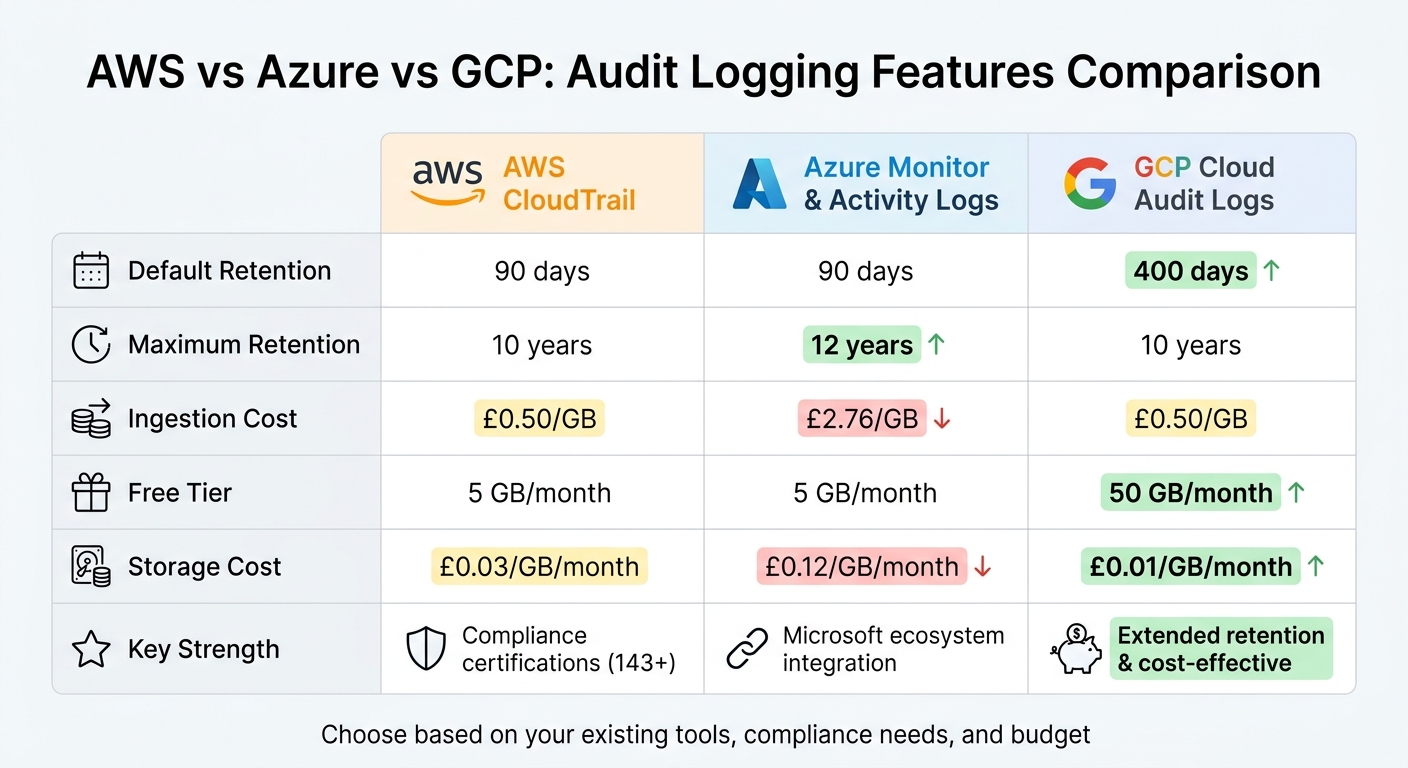 {AWS vs Azure vs GCP Audit Logging Features Comparison}
:::
{AWS vs Azure vs GCP Audit Logging Features Comparison}
:::
AWS CloudTrail Features and Use Cases
Core Capabilities of AWS CloudTrail
AWS CloudTrail provides detailed logging for four key activity types across your cloud infrastructure:
- Management events: These capture control plane operations, such as creating a subnet or attaching a role policy.
- Data events: These focus on high-volume activities, like
GetObjectcalls in S3 or Lambda function invocations. - Network activity events: These track API calls made through VPC endpoints.
- Insights events: These flag unusual patterns, such as spikes in API call volumes or error rates [5][8].
Every AWS account includes Event History, which offers a 90-day searchable record of management events at no additional cost [6]. For organisations needing longer data retention, CloudTrail Lake provides immutable storage and SQL querying capabilities, extending the retention period beyond 90 days [4]. Typically, CloudTrail delivers log files to an S3 bucket within five minutes of an API call [8].
To ensure the integrity of logs, CloudTrail employs SHA-256 hashing combined with RSA digital signatures. This setup makes it possible to detect any tampering, deletion, or forgery of logs after delivery [7]. For organisations managing multiple accounts, CloudTrail integrates with AWS Organisations, allowing logs from all regions and member accounts to be centralised in a single S3 bucket [4][7].
CloudTrail also connects seamlessly with other AWS services to enhance its functionality. For example:
- Amazon EventBridge facilitates near real-time automated responses.
- Amazon GuardDuty supports threat detection.
- AWS Config helps correlate configuration changes with specific API activities [10].
During forensic investigations, CloudTrail serves as a critical tool. Analysts can trace unauthorised access by reviewing fields such as eventTime, sourceIPAddress, and userIdentity [9]. These features not only strengthen infrastructure security but also support a range of practical applications.
Use Cases for AWS CloudTrail
CloudTrail's capabilities are indispensable for both security and operational needs. A notable example of its importance was a breach involving a contractor for the European Commission in Q1 2026. Attackers exploited an AWS API key that had been exposed in a GitHub Actions environment variable for 847 days. CloudTrail logs, including GetCallerIdentity and AssumeRole events, revealed how the attackers escalated privileges across 14 member accounts and exfiltrated 340 GB of data to an S3 bucket in the ap-southeast-1 region. The breach resulted in over €340 million in penalties and remediation costs [11].
This incident underscores CloudTrail's role in security incident response. To mitigate such risks, organisations can enable data events for sensitive S3 buckets and configure GuardDuty S3 protection to detect anomalies, such as Exfiltration:S3/ObjectRead.Unusual [11]. Additionally, replacing long-lived IAM access keys with OIDC federation methods, like GitHub Actions OIDC, can reduce the likelihood of credential theft [11].
For operational troubleshooting, CloudTrail provides insights into configuration changes that may have caused system failures. By using Service Control Policies in AWS Organisations, teams can explicitly deny actions like StopLogging and DeleteTrail, ensuring the audit trail remains intact [7]. Moreover, integrating CloudTrail logs with Amazon EventBridge or CloudWatch Logs enables automated responses to security events, such as unauthorised API calls [7].
Need help optimizing your cloud costs?
Get expert advice on how to reduce your cloud expenses without sacrificing performance.
Azure Monitor and Activity Logs Features and Use Cases
Core Capabilities of Azure Monitor and Activity Logs
Azure's audit logging system is divided into two key categories: Activity Logs, which track control plane operations like creating virtual machines or updating policies, and Resource Logs, which focus on data plane actions such as retrieving secrets from Key Vault [12][13].
Activity Log events are retained for 90 days at no cost for all Azure subscriptions [13]. For organisations needing extended retention, these logs can be exported to a Log Analytics workspace, where they can be stored for up to 12 years [13]. Additionally, logs are typically ready for analysis or alerting within 3 to 20 minutes of an event, allowing teams to respond quickly to infrastructure changes [13].
Azure's integration with Microsoft Entra ID (formerly Azure Active Directory) provides detailed insights into user sign-ins and group management activities across Microsoft's ecosystem [12][14]. This seamless connection extends to Microsoft Sentinel and Microsoft Defender for Cloud, enabling organisations to consolidate telemetry from identity, endpoints, and infrastructure. As Johan Carlsson, Country Manager for Sweden at Opsio, highlights:
Azure's core strength is integration: Azure Active Directory (now Entra ID) connects directly to Microsoft 365, Dynamics 365, Power Platform, and GitHub [14].
Other notable features include Change History, which enables administrators to investigate resource modifications up to 30 minutes before and after an event, and Activity Log Insights, which offers pre-built dashboards for monitoring subscription-level changes [13]. For organisations with hybrid environments, Azure Arc extends these logging capabilities to on-premises and edge infrastructures, ensuring consistent auditing across diverse setups [14].
| Feature | Azure Activity Logs | Azure Resource Logs |
|---|---|---|
| Scope | Control Plane (Management) | Data Plane (Operations) |
| Examples | Create VM, Update Policy | Get Secret, Database Request |
| Default Retention | 90 Days | Not collected by default |
| Configuration | Enabled by default | Requires Diagnostic Setting |
| Cost | Free for 90 days | Based on ingestion/storage |
To maintain the integrity of logs, it's recommended to export them to a Log Analytics workspace immediately. Since Activity Logs are the only source that identifies resource creators, preserving them is crucial as they expire after 90 days [13]. When querying the AzureActivity table in Log Analytics, use case-insensitive operators like =~ or the tolower() function to handle potential casing inconsistencies [13].
These capabilities are instrumental in various operational and compliance scenarios.
Use Cases for Azure Monitor and Activity Logs
Azure Monitor enables organisations to automate alerts and simplify compliance and troubleshooting processes. For example, in environments heavily reliant on Microsoft tools, alerts can be set up for critical events, such as changes to Key Vault access policies or the creation of virtual machines [13]. Activity Log Insights makes it easy to identify which users or services performed specific actions, while the Change History feature allows for detailed investigations into resource modifications.
From a compliance perspective, Azure's audit features support regulations like those from the Reserve Bank of India (RBI) and the Securities and Exchange Board of India (SEBI), which require customer data to remain in India and mandate audit access for regulators [14]. With three Azure regions in India - Pune, Chennai, and Hyderabad - Azure provides high geographic redundancy, making it a reliable choice for industries like banking and finance [14].
For troubleshooting deployment failures, reviewing Resource Manager errors can help pinpoint the source of failed actions [13]. In multi-cloud environments, Activity Logs can be routed to Azure Event Hubs and integrated with third-party SIEM solutions, enabling a unified security posture across hybrid and multi-cloud setups [13]. While there are no ingestion charges for Azure Activity Logs, retention beyond the default 90 days incurs additional costs [13].
GCP Cloud Audit Logs Features and Use Cases
Core Capabilities of GCP Cloud Audit Logs
Google Cloud Platform (GCP) organises its audit logs into four categories. Admin Activity Logs document API calls that modify configurations - like creating a virtual machine or updating firewall rules. These logs are always active and come at no additional cost [2]. Data Access Logs, on the other hand, track API calls that access configuration metadata or user-provided data. By default, these logs are turned off (except for BigQuery) to help manage log volume and associated expenses [2]. System Event Logs capture Google-generated actions such as live migrations or autoscaling events, while Policy Denied Logs record attempts blocked by security policies [17].
Retention policies vary: Admin Activity and System Event logs are kept for 400 days, while Data Access and Policy Denied logs are stored for 30 days by default. However, retention for the latter can be extended up to 3,650 days to meet compliance needs [22]. All logs are immutable, ensuring they provide a reliable and tamper-proof record [22]. Additionally, Access Transparency offers insight into actions taken by Google personnel when accessing customer data, catering to organisations requiring high levels of operational visibility [23].
GCP's audit logging integrates seamlessly with its broader ecosystem. Cloud Logging acts as the central repository for storing, searching, and viewing logs using the Logs Explorer, API, or gcloud CLI [2]. Logs can also be routed to BigQuery for deeper analysis, enabling teams to use SQL to uncover patterns like unusual API activity [14]. Tools like Security Command Centre and Cloud Monitoring enhance the process by providing threat detection, security posture management, and real-time alerts. For multi-cloud environments, logs can be streamed via Pub/Sub to external SIEM platforms like Splunk [2].
What sets GCP apart is its global virtual network architecture. A single VPC's audit logs can track traffic and administrative actions across multiple regions without additional complexity [20]. For operations that take longer to complete, GCP links start and finish logs using unique operation IDs, ensuring traceability [17]. Moreover, GCP's FedRAMP High certification guarantees compliance with NIST standards for event logging, audit record details, and extended log retention [23].
These features provide a strong foundation for both security and operational use cases.
Use Cases for GCP Cloud Audit Logs
Organisations rely on GCP Cloud Audit Logs for tasks like threat detection and compliance monitoring. Cloud Monitoring alert policies can notify teams instantly when critical events occur, such as unauthorised access attempts or violations of security policies [2]. For example, Policy Denied Logs are instrumental in maintaining secure VPC perimeters by recording every blocked access attempt [18].
As Allan Alfonso, a Customer Engineer at Google Cloud, puts it:
Audit Logs answer the question 'Who did what, where, and when?' [24]
For troubleshooting, Google recommends selectively enabling Data Access Logs to assist support teams in diagnosing issues [22]. Security teams can also leverage BigQuery to perform advanced SQL-based analysis on audit data, making it easier to identify unusual behaviours like defence evasion tactics or excessive API activity by a single user [18]. In larger organisations, logs from multiple projects can be centralised into a single BigQuery dataset or storage bucket using aggregated sinks, simplifying cross-project analysis [19].
To control costs, it's wise to enable Data Access Logs only for sensitive production services and apply exclusion filters for less critical environments like development [19]. GCP offers cost-saving measures, such as the first 50 GB of logs ingested into the _Default log bucket being free each month, with additional usage priced at £0.50 per GB [24]. For secure access, the Private Logs Viewer role (roles/logging.privateLogViewer) should be assigned to those who need to view Data Access Logs, as the standard Logs Viewer role does not include this permission [16].
Lastly, Google Anthos simplifies multi-cloud governance by allowing organisations to manage Kubernetes clusters across GCP, AWS, and on-premises environments from a single control plane, ensuring unified audit logging across all clusters [21].
Comparison of Audit Logging Features
Comparison Table
When it comes to audit logging, AWS, Azure, and GCP each bring something different to the table. Their features vary in retention periods, storage options, and access management, all of which directly impact compliance efforts and operational costs.
GCP takes the lead with a default retention period of 400 days, far surpassing the 90-day default offered by AWS CloudTrail and Azure Activity Logs [26]. This extended retention can ease the burden of exporting logs to long-term storage, making compliance simpler for organisations with strict regulatory requirements.
All three providers rely on their native storage services: AWS S3, Azure Blob Storage, and GCP Cloud Storage [3]. However, their access management systems differ significantly. AWS uses IAM policies, Azure employs Entra ID RBAC, and GCP leverages a resource hierarchy. These systems offer varying levels of control over provider access. For organisations prioritising transparency into provider access to customer data, Azure offers Customer Lockbox, GCP provides Access Transparency, and AWS relies on its Nitro System hardware isolation [26].
Pricing is another critical factor. AWS CloudWatch and GCP Cloud Logging both charge £0.50 per GB for ingestion, while Azure Monitor Logs (Analytics tier) costs a much higher £2.76 per GB [27]. GCP also offers a more generous free tier - 50 GB per project per month - compared to just 5 GB for AWS and Azure [27]. Storage costs further highlight the differences: GCP is the most affordable at £0.01 per GB per month, followed by AWS at £0.03, and Azure at £0.12 [27]. For most organisations, ingestion costs tend to dominate multi-cloud logging bills [27].
| Feature | AWS (CloudTrail/CloudWatch) | Azure (Monitor/Activity Logs) | GCP (Cloud Audit Logs) |
|---|---|---|---|
| Default Retention | 90 days [26] | 90 days [26] | 400 days [26] |
| Maximum Retention | 10 years [27] | 12 years [27] | 10 years [27] |
| Long-term Storage | S3 Buckets [3] | Storage Accounts (Blob) [3] | Cloud Storage/BigQuery [15] |
| Access Management | IAM Policies & SCPs [14] | Entra ID RBAC [14] | Cloud IAM & Resource Hierarchy [14] |
| Ingestion Cost | £0.50/GB [27] | £2.76/GB (Analytics) [27] | £0.50/GB [27] |
| Storage Cost | £0.03/GB/month [27] | £0.12/GB/month [27] | £0.01/GB/month [27] |
| Free Tier | 5 GB ingestion [27] | 5 GB per billing account [27] | 50 GB per project [27] |
| Query Tool | CloudWatch Logs Insights [27] | Kusto Query Language (KQL) [27] | Logging query language [27] |
| Encryption | AES-256 at rest [26] | AES-256 at rest [26] | AES-256/128 at rest [26] |
| External Key Support | External Key Store (XKS) [26] | Azure Key Vault External [26] | Cloud External Key Manager (EKM) [26] |
| Provider Access Control | Nitro System Isolation [26] | Customer Lockbox [26] | Access Transparency [26] |
| Compliance Tools | AWS Audit Manager [25] | Defender for Cloud [25] | Security Command Centre [25] |
One commonality across all platforms is that data plane logging is disabled by default. This means organisations must explicitly enable it to capture interactions with sensitive data [3]. These distinctions in features and pricing play a critical role in shaping how organisations approach compliance and cost management.
Johan Carlsson, Country Manager for Sweden at Opsio, encapsulates the importance of proper configuration:
The cloud provider is rarely the weak link - the configuration is [14].
Key Differences and Selection Criteria
Factors to Consider When Selecting a Platform
Deciding between AWS, Azure, and GCP for audit logging comes down to how well each platform fits your specific infrastructure and compliance requirements. Each has its own strengths and trade-offs, as highlighted in earlier comparisons.
Take AWS CloudTrail, for instance. It boasts an extensive compliance portfolio with over 143 certifications, making it a strong candidate for industries with stringent regulatory demands [26]. However, its default 90-day log retention period and the need to integrate additional services like CloudWatch for alerting can add layers of complexity and increase costs [31].
For organisations already entrenched in the Microsoft ecosystem, Azure Activity Logs might be the logical choice. Features like Customer Lockbox, which restricts Microsoft engineer access, align with GDPR compliance needs [26]. If you're using Entra ID for identity management, Azure further strengthens its appeal [3]. That said, while Azure's log ingestion costs can be higher, redirecting logs to more economical storage accounts can help balance the budget [30].
GCP Cloud Audit Logs, on the other hand, stand out with a 400-day default retention for Admin Activity logs and built-in alerting through Cloud Logging. This eliminates the hassle of setting up separate monitoring services [1][31]. Additionally, Access Transparency logs provide accountability by documenting when Google staff access your content, which is particularly useful for organisations concerned about regulatory oversight [26].
It’s worth noting that across all three platforms, data plane logging is turned off by default to manage costs [3]. To monitor interactions with sensitive resources, you’ll need to enable AWS Data Events, Azure Diagnostic Settings, or GCP Data Access logs manually - except for BigQuery Data Access logs in GCP, which are enabled by default [1]. As Binadox aptly puts it:
An incomplete audit log is often more dangerous than no audit log at all. It creates a false sense of security, causing teams to believe they have visibility whilst attackers operate undetected [30].
Multi-Cloud Audit Logging Approaches
For organisations operating across multiple cloud platforms, ensuring a unified approach to audit logging is crucial. With AWS, Azure, and GCP collectively holding 62% of the cloud market [29], centralising logs becomes a necessity. Using unified SIEMs like Splunk can help correlate events from different providers, offering a clearer picture of your security posture.
Each platform offers tools to centralise logs: AWS Organization Trails, Azure Diagnostic Settings combined with Azure Policy, and GCP Aggregated Sinks [30][31]. Consolidating logs into a central security account not only simplifies compliance audits but also reduces the risk of configuration drift. When analysing these aggregated logs using tools like AWS Athena or GCP BigQuery, adopting partitioning techniques can significantly reduce the volume of data scanned, helping to keep costs under control [31].
Audit Logs: Querying Logs, Pricing and Retention
Conclusion
Audit logging plays a crucial role in cloud security and compliance by ensuring visibility into every action within your environment. Without this visibility, organisations risk being unaware of potential threats and compliance violations. As Chemiron Adam, a Security Professional, aptly puts it:
In the cloud, everything is API-driven... Without logs, you're essentially flying blind [28].
This visibility empowers security teams to select solutions tailored to their regulatory and operational needs.
Each cloud provider offers distinct strengths. AWS CloudTrail boasts a broad range of compliance certifications. Azure Monitor integrates seamlessly with Microsoft tools, though its logging structure can feel fragmented. Meanwhile, GCP Cloud Audit Logs stands out with unified logging and a generous 400-day default retention period [32].
The right choice depends on your organisation's infrastructure, compliance obligations, and operational goals. If you're heavily invested in Microsoft 365, Azure’s integration is a logical fit. Organisations prioritising compliance coverage may lean towards AWS. On the other hand, GCP’s extended retention period is attractive for streamlined operations without compromising visibility.
It’s also important to remember that data plane logging is turned off by default. Enabling it selectively for critical resources - like production databases, financial records, or customer data - helps maintain visibility while managing costs [3]. As the Inventive HQ Team wisely notes:
You can't secure what you can't see [32].
Ultimately, as highlighted in the comparisons above, there is no single best
provider. The key lies in aligning the capabilities of your chosen solution with your organisation’s specific security and compliance needs.
FAQs
Which logs count as data plane events on AWS, Azure and GCP?
Data plane events are logs that capture the operation or usage of cloud resources, rather than administrative actions. On AWS, this includes activities like accessing S3 or invoking Lambda functions. For Azure, data plane logs can encompass events such as security logs or application logs generated by virtual machines. Over on GCP, Data Access audit logs monitor actions like reading or modifying data in services such as BigQuery or Cloud Storage.
How do I keep audit logs for 10+ years without huge costs?
To keep audit logs for more than 10 years without overspending, start by reducing log volume with filtering and aggregation. Take advantage of tiered storage solutions, such as archiving older logs in lower-cost options like Amazon S3 or Google Cloud Storage. Make sure your retention policies match regulatory needs, such as GDPR, to avoid extra expenses. Regularly review your log management strategy and automate processes to stay compliant while keeping costs under control.
What’s the easiest way to centralise audit logs across multi-cloud?
To centralise audit logs in a multi-cloud setup, the easiest approach is using a unified logging platform. This type of platform pulls together logs from various providers, including AWS CloudWatch, Azure Monitor Logs, and Google Cloud Logging. By implementing provider-neutral logging policies and automating the process of log collection and analysis, you can simplify management, improve visibility, and maintain compliance across all platforms.