
AWS and Azure are two leading cloud platforms for gaming infrastructure, each offering tools to meet the demands of modern multiplayer games. Here's a quick breakdown to help you decide:
- AWS: Known for its global reach, Amazon GameLift for scalable game server hosting, and Graviton processors offering up to 40% better price-performance. AWS excels in low-latency performance, cost efficiency with Spot Instances, and advanced GPU options like EC2 G5 instances.
- Azure: Strong in integration with Microsoft's ecosystem, PlayFab for backend services, and dual-region setups in the UK. Azure provides cost-saving options like Hybrid Benefits and free data transfers within regions. Its GPU-powered instances support AI-driven features and high-performance gaming needs.
Key factors to consider:
- Performance: AWS leads in CPU and memory benchmarks, while Azure offers strong hybrid and Microsoft-centric solutions.
- Cost: AWS charges per second, ideal for short-term workloads. Azure's Hybrid Benefits can cut costs for Windows-based setups.
- Scalability: Both platforms handle player spikes well, but Azure's dual UK regions give it an edge for local redundancy.
- Networking: AWS uses Local Zones for low latency, while Azure relies on its extensive regional network.
Quick Comparison
| Feature | AWS | Azure |
|---|---|---|
| Gaming Tools | Amazon GameLift, FlexMatch | PlayFab, Multiplayer Servers |
| GPU Instances | EC2 G5 (NVIDIA A10G GPUs) | NC-series (NVIDIA A100 GPUs) |
| Latency Solutions | Local Zones, Wavelength | Over 70 global regions |
| Cost Model | Per-second billing | Per-minute billing |
| UK Regions | 1 (London) | 2 (UK South, UK West) |
| Data Transfer Costs | £0.01/GB cross-AZ | Free within same region |
Decision Tip: Choose AWS for high performance and global scalability. Opt for Azure if you're already using Microsoft tools or need local redundancy in the UK.
::: @figure 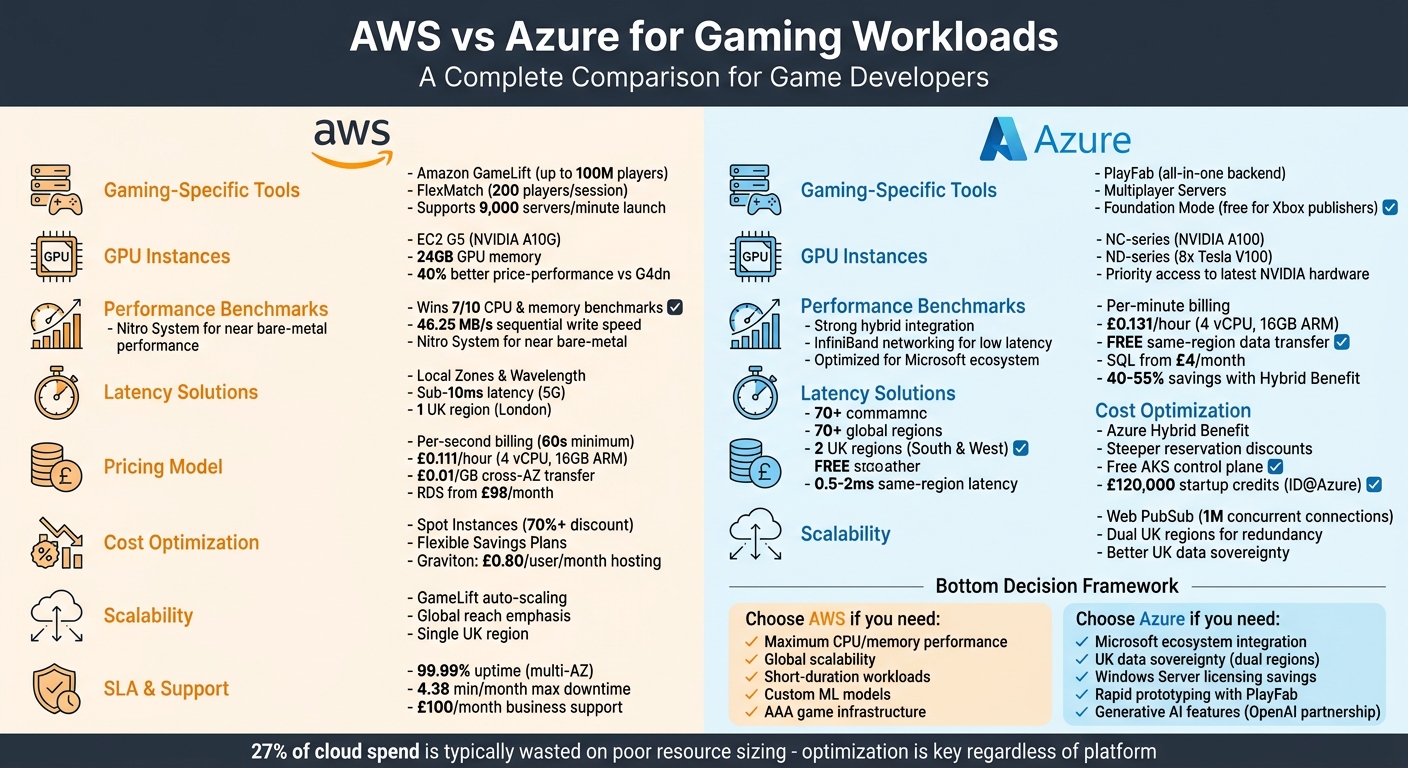 {AWS vs Azure Gaming Workloads Comparison: Features, Pricing, and Performance}
:::
{AWS vs Azure Gaming Workloads Comparison: Features, Pricing, and Performance}
:::
AWS re:Invent 2024 - Effortless game launches: How League of Legends runs at scale on AWS (GAM307)

Need help optimizing your cloud costs?
Get expert advice on how to reduce your cloud expenses without sacrificing performance.
What Gaming Workloads Need from Cloud Platforms
Gaming infrastructure has unique requirements, especially when it comes to delivering real-time performance within sub-100ms latency. As Microsoft's Kevin Guo points out:
Building multiplayer games is very different from building typical business APIs. Small timing and synchronization issues are immediately visible to players[3].
This sets the stage for understanding how cloud platforms like AWS and Azure meet these demanding needs.
Low Latency and Real-Time Performance
Latency is a critical factor in gaming. Even a slight delay can disrupt gameplay and create unfair advantages. Imagine a scenario where one player spots their opponent half a second earlier - such discrepancies can render the game unplayable. To avoid this, gaming platforms need to maintain end-to-end latency below 100 milliseconds [3]. Achieving this requires edge computing, optimised UDP networking, and precise adjustments to socket configurations.
The challenge becomes even more complex with stateful game servers. These servers manage in-memory states for real-time simulations, making them vastly different from stateless web applications. In stateless systems, any server instance can handle a request. However, stateful servers require careful handling of state replication and session persistence, complicating scaling efforts [1].
Scalability for Player Spikes
Gaming workloads are unpredictable by nature. A new release, a seasonal event, or a viral moment can trigger a massive surge in players - sometimes 10× or more within minutes. To handle this, cloud platforms must scale quickly and efficiently, avoiding crashes or long queue times. Traditional CPU-based scaling often falls short. Instead, gaming infrastructure needs to scale based on player-centric metrics like active sessions, queue lengths, and latency [1].
Managed services simplify this process. For instance, Azure Web PubSub supports up to 1 million concurrent connections per resource [3]. Meanwhile, AWS Spot instances offer a cost-effective way to handle traffic spikes, with discounts exceeding 70% compared to on-demand pricing [1]. However, Spot instances come with trade-offs, as they require systems to manage graceful shutdowns and offload state to durable storage. Successfully managing these surges is not only about performance - it directly affects infrastructure costs.
Cost Efficiency
With compute costs making up 60–70% of gaming cloud expenses [6], optimising spending is crucial. On average, organisations waste 27% of their cloud budget on idle resources [6], an inefficiency that can quietly erode profitability.
Smart studios adopt a mix of strategies to control costs. They use on-demand instances to guarantee a baseline capacity while leveraging Spot instances for overflow traffic. Automated shutdown schedules for testing environments, content delivery networks to cut egress fees, and right-sizing workloads are all part of the equation. Additionally, committing to Reserved Instances or Savings Plans only after careful evaluation ensures better cost efficiency [1][5]. The focus isn’t just on reducing costs but on delivering the best performance for players without unnecessary waste.
AWS Gaming Services and Features
AWS provides a robust set of tools and services tailored for the gaming industry, including GPU-powered instances and managed hosting solutions. These offerings are designed to deliver low latency, scalability, and efficient cost management.
EC2 Instance Types for Gaming
Amazon's EC2 G5 instances are built with NVIDIA A10G Tensor Core GPUs, offering up to three times better graphics performance and 40% improved price-performance compared to older G4dn instances [8]. Each GPU comes with 24 GB of memory, 80 ray tracing cores, and networking speeds of up to 100 Gbps, making it ideal for high-quality game streaming [8].
For Android game streaming, EC2 G5g instances combine AWS Graviton2 processors with NVIDIA T4G Tensor Core GPUs. This setup reduces costs by approximately 30% compared to G4dn instances, making it a cost-effective choice for developers [7].
Game Development and Hosting Tools
AWS's Amazon GameLift is a managed service designed to scale dedicated game servers dynamically. It supports up to 100 million players and can launch up to 9,000 servers per minute [12]. The service also includes FlexMatch, which can group up to 200 players into a single session [12][13].
GameLift extends its reach through multi-location fleets, leveraging AWS Local Zones to bring game servers closer to players, reducing latency [9][10]. Real-time player latency data is collected via UDP ping beacons, ensuring optimal session placement [9]. High-profile games like Dead by Daylight and Apex Legends have used GameLift to achieve global scalability, with the latter migrating to the platform in just 10 days [12].
Performance Optimisation Features
At the core of AWS's gaming infrastructure is the AWS Nitro System, which removes hypervisor overhead by using dedicated hardware. This approach delivers near bare-metal performance and consistent I/O, crucial for maintaining low latency during peak traffic [7][8]. By eliminating virtualisation overhead, Nitro ensures predictable performance even under heavy loads.
Cost efficiency is another highlight. Using Linux operating systems, Graviton instances, and container packing techniques can lower game server hosting costs to as little as £0.80 per user each month [11]. For instance, AWS Graviton instances like the c6g.large (priced at around £0.088 per hour) offer savings of 12% to 18% compared to standard compute-optimised instances. These instances are particularly effective for multiplayer game servers that require intensive network processing and data compression [11].
These features underscore AWS's commitment to supporting the gaming industry, setting the stage for a comparison with Azure's gaming solutions.
Azure Gaming Services and Features
Azure offers a robust gaming infrastructure built around specialised virtual machine families and a comprehensive backend platform called PlayFab. This setup is designed to support advanced gaming needs, from hardware configurations to live operations tools that handle matchmaking, virtual economies, and more.
GPU-Powered VM Instances
Azure's GPU instances are tailored for specific gaming scenarios, ensuring optimal performance for a variety of tasks. The NC-series, particularly the NCv4 models, uses NVIDIA A100 GPUs to handle compute-heavy tasks and AI-driven features like content moderation and speech-to-text processing [16][17]. Meanwhile, the NDv2-series boasts 8 NVIDIA Tesla V100 GPUs, NVLink connectivity, and powerful CPU and memory setups, making it ideal for large-scale simulations [14].
For cloud gaming, the NG-series (NGads V620) is a dedicated option [16][17], while the NV-series (NVadsA10_v5) leverages NVIDIA A10 GPUs for video encoding, rendering, and virtual desktop applications [16][17]. For multiplayer game servers, Azure suggests the Dasv4 series, which, according to Microsoft Learn, offers a stable and cost-efficient option without requiring code changes:
Azure Performance Improvement team has tuned Dasv4 VMs to be the most stable, delivering the best price/performance ratio on Azure with no code changes needed[15].
These GPU configurations are designed to meet the low-latency demands of real-time gaming, creating a solid hardware foundation for game development environments powered by PlayFab.
Game Development and Hosting Tools
Azure PlayFab provides an all-in-one backend solution for multiplayer games, covering hosting, matchmaking, and real-time analytics. Its Multiplayer Servers service dynamically scales containerised game servers (Windows or Linux) based on player demand. It also includes tools to measure latency and connect players to the best server locations [20].
In March 2026, Azure introduced Foundation Mode, allowing Xbox publishers to use cross-platform game services at no extra cost under the Xbox publishing agreement [18]. Additionally, PlayFab Development Mode supports up to 1,000 lifetime player account creations across 10 titles for free [19], with a pay-as-you-go model available for scaling. In April 2026, Azure launched the PlayFab Unreal Integration Bundle v2, optimised for Unreal Engine 5.7 and newer versions [18].
To complement these hosting tools, Azure also offers advanced networking capabilities that minimise latency and enable distributed gaming setups.
Networking for Hybrid Setups
The NDv2 instances feature 100-Gigabit InfiniBand EDR networking, ensuring high-performance clustering and low-latency communication for distributed workloads [14]. This setup supports GPU clustering through NVIDIA's NCCL2 libraries [14]. Azure Web PubSub further enhances real-time communication by removing latency-heavy polling, delivering event-driven updates in milliseconds [3]. In optimised architectures, backend-to-service latency is reduced to single digits [3].
Azure's advanced networking and backend capabilities make it a strong choice for real-time gaming workloads, ensuring seamless performance across hybrid setups.
Performance Comparison
Instance Specifications and Performance
When it comes to high-end GPU instances for gaming, both AWS and Azure bring impressive hardware to the table, though their configurations differ. These setups aim to meet the demands of low latency and high computational power needed for gaming workloads. For tasks like backend physics or AI processing, AWS P5 instances and Azure's ND-series both utilise NVIDIA H100 GPUs with 640 GB of GPU memory [21][22].
AWS P5 instances boast 3.2 TB/s of memory bandwidth, alongside 50 MB of L2 cache to minimise memory access delays [21][22]. They also feature 900 GB/s NVSwitch interconnects and support up to 3,200 Gbps of total network throughput [21][22]. On the other hand, Azure's ND-series focuses on InfiniBand networking, which ensures low-latency performance for distributed workloads [21].
In independent benchmarking, AWS outperformed Azure in seven out of ten categories for CPU and memory performance, excelling in multi-core tasks that drive compute-heavy applications [4]. For instance, AWS achieved 46.25 MB/s sequential write speeds, compared to Azure's 27.53 MB/s in 4K random read/write operations [4]. These performance advantages not only boost gaming efficiency but also contribute to cost savings for large-scale deployments.
These hardware variations highlight each platform's unique strengths in delivering real-time performance, as explored further below.
Real-Time Gaming Performance
For multiplayer gaming, reducing latency is critical, and AWS and Azure tackle this challenge differently. AWS leverages Local Zones and Wavelength locations to bring compute resources closer to 5G networks, aiming for sub-10-millisecond latency [23]. Meanwhile, Azure relies on its extensive network of over 70 regions to ensure proximity to players [23][24].
Latency within the same region for both platforms typically falls between 0.5–2 ms [21]. AWS enhances performance with its Nitro System, which offloads networking and virtualisation tasks to dedicated hardware, freeing up CPU resources for game logic [23][24]. On the cost side, Azure offers an advantage by not charging for data transfer between availability zones within the same region, whereas AWS imposes a fee of £0.01 per GB for such transfers [6].
These factors - ranging from hardware design to cost structures - play a crucial role in shaping the gaming experience and operational efficiency for developers.
Cost and Scalability Comparison
Pricing Models and Costs
When it comes to gaming deployments, understanding cost structures is just as important as evaluating performance and scalability. AWS charges on a per-second basis (with a 60-second minimum), while Azure uses a per-minute billing model [25]. This difference becomes significant for gaming servers that frequently spin up and down to handle sudden spikes in player activity. For sessions lasting less than a minute, AWS ends up being more cost-effective.
AWS provides specialised services tailored to gaming, whereas Azure benefits from deep integration with Microsoft's ecosystem [5]. For gaming studios already relying on Windows Server or SQL Server, the Azure Hybrid Benefit can lead to savings of 40–55% compared to AWS [6]. As Cloud Toggle aptly puts it:
The 'cheaper' provider is always situational. Your final bill has less to do with the sticker price... and more to do with your application's architecture[5].
Here's a quick comparison of instance costs in the UK:
| Instance Type | Specs | AWS (London) | Azure (UK South) |
|---|---|---|---|
| General Purpose (Arm): | 4 vCPU, 16GB | £0.111/hour (t4g.xlarge) | £0.131/hour (D4ps v5) |
| Compute Optimised: | 4 vCPU, 8GB | £0.17/hour (c5.xlarge) | £0.0846/hour (F2s v2) |
For database needs, AWS RDS starts at approximately £98/month for basic setups, while Azure's entry-level SQL offering is significantly cheaper at around £4/month [5]. However, it's worth noting that 27% of cloud spend is often wasted, regardless of the provider. This waste is typically due to poor resource sizing rather than the platform itself [6].
Scalability Features
Cost alone isn’t the whole story; scalability plays a crucial role, especially for gaming workloads that experience fluctuating demand. Both AWS and Azure offer autoscaling to manage player spikes, but their regional footprints differ. Azure operates two UK regions (UK South and UK West), while AWS has just one (London) [26]. This gives Azure an advantage for UK-based studios needing local redundancy and lower latency for British players.
Another key difference lies in data transfer costs. Azure doesn’t charge for data transfers between zones within the same region, whereas AWS charges £0.01 per GB for cross-AZ traffic [6]. For real-time gaming setups that synchronise game state across zones, these costs can add up quickly. AWS mitigates some of this with Savings Plans that offer flexible discounts across instance families and regions. In contrast, Azure Reservations provide steeper discounts but are less flexible [6].
For containerised workloads, Azure Kubernetes Service (AKS) includes a free control plane, while AWS Elastic Kubernetes Service (EKS) charges around £58/month, regardless of cluster size [27].
Service Level Agreements (SLAs)
Reliability is another critical factor, and both platforms offer robust SLAs to ensure uninterrupted gaming experiences. AWS and Azure guarantee 99.99% uptime for virtual machines deployed across multiple availability zones. This translates to roughly 4.38 minutes of downtime per month - a critical consideration for gaming applications where every minute of downtime can impact player satisfaction and revenue.
Support pricing also varies slightly. Both platforms start business-level support at £100/month [25]. Azure holds an edge for Windows-based workloads due to its seamless integration with Microsoft's broader ecosystem. On the other hand, AWS provides a wider GPU inventory for compute-heavy tasks, while Azure offers priority access to the latest NVIDIA hardware through its OpenAI partnership [2].
For startups, Azure's ID@Azure programme is a major draw, offering up to £120,000 in credits (approximately $150,000). This provides a significant buffer for new studios to test scalability and fine-tune their architecture, helping to minimise the industry-standard waste rate of 27% [6].
Recommendations for Gaming Workloads
Choosing Based on Performance
When it comes to performance, AWS takes the lead, excelling in 7 out of 10 CPU and memory benchmarks and achieving impressive sequential write speeds of 46.25 MB/s. This makes AWS a strong choice for gaming workloads that demand low latency and high compute power, especially when paired with services like GameLift and auto-scaling capabilities [4][1]. These performance metrics directly impact the efficiency of operations, making AWS a go-to platform for many studios.
On the other hand, Azure shines in hybrid setups and Microsoft-centric environments. For studios in the UK that require strict data sovereignty, Azure's dual-region architecture in London and Cardiff provides a significant advantage over AWS, which operates only in a single London region [28]. As the Cloudswitched Team highlights:
If your business handles sensitive UK citizen data and requires all backup and disaster recovery infrastructure to remain within UK borders, Azure's dual-region architecture (London & Cardiff) offers a clear structural advantage.[28]
While performance is crucial, managing costs effectively is just as important for long-term success.
Cloud Audits and Optimisation
Keeping cloud costs under control starts with accurate resource sizing. Hokstad Consulting focuses on cloud cost engineering and DevOps transformation, helping gaming studios cut expenses by 30–50%. Their tailored audits and optimisation strategies include seamless cloud migrations, automated CI/CD pipelines, and continuous performance monitoring. These services are critical for gaming workloads, where even brief disruptions during peak times can be costly.
For development and staging environments, features like auto-pausing can significantly lower expenses. For example, Azure SQL's serverless tier can reduce costs by up to 70% during periods of inactivity [6]. Hokstad Consulting’s No Savings, No Fee
model ensures studios only pay when tangible cost reductions are achieved.
As you plan, it’s essential to balance current needs with future growth and technological advancements.
Future Scalability and Innovation
Long-term success in gaming hinges on scalability and staying ahead with technological developments. A studio’s return on investment (ROI) depends on factors like team expertise, service costs, scalability, and integration capabilities. AWS’s heavy investment in AI infrastructure and custom silicon, combined with Azure’s leadership in generative AI through its OpenAI partnership, underscores the importance of aligning your platform choice with your studio’s future goals [24][23].
No matter which platform you choose, having the right expertise - whether in-house or through partners like Hokstad Consulting - will ensure that your investment delivers the best results.
Conclusion
Making the right choice between AWS and Azure comes down to your studio's specific needs, infrastructure, and future goals. AWS leads the way in performance and global reach, making it a strong contender for AAA games and custom machine learning models. On the other hand, Azure thrives on its seamless integration with the Microsoft ecosystem, offering indie and mid-sized studios tools like PlayFab and bundled credits to accelerate development [2].
When it comes to pricing, AWS and Azure are often within a 5–10% range of each other [6]. However, the ultimate cost hinges on factors such as architecture, data transfer, and optimisation. For instance, cross-AZ transfers on AWS cost £0.01/GB, whereas Azure offers free transfers within the same region [6]. These less obvious expenses can greatly influence your budget, making it essential to align your cloud setup with your gaming requirements.
Suvrajit Sarkar, Game Product Manager, highlights the core differences between these platforms:
Azure and AWS each represent distinct philosophies: Azure as the platform of immediacy, integration, and cutting-edge generative AI; AWS as the platform of scale, breadth, and long-term resilience[2].
More studios are adopting hybrid strategies, using Azure for rapid prototyping and AI-driven narratives while relying on AWS for multiplayer gaming and global scalability [2]. This dual approach allows studios to balance flexibility with performance.
Understanding your workload requirements - whether it's session management, Windows licensing, or AI capabilities - is crucial for an informed decision. Hokstad Consulting can help studios navigate these choices, offering services like cloud cost audits and DevOps transformation. Their approach, which promises savings of 30–50% through tailored optimisation, operates on a No Savings, No Fee
model, ensuring affordability for studios of all sizes.
FAQs
Which cloud is best for my game server latency in the UK?
For game servers in the UK that demand low latency, Azure tends to be a solid option. Its robust regional infrastructure, including UK South and UK West, provides excellent support for local users. Additionally, Azure's hybrid cloud capabilities help maintain minimal lag, which is crucial for gaming.
While AWS offers strong global performance, it relies heavily on public networks. This can sometimes result in fluctuating latency for users in the UK. Thanks to its local data centres, Azure stands out as a dependable choice for delivering consistent, low-latency gaming experiences.
How do data transfer fees affect multiplayer running costs?
Data transfer fees can quickly add up when running multiplayer games, especially if data needs to move across regions or availability zones. For instance, AWS charges around £0.07 per GB once you exceed its free tier, with even higher rates for cross-region transfers. On the other hand, Azure tends to ease the burden by reducing or even waiving intra-region transfer costs.
Keeping these fees in check is crucial, particularly for games with a global player base or architectures that rely on frequent data replication. Without careful management, these costs can spiral and impact the overall budget.
When should I use Spot/Reserved pricing for player spikes?
When dealing with predictable, consistent workloads, Reserved pricing is a smart choice. It can save you up to 72% compared to on-demand pricing, making it ideal for steady operations.
For tasks that are less critical and can handle interruptions, Spot pricing is a great option. With potential savings of up to 90%, it's perfect for workloads like batch processing or testing environments.
Gaming workloads can benefit from a mix of both. Use Reserved instances to cover peak usage times, ensuring reliable performance. Then, add Spot instances to handle unexpected spikes, keeping costs in check without sacrificing scalability or user experience.