If I had to sum it up in one line: Azure is simpler to start with, while AWS gives me more control once I’ve put the setup together.
If you’re comparing AWS and Azure for performance testing, I’d focus on five things straight away:
- Load testing: Azure has a built-in service; AWS often needs separate parts
- Monitoring: Azure links test data and telemetry with less setup; AWS splits this across CloudWatch and X-Ray
- Automation: both fit CI/CD, but Azure is easier to gate in pipelines
- Cross-cloud testing: open-source tools like JMeter, k6, Gatling, and Locust work on both
- Cost and scale: test results can flip at different traffic levels, so one low-load test is not enough
One stat stands out. In one JMeter comparison, Azure handled about 92.2 requests per second at 100 concurrent users, while AWS managed 37.5. But at 600 users, AWS moved ahead at 41.6 requests per second, versus Azure’s 31.2. That tells me one thing fast: benchmark at more than one load level.
If I were choosing a setup, I’d keep it simple:
- Small team: Azure Load Testing + Application Insights
- Multi-cloud team: one open-source tool used the same way on both clouds
- Governed enterprise setup: IaC, pipeline gates, tagged results, and cost tracking in £
Quick Comparison
| Area | AWS | Azure |
|---|---|---|
| Managed load testing | Usually self-built with EC2, ECS, Fargate, or AWS solution templates | Azure Load Testing is built-in |
| Time to first test | More setup work | Less setup work |
| Observability | CloudWatch + X-Ray + service tools | Azure Monitor + Application Insights |
| Tracing | Deep tracing, but more manual setup | Lower setup effort for request tracking |
| CI/CD fit | Flexible, but needs more wiring | Easier pass/fail checks in pipelines |
| Cross-cloud fit | Good with open-source tools | Good with open-source tools |
| Cost model | Runners, logs, traces, and duration drive spend | Virtual User Hours and duration drive spend |
My view: if you want a fast path to a first benchmark, Azure is the easier pick. If you want tighter control over how tests, telemetry, and infra fit together, AWS gives me more room. But for a clean AWS vs Azure comparison, I’d use the same external tool on both sides and judge results on latency, throughput, error rate, and £ per 1,000 requests.
That’s the core of the article below.
AWS benchmarking tools: how the stack works in practice
AWS doesn’t offer one managed benchmarking service that does it all. In practice, teams piece the stack together themselves: load generation, observability and orchestration. That freedom is useful, but it often means more setup work at the start than people expect. [4][7][8][10]
The first step is simple: decide which metrics matter most. For most teams, that means p95/p99 latency, throughput, error rate and cost per 1,000 requests. From there, build scenarios and payloads that look as close to production as possible. A clean test with fake traffic patterns can give you tidy numbers, but not much truth. [4][7][10]
Core AWS tools for load testing and observability
Amazon CloudWatch is the main AWS-native service for monitoring and observability. It collects infrastructure metrics like CPU, memory, network I/O and disk operations. It also tracks service-level metrics such as latency, request counts and error rates, and it brings logs into one place. During a benchmark, CloudWatch dashboards give teams a live view of latency, throughput and error rates as the test runs. [4][7][10][13][15]
For load generation, teams often use open-source tools like Apache JMeter, k6 or Locust on EC2, ECS or Fargate. AWS also provides the Distributed Load Testing on AWS solution, which can launch and manage distributed test runners automatically and pull results together across Regions. [4][7][10][13][15]
AWS X-Ray handles distributed tracing. It tracks individual requests as they move through microservices, databases and external API calls, then builds a service map to show where latency gets introduced. Put simply, CloudWatch shows overall system behaviour; X-Ray shows where the delay begins. CloudWatch Application Signals and ServiceLens pull those views together by linking metrics, logs and traces in one place. [3][4][6][11]
AWS strengths and limitations
One of AWS’s biggest strengths is the depth of instrumentation. Teams can watch everything from ALB TargetResponseTime at p99 to Lambda Throttles and API Gateway IntegrationLatency. Then, if something slows down, they can trace that request back to a bottleneck in the application or database layer. That kind of visibility matters when a test result looks off and you need to know whether the problem sits in code, config or data access. [4][8][14][16]
AWS also fits neatly with infrastructure-as-code and CI/CD pipelines. That makes it straightforward to bake benchmarks into deployment workflows and rerun them in a consistent way after each change. [4][8][14][16]
The downside is complexity. Teams need to wire together load generators, CloudWatch, X-Ray and workload-specific tools like RDS Performance Insights. That takes time, and getting the setup right isn’t automatic. There’s also the cost angle: high-volume logging and detailed tracing can push monitoring spend up if nobody keeps an eye on it. And AWS won’t standardise test scenarios for you, so teams need to define and enforce that discipline themselves. [4][5][7][9][12]
Azure takes a more managed approach, which makes the contrast in the next section easier to see.
Azure benchmarking tools: managed testing with integrated monitoring
Unlike AWS, which leans on separate services, Azure puts load generation and telemetry into one managed flow. The result feels more guided: you move from test execution to monitoring to analysis inside a setup that’s already wired together.
Core Azure tools for test execution and monitoring
Azure Load Testing sits at the heart of this setup. It’s a fully managed service for generating large-scale load, so teams don’t need to provision or maintain their own test infrastructure [2][1][19].
For simple checks, URL-based tests need no scripting [23][2]. For more lifelike scenarios, teams can upload existing Apache JMeter or Locust scripts and parameterise them for different environments [21][22]. That makes reuse much easier, especially if you already have test assets from on-premises systems or older projects.
During a test run, Azure Load Testing shows client-side metrics such as throughput, response time and error rate, alongside resource metrics from Azure Monitor [1][22][24]. Azure Monitor collects platform and resource signals like CPU, memory, disk, network and request counts for Azure-hosted services including App Service, AKS, SQL Database and Cosmos DB [24].
Application Insights, which sits within Azure Monitor, adds app-level telemetry, including request timings, dependency calls, exceptions and failed requests [20][22]. Its Performance and Failures views help teams spot which endpoints are slowing down and trace troublesome requests end to end across dependencies [20].
Put together, these tools make one thing much easier: working out where the bottleneck actually is. Is it the code? The database? A scaling issue in the infrastructure? Azure gives you a cleaner path to that answer.
Azure strengths and limitations
Azure’s big selling point is managed execution. The catch is that it works best when you’re already deep in the Azure world. That trade-off is easier to see side by side.
| Feature | Strengths | Limitations |
|---|---|---|
| Workflow | Managed, structured path from test design to results | Heavily tied to Azure-centric and Azure DevOps-style workflows |
| Integration | Native, low-friction connection with Azure DevOps pipelines | Less flexible for multi-cloud or heavily custom observability stacks |
| Observability | Built-in correlation between infrastructure and application telemetry | Requires pairing multiple services for full depth |
| Automation | Straightforward to set up quality gates in CI/CD release pipelines | Best suited to Azure-centric release processes |
| UK context | Region selection can be aligned to UK user bases, such as UK South or UK West | Results can vary if region choice does not reflect the real user base |
There are two main trade-offs here: tighter Azure dependence and a workflow spread across more than one service. Test configurations are managed as Azure resources, versioned and governed through ARM or Bicep templates and RBAC, which fits neatly into DevOps-style delivery pipelines [18][25].
That’s great if your team already lives in Microsoft tooling. If you run across multiple clouds, or you’ve built your own observability stack, the fit can feel more restrictive.
Azure Load Testing uses Virtual User Hours (VUH), so pricing depends on user count and test duration [26][27]. That cost model matters most when you put Azure next to AWS in the next section.
These differences stand out most clearly in the side-by-side comparison next.
AWS vs Azure: direct comparison of benchmarking tools
::: @figure 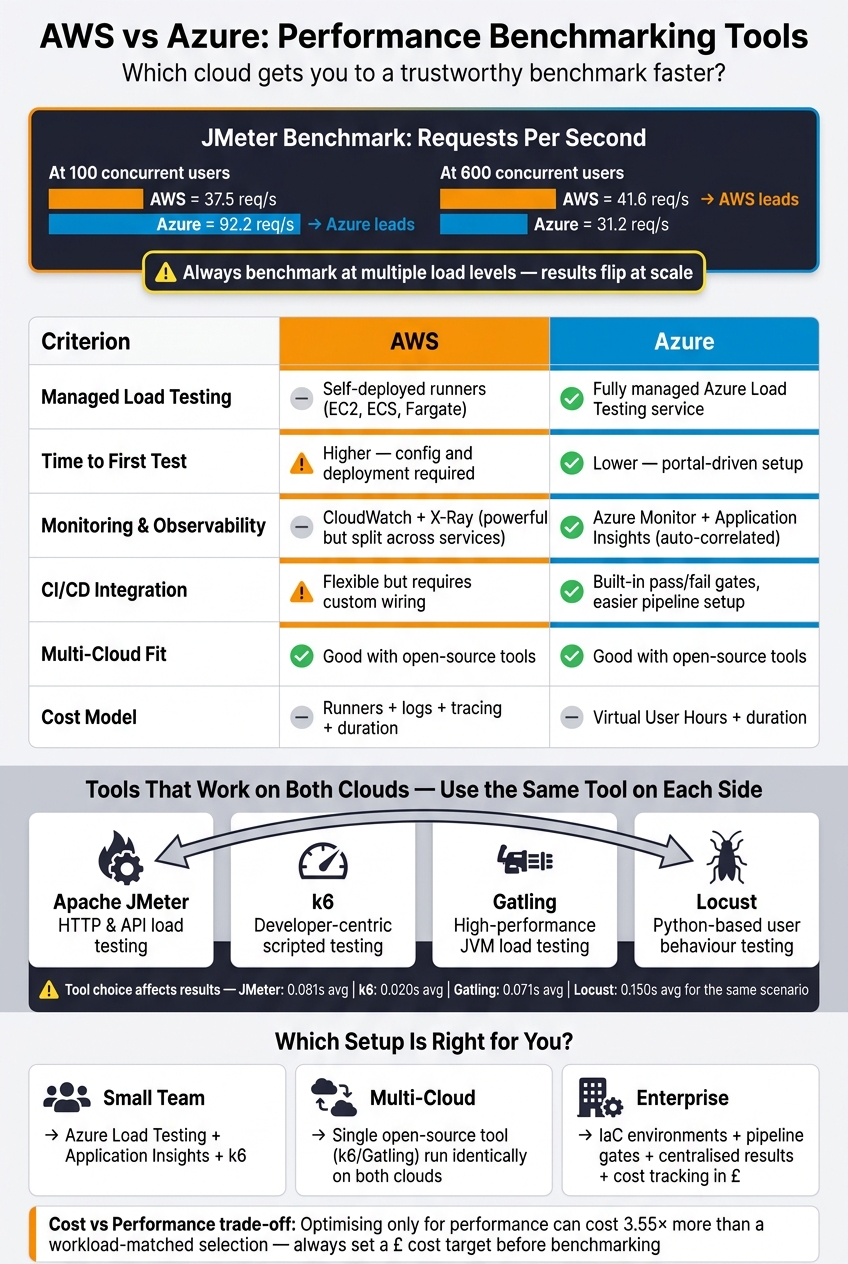 {AWS vs Azure Performance Benchmarking Tools: Side-by-Side Comparison}
:::
{AWS vs Azure Performance Benchmarking Tools: Side-by-Side Comparison}
:::
Side by side, the main difference comes down to effort. Azure gets you to a test run faster. AWS gives you more control, but you have to wire more of it together yourself.
So the better question isn't which platform offers more features. It's which one helps you get a trustworthy result with less setup.
Comparison table: setup, observability, automation, and workload fit
Azure Load Testing is faster to get going. Teams can bring existing JMeter or k6 scripts into Azure and run them with minimal setup[17][30]. AWS Distributed Load Testing takes more initial configuration before a full test is ready[13][28][32]. For smaller UK teams, especially ones without much platform engineering capacity, that gap to a first test can matter a lot.
Observability shows a similar pattern. Azure automatically correlates load-test results with platform metrics. AWS can give you deep visibility too, but teams often have to align dashboards, traces, and test windows by hand[3][17][29][30].
| Criterion | AWS | Azure |
|---|---|---|
| Managed load testing | Self-deployed test runners | Fully managed service with JMeter and k6 support |
| Time to first test | Higher - deployment and configuration required before running | Lower - portal-driven setup and script upload |
| Monitoring depth | Metrics, logs, and tracing, but split across services | Azure Monitor + Application Insights, with automatic correlation |
| Distributed tracing | X-Ray - detailed segment-level tracing, but explicit instrumentation required | Application Insights - request and dependency tracking with lower setup effort |
| Automation and CI/CD | CodePipeline, CodeBuild, and CDK Pipelines; flexible but custom wiring needed | Azure Pipelines and GitHub Actions; pass/fail gates are straightforward |
| Hybrid and multi-cloud fit | Works well when runners must sit near mixed environments using Outposts and Direct Connect | Works well when runners must sit near mixed environments using Arc and ExpressRoute |
| Cloud-native workload fit | Best when the benchmark targets the cloud-native services already instrumented in that platform | Best when the benchmark targets the cloud-native services already instrumented in that platform |
| Cost model | Cost rises with runners, logs, tracing, and test duration | Cost rises with Virtual User Hours and test duration |
For teams that run regular performance gates, Azure's built-in pass/fail criteria make pipeline integration simpler. AWS gives you more room for bespoke benchmark pipelines, but you pay for that freedom with more infrastructure-as-code work to maintain.
Native services are handy, but cross-cloud teams still need one benchmark method they can run the same way in both places.
Open-source tools that work across both clouds
If you need identical test logic across both clouds, use the same external tool on each side.
Neither platform locks you into its own tooling. Apache JMeter, k6, Gatling, and Locust all run on both AWS and Azure, and you can plug them into whichever CI system you already use.
There's one caveat, and it's a big one: the tool itself can change the result you think you're seeing. In a comparative study, the same scenario produced average response times of about 0.081 s with JMeter, 0.01959 s with k6, 0.071 s with Gatling, and 0.150 s with Locust[31]. So if you test AWS with k6 and Azure with Locust, you aren't comparing clouds at all. You're comparing tools. Pick one tool and keep it consistent across both environments.
For disk and volume testing, don't use application load generators. Use storage-specific tools instead. fio is the standard choice for Linux storage tests, while DiskSpd fits Windows storage tests; both are cloud-neutral and run across AWS and Azure[31].
| Tool | Type | Benchmark domain | Deployment pattern |
|---|---|---|---|
| Apache JMeter | Protocol-level load tester | HTTP, APIs, and other protocols | Docker on ECS/EKS or AKS; supported by Azure Load Testing |
| k6 | Developer-centric scripted load tester | HTTP and API scripting | Containers on ECS/EKS or AKS; CI pipelines on both clouds |
| Gatling | High-performance JVM-based load tester | Web and API user flows | VMs or containers on AWS and Azure; metrics exported via agents |
| Locust | Python-based user behaviour load tester | HTTP/API with user-flow scenarios | Distributed workers on EC2/ECS or VM Scale Sets/AKS |
| fio | Storage/I/O benchmarking tool | Block and file storage | Linux VMs on EC2 or Azure VMs; cross-cloud |
| DiskSpd | Storage/I/O benchmarking tool | Block and file storage | Windows EC2 or Azure VMs; on-premises Windows |
Choosing the right benchmark setup and next steps
Use the table and tool list above to pick the simplest setup that still gives repeatable results you can rely on. The right choice is the one that fits your team, your workload, and the way your organisation handles governance.
Use the rows below to match the benchmark setup to team size, workload, and governance needs.
Selection criteria for start-ups and larger enterprises
Start with the question you need answered. Set clear targets first - for example, 95% of checkout requests completing in under 800 ms at 10,000 concurrent users, with infrastructure cost staying below £X per peak hour. Without that, you don't have a decision framework. You just have a pile of numbers.
The rules below turn that into something usable.
| Situation | Recommended approach |
|---|---|
| Small team, limited DevOps capacity | Use Azure Load Testing with Application Insights, plus k6 for repeatable scenarios |
| Mature CI/CD pipeline, multi-cloud | Open-source harness such as k6, Gatling, or Locust, versioned in Git and triggered from GitHub Actions or Azure DevOps |
| Enterprise with governance requirements | Infrastructure-as-code test environments, peer-reviewed test definitions, pipeline-gated performance stages, centralised results, and audit trails with timestamps and environment tags |
| Hybrid or mixed hosting | The same open-source tool across all targets, with cloud-native observability such as CloudWatch or Azure Monitor layered on top for diagnostics |
If your internal team is stretched, Hokstad Consulting can help design a lean, repeatable benchmark setup.
Key takeaways
AWS gives you deeper and more flexible instrumentation, but it takes more setup work. Azure gives you a more managed route and gets you to a first test sooner. The better fit depends on how much platform engineering time you can spare.
For fair AWS versus Azure comparisons, cross-cloud open-source tools are still the safest option, as long as you use the same tool on both sides. And whichever setup you choose, the benchmark only matters if it leads to something concrete: an architecture decision, a right-sizing change, or a cost target checked against actual GBP spend.
A study comparing AWS instance families found that optimising only for performance made total workload costs 3.55 times higher than optimising for cost, while workload-matched selection delivered a 35.5% performance improvement over a baseline instance.[33] That sort of result only shows up when benchmarks are built with a cost limit in mind from the start.
Build benchmarking into your release process, run it again when infrastructure changes, and use the results to keep architecture and spending decisions tied to evidence.
FAQs
Which cloud is better for a first benchmark?
It depends on your workload and the setup you already have in place.
Azure is often a strong fit if your organisation already works inside the Microsoft ecosystem. It offers dependable performance and solid hybrid support, which can make day-to-day operations much smoother.
AWS may be the better choice if you need broad global reach and more advanced auto-scaling. If your traffic shifts a lot, or you’re running services across many regions, that can matter quite a bit.
For consistent benchmarking across more than one platform, PerfKit Benchmarker can automate the setup and give you repeatable results. Hokstad Consulting can tailor those tests to match your requirements.
How can I compare AWS and Azure fairly?
Normalise metrics across both platforms so you’re not comparing one vendor’s reporting quirks with another’s. A unified tool such as PerfKit Benchmarker helps keep setup and commands consistent, which makes the results far easier to trust.
Run tests during low-activity periods so background noise doesn’t muddy the picture. Pre-warm environments before you start measuring, as this helps steady caches and cuts out odd first-run behaviour. It’s also best to stick with the default benchmark settings. If you tweak too much, you can end up testing your custom setup instead of the platforms themselves.
For a clearer view beyond raw system numbers, add OpenTelemetry or APM tools to track application-level throughput and latency. That way, you’re not just seeing what the infrastructure is doing, but how the application behaves under load.
What metrics should I track in a benchmark?
Track latency metrics such as RTT, jitter, and packet loss. Also keep an eye on tail latency like p50, p95, and p99, along with TTFB, throughput, error rate, resource health, network I/O, disk I/O, and availability.
If you’re setting SLOs, focus on p95 and p99 rather than averages. Averages can smooth over the rough bits and hide slower user experiences.