
API gateways play a key role in managing traffic to APIs through rate limiting and throttling. These mechanisms ensure backend stability, fair resource usage, and protection against misuse (e.g., bots or DDoS attempts). Rate limiting caps requests within a timeframe (e.g., 5,000/hour), while throttling enforces these caps by rejecting, delaying, or queuing requests.
Here’s how four popular API gateways manage these tasks:
- AWS API Gateway: Uses the token bucket algorithm for layered limits (per-client, account, etc.), with strong AWS integration but higher costs for heavy usage.
- Kong: Offers flexible rate-limit policies and plugins, ideal for multi-cloud setups, but requires expertise for self-hosting.
- NGINX: Prioritises speed with leaky bucket rate limiting, suited for high-performance needs but lacks advanced API management features.
- Azure API Management: Provides a structured tier system for rate limits and seamless integration with Microsoft tools, though limited for multi-cloud environments.
Quick Tip: Choose a gateway based on your infrastructure, traffic patterns, and team expertise. For high traffic, distributed rate limiting and headers like X-RateLimit-Limit help manage usage effectively.
AWS HTTP API Gateway Throttling (API Rate Limiting)
Need help optimizing your cloud costs?
Get expert advice on how to reduce your cloud expenses without sacrificing performance.
How API Gateways Control Rate Limiting and Throttling
API gateways act as a central front door
for managing incoming requests, sitting between clients and microservices. This placement enables them to enforce rate limiting and throttling policies consistently across multiple services without requiring changes to individual applications. By defining these policies once at the gateway level, organisations reduce complexity and save time.
The process starts with identifying the client. Gateways use methods like API keys, OAuth or JWT tokens, IP addresses, or mutual TLS certificates to determine the request's origin. Once identified, the gateway evaluates the request against pre-set policies - often tied to subscription plans (e.g., Free, Pro, Enterprise) - to decide if it should proceed. Authentication verifies the requester’s identity, while authorisation ensures they have the right to access the requested endpoint.
In distributed environments, request counts are tracked using shared data stores like Redis. Each time a request comes in, the gateway increments a counter and checks it against the defined limit, ensuring accurate tracking even when requests are handled by different nodes. Modern API gateways, such as Kong or AWS API Gateway, are designed to handle this efficiently, adding less than 5 milliseconds of latency for JWT validation [2].
When a client exceeds their limit, the gateway enforces the policy by rejecting requests - typically returning an HTTP 429 Too Many Requests
error. Some gateways offer alternative approaches, such as queuing or delaying requests until the rate limit resets or applying gradual throttling by slowing down response times instead of outright blocking requests. To assist developers, standard headers like X-RateLimit-Limit, X-RateLimit-Remaining, and Retry-After provide information for implementing smarter retry strategies.
An API gateway is useful when it makes cross-cutting backend concerns explicit. Authentication, rate limits, routing, and observability all need a consistent layer.- Zoe Mitchell, Tech Writer
The following sections explore how top API gateways implement these features.
1. AWS API Gateway
AWS API Gateway uses the token bucket algorithm to manage requests. Each incoming request consumes one token from a bucket that refills steadily over time. If the bucket runs out of tokens, the service responds with a 429 Too Many Requests error, ensuring that traffic spikes are handled while maintaining system stability [6].
Policy Granularity
With the token bucket method as its foundation, AWS API Gateway provides a layered throttling system. Limits can be applied at different levels:
- Per-client or method limits: Controlled through usage plans.
- Per-method limits: Configurable at specific API stages.
- Account-level limits: Applied across all APIs within a Region.
- AWS Regional limits: Enforced at a broader geographical level.
By default, accounts have a limit of 10,000 requests per second, but stricter controls can be placed on sensitive API methods. For even finer control, you can pair API Gateway with AWS WAF to set up IP-based rate limiting. This allows thresholds ranging from 10 to an impressive 2 billion requests per evaluation window [3][4][7].
Enforcement Actions
When a request exceeds the set limits, the system returns a 429 Too Many Requests response. To handle this, clients should implement jittered exponential backoff retry strategies to avoid creating a retry storm
that could further strain the system [4][6]. AWS documentation notes that Usage plan throttling and quotas are not hard limits, and are applied on a best-effort basis
[8].
Scalability
AWS API Gateway’s default throttling allows 10,000 requests per second with a burst capacity of 5,000 requests across all APIs in a Region. However, in certain regions like Cape Town and Milan, these limits are lower, typically capped at 2,500 requests per second with reduced burst capabilities [3][4]. For applications dealing with high traffic or requiring asynchronous processing, API Gateway can integrate with Amazon SQS or Kinesis to buffer and smooth out request spikes. Additionally, enabling caching can help reduce backend load during peak times by serving frequently requested data directly [4].
Cloud Integration
API Gateway integrates seamlessly with AWS services like WAF for enhanced DDoS protection and Lambda for custom rate-limiting logic, such as per-tenant sliding windows [9]. AWS Cloud Consultant Sampreeth Amith Kumar emphasises:
A most valuable feature of Amazon API Gateway is how quickly we can connect to backend services and have APIs accessible from anywhere[5].
As of May 2026, AWS API Gateway boasts a 99.99% uptime and holds a PeerSpot rating of 8.2/10, with 93% of users recommending the service [5]. This robust setup offers a strong benchmark as we move on to evaluate Kong, NGINX, and Azure API Management in the next sections.
2. Kong
Kong provides both open-source and enterprise options for rate limiting. The standard rate limiting plugin is part of the open-source Kong Gateway, while the Advanced plugin - exclusive to Kong Gateway Enterprise or Konnect subscriptions - adds features like sliding windows, consumer groups, and request throttling [11][15][16]. This section explores how Kong's architecture supports rate limiting and throttling in dynamic environments.
Policy Granularity
Kong's API gateway capabilities allow for fine-grained policy control, enabling client identification and rate limiting based on various criteria, such as IP address, Consumer ID, Consumer Groups, credentials, specific HTTP headers, or URL paths [10][11][15][16]. Policies can be applied globally or tailored to specific Services, Routes, or Consumers [10][14]. The Advanced plugin also supports compound identifiers, which combine multiple criteria - like consumer and service - to create highly specific rate limiting keys [15].
Time windows for rate limits can be set over intervals ranging from seconds to years [10]. Kong supports both Fixed Window and Sliding Window algorithms, with the Sliding Window as the default in the Advanced version. The Sliding Window method reduces traffic bursts by calculating limits based on weighted averages of previous hit rates [11][12][13].
Enforcement Actions
When rate limits are exceeded, Kong responds with an HTTP 429 status and customisable JSON error messages [10][15]. Responses include headers like RateLimit-Limit, RateLimit-Remaining, RateLimit-Reset, and Retry-After, and administrators can add jitter to stagger retries [10][11][15].
The Advanced plugin introduces request throttling, which queues excess requests instead of rejecting them outright. These requests are retried at set intervals, reducing strain on upstream servers and improving the user experience [11]. However, each throttled connection uses about 220 KB of memory, making resource monitoring essential during heavy traffic [11].
Scalability
Kong supports three storage strategies to balance performance and accuracy. The local strategy stores counters in-memory on individual nodes, offering low latency but sacrificing cross-node accuracy [10][11]. The cluster strategy uses Kong's datastore (PostgreSQL or Cassandra) for consistency across nodes, though this impacts performance due to database operations on every request [10][11]. The redis strategy provides a middle ground, leveraging an external Redis server for distributed rate limiting with high performance and accuracy [10][11].
The sync_rate parameter allows administrators to choose between synchronous updates (focusing on accuracy) or eventual consistency (prioritising low latency) [10][13][15]. The minimum synchronisation interval is 20 milliseconds [15]. For high availability, Kong supports Redis Sentinel and Redis Cluster, ensuring fault tolerance in the rate limiting infrastructure [11][15]. If a Redis connection is lost, Kong automatically switches to local in-memory rate limiting until the connection is restored [11].
Cloud Integration
Kong integrates seamlessly with cloud-managed Redis providers, using modern identity protocols [10][11]. Supported options include AWS ElastiCache with IAM authentication, Azure Managed Redis with Microsoft Entra ID, and Google Cloud Memorystore [10][11][15]. These integrations simplify infrastructure management and enhance security for organisations already using these cloud platforms. This capability positions Kong as a strong contender for comparison with other platforms in later sections.
3. NGINX
NGINX takes a unique approach to rate limiting by employing the leaky bucket algorithm, which processes requests at a consistent rate. Policies can be applied at different levels, including http, server, or location[17]. Here's a closer look at how NGINX's method stands out from other gateways.
Policy Granularity
NGINX allows you to define keys using static text, variables (like $binary_remote_addr for efficient IP lookup), or a mix of both[17]. For instance, a shared memory zone of just 1 MB can handle approximately 16,000 IPv4 states[17][18].
For more advanced configurations, NGINX Plus supports additional options such as HTTP methods, headers, cookies, and JWT claims[20]. Variables like $server_name or $request_uri can also be used to create tailored rate-limiting policies[19].
Enforcement Actions
NGINX enforces rate limits by either delaying, queuing, or rejecting requests outright. The burst parameter, combined with the optional nodelay, controls how excess requests are handled[17][18]. The delay parameter introduces two-stage rate limiting: a set number of requests are allowed through without delay, after which subsequent requests are throttled until the burst limit is reached[22]. You can fine-tune responses using limit_req_status or test configurations with limit_req_dry_run[17][19].
By default, rejected requests return a 503 Service Unavailable status, but this can be changed to something like 429 Too Many Requests using the limit_req_status directive[17][19].
To handle occasional spikes above thresholds, allow between 5-15% burst capacity. If a backend limit is 50 req/sec, let client traffic burst up to 60 before limiting. Never reject outright at the exact threshold.- John Thompson, Lead Infrastructure Engineer, Dynamics CRM, Inc.[23]
Scalability
NGINX uses shared memory zones to store state information accessible by all worker processes on a single instance[17]. For distributed setups, NGINX Plus offers the sync parameter, which synchronises shared memory zones across multiple nodes in a cluster, ensuring consistent rate limiting[17][18]. However, this feature requires an NGINX Plus subscription.
In Kubernetes environments, the NGINX Ingress Controller includes a scale parameter that adjusts rate limits based on the number of active pods. This ensures global rate limits remain consistent as the cluster grows, with synchronisation across all replicas[20].
Cloud Integration
For cloud-native setups, NGINXaaS for Azure includes standard rate-limiting modules and runtime state sharing, enabling synchronised rate limiting across cloud infrastructures[21]. In Kubernetes, the NGINX Gateway Fabric and Ingress Controller provide RateLimitPolicy APIs and Custom Resource Definitions (CRDs). These features allow native management of rate-limiting policies within clusters while maintaining NGINX's high performance[19][20].
4. Azure API Management
Azure API Management (APIM) offers a five-tier policy structure that provides flexibility for managing rate limits and throttling. Policies can be applied at various levels: Global (affecting all APIs), Workspace, Product (groups of APIs), API (all operations within a single API), or Operation (a specific endpoint)[30]. This layered approach lets you establish broad protections while fine-tuning limits for specific endpoints.
Policy Granularity
APIM's tiered structure allows for detailed control over rate limiting. The platform includes rate-limit-by-key and quota-by-key policies that use expressions to identify users. This means you can throttle requests based on factors like IP addresses, JWT claims (e.g., Subject), or custom headers[24][31]. For example, to apply separate rate limits within a single API, you could use a counter-key expression like @(context.Request.IpAddress + context.Operation.Id)[31].
The system distinguishes between rate limits, which manage short-term usage (measured in calls per second or minute), and quotas, which handle longer-term usage such as monthly call totals or bandwidth consumption[24]. Classic tiers rely on a sliding window algorithm, while V2 tiers adopt a token bucket algorithm for better alignment with Azure Resource Manager standards[24].
Enforcement Actions
When policies are exceeded, APIM automatically enforces them by returning specific HTTP status codes. A 429 Too Many Requests response is issued for rate limit violations, while a 403 Forbidden response is used for quota breaches. These responses include a Retry-After header that tells clients how long to wait before retrying[25][29].
By default, APIM doesn't reveal rate limit status, but you can configure headers like remaining-calls-header-name and total-calls-header-name to display remaining quotas[27]. Specialised policies, such as llm-token-limit for managing language model tokens per minute and limit-concurrency for restricting simultaneous requests, add even more flexibility[24][26].
Because of the distributed nature of throttling architecture, rate limiting is never completely accurate. The difference between the configured number of allowed requests and the actual number varies depending on request volume and rate, backend latency, and other factors.- Microsoft Learn[24]
Scalability
APIM supports strong scaling options to handle growing demand. Azure Monitor Autoscale can automatically scale Basic, Standard, and Premium tiers (including V2 versions)[32]. Scaling is advised when capacity metrics consistently exceed 60%-70% for 30 minutes or more. For single-unit instances, scaling should start at 40% to ensure resources are available for platform updates[28].
In the Premium tier, multi-region deployment is available, allowing gateway capacity to be distributed across different locations[32]. However, rate limit counters are maintained separately at each regional gateway, meaning limits are enforced per region rather than across the entire instance[24][25]. Quotas, on the other hand, are applied globally across the APIM instance[24].
Cloud Integration
APIM integrates smoothly with other Azure services. Azure Monitor tracks capacity metrics, while Application Insights enables traffic analysis using Kusto (KQL) queries[35]. Developers can also leverage Azure Copilot and GitHub Copilot to simplify policy creation through AI-driven natural language prompts[34].
For authentication and user-based throttling, APIM supports Microsoft Entra ID (formerly Azure AD), enabling policies based on JWT claims[24]. Starting in March 2026, Azure will standardise resource limits across tiers, with the Premium tier accommodating up to 75,000 API operations and 75,000 subscriptions per instance[33]. This combination of features ensures APIM remains competitive with other leading API gateways for traffic management.
Advantages and Disadvantages
::: @figure 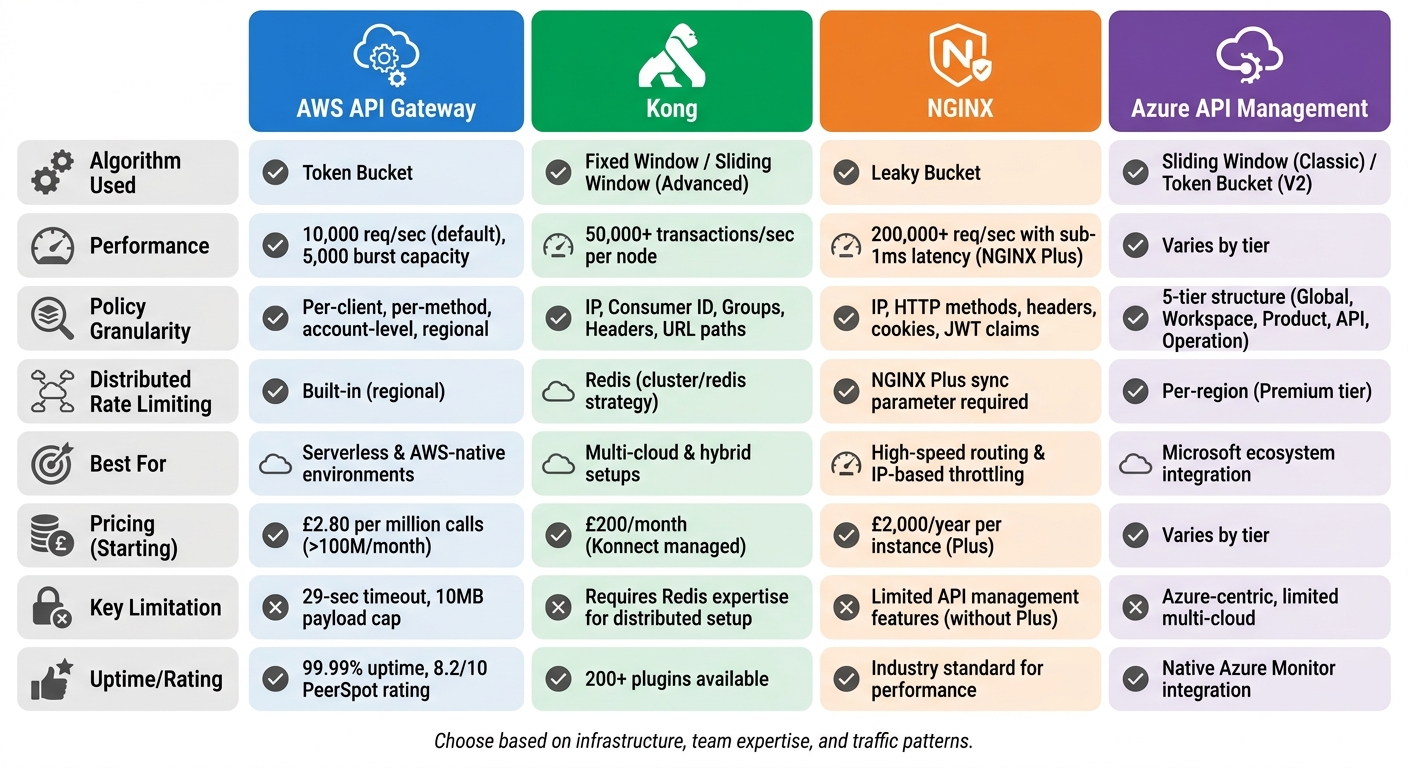 {API Gateway Comparison: AWS, Kong, NGINX, and Azure Rate Limiting Features}
:::
{API Gateway Comparison: AWS, Kong, NGINX, and Azure Rate Limiting Features}
:::
Every API gateway brings its own set of strengths and challenges, especially when it comes to rate limiting and throttling. Here's a closer look at the trade-offs associated with each gateway discussed earlier.
AWS API Gateway is an excellent choice for serverless and AWS-native environments due to its fully managed nature and automatic scaling capabilities. However, it does come with limitations, such as a 29-second timeout and a 10MB payload cap, which can hinder long-running or data-heavy requests [36]. Additionally, while it performs well at scale, costs can rise sharply - beyond 100 million REST calls per month, the rate is approximately £2.80 per million calls [36].
Kong stands out for its vast plugin ecosystem, boasting over 200 plugins, and its flexibility across multi-cloud and hybrid setups [36]. Performance-wise, Kong 3.6 is impressive, handling over 50,000 transactions per second per node on AWS c6g instances [38]. On the downside, self-hosting requires advanced operational skills and relies on Redis for synchronising rate limiting counters, which adds a layer of complexity [1]. For those opting for the managed service, Kong Konnect, the starting price is around £200 per month [36].
NGINX is all about speed and efficiency. With NGINX Plus, you get the ability to handle over 200,000 requests per second with sub-1ms latency, making it ideal for high-speed routing [38]. However, without upgrading to NGINX Plus or investing in custom solutions, it lacks modern API management features like developer portals and built-in analytics. For those considering NGINX Plus, the annual cost is approximately £2,000 per instance [36].
Azure API Management excels in enterprise governance, offering a centralised five-tier policy structure and native rate limiting that doesn’t require external databases [37]. It integrates seamlessly with tools like Microsoft Entra ID and Azure Monitor. That said, its Azure-centric design might pose challenges for organisations looking for multi-cloud flexibility [36].
Ultimately, selecting the right API gateway comes down to finding the right balance between cost, performance, and the complexity of operations required. Each option has its strengths, but the best choice will depend on your specific needs and setup.
Conclusion
Choosing the right API gateway boils down to your infrastructure, your team's expertise, and how your traffic behaves. AWS API Gateway is a go-to for serverless architectures and AWS-heavy setups, thanks to its low operational demands. On the other hand, Kong shines in multi-cloud environments and offers extensive customisation - though it requires a skilled team to handle external state dependencies like Redis. If speed and efficient IP-based throttling are your priorities, and you already have NGINX expertise, NGINX is a solid contender. For organisations deeply invested in Microsoft's ecosystem, Azure API Management provides seamless integration with built-in rate-limiting and governance features.
A practical rule of thumb? If you're managing fewer than 10 services, a full-featured gateway might bring more complexity than benefits. But when dealing with high traffic - say, over 50,000 QPS - solutions like Kong can help reduce costs by keeping per-request expenses under control.
When setting up your gateway, consider using Token Bucket or Sliding Window algorithms to handle sudden traffic spikes effectively. Include headers such as X-RateLimit-Limit, X-RateLimit-Remaining, and Retry-After to help clients understand and manage their usage. For environments at scale, distributed rate limiting ensures consistent performance across your system.
Remember, the best
gateway isn't necessarily the one with the most features - it's the one that fits your infrastructure, team capabilities, and traffic demands.
For more tips on refining your API management approach or cutting cloud hosting expenses, check out the resources at Hokstad Consulting.
FAQs
What’s the difference between rate limiting and throttling?
Rate limiting caps the number of requests a client can make within a set time frame, ensuring fair access and protecting servers from being overwhelmed. On the other hand, throttling manages the flow of requests by slowing down or reducing traffic when limits are breached, helping to keep the system stable.
While rate limiting imposes fixed quotas, throttling takes a more flexible approach to regulate traffic, making them both key tools for maintaining balance and reliability in API gateways.
How do you handle rate limiting consistently across multiple gateway nodes?
To maintain consistent rate limiting across multiple gateway nodes, it's essential to synchronise request count data between them. This is usually done through a shared state or a centralised store. By doing so, you can prevent system overloads and ensure requests are distributed fairly across the nodes.
What should my client do when it gets a 429 response?
When a client encounters a 429 response, it's essential to implement a retry mechanism. The Retry-After header provides the duration to wait before making another request. By adhering to this, you can respect the server's rate limits and avoid overwhelming it.