
AI can cut private cloud spend, trim manual work, and improve issue response - but it also adds audit, security, and control problems.
If I had to sum this up in one line, it would be this: AI works best in private cloud when I keep people in control, limit autonomy, and log every high-impact action. The upside can be strong - 30–50% savings from predictive scaling, 26.4% lower costs in mature FinOps programmes, and 75% faster deployment in some AIOps settings. But the downside is just as clear: black-box decisions, bad actions from poor data, and AI tools that may clash with UK GDPR and the Data Protection Act 2018.
Before I roll out AI in private cloud, I’d focus on four areas:
- Resource allocation and autoscaling: lower waste, but harder-to-check decisions
- Cost optimisation: less idle spend, but setup can be costly and hard
- Security and compliance automation: faster drift checks and audit support, but new attack paths appear
- AIOps and AI agents: less toil and faster fixes, but too much automation can weaken team skills and control
Looking at AI Private Clouds
Quick comparison
| Area | Main upside | Main risk | What I’d lock down first |
|---|---|---|---|
| Resource allocation and autoscaling | Lower waste and better capacity use | Opaque model decisions | Hard limits, override path, rollback |
| Cost optimisation | Lower idle spend and tighter budget control | Setup cost and hidden service links | Budget caps, approval gates, service checks |
| Security and compliance automation | Faster drift detection and audit evidence | False alerts, model drift, AI attack risk | Policy-as-code, validation, audit logs |
| AIOps and AI agents | Faster triage and multi-step actions | Over-privileged agents and chain failures | Least-privilege access, action logs, staged rollout |
My take: start with low-autonomy use cases such as cost checks and policy review. Move to higher-autonomy tasks only when audit trails, access controls, model checks, and rollback steps are already in place.
That’s the core trade-off in this piece: more speed often means less visibility unless governance is built in from day one.
1. AI for Resource Allocation and Autoscaling
Rules-based autoscaling usually kicks in after a threshold has already been crossed. AI-driven allocation takes a different route. It looks at past usage, application behaviour and workload trends to spot demand earlier. That can mean fewer sudden spikes, steadier handling at busy times and less manual tuning.
Cost and resource impact
AI can cut idle headroom by telling the difference between a short spike and a lasting rise in demand. Rules-based systems often keep extra capacity sitting there just in case, because they can't make that call well. AI can reduce that buffer by making better judgements about when extra capacity is needed, which makes spend easier to keep under control in private cloud setups.
Operational resilience
Predictive scaling tends to work best when demand follows a pattern on the calendar. AI scaling can get capacity ready before expected load increases hit. That helps during month-end reporting, batch windows and other repeat peak periods. The catch is simple: if the model reads an odd pattern the wrong way, the problem may be harder to spot than a plain threshold breach. So teams still need monitoring and fallback rules.
Governance and control
The hard part with governance is transparency. Threshold-based automation is easy to check. Predictive scaling depends on model behaviour and training data, so each change needs an audit trail, an override path and named owners. In practice, that makes AI decisions harder to audit, which is why auditability needs to be built into the process from the start, not bolted on later. Apply zero-trust controls to model endpoints and data stores so every scaling action is authenticated, logged and reversible. [1] Governance frameworks should record when AI changes capacity, why it did so and who can override it.
Security and compliance
Automated scaling can create security risks when the data behind the model is wrong or incomplete. If the model gets poor-quality usage data, it may scale in the wrong direction or at the wrong time. Log each scaling decision, review model behaviour on a regular basis and keep human oversight for exceptions.
The same controls matter when AI moves from capacity management into cost control.
2. AI-Driven Cost Optimisation and Financial Controls
Where scaling automation is about capacity, cost optimisation is about the price of that capacity - and whether the spend makes sense. AI gives teams a much tighter grip than manual reviews or fixed budget alerts.
Cost and resource impact
Private cloud waste often hides in idle or badly sized workloads. AI tackles this with anomaly detection, clustering, and predictive analytics.
Anomaly detection spots unusual consumption early. Say a non-critical application suddenly starts using more storage than normal. AI can flag that before the bill climbs. Clustering groups workloads by resource profile, which makes it easier to place similar jobs on fewer, more efficient nodes. Put together, these methods help teams find savings that manual checks often miss.
Mature FinOps implementations in financial services cut costs by 26.4% while increasing workload volume by 31.8%.[2] The gains were bigger in dev/test environments (38.7%) than in production (21.3%), largely because regulated workloads come with tighter controls.[2]
Governance and control
AI turns cost policy into action. It can tag resources by team, project, and environment, which supports showback or chargeback with near real-time attribution. Finance teams can see which department is driving spend, whether that spend matches approved budgets, and where variances are starting to appear - while the month is still in progress.
It also helps lock controls into day-to-day operations. Budget thresholds, automated alerts, and approval gates for larger changes can all be coded into policy, so the process stays consistent instead of relying on someone to remember to check a dashboard.
For private cloud, this matters a great deal. The economics can look very good when utilisation is handled well. Dell-backed research reported that private cloud solutions can reduce costs by 26% to 64% versus public cloud for certain workloads, including AI.[3] But those savings only show up when resource usage is tracked closely and governed with care. That is where AI-driven financial controls start to pay off.
The same resource data can also help spot compliance drift.
Security and compliance
AI-based configuration analysis can flag orphaned virtual machines, unused storage volumes, and unauthorised environments, work out their running cost, and trigger automated remediation. AI can also check whether encryption, access control, and logging settings meet UK and EU regulatory requirements while linking resource usage back to cost.
That same analysis can identify orphaned VMs, unused storage volumes, and unauthorised environments, then trigger remediation to cut both spend and compliance exposure.
Operational resilience
Cost optimisation can chip away at resilience if nobody checks the trade-offs. AI can model the effect of savings measures on availability, latency, and recovery time before any change is made. Savings should only be applied where actions stay within agreed RTO and RPO thresholds.
Hokstad Consulting helps define those policy boundaries so AI cost controls do not weaken availability.
That same policy data also supports security and compliance checks.
3. AI-Enhanced Security and Compliance Automation
The same data that cuts waste can also reveal drift, misconfiguration and access abuse.
Security and compliance
Private cloud security depends on spotting unusual behaviour early, not just blocking known threats. AI gives teams a better shot at doing that because it can flag anomalies sooner than rule-based controls.
Tools such as AI-enabled CSPM, SIEM and identity analytics can detect misconfigurations, threats and unusual access in real time. That can speed up detection in a big way. But there’s a catch: alerts still need to be explainable and traceable. If a system throws up warnings that no one can make sense of, you don’t have control. You have noise.
Governance and control
AI can also help with audit readiness. It logs policy actions, changes and anomalies automatically, which gives teams security evidence and control verification instead of leaving them to rely on periodic manual checks.
That said, speed on its own isn’t enough. Model drift can chip away at accuracy as environments change, and opaque decisions make alerts harder to explain. Regular model reviews, explainability requirements and human sign-off on high-impact automated actions help keep security automation trustworthy, not just fast. Security automation only works if it stays auditable as the estate changes.
Operational resilience
Apply zero-trust controls to AI monitoring and remediation pipelines so each query, policy check and action is authenticated, logged and policy-bound. That keeps AI security tooling under the same control plane as the rest of the private cloud.
4. AIOps and AI Agents for DevOps and Infrastructure Management
After monitoring comes action. AIOps helps teams spot issues, and agents can take the next step.
AIOps platforms and AI agents often get lumped together, but they do different jobs. AIOps platforms focus on observability. They spot anomalies and surface alerts. AI agents go a step further. They work across context, handle multi-step tasks, and interact with internal systems.
That move from alerts to action changes the cost, risk, and governance picture for private cloud operations.
Operational resilience
Agentic AI is moving into controlled private environments to use predictable performance, deeper observability, and stronger isolation for sensitive actions [1]. That makes sense for repetitive, well-defined operational work. But when the change could have a major effect, human oversight should still stay in place.
Cost and resource impact
Private cloud GPUs can make inference costs more predictable than variable public cloud pricing [1]. Reserved capacity can smooth spend, but only if planning is tight. A simple rule of thumb: keep steady inference and sensitive retrieval workloads in the places where cost stability matters most.
Security and compliance
Apply zero-trust controls to agent identities, model-serving endpoints, vector databases, and orchestration layers [1].
Governance and control
The table below shows the main difference between what AIOps platforms and AI agents bring to private cloud operations:
| Feature | AIOps Platforms | AI Agents |
|---|---|---|
| Core function | Observability & anomaly detection | Reasoning & autonomous action |
| Decision basis | Historical data & big data | Intent and context |
| Workflow | Rule-based or ML-assisted | Multi-step reasoning |
| Integration | SIEM, monitoring tools | ERP, CRM, internal APIs |
| Human role | Interpreting alerts | Setting intent & guardrails |
Governance should spell out what each agent can do on its own, what needs approval, who gives that approval, and what rollback path is in place. That part can't be vague. Hokstad Consulting can help define those guardrails.
Pros and Cons Across All Four Use Cases
::: @figure 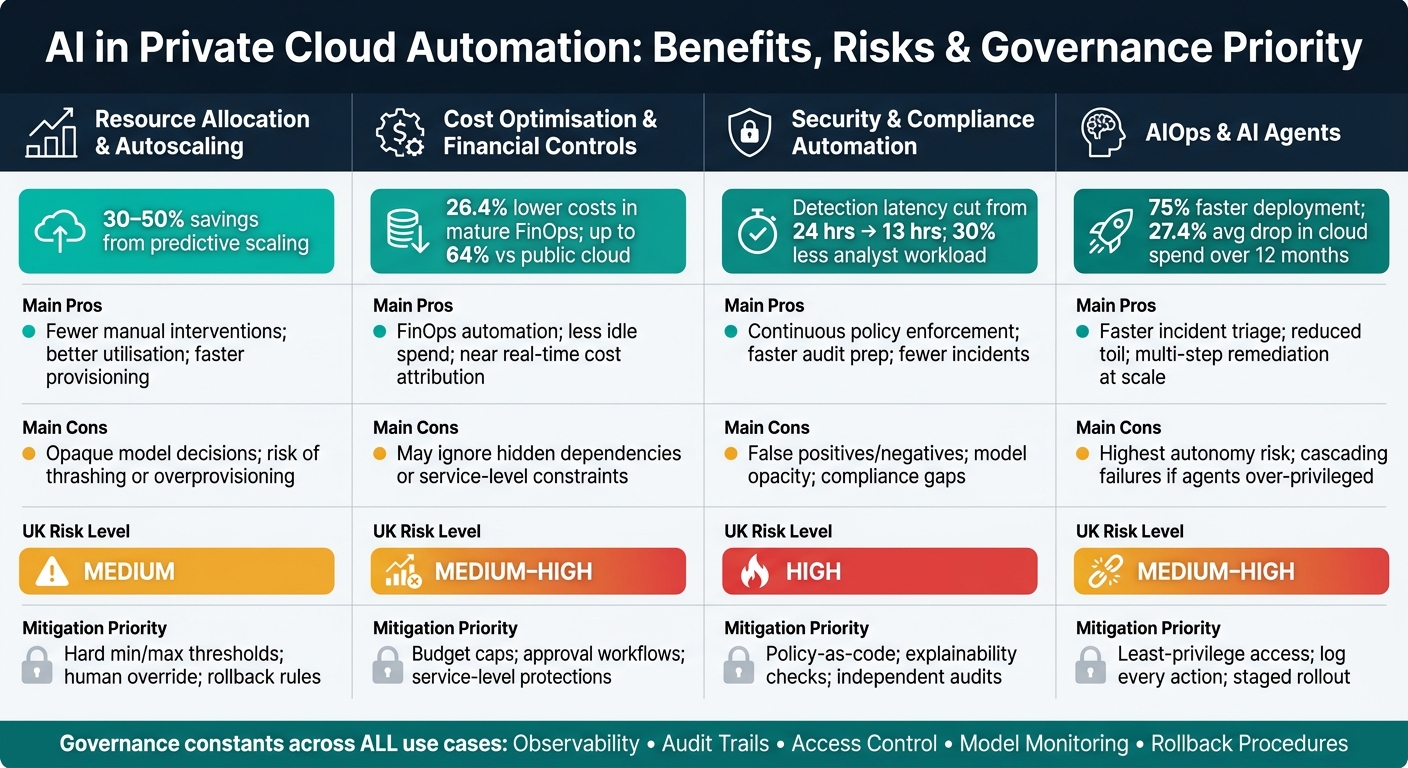 {AI in Private Cloud: Benefits, Risks & Governance by Use Case}
:::
{AI in Private Cloud: Benefits, Risks & Governance by Use Case}
:::
Across the four use cases above, the pattern stays pretty consistent: AI brings speed, consistency and scale, above all in data-heavy, rules-based workflows. Where things change is in the trade-off between speed and control.
AI can link events, apply policies and shift capacity much faster than a manual team can. In cloud security settings, AI-enhanced threat detection cut detection latency from 24 hours to 13 hours, while also reducing analyst workload by 30% [7]. On the cost side, organisations that built AI into optimisation frameworks reported an average 27.4% drop in cloud spend over 12 months [5]. For private cloud estates, those gains are hard to ignore.
But the weak points also show up again and again. Opaque decisions can be hard to justify. Noisy data can lead to bad configuration changes. New attack paths can appear around AI tooling. And AI is not free to run: it uses compute, storage and oversight time, which can eat into the savings. Research from Skyhigh Security found that 95% of AI applications carry medium or high GDPR risk, with 84% lacking encryption at rest and 83% lacking MFA integration [4]. For UK private cloud organisations working under UK GDPR or sector rules, that should set off alarm bells.
The table below shows where each use case helps, where it can fall short, and what to lock down first.
| Use Case | Concise Pros | Concise Cons | UK Risk Level | Mitigation Priority |
|---|---|---|---|---|
| Resource allocation & autoscaling | Faster provisioning; better utilisation; fewer manual interventions | Instability if AI reacts to noisy signals; risk of thrashing or overprovisioning | Medium | Set hard min/max thresholds; human override; rollback rules |
| Cost optimisation & financial controls | 23–47% cost reductions reported; FinOps automation; less wasted capacity [5] | Recommendations may ignore hidden dependencies or service-level constraints | Medium–High | Budget caps; service-level protections; approval workflows for large changes |
| Security & compliance automation | Fewer incidents; faster audit preparation; continuous policy enforcement [6][7] | False positives; false negatives; model opacity; compliance gaps if context is misread | High | Policy-as-code; continuous validation; independent audits; explainability checks |
| AIOps & AI agents for DevOps/infra | Faster incident triage; reduced toil; multi-step remediation at scale | Highest autonomy risk; actions hard to audit; cascading failures if agents are over-privileged | Medium–High | Limit agent permissions; log every action; staged rollout; step-up approvals for production |
A simple way to think about it: the use cases may differ, but the guardrails don’t change much. Observability, access control, audit trails, model monitoring and clear rollback procedures matter across the board.
Conclusion
AI is worth pursuing in private cloud automation, but only when the rollout is phased and governance stays tight.
The best place to start is with low-autonomy, low-complexity use cases. Then, once audit trails, override controls and model monitoring are working as they should, teams can move into areas with more autonomy.
Across the four use cases above, the key issue isn't just value. It's how much autonomy your control framework can safely handle. That's where things get real. A use case might look great on paper, but if the guardrails aren't there, the risk climbs fast.
The table below compares each use case by business value, implementation complexity and governance burden.
| Use Case | Potential Business Value | Implementation Complexity | Governance Burden |
|---|---|---|---|
| AI-Driven Cost Optimisation and Financial Controls | High | Low | Low |
| AIOps and AI Agents for DevOps and Infrastructure Management | Very High | Very High | Very High |
| AI for Resource Allocation and Autoscaling | High | High | High |
| AI-Enhanced Security and Compliance Automation | High | Moderate | High (UK GDPR/PCI DSS) |
As autonomy goes up, audit, access and rollback controls need to get tighter too. That's the trade-off. AI tends to deliver the most when it improves speed and consistency without taking people out of the loop.
Hokstad Consulting helps teams put the governance and automation controls in place for private cloud AI.
FAQs
Where should we start with AI in private cloud?
Start with the basics and get them right. Review your current infrastructure, spot performance bottlenecks, and set your security policies as machine-readable code. Then begin with low-risk automation, like switching off non-production environments outside office hours or putting simple log management in place.
Don’t try to scale too soon. First, make sure you have broad monitoring across your systems and add policy-as-code guardrails so AI-driven decisions remain secure and compliant.
How do we keep AI automation auditable and controllable?
Keep AI automation auditable and under control with clear visibility, detailed logs, and human checks. That means recording configuration changes, access attempts, and the reasons behind AI-led decisions.
You also need guardrails that don’t live in someone’s head. Use policy-as-code, keep monitoring systems running, and add approval steps for higher-risk actions, such as dual authorisation for major changes.
Regular audits help confirm that the automation is still doing what the business wants and still meeting regulatory requirements.
What are the main UK compliance risks of using AI in private cloud?
The main UK compliance risks centre on data protection breaches and failure to meet standards such as UK GDPR and the Data Protection Act 2018.
In plain terms, the trouble usually starts when controls don't keep up with how data is used. That can mean unauthorised access, poor storage practices, or staff and systems having more permissions than they need.
There's also the risk of compliance drift. When automated changes happen fast, teams can slip out of line without spotting it straight away. On top of that, limited model transparency, bias, and weak oversight can make it harder to interpret complex regulations in a clear and consistent way.