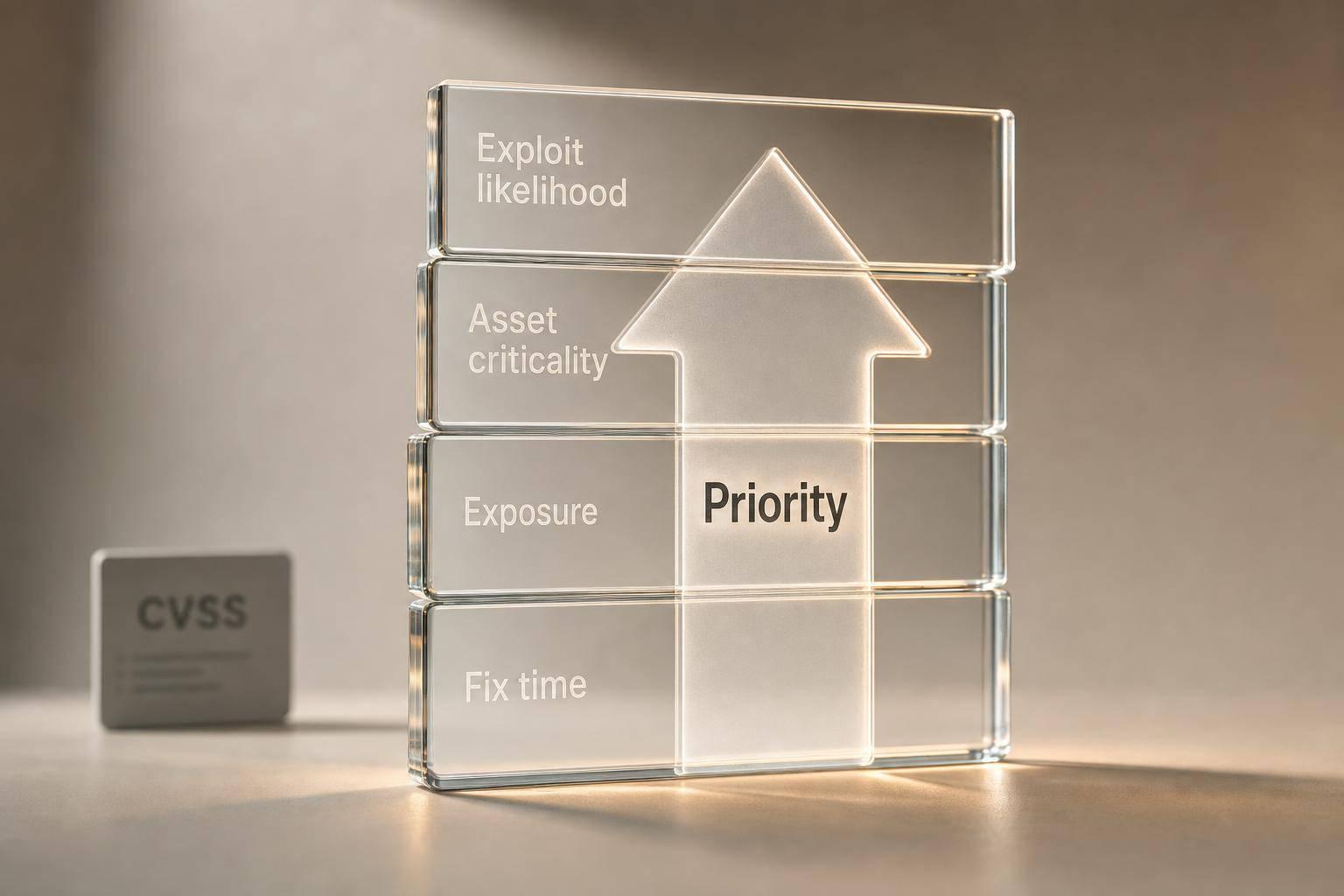
If I sort vulnerabilities by CVSS alone, I will patch the wrong things first. In 2026, the better approach is simple: I rank findings by chance of attack, asset importance, internet exposure, and time to fix.
Here’s the short version:
- CVSS is only a starting point, not the decision-maker.
- CISA KEV should push a finding to the front because it shows known exploitation.
- EPSS helps me estimate the chance of exploitation in the next 30 days.
- Asset tier and exposure change the answer fast: a medium CVE on a public payment service can matter more than a critical CVE on a test box.
- Risk-based SLAs keep patching deadlines clear, such as 24–72 hours for top-tier cases.
- Exceptions must be tracked, time-limited, and backed by controls like segmentation or WAF rules.
- In cloud and DevSecOps setups, automation and pipeline gates stop high-risk issues from drifting.
One stat sums up the problem: exploitation can begin in days, while average remediation often runs to about 57.5 days. That gap is where risk sits.
Vulnerability Risk Prioritization with EPSS, KEV, and CVSS metrics (GitLab 17.9)
Need help optimizing your cloud costs?
Get expert advice on how to reduce your cloud expenses without sacrificing performance.
Quick comparison
| Approach | What I use | Main problem | Better use |
|---|---|---|---|
| CVSS-only | Severity score | Misses business context and likelihood of attack | Baseline input only |
| Risk-based | CVSS + EPSS + KEV + asset tier + exposure + fix effort | Needs clean asset data and workflow rules | Best for daily prioritisation |
So the core idea is clear: I should fix what is most likely to hurt the business first, not what looks worst on paper.
1. Move Beyond CVSS with Composite Risk Scoring
CVSS tells you how severe a flaw is from a technical point of view. What it doesn't tell you is whether anyone is likely to exploit it, how exposed the asset is, or how hard the fix will be. FIRST warns that CVSS base scores should not be used on their own for prioritisation.[6][17] That matters, because CVSS-only queues often burn patching time on theoretical critical issues while exposed, exploitable medium findings sit open.[10][1]
That’s why many programmes now layer in exploitability signals. EPSS estimates the chance that a CVE will be exploited in the next 30 days, while CISA KEV marks vulnerabilities already confirmed as exploited in the wild.[7][1][12][13][14] A sensible approach is to use EPSS as a live risk signal and treat any CISA KEV entry as top priority, no matter what its CVSS score says.[16]
You also need a separate view of asset criticality and exposure. That means scoring things like:
- data sensitivity
- business function
- regulatory impact
- internet-facing status
- segmentation[3][9][5][15]
Remediation effort belongs in the mix too. If a high-risk issue can be fixed with a configuration change or a WAF rule, it will often make sense to move that ahead of a similarly scored issue that needs a messy, multi-team upgrade.[3][11] And when patching has to wait, compensating controls such as IPS rules or network isolation can help cut risk in the meantime.
In cloud-native estates, this gets even more context-driven. A score should reflect runtime facts, such as whether a vulnerable library is actually loaded in a production container, or whether a misconfigured security group is live on an exposed resource.[8] Hokstad Consulting helps teams build this scoring into CI/CD so high-risk findings can block deployments or kick off automated remediation.[8]
Once the score is set, weight it by asset criticality and business impact.
2. Make Asset Criticality and Business Impact Central to Prioritisation
Asset criticality and business impact should take priority over raw severity in every triage call. Once you know whether a flaw can be used in practice, the next question is simple: what would happen to the business if it were hit? The same weakness on a VPN-only HR tool and on a public customer portal does not carry the same level of risk.[21][6] On Tier 0 assets, KEV-listed issues should move straight into same-day or 24-hour action.
Asset and exposure context
A simple tier model works well here: Tier 0 crown jewels, Tier 1 critical production, Tier 2 standard production, and Tier 3 low impact. Score each asset against outage impact, data sensitivity, and operational dependency.[19][23]
Those scores should feed straight into your priority rules. That means a modest CVSS finding on a Tier 0 asset can jump ahead of a high-CVSS finding on a Tier 3 system. In plain terms, the asset matters as much as the flaw. Tiers should also set SLA timing and shape how exceptions are handled.
Operational remediation impact
Fixing a vulnerability can bring its own operational risk, especially on systems with tight uptime demands or messy rollback steps.[23][24] A Tier 0 payments platform supporting UK card transactions, for example, may only have short overnight maintenance windows. High-risk vulnerabilities still need to be dealt with inside strict SLAs, but the change itself has to land in a tightly controlled window.[2][19][23]
Where remediation impact is genuinely high - legacy systems with brittle integrations, for example - the right move is a documented risk acceptance with compensating controls and a tracked exception, not silent deferral.[2][23][24]
Cloud and DevSecOps fit
Map criticality to services and workloads, then enforce it in CI/CD and infrastructure as code so high-risk issues block Tier 0 deployments.[20][22] That turns prioritisation into part of delivery, instead of leaving it stuck in a separate security queue.
3. Use CISA KEV, EPSS and Threat Intelligence as Daily Inputs
Once criticality is set, refresh priorities every day with live exploitation signals. Knowing an asset’s criticality tier gives you only half the story. The other half is much simpler: is this flaw being used right now, is it likely to be used soon, and does current threat activity suggest your estate is in scope? That’s where daily reprioritisation with CISA KEV, EPSS and threat intelligence comes in.
Exploitability signals
Use KEV as the emergency bell and EPSS to sort everything else. If a vulnerability appears in KEV, treat it as an emergency fix with a fixed SLA. In practice, that means auto-escalating any KEV-listed finding into an emergency remediation lane.
KEV handles immediate escalation. EPSS helps you rank the rest by near-term likelihood. Use EPSS thresholds to shape patch windows, not as stand-alone triggers. Put plainly, EPSS works best as a ranking tool inside remediation buckets, not as a trigger on its own. A high score on an isolated test host does not mean the same thing as that exact score on an internet-facing payment service.[32][34][33]
Threat intelligence covers the gap that CVSS and EPSS leave behind. It answers the question they can’t: whether someone is targeting your environment now, instead of whether a vulnerability looks dangerous on paper. Focus on signs such as active exploitation, proof-of-concept release, exploit-kit use, mass scanning, ransomware linkage, and sector-specific alerts. Keep operational indicators updating every 5–15 minutes, while tactical intelligence can refresh daily or weekly.[25][27][28][30]
Asset and exposure context
Exploitability on its own isn’t enough; exposure sets the urgency. Exposure can shift a vulnerability from a low-priority item to a critical one in no time. A KEV-listed flaw on an internet-facing identity provider or cloud control-plane component needs immediate action. The same flaw on an offline internal lab machine does not.
Each finding should carry three required attributes:
- KEV status
- Exposure class
- Criticality tier
Business criticality and compensating controls can add more context where needed.[28][29][35][4]
Cloud and DevSecOps fit
In cloud estates, these signals work only if they flow straight into pipeline and runtime controls. KEV and EPSS signals should feed directly into CI/CD pipelines, container scanning, and infrastructure-as-code checks, so a KEV-listed base image or exposed Kubernetes component triggers a pipeline gate automatically.
Cloud assets change fast. That’s why daily signal ingestion matters so much here. Static queues can miss short-lived but highly exposed resources altogether.[26][18][31][36]
4. Set Risk-Tiered Remediation SLAs and a Clear Exception Process
Once daily signals are coming in, you need a clear way to respond. If SLAs aren't defined, teams drift into ad hoc queues and patch whatever is loudest. After risk is scored, the next job is simple: turn that score into a deadline.
Risk tiers and SLAs
A practical way to do this is to map exploit status to fixed remediation windows. Put KEV-listed items into the shortest SLA first. Then sort everything else by EPSS, exposure and business criticality.
| Tier | Criteria | Remediation SLA |
|---|---|---|
| Critical | CISA KEV listed, or high EPSS on an internet-facing or business-critical asset | 24–72 hours |
| High | Likely exploitable, non-critical asset | 7 days (internet-facing) / 14 days (internal) |
| Medium | Limited exploitability or lower-impact asset | 30 days |
| Low | Unlikely to be exploited, minimal business impact | 60–90 days |
Leading programmes often aim for 24–72 hours for critical MTTR, while the mean across all vulnerabilities sits at about 57.5 days.[37][38][39]
Asset and exposure context
The asset itself matters just as much as the flaw. Data sensitivity, exposure, regulatory impact and business criticality should all shift the final tier.
For example, a high-EPSS finding on a public-facing system that handles sensitive data should be treated as Critical. That same finding on a non-production internal system with no regulatory exposure may reasonably sit at Medium. Same weakness, very different risk.
Operational remediation impact
Of course, not every Critical finding can be patched inside 72 hours without knocking over a live service. That's where a time-bound exception process comes in.
If a patch can't be applied inside the normal window, the asset owner should submit a documented exception request. That request needs the business reason and the compensating controls already in place, such as:
- network segmentation
- WAF rules
- access restrictions
Keep the exception time-bound, with a cap of 30 days for Critical or High findings, and require sign-off from the CISO or risk committee. Every exception should sit in a central register with an expiry date. Otherwise, a short-term workaround has a habit of turning into a permanent, untracked risk.
Just as important, exceptions should feed straight into ticketing and workflow controls. They shouldn't live in someone's inbox or get buried in email threads.
Cloud and DevSecOps fit
In cloud-native environments, SLAs only work when tooling enforces them. Spreadsheets won't cut it.
Build tier assignments into CI/CD pipelines so Critical findings block deployments automatically. Use asset tags and pipeline gates to apply tiered SLAs across production and non-production environments. That way, the SLA becomes part of the delivery flow instead of a separate security task.
5. Align Prioritisation with Cloud-Native and DevSecOps Workflows
Once SLAs are set, the next job is to build them into delivery pipelines and live workloads. In cloud-native setups, that isn't optional. Containers can appear and vanish in minutes, serverless functions run only when called, and one weak base image can spread across hundreds of pods in no time.
Exploitability signals
Inside CI/CD pipelines, KEV status and EPSS scores mean little on their own. What matters is whether the weak code path is reachable in the live workload - not just sitting somewhere in a dependency tree.
That is why container and SCA scanners should show labels like known exploited, internet-facing or privileged workload
right inside pull request checks and CI reports. Those labels should help decide if a pull request blocks, warns, or carries on, without waiting for a separate security review.
Still, those signals only help when they are tied to the right asset and workload context.
Asset and exposure context
In multi-account, multi-region cloud estates, asset context needs to be built around services, data flows and identities. Use the same resource tags across the estate - environment, data sensitivity, internet exposure, and business criticality - so security tools group findings by things like customer-facing services or highly privileged identities, instead of dumping everything into flat severity lists.
The difference matters. A weakness on an internet-facing Kubernetes Ingress controller handling payment data is not the same risk as that very same finding in a development namespace with no sensitive data.
Operational remediation impact
Fix the base image, dependency, or security context at the source so the change rolls out in the same way to every derived workload. If a fix brings deployment risk - say, an upgrade to a widely used API gateway image - use blue/green or canary roll-outs, and make sure rollback paths are clear.
Track mean time to remediate (MTTR) by risk tier and watch change failure rates for security-led updates. That gives teams a way to improve without slowing delivery.
This shifts remediation into release and infrastructure work, instead of leaving it in a separate security queue.
Cloud and DevSecOps fit
The aim is to enforce security through the same systems used for features and defects. Create tickets in Jira or Azure DevOps automatically, with exploitability and asset context already attached. Push remediation changes - such as updated image tags or hardened network policies - through GitOps pull requests instead of separate manual steps.
Teams also need a clear line between findings that fail the pipeline and findings that only trigger warnings. Without that split, alert fatigue creeps in and delivery slows. With no gates at all, critical findings sit unresolved.[40]
For teams running this at scale across large UK cloud estates, Hokstad Consulting can help design and automate risk-aware remediation workflows that connect vulnerability prioritisation straight to deployment cycles.
6. Use Automation, Orchestration and Specialist Support to Scale
Once scoring rules and SLAs are set, automation turns them into day-to-day action across cloud estates at scale. Manual triage just can't keep pace with large cloud environments. Automation fills that gap by handling context enrichment, scoring and routing, so security engineers can spend their time on calls that need human judgement.
Exploitability signals
Pull in KEV and EPSS feeds each day, then auto-create priority tickets when they match scanned assets. KEV membership should work as a hard override: any KEV-listed CVE on an internet-facing or business-critical asset goes straight to the top remediation tier, no matter what its CVSS score says. High EPSS scores then add another layer, acting as a probability-based modifier to auto-escalate findings that haven't yet been exploited in the wild but are statistically likely to be next. [32][41][42]
Asset and exposure context
Automated discovery should keep reconciling cloud APIs, CMDBs and identity platforms, then apply consistent tags such as internet-facing
, contains personal data
, PCI environment
and Tier 1 revenue service
. When exposure changes, assets should be re-evaluated straight away so SLAs update on their own.
Operational remediation impact
Orchestration can check ownership and maintenance windows before a ticket is created, then route phased patching or rolling updates to cut disruption. Pre- and post-change checks built into the workflow also give teams a safety net, letting them roll back automatically if key metrics slip.
Cloud and DevSecOps fit
Orchestration should connect vulnerability data straight to ticketing and workflow tools, with exploitability scores and asset context attached to every ticket from the start.
Where teams need outside help, Hokstad Consulting can support the design and tuning of end-to-end automation for KEV/EPSS ingestion, prioritised routing and SLA alignment. This tends to matter most when internal capacity is tight. In practice, that means setting composite scoring rules, mapping SLAs to business impact, and checking that automation matches the organisation's risk appetite and any regulatory duties, including ISO 27001, NCSC guidance and FCA requirements.
The comparison tables below show how these controls play out in day-to-day prioritisation.
Comparison Tables
::: @figure 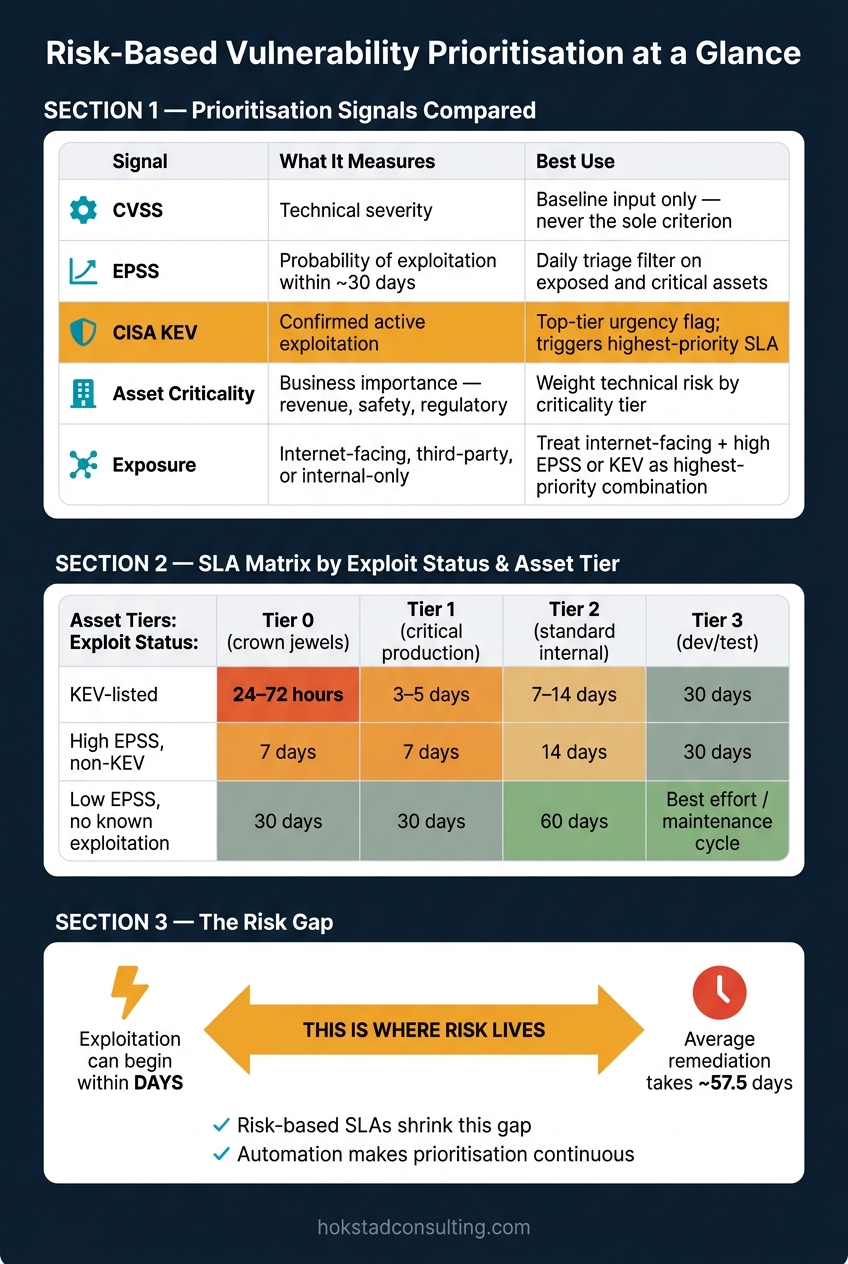 {Risk-Based vs CVSS-Only Vulnerability Prioritisation: SLA Matrix & Scoring Signals}
:::
{Risk-Based vs CVSS-Only Vulnerability Prioritisation: SLA Matrix & Scoring Signals}
:::
Use these tables to turn the scoring and SLA rules above into one triage view.
Severity-Only vs Risk-Based Prioritisation
| Severity-Only (CVSS) | Risk-Based (Composite) | |
|---|---|---|
| Inputs | CVSS base score, vendor severity label | CVSS + EPSS + CISA KEV + asset criticality + exposure + compliance context |
| Pros | Simple to put in place; no extra tooling needed | Puts effort where actual risk is highest; cuts alert fatigue |
| Cons | No exploitation or business context; over half of all CVEs score ≥7 [43] | Needs an accurate asset inventory, linked threat feeds, and agreed risk models |
| Typical outcome | Backlog filled with critical findings on low-value assets; dangerous medium issues missed | High-risk issues on critical assets fixed within SLAs; clearer audit trail for regulators |
Once the model is in place, the next step is to weight each finding by the signal that most changes its urgency.
Prioritisation Signals Compared
| Signal | What it measures | Strengths | Limitations | Best use in practice |
|---|---|---|---|---|
| CVSS | Technical severity | Industry standard; available in most scanners | No exploitation likelihood or asset context | Baseline input only - never the sole criterion |
| EPSS | Probability of exploitation within ~30 days | Data-led; brings risky medium-CVSS items to the surface | Does not reflect local asset importance | Daily triage filter on exposed and critical assets |
| CISA KEV | Confirmed active exploitation | Clear urgency signal; recognised by regulators | Not exhaustive; some UK-specific threats may not appear quickly | Top-tier urgency flag; triggers highest-priority SLA on exposed or regulated assets |
| Asset criticality | Business importance - revenue, safety, regulatory obligation | Links vulnerabilities to business impact | Needs steady classification | Weight technical risk by criticality tier |
| Exposure | Internet-facing, third-party accessible, or internal-only | Separates isolated systems from public APIs | Needs accurate topology mapping; can change fast | Treat internet-facing + high EPSS or KEV as the highest-priority combination |
These signals only help if they tie directly to deadlines.
SLA Matrix by Exploit Status and Asset Tier
The timeframes below reflect realistic targets for UK organisations. If patching cannot happen at once, documented compensating controls and a risk-acceptance sign-off are required.
| Exploit status | Tier 0 (crown jewels: payment, regulated data, identity) | Tier 1 (critical production, key revenue systems) | Tier 2 (standard internal systems) | Tier 3 (dev, test, low-impact environments) |
|---|---|---|---|---|
| KEV-listed | 24–72 hours; immediate interim controls if patching delayed | 3–5 days; interim monitoring and exposure reduction | 7–14 days | 30 days |
| High EPSS, non-KEV | 7 days; explicit exception record if complex | 7 days | 14 days | 30 days |
| Low EPSS, no known exploitation | 30 days | 30 days | 60 days | Best effort / maintenance cycle |
Different workloads need different prioritisation rules.
Compute Model Exposure and Prioritisation Signals
| Compute model | Typical exposure | Key prioritisation signals | Common risk pitfalls | Prioritisation focus |
|---|---|---|---|---|
| Traditional servers (on-premises or IaaS VMs) | Persistent, often internet-facing; long-lived OS and middleware | CVSS + CISA KEV; network exposure; configuration hardening | Slow patch cycles; forgotten legacy services; manual change control | KEV and high-EPSS OS and middleware CVEs on internet-facing or critical servers |
| Containers (e.g. Kubernetes workloads) | Ephemeral microservices; often exposed through ingress or load balancers | Image CVEs (CVSS/EPSS/KEV); orchestrator misconfigurations; ingress exposure | Patching base images without redeploying; outdated public registry images; misconfigured RBAC | High-EPSS or KEV vulnerabilities in widely used base images and exposed service libraries |
| Serverless functions | Event-driven; triggered by public APIs, messages, or storage events | Runtime CVEs; third-party library issues; API gateway exposure; IAM misconfigurations | Assuming fully managed means fully protected; over-privileged roles; neglected dependencies | Library vulnerabilities with high EPSS or KEV in functions behind public APIs or handling personal data |
| Managed cloud services | Provider patches the platform; configuration remains the customer's responsibility | Configuration and IAM issues; public endpoint exposure; provider security advisories | Publicly exposed data stores; weak encryption; overly broad firewall rules | Misconfigurations leading to data exposure or unauthorised access - prioritise over standard OS CVEs |
Tools and Support for Prioritisation at Scale
Once the scoring model is in place, the next job is making sure it stays consistent across thousands of assets. That takes tooling that keeps data in sync, not a patchwork of spreadsheets and separate queues.
A risk-based vulnerability management platform tied into CMDB and cloud inventory data helps keep asset IDs, ownership and criticality tags aligned across on-premises, cloud and container workloads. Findings can then be enriched with EPSS, CISA KEV status and business context, so composite risk scores use the same inputs throughout the prioritisation framework: KEV, EPSS, asset criticality and exposure.
Routing matters just as much as scoring. A remediation orchestration layer connected to ITSM sends prioritised findings to the right infrastructure, application or DevOps team, with the right SLA attached. Manual remediation doesn’t scale. Without a central orchestration layer, teams often end up with duplicate tickets and mismatched SLAs when several inventories, teams and remediation windows overlap.
Static scanners only show part of the picture. They can miss what’s live and exposed right now, which is why runtime-aware context needs to feed into the same prioritisation model. CNAPP and CSPM tools add context such as exposure, production status and active exploitation that static scanners can’t provide. That helps teams fix vulnerabilities that are actually reachable, not just severe on paper.
When internal capacity is stretched, Hokstad Consulting can help define risk tiers, ownership and automation playbooks for cloud and DevOps environments. That said, the operating model should stay in-house: who owns risk decisions, how exceptions get approved, and how automation rules are governed.
One common mistake is rolling out overlapping tools without clear integration or ownership. If several scanners feed separate queues and scoring systems, the result is messy: inconsistent risk scores, duplicated work and teams pulling in different directions. A better path is to start with a small set of playbooks for KEV, internet-facing and high-criticality assets, then expand only once the workflow is stable.[44]
Conclusion
Effective vulnerability prioritisation in 2026 is not about fixing every “high” on a CVSS-sorted list. The risk gap is plain: exploitation can start within days, while remediation often takes weeks [45][46].
That gap only starts to shrink when prioritisation becomes continuous instead of periodic. In practice, that means continuous, risk-based prioritisation backed by SLAs and pipeline controls. The aim is simple: cut the exposure window and make remediation part of normal delivery, not a separate clean-up task.
For UK teams, there’s another layer to this. The approach also needs to hold up under audit and regulatory review. UK regulators expect documented, risk-based decisions rather than CVSS-only queues. The takeaway is straightforward: prioritise by actual risk, automate the response, and report in business terms. Risk-based prioritisation is now a control, not a reporting exercise.
FAQs
How do I start moving beyond CVSS-only prioritisation?
Start by adding business context and threat intel from the field to your workflow.
Assess vulnerabilities using:
- asset criticality
- exploitability with EPSS
- attack exposure
Use CVSS as your baseline. Then layer in these factors to focus on vulnerabilities that pose a real, actionable threat, instead of just working through a big backlog.
What counts as a Tier 0 or Tier 1 asset?
Tier 0 and Tier 1 assets are the systems your business can’t afford to get wrong. They sit at the top of the list because they play a direct part in day-to-day operations and often hold the data attackers want most.
This group will usually include customer-facing production servers, payment platforms, and databases that store sensitive customer data.
A simple way to handle this is with asset criticality tagging. Tag your most important systems so they stand apart from lower-priority assets, such as internal test or development servers. That makes triage far less messy when time is tight.
When deciding where an asset belongs, look at:
- how important it is to the business
- whether it’s exposed to the internet
- the likely business impact if it’s compromised or goes down
When should I allow a patching exception?
Allow a patching exception only for accepted risks or false positives. In plain terms, that means cases where there’s no usable path for attack, or where fixing the issue would demand major architectural changes.
Any exception should go through a formal workflow with clear written justification and a mandatory expiry date. That keeps security oversight in place, supports compliance, and gives auditors evidence that monitoring and review are still happening.