
Validating infrastructure configurations in CI/CD pipelines ensures your code is error-free, secure, and aligned with organisational policies before deployment. This process helps prevent costly mistakes like misconfigurations, security gaps, and downtime. Here's a quick summary of how to implement it:
- Automated Validation: Use tools like Terraform, TFSec, and Open Policy Agent to check syntax, security, and compliance during CI/CD stages.
- Testing Environments: Run changes in isolated (ephemeral) or shared staging environments to safely validate functionality.
- Drift Detection: Regularly compare deployed infrastructure with code to spot and fix manual changes.
- Post-Deployment Checks: Use automated tests and health checks to confirm infrastructure is working as expected.
::: @figure 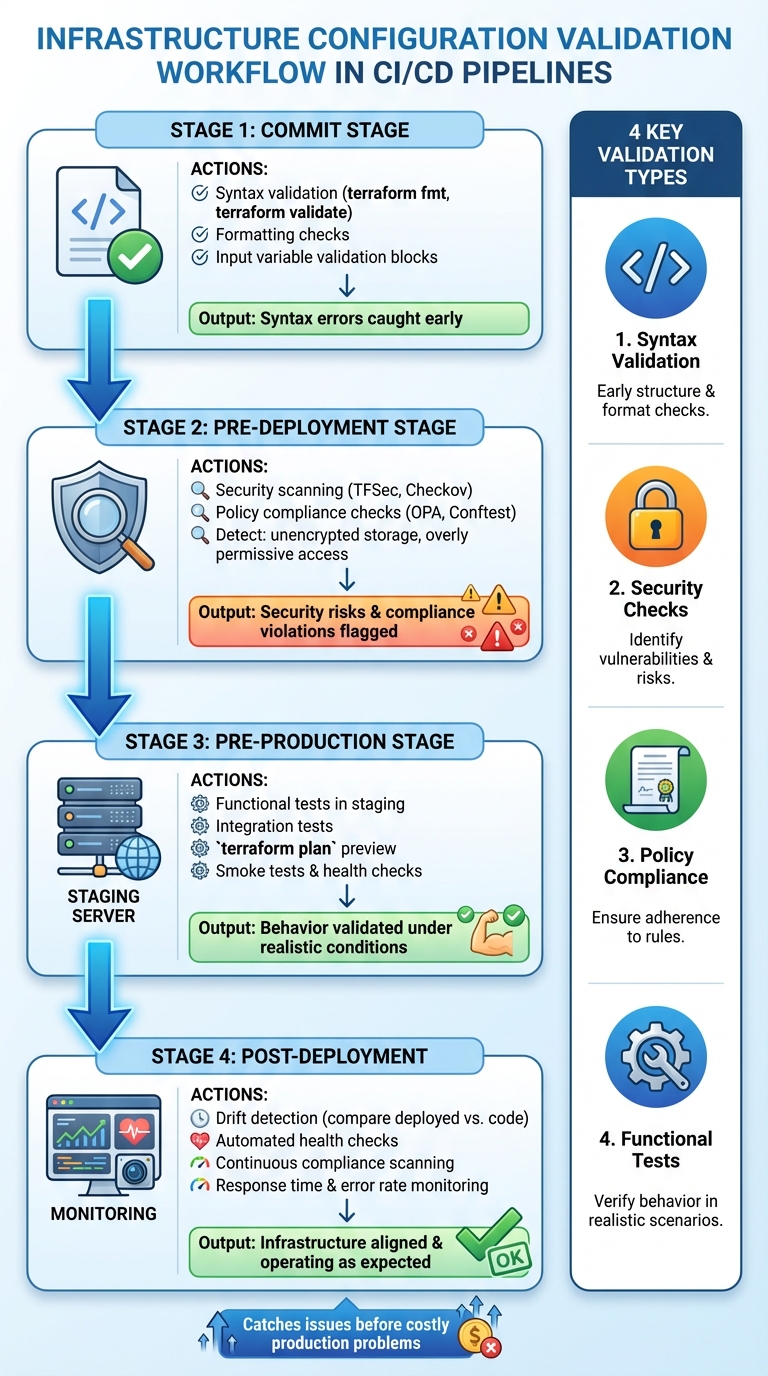 {Infrastructure Configuration Validation Workflow in CI/CD Pipelines}
:::
{Infrastructure Configuration Validation Workflow in CI/CD Pipelines}
:::
CI/CD Pipelines for Infrastructure Automation
Designing a Validation Strategy for CI/CD Pipelines
Creating a solid validation strategy for your CI/CD pipelines means aligning checks with each stage of the process, choosing the right types of tests, and concentrating on areas that pose the highest risks. At Hokstad Consulting, we've found that embedding validation checks into CI/CD stages not only strengthens security and reliability but also helps cut cloud costs by catching problems early.
Mapping Validation to CI/CD Stages
Validation checks should be tailored to fit the different stages of your CI/CD pipeline, so issues are addressed incrementally. At the commit stage, start with syntax and formatting checks. Use tools like terraform fmt and terraform validate to ensure your HCL code is correctly formatted and free of syntax errors before it progresses further in the pipeline [8][4]. Additionally, leverage Terraform's validation blocks within variable definitions to enforce input requirements - such as verifying AMI ID formats or ensuring values fall within acceptable ranges - before generating plans.
In the pre-deployment stage, focus on security and compliance. Tools like tfsec and Open Policy Agent (OPA) can analyse your planned changes against your organisation’s policies, flagging any potential security risks or compliance violations. Finally, during the pre-production stage, run functional and integration tests in staging environments. These tests validate how your infrastructure behaves under realistic conditions, ensuring it meets expectations. This step-by-step approach ensures quality control at every stage and sets the groundwork for the various validation types discussed below.
Types of Validation Checks
To build a comprehensive testing framework, focus on four key types of validation checks:
- Syntax validation ensures your IaC code is properly structured. Use
terraform validateto confirm HCL syntax correctness andterraform fmtto maintain consistent formatting. - Security checks help identify vulnerabilities and misconfigurations before deployment. Tools like
tfseccan detect issues such as unencrypted storage or overly permissive security group settings. - Policy compliance checks enforce organisational and regulatory requirements. Policy-as-code tools like OPA can automatically block CI jobs that violate rules, such as deploying resources to unauthorised regions or using non-compliant VM images.
- Functional tests verify that your infrastructure operates as intended once deployed. These tests assess factors like network connectivity, service availability, and resource dependencies, ensuring everything works as expected [1][3].
Prioritising Validation for High-Impact Areas
Once you’ve defined the types of validation checks, focus on the components that carry the highest risks. Pay special attention to critical infrastructure, such as security groups, public-facing services, databases, and high-cost resources. For instance, a misconfigured security group on a public-facing load balancer is far riskier than a tagging issue on an internal development instance [10].
Assign severity levels - ERROR, WARNING, or INFO - to validation checks so that critical issues can halt the pipeline, while minor concerns serve as alerts [9]. Use resource-specific labels like aws_instance or aws_* in custom checks to zero in on high-risk components [9]. For particularly sensitive configurations, such as those involving security or significant costs, implement blocking validations using Terraform’s input variable validations, preconditions, and postconditions. Additionally, consider adding manual approval gates for production deployments or other changes with far-reaching consequences. These human reviews act as a final safeguard, even after automated checks have passed.
Automating Validation Steps in CI Pipelines
Integrating Validation Jobs in CI Pipelines
To catch configuration errors early, set up validation jobs to run on pull requests or updates to the main branch [2][7]. Start with static code analysis to check formatting and syntax. Add security scanning tools like TFSec or Checkov to detect vulnerabilities, such as unencrypted storage or overly permissive access controls. For enforcing organisational policies, tools like Open Policy Agent (OPA) or Conftest can block deployments to unauthorised regions or flag non-compliant VM images [2].
You can structure these validation jobs to run either sequentially or in parallel, depending on your pipeline's setup. Each validation step should exit with a non-zero code if it fails, ensuring the pipeline halts immediately. This setup not only enhances error detection but also sets the stage for improving overall pipeline performance.
Optimising Pipeline Performance
Once validation jobs are in place, keeping feedback loops fast becomes crucial. Running multiple checks can slow things down, so it's smart to start with lightweight checks. Syntax validation and formatting are quick and can fail the pipeline early if basic issues exist, whereas security scans might take longer [10][7]. To streamline this process, prepare your build environment by pre-installing CLI tools and running terraform init to fetch providers and plugins ahead of time, avoiding repetitive setup for every job [10].
Set the TF_PLUGIN_CACHE_DIR variable to create a shared plugin cache. This ensures Terraform plugin binaries are downloaded once and reused across all workloads on the same machine, saving time [10]. Use parallel jobs for independent checks - run security scans alongside policy compliance checks to reduce the overall build duration. Additionally, local pre-commit hooks can help catch simple errors before they even reach the CI pipeline [10][7].
Example Pipeline Configuration
With performance optimisations in place, a well-structured pipeline might look like this: a GitHub Actions workflow for UK-based teams could include steps like checkout, OPA setup, and validation, all completing within five minutes. Using the official open-policy-agent/setup-opa action, the pipeline downloads OPA and runs custom validation commands. For example, test results can be piped into opa eval with the --fail-defined flag to ensure specific thresholds, such as maintaining test coverage above 70% [2]. If these thresholds aren't met, the job fails immediately, preventing progress of subpar code.
For AWS users, CodeBuild can handle continuous integration tests for Terraform code, using frameworks like Terratest for end-to-end validation [11]. Divide your pipeline into clear stages - syntax validation, security scanning, policy compliance, and functional testing. Each stage should clearly report its status, making it easy to pinpoint failures and their causes.
Need help optimizing your cloud costs?
Get expert advice on how to reduce your cloud expenses without sacrificing performance.
Validating Infrastructure in Test and Staging Environments
Using Plans and Previews to Validate Changes
Before rolling out changes to staging, it’s crucial to preview what those changes will do. Tools like terraform plan, Kubernetes dry-runs, or CloudFormation Change Sets make this possible. For example, running terraform plan generates a detailed execution plan that outlines the changes to your resources. This step can quickly flag destructive actions, like accidentally deleting a critical database, allowing you to stop the pipeline immediately [18][19].
Validation starts early in the process with input variable rules and preconditions, which block operations if configurations don’t meet the required standards. Incorporating the terraform plan -detailed-exitcode command into your CI/CD pipelines adds another layer of automation. This command helps detect unexpected changes (exit code 2) or confirm that no changes are needed (exit code 0), streamlining automated approval workflows [18]. Once plans are verified, you can move forward with confidence to thorough testing in dedicated environments.
Ephemeral vs. Shared Test Environments
After previewing changes, the next step is testing them in environments that mimic production. Temporary environments, or ephemeral environments, are created specifically for a single validation run and are destroyed immediately after [14]. These environments, defined entirely through Infrastructure-as-Code (IaC), ensure consistency and prevent configuration drift. Their creation and teardown can be automated within CI/CD pipelines, offering an isolated space to test each change. This approach is particularly effective for microservices architectures, where Kubernetes-native pipelines can validate individual services independently [12].
On the other hand, shared staging environments are long-lived and designed to mirror production as closely as possible. These environments are ideal for simulating deployments and maintaining parity with the live system [15]. Both ephemeral and shared setups are valuable tools for avoiding misconfigurations and ensuring infrastructure consistency.
Running Functional and Integration Tests
Once staging environments are set up, it’s time to validate the behaviour of your infrastructure through targeted tests. Start with smoke tests and health checks to confirm basic functionality. These tests ensure networks are routing correctly, services are responding on expected ports, and load balancers are distributing traffic as intended [13][15]. To further secure your pipeline, integrate Dynamic Application Security Testing (DAST) to scan for runtime vulnerabilities, such as authentication flaws or server misconfigurations, before changes reach production [16].
Integration tests play a vital role in verifying workflows and data pipelines. Use specialised tools to confirm that notebooks and workflows function as expected [17]. Keep an eye on technical metrics like response times and error rates during testing to catch potential issues early [15][17]. Automated deployment validation, including smoke tests and health checks, should also be part of your process. If a deployment fails these validations, automated rollbacks can restore the system to its previous state [15][17]. Finally, regular deployment rehearsals in staging environments that closely resemble production help uncover issues before they affect end users [15].
Continuous Compliance, Drift Detection, and Post-Deployment Validation
Once your infrastructure is deployed, the work isn't over. Continuous compliance, drift detection, and post-deployment checks ensure everything stays aligned with your defined code and operates as expected.
Detecting and Resolving Configuration Drift
Configuration drift happens when the deployed infrastructure no longer matches what's specified in your Infrastructure as Code (IaC). This often stems from manual changes, which can result in inconsistent and unpredictable environments [5]. The solution? Always make updates through your IaC code, not directly on deployed systems [5].
To spot drift, regularly run terraform plan. This command compares your current setup with the desired state in your code. For a more automated approach, use HCP Terraform’s health checks to validate check blocks, preconditions, and postconditions. If something like an expired API gateway certificate crops up, you'll get an alert before it disrupts future updates [3].
When drift is detected, reapply your IaC configuration. Thanks to Terraform's idempotence, running terraform apply resets your infrastructure to match the code, no matter what manual changes were made [5]. Automating this process - triggering reapplication workflows when drift is found - can save time and ensure stability. After resolving drift, health checks can confirm everything is back on track.
Post-Deployment Health Checks
Automated health checks after deployment confirm your systems are functioning as intended. Terraform’s check blocks are particularly handy - they can flag problems without interrupting operations. For instance, you could use a check block to test if your website returns a 200 status code by sending an HTTP request to its endpoint [3].
For more thorough testing, tools like Terratest let you write end-to-end tests in Go. These tests deploy real infrastructure and verify functionality through methods like API calls, HTTP requests, or SSH connections [20][22]. Such checks ensure that network routing works, services respond on the correct ports, and components integrate seamlessly.
Enforcing Continuous Compliance
To maintain compliance, define organisational and regulatory standards as code using tools like Checkov, Open Policy Agent (OPA), or Pulumi Policies. OPA, in particular, is a powerful tool for embedding policy-as-code into CI/CD pipelines. As the Open Policy Agent documentation explains:
OPA is a great tool for implementing policy-as-code guardrails in CI/CD pipelines. With OPA, you can automatically verify configurations, validate outputs, and enforce organisational policies before code reaches production [2].
For ongoing compliance, audit modes can continuously scan resources without disrupting operations. Pulumi Policies, for example, can operate in Audit
mode to review resources - whether managed by Pulumi, Terraform, CloudFormation, or created manually. Violations are then centralised into a single report, giving you a clear view of your compliance status [21].
Incorporating these practices not only ensures compliance but also simplifies DevOps workflows and helps manage operational costs. If you're looking to implement these strategies effectively, Hokstad Consulting (https://hokstadconsulting.com) offers expertise in optimising cloud infrastructures and DevOps processes, ensuring your CI/CD pipelines remain compliant and efficient.
Conclusion
Ensuring infrastructure configurations are validated within CI/CD pipelines lays the groundwork for deployments that are reliable, secure, and cost-efficient. By weaving validation checks throughout the pipeline - from the moment code is committed to post-deployment monitoring - you can catch and resolve issues before they escalate into costly production problems. Tools like LocalStack, a local cloud emulator, can further reduce development expenses during testing stages [6]. Catching Infrastructure as Code errors early also helps avoid the financial and resource strain associated with outages and extensive rework.
A well-structured validation strategy incorporates automated testing, drift detection, and compliance checks into the CI/CD process. This approach keeps your infrastructure aligned with both defined configurations and regulatory requirements. By doing so, your CI/CD pipeline becomes a proactive system for mitigating errors. As Group107 aptly states:
Policy as Code makes compliance an engineering problem, not a bureaucratic one. It empowers developers with fast, automated feedback, enabling them to build securely and compliantly from the first commit [23].
For organisations in the UK, transitioning from basic validation to fully automated processes demands both expertise and careful planning. Hokstad Consulting (https://hokstadconsulting.com) offers specialised services in DevOps transformation and cloud cost management, helping organisations implement automated CI/CD pipelines while cutting cloud expenses by 30–50%. Their tailored solutions range from initial cloud cost audits to ongoing monitoring and security optimisation.
Starting with essential validation checks, documenting processes, and scaling efforts gradually can lead to faster deployments, fewer incidents, and reduced operational costs as your infrastructure grows.
FAQs
How do I add configuration validation to my CI/CD pipeline?
To include configuration validation in your CI/CD pipeline, make it a distinct step that runs before deployment. Tools like Open Policy Agent (OPA), Terraform's validate command, or Checkov are excellent options. These tools return a non-zero exit code if validation fails, effectively blocking invalid configurations from moving forward.
Begin by adding a validation job to your pipeline (whether you're using GitHub Actions, GitLab CI, or Jenkins) right after the code checkout stage. In this job, install the necessary tool for validation. For example:
- For OPA:
pip install conftest - For Checkov:
pip install checkov
Then, run the tool against your infrastructure code. If you're working with Terraform, you might use the following commands:
terraform init -backend=false
terraform validate
Make sure your pipeline is configured to treat any validation failure as a job failure. This ensures that non-compliant code won't proceed further in the pipeline. Additionally, consider generating validation reports for better insight into the results. Over time, as your infrastructure evolves, you can update rules or policies to keep your validation process aligned with your requirements. This method promotes reliable and consistent deployments.
What are the best tools for identifying configuration drift in infrastructure?
Configuration drift happens when your infrastructure's current state no longer matches the planned, version-controlled setup. To tackle this effectively, tools like Firefly can be a game-changer. Firefly fits right into CI/CD pipelines, providing real-time alerts for drift, checking compliance, and enforcing policies after deployment.
By keeping an eye out for unauthorised changes - like manual tweaks made directly in cloud platforms - Firefly ensures any drift is spotted immediately. This gives organisations the chance to halt or adjust deployments to stay in sync with the original configuration. Adding drift detection to your CI/CD process not only strengthens compliance but also helps prevent issues like security gaps or performance hiccups caused by misconfigurations.
What is the difference between ephemeral environments and shared staging environments in testing?
Ephemeral environments are temporary setups designed for specific tasks like testing or feature development. These environments are created on-demand, used briefly, and then automatically removed. This approach ensures that developers or teams can work in isolated, clean spaces, free from disruptions caused by others.
In contrast, shared staging environments are more permanent and cater to multiple teams. They are primarily used for testing integrations and preparing for production releases. While shared environments encourage collaboration, they can sometimes cause bottlenecks or conflicts, especially when teams work on overlapping updates.
The appeal of ephemeral environments lies in their ability to minimise dependencies and avoid conflicts, offering a smoother and more consistent experience - qualities that align perfectly with modern CI/CD practices.