
Renewing cloud commitments can save your organisation up to 72% on infrastructure costs. But without proper planning, you risk paying higher on-demand rates or locking into unsuitable contracts. Here's what you need to know:
- Start Early: Begin planning 6–12 months before renewal to gather data, negotiate better terms, and avoid rushed decisions.
- Understand Commitment Types: Choose between spend-based (flexible but lower discounts) or resource-based commitments (higher savings but less flexibility).
- Analyse Usage: Review historical data to identify under-utilised resources and avoid paying for unused capacity.
- Forecast Needs: Use past trends and business goals to predict future cloud requirements, adding a 10–20% buffer for unexpected growth.
- Negotiate Smartly: Request renewal pricing early, negotiate rollover credits, and time discussions around provider fiscal deadlines for better deals.
Quick Tip: Auto-renewal options can help ensure uninterrupted discounts but should be managed carefully to avoid unnecessary costs.
This guide covers strategies for AWS, Azure, and Google Cloud, helping you make informed decisions to optimise cloud spending and avoid common pitfalls.
Cloud Commitments and Renewal Basics
What Are Cloud Commitments?
Cloud commitments are agreements where you pledge to use or spend a certain amount on cloud services over a set period - usually one or three years - in exchange for reduced costs [4][7]. Instead of being tied to physical resources, these commitments come as billing discounts applied to eligible on-demand usage [8].
With on-demand pricing, providers factor in a risk premium to cover underutilisation [9][7]. By committing upfront, you take on that risk, which translates into significant savings. For instance, Azure reservations can offer discounts of up to 72%, while other major providers may go as high as 75% [7][8][11].
There are two primary types of cloud commitments:
- Spend-based commitments: Examples include AWS Savings Plans and Azure Savings Plans. These require a commitment to a specific monetary amount per hour, offering flexibility across resource types and regions.
- Resource-based commitments: Examples include AWS Reserved Instances and Azure Reservations. These are tied to specific resource configurations - like instance type, region, and operating system - and generally yield higher discounts [8][7].
To illustrate, Hans De Kruif, a Platform Engineer and Azure Cost Manager at ABN AMRO, shared that his organisation saved over €1 million monthly by leveraging Azure reservations [10]. Similarly, Carlsberg Group reported 45–65% savings on cloud costs by using Azure pricing offers, including Reserved Instances for Windows and SQL Server [10].
Payment structures for these commitments usually fall into three categories:
- All Upfront: Full payment at the start, offering the maximum discount.
- Partial Upfront: A portion paid initially, with the rest billed at a reduced hourly rate.
- No Upfront: No initial payment, but a discounted hourly rate applies throughout the term [8].
The standard commitment terms are typically one or three years [8]. Understanding these models is key to managing renewals effectively.
Renewal Timelines and Policies
Before diving into renewal policies, it’s essential to grasp the structure of these commitments, as renewal processes vary widely across providers.
AWS requires manual action for renewals. When Reserved Instances or Savings Plans expire, your resources immediately switch back to full on-demand rates. To maintain discounts, you need to manually repurchase or queue new commitments, often using tools like AWS Cost Explorer [13].
Azure, on the other hand, offers flexibility with an auto-renewal option. If enabled, a replacement reservation is automatically purchased when the current one expires. This is particularly helpful for long-term, stable workloads that benefit from uninterrupted discount coverage [2].
Google Cloud provides an Auto-renewal
feature for resource-based Committed Use Discounts (CUDs). When enabled, the commitment renews for the same term - either one or three years - at the current on-demand price. Auto-renewals occur at 12:00 AM US and Canadian Pacific Time on the renewal date. You can toggle this feature on or off anytime before the commitment expires [6].
| Provider | Auto-Renewal Available | Standard Terms | Discount Range |
|---|---|---|---|
| AWS | No (manual or queued) [13] | 1 or 3 years [13] | Up to 66–72% [13] |
| Microsoft Azure | Configurable auto-renewal [2] | 1, 3, or 5 years [2] | Up to 65–72% [2] |
| Google Cloud | Configurable auto-renewal (CUDs) [6] | 1 or 3 years [6] | Varies by resource [6] |
For projects with predictable workloads, enabling auto-renewal ensures continuous discount coverage and avoids gaps. However, if a project has a defined end date, disabling auto-renewal prevents unnecessary costs for unused commitments [6]. No matter the provider, setting up utilisation alerts is a smart move. These alerts notify stakeholders if usage drops below a specific threshold, helping to keep spending in check [2].
Preparing for Cloud Commitment Renewals
Analysing Current Cloud Usage and Spend
Start planning for your cloud commitment renewal well in advance - ideally 6–12 months before the contract expires. This gives you time to gather accurate data, secure competitive quotes, and improve your negotiating leverage [16]. Unfortunately, many organisations leave this task until just three months before renewal, which can limit their options [18].
Begin by collecting detailed usage data, focusing on key metrics like CPU, memory, storage, and how much of your discounts you've actually used [15, 17]. Look at your spending trends over the past year to identify patterns, such as seasonal fluctuations or consistent growth [15, 17]. If you're using Google Cloud, pay close attention to how your commitments are structured and the discount percentages tied to them [12].
Next, identify under-utilised resources. Use commitment utilisation reports to compare your actual usage against what you've committed to. Resources running at less than 50% utilisation could be downsized, but make sure to factor in predictable low-usage periods, like seasonal workloads, before making decisions [15, 17].
It's also crucial to request renewal pricing from your cloud provider 6–12 months before your contract ends [15]. Many contracts include annual price increases (usually 3–5%) or require renewal at the current list price minus your original discount [15]. Without safeguards, renewal costs can jump by 10–20% or more [17]. To make an informed decision, compare the renewal pricing with the cost of purchasing new commitments at today's market rates.
Document everything - usage reports, active commitments (including terms and discounts), and market pricing benchmarks [15]. This level of preparation not only makes you a stronger negotiator but also ensures you're getting the best deal possible.
Once you've gathered and analysed your current usage data, the next step is to forecast your future requirements.
Forecasting Future Cloud Needs
Use your historical data as a foundation for predicting your future cloud requirements, aligning these projections with your business objectives. Analysing 12–24 months of usage history can reveal growth trends and seasonal patterns, which you can then match to your strategic goals [15]. For example, upcoming product launches, entering new markets, or expanding your customer base will likely increase your cloud consumption.
Collaborate with your development and product teams to understand their roadmaps and planned investments [15]. If your company is expecting a 50% increase in customers next year, you'll need to estimate how that growth will impact your compute, storage, and data transfer needs [15]. A 90-day spending and usage snapshot can serve as a reliable baseline for these forecasts.
To avoid over-committing, consider adding a 10–20% buffer to your projections. This allows for unexpected growth while avoiding wasted budget on unused resources [15]. Sharing these detailed forecasts with your cloud provider can also help justify the level of commitment you're requesting [16].
Finally, evaluate whether your current commitment term lengths still suit your business. One-year commitments offer flexibility to adapt to changing needs, while three-year commitments come with steeper discounts but tie you into a longer-term arrangement [15, 17]. Establishing a renewal planning committee with representatives from finance, engineering, product, and procurement ensures your decisions align with the organisation's overall priorities [15].
How to Structure, Negotiate, and Win the Azure Commitment Game
Renewal Options and Strategies by Provider
::: @figure 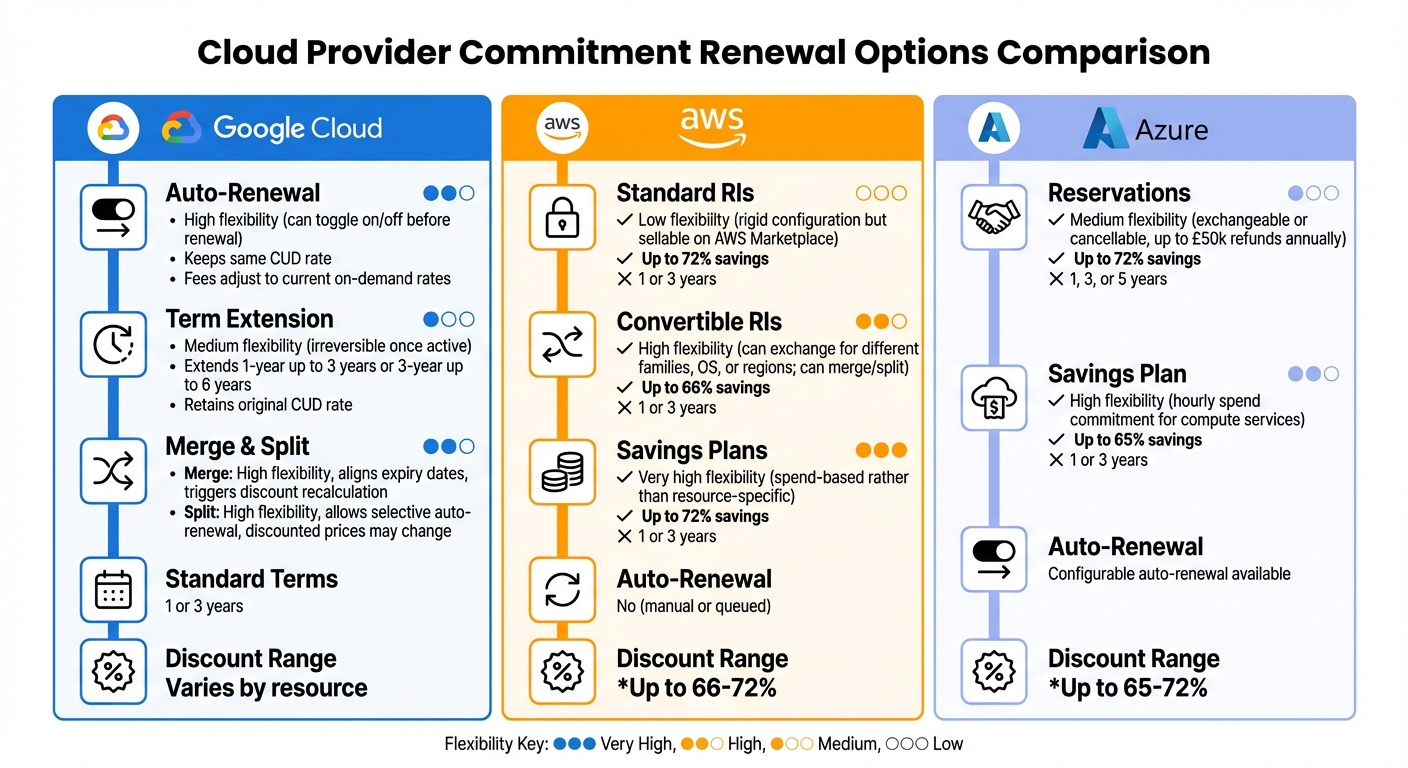 {Cloud Provider Commitment Renewal Options Comparison: AWS vs Azure vs Google Cloud}
:::
{Cloud Provider Commitment Renewal Options Comparison: AWS vs Azure vs Google Cloud}
:::
Google Cloud Commitment Renewal Options
When it comes to managing cloud commitments, Google Cloud offers several tools to help you optimise costs while maintaining flexibility. One key feature is auto-renewal, which automatically renews your commitment for the same term (1 or 3 years) upon expiration. This feature can be turned on or off at any time before the renewal date, giving you control over your cloud spend. While the discount rate stays the same, the fees are adjusted to reflect current on-demand rates [6][12].
Another option is term extensions, which allow you to customise the end date of your commitment. For instance, a 1-year commitment can be extended up to 3 years, and a 3-year one can go up to 6 years [5][14]. This is particularly useful for aligning commitments with project timelines. However, it’s worth noting that you need to act within a specific time frame - 4 months for 1-year plans and 1 year for 3-year plans - and once extended, the new term cannot be shortened or undone.
Google Cloud also provides the ability to merge commitments to align expiry dates or split a commitment for more granular control over auto-renewal settings [12][14]. Splitting is especially helpful if you want to auto-renew only a portion of your resources. Be aware, though, that both merging and splitting will lead to a recalculation of discounts.
| Feature | Description | Flexibility | Discount Impact |
|---|---|---|---|
| Auto-renewal | Automatically renews commitment at expiry | High; can be toggled on/off before renewal | Keeps the same CUD rate; fees adjust to current on-demand rates [6][12] |
| Term Extension | Extends a 1-year term up to 3 years or a 3-year term up to 6 | Medium; irreversible once active | Retains the original CUD rate for the extended period [5][14] |
| Merge | Combines multiple commitments into one | High; aligns expiry dates to the furthest date | Triggers a recalculation of discounts [12][14] |
| Split | Divides one commitment into smaller ones | High; allows selective auto-renewal | Discounted prices for split commitments may change [12][14] |
Next, let’s explore how AWS and Azure approach their commitment options, which cater to a variety of workload needs.
AWS Reserved Instances and Azure Reservations
AWS offers two primary commitment types: Reserved Instances (RIs) and Savings Plans. Standard RIs provide discounts of up to 72% but come with fixed configurations. On the other hand, Convertible RIs allow you to exchange them for different instance types, operating systems, or regions, though the discounts are slightly lower at up to 66% [21]. A unique feature of AWS is its Marketplace, where unused Standard RIs can be sold, giving businesses an exit strategy.
AWS Savings Plans take a more flexible approach, focusing on a commitment to an hourly spend (in pounds sterling) rather than specific resources. This model offers savings of up to 72% and applies across multiple services, making it ideal for dynamic environments [19].
Azure also provides commitment options tailored to varying workloads. Azure Reservations can save up to 72% on specific virtual machines and allow exchanges or cancellations, though refunds are capped at £50,000 annually [7][21][22]. Alternatively, the Compute Savings Plan requires an hourly spend commitment and offers up to 65% savings. This plan applies discounts to any VM within the same group and region, even if the instance size changes [22].
| Provider | Option | Timelines | Flexibility | Savings Potential |
|---|---|---|---|---|
| AWS | Convertible RIs | 1 or 3 Years | High; can exchange for different families, OS, or regions; can merge/split | Up to 66% [21] |
| AWS | Standard RIs | 1 or 3 Years | Low; rigid configuration but sellable on AWS Marketplace | Up to 72% [21] |
| AWS | Savings Plans | 1 or 3 Years | Very high; spend-based rather than resource-specific | Up to 72% [19] |
| Azure | Reservations | 1 or 3 Years | Medium; exchangeable or cancellable (up to £50k refunds annually) | Up to 72% [7] |
| Azure | Savings Plan | 1 or 3 Years | High; hourly spend commitment for compute services | Up to 65% [22] |
The real challenge lies in balancing two competing goals: securing the highest possible savings whilst keeping commitments flexible enough to adapt to business and workload changes.
– Andrew DeLave, Senior FinOps Specialist, ProsperOps [20]
For predictable workloads, resource-specific commitments like Standard RIs, Azure Reservations, or Google Cloud’s resource-based CUDs deliver the steepest discounts. Meanwhile, spend-based options like AWS Savings Plans or Google Cloud Flexible CUDs offer the adaptability needed for evolving infrastructures.
Need help optimizing your cloud costs?
Get expert advice on how to reduce your cloud expenses without sacrificing performance.
Negotiation Strategies for Cloud Commitment Renewals
Tactics for Successful Negotiations
Once you've laid the groundwork, it's time to focus on the negotiation process itself. The best results come from starting negotiations early - ideally 12–18 months before your current contract expires[24]. This window gives you the chance to review your cloud usage, eliminate unnecessary resources, and establish a lean baseline for your next agreement.
If your organisation spends over £750,000 annually, you might qualify for tailored Enterprise Discount Programs or Private Pricing Agreements[23]. For even larger commitments (around £3.75M+ per year), discounts can range from 20–30% off the standard rates[3].
Timing your negotiations strategically can also make a huge difference. Providers often push for deals around their fiscal year-end (e.g., Microsoft’s 30th June) or quarter-end deadlines, giving you extra leverage as their sales teams aim to hit targets[3]. Conduct a detailed usage analysis to ensure your licence counts are accurate and address any compliance issues. This avoids the risk of providers using penalties as a bargaining tool[24].
Consider requesting flexible ramp-up structures that start with lower spending and scale as your usage grows. This prevents you from overpaying in the early stages[23][3]. Additionally, negotiate provisions such as rollover credits for unused funds and fixed unit rates or caps on annual price adjustments tied to the Consumer Price Index[23][3]. For larger commitments, it's often beneficial to escalate discussions to senior executives who can authorise greater discounts[23].
Working with Cloud Providers
Strong relationships with cloud providers are key to successful negotiations. Ensure your IT, Finance, and Procurement teams work together seamlessly to present a united front, avoiding situations where providers exploit internal disagreements[24]. Highlight credible alternatives to strengthen your bargaining position[24][3].
When drafting contracts, include a no automatic renewal
clause to prevent unwanted increases without a formal renegotiation[23]. For organisations with global operations, negotiate limits on price increases tied to currency fluctuations to maintain financial predictability[3]. Calculate the breakeven point to ensure the savings from the commitment justify the investment[7].
Lastly, forecast your organisation's needs over the next 3–5 years, using both conservative and optimistic growth projections. This will help you determine realistic commitment levels, protecting your organisation from either underutilisation or excessive spending[23].
How Hokstad Consulting Can Help with Renewals

Cloud Cost Engineering Services
After negotiating favourable terms, having expert support to fine-tune your renewal strategy is essential. Hokstad Consulting dives deep into your current commitments, trims unnecessary capacity, and fine-tunes usage to deliver cost savings of 30–50%. This involves auditing your commitments, analysing usage data, and leveraging forecasting tools to pinpoint overcommitments. By addressing these, you can renegotiate agreements that reflect your actual needs, steering clear of common pitfalls like auto-renewals, where tailored terms revert to standard agreements.
For instance, in 2025, Hokstad Consulting helped one client save £96,000 annually and reduced another's cloud expenditure by 35%, all while enhancing system performance by up to 50%. In one case, a mid-sized firm with £2M annual AWS spending was found to have 40% idle capacity in Reserved Instances. Hokstad Consulting helped transition them to flexible Savings Plans, maintaining performance for their hybrid cloud environment.
These cost engineering practices lay the groundwork for the tailored renewal strategies outlined below.
Custom Renewal Strategies
Building on the negotiation tactics mentioned earlier, Hokstad Consulting develops tailored renewal strategies using detailed workload profiling, predictive forecasting, and scenario modelling. This involves analysing metrics like CPU and memory usage to categorise workloads into predictable and variable, ensuring the right commitment types are chosen.
Take the example of a UK-based e-commerce platform in 2025. Hokstad Consulting introduced dashboards and automated scaling policies, cutting their monthly cloud costs by 30% while improving system performance by 50%. Our process includes ingesting usage data, detecting anomalies through automation, generating recommendations for scaling commitments, and implementing changes with ongoing monitoring via dashboards.
UK businesses can explore Hokstad Consulting's website to request a free audit. Strategies are tailored to UK standards, using £ currency, DD/MM/YYYY date formats, and metric units. Plus, with flexible engagement options like the No Savings, No Fee
model - where fees are tied to a percentage of realised savings - cost optimisation becomes risk-free and accessible without any upfront costs.
Conclusion
Renewing cloud commitments requires careful and early planning. Ideally, start the process 120–180 days before your renewal date to optimise usage, cut unnecessary costs, and secure better terms. Without this preparation, you could face standard price hikes of 12–18% or end up locked into contracts that no longer suit your needs [26]. Taking the initiative early sets the stage for effective negotiations and smarter renewal decisions.
Most teams do not lose money on SaaS because they negotiate poorly once a year; they lose money because renewals appear as surprises[25].
This quote highlights the financial risks tied to unprepared renewals. For example, Azure Savings Plans can lower costs by up to 65% for dynamic workloads [1][4]. But achieving these savings requires more than just signing up - it depends on conducting independent audits to establish accurate usage data, negotiating beyond just price (think rollover credits or price caps), and timing renewals to align with your provider's fiscal year-end for added leverage.
Expert advice can make all the difference in navigating these decisions. Hokstad Consulting, for instance, combines workload profiling with predictive forecasting to pinpoint breakeven and optimal coverage points. Their approach ensures you avoid over-committing while still taking full advantage of available discounts [7]. Clients have seen measurable cost reductions and improved performance by leveraging these strategies.
Whether your cloud spend is small or large, the key is to act early, audit thoroughly, and negotiate strategically. UK businesses can even request a free audit through Hokstad Consulting, which offers flexible options like a No Savings, No Fee
model - so you only pay a percentage of the savings achieved. With proactive planning and expert negotiation, you can secure contracts that truly align with your business needs.
FAQs
What are the pros and cons of auto-renewing cloud commitments?
Auto-renewing cloud commitments can help businesses maintain uninterrupted service and potentially keep discounts or special pricing intact. This can be especially helpful for organisations aiming to minimise service interruptions or reduce administrative tasks.
That said, they can also result in unexpected expenses if your usage patterns or budget priorities shift. Once a renewal takes effect, renegotiating terms can become a challenge. To get the most out of auto-renewals, it’s crucial to routinely assess your cloud usage and confirm that your commitments still match both your current needs and future plans.
How can I accurately predict future cloud requirements to avoid overcommitting?
To plan your future cloud needs without overcommitting, begin by examining your historical usage data. This helps uncover trends and patterns that can guide your decision-making. Pair this with real-time monitoring tools to stay prepared for sudden changes or seasonal spikes in demand.
Using AI-driven forecasting can take this process a step further. These tools can handle massive datasets and adapt to shifting conditions, giving you more precise predictions. Regularly revisiting and fine-tuning your forecasts ensures your cloud resources remain aligned with your business goals while keeping costs under control.
How can I negotiate better terms for my cloud commitment renewal?
To negotiate better terms for your cloud commitment renewal, the first step is to evaluate your current and projected cloud usage. This ensures your commitments match your actual needs, helping you avoid overcommitting and paying for resources you don’t use.
Reach out to your cloud provider early to discuss potential discounts tied to your commitment levels. You can also ask about flexible contract options that let you adjust to changing business needs without facing penalties. Additionally, explore the possibility of bundling extra services or agreeing to a longer contract. Providers are often willing to offer better terms when you commit to more services or extend the agreement period.