
Vulnerability scanning in CI/CD pipelines is a must for secure software delivery. It identifies risks like coding flaws, misconfigurations, and dependency issues early in the development process, reducing the time and cost of fixing them later. With over 40,000 new CVEs published yearly, manual reviews are no longer practical, especially for UK organisations navigating stricter regulations like the Cybersecurity and Resilience Bill.
Key Methods:
- SAST: Detects issues in source code during commits.
- DAST: Tests live applications for runtime vulnerabilities.
- SCA: Scans third-party libraries for known flaws.
- IaC Scanning: Reviews configuration files for security risks.
- Container Scanning: Examines image layers for vulnerabilities.
Challenges: False positives, pipeline delays, and scaling across projects. Solutions include optimising scan timing, focusing on critical risks, and automating processes.
Best Practices:
- Integrate tools like SAST and SCA early in the pipeline.
- Automate scans with policy enforcement to halt builds for critical issues.
- Continuously monitor and rescan for new vulnerabilities post-deployment.
- Use multiple tools for broader coverage and generate SBOMs for compliance.
SBOM & Security Scanning in CI/CD | Secure Your DevOps Pipeline with GitHub Actions
Types of Vulnerability Scanning for CI/CD Pipelines
::: @figure 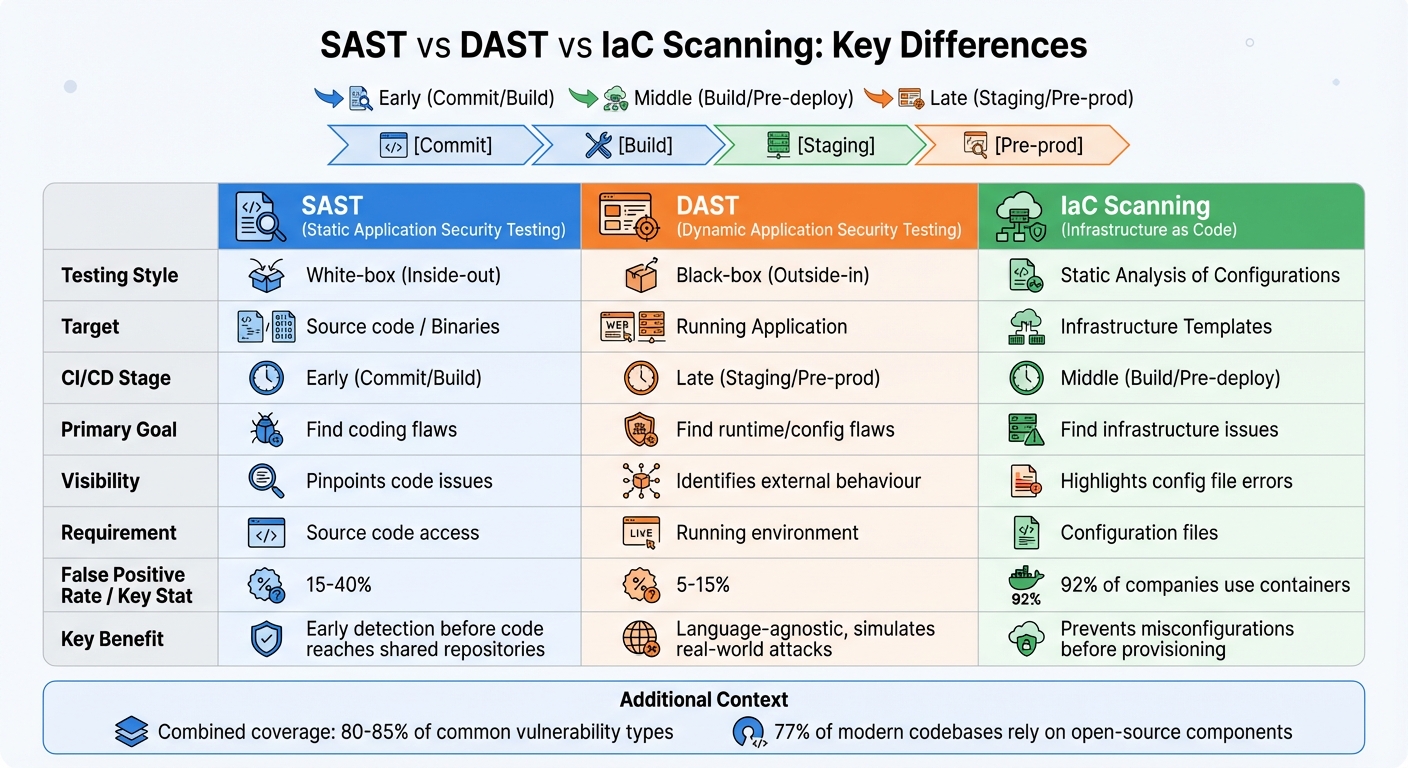 {SAST vs DAST vs IaC Scanning: CI/CD Vulnerability Testing Methods Compared}
:::
{SAST vs DAST vs IaC Scanning: CI/CD Vulnerability Testing Methods Compared}
:::
Different scanning methods address distinct layers of the software delivery process. When combined, they can secure approximately 80–85% of common vulnerability types [5].
Static Application Security Testing (SAST)
SAST inspects source code or binaries without running the application, making it a form of white-box testing. It operates during the early commit or build stages, pinpointing the exact lines of code where vulnerabilities, such as SQL injection patterns, hardcoded credentials, or weak cryptographic implementations, are located. This early detection is invaluable for preventing issues from advancing further in the pipeline.
However, SAST tools often produce false positives, with rates typically ranging from 15% to 40% [5]. This is because they analyse code in isolation, without understanding runtime dynamics. Despite this drawback, the ability to catch vulnerabilities early outweighs the inconvenience of false positives. Integrating SAST into developers' IDEs or as pre-commit hooks ensures immediate feedback before code reaches shared repositories [9].
It's worth noting that SAST tools are language-specific, requiring different tools for different programming languages or frameworks.
Dynamic Application Security Testing (DAST)
Unlike SAST, DAST evaluates applications in a live environment, simulating real-world attacks. As Liran Tal, Director of Developer Advocacy at Snyk, explains:
DAST is a black-box testing methodology that analyses running applications from an external perspective, simulating exactly how real attackers would probe for weaknesses [1].
DAST typically runs during the staging or pre-production phase, after deployment. It excels at identifying runtime and configuration vulnerabilities in live environments, such as cross-site scripting (XSS), authentication bypasses, or server misconfigurations. Since it interacts with applications via web protocols, DAST is language-agnostic and works across various technology stacks [7].
With a lower false-positive rate - ranging from 5% to 15% [5] - DAST is more precise than SAST. However, it can be time-consuming, leading many teams to schedule intensive scans during off-peak hours while running lighter checks more frequently. For thorough testing, DAST scanners need credentials to access protected areas requiring authentication [1][6].
Infrastructure as Code (IaC) and Container Scanning
IaC scanning adds another layer of security by focusing on configuration and container environments. With 92% of companies now using containers [8], and infrastructure increasingly defined through code, scanning configuration files has become crucial. IaC scanning reviews templates like Terraform, Kubernetes manifests, or AWS CloudFormation for misconfigurations and compliance issues before provisioning. Meanwhile, container scanning examines image layers and operating system packages for known vulnerabilities [8].
These scans occur in the middle stages of the pipeline - after code is built but before deployment. They address issues such as overly permissive security groups, unencrypted storage buckets, or exposed secrets in configuration files.
Given that 77% of modern codebases rely on open-source components [5] and containers encapsulate entire dependency chains, these scans are indispensable for detecting vulnerabilities that SAST or DAST might miss. Combining tools like Hadolint for Dockerfile checks with vulnerability scanners for image layers ensures thorough coverage [10].
| Feature | SAST | DAST | IaC Scanning |
|---|---|---|---|
| Testing Style | White-box (Inside-out) | Black-box (Outside-in) | Static Analysis of Configurations |
| Target | Source code / Binaries | Running Application | Infrastructure Templates |
| CI/CD Stage | Early (Commit/Build) | Late (Staging/Pre-prod) | Middle (Build/Pre-deploy) |
| Primary Goal | Find coding flaws | Find runtime/config flaws | Find infrastructure issues |
| Visibility | Pinpoints code issues | Identifies external behaviour | Highlights config file errors |
| Requirement | Source code access | Running environment | Configuration files |
How to Implement Vulnerability Scanning in CI/CD Pipelines
Integration with CI/CD Tools
Start addressing security issues early by integrating scanning tools right from the first commit. Using IDE plugins and pre-commit hooks can help catch vulnerabilities before the code even enters your repository [2]. For platforms like Jenkins, GitHub Actions, and GitLab, you can rely on CLI-based tools or native plugins to seamlessly include scanners as part of your pipeline steps - no need for overly complex scripts.
To maintain security, use connector-based or scoped token authentication, which allows for precise access control. Configure pipelines to fail when Critical or High vulnerabilities are detected, while Medium or Low issues trigger warnings. This layered approach ensures robust security without causing unnecessary disruptions to workflows.
Run SAST (Static Application Security Testing), SCA (Software Composition Analysis), and IaC (Infrastructure as Code) scans simultaneously to save time during builds. Additionally, caching vulnerability databases between runs can improve performance. For DAST (Dynamic Application Security Testing), make sure your staging environments closely replicate production settings, including database configurations and API endpoints, for results that more accurately reflect deployment conditions [11].
This setup creates a strong foundation for automation to build upon.
Automating Scans and Policy Enforcement
Automation can be initiated with webhooks or source control management (SCM) polling, triggering scans automatically with every code commit or pull request. As Nawaz Dhandala from OneUptime puts it:
Shifting security left means integrating security testing early in the development lifecycle. CI/CD pipelines provide the ideal enforcement point for automated security scanning, catching vulnerabilities before they reach production [2].
To enforce policies, configure specific exit codes (e.g., --exit-code 1) in scanning commands to halt pipelines when thresholds are breached. For false positives or accepted risks, use exception files like .trivyignore or security-waivers.yaml, including expiry dates and documented justifications [12]. Start with automating SAST and SCA scans - they're relatively easy to set up and deliver quick results [2].
During the build phase, automatically generate a Software Bill of Materials (SBOM) to improve transparency and meet compliance standards like GDPR or ISO 27001. Export scan results in SARIF format to integrate directly into the Security tabs of platforms like GitHub or GitLab, enhancing visibility [2].
With these automated processes in place, you can ensure vulnerabilities are caught early and addressed efficiently.
Continuous Monitoring and Reporting
Once scanning tools are integrated and automated, the next step is to continuously monitor deployed applications. Vulnerabilities can appear even after deployment, as new CVEs are disclosed regularly. Code that was once secure could suddenly become vulnerable. To address this, schedule daily scans - many teams opt for early-morning cron jobs, such as 6 AM, to check registry images for new vulnerabilities [13].
As Fernando Diaz from GitLab highlights:
Container vulnerabilities don't wait for your next deployment. They can emerge at any point, including when you build an image or whilst containers run in production [14].
Platforms like GitLab can automatically track advisory databases against a project’s SBOM, creating vulnerability records without requiring a new pipeline trigger [14]. For runtime scanning, deploy tools like the GitLab Agent for Kubernetes to monitor containers running in clusters. To centralise alerts, configure tools to send prioritised notifications to communication platforms like Slack or Microsoft Teams. Additionally, aggregate results from multiple tools into a single dashboard for a comprehensive view of your security posture [11].
Need help optimizing your cloud costs?
Get expert advice on how to reduce your cloud expenses without sacrificing performance.
Best Practices for CI/CD Vulnerability Management
How to Prioritise and Manage Vulnerabilities
When managing vulnerabilities, focus on factors like CVSS scores, exploitability, and the potential impact on your business. For example, a critical SQL injection flaw in a public-facing API should be addressed immediately, while a low-priority issue in outdated code can be deferred. To ensure efficiency, correlate alerts from tools like SAST and DAST to confirm exploitability and concentrate on real threats.
It's also essential to have a formal waiver process for risks that can be accepted. If a vulnerability lacks an exploitable path or fixing it requires extensive architectural changes, the security team can approve deployments with proper documentation outlining the rationale [12]. This approach keeps your CI/CD pipeline secure without slowing down deployment cycles.
Using Multiple Tools for Better Coverage
Relying on a single tool for vulnerability scanning is not enough. Instead, combine multiple tools like SAST, DAST, SCA, and infrastructure scanning to achieve broader coverage. As Snyk highlights:
No single tool catches everything, but together they provide overlapping coverage that dramatically reduces the attack surface [1].
Start with tools like SCA and secret scanning for quick, reliable results [4][9]. Over time, expand your security programme to include SAST, container, and Infrastructure-as-Code (IaC) scanning. This gradual rollout helps avoid alert fatigue while building a robust security framework. Keep in mind that misconfigurations account for 80% of cloud breaches, and fixing a security bug in production can cost 100 times more than addressing it during development [9].
Meeting Industry Standards and Compliance Requirements
Aligning your vulnerability management processes with industry regulations like GDPR, ISO 27001, and PCI DSS is just as important as internal practices. Automate the generation of Software Bills of Materials (SBOMs) during builds to maintain transparency and track the origins of your components. Export scan results in SARIF format to support audits and compliance reporting. Regularly rescan deployed images, as vulnerability databases are continually updated [12].
Ensure your scanning policies, remediation timelines, and exceptions are well-documented to provide evidence of continuous monitoring for auditors. Configure your tools to enforce policies automatically - for instance, blocking deployments when critical vulnerabilities are detected in components that handle sensitive data. This not only demonstrates accountability but also reduces compliance risks. By combining automated scanning with detailed documentation, you can strengthen both security and compliance across your CI/CD pipeline.
How Hokstad Consulting Can Improve Your CI/CD Security
Customised DevOps Transformation
Hokstad Consulting reshapes CI/CD pipelines by integrating tools like SAST and SCA into every pull request. This includes setting thresholds to automatically halt builds when critical vulnerabilities or more than three high-severity issues are detected. For UK-based organisations, additional measures such as pre-commit hooks and ephemeral runners are implemented to secure build environments, ensure compliance with NIST and PCI DSS, and reduce both deployment cycles and cloud costs (calculated in GBP).
One transformation project achieved impressive results: a 70% reduction in critical vulnerabilities, deployment times cut from days to hours, and a 40% drop in cloud hosting costs [2]. Continuous dashboards provide insights into vulnerability trends and remediation times, while tools like Jira streamline actionable workflows. These integrations lay the groundwork for even more advanced, AI-powered security enhancements.
AI-Driven Security Optimisation
Hokstad Consulting builds on these robust foundations with AI-powered security enhancements. Their AI solutions analyse dependency graphs, predict potential exploits by tracking CVE trends, and even suggest automated fixes. AI also monitors runtime anomalies in hybrid cloud setups, prioritising risks based on severity and exploitability. This approach has led to remediation times being slashed by up to 50%, with some financial services firms reducing their average remediation time from weeks to just days [15].
Continuous Support and Security Audits
To ensure long-term security of CI/CD pipelines, Hokstad Consulting provides continuous monitoring and periodic audits. These audits uncover secrets, misconfigurations, and compliance issues, all formatted to UK standards (e.g., DD/MM/YYYY and metric units). Findings are mapped to frameworks like SLSA and PCI DSS, while 24/7 AI monitoring generates quarterly reports. These reports highlight GBP-denominated cost savings - up to 30% - through automated remediation and least-privilege enforcement [3].
Conclusion
Vulnerability scanning within CI/CD pipelines is essential for delivering secure and compliant software. By incorporating tools like SAST, DAST, SCA, IaC, and container scanning early in the process, organisations can identify and address vulnerabilities throughout the development lifecycle. Automating scans with policy enforcement - such as halting builds when critical issues or more than three high-severity vulnerabilities are found - helps catch problems early without disrupting deployment schedules.
The advantages are clear: faster remediation through real-time feedback loops integrated with tools like Jira, reduced risk of breaches by catching threats like SQL injection or misconfigured IAM roles early, and improved security oversight with dashboards tracking vulnerability trends and remediation times. With cloud misconfigurations continuing to be a major cause of security incidents, automated pull request scans and IaC checks can significantly cut down on fix times.
A phased approach works best: begin with SAST and SCA for every commit, add container and IaC scanning, and finally include DAST before production deployment. By focusing on risk-based prioritisation, generating SBOMs with tools like Syft to verify artifact integrity, and enforcing least-privilege policies, organisations can stay audit-ready and meet requirements for standards like NIST, SLSA, and PCI DSS.
This approach not only ensures compliance but also lays the groundwork for further improvements. For organisations looking for customised solutions to enhance their CI/CD security framework, Hokstad Consulting offers tailored DevOps integration, AI-driven security enhancements, and ongoing support through quarterly audits - all while helping reduce cloud costs by up to 30% (calculated in GBP). Their expertise ensures that strong security measures can coexist with efficient deployment cycles.
FAQs
Where should vulnerability scans run in my CI/CD pipeline?
Vulnerability scans are a critical part of maintaining security in your CI/CD pipeline. These scans should be performed at various stages to ensure early detection and continuous protection. For instance, during the build stage, tools can be used to catch issues right from the start. Later, pre-deployment or runtime scans, such as Dynamic Application Security Testing (DAST), can be conducted in staging environments. By scanning at these points, you can uncover vulnerabilities, enforce security protocols, and ensure compliance - all without interrupting the development process.
How do I cut false positives without missing real risks?
To minimise false positives and accurately identify real risks during CI/CD vulnerability scanning, it's essential to fine-tune and customise your security tools. This involves adjusting severity thresholds, setting confidence levels, and crafting custom rules tailored to your application's specific needs. Don't forget to account for internal libraries and the unique behaviours of the frameworks you're using.
Another effective approach is combining static and interactive testing methods. This allows you to cross-check findings with runtime data for better validation. Additionally, regularly revisiting and updating suppression rules based on developer feedback helps maintain precision and improves overall scanning results.
What’s the best way to enforce build breaks and waivers?
To maintain security and compliance in your CI/CD pipelines, it's crucial to integrate automated vulnerability scanning tools at every stage of the process. Tools like SAST (Static Application Security Testing) and DAST (Dynamic Application Security Testing) can help identify vulnerabilities early on.
Set up thresholds that automatically fail builds when critical issues are detected. This ensures that no code with severe vulnerabilities moves forward in the pipeline. Additionally, implement strict waiver controls - these should require proper approvals and have clearly defined expiration dates to prevent unchecked risks.
To keep everything running smoothly, regular monitoring and auditing are essential. These practices help ensure your pipeline adheres to established security policies and maintains high standards over time.