
AI testing in CI/CD pipelines addresses common software delivery challenges like manual test maintenance, flaky tests, and costly, slow workflows. By using machine learning and natural language processing, AI-driven tools automate test creation, adapt to code changes, and reduce false positives. This approach improves testing speed, accuracy, and cost efficiency.
Key takeaways:
- AI tools automate repetitive tasks, cutting test maintenance by up to 90%.
- Intelligent test selection reduces cloud costs and test execution time.
- Self-healing capabilities repair broken tests automatically, minimising disruptions.
- AI enhances test accuracy, filtering out false positives to focus on real issues.
- Tools like mabl, Virtuoso QA, and Applitools streamline testing with features like NLP-based test creation and visual UI analysis.
To implement AI testing:
- Build a reliable CI/CD foundation with tools like Jenkins or GitLab CI.
- Start small with unit test automation and gradually scale.
- Track metrics like self-healing success rates and test selection accuracy.
- Use AI-enhanced code reviews to catch issues early.
AI testing transforms CI/CD pipelines, enabling faster, more reliable software delivery. Begin with pilot projects, monitor performance, and expand gradually for maximum impact.
::: @figure 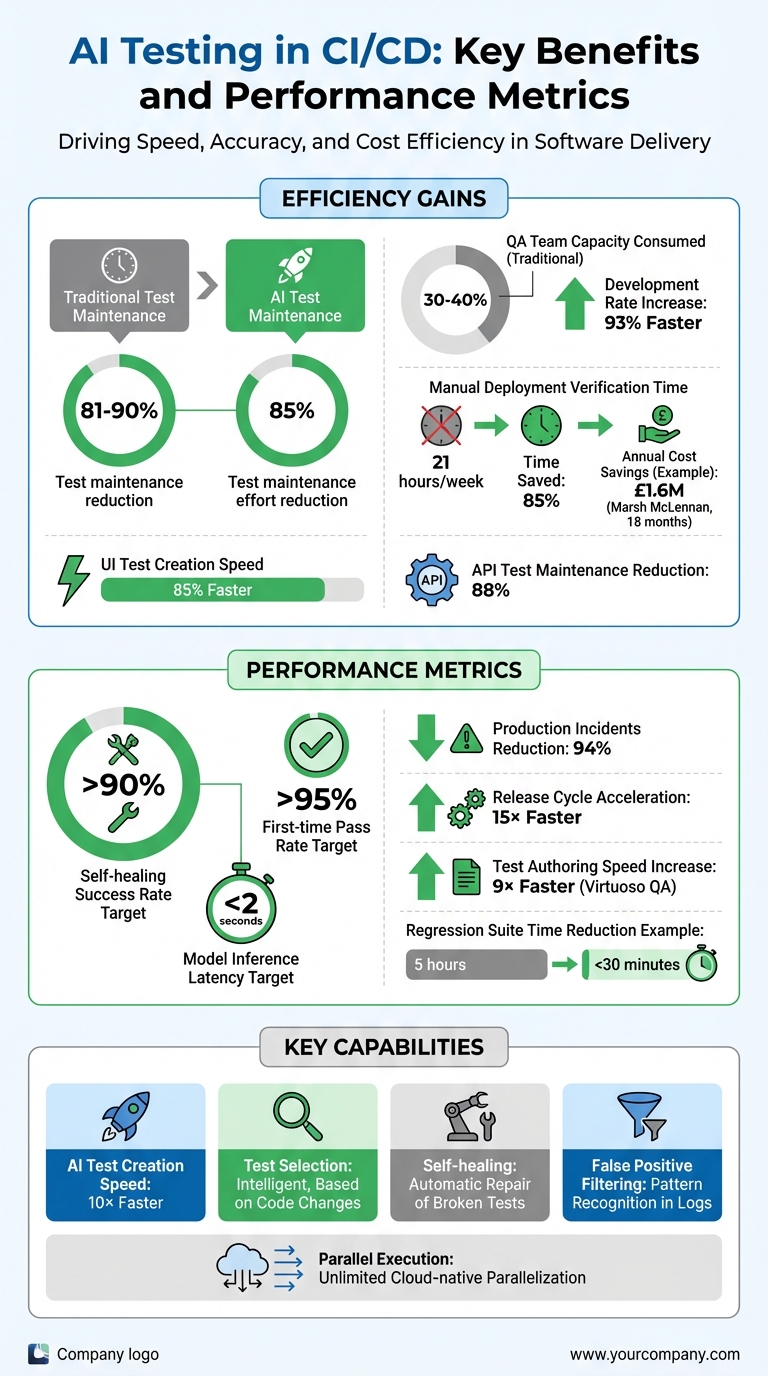 {AI Testing in CI/CD: Key Benefits and Performance Metrics}
:::
{AI Testing in CI/CD: Key Benefits and Performance Metrics}
:::
What is AI-Driven Testing in CI/CD?
Defining AI-Driven Testing
AI-driven testing leverages machine learning (ML), deep learning, and natural language processing (NLP) to automate and improve testing processes [3]. Unlike traditional testing that relies on rigid scripts, AI uses algorithms to analyse historical test data and code, identifying areas more likely to have defects [3].
The key difference is that AI-driven testing is intent-driven, not instruction-driven. Traditional methods require developers to write detailed, step-by-step instructions. In contrast, AI-driven testing understands the context of code changes and adjusts its approach dynamically [5].
Abbey Charles from Mabl sums up the limitations of older methods:
Traditional testing approaches are buckling under the pressure. Manual testing? Can't keep pace. Scripted automation? Too brittle and maintenance-heavy.[5]
This brittleness leads to test maintenance consuming 30% to 40% of a QA team's capacity [5]. By adopting AI-powered tools, teams have reported an 85% reduction in test maintenance effort [5], allowing engineers to focus on building new features instead of constantly fixing outdated tests.
This adaptive approach seamlessly integrates into all stages of CI/CD, boosting efficiency from code commits to deployment.
How AI Fits into CI/CD Pipelines
AI weaves into every step of the CI/CD process, from source control to deployment. During the build stage, AI evaluates commits and pull requests, offering risk-based testing recommendations and analysing the impact of changes [2]. It determines which tests are necessary based on the specific code modifications.
At the test execution stage, AI selects relevant tests and runs them in parallel, speeding up feedback and minimising delays [2]. According to the QASource Engineering Team:
AI complements your existing setup by introducing intelligent test selection based on code changes, self-healing scripts that adapt to UI changes, and failure prediction.[2]
When tests fail, AI agents review DOM snapshots, network data, and logs to separate real bugs from false positives [5]. This gives developers actionable insights within seconds, enabling faster release cycles.
AI also supports automated test generation by using NLP to extract requirements from user stories or API documentation, creating executable test cases [3]. This can make test creation up to 10 times faster, increasing coverage without needing additional resources [5].
Benefits of AI Testing in CI/CD
Faster Feedback Loops
AI has revolutionised the speed at which developers receive feedback on code changes. By running only the tests relevant to each commit, it eliminates unnecessary testing and dramatically shortens the feedback cycle. This ensures developers can address issues much faster.
When minor UI updates cause tests to fail, AI steps in with self-healing capabilities, automatically repairing broken locators or script elements. This prevents pipeline interruptions and reduces the need for manual fixes. Even when failures occur, AI agents quickly analyse DOM snapshots, network activity, and logs to determine whether the issue is a genuine bug or just environmental flakiness. Additionally, cloud-native AI platforms allow for unlimited parallelisation, cutting test durations from hours to mere minutes. The result? A faster, more efficient testing process with reliable outcomes.
Better Accuracy and Fewer False Positives
Beyond speed, AI enhances test accuracy by filtering out noise in test results. Using unsupervised machine learning, it identifies patterns in logs, distinguishing between harmless normal
errors - like known legacy exceptions - and new anomalies that signal genuine regressions [7]. This automatic root cause analysis provides clear context for failures, helping teams quickly determine whether an issue is a real bug or an environmental hiccup [5].
A great example of this comes from Build.com’s engineering team. In 2017, they adopted Harness's machine learning tools to automate production deployment verification. Previously, six or seven team leads spent an hour per deployment manually reviewing New Relic metrics. With unsupervised machine learning, they slashed manual effort from 21 hours per week to just three - an impressive 85% reduction [7]. As Harness put it:
There is no gut feel with ML; everything is measurable and quantifiable[7].
Cost Efficiency and Scalability
AI-driven testing doesn't just save time - it also reduces costs. By automating repetitive tasks, it minimises the need for manual intervention, cutting test maintenance expenses by up to 90%. Plus, catching bugs early in the pipeline is far more cost-effective than addressing them later in development or after release. This combination of efficiency and scalability makes AI testing a smart choice for teams looking to optimise resources.
Maximizing Test Coverage at Every Stage of Your CICD Pipeline with Visual AI
Tools for AI-Driven Testing
The success of AI testing hinges on the right tools. Modern CI/CD pipelines rely on three core layers: orchestration platforms to trigger tests, AI-driven tools for execution and maintenance, and AI-assisted code review systems to identify issues early. Together, these tools create a seamless, AI-enhanced CI/CD pipeline, enabling quicker and more reliable deployments. Here’s a breakdown of each layer and its role in optimising the pipeline.
Pipeline Automation Tools
Tools like Jenkins, GitLab CI, and CircleCI form the backbone of CI/CD workflows by automating test triggers whenever code changes are made [11]. Jenkins is highly adaptable, offering plugins and shell script capabilities, while GitLab CI simplifies integration with AI tools using pre-built templates like .gitlab-ci.yml [14][15]. CircleCI’s Orbs make it easier to connect with platforms such as Cypress and LambdaTest [16]. Additionally, GitHub Actions uses YAML-based workflows to perform tasks like change-impact analysis directly within the version control system [14].
Once the pipeline is automated, AI-powered testing tools take test execution and maintenance to the next level.
AI-Powered Testing Tools
Platforms like mabl, Virtuoso QA, and testRigor tackle flaky tests by using self-healing features that automatically update UI locators [8][9]. This approach can cut maintenance costs by up to 85% [8]. Many of these tools leverage natural language processing (NLP), allowing teams to write tests in plain English instead of code. For example, Virtuoso QA has boosted test authoring speeds by up to 9x [8].
Visual AI tools like Applitools use computer vision to identify pixel-level UI issues that traditional scripts might miss [9]. A notable example is ASDA, a UK retailer that partnered with Perfecto to scale its mobile testing. By incorporating AI-powered workflows, ASDA reduced manual effort and expanded test coverage [10].
The final piece of the puzzle is ensuring code quality from the start with AI-enhanced code review systems.
AI-Enhanced Code Reviews
AI tools like GitHub Copilot integrate directly into the development process, generating unit tests and reviewing pull requests for architectural consistency [12]. Diffblue Cover automates Java unit test creation and maintenance during code merges [13]. For instance, in May 2025, Goldman Sachs adopted Diffblue Cover to automate unit testing. Matt Davey, MD of Technology QAE & SDLC, remarked:
Diffblue Cover is enabling us to improve quality and build new software, faster.[13]
The tool also helped a major US pension fund generate over 4,750 tests, saving an estimated 132 developer days [13]. Beyond this, AI tools can analyse files like package.json to check for licensing issues and flag outdated dependencies - essential for UK businesses navigating compliance challenges [12].
These tools collectively form a powerful ecosystem, streamlining workflows and enhancing software quality at every stage.
Need help optimizing your cloud costs?
Get expert advice on how to reduce your cloud expenses without sacrificing performance.
How to Implement AI Testing in CI/CD
Introducing AI testing into your CI/CD pipeline doesn't have to be overwhelming. By taking a phased approach - starting small, showcasing early successes, and scaling gradually - you can integrate AI without disrupting your existing workflows. Here's how to get started.
Step 1: Build a Solid CI/CD Foundation
Before diving into AI, ensure your pipeline is already reliable. Tools like Jenkins, GitLab CI, or CircleCI should be automating test triggers effectively. Your codebase should include well-defined unit tests, strong version control practices, and sufficient computational resources to handle the additional demands of AI processing. Remember, AI can only enhance a pipeline that’s already well-structured.
Step 2: Choose the Right AI Tools
Pick AI tools that offer features like self-healing, intelligent test selection, and autonomous failure analysis. There’s a key difference between AI-native platforms - designed with machine learning at their core - and older frameworks that have basic AI features tacked on. AI-native tools excel at tasks like deep learning and recognising behavioural patterns, while AI-washed
alternatives often require more manual intervention [17].
For example, Marsh McLennan, a global insurance leader, saw an 85% faster UI test creation rate and cut maintenance time by 81% after adopting an AI-native testing platform. This led to annual savings of approximately £1.6M within 18 months [17]. Likewise, IBM reduced API test maintenance by 88% and achieved a 93% faster development rate, seeing a return on investment in just four months [17].
When selecting tools, ensure they support a human-in-the-loop
phase. This allows QA engineers to validate AI decisions during the early stages [2][18]. Additionally, keep an eye on token usage and API call costs in real time to manage expenses effectively [1].
Step 3: Begin with Unit Test Automation
Start small by running a pilot project on a key module. Use AI to generate test cases that cover both typical scenarios and complex edge cases. This can help you demonstrate quick wins and build confidence within your team. Aim for a first-time test pass rate of at least 95% to ensure reliability. Unit tests are a great starting point because they run quickly and provide immediate feedback on AI’s effectiveness [1].
Step 4: Establish Feedback Loops
Set up monitoring systems where QA engineers can review AI decisions during the initial phase. Track metrics like self-healing success rates, which can reach as high as 95%, and test selection accuracy. Use dynamic thresholds based on historical data - for instance, flagging error rates above 0.1% for five minutes - to minimise false positives [1].
Tag logs and metrics with details like model version and dataset hash to make debugging easier. Additionally, test AI models against fixed benchmark datasets to ensure consistency before deploying updated versions [4]. These feedback mechanisms are critical for refining your AI testing process as you scale.
Step 5: Scale and Optimise
Once your pilot project delivers results, expand AI testing to include integration, end-to-end, and performance tests. Use parallel execution in the cloud to maintain pipeline speed even as test coverage grows [5]. Introduce drift detection to monitor when your AI models need retraining as your application evolves [1][4].
By implementing autonomous reliability agents, you can significantly reduce production incidents - by as much as 94% - and accelerate release cycles by up to 15× [19].
To maintain security, store API keys and credentials as environment variables (e.g., using GitHub Secrets) instead of embedding them directly in scripts. Start with a monitor-only
phase, where AI scores alerts but doesn’t halt the pipeline. This cautious approach helps build trust in AI while minimising risks [1].
Best Practices for AI Testing in CI/CD
Integrating AI testing into your CI/CD pipeline is just the beginning. To keep it effective, you need to treat AI as a system that evolves over time. Regular monitoring, adjustments, and scaling are essential - it’s not a set it and forget it
solution.
Use AI for Test Prioritisation
Running your entire test suite for every commit can be time-consuming. Instead, leverage AI to prioritise tests based on code changes and historical defect data. This strategy can dramatically cut regression suite execution times, turning hours into minutes. For instance, in one e-commerce project, an AI test optimiser reduced regression suite execution time from five hours to under 30 minutes [6].
The key metric here is Test Selection Accuracy. This measures how well the AI selects relevant tests without missing critical ones. By tracking this metric against real-world data, you can ensure your AI is identifying high-risk areas accurately. When done right, this gives your team faster feedback while maintaining comprehensive test coverage [1].
Monitor and Refine AI Models
AI models don’t stay accurate forever. As your application evolves, performance drift can occur. To address this, use drift detection tools to compare current input/output distributions against established baselines. If accuracy thresholds are breached, automated retraining cycles can kick in [1][4].
Instead of relying solely on traditional metrics like pass/fail counts, focus on AI-specific ones. Track:
- Self-Healing Success Rate (aim for over 90%) to measure how often the AI fixes broken tests automatically.
- First-Time Pass Rate (target above 95%) to identify flaky tests versus real bugs.
- Model Inference Latency (keep it under 2 seconds) to ensure AI doesn’t slow down your CI/CD pipeline [1].
To maintain quality, consider model-graded evaluations. This involves using a secondary AI model to evaluate the primary model’s outputs for accuracy and fairness. A fixed golden dataset
can serve as a benchmark for testing new model versions, ensuring no quality drop [4]. Additionally, tag telemetry data with metadata like model version and dataset hashes to quickly diagnose performance issues [1].
Customise and Scale Your Approach
As your AI testing matures, scaling requires customisation. Generic configurations might not fit your specific workflows or team structure. Tailor your AI settings to match your risk profiles and operational needs. For example, set clear thresholds for alerts, such as flagging when the cost per successful output rises by 30% in a week or when self-healing rates dip below 90% [1].
Real-time tracking of token usage and API calls can help prevent unexpected budget spikes caused by inefficient prompts or processes [1]. When rolling out updates to AI models or prompts, use canary deployments. Start by routing only 5% of traffic to the new version, monitoring for issues before a full-scale rollout [1].
Finally, maintain a human-in-the-loop approach during the early stages of new AI features. QA engineers should review and validate AI decisions to build trust and provide high-quality data for retraining [1][2]. This hands-on validation ensures your AI aligns with your quality standards as your testing scope grows.
| Metric | Target Benchmark | Purpose |
|---|---|---|
| Self-Healing Success Rate | >90% | Measures AI's ability to fix broken tests automatically [1] |
| First-Time Pass Rate | >95% | Differentiates real product bugs from flaky tests [1] |
| Test Selection Accuracy | High (vs. Ground Truth) | Ensures relevant tests are selected without missing critical ones [1] |
| Model Inference Latency | <2 seconds | Keeps AI response times from slowing down CI/CD gates [1] |
Advanced Topics: AI Agents and Continuous Monitoring
AI Agents in CI/CD Pipelines
AI agents are transforming quality assurance within CI/CD pipelines by acting as autonomous systems capable of planning, reasoning, and executing tests. Unlike traditional scripts that follow fixed instructions, these agents translate user requirements into actionable tests. When tests fail, they don't just stop there - they analyse DOM snapshots, network activity, and logs to pinpoint whether the issue is a genuine bug, an environmental glitch, or a timing issue [5].
One standout feature of AI agents is their ability to adapt to UI changes. For instance, if a button shifts position or a form field gets renamed, these agents use visual recognition and code-based locators to automatically update test scripts. This adaptability prevents pipeline disruptions caused by minor layout changes [5][20].
Advanced tools like Datadog's Bits AI take things a step further by generating verified code fixes for flaky tests and packaging them as production-ready pull requests [21]. This is a game-changer for addressing flaky tests, which have long been a thorn in the side of developers. As Bowen Chen from Datadog explains:
Flaky tests reduce developer productivity and negatively impact engineering teams' confidence in the reliability of their CI/CD pipelines[1].
Continuous Monitoring with AI Tools
AI-driven testing requires a new level of monitoring that goes beyond simple pass/fail metrics. Tools like Sentry and Datadog provide comprehensive observability by tracking the entire lifecycle of AI agents. This includes monitoring tool calls
, model interactions, and handoffs
between agents to detect silent failures or performance bottlenecks [1]. Such insights are crucial because AI models can experience performance drift as applications evolve.
Real-time monitoring also helps control costs by tracking API token usage and identifying inefficiencies, such as overly complex prompts or recursive agent loops [1]. A robust monitoring strategy typically involves three stages:
- Build Stage: Analysing commits through webhooks.
- Execution Stage: Tracking self-healing capabilities and latency in real time using SDKs.
- Post-deployment Stage: Reviewing production logs to spot behavioural anomalies.
Dynamic thresholds, informed by historical trends, help reduce false positives and minimise alert fatigue.
As David Girvin from Sumo Logic highlights:
False positives are a tax: on time, on morale, on MTTR, on your ability to notice the one alert that actually matters[1].
This level of monitoring not only ensures system reliability but also provides actionable insights for continuous improvement.
Hokstad Consulting's AI and DevOps Services

Hokstad Consulting leverages AI to optimise CI/CD pipelines, offering services that include autonomous test generation, continuous monitoring, and streamlined DevOps workflows. Their expertise spans areas like automated CI/CD pipelines, cloud cost management, and custom solutions tailored to AI agents. They excel at integrating AI-driven testing into existing systems without causing downtime during migrations or updates.
Whether you're looking to implement autonomous testing, establish advanced monitoring, or scale AI capabilities across your infrastructure, Hokstad Consulting tailors its services to match your operational needs and risk profile. To learn more about how they can enhance your deployment cycles and reduce testing overhead, visit hokstadconsulting.com.
Conclusion
AI-driven testing is reshaping the way businesses handle quality assurance in CI/CD pipelines. The data speaks volumes: manual test maintenance can be reduced by 81%–90%, and self-healing success rates can reach up to 95% [1]. These improvements directly enhance deployment frequency, shorten lead times for changes, and boost overall system reliability.
To harness these benefits effectively, a step-by-step implementation approach is key. Start with small, controlled pilot projects that include human oversight. Use these pilots to track critical metrics and validate early successes before scaling up. Monitoring AI-specific metrics is crucial to ensure a solid return on investment [1]. As Abbey Charles from mabl wisely points out:
Speed without quality is just velocity toward failure[1].
This highlights the importance of maintaining strong oversight, even as automation takes on a larger role in your testing process.
For businesses ready to adopt AI-driven testing, the journey begins with assessing current automation levels, setting clear, measurable objectives, and running pilot tests. Hokstad Consulting offers comprehensive support to help organisations integrate AI-driven testing into their workflows. Their services include selecting the right tools, ensuring GDPR compliance for UK businesses, and upskilling teams to maintain long-term operational success.
If you're looking to streamline your deployment cycles and cut down on testing overhead, visit hokstadconsulting.com to find tailored solutions that align with your operational goals and risk management needs.
FAQs
How do AI-driven tools enhance testing accuracy in CI/CD pipelines?
AI-powered tools bring a new level of precision to testing within CI/CD pipelines by automating tasks like test creation and upkeep. This automation minimises human error and ensures consistency. These tools can detect issues early in development, analyse historical data to predict possible failures, and even repair broken scripts on their own.
Incorporating AI into your CI/CD workflows leads to more dependable and efficient testing, enabling quicker and more accurate deployments. The result? Time savings and consistently high-quality software delivery.
How can I start using AI testing in my CI/CD pipeline?
To bring AI testing into your CI/CD pipeline, start by reviewing your current testing workflows. Look for areas where AI could make a noticeable difference, like boosting test coverage or cutting down on manual tasks. It's important to set clear objectives - whether that's speeding up deployment times or predicting failures more accurately.
Start small. Pick a specific, impactful use case to test how well AI performs and to gather useful insights. Make sure your team is equipped with the right skills, your infrastructure can support AI tasks, and you have high-quality data to train your AI models. Choose tools that integrate smoothly with your existing CI/CD setup, and keep a close eye on the results to fine-tune your strategy.
By rolling this out step by step, you can steadily improve your pipeline, increase automation, and make your processes more efficient.
How does AI testing help reduce costs and improve efficiency in software delivery?
AI testing simplifies the software delivery process by automating repetitive tasks like creating and running tests. This cuts down on manual effort, saving both time and resources while maintaining consistent quality throughout.
By catching issues early in development and streamlining test processes, AI testing helps to prevent expensive delays and eliminates unnecessary test repetitions. The outcome? Quicker deployments, fewer bugs, and reduced operational costs - making it an efficient choice for modern CI/CD pipelines.