
Managing CDN costs effectively can save your business up to 40%. Here’s what you need to know to avoid surprise charges and optimise your spending:
- CDN costs primarily come from bandwidth usage, request fees, and cache misses.
- Region-based pricing means serving users in Asia-Pacific or South America can cost 2–5x more than in Europe or North America.
- Request-based billing can make up 30–50% of your costs, especially for API-heavy services.
- Boosting cache efficiency (e.g., improving cache hit ratios) can cut monthly bills by up to 35%.
- Features like Web Application Firewalls (WAF), edge computing, and cache invalidation often add unexpected costs.
Key strategies to reduce costs:
- Maximise cache hit ratios by optimising TTLs and stripping irrelevant query parameters.
- Use compression (e.g., Brotli or WebP) to minimise file sizes.
- Monitor usage patterns with tools like AWS Cost Explorer to detect anomalies.
- Separate test and production environments to avoid unnecessary charges.
Understanding your CDN provider’s billing model and regional pricing is essential for controlling expenses. By tweaking your setup and monitoring invoices closely, you can eliminate inefficiencies and keep costs predictable.
Amazon CloudFront Pricing: How to Approach it and Save Money?
CDN Billing Models Explained
::: @figure 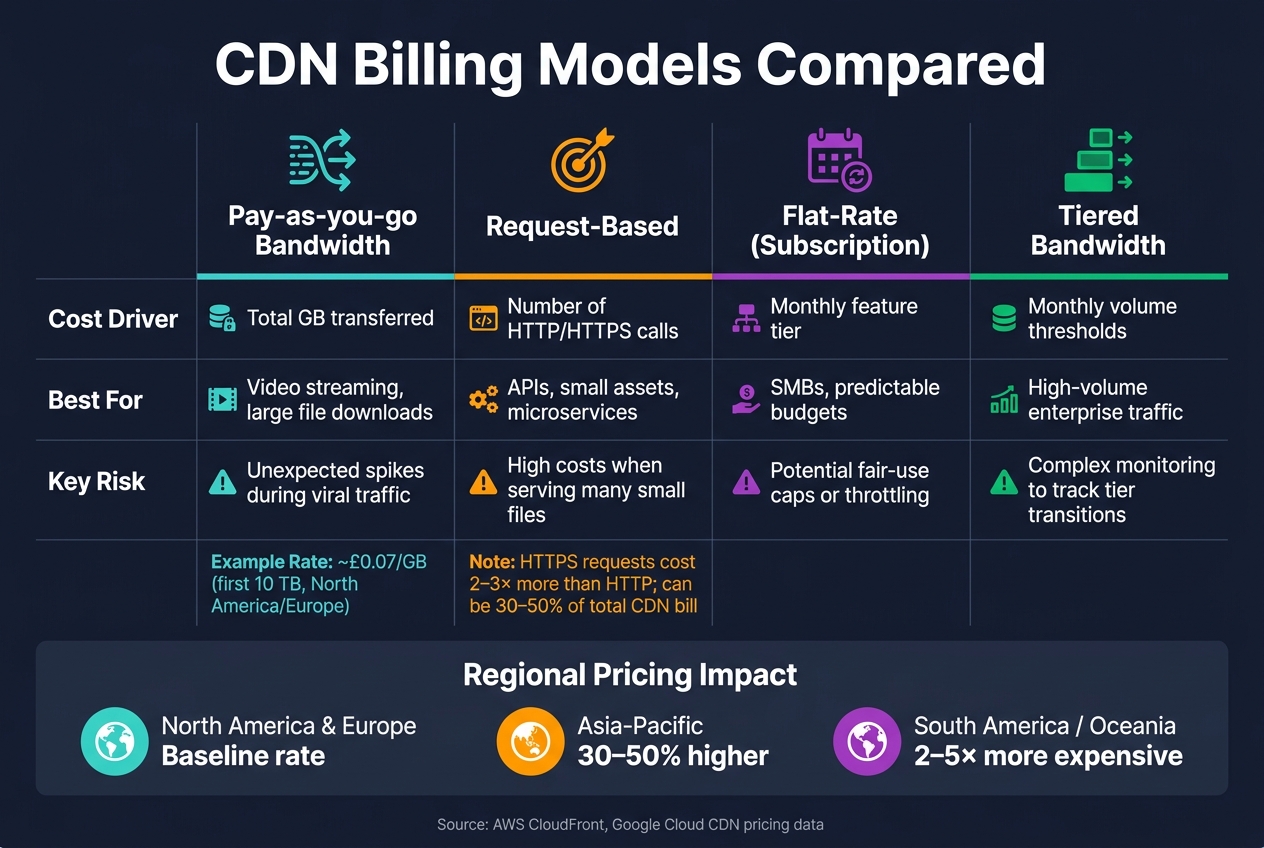 {CDN Billing Models Compared: Cost Drivers, Use Cases & Risks}
:::
{CDN Billing Models Compared: Cost Drivers, Use Cases & Risks}
:::
Understanding how your CDN provider bills you is crucial to managing costs effectively. By matching the right billing model to your traffic patterns, you can avoid surprises on your invoice. Let’s break down the main billing models and what they mean for your budget.
Bandwidth and Data Transfer Charges
Most CDN providers base their charges on the amount of data delivered from edge nodes to users, measured per gigabyte. The pricing typically follows a tiered structure, where the cost per gigabyte decreases as your usage increases. For example, AWS CloudFront charges around £0.07 per GB for the first 10 TB delivered across regions like North America and Europe [6].
However, pricing varies significantly by region. Costs in Asia-Pacific can be 30–50% higher than in North America and Europe, while regions like South America or Oceania might cost two to five times more [1][6]. If most of your audience is in the UK or Western Europe, you can use regional price class settings to avoid paying for edge locations you don’t need.
Now, let’s explore how request-based fees can add to your overall expenses.
Request-Based Billing
In addition to bandwidth charges, many providers bill based on the number of HTTP/HTTPS requests. These are usually priced per 10,000 or per million requests and represent the cost of processing each request, regardless of the file size being served [1].
HTTPS requests are more expensive - 2–3 times higher than HTTP - because of the added SSL/TLS overhead [1]. If your service relies heavily on APIs with small payloads, these fees can make up 30–50% of your total CDN costs [1]. This often surprises teams that focus solely on bandwidth expenses.
Beyond request fees, fetching uncached content from your origin server introduces another layer of cost.
Storage and Origin Fetch Costs
When the CDN needs to retrieve content from your origin server (a cache miss), origin fetch costs apply. These charges effectively double your egress costs for uncached files [1].
For example, Google Cloud CDN charges about £0.01 per GiB for cache fills within North America or Europe, but inter-region fetches - like retrieving data from Asia to North America - can cost up to £0.03 per GiB [7]. Improving your cache hit ratio from 85% to 96% could reduce your monthly CDN costs by as much as 35% [6]. This highlights the importance of optimising your cache efficiency.
Here’s a quick comparison of the main billing models to help identify which one fits your needs:
| Billing Model | Primary Cost Driver | Best Suited For | Key Risk |
|---|---|---|---|
| Pay-as-you-go Bandwidth | Total GB transferred | Video streaming, large file downloads | Unexpected spikes during viral traffic [3] |
| Request-Based | Number of HTTP/HTTPS calls | APIs, small assets, microservices | High costs when serving many small files [1] |
| Flat-Rate (Subscription) | Monthly feature tier | SMBs, predictable budgets | Potential fair-use caps or throttling [3] |
| Tiered Bandwidth | Monthly volume thresholds | High-volume enterprise traffic | Complex monitoring to track tier transitions [3] |
Key Cost Components on CDN Invoices
Once you're familiar with the billing models, the next step is to break down the details of your CDN invoice. These bills can be surprisingly detailed, with multiple line items reflecting different types of usage and activities.
Outbound Traffic Charges
The largest portion of your CDN bill usually comes from outbound traffic, which is billed per GB or GiB. This covers the data sent from CDN edge nodes to your users. On invoices, it might appear as Data Transfer Out to Internet
, Edge Egress
, or Internet Transfer
. For instance, AWS CloudFront charges around £0.068 per GB for the first 10 TB delivered from edge locations in North America and Europe [1].
However, regional pricing can vary significantly. In regions like Japan, Singapore, and Hong Kong, costs can be 30–50% higher. If your focus is on Western Europe, you can reduce outbound bandwidth costs by 20–30% by utilising specific price classes, such as CloudFront's Price Class 100 [1].
Cache Miss and Origin Egress Costs
Cache misses are another item you'll find on your invoice. These charges reflect the cost of retrieving uncached content from your origin server. Often labelled as Cache Fill
or Origin Pull
, these costs can add up quickly. For example, Google Cloud CDN charges between £0.008 and £0.032 per GiB for cache misses, and poor cache hit rates can significantly increase your overall expenses [2].
Cache fill and cache data transfer out charges apply to cacheable content. On cache misses, any applicable Cloud Load Balancing data processing or Cloud Storage operation charges apply.- Google Cloud [2]
It's worth noting that these charges may also show up on your origin provider's invoice. For instance, AWS S3 egress charges could appear separately from your CDN bill [2].
Beyond traffic-related costs, invoices often include charges for additional features and services.
Advanced Features and Add-Ons
CDN providers often charge for premium features, which are itemised separately. Here's a breakdown of some common add-ons and their typical costs:
| Feature | Billing Method | Example Cost |
|---|---|---|
| WAF (Web Application Firewall) | Monthly fee + per-request charge | £16–£160/month |
| Bot Management | Monthly subscription | Varies by provider |
| Edge Computing (Workers/Functions) | Per invocation + CPU execution time | ~£0.48 per 1 million requests |
| Origin Shield | Per-request charge | ~£0.0072 per 10,000 requests |
| Cache Invalidation | First 1,000 free, then per-path fee | ~£0.004 per path after the threshold |
| Custom SSL (Dedicated IP) | Monthly fee | ~£480/month for dedicated IP (SNI is free) |
One often-overlooked cost is cache invalidation. Full cache purges can lead to a spike in origin pull traffic and additional fees. A better approach is to use versioned filenames, which help avoid these sudden surges and keep costs in check [1].
How to Reduce CDN Costs
CDN overspending often boils down to a few core issues: inefficient cache settings, unnecessarily large files, and limited insight into usage patterns. By addressing these areas, you can significantly reduce your costs.
Improving Cache Efficiency
Boosting your cache hit ratio - the percentage of requests handled directly by the CDN edge - is key. A ratio under 60% suggests issues like short TTLs (time-to-live) or overly complex cache keys [9].
One common issue is cache key fragmentation. Query strings such as utm_source, fbclid, or session_id can lead the CDN to treat identical content as multiple unique requests. To fix this, strip out these irrelevant parameters from your cache key configuration, reducing unnecessary origin fetches [9][10].
For better control over cache behaviour, use the s-maxage directive in your Cache-Control headers to set CDN-specific expiry times. For static assets, TTLs lasting weeks or months are fine as long as you use versioned filenames (e.g., main.v4.js). This ensures updates are recognised immediately without requiring manual cache invalidation [10].
| Strategy | Time | Savings |
|---|---|---|
| Maximise cache hit ratio | 2–4 hours | 20–60% on origin transfer [9] |
| Enable Origin Shield | 30 minutes | £80–£1,600/month (high traffic) [9] |
| Select the right price class | 15 minutes | 30–50% on regional data transfer [9] |
| Move origin to S3 | 2–4 hours | 40–80% vs. direct internet egress [9] |
Once your cache is optimised, focus on reducing the size of the files being delivered.
Compressing and Shaping Content
Minimising the size of delivered content is just as impactful as reducing how often it’s fetched. For text-based assets like HTML, JavaScript, and CSS, Brotli compression is a great choice. It outperforms Gzip and is natively supported by most modern CDNs, cutting file sizes by up to 70% [8].
Images, which often make up 40–60% of a webpage’s weight [4], are another area to target. Switching from older formats like JPEG and PNG to WebP or AVIF can shrink image sizes by 25–50% without sacrificing quality [4]. Combine this with lazy-loading - loading images only when they appear in the user’s viewport - to avoid paying for data transfer on unused content.
However, don’t try to compress files that are already compressed, such as MP4, JPEG, or ZIP. Doing so wastes resources without reducing file sizes.
Monitoring and Budgeting Tools
After optimising caching and content, regular monitoring is essential. For instance, 34% of mid-market CDN bills can stem from invalidation requests and real-time log delivery - expenses that often go unnoticed without proper oversight [11].
Tools like AWS Cost Explorer allow you to filter CDN expenses by region and usage type, helping you identify cost spikes. Meanwhile, Amazon CloudWatch can alert you to drops in CacheHitRate or increases in 5xx errors, which usually indicate misconfigurations rather than genuine traffic surges. If you use real-time log delivery, consider enabling it only when troubleshooting. For routine analytics, switch to standard S3-based logs, as real-time logs can quickly rack up costs [11].
By implementing these strategies, you’ll gain better control over your CDN spending and avoid unexpected charges.
For those seeking expert help, Hokstad Consulting specialises in reducing infrastructure costs, including CDN and hosting expenses. They even offer a no-savings, no-fee model for their services.
Reviewing and Reconciling CDN Invoices
Once you've optimised your CDN costs, it's crucial to reconcile invoices to ensure every charge aligns with actual usage. CDN invoices can sometimes obscure the real picture, but a structured reconciliation process can help uncover errors or unnecessary expenses.
Matching Usage to Invoices
One of the main hurdles in reconciling CDN invoices is that billing data is often aggregated, making it hard to see detailed usage patterns. To ensure accuracy, compare the summary invoice with detailed hourly or daily usage reports.
Pay close attention to regional billing codes. These codes use two-letter abbreviations, such as EU for Europe and Israel, AP for Asia Pacific, AU for Australia, and IN for India. If your traffic is primarily UK-based but you're charged for unexpected regions like AP or SA, it’s worth investigating further.
Here’s a quick reference for how AWS CloudFront invoice items map to usage report fields:
| Invoice Line Item | Usage Report Field | What to Check |
|---|---|---|
region-DataTransfer-Out-Bytes |
region-Out-Bytes-[Protocol]-[Type] |
Total GB served from edge locations |
region-Requests-Tier1 |
region-Requests-HTTP-Static/Dynamic |
Count of HTTP GET and HEAD requests |
region-Requests-HTTPS-Proxy |
region-Requests-HTTPS-Proxy |
HTTPS DELETE, OPTIONS, PATCH, POST, and PUT requests |
| Invalidations | Invalidations | Paths invalidated beyond the free 1,000 threshold |
region-Lambda-Edge-Request |
region-Lambda-Edge-Request |
Edge function invocations |
Additionally, check the Resource ID (e.g., CloudFront Distribution ID) on each invoice line item. This helps pinpoint which distribution generated specific charges, especially useful if you're managing multiple environments.
Once you've identified discrepancies, investigate their root causes to avoid similar issues in the future.
Detecting Anomalies in Traffic and Costs
Cost spikes usually have an identifiable source. Common issues include cache-key explosion (caused by excessive query parameters), short TTLs left over from incident responses, or invalidation overuse (e.g., triggering invalidations during every deployment instead of using versioned URLs).
For instance, in Q1 2026, a mid-market streaming platform managed to cut its AWS CloudFront bill from £38,000 to £22,400 in just four weeks. An audit revealed that 34% of the costs were due to invalidation requests, while data transfer accounted for 41% of the total [11].
Invalidation should be reserved for emergencies, not CI/CD pipelines.- BlazingCDN [11]
To monitor costs effectively, track metrics like bandwidth by region, requests by type, cache hit ratio, and cost per GB (total bill divided by GB delivered). Setting billing alerts to flag a 10% or higher increase in cost per GB can help you catch unexpected changes in traffic patterns or features before expenses spiral.
Separating Test and Production Costs
Another important step is separating test and production traffic to get a clear view of actual production costs. Using distinct CDN distributions for each environment simplifies this process.
Here’s how to differentiate configurations:
| Configuration Item | Test/Staging Environment | Production Environment |
|---|---|---|
| CDN Endpoint/ID | Dedicated test distribution | Primary production distribution |
| Domain/URL | Subdomain (e.g., stg.site.com) |
Primary domain (e.g., site.com) |
| API Credentials | Unique test token/key | Unique production token/key |
| Billing Tags |
Env: Test or CostCenter: R&D
|
Env: Prod or CostCenter: Ops
|
During early development, consider loading static assets from local folders instead of the CDN. This avoids unnecessary test-related CDN charges while enabling faster iterations [13]. Additionally, set a budget alert specifically for your test distribution. Load testing against staging can sometimes generate unexpectedly high data transfer costs if left unchecked [12].
Conclusion
CDN billing can feel like a maze. Costs are influenced by factors like bandwidth usage, request volumes, regional price differences, and feature add-ons. Without a clear grasp of these elements, unexpected charges can quickly pile up. For instance, delivering traffic to regions like Asia-Pacific or South America can cost two to three times more per GB compared to North America or Europe [5].
The key takeaway here is that visibility leads to savings. By understanding how your CDN invoices are broken down - from outbound traffic and cache miss charges to HTTPS premiums and invalidation fees - you gain the power to make smarter decisions. Even small tweaks, such as optimising cache settings or adjusting delivery routes, can significantly lower your monthly costs without compromising performance. These adjustments not only reduce expenses but also refine your overall CDN strategy.
Compliance and cost efficiency often go hand-in-hand. For businesses in the UK and EU, GDPR compliance mandates that edge servers process data locally whenever possible. This approach not only meets legal requirements but also helps keep billing predictable, reinforcing the regional pricing insights discussed earlier. Tailoring your CDN setup to match your users' geographic locations isn't just a regulatory necessity - it’s a smart way to manage costs [6]. If your CDN expenses seem disproportionate or are climbing faster than your traffic, it’s worth conducting a detailed audit. Regular reviews, as highlighted in this guide, allow you to stay in control of both costs and performance. Firms like Hokstad Consulting specialise in cloud cost optimisation and can pinpoint inefficiencies, helping you cut costs while maintaining delivery quality.
FAQs
Which CDN billing model fits my traffic best?
The right CDN billing model hinges on your traffic patterns and budget. If you experience consistent traffic levels, fixed-rate or committed volume plans can provide predictable costs. On the other hand, if your traffic fluctuates, pay-as-you-go models offer flexibility, though they might lead to higher costs during traffic surges. For a middle ground, hybrid models blend the stability of fixed plans with the adaptability of pay-as-you-go options.
To make the best choice, consider factors like your average traffic volume, how your audience is spread across regions, and your overall priorities. If you're unsure, seeking advice from an expert can help you find a solution tailored to your needs.
Why is CDN delivery pricier in some regions?
CDN delivery can be pricier in certain regions because of factors like infrastructure costs and regional demand. For example, areas like Asia, Africa, and South America often face higher expenses due to less developed network infrastructure, which increases the cost of data transfer. On top of that, regional pricing takes into account the challenges of maintaining networks, the availability of edge servers, and local demand, with providers typically passing these added costs onto their customers.
How can I spot surprise CDN charges early?
To avoid surprise CDN charges, keep an eye on critical cost factors like bandwidth usage, number of requests, and any extra features you've enabled. Make it a habit to review your usage and billing reports regularly - this can help you spot anomalies, such as unexpected spikes in data transfer or request volumes.
It's also worth conducting audits of your cache policies to ensure you're optimising hit rates and cutting down on unnecessary data transfers. Don’t forget to monitor regional pricing variations and set up alerts for unusual activity - this can help you stay ahead of potential overage fees.