
Managing big data workloads on cloud platforms can quickly inflate costs, especially with the growing demand for AI and data-intensive technologies. This article breaks down how UK businesses can cut expenses by up to 70% without compromising performance. Key strategies include:
- Identifying waste: Use tools like AWS Cost Explorer and Trusted Advisor to locate underutilised resources.
- Optimising resources: Right-size compute, storage, and memory while leveraging lower-cost options like Spot Instances.
- Scaling efficiently: Implement auto-scaling for dynamic resource allocation and avoid over-provisioning.
- Modern approaches: Adopt containerisation, serverless computing, and advanced performance-tuning tools to reduce idle costs.
- FinOps practices: Regular reviews, tagging, and real-time monitoring ensure ongoing cost control.
For UK organisations, these methods can transform cloud budgeting, ensuring resources are aligned with actual needs while maintaining reliability.
5 Best Practices for Optimizing Your Big Data Costs With Amazon EMR
Evaluating Your Current Big Data Workloads
Before you can cut costs, you need to figure out where your money is going. This means taking a thorough look at your existing workloads to pinpoint where resources are being wasted. Cloud platforms provide analytics tools that can break down your spending, giving you the insights you need to make smarter decisions about cost management.
Monitoring Costs with Cloud Analytics Tools
Cloud providers come equipped with tools that track spending and resource use in real time. For example, AWS Cost Explorer allows you to visualise cost trends and identify underutilised resources across EC2 and containerised workloads. It doesn’t stop there - tools like AWS Compute Optimizer dig deeper, analysing CPU, memory, and storage metrics to offer recommendations for rightsizing EC2 instances, EBS volumes, Lambda functions, and RDS databases based on actual usage patterns [4].
If you're managing containerised applications on ECS or AWS Batch, Split Cost Allocation Data in Cost Explorer can break down shared compute and memory resource usage by individual applications [3]. When unexpected cost spikes occur, Amazon Athena can help you query Cost and Usage Reports to uncover which specific API operations - like PutMetricData or GetMetricData - are driving up your CloudWatch bill [5]. To get a full picture, it's best to monitor performance metrics over two to four weeks to account for business peaks and seasonal changes [6].
Finding Wasted Resources and Over-Provisioning
Once you’ve got a handle on where your money is going, the next step is to find inefficiencies. Tools like AWS Trusted Advisor can flag idle resources, such as RDS database instances with no connections for seven days, Redshift clusters running at less than 5% CPU utilisation, or load balancers that handle fewer than 100 requests in a week [2].
Storage inefficiencies are another common issue. For example, Amazon EBS volumes with less than one IOPS per day over a seven-day period are likely underutilised and should be deleted - after creating a snapshot for safety [2]. Similarly, S3 Analytics can monitor access patterns over 30 days and suggest moving rarely accessed data to lower-cost storage tiers like S3 Infrequently Accessed [2].
Right-sizing is another area to focus on. If your application’s peak vCPU or memory usage consistently falls below 80% of capacity, it’s a sign that you’re over-provisioned [6]. Running instances at just 10% CPU utilisation while paying for 100% capacity is an easy way to waste money [7]. Don’t forget to check for unattached storage volumes, which often continue to generate costs even after their associated instances have been terminated [7].
Methods for Reducing Big Data Workload Costs
::: @figure 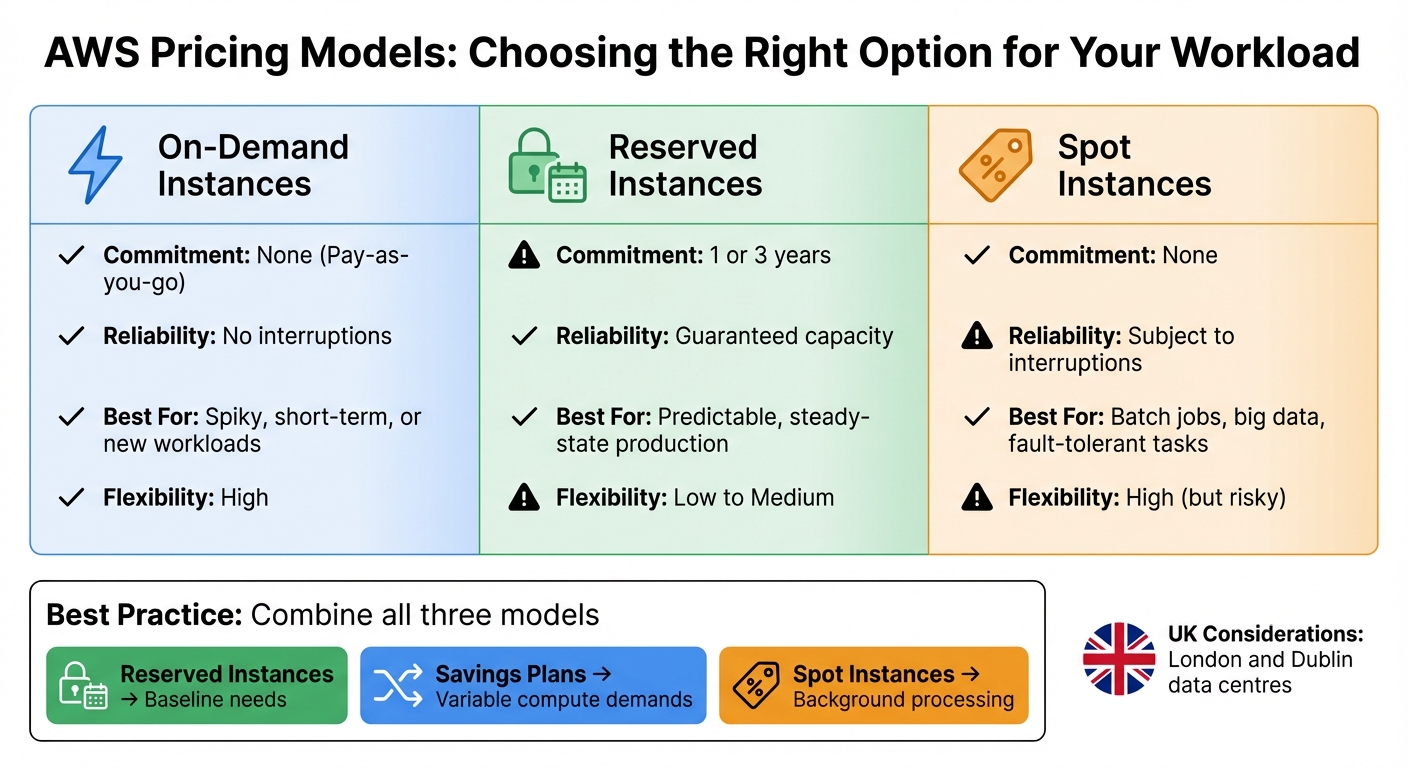 {AWS Pricing Models Comparison: On-Demand vs Reserved vs Spot Instances}
:::
{AWS Pricing Models Comparison: On-Demand vs Reserved vs Spot Instances}
:::
Once you've pinpointed areas where resources are being wasted, the next step is to take action. The aim here is to align your expenses with your actual resource requirements while maintaining reliable performance. This means fine-tuning compute, storage, and scaling strategies.
Adjusting Compute, Storage, and Memory to Match Your Needs
Right-sizing is all about striking the right balance between cost and performance. By monitoring metrics like vCPU, memory, network throughput, and disk I/O over a 14–30-day period, you can identify over-provisioned or underutilised resources [6][8]. This gives you the data needed to adjust your infrastructure efficiently.
Storage costs can also spiral out of control if redundancy settings aren't tailored to your business needs. For example:
- Locally-Redundant Storage (LRS): Keeps three copies in a single location and is the most cost-effective option, ideal for non-critical data or development environments.
- Zone-Redundant Storage (ZRS): Spreads three copies across zones, offering medium-level availability at a moderate cost.
- Geo-Redundant Storage (GRS): Maintains six copies across different regions, suitable for critical data or compliance requirements.
- Geo-Zone Redundant Storage: Provides the highest level of protection with copies across regions and zones, but at the highest cost.
Choose the redundancy level that matches your actual business needs rather than defaulting to the most expensive option. Before committing to long-term capacity, monitor your resource usage and spending for at least 90 days to establish a reliable baseline. Once you've optimised your setup, implementing automatic scaling can help refine costs even further.
Setting Up Auto-Scaling and Dynamic Resource Allocation
Auto-scaling ensures that resources adjust automatically based on demand, so you're not paying for unused capacity during quieter times. Many big data platforms include managed scaling features designed for specific workloads. For instance:
- Amazon EMR managed scaling adjusts cluster sizes based on workload patterns.
- AWS Glue auto-scaling dynamically handles ETL jobs.
- Redshift concurrency scaling manages query loads without requiring manual intervention [9].
Pairing auto-scaling with the right pricing model can further reduce costs. For example, combining auto-scaling with Spot instances is perfect for background processing tasks, such as batch jobs and analytics, where occasional interruptions are acceptable.
Using Spot Instances and Reserved Capacity
Different pricing models cater to different workload needs:
- Reserved Instances (RIs) and Savings Plans: Ideal for steady, always-on workloads like production databases. These typically involve a one- or three-year commitment.
- On-demand instances: Best for unpredictable spikes or short-term projects, offering flexibility without long-term commitments.
- Spot instances: Perfect for stateless or fault-tolerant tasks like big data analytics and batch processing, though they come with the risk of interruptions.
| Pricing Model | Commitment | Reliability | Best For | Flexibility |
|---|---|---|---|---|
| On-Demand | None (Pay-as-you-go) | No interruptions | Spiky, short-term, or new workloads | High |
| Reserved Instances | 1 or 3 years | Guaranteed capacity | Predictable, steady-state production | Low to Medium |
| Spot Instances | None | Subject to interruptions | Batch jobs, big data, fault-tolerant tasks | High (but risky) |
A hybrid approach often works best. Use Reserved Instances for your baseline needs, Savings Plans for variable compute demands, and Spot instances for flexible, background processing. For big data and analytics tasks, Spot instances can offer significant savings on fault-tolerant workloads. Meanwhile, Savings Plans provide flexibility, as they cover multiple services (like EC2, Lambda, and Fargate) and regions, based on a consistent hourly spend (£/hour).
UK businesses should also account for currency fluctuations and the availability of regional data centres - such as those in London and Dublin - when considering long-term commitments.
Need help optimizing your cloud costs?
Get expert advice on how to reduce your cloud expenses without sacrificing performance.
Modern Infrastructure Approaches for Big Data
Modern infrastructure strategies are reshaping how organisations manage big data by offering smarter ways to handle compute, storage, and scaling. These approaches not only reduce costs but also simplify operations. Technologies like containerisation and serverless computing ensure you only pay for the resources you actually use, avoiding unnecessary expenses from idle capacity. They also scale automatically, so you're not left paying for over-provisioned systems during quieter periods.
Containerisation and Serverless Options
Kubernetes has emerged as the leading platform for running big data workloads in containers, thanks to its built-in autoscaling capabilities. These features dynamically adjust pods and nodes, making resource usage more efficient and cutting operating costs. Importantly, driver nodes can remain on stable, on-demand instances to ensure reliability [1].
Serverless Kubernetes options, such as Virtual Nodes, take this further by offering per-pod pricing and removing the need for cluster management [10]. For workloads with unpredictable demands, this is a game-changer. Platforms like AWS Lambda and AWS Glue extend the pay-as-you-go model by charging solely for execution time. For instance, running a Spark job on AWS Glue can cost as little as £0.36, compared to £429 per month for a self-managed EMR cluster - a potential saving of 97% [1]. However, serverless solutions require careful monitoring to avoid unexpected costs. These scalable approaches provide a solid foundation for fine-tuning performance.
Performance Tuning Tools for Big Data Platforms
Once efficient infrastructure is in place, performance tuning tools can take optimisation to the next level by addressing resource inefficiencies. AWS Compute Optimizer, for example, analyses resource configurations and usage metrics across EC2, Lambda, and ECS, offering recommendations for rightsizing. It can also integrate external memory metrics from tools like Datadog and Dynatrace to enhance accuracy [4].
For Databricks users, the Photon query engine accelerates SQL and DataFrame operations, reducing the time spent on compute resources [11][12]. Amazon EMR Managed Scaling and AWS Glue Auto Scaling dynamically adjust cluster sizes to match workload demands, avoiding over-provisioning during slower periods [9][14]. A real-world example: Salesforce achieved savings of up to 40% compared to Reserved Instance pricing and up to 80% compared to on-demand pricing by using Spot Instances for batch processing tasks [1].
Another effective tool is the Kinesis Producer Library (KPL), which consolidates multiple records into a single unit, reducing the number of shards required for high-volume data streams. This approach can lower monthly streaming costs by as much as 95% [1]. For businesses in the UK, many of these solutions are available through London and Dublin data centres, ensuring compliance with both latency and data residency requirements.
UK companies aiming to streamline their big data operations and cut cloud expenses can explore tailored solutions with Hokstad Consulting.
Maintaining Cost Efficiency Over Time
Keeping costs under control is an ongoing effort, especially as workloads evolve. It’s estimated that organisations using cloud services waste up to 32% of their budgets [16]. This happens because cost optimisations can slip as businesses scale, launch new projects, or experience unexpected usage spikes. As Databricks highlights:
Cost optimisation needs to be seen as an ongoing process and strategies need to be revisited regularly in the event of scaling, new projects or unexpected cost spikes[15].
Regular reviews and real-time tracking play a vital role in maintaining the balance between cost and performance, ensuring that savings don’t erode over time.
Real-Time Monitoring and Performance Tracking
Real-time monitoring tools are indispensable for identifying inefficiencies before they spiral out of control. Advanced tools can spot spending anomalies, allowing teams to tackle issues early and avoid unnecessary costs [7][16]. These platforms offer detailed insights, breaking down expenses by features, teams, environments, or even individual customers - providing what’s commonly referred to as unit cost
analysis [16].
Such tools are particularly effective at identifying idle resources, like unattached storage or temporary servers that were set up for a task but never decommissioned [7][4]. By continuously evaluating costs, organisations can fine-tune configurations to remain efficient without sacrificing performance [7][4]. For big data workflows, tracking costs at each step or branch of a pipeline is especially important for accurate ROI calculations [18].
Regular Resource Reviews and FinOps Practices
Building on real-time data, structured resource reviews help reinforce cost control over the long term. A standard tagging system - using labels like Business_Units, Projects, or Environment - is essential for ensuring that every pound of cloud spend can be attributed to specific workloads [15][7]. Budget alerts are another simple yet effective measure to prevent overspending [15].
FinOps (Financial Operations) offers a comprehensive framework for proactive cost management rather than reacting after the fact [17][7]. This approach is built around three phases: Inform, Optimise, and Operate.
- Inform focuses on tagging, cost allocation, and real-time dashboards to improve visibility.
- Optimise involves actions like rightsizing resources, using Spot Instances, and leveraging Reserved Capacity to cut costs immediately.
- Operate integrates cost considerations into everyday workflows, such as the Software Development Lifecycle, and relies on continuous monitoring.
A growing trend is giving engineers real-time access to cost data - such as the cost per deployment - so they can make smarter, cost-conscious decisions during development [16]. For big data environments, it’s wise to prioritise job-specific compute over general-purpose compute for non-interactive ETL tasks. Using performance-focused formats like Delta Lake can also speed up workloads, reducing compute time and associated costs [15].
UK businesses aiming to adopt these strategies can explore tailored guidance from Hokstad Consulting.
Conclusion: Balancing Cost and Performance for Big Data
Optimising big data workloads isn't a one-and-done task - it’s an ongoing effort that evolves as businesses grow and cloud technologies advance. The strategies outlined here, such as rightsizing compute resources, using Spot Instances, adopting columnar data formats, and enabling auto-scaling, can help UK organisations cut cloud costs by 20% to 70% [19]. The secret lies in treating cost management as a continuous process rather than a quick fix.
Using structured FinOps frameworks - spanning the Inform, Optimise, and Operate phases - brings technical and financial teams together to make smarter resource allocation decisions [17][13]. This approach builds on the strategies discussed earlier and ensures cost optimisation becomes a long-term practice.
The results speak for themselves. Between 2023 and 2024, software firm Cegid saved €6 million annually on cloud costs while growing its subscriber base by 27%. Similarly, Qualtrics managed to save $20 million over 18 months, all while scaling usage by 30% each year [19]. These achievements required not just technical know-how but also regular assessments and a commitment to embedding cost efficiency into every stage of development.
For UK organisations, having access to expert cloud cost engineering can make all the difference. Hokstad Consulting offers tailored solutions, including audits, strategic migrations, and custom automation, under a No Savings, No Fee
model. Their expertise has helped clients reduce cloud expenses by 30–50%, making them a valuable partner for businesses seeking to optimise costs without compromising performance.
Striking the right balance between cost and performance means questioning assumptions about resource provisioning and staying vigilant with regular monitoring and reviews. When done right, this balance becomes more than just cost-saving - it turns into a strategic advantage.
FAQs
How can UK businesses identify and reduce wasted cloud resources?
UK businesses can take a smart first step towards cutting cloud costs by auditing their current cloud environment. This means checking for underused resources and ensuring everything is being utilised efficiently. A good starting point is implementing mandatory tagging for all assets, making it easier to track and manage them. From there, businesses should review key performance metrics like CPU, memory, network, and storage usage over a realistic time frame. This helps pinpoint issues such as idle virtual machines, oversized instances, or unused storage that might be unnecessarily inflating costs.
Tools like AWS Cost Explorer or Azure Cost Management are excellent for gaining a clearer picture of usage patterns. Performing regular audits and rightsizing workloads ensures that businesses aren’t paying for more than they need. By tackling these inefficiencies head-on, companies can trim their cloud expenses while still maintaining the performance and quality their operations depend on.
How can Spot Instances help reduce costs for big data workloads?
Spot Instances provide a budget-friendly option for running large-scale data workloads, offering access to unused cloud capacity at up to 90% less than On-Demand pricing. This makes them a great fit for tasks that can handle interruptions and have flexible scheduling needs.
With Spot Instances, you can expand your computing power significantly, speeding up data processing and boosting performance for intensive workloads. However, since their availability isn't guaranteed, they work best for tasks like batch processing, data analysis, or training machine learning models - scenarios where occasional disruptions can be managed without major issues.
How does containerisation help lower cloud computing costs?
Containerisation lets applications operate in lightweight, self-contained environments that are both isolated and highly scalable. These containers can adjust automatically to meet workload demands and shut down when they're no longer needed, ensuring that resources are used efficiently.
By cutting down on idle compute time and allowing for precise resource allocation, containerisation helps minimise unnecessary costs. You only pay for the resources you actually use, making it an ideal solution for handling dynamic workloads or applications with fluctuating traffic.