
Blue-green deployments are a method for releasing updates with minimal downtime by maintaining two identical environments: one live (blue) and one idle (green). Traffic routing is the key to making this process smooth and reliable. Here's what you need to know:
- Traffic management ensures a seamless switch between environments, reducing risks like downtime, delays, or misconfigurations.
- Common challenges include DNS propagation delays, abrupt traffic cutovers, and manual errors in configuration.
- Solutions involve using tools like load balancers for instant switching, gradual traffic shifting for safer transitions, and service meshes for precise control in microservices.
- Automation with Kubernetes tools like Argo Rollouts can simplify routing, health checks, and rollbacks.
Key takeaway: Effective traffic routing, combined with robust monitoring and rollback mechanisms, ensures smooth blue-green deployments and reduces risks during updates.
Blue Green Deployment From Scratch | Full Tutorial
Common Traffic Routing Challenges in Blue-Green Deployments
As mentioned earlier, precise traffic routing is crucial, but it’s not without its challenges. Even with blue-green deployments, routing issues can disrupt reliability. Understanding these common pitfalls - like DNS errors, abrupt cutovers, and manual missteps - can help you avoid them. Here's a closer look at these challenges.
DNS Propagation Delays
Using DNS-based routing often leads to timing problems. When DNS records are updated to direct traffic to the new environment, some users still connect to the old version while others access the new one until DNS caches are refreshed [5]. This means users may encounter different versions of your application at the same time. For example, a customer in the UK might see an updated checkout page, while someone else is stuck with the older version, resulting in inconsistent user experiences and confusing bug reports.
This isn’t just an inconvenience - it’s a significant risk. DNS propagation delays can range from a few minutes to as long as 48 hours [5]. Even if you set a low TTL (time-to-live) value, not all DNS resolvers will respect it. This makes rollbacks equally sluggish, which is particularly problematic during critical periods like sales events or end-of-month processing. For services accessed globally, the situation worsens as different regions rely on resolvers with varying cache policies, further complicating consistency.
Risk of Full Traffic Cutovers
Shifting all traffic to the green environment at once is risky. If there are undetected issues in the new environment, every single user will be affected immediately [9][10]. To avoid problems, both environments must align perfectly in terms of data, configuration, and state. Any mismatch can cause failures the moment traffic is redirected [9]. Unlike gradual rollouts, where only a small portion of users are exposed to potential issues, full cutovers leave no room for error.
This approach also makes incident management harder. If monitoring alerts go off after a full cutover, you’re already dealing with a large-scale outage rather than a contained issue. The urgency to roll back becomes overwhelming, but if you're using DNS-based routing, propagation delays will slow down recovery when you need it the most.
Manual Errors in Routing Configuration
Human error is another frequent cause of downtime. Mistakes while updating DNS records, load balancer rules, or service selectors can lead to routing misconfigurations [3][7]. A single typo in a target group or a wrong label could send traffic to the wrong environment - or worse, block user access entirely.
In microservice or Kubernetes setups, the complexity multiplies. There are numerous layers to update - DNS, virtual services, service mesh rules, Kubernetes Services/Ingresses, and load balancers [6][7]. A small misstep, such as mismatched selectors or labels, can result in version skew, where some services interact with the old version while others use the new one. This creates frustrating, hard-to-diagnose bugs [7]. Service meshes add another layer of complexity with virtual hosts, routes, and destination rules. A misconfiguration here could silently misdirect traffic to the wrong environment, making troubleshooting even more challenging.
Solutions and Best Practices for Traffic Routing
Addressing DNS propagation delays, full cutover risks, and manual configuration errors requires a tailored approach. While the best solution depends on your specific infrastructure, the following practices can help ensure smooth and reliable deployments.
Using Load Balancers for Immediate Traffic Switching
Load balancers solve DNS propagation delays by enabling instant traffic redirection between environments. Unlike DNS routing - which can take hours to update - load balancers allow backend server updates while keeping DNS static. This ensures complete redirection without any downtime [3].
For instance, in Kubernetes, you can modify a service selector from version: blue to version: green to reroute traffic instantly. Similarly, in Cloud Foundry, production routes can be switched between blue and green quickly, allowing for rapid rollbacks if necessary [9]. This method offers control over backend pools or service selectors, enabling swift adjustments by simply reverting configurations.
To further minimise risks, you can implement a gradual traffic shift.
Gradual Traffic Shifting for Safer Transitions
Instead of redirecting all traffic at once, weighted routing allows you to shift traffic gradually, reducing potential risks. For example, you might start by routing 10–20% of traffic to the green environment for canary testing, increasing the percentage based on performance metrics [2] [10].
Services like Amazon Route 53 and Azure Traffic Manager support weighted DNS records, making this process straightforward. You could begin with a 90/10 traffic split (blue/green) and adjust it incrementally while monitoring key metrics such as response times and error rates. If issues arise - like error rates exceeding 5% - you can quickly revert to the previous configuration, limiting the impact on users.
For microservices architectures, service meshes provide even greater control over traffic management.
Service Meshes for Microservices Architectures
In microservices setups, service meshes such as Istio and Linkerd offer more precise traffic control than load balancers [3] [7]. These tools enable advanced features like retries, circuit breaking, and weighted routing between blue and green environments without requiring changes to the infrastructure.
For example, Istio’s virtual services allow you to split traffic - for instance, 80% to blue and 20% to green - while providing automated failover capabilities. Linkerd offers similar functionality, along with built-in mTLS security, making it a strong choice for Kubernetes environments where granular service-level routing is essential. By integrating tools like Prometheus, you can monitor metrics such as response times, error rates, and resource usage in real time. Alerts can even trigger automatic rollbacks if performance issues are detected.
Automating Routing with Kubernetes Tools
Manual configuration errors remain a major risk in traffic routing, but automation tools can significantly reduce this threat. Tools like Argo Rollouts automate blue-green deployments in Kubernetes by managing ReplicaSets, handling progressive traffic shifts, performing health checks, and executing automated rollbacks [2] [7] [9].
For example, you can deploy a new green ReplicaSet, assign it a canary weight, and promote it to handle 100% of traffic once it’s stable. This automated process eliminates the need for manual DNS or load balancer updates, making it especially useful in CI/CD pipelines. Deployment times can shrink from hours to minutes, even when managing multiple clusters. In practice, you might configure load balancers to initially point to the blue environment, validate the green version with readiness probes, and let Argo Rollouts handle the backend updates. If issues arise, the system can automatically roll back to the previous configuration [2] [7] [9].
Need help optimizing your cloud costs?
Get expert advice on how to reduce your cloud expenses without sacrificing performance.
Comparison of Traffic Routing Approaches
::: @figure 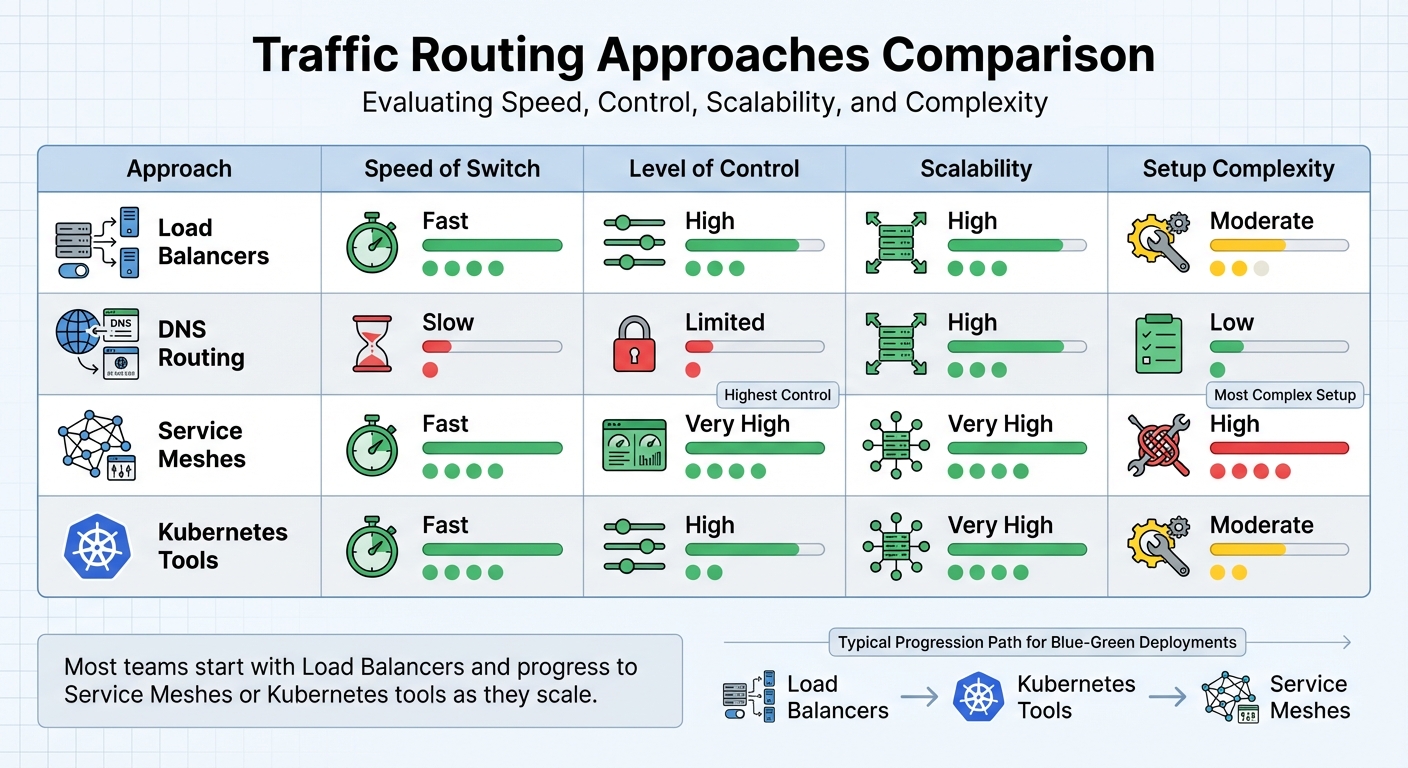 {Traffic Routing Methods for Blue-Green Deployments: Speed, Control, and Complexity Comparison}
:::
{Traffic Routing Methods for Blue-Green Deployments: Speed, Control, and Complexity Comparison}
:::
Let’s dive into how different traffic routing methods stack up against each other. Each approach has its own strengths and trade-offs when it comes to speed, control, scalability, and complexity.
Load balancers are a popular choice for their ability to switch traffic quickly by updating backend pools. They offer a high degree of traffic control and scalability, but setting them up requires moderate effort. Configuring health checks and routing rules is essential to make them work effectively. On the other hand, DNS routing is simple and highly scalable but comes with slower switching speeds and limited control. This makes it less ideal for precise scenarios like blue-green deployments [2][5].
Service meshes shine in microservices setups. They provide exceptional control, allowing detailed, service-level routing using features like header-based targeting and traffic mirroring [5]. They’re fast, highly scalable, and versatile, but they come with a steep operational learning curve. Managing sidecar proxies, certificates, and control planes demands advanced engineering skills [5]. Meanwhile, Kubernetes tools like Argo Rollouts strike a balance between automation and control. They make traffic management seamless, offering fast switching and high scalability while keeping setup complexity moderate. Tools like these work directly with Kubernetes Services and integrate well with GitOps workflows, making them a great fit for containerised environments [2][5][7].
| Approach | Speed of Switch | Level of Control | Scalability | Setup Complexity |
|---|---|---|---|---|
| Load Balancers | Fast | High | High | Moderate |
| DNS Routing | Slow | Limited | High | Low |
| Service Meshes | Fast | Very High | Very High | High |
| Kubernetes Tools | Fast | High | Very High | Moderate |
Many teams begin with load balancer-based deployments because they’re straightforward and effective. As teams grow more experienced, they often transition to service meshes or Kubernetes rollout tools to leverage advanced capabilities. However, these approaches require careful testing of routing changes in non-production environments. Treat routing configurations as code, ensuring they go through proper peer reviews [5][7]. The key is to align your choice with your team’s expertise and deployment requirements to ensure smooth and reliable transitions.
Ensuring Reliability Through Monitoring and Rollback
Continuous Monitoring of Traffic and Performance
Keeping a close eye on real-time metrics is crucial for maintaining reliability. Key indicators like HTTP response codes (especially 4xx and 5xx errors), latency percentiles (p50, p95, p99), throughput, and resource usage (CPU, memory, disk I/O, network) should be monitored across both environments [3]. It's also important to track application-specific metrics, such as failed transactions, timeouts, and the health of dependencies like databases, queues, or third-party APIs [3][9].
To cover all bases, use a layered monitoring approach. This means combining infrastructure metrics from platforms like Kubernetes or cloud providers, application telemetry from APM tools, and both synthetic and real user monitoring to catch user experience issues [3][5]. Set strict thresholds for critical metrics with short evaluation periods - triggering alerts immediately if latency or errors exceed your service level objectives (SLOs) [3][4]. Tailored alert policies for each environment can help detect even minor anomalies in the green environment early on. Health checks and readiness probes also play a key role in ensuring traffic isn’t routed to underperforming instances [7][9].
Tools like Prometheus, CloudWatch, and Grafana are invaluable for comparing metrics side-by-side between the blue and green environments [3][4]. Define clear alert rules such as: Trigger an alert if the 5xx error rate on green surpasses blue by a set percentage for a specific duration
or Raise an alert if p95 latency on green exceeds the SLO by a defined margin
[3]. Synthetic checks targeting both environments directly can also help catch issues before fully switching traffic. For UK-based operations, aligning alerting with on-call schedules and avoiding major changes during public holidays can prevent disruptions during critical times.
Strong monitoring practices not only help identify issues quickly but also enable seamless and automated rollbacks when needed.
Implementing Reliable Rollback Mechanisms
Effective rollback mechanisms rely on the detailed monitoring outlined above. If issues arise, traffic should be rerouted back to the blue environment quickly and automatically by updating load balancer backends, service selectors, or routing rules [5][9]. The blue environment must remain untouched and fully operational until the green version is thoroughly validated [3][9].
Automation is key here. Routing changes and configuration reverts should happen within seconds [3][4]. For load balancers, this typically involves adjusting backend pool configurations or weights to redirect 100% of the traffic back to blue [3][5]. Tools like service meshes and Kubernetes rollout solutions (e.g., Argo Rollouts or Flagger) can automate rollbacks based on health checks, ensuring traffic is moved back to the healthy ReplicaSet if error rates or latency exceed acceptable thresholds [7][9]. For example, Argo Rollouts in Kubernetes uses a scaleDownDelaySeconds setting (commonly 30–60 seconds) to allow IP tables to update before scaling down old ReplicaSets, preventing traffic from hitting terminated pods [7].
To ensure rollbacks go smoothly, your application must remain backward compatible with existing schemas and data formats. This ensures the blue environment can continue functioning correctly even after the green version has been live [4]. Schema changes should follow an expand-and-contract
model: add new fields before they are required by the code, and delay removing old fields until all older versions of the application are retired [4][5]. Stateful services should store session data centrally rather than tying it to a specific environment. This prevents issues like user logouts when switching traffic back to blue.
Finally, regular game days
or chaos exercises are invaluable. These drills test your monitoring systems, ensure alerts work as expected, and validate that rollback procedures can restore traffic to blue within your desired recovery time. These practices keep your team prepared for real-world incidents and minimise downtime.
Conclusion and Key Takeaways
Key Points to Remember
When it comes to managing traffic in blue-green deployments, a few practices stand out as particularly effective. Load balancers allow for immediate traffic redirection, sidestepping delays caused by DNS propagation[3][5]. Weighted routing provides a way to gradually shift traffic, which is invaluable for catching issues early without exposing the entire system[10]. For those using microservices, service meshes offer detailed control at the network level, while automation tools like Argo Rollouts simplify progressive delivery, handle health checks, and manage rollbacks seamlessly[2][5][7].
The backbone of zero-downtime releases lies in strong monitoring systems and automated rollback mechanisms. These ensure precise control over traffic flow and timing, which are essential for dependable deployments[3][8]. By adopting these strategies, organisations can achieve both reliable releases and opportunities for optimisation.
How Hokstad Consulting Can Help

Putting these strategies into action demands a combination of technical know-how and careful planning. Hokstad Consulting specialises in helping businesses implement these best practices. With expertise in DevOps transformation and cloud cost engineering, they focus on improving blue-green deployments while cutting infrastructure costs by 30–50%[1]. Their services include automating traffic routing, building custom CI/CD pipelines to reduce manual errors, and designing cloud migrations that ensure zero downtime.
Their results speak for themselves: clients have reported deployment times cut by up to 75% and error rates reduced by 90%[1]. Whether you’re navigating hybrid environments, Kubernetes clusters, or traditional cloud infrastructure, Hokstad Consulting offers tailored solutions that prioritise cost efficiency, performance, and reliability.
And here’s the kicker - their No Savings, No Fee
model for cost optimisation means you only pay based on the savings they deliver. It’s a win-win approach that makes investing in better deployment practices a no-brainer[1]. To find out more about how they can help with robust traffic routing and faster delivery, visit Hokstad Consulting.
FAQs
How do load balancers optimise traffic routing in blue-green deployments?
Load balancers are crucial in blue-green deployments, as they effectively manage user traffic between the current (blue) and new (green) environments. This approach ensures a smooth transition, reduces downtime, and keeps services highly available during the deployment process.
By keeping a close eye on the health of both environments, load balancers can instantly redirect traffic if any problems arise. This not only boosts reliability but also helps maintain a consistent and positive user experience. Their role is indispensable for ensuring deployment processes run seamlessly and without disruption.
What are the key risks of using DNS-based routing in blue-green deployments?
Using DNS-based routing in blue-green deployments carries a few notable risks. One of the biggest threats is DNS cache poisoning. This occurs when attackers tamper with DNS records, potentially redirecting users to harmful or fraudulent sites.
Another issue is propagation delays. These delays can result in inconsistent routing, where some users are sent to the old environment while others are directed to the new one. This inconsistency might lead to confusion or errors, especially during critical transitions.
There's also the risk of downtime if DNS records aren't updated correctly or quickly enough. This could mean users are sent to outdated or broken systems, which can negatively affect their experience. To reduce these risks, it's essential to carefully plan DNS updates and keep a close watch on traffic patterns during the switch.
How do service meshes improve traffic management in microservices?
Service meshes play a key role in managing traffic within microservices, giving you fine-tuned control over how requests flow between different services. With features like dynamic traffic shifting, canary releases, and load balancing, they make deployments not only safer but also more efficient.
Take blue-green deployments, for example. Service meshes make the transition between environments seamless by dynamically routing traffic to the correct version. This helps reduce downtime, improves system reliability, and provides users with a smoother experience. On top of that, built-in observability tools allow you to monitor and troubleshoot traffic behaviour in real time, ensuring everything runs as expected.