
If I had to boil this down to one point, it’s this: terraform validate catches config mistakes before they turn into failed plans, bad deploys, or wasted cloud spend.
In plain terms, schema validation checks whether my Terraform code matches what a provider, resource, data source, or module expects. It helps me spot things like:
- misspelt arguments
- missing required fields
- wrong value types such as
stringinstead oflist - broken references to resources, variables, or module outputs
- blocks placed in the wrong location
Just as important, it does not check live cloud conditions. So it will not tell me whether:
- an AWS instance type exists in
eu-west-2 - an IAM role has the right access
- my account quota is high enough
- a resource already exists in the way I expect
That split matters because terraform validate is local and fast, while terraform plan checks against cloud state and is slower.
Here’s the short version:
- I run
terraform initfirst, because validation needs provider schemas - I run
terraform validatenext, to catch structure and type issues - I use variable
validationblocks to stop bad inputs - I use
checkblocks for post-apply tests - In CI,
terraform validate -jsonmakes errors easier to parse and show in pull requests
A simple way to think about it: validate checks shape, plan checks reality.
For teams shipping often, that can mean fewer failed runs, less rework, and fewer cases where someone spins up cloud resources that should never have existed in the first place. Even a single bad deploy can waste hours of engineer time and add £100s or £1,000s in avoidable cloud cost.
So when I read this topic, the main takeaway is clear: treat schema validation as the first stop, not the last line of defence.
Terraform Validate | Terraform Tapas
Need help optimizing your cloud costs?
Get expert advice on how to reduce your cloud expenses without sacrificing performance.
How terraform validate works
Once you know what schema validation covers, terraform validate is the fastest way to check it on your machine. It scans the .tf files in the working directory, compares them with the loaded provider schemas, and reports structural errors locally.
Why terraform init must run first
terraform init downloads the provider plugins and schemas that terraform validate needs. After terraform init, the .terraform directory holds the provider data that terraform validate uses.
In CI, set TF_PLUGIN_CACHE_DIR so provider binaries can be reused. That keeps terraform init fast and cuts wasted downloads.
What terraform validate checks without connecting to the cloud
This command performs static analysis. It reads the configuration exactly as written and does not touch live infrastructure.
It checks things like:
- syntax
- block nesting
- required arguments
- attribute types
- references between resources and modules
So if a variable is undeclared, a type is wrong, or a block is in the wrong place, validation will flag it. That matters because validation errors should be caught during development, not left waiting for CI to find them.
The next step is spotting the errors it raises most often.
How terraform validate differs from terraform plan
terraform validate checks structure. terraform plan checks structure plus live infrastructure.
That’s the big difference. terraform plan connects to your cloud provider, reads the current state file, and works out exactly what would change. As a result, it’s slower and depends on credentials and network access.
Use terraform validate first to make sure your configuration is well-formed before you run a plan.
Common validation errors and how to fix them
Most validation failures fall into a few common buckets.
Unsupported argument and missing required argument errors
An unsupported argument error usually means one of two things: the argument is misspelt, or it’s been put in the wrong block. A missing required argument error means a mandatory parameter hasn’t been provided.
Start with the basics. Check the spelling, make sure the argument sits in the right block, and compare it against the provider schema or variables.tf.
Most failures here come down to either argument issues or value issues.
| Error Type | Meaning | Typical Fix |
|---|---|---|
| Unsupported Argument | Argument name is unknown to the schema or placed in the wrong block | Check spelling; verify the argument belongs in that specific resource block |
| Missing Required Argument | A mandatory parameter was omitted | Consult provider docs or variables.tf; add the missing argument |
Type mismatches and reference errors
Type mismatches happen when a value doesn’t match the schema. For example, Terraform may expect a list but get a string instead. Reference errors happen when the code points to a resource that doesn’t exist or an undeclared module output.
Using JSON output in CI for faster error diagnosis
In CI, it helps to surface these failures in a machine-readable format. terraform validate -json does exactly that. Rather than digging through raw console logs, your pipeline can pull out the exact file path, line number, and error message for each failure, then show them straight in pull request summaries.
Use the non-zero exit code to stop the pipeline before plan or apply.
Input validation, advanced checks, and policy guardrails
Schema validation spots structural issues. Variable validation answers the next question: do the inputs actually make sense? A configuration can be valid in Terraform terms and still be a bad idea.
How variable validation works alongside schema validation
Variable validation uses validation blocks inside your variable definitions. Each block includes a condition and an error_message that appears when validation fails.
This is where you enforce rules that terraform validate can't catch on its own. For example, you can restrict environment names to dev, staging, or prod, enforce naming patterns with regex, or limit instance sizes and storage values to help avoid cost overruns. The goal is simple: catch bad inputs before plan or apply.
When to use check blocks and provider-side validation
Terraform also gives you runtime checks after deployment. check blocks test the actual state of your infrastructure after an apply. That might mean confirming that a certificate hasn't expired or that connectivity works as expected. Think of them as runtime health checks, not pre-flight checks.
Provider-side validation adds provider-enforced checks during plan or apply.
Use the table below to keep pre-deployment validation separate from runtime checks.
| Validation Type | Mechanism | Primary Protection | When It Runs |
|---|---|---|---|
| Syntax/Schema | terraform validate |
Typos, missing arguments, structural errors | Before apply |
| Input Validation |
validation blocks |
Invalid business logic, cost overruns | Before apply |
| Functional Check |
check blocks |
Runtime health, certificate expiry, connectivity | After apply |
These layers work together, not as substitutes. Schema validation comes first, input validation comes next, and runtime checks come last. That gives you a stronger safety net across the deployment lifecycle.
Using schema validation in DevOps workflows
::: @figure 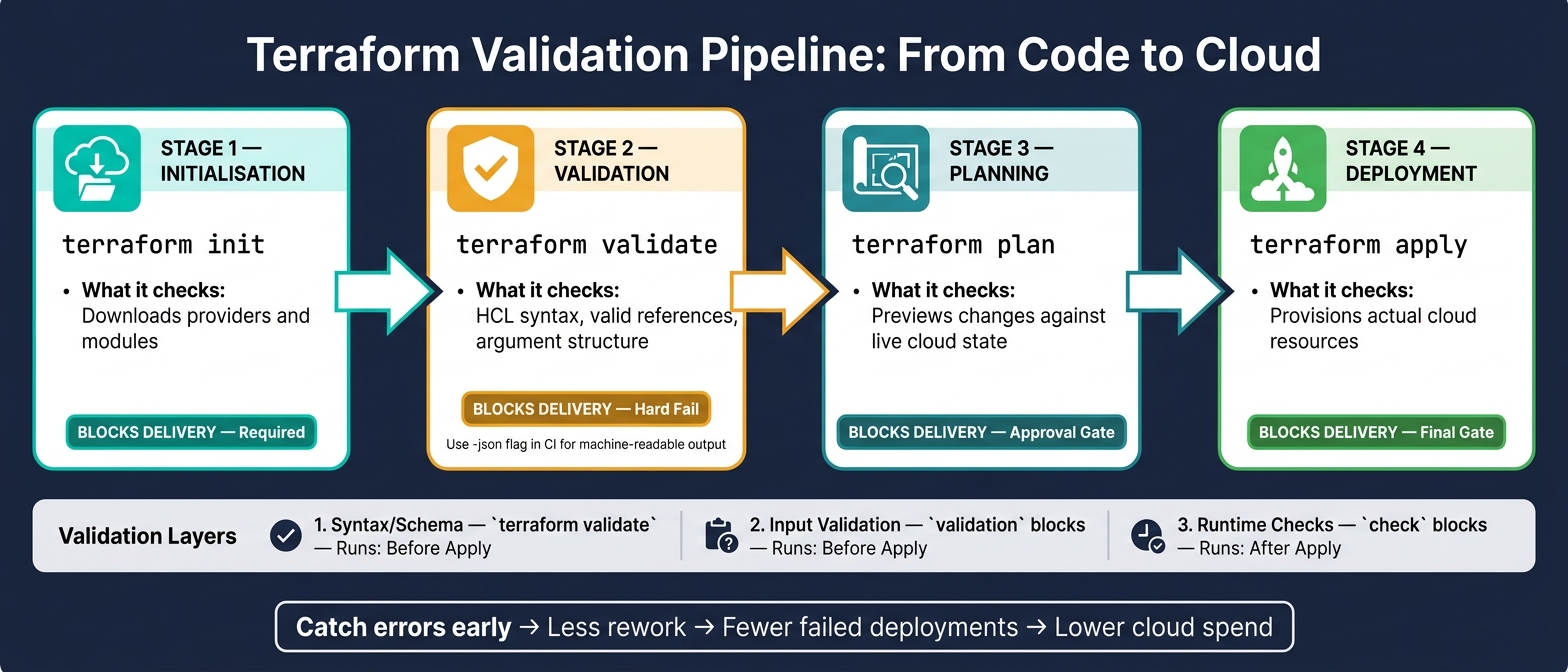 {Terraform Validation Pipeline: From Code to Cloud}
:::
{Terraform Validation Pipeline: From Code to Cloud}
:::
Place schema validation straight after terraform init and before terraform plan. In day-to-day CI, that usually means running terraform validate immediately after terraform init.
A simple validation stage before plan and apply
Keeping the order simple stops schema issues from slipping into planning or deployment.
| Pipeline Stage | Tool / Command | What It Checks | Blocks Delivery? |
|---|---|---|---|
| Initialisation | terraform init |
Downloads providers and modules | Yes (required) |
| Validation | terraform validate |
HCL syntax, valid references and argument structure | Yes (hard fail) |
| Planning | terraform plan |
Previews changes against live state | Yes (approval gate) |
| Deployment | terraform apply |
Provisions actual cloud resources | Yes (final gate) |
It also helps to run terraform fmt and terraform validate as pre-commit hooks. That way, the obvious problems get stopped before they ever hit CI.
Why early validation reduces delivery risk and unnecessary cloud spend
Schema errors are cheap to fix when you catch them before plan. Miss them, and the cost can spread fast: partial environments, unintended API calls, and time spent rolling things back.
For UK businesses trying to ship more often without pushing up infrastructure costs, this matters in plain terms. Fewer failed releases usually mean fewer late-night incidents. Less rework means engineers can spend more time on features instead of firefighting. And if a misconfiguration is caught before apply, you avoid paying for resources that should never have been created.
Where Hokstad Consulting can help
Hokstad Consulting helps teams add Terraform validation to CI/CD as part of broader DevOps and cloud cost engineering work.
Conclusion: Key points to remember
The main takeaway is simple: terraform validate is your first guardrail.
It gives you a fast, offline check of your HCL syntax, block structure, and attribute types, and it does all that without needing cloud credentials. That’s why it sits at the start of a broader validation chain. terraform validate checks structural integrity, variable validation blocks handle input logic, and CI/CD automation makes sure those checks happen every time. In UK environments, this helps teams spot missing deployment guardrails earlier.
Early validation means less rework and fewer failed deployments. If terraform validate fails, treat it as a local fix, not a nasty surprise in CI. Validate locally, fix the issue early, then let CI take it from there.
FAQs
When should I run terraform validate?
Run terraform validate early in development and make it a required step in your CI/CD pipeline.
Use it in your local pre-commit flow to catch syntax, structural, and constraint errors before you push code. Then run it in CI/CD right after code checkout, before plan and apply, so only valid configurations move forward to deployment.
Why does terraform validate need terraform init first?
terraform validate needs the provider plugins and schemas that terraform init downloads first. It does more than check syntax. Terraform uses those schemas to confirm that your configuration is semantically correct.
In CI/CD pipelines, you can run init with -backend=false to fetch what validate needs without setting up a remote state backend.
What errors can terraform validate miss?
While terraform validate checks HCL syntax, structure, and reference consistency, it does not check meaning or security. That gap matters.
It can miss issues like:
- IAM roles that are too open
- Resources with no encryption
- Hard-coded secrets
It also won’t catch runtime problems. For example, it can’t spot resource name conflicts, configuration drift, or infrastructure that breaks specific compliance rules, because it doesn’t actually provision anything.