
If I had to sum this up in one line: Terraform helps me build private cloud HA the same way every time, which cuts drift, lowers outage risk, and makes DR easier to test.
If you run services that cannot go down, the article makes three points fast:
- Single-node private cloud setups are risky
- Terraform turns HA designs into versioned code
- Two-site DR only works well if the Terraform setup itself can survive site failure
I also get the main trade-off straight away: higher infrastructure spend in exchange for lower downtime risk. In the example web stack, adding a second node and load balancing can mean roughly 10–40% more spend. In the two-site DR example, a mid-sized setup with 50–200 application VMs may sit around £15,000–£40,000 per month for active-passive, or £35,000–£80,000 per month for active-active.
Here’s the article in plain English:
- I use network segmentation, duplicate compute nodes, health-checked load balancing, and replicated data to cut single points of failure
- I keep state remote, locked, versioned, and access-controlled, because losing Terraform state during an incident can be as bad as losing part of the platform
- I use separate state and pipelines per site so one data centre issue does not spill into the other
- I move changes through
terraform planreview, approvals, and logged applies instead of making one-off fixes on live systems - I start with a small set of critical services, then build shared modules for network, compute, load balancing, and data services
Quick comparison
| Area | Manual private cloud setup | Terraform-led HA setup |
|---|---|---|
| Build method | GUI and shell changes | Version-controlled code |
| Failure handling | More manual work | More automated failover paths |
| Drift | Builds up over time | Easier to spot in plan output |
| DR across two sites | Hard to rehearse | Easier to run in a set sequence |
| Audit trail | Often patchy | Clearer through pipeline logs and approvals |
| Cost | Lower at first | Higher at first, lower outage cost over time |
So if you want the short answer, it’s this: Terraform adds the most value when I need repeatable HA builds, cleaner change control, and DR that I can run without guesswork.
Reference architecture: a Terraform pattern for private cloud HA
A solid private cloud HA setup usually comes down to four layers: segmented networking, redundant compute, load balancing with health checks, and a replicated data tier. In Terraform, each layer maps to a set of resources. That gives teams a blueprint they can copy, tweak, and roll out in a consistent way across sites.
Core building blocks: network, compute, load balancing, and data redundancy
The network layer comes first. Traffic moves through a front-end or DMZ segment, then into application subnets, and finally into a separate data segment. Each segment has its own CIDR block, routing rules, and firewall policies, all declared in a Terraform network module.
Site-level settings - VLAN IDs, gateway addresses, and IP ranges - are passed in as variables. So the same module can run at both a primary site and a secondary site without changing the structure. That’s the point: same pattern, different inputs.
Compute nodes are declared with count or for_each and spread across at least two separate failure domains, such as different racks or clusters depending on the platform. Stateless application servers sit behind a load balancer like HAProxy, OpenStack Octavia, or a hardware appliance such as an F5. Health checks are also defined in Terraform, so failed nodes are removed from the pool on their own. Where the platform allows it, Terraform can also define autoscaling policies and readiness probes.
The data layer is where things get harder. It’s usually the trickiest part to make resilient. This pattern uses clustering or primary–replica replication. In private cloud setups, PostgreSQL with Patroni and MySQL Galera are common options. Terraform provisions the virtual machines, volumes, and replication networks. It also uses lifecycle blocks such as prevent_destroy to stop accidental deletion of data resources. The replication itself is handled by the database tooling, not by Terraform.
Each site uses the same modules, with only the variables changing. Terraform state is stored separately for each site in a highly available backend. That avoids cross-site interference while keeping the architecture aligned. The result is simple in principle: if one layer has a problem, the blast radius is smaller. That’s exactly what the case studies put into practice.
Comparison table: single-site manual builds vs Terraform-based HA designs
This gap shows up most clearly in day-to-day operations:
| Factor | Single-Site Manual Build | Terraform-Based HA Design |
|---|---|---|
| Uptime | Lower; single points of failure across tiers | Higher; fewer single points of failure at each layer |
| Failover | Manual or scripted; slow and error-prone | Codified and repeatable; faster recovery with lower MTTR |
| Configuration drift | High; GUI and shell changes accumulate silently | Low; all changes go through version-controlled code |
| Change speed | Slow; manual steps, no consistent review process | Faster; CI/CD pipelines with terraform plan review before apply |
| Operational complexity | Lower upfront, but grows quickly as the environment ages | Higher upfront investment; more manageable and auditable over time |
| Cost impact (£) | Lower infrastructure spend initially; higher cost of downtime and incidents | Higher infrastructure cost, lower downtime cost |
The next case studies show how this pattern plays out in a live web stack and across two sites.
Use case 1: highly available web application stack in private cloud
This first case shows how the reference pattern can be used for a single private-cloud web tier.
A mid-sized UK IT services firm ran a customer-facing SaaS application on a private cloud platform, but the setup had a clear weak spot: the whole SaaS platform sat on one VM. That single node handled the web server, the application logic behind one reverse proxy, and it relied on local storage too. So when the host needed patching, the application went offline. If hardware failed, engineers had to SSH in, restart services by hand, and hope they didn’t create configuration drift along the way. To make matters worse, the documentation was patchy, and manual edits to firewall rules and server settings often no longer matched what was live.[5][1]
Problem, design, and Terraform implementation
The risk was simple: one failure anywhere in the stack meant a full outage. Maintenance windows were done manually, usually out of hours, and rollback was mostly limited to restoring a snapshot or rebuilding the VM.
The target design applied the network, compute, and load-balancing pattern from the reference architecture to the live SaaS stack. The web and application tier moved to at least two identical VMs, each placed in separate failure domains inside the private cloud. That meant a host or cluster issue was far less likely to take out both nodes at the same time. A load balancer sat in front of them and removed unhealthy instances on its own.
The build was split into clear Terraform modules:
- A network module created the front-end and application subnets, along with routing rules
- A compute module deployed multiple identical web nodes from the same base image
- A load-balancer module attached the back-end pool and configured health checks
Security rules were declared in code, so inbound traffic was limited to the load balancer, while database access stayed restricted to the application subnet.[5][2]
For this phase, the database tier stayed on the firm’s existing clustered solution. That choice kept the move smaller and cut risk, because the team only had to migrate the stateless web and application tier. The new stack was provisioned alongside the old single-node setup, traffic was switched over through DNS or reverse-proxy cutover, and the original VM was retired only after the new environment had been checked and signed off.[3][5]
Results: uptime, failover, and change control
Once the new setup went live, host-level failures stopped turning into outages. During a routine maintenance event, one web node became unavailable, but the load balancer removed it from service and the application kept serving traffic from the other node with no manual action needed. That’s the difference between “the box is down” and “users barely notice”.
Change management improved too. Work that once meant logging into VMs and making one-off firewall updates now moved through a pipeline. A terraform plan was reviewed in a pull request, approved, and then applied during a controlled change window.[6]
Manual changes didn’t stay hidden either. They showed up in the next terraform plan, which gave the team a direct signal that something needed checking.[1][4] Costs went up because of the extra node and the load-balancing layer - usually a 10–40% uplift in compute and load-balancer spend, depending on capacity settings and failure domains - but that was balanced by less incident response work and fewer unplanned outages.[1][4]
The same design choices matter even more when a second site is added for failover.
Use case 2: multi-site disaster recovery and Terraform operations
::: @figure 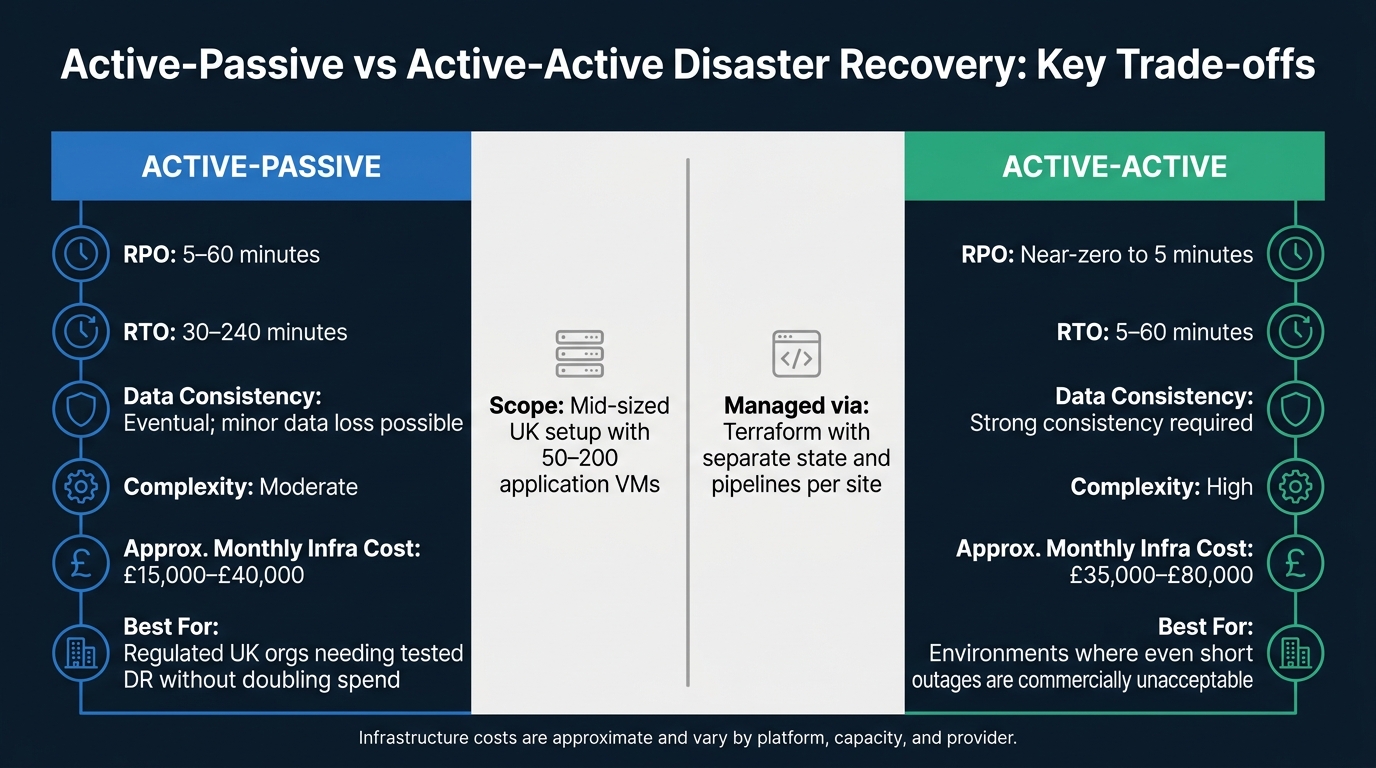 {Active-Passive vs Active-Active DR: Cost, RTO & RPO Compared}
:::
{Active-Passive vs Active-Active DR: Cost, RTO & RPO Compared}
:::
This second case goes past a single private cloud site and looks at what happens when an organisation needs proper disaster recovery across two physical data centres - and why Terraform’s own resilience matters just as much as the application’s. In the first case, the goal was to remove a single-site failure point. Here, the same idea is extended across two sites.
Active-passive or active-active private cloud DR across two sites
A UK financial services firm ran a VMware private cloud across two data centres and needed clear RTO and RPO targets - RPO between 5 and 60 minutes and RTO between 30 and 240 minutes.[9][10][11][15] The secondary site was meant to act as a standby site, but it still had to be provisioned in a consistent way on demand, not rebuilt manually during an incident.
The team modelled both sites in Terraform with shared modules for networking, compute, and load balancing. They used separate workspaces and separate state for each site so a problem in one place would not spill into the other. Site-specific variables handled the differences, such as IP ranges, capacity settings, and local integrations. The DR site kept a scaled-down compute layer on standby and could be expanded to full production size during promotion. Replicated storage and database failover stayed in the firm’s existing tooling, while Terraform consumed the needed volumes and mount points through data sources.[9][10][11]
When DR promotion was needed, a dedicated pipeline ran the sequence: scale up DR compute through terraform apply, promote the standby database, update load balancer targets and DNS, then run automated smoke tests before switching user traffic. That matters because it cuts out manual steps and makes DR tests repeatable instead of nerve-racking fire drills.[9][10][11][15]
For a mid-sized UK setup with 50–200 application VMs, the trade-offs usually look like this:[12]
| DR pattern | Typical RPO | Typical RTO | Data consistency | Complexity | Approx. monthly infra cost (£) |
|---|---|---|---|---|---|
| Active-passive | 5–60 minutes | 30–240 minutes | Eventual; minor data loss possible | Moderate | £15,000–£40,000 |
| Active-active | Near-zero to 5 minutes | 5–60 minutes | Strong consistency required | High | £35,000–£80,000 |
Active-passive fits most regulated UK organisations that need a tested DR setup without doubling infrastructure spend. Active-active is more suitable when even short outages are commercially unacceptable, but it asks for more advanced CI/CD orchestration and strict testing to stop configuration drift between sites.[12]
The next risk is not only site failure. It is losing control of the automation that rebuilds the site.
High-availability Terraform state, pipelines, and team controls
Application resilience does not help much if Terraform state is fragile. State is the control plane for recovery. Lose it - or let two applies run at once against an old copy - and things can go wrong at the worst possible time.[7]
The fix is a remote backend with locking and versioning turned on. Versioned object storage gives state much stronger durability and availability than a local disk.[7] State locking - often through a database or key-value store acting as a lock manager - stops two pipeline runs from pushing conflicting changes at the same time. Encryption at rest and in transit, paired with strict RBAC, means state is handled like a secret, not a text file passed around the team.[7][8][13]
Pipelines need the same treatment. If CI/CD runners live only in the primary site, that site becomes a single point of failure; once it goes down, the team loses the ability to run Terraform at all. Running redundant runners across both data centres, with pipeline definitions stored in a highly available source control system, means DR operators can still execute plans and applies during an incident.[14] Alerts should fire if state unlocks happen from developer workstations, because that often points to a change taking place outside the controlled pipeline.[7]
In regulated UK environments, governance sits over the whole setup. Role-based access makes sure only authorised engineers can run terraform apply against production or DR workspaces. Change approvals - whether through a formal CAB process or a digital approval gate in the pipeline - must be in place before Terraform runs. Every plan and apply is logged with the user who triggered it, the changes made, and links to the related change or incident record. That audit trail is exactly what regulators and internal audit teams expect to see.[13][14][15]
| Approach | State loss risk | Collaboration | Traceability | Suitability for regulated UK environments |
|---|---|---|---|---|
| Local state and ad hoc execution | High - state on individual machines, limited backup | Poor - changes isolated to individuals | Low - hard to reconstruct who changed what | Generally unsuitable; fails audit and control expectations |
| Centralised, highly available automation | Low - remote, replicated, versioned state | Strong - shared workspaces, team pipelines | High - audited pipelines, logged plans and applies | Well-suited; supports FCA/NHS-style audit, approvals and RBAC |
That is what makes DR automation usable in practice: infrastructure you can recover, recovery steps you can repeat, and controls you can audit.
Conclusion: where Terraform adds the most value for private cloud HA
These two case studies point to the same thing: Terraform does its best work in private-cloud HA when the goal is repeatable, auditable infrastructure.
That shows up most clearly in a few areas. Teams get a standard way to build resilient systems, less config drift, faster recovery, and more controlled scaling. And that isn't just neat on paper. It has a direct day-to-day payoff: fewer late-night incidents and DR tests that look much closer to live production.
There is, of course, a trade-off. Terraform makes the price of stronger resilience hard to ignore. That can be useful. It gives teams a clear way to weigh extra infrastructure against the risk of downtime and the pressure of compliance, especially when moving from a single-site setup to active-passive or active-active DR models.
The practical takeaway is straightforward: start small, codify the pattern, then expand.
Begin with a handful of critical services. From there, build reusable modules for:
- network
- compute
- load balancing
- data redundancy
Then place those modules inside a governed CI/CD pipeline, so the setup stays consistent as it grows.
For teams ready to put that into practice, Hokstad Consulting can help. They work with organisations to design Terraform module libraries for private-cloud HA, connect them to DevOps pipelines, and line up resilience goals with cost in £.
FAQs
When should I use Terraform for private cloud HA?
Use Terraform for private cloud high availability when you need to codify and standardise infrastructure for repeatable, version-controlled deployments. It works well for failover and zero-downtime setups because it defines resources through declarative states.
Use it at the initial provisioning layer to build consistent environments from the start. Lifecycle rules such as create_before_destroy help swap resources without service interruption, while health checks and scaling policies support smooth handovers during maintenance or outages.
What should I put in Terraform and what should stay outside it?
Use Terraform for the base infrastructure layer: virtual machines, networking, and storage. It lets you define the target state in declarative configuration, then provision it in a consistent way.
Keep post-deployment configuration, day-to-day maintenance, and application management outside Terraform. That kind of task-based work is a better fit for tools like Ansible, especially for jobs such as patching or manual scaling.
It also helps to keep policies as code separate. That way, guardrails and compliance checks can be enforced before anything is deployed.
How do I make Terraform resilient across two sites?
Use standardisation and a modular architecture. Define infrastructure with Terraform modules, then parameterise site-specific values and provider details so the same code can be deployed in both environments without guesswork.
Add lifecycle rules such as create_before_destroy, along with consistent version control and automated CI/CD pipelines, to keep deployments across both sites in sync and cut downtime during updates.