
If I had to boil this down to one point, it’s this: Terraform helps me run AWS, Azure and Google Cloud through one code-based workflow - but only if I keep state split, modules simple, and access tight.
Multi-cloud can add a lot of extra work. So I’d only use it when there’s a clear reason, such as:
- uptime across more than one provider
- UK or EU data location rules
- commercial choice between cloud vendors
- £ cost tracking with shared tags and shutdown rules
Here’s the short version of what matters most:
- I keep one main cloud first, then add another only when there’s a firm need
- I treat Terraform as a way to get a shared process, not the same setup on every cloud
- I split state by environment and stack so one change does not hit everything
- I use modules with simple inputs and outputs
- I run the same flow every time: init → fmt → validate → checks → plan → review → apply saved plan
- I keep secrets out of code and use short-lived identities
- I run drift checks on a schedule, such as nightly for key platforms
- I build cost rules into Terraform from day one, like tagging and shutting down dev workloads outside 07:00–19:00 or office hours
A few facts stand out to me. Terraform state is the file that tells Terraform what it thinks exists, so if I mix too many things into one state file, the risk goes up fast. And in production, using a set UK window such as 10:00–16:00 Europe/London can cut confusion because the right people are online when changes land.
Quick comparison
| Area | What I’d do | What I’d avoid |
|---|---|---|
| Multi-cloud scope | Start with one cloud, add a second for a clear reason | Using multi-cloud just because it sounds good |
| State | Split by environment and stack | One shared state for unrelated workloads |
| Modules | Keep interfaces simple and neutral | One giant module full of conditionals |
| Environments | Separate dev, staging, prod roots |
Relying only on workspaces for production separation |
| Credentials | Use IAM roles, managed identities, service accounts, OIDC | Long-lived keys in code or CI variables |
| Deploy flow | Review plan, apply the saved plan only |
Ad-hoc applies from a local machine |
| Cross-cloud links | Use outputs, DNS names, APIs, queue names | Tight coupling through shared state |
| Cost control | Enforce tags, rightsize defaults, stop non-prod out of hours | Leaving spend checks until after launch |
So when I look at multi-cloud Terraform, I don’t think “one tool fixes everything”. I think clear boundaries, repeatable steps, and tight control. That’s what makes it work.
Need help optimizing your cloud costs?
Get expert advice on how to reduce your cloud expenses without sacrificing performance.
Set up a Terraform project for multiple clouds
With the core ideas in place, the next step is to turn them into isolated roots, pinned providers, and separate state. Before you write any resources, set up a separate root for each environment, check that you can log in to each cloud, and note the region and identity method for every platform.
Create the project structure and pin provider versions
A clean layout keeps reusable modules away from environment-specific config. A solid starting point looks like this:
├── modules/
│   ├── networking/
│   └── compute/
└── environments/
    ├── dev/
    ├── staging/
    └── prod/
Each environment folder should contain its own main.tf, providers.tf, variables.tf, outputs.tf, and, if needed, terraform.tfvars for environment-level values. That keeps dev, staging, and prod apart: different state, different variables, different purpose.
Pin Terraform and provider versions with required_version and required_providers, then commit .terraform.lock.hcl.
After that, connect each environment root to the correct cloud identity and region.
Configure AWS, Azure and Google Cloud providers safely
Declare each provider in providers.tf and pass region or location values through variables. Patterns like var.aws_region, var.azure_location, and var.gcp_region help keep modules portable and make region changes a one-line update in each environment.
Keep credentials out of code. Pull them from cloud identity or a secret manager instead. Use provider aliases when you work with more than one account, subscription, project, or region [1][5][6]. An alias makes it plain which credentials and geography Terraform is using for a resource. That cuts the chance of creating something in the wrong place.
Choose and secure remote state for each environment
Use one backend per environment, and split state by cloud or stack where that makes sense. Sharing one state file across unrelated workloads increases blast radius fast: a mistaken apply in one area can affect another [2][3][4][9].
Choose the backend that fits the cloud hosting that environment, then lock it down. All three common backends support encryption at rest and some form of state locking, but they do it in different ways:
| Backend | Encryption | Locking mechanism | Key trade-off |
|---|---|---|---|
| AWS S3 | SSE-S3 or SSE-KMS (encrypt = true) |
DynamoDB table or native lockfile (use_lockfile = true) |
More manual setup, but familiar to many AWS teams [3][4][7][8] |
| Azure Blob Storage | Azure Storage encryption at rest by default; optional customer-managed keys via Key Vault | Automatic blob lease locking | Simple for Azure-focused teams, with RBAC and Key Vault integration [3][9][10][11] |
| Google Cloud Storage | Google-managed or customer-managed keys | State locking support | Simple to run and works well with GCP IAM [3][4] |
Store backend credentials in a secret manager or in environment variables. Turn on encryption, limit access, and enable versioning where the backend supports it.
Design reusable modules and a clear multi-cloud layout
Once your project structure and remote state are set up, the next job is keeping things easy to run as your estate gets bigger. That usually comes down to disciplined module design: clear interfaces, steady naming, and a layout that keeps reusable code apart from environment-specific wiring.
Use modules with neutral inputs and clear outputs
Build modules around capabilities, not providers. Keep the interface tight, with neutral inputs like environment, segment_type and internet_exposed, and keep provider-specific resources hidden inside the module.
Don’t try to make one module handle cloud patterns that don’t match. AWS, Azure and GCP often differ a lot for some services, especially networking. In those cases, keep separate modules for each cloud, but make them follow the same interface contract instead of stuffing one module with lots of conditionals.
Outputs should follow the same idea. Expose neutral concepts such as network_id, subnet_ids and security_group_ids. That keeps the calling code steady, and engineers can swap one implementation for another without rewriting root modules.
It also helps to keep one small shared module for common outputs like tags, naming and monitoring references.
Once those interfaces are fixed, lock down the names and tags the modules produce.
Standardise names, tags and labels across clouds
Messy tagging makes cost reporting and audit trails hard to trust across clouds.
Use these keys across AWS tags, Azure tags and GCP labels:
| Tag / Label key | Example value | Purpose |
|---|---|---|
environment |
prod, staging, dev
|
State isolation and governance |
service_name |
payments-api |
Operational clarity and incident response |
owner |
platform-team |
Accountability |
cost_centre |
CC-4821 |
GBP cost allocation and chargeback |
data_classification |
confidential, internal
|
GDPR and audit readiness |
retention |
1y, 7y
|
Data retention policy evidence |
Use a fixed name pattern such as <env>-<service>-<component>-<region> - for example, prod-orders-api-web-euw1. You can tell the environment and purpose at a glance, which saves time in day-to-day operations and during audits.
To stop drift, generate tag maps in one shared tagging module and apply them through default_tags in the AWS provider or matching locals blocks in Azure and GCP. Check allowed values with Terraform validation blocks, and enforce this in CI so resources missing required tags are rejected before apply.
Once naming and tagging are sorted, pick the simplest module pattern that fits the service.
Pick the right module pattern for shared and per-cloud services
Not every service needs the same module pattern. Pick the wrong one and you either add extra complexity or block access to cloud-native features.
| Module pattern | Advantages | Disadvantages | Suitable use cases |
|---|---|---|---|
| Cloud-specific | Full provider feature access; easier debugging; clear behaviour per cloud | Duplicate modules per cloud; less reuse across providers | Core networking, compute, storage in each cloud |
| Abstracted multi-cloud | Single interface for multiple clouds; reduces duplication | Complex internals; risk of over-abstraction; harder troubleshooting | Simple, similar services across clouds (e.g. basic compute) |
| Shared-service | Centralised governance; cross-cloud visibility; provider-agnostic | Depends on external platforms; may not cover all per-cloud specifics | Central governance layers such as DNS, identity, observability and policy |
In practice, start with cloud-specific modules for core infrastructure like networking and compute, where provider differences matter most. Bring in abstracted or shared-service modules only when they give you a clear upside without hiding the implementation under too many conditionals.
With modules and labels standardised, the next step is a repeatable init, plan and apply workflow.
Run a multi-cloud Terraform workflow step by step
::: @figure 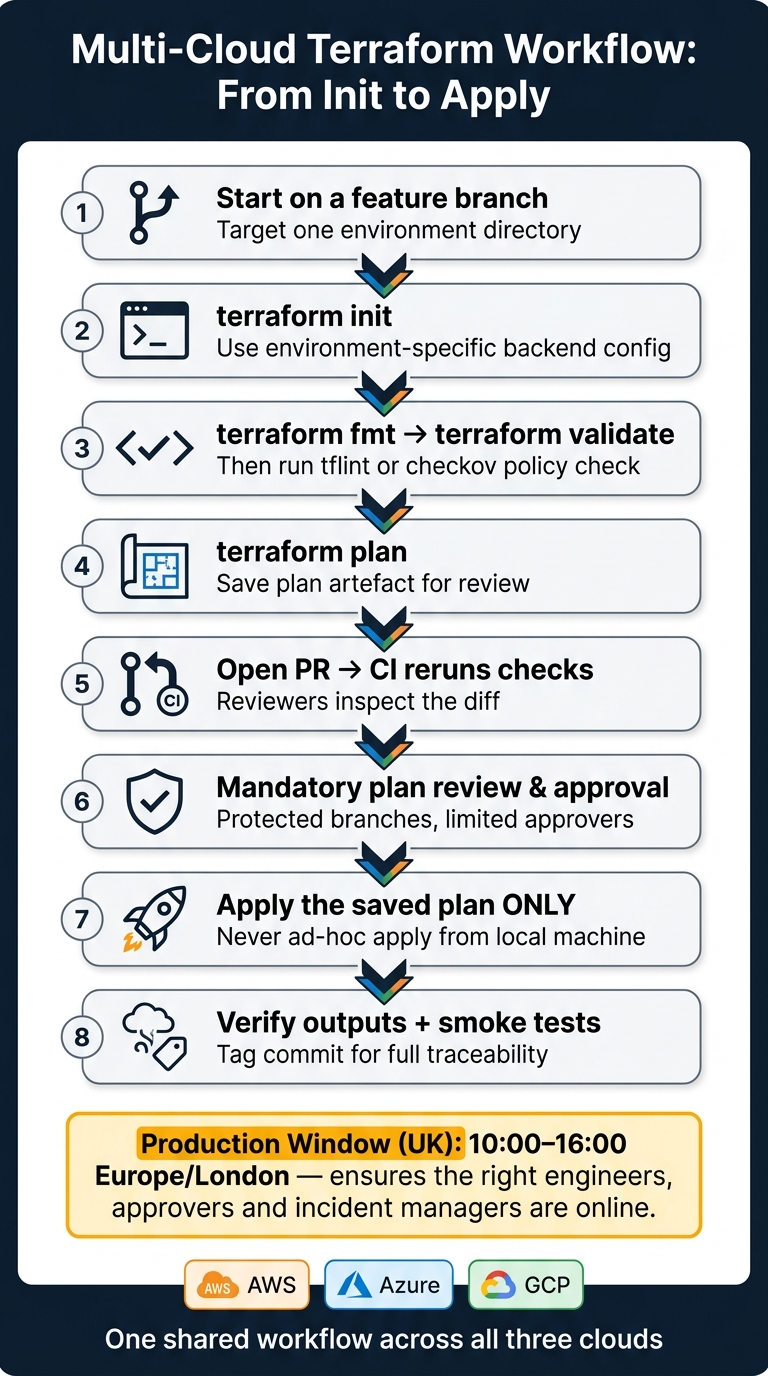 {Multi-Cloud Terraform Workflow: From Init to Apply}
:::
{Multi-Cloud Terraform Workflow: From Init to Apply}
:::
With the layout and state model in place, use the same workflow for every change.
From init to apply: the core command sequence
Every change should follow the same path, no matter which cloud you're working in. Start on a feature branch. Then run terraform init in the target environment directory using that environment's backend config.
After that, run the standard checks:
-
terraform fmt -
terraform validate - a policy check such as
tflintorcheckov
Then create and store a terraform plan artefact for review. That gives AWS, Azure and Google Cloud changes one shared review path instead of three different ones.
Next, push your branch, open a pull request, and let CI run the same checks again so reviewers can inspect the diff. Once the change is approved, apply the saved plan only. After the apply, verify outputs and run smoke tests. Tag the commit so you can trace exactly what changed and when.
For production applies, many UK teams book changes inside a set local window - for example 10:00–16:00, Europe/London - so the right engineers, approvers and incident managers are on hand.
Manage dev, staging and prod without mixing state
Run that workflow from one environment directory at a time. Treat each environment as its own deployment boundary. In practice, that means separate dev, staging and prod directories, each with environment-specific .tfvars files for things like region (eu-west-2 for London), pricing tiers and alerting thresholds.
Use the same setup across clouds, but keep each cloud's state separate.
Terraform workspaces can be handy for small or short-lived setups. But they share one backend and one configuration, which makes them a weaker choice as teams and environments get bigger. Here's the trade-off:
| Aspect | Workspaces | Separate directories and backends |
|---|---|---|
| Isolation | Logical isolation only; shared backend and configuration | Strong; separate backend, credentials and often separate cloud account |
| Auditability | Harder to trace per-environment history | Clear audit trail per environment path and backend |
| Operational simplicity | Simple to start; fewer files to manage | More setup, but easier to reason about at scale |
| Production suitability | Not recommended as the sole isolation mechanism | Strongly preferred; supports stricter access and approval controls |
Production also needs tighter controls around the workflow itself: protected branches, mandatory plan review, limited approvers, locked state access and audit logging.
Handle cross-cloud dependencies carefully
Once environments are split out, keep cross-stack links explicit. Keep separate state for each stack and environment. Use terraform_remote_state or a native data source to read only the outputs you need. Link stacks through published outputs, not shared state files.
That matters because cross-cloud dependencies can get messy fast. A few stable integration points are fine, such as shared DNS, identity or core networking, where strict apply order actually matters. But for most application stacks, it's safer to integrate through clear contracts like DNS names, public API endpoints or queue names.
That approach gives teams room to deploy on their own schedules without one cloud's apply holding up another. It also keeps the blast radius smaller if something breaks.
Secure, optimise and operate Terraform in production
Protect credentials, permissions and state access
Once you've split environments and put modules in place, production control comes down to three things: identity, state access and drift monitoring.
Start with identities. Use federated identities - AWS IAM roles, Azure managed identities or service principals, and GCP service accounts - instead of long-lived API keys. In CI, set pipelines to assume short-lived roles through OIDC or workload identity federation. That way, static credentials never end up sitting in files or logs.
Permissions need the same discipline. Build least-privilege IAM roles per provider, per environment and per stack. In AWS, that often means separate roles such as tf-prod-network and tf-prod-app, with each role limited to the resources Terraform is meant to manage. Azure and GCP follow the same pattern with custom roles and tight service account bindings.
Remote state needs careful handling too. Lock down S3, Azure Blob or GCS backends so only CI jobs and a small admin group can read or write state. Turn on encryption at rest with customer-managed keys, enable versioning, and keep state locking on at all times. In production, never pass -lock=false. State is critical data, so treat it that way: document recovery steps, test restores, and define RTO/RPO targets.
That covers access, but it doesn't catch everything. Scheduled drift checks help you spot changes Terraform didn't make. Run terraform plan -refresh-only on a schedule - nightly at minimum for critical platforms - and alert on unexpected changes after the scheduled plan review. When drift shows up, either bring it back in line with code or use terraform import only if the live resource is the source of truth you want to keep. A clear runbook matters here. Spell out who handles drift alerts and how fast they need to respond.
Build cost control into the Terraform design
Once security is sorted, build cost control straight into your Terraform design. Don't leave it as a separate finance exercise. Put these rules into module defaults and policy checks from the start.
| Cost optimisation technique | Terraform feature used | Cloud/provider capability | Practical example |
|---|---|---|---|
| Rightsize compute and storage | Opinionated modules with validated instance type variables | Instance families in AWS, Azure, GCP | Default non-production modules to small general-purpose instances; require a PR justification for larger types |
| Shut down non-production resources out of hours | Terraform-managed schedulers or scale-to-zero rules | AWS EventBridge/Lambda, Azure Automation, GCP Cloud Scheduler | Stop dev and test workloads 19:00–07:00 UK time and at weekends, reducing runtime |
| Enforce tagging for chargeback/showback |
default_tags in AWS provider; label blocks in GCP; policy-as-code to block untagged resources |
Cloud billing and cost allocation tools | Block untagged resources with policy-as-code |
| Use commitments for stable workloads | Terraform resources for Savings Plans, Reserved Instances or Committed Use Discounts | Cloud-specific commitment and billing APIs | Model predictable baseline capacity as commitments, improving £/month cost predictability |
| Use autoscaling and serverless for variable demand | Autoscaling group modules; serverless service resources; scaling parameters as inputs | AWS Auto Scaling, Azure VM scale sets, GCP Managed Instance Groups | Scale services to minimum capacity at nights and weekends when UK load drops, paying only for actual usage |
Keep an eye on savings in £. It also helps to line up shutdown schedules with UK office hours and bank holidays. Small timing changes can make a clear difference to monthly spend, especially in dev and test estates.
Conclusion: Core steps for a reliable multi-cloud IaC practice
A reliable multi-cloud Terraform practice usually comes down to a few steady decisions made early, then kept in place as things grow. Structure projects cleanly, with separate state per environment and per ownership boundary, so an issue in one stack doesn't spill into another. Reusable modules with cloud-agnostic inputs make the codebase easier to manage as it expands.
Security and cost control shouldn't be bolted on later. They need to live in the design from day one, written straight into modules, IAM roles, tagging standards and scheduling logic.
Used with consistency, Terraform improves delivery speed, cost visibility and governance across clouds.
FAQs
When should I choose multi-cloud with Terraform?
Choose a multi-cloud strategy with Terraform when your organisation needs more freedom and wants to avoid getting tied too closely to one provider, whether that’s AWS, Azure or Google Cloud.
It also works well when you need one declarative way to manage infrastructure the same way across many cloud and on-premises environments. That matters even more if you’re dealing with more involved setups, compliance needs and audit trails.
How should I split Terraform state safely?
Organise infrastructure by environment and by job.
Keep separate state files for development, staging and production. That way, a change in one place doesn’t spill into another. Inside each environment, split long-lived resources, such as databases, from short-lived application servers.
A good rule of thumb is to keep each root configuration under 100 resources. This helps Terraform run with less drag and keeps the blast radius smaller if something goes wrong.
When one state needs data from another, use terraform_remote_state to share outputs as read-only.
What is the best way to handle cross-cloud dependencies?
Start by defining at least one output for each resource in a module. That gives Terraform something concrete to work with, so it can infer dependencies between modules without guesswork.
For resources that depend on each other, deploy them in sequence. For parts that don't share dependencies, deploy them in parallel to save time and keep the process moving.
In more complex setups, a Configuration Management Database can serve as a central hub for mapping relationships. It helps teams see how a change in one service can affect dependent applications across cloud providers.