
If you move data between AWS, Azure and Google Cloud, the network bill can climb fast - and the lowest-cost route can still hurt speed and stability.
I’d boil the study down like this:
- Cross-cloud egress adds up fast. Even 200 GB per day can turn into about 6 TB per month, with charges running into the hundreds of pounds.
- Public internet links are often cheaper at low volumes, but once traffic gets to about 7 TB per month or more, private links can start to cost less overall.
- Performance changes by route. Short UK-to-EU paths can stay under 50 ms RTT, while UK-to-US East often sits above 80–100 ms.
- Some workloads care more about cost, others about timing. Backups and replication often focus on £/GB. Database moves and streaming flows care more about throughput, jitter and consistency.
- At 50–200 TB per month, spend can become a major budget line, reaching roughly £38,000 to £160,000 per year at list pricing.
Here’s the simple takeaway: I’d only use the cheapest transfer path if it still meets the workload’s timing and stability needs. For small or irregular flows, public internet may be enough. For steady, high-volume traffic, dedicated links can cut both unit cost and performance swings.
Quick comparison
| Option | Upfront cost | Cost at low volume | Cost at high volume | Speed consistency | Best fit |
|---|---|---|---|---|---|
| Public internet egress | Low | Often lower | Often higher | Lower | Small or occasional transfers |
| Private interconnect | Higher | Often higher | Often lower | Higher | Steady, heavy, time-sensitive traffic |
If I were reviewing a multi-cloud setup, I’d start with four checks: monthly TB moved, source/destination regions, latency limits, and whether the traffic is batch, replication, database export, or streaming. That usually shows where the money goes and which links need a different setup.
::: @figure 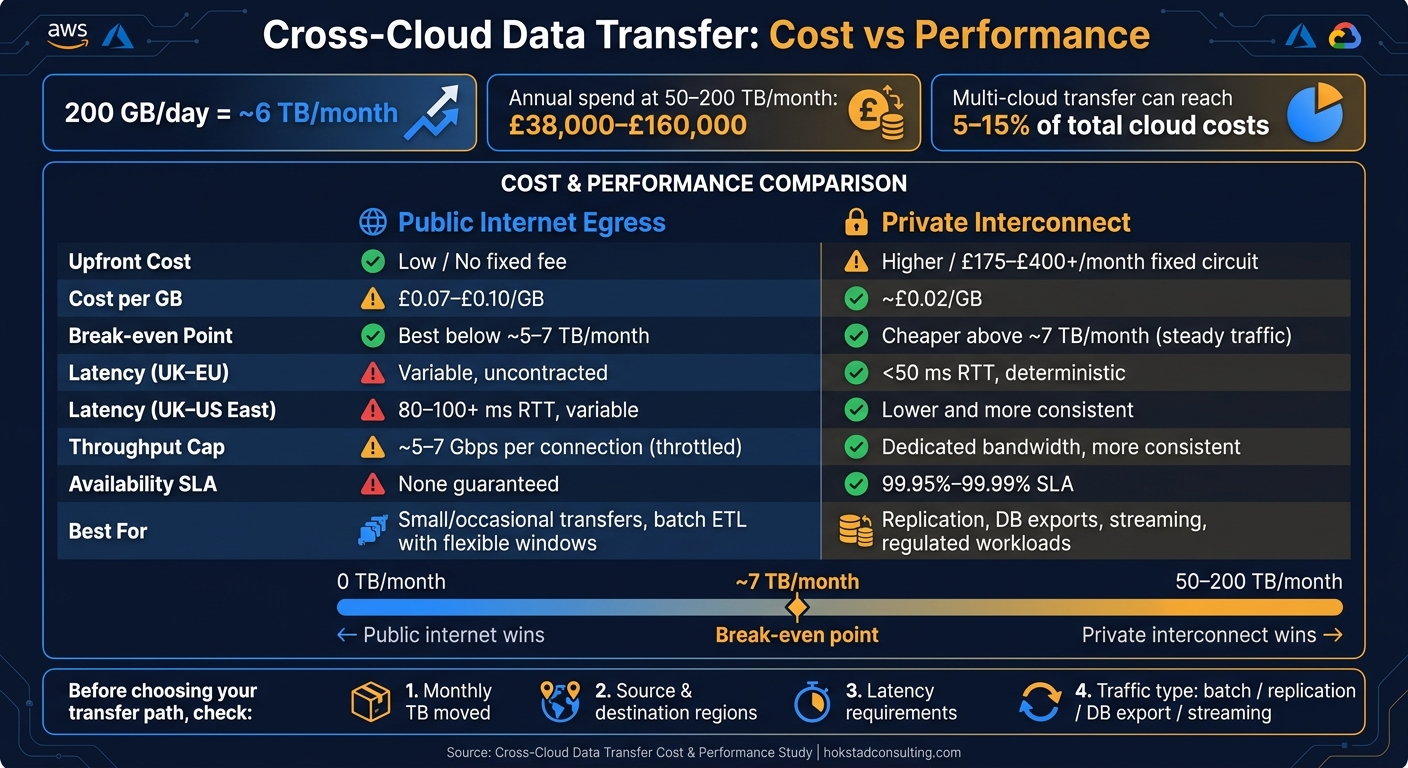 {Cross-Cloud Data Transfer: Public Internet vs Private Interconnect Cost & Performance}
:::
{Cross-Cloud Data Transfer: Public Internet vs Private Interconnect Cost & Performance}
:::
Study scope and method
Research questions and test scope
The study looked at a familiar multi-cloud trade-off: cost vs network performance.
To test that properly, it compared major hyperscalers across three areas:
- cross-cloud pricing
- route efficiency
- the break-even point for private interconnects
Public internet scenarios modelled standard outbound traffic over normal business internet connections. Private interconnect scenarios covered dedicated links through AWS Direct Connect, Azure ExpressRoute, and Google Cloud Partner Interconnect, based on enterprise setups in UK carrier-neutral data centres.
Cloud paths, workloads and regions tested
The team tested transfers between AWS, Azure, and Google Cloud in both directions across UK-to-EU, intra-EU, and transatlantic routes. That made it possible to track pricing asymmetries and routing differences across multi-cloud setups commonly used by UK organisations.
Different workloads put different kinds of pressure on the network, so the same routes were tested against four traffic patterns:
| Workload | Transfer Profile | Primary Sensitivity |
|---|---|---|
| Storage replication | Large volumes, periodic or continuous | Egress cost per GiB |
| Database export/import | Smaller volumes, time-constrained | Throughput and completion window |
| Batch ETL transfers | High-volume, overnight jobs | Predictable routing and throughput |
| Streaming logs/events | Continuous, lower volume | Latency jitter and path stability |
That matters because the best route for one workload may be the wrong one for another. A storage replication job, for example, may live or die on per-GiB egress cost, while a database export has much less patience for delays.
How measurements were collected
The next step was measuring both application-level and network-level behaviour under repeatable conditions. The study used production-style cloud tests alongside synthetic benchmarks, so it could compare day-to-day behaviour with raw network performance.
Tests ran over several weeks and were scheduled at different times of day, across weekdays and weekends, to catch time-based variation and congestion patterns. Each scenario was repeated dozens to hundreds of times, which helped produce stable averages and more dependable p95 and p99 latency figures.
Automated probes ran in parallel to spot re-routing. When routing shifts appeared, they were either flagged and removed from the main set or examined separately.
Prices were normalised to GBP (£) and shown per GiB and for sample monthly workloads. Enterprise contract rates may differ.
Cost findings: where cross-cloud transfer spend rises fastest
Egress pricing and cross-cloud transfer charges
Cross-cloud bills are mostly shaped by outbound egress from the source cloud. At list price, AWS → Azure comes to about £730/month for 10 TB and around £6,300–£6,400/month for 100 TB, depending on direction. If the traffic starts in GCP, pricing begins higher, at roughly £0.10/GB at lower volumes.[8]
That said, the price difference on paper only tells part of the story. Once you add fixed circuit fees, the maths changes.
| Transfer scenario | Variable cost per GB (approx., £) | Fixed monthly connectivity cost (approx., £) | Usage level where this option becomes cheaper |
|---|---|---|---|
| AWS → Azure via public internet | £0.07–£0.09 | £0 | Best below ~5 TB/month |
| AWS → Azure via Direct Connect + ExpressRoute | ~£0.02 | £175–£400+ | Typically cheaper above ~7 TB/month |
| Azure → GCP via public internet | ~£0.07 | £0 | Best below ~5 TB/month |
| Azure → GCP via Interconnect | ~£0.02 | ~£255/month+ | Typically cheaper above ~7 TB/month |
| Multi-cloud backup via private links | ~£0.02 | £175–£400+ | Typically cheaper above ~7–10 TB/month |
Spend climbs fastest on steady traffic flows like backups, replication and analytics feeds. Those are the jobs most likely to drift into double-digit TB per month. At 50–200 TB/month, annual cross-cloud transfer spend can land at roughly £38,000–£160,000 at list rates, which can wipe out any savings on compute.[4]
Break-even points for direct connectivity
Private connectivity options - AWS Direct Connect, Azure ExpressRoute and GCP Cloud Interconnect - cut the per-GB rate, but they also bring a fixed monthly circuit fee. A good example is a 1 Gbps Azure ExpressRoute metered circuit, which breaks even at roughly 7 TB/month compared with standard internet egress. In day-to-day use, private connectivity tends to make more financial sense once steady outbound traffic gets to around 50–100 TB/month.[5][6][7][9][10][11][12]
But cost is only one side of it. The next step is to ask whether the lower-cost route can also handle your latency, throughput and consistency needs. A cheaper path is not always the right one for critical workloads.
Performance findings and cost-performance trade-offs
Latency, throughput and path consistency
Once you’ve worked out the cost break-even point, the next step is simple: does the cheaper route actually meet your performance needs? Price is only one side of the decision. A low-cost path can still miss latency, throughput, or stability targets, and that can add operational risk, not just hurt service quality.
Cross-cloud performance is shaped in large part by route distance. Short-haul paths, such as London to Amsterdam or Dublin, can stay below 50 ms RTT, which makes them a good fit for low-latency integration. That matters most for replication and synchronous application traffic. By contrast, UK-to-US East routes usually run above 80–100 ms RTT, and UK-to-Asia-Pacific is higher again, which makes synchronous calls a poor fit on those routes.[14]
Throughput on the public internet can also top out sooner than teams expect. Benchmarking has found inter-cloud egress throttling of around 7 Gbps per connection on GCP and about 5 Gbps on AWS. That may be fine for modest replication, but it becomes a hard ceiling for routine multi-terabyte transfers.[17]
Public internet transfers also tend to swing more over time, with broader latency ranges on long-distance routes. One replication benchmark reported average latencies of 89 ms for small record updates and 147 ms for complex records, while same-region replication ran 40–50% lower than cross-region equivalents.[14] Dedicated circuits with redundancy tend to stay closer to contracted values and usually come with 99.95% to 99.99% availability SLAs.[15]
When cheaper paths reduce performance
The table below compares transfer modes on both cost and performance, so you can line up each option with the workload it needs to support.
| Transfer mode | Cost profile | Latency profile | Throughput profile |
|---|---|---|---|
| Public internet (standard egress) | Lowest upfront spend, but variable | Variable and uncontracted | Constrained and less predictable |
| Dedicated interconnect (Direct Connect / ExpressRoute / Interconnect) | Higher fixed cost, but lower effective cost at scale | Lowest and more deterministic | Dedicated and more consistent |
The lowest-cost option tends to fall short in three cases:
- Bulk replication with tight transfer windows
- Latency-sensitive cross-cloud services
- Regulated workloads that need predictable RPO and RTO[3][13][14][15][2]
Batch ETL can live with more variation. Transactional and regulated workloads usually can’t.
There’s also a trap here: a long-haul link does not get faster just because you buy more bandwidth. High RTT and untuned TCP windows can still drag down throughput on a high-bandwidth transatlantic link.[16] That’s why it’s worth measuring p50, p95 and p99 latency, along with average throughput, for at least one week before picking a path. Those numbers make it much easier to decide which workloads can stay on public links and which need dedicated connectivity.
What businesses should do next
Practical steps for multi-cloud cost control
Cross-cloud spend tends to pile up around a small set of heavy data flows. So the first job is simple: find the biggest ones. In most setups, the main culprits are sustained replication streams, analytics pipelines, backup and disaster recovery copies, and app designs that keep pulling data across cloud boundaries. Fixing one major route often saves more than tinkering with ten minor ones.
From there, pick the lowest-cost path that still does the job. Keep compute and data in the same cloud or region where you can. Batch transfers that aren't urgent, and run them in off-peak windows. Split latency-sensitive traffic from bulk replication or backup traffic so each type uses the right path. Compress or deduplicate data before moving it. If a workload keeps fetching the same dataset from another cloud, cache it locally or place a local copy there instead. That can wipe out the transfer charge altogether.
Private interconnect can also make sense for large, steady flows. The fixed port charges are high, so it won't suit every case. But when traffic is recurring and high-volume, the lower per-GB cost and steadier performance can still make it the cheaper option. The key is to run the maths on dedicated links and check the break-even point against your actual monthly transfer volume.
Where specialist review can help
In complex multi-cloud estates, a cost review can spot hidden transfer paths and weak region pairings that are easy to miss in day-to-day operations. Hokstad Consulting works with businesses on cloud cost engineering, migration planning, DevOps optimisation, and analysis of data transfer spend against actual performance needs. Its no-savings, no-fee cost reduction option also cuts the upfront risk of review work.
Key takeaways from the study
The study's main point is straightforward:
- Egress-heavy pricing compounds fast - what looks like a modest per-GB rate becomes a major line item once high-volume transfers are involved, and multi-cloud traffic can reach 5–15% of total cloud costs in some modelling.[1][18]
- The cheapest path is not always the best one - lower-cost routes only work if they still meet latency, throughput, and reliability targets.
- The biggest gains come from a few decisions: cut unnecessary data movement, improve region pairings, and choose transfer methods that balance cost with steady performance.
FAQs
How do I work out my break-even point for private links?
Compare the full monthly spend for both paths: private links and public/internet egress.
With private links, your total usually has two parts: fixed monthly fees and a lower per-GB charge. With public/internet egress, the total comes from the per-GB charge plus any linked costs you already carry, like NAT or cross-region data transfer.
The break-even point is the number of GB per month where those two totals match. Once you have that figure, compare it with your past traffic patterns to see which side of the line you’re on most of the time.
Which workloads should stay on the public internet?
Workloads where cost matters more than speed should stay on the public internet. That usually includes non-critical regional traffic and services built around keeping spend down.
If a workload needs steady performance, low latency, or sends out large and steady volumes of data, private connectivity is usually the better fit.
What should I measure before moving traffic between clouds?
Before moving traffic between clouds, set a clear baseline for your current network usage and costs. Go through the raw billing data, not just the top-line summaries, so you can see where the money is actually going. That means checking line items like internet egress, cross-region transfers, and NAT Gateway processing fees.
You’ll also want to look at how traffic moves inside the network. VPC Flow Logs and load balancer metrics can help you find high-volume IPs and noisy services that talk far more than expected. On top of that, measure the actual data transfer volumes, traffic patterns, and latency. Tools like ping, traceroute, and Netperf are useful here because they show what’s happening on the wire, not just what the bill says.