
SAST and DAST are two key methods to secure your CI/CD pipelines. Here's what you need to know:
- SAST (Static Application Security Testing) analyses code early in development to find vulnerabilities like SQL injection or hardcoded secrets. It doesn’t require a running application and provides precise feedback, making it ideal for catching issues before deployment.
- DAST (Dynamic Application Security Testing) tests live applications in staging or pre-production environments. It simulates attacks to highlight runtime issues like authentication flaws or misconfigurations.
Quick Facts:
- SAST operates early in development; DAST works later in staging.
- SAST identifies code-level issues; DAST focuses on runtime vulnerabilities.
- Combining both methods ensures broader security coverage, especially for Kubernetes deployments.
Key Takeaway: Use SAST to secure your codebase from the start and DAST to validate live configurations before production. Together, they address 80–90% of vulnerabilities detectable by automated tools.
Quick Comparison:
| Feature | SAST | DAST |
|---|---|---|
| Testing Approach | White-box (code-level) | Black-box (runtime-level) |
| CI/CD Stage | Early (build/commit) | Late (staging/pre-deploy) |
| Execution | No app execution needed | Requires running app |
| False Positives | 15–40% | 5–15% |
| Focus | Source code vulnerabilities | Runtime and configuration issues |
For Kubernetes, combine SAST for pre-deployment checks (e.g., YAML misconfigurations) with DAST to ensure runtime security. This dual strategy reduces vulnerabilities and strengthens your pipeline.
::: @figure 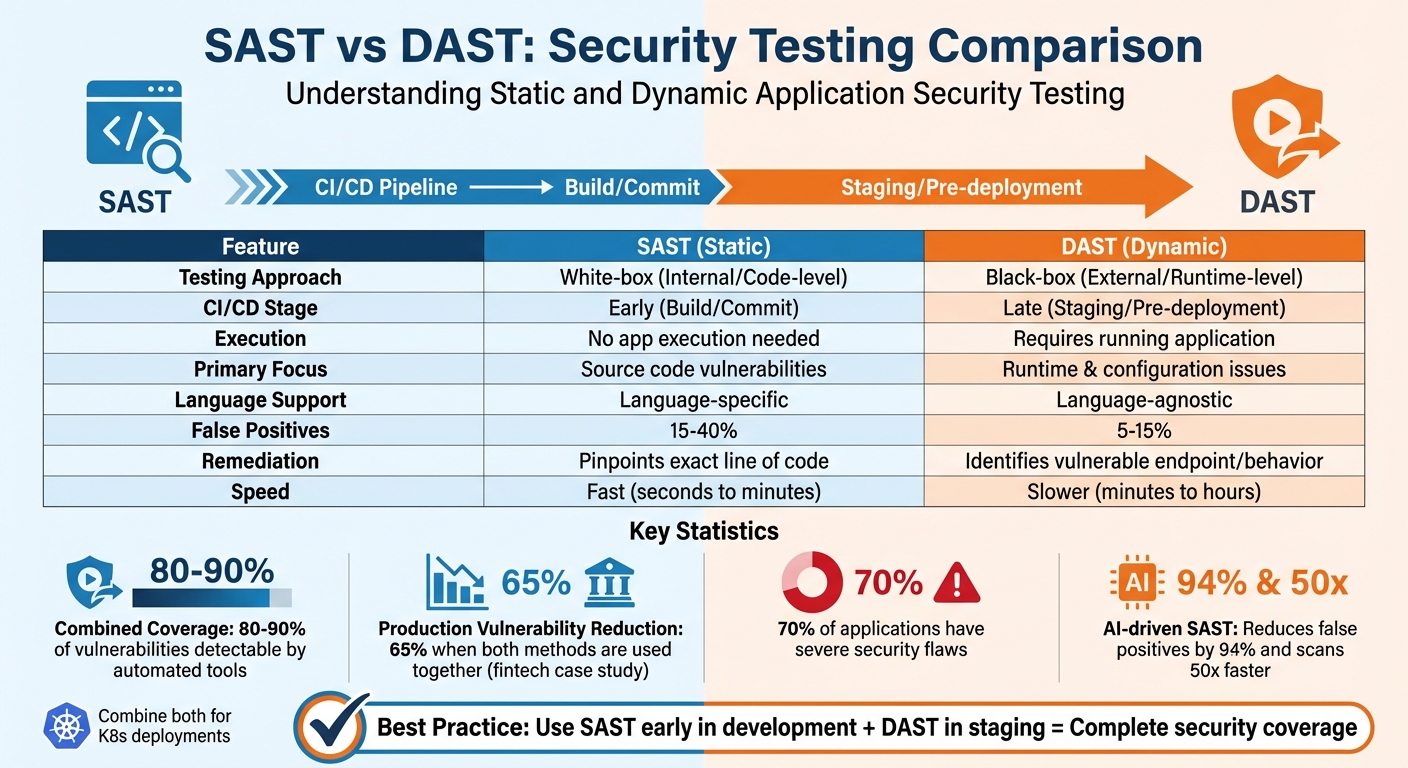 {SAST vs DAST Security Testing Comparison Chart}
:::
{SAST vs DAST Security Testing Comparison Chart}
:::
Static Application Security Testing (SAST) in CI/CD
How SAST Works
SAST takes a white-box approach, analysing your source code, bytecode, or binaries without running the application. In CI/CD pipelines, SAST tools parse your code to create an Abstract Syntax Tree (AST), which maps the programme's flow. This process helps the tools spot vulnerabilities by matching predefined security rules to known patterns.
Integration happens early in the development cycle. You can set it up in your IDE, use pre-commit hooks, or automate it during the build phase. Once integrated, automated scans trigger whenever new code is committed or a pull request is made. If vulnerabilities above a certain severity level, like Critical
or High
, are found, security gates automatically fail the build, stopping insecure code from moving forward.
Modern AI-driven SAST engines are a game changer. They reduce false positives by over 94% and scan up to 50 times faster than older tools [6][8]. This addresses the long-standing issue of alert fatigue caused by false positives, which once reached rates as high as 80%. These advancements allow teams to fix vulnerabilities quickly and with greater accuracy.
Benefits of SAST
SAST's biggest strength lies in its ability to detect vulnerabilities early, during the coding and build stages, instead of later in deployment or production. This early detection can save both time and money. As Matt Tanner from StackHawk points out:
Finding a SQL injection vulnerability during code review takes five minutes to fix. Finding the same issue after it's in production? That's incident response meetings, emergency patches, and explaining to customers why their data might be at risk.[7]
Unlike dynamic testing, SAST doesn’t require a running application or complex test environments. It pinpoints the exact file and line of code containing a vulnerability, often with data flow insights to help developers trace the root cause. This precision speeds up remediation and promotes better coding practices with real-time feedback in the IDE.
SAST also supports compliance with frameworks like PCI DSS, HIPAA, SOC 2, and ISO 27001 by ensuring secure development practices are followed throughout the pipeline. With research showing that 70% of applications have severe security flaws [8], automated quality gates are crucial for maintaining high security standards.
When to Use SAST
SAST is particularly effective for uncovering vulnerabilities that are difficult to detect during runtime. It excels at identifying issues like SQL injection, Cross-Site Scripting (XSS), path traversal, command injection, hardcoded secrets, and insecure cryptographic implementations [1]. These capabilities align with its focus on early detection and cost-effective remediation, making it a must-have in CI/CD workflows.
When paired with Software Composition Analysis (SCA), SAST becomes even more powerful. It can catch vulnerabilities during the build phase, before code is packaged into containers or deployed to Kubernetes clusters. With open-source code making up 77% of modern codebases and 84% of them containing at least one known vulnerability in their dependencies [1], this combination is crucial.
To maximise efficiency, fine-tune rulesets based on the language and framework in use. Set CI/CD gates to fail only for Critical
or High
issues and use incremental scans on pull requests to maintain pipeline speed. This selective approach ensures security without slowing down development, especially when preparing code for complex environments like Kubernetes.
Dynamic Application Security Testing (DAST) in CI/CD
How DAST Works
DAST uses a black-box testing approach, simulating external attacks on a running application without needing access to its source code. Liran Tal from Snyk describes it as:
DAST is a black-box testing methodology that analyses running applications from an external perspective, simulating exactly how real attackers would probe for weaknesses.[4]
Here’s how it works: DAST begins by crawling the application to map its endpoints. It then authenticates using test credentials and sends malicious payloads to expose vulnerabilities like SQL injection or XSS. The tool analyses the application's responses to flag insecure behaviours and generates a report that includes severity ratings for the identified issues.
In CI/CD pipelines, DAST is usually executed in staging or pre-production environments. This timing ensures the application is tested in a setup that closely resembles the live environment but avoids impacting production. These steps make it easier to integrate DAST into CI/CD workflows effectively [4].
Benefits of DAST
DAST does more than just uncover vulnerabilities - it also provides real-time insights into configuration and authentication problems. Unlike static tests, DAST excels at identifying runtime vulnerabilities, such as deployment misconfigurations or session management flaws. For example, it can detect issues like CORS misconfigurations, SSL/TLS weaknesses, and insecure HTTP headers, which often appear only in live environments.
Modern DAST tools are particularly adept at discovering API endpoints, including undocumented shadow APIs
that emerge at runtime in containerised setups. This is especially crucial for microservices running in Kubernetes. As Matt Tanner from StackHawk points out:
Modern applications are API-first architectures where the real attack surface only materialises at runtime.[5]
DAST also shines in testing authentication and session management, uncovering issues like broken authentication, session fixation, and even complex vulnerabilities such as Insecure Direct Object References (IDOR). Since it tests live environments, DAST tends to produce fewer false positives - typically around 5–15%, compared to SAST's 15–40% [1].
When to Use DAST
DAST complements early-stage SAST by validating live configurations before production. It’s particularly useful in staging environments, where it ensures the application is secure before going live. For Kubernetes deployments, DAST can target ephemeral containers or preview environments, testing the exact container image intended for production.
To get started, run DAST in audit mode to fine-tune its settings and build developer confidence. Once optimised, it can be enforced as a blocking gate in the pipeline. For efficiency, you can use HAR (HTTP Archive) files from existing end-to-end tests (e.g., Cypress or Playwright). These files guide the scanner to focus on critical user flows, cutting scan times from hours to just minutes.
Adopt a tiered testing strategy to balance thoroughness with speed. For example, run quick, targeted scans on every pull request to check key endpoints in under five minutes. Reserve more in-depth, comprehensive scans for nightly or weekly schedules. This approach ensures robust security coverage while keeping development workflows smooth and efficient.
SAST vs DAST: A Detailed Comparison
Comparison Table: SAST vs DAST
This section takes a closer look at how SAST (Static Application Security Testing) and DAST (Dynamic Application Security Testing) differ. While SAST focuses on analysing code during development, DAST mimics potential attacks on a live application. Knowing these distinctions helps you decide how to integrate them into your CI/CD pipeline.
| Feature | SAST (Static) | DAST (Dynamic) |
|---|---|---|
| Testing Approach | White-box (Internal) | Black-box (External) |
| CI/CD Stage | Build/commit (early) | Staging/pre-deployment (late) |
| Execution | No execution required | Requires a running application |
| Primary Focus | Source code, logic, and syntax | Runtime behaviour and configuration |
| Language Support | Language-specific | Language-agnostic |
| False Positives | 15–40% [1] | 5–15% [1] |
| Remediation | Pinpoints exact line of code | Identifies vulnerable endpoint/behaviour |
| Execution Speed | Fast (seconds to minutes) | Slower (minutes to hours) |
False positive rates highlight a key difference. SAST's higher rate can overwhelm developers with non-critical alerts, potentially causing alert fatigue. On the other hand, DAST’s lower rate stems from its ability to detect vulnerabilities in a live environment, making its findings more actionable. As Zbigniew Banach from Invicti explains:
The difference between SAST and DAST results is the difference between 'we should probably look at this' and 'we need to fix this now.'[9]
This table underscores how each method complements the other, helping you decide when and where to use them.
Choosing Between SAST and DAST
The decision to use SAST or DAST depends on your development phase and security goals. SAST is ideal for catching issues early, such as hardcoded secrets or weak cryptographic algorithms, while the code is still fresh in the developers' minds [8]. It’s particularly useful for enforcing secure coding practices across teams.
DAST, on the other hand, shines in staging environments. It identifies runtime issues like broken authentication, server misconfigurations, and API vulnerabilities that may not be evident during static analysis. DAST is also invaluable for testing legacy systems or third-party components when source code isn’t available, as it evaluates security from an attacker’s perspective [9].
For Kubernetes deployments, combining these methods is essential. Use SAST to scan infrastructure-as-code files for risks like exposed secrets or unnecessary privileges before container images are built. Then, apply DAST to check for runtime issues such as open ports or misconfigured network policies in your running pods and services. Studies reveal that 70% of applications have severe security flaws [8], so combining these approaches ensures more thorough coverage. In fact, a hybrid approach in a fintech setting led to a 65% drop in production vulnerabilities [10].
To get started, perform baseline scans: run a comprehensive SAST scan on your codebase and a full DAST scan on your live application to uncover existing vulnerabilities. Automate SAST scans for every commit, and reserve DAST for staging environments. Set up security gates to block builds with critical vulnerabilities, while allowing lower-severity warnings to avoid slowing down development [3].
Combining SAST and DAST for Complete Security Coverage
How SAST and DAST Work Together
SAST and DAST serve different purposes in identifying security vulnerabilities, yet they complement each other perfectly. SAST takes an inside-out approach, analysing your source code to detect issues like hardcoded secrets or weak cryptographic implementations. On the other hand, DAST works from the outside-in, testing a live application to uncover runtime vulnerabilities such as authentication bypasses or server misconfigurations.
When combined, these tools validate each other's findings, reducing false positives and minimising unnecessary alerts. SAST identifies potential code issues, while DAST confirms which of these are actual threats in a functioning application. As Liran Tal from Snyk highlights:
DAST should be combined with other security methods like SAST, SCA, and IAST to achieve comprehensive security coverage.[4]
Together, SAST and DAST can uncover 80% to 90% of vulnerabilities detectable by automated tools [11]. While SAST misses runtime problems like misconfigurations, DAST can't detect insecure coding practices or hidden flaws that don't manifest during runtime. By working in tandem, they provide a continuous security view - from the first line of code to live deployment - making them essential for secure CI/CD pipelines.
How to Integrate Both Methods
To maximise effectiveness, SAST should be integrated early in the development cycle (often referred to as shift-left
), while DAST is better suited for later stages. Running SAST on every code commit or pull request - using IDE plugins or as part of CI pipelines - ensures developers can address vulnerabilities while the code is still fresh. DAST, on the other hand, is most effective in staging environments that closely mimic production, where it can capture runtime issues.
For example, in Kubernetes environments, you can scan infrastructure-as-code files with SAST and validate the running containers using DAST.
A fintech company in April 2025, using a Node.js and React stack, adopted this dual approach by employing SonarQube for SAST during development and Burp Suite for DAST in staging. This led to a 65% reduction in production vulnerabilities, with DAST pinpointing XSS flaws in staging that SAST couldn't detect [10].
Automating Security Testing Without Slowing Development
Balancing security with development speed requires a smart scanning strategy. One way to achieve this is by running targeted delta scans
on every commit, which focus only on the modified parts of the code. Save full DAST scans for nightly builds or pre-production releases to minimise delays.
To speed up DAST scans, use HAR files generated from functional tests (e.g., Cypress or Playwright). These files guide the scan, cutting runtime from hours to just minutes. When introducing DAST, start with audit mode
, where scans run without blocking builds. This allows teams to refine the process and build trust in the tool before making it a mandatory part of the pipeline.
Streamline remediation by routing SAST findings into pull request comments and DAST results into tools like Jira or Slack. As the Cycode team puts it:
SAST finds bugs before they ship; DAST finds bugs that only appear in runtime environments.[8]
To maintain speed without sacrificing security, set thresholds that block builds only for critical vulnerabilities, while allowing lower-severity issues to pass with warnings. For Kubernetes, tools like OPA Gatekeeper or Kyverno can automatically enforce security policies, such as preventing containers from running as root or exposing unnecessary ports. This ensures robust security without slowing down the development process.
Security Testing for Kubernetes Deployments
Kubernetes Security Challenges
Kubernetes brings its own set of security hurdles that go beyond what traditional application testing covers. Unlike standard setups, Kubernetes often comes with insecure defaults. For instance, pods might run with root privileges, resource limits can be missing, and the Kubelet API (port 10250) might be left exposed without proper authentication [12]. These gaps create easy opportunities for attackers to exploit.
The risks don’t stop there. At runtime, vulnerabilities like container escapes - such as CVE-2024-21626, nicknamed Leaky Vessel
- can allow processes to break out of containers and access the host system [12]. On top of that, Kubernetes' dynamic workloads make it challenging to monitor inter-service communications effectively. Misconfigured Role-Based Access Control (RBAC), such as service accounts with excessive permissions (e.g., cluster-admin), can also open the door to lateral movement if just one pod is breached.
To tackle these risks, Kubernetes security needs to address both pre-deployment misconfigurations and runtime anomalies.
Security Testing Tools for Kubernetes
A robust defence for Kubernetes relies on using the right mix of tools for static analysis, image scanning, and runtime monitoring. For identifying issues before deployment, tools like kube-linter and checkov scan Kubernetes manifests and Helm charts. They flag problems such as containers running as root (e.g., runAsUser: 0) or missing resource limits. Image scanners like Trivy and Grype take it further by detecting vulnerabilities (CVEs) in container libraries and generating Software Bills of Materials (SBOM), helping teams identify risky dependencies before they hit production.
When it comes to runtime security, tools step in to monitor live workloads and catch threats that static analysis might miss. For example:
- Falco uses eBPF to track system calls and Kubernetes events in real time, alerting teams to unauthorised access attempts or suspicious network activity.
- Sysdig Secure builds on Falco’s capabilities with advanced analytics for deeper insights.
- Platforms like Aqua Security and Prisma Cloud combine vulnerability scanning with runtime protection for a more comprehensive approach.
Additionally, policy enforcement tools such as OPA Gatekeeper and Kyverno act as gatekeepers, automatically blocking deployments that don’t meet security standards - like containers requiring elevated privileges. Tools like rbac-lookup audit RBAC configurations to ensure permissions aren’t overly broad, while network security tools like Cilium offer visibility into pod-to-pod communication, making it easier to maintain proper segmentation.
With these tools, the focus shifts to balancing security testing with deployment speed.
Maintaining Speed and Security in Kubernetes
After assembling the right tools, the next step is ensuring security doesn’t slow down deployments.
Kubernetes-native orchestration can help keep things fast. Tools like Testkube transform traditional testing tools (e.g., OWASP Zap, Trivy) into Kubernetes-native jobs that run directly within the cluster, taking advantage of its elastic resources [13][2]. As Atulpriya Sharma, Senior Developer Advocate at Improving, puts it:
The promise of agility and flexibility is meaningless if security vulnerabilities force you to choose between speed and safety.[2]
To optimise testing, targeted scanning focuses on critical areas like authentication flows and data-handling endpoints, rather than scanning the entire application. Delta scanning takes this a step further by only analysing components that have changed. Meanwhile, Pod Security Admission profiles add an extra layer of defence. For example:
- Baseline profiles block privilege escalations (e.g.,
hostNetwork,hostPID) in production namespaces. - Restricted profiles enforce stricter controls, such as requiring non-root users and read-only filesystems for standard workloads [12].
By treating security tests as Kubernetes-native workloads, teams can enable event-driven, elastic execution that scales with deployment needs. This approach shifts security from being a periodic task to a continuous process, seamlessly integrated into CI/CD pipelines without sacrificing speed.
For organisations looking to strengthen their Kubernetes security, Hokstad Consulting (https://hokstadconsulting.com) offers tailored strategies to enhance DevOps workflows while ensuring thorough security measures.
Conclusion
Key Takeaways
SAST (Static Application Security Testing) and DAST (Dynamic Application Security Testing) play distinct yet complementary roles within CI/CD pipelines. SAST examines code early in the development process, catching issues like SQL injection before deployment. On the other hand, DAST focuses on live environments, identifying runtime vulnerabilities. Neither method alone is enough to ensure complete security. For context, SAST typically has a false positive rate of 15–40%, while DAST falls between 5–15% [1]. When combined, these methods can tackle around 80–85% of common vulnerability types [1]. As the Cycode Team aptly puts it:
SAST and DAST aren't either/or - they're designed to work together. Each uncovers different types of vulnerabilities at different stages of the SDLC[8].
This synergy becomes even more crucial for Kubernetes deployments. In these environments, you need both pre-deployment manifest scanning and runtime monitoring to address the platform's specific security demands. Together, these tools form a solid foundation for a practical and effective security strategy.
Next Steps for Implementation
For Kubernetes deployments, adopting a dual approach is essential. Start by baselining your codebase to identify and prioritise vulnerabilities. Set up security gates that fail builds only when critical issues are detected. Integrate SAST into your commits and pull requests to provide immediate feedback during development. Deploy DAST in staging environments to validate live configurations before production. To optimise efficiency, consider delta scanning, which focuses only on modified components, reducing scan times significantly.
If you're looking to enhance automated security testing without sacrificing speed, Hokstad Consulting offers tailored solutions. Their services integrate security seamlessly into DevOps workflows, ensuring both robust protection and efficient deployment. Visit their website at https://hokstadconsulting.com for more information.
SAST vs DAST: Stop Choosing, Start Correlating
FAQs
How do I choose SAST vs DAST for my pipeline?
When deciding between SAST (Static Application Security Testing) and DAST (Dynamic Application Security Testing), it’s essential to think about their specific roles and how they align with your security requirements.
SAST focuses on analysing source code or binaries during the early stages of development. It helps identify vulnerabilities such as insecure coding practices or hardcoded credentials before the application is executed.
DAST, on the other hand, evaluates applications while they are running. This approach detects runtime issues like injection vulnerabilities or configuration errors that only become apparent in a live environment.
For a robust security strategy, combining both methods in your CI/CD pipeline is the best approach. This ensures you can catch vulnerabilities at every stage of development and deployment.
Where should DAST run in Kubernetes CI/CD?
DAST (Dynamic Application Security Testing) should be executed in staging or pre-production environments as part of Kubernetes CI/CD pipelines. This approach helps uncover runtime vulnerabilities after the build and deployment phases, ensuring production stability remains unaffected.
How can I cut false positives and scan time?
To cut down on false positives and speed up scans in CI/CD pipelines, fine-tune your security tools by adjusting rules to better align with your environment. Bring security into earlier stages by running scans early in the development process and automating vulnerability detection. This helps identify problems sooner. Focused scans during particular pipeline stages and incremental methods that analyse only modified components can deliver quicker results without sacrificing security.