
Spot instances can slash cloud costs by up to 90%, making them a game-changer for businesses managing multi-cloud setups. These discounted, spare computing resources from AWS, Azure, and Google Cloud are ideal for non-critical, interruption-tolerant workloads like batch processing, CI/CD pipelines, or development environments. However, they come with risks: providers can reclaim them with short notice (as little as 30 seconds).
Here’s the core strategy:
- Leverage Spot Instances for flexible, fault-tolerant tasks.
- Mix Capacity Types: Combine Spot, On-Demand, and Reserved Instances to balance cost savings with reliability.
- Automate Management: Use tools like CAST AI or Kubernetes autoscalers to handle interruptions.
- Monitor Savings: Track costs and performance regularly to adjust your approach.
Companies like Wio Bank and Lyft have achieved massive savings (up to 90%) by aligning workloads to Spot Instances. By carefully planning and monitoring, you can reduce expenses without compromising performance.
How Do Spot Instances Reduce Cloud Costs?
What Are Spot Instances and When Should You Use Them?
::: @figure 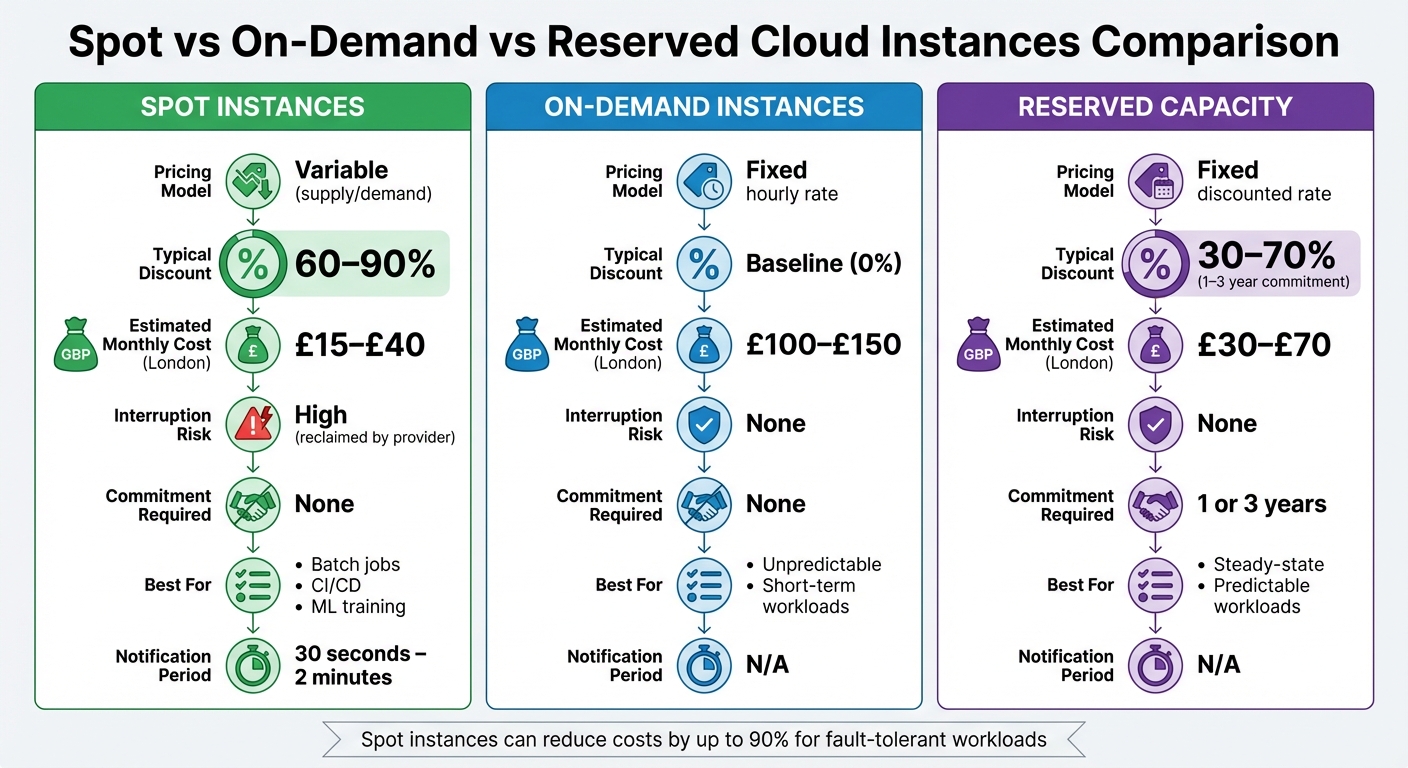 {Spot vs On-Demand vs Reserved Cloud Instances: Cost and Feature Comparison}
:::
{Spot vs On-Demand vs Reserved Cloud Instances: Cost and Feature Comparison}
:::
Spot Instances Across AWS, Azure, and Google Cloud
Spot instances let you tap into unused cloud capacity at a fraction of the cost - typically 60–90% less than on-demand rates. Each major cloud provider offers their version of this service: AWS EC2 Spot Instances, Azure Spot VMs, and Google Cloud Spot VMs. The idea is simple: you're renting spare resources that the provider can reclaim when needed for full-paying customers. However, this cost-saving option comes with a catch - interruption risk. AWS gives a 2-minute warning before reclaiming capacity, while Azure and Google Cloud offer just 30 seconds.
The pricing structures also vary. AWS uses a dynamic supply-and-demand model, which can lead to frequent price changes. On the other hand, Azure and Google Cloud follow more predictable pricing. Google, for instance, guarantees at least a 60% discount and adjusts prices every three months. A unique limitation with Google Cloud Spot VMs is their 24-hour maximum runtime, making them ideal for tasks like batch jobs that can finish within that time frame. These nuances make it essential to match workloads carefully to the characteristics of spot instances.
Which Workloads Work Best with Spot Instances
Spot instances shine when used for tasks that are fault-tolerant, stateless, or flexible with timing. Examples include CI/CD pipelines, batch processing, machine learning training, and big data analytics. These workloads can handle interruptions by either checkpointing progress or restarting without much hassle.
Take the NFL, for example - they’ve saved over £20 million since 2014 by using AWS Spot Instances [5]. Lyft managed to cut its compute costs by 75% with only minor code adjustments [5]. Similarly, InMobi revamped its entire application stack to be stateless, achieving 50–60% savings with Azure Spot VMs, according to their Senior Vice President of Engineering, Prasanna Prasad [2]. Jellyfish Pictures also reported an 80% reduction in rendering costs by leveraging Azure Spot VMs for visual effects production [2].
Azure Spot VMs, combined with Rescale's HPC job orchestration and automated checkpoint restarts, help mitigate preemption risks. As a result, our customers can finally use the best cloud infrastructure, whenever they want.- Mulyanto Poort, VP of HPC Engineering, Rescale [2]
Spot vs On-Demand vs Reserved Capacity
Choosing between spot instances, on-demand instances, and reserved capacity depends on your workload's tolerance for interruptions, your budget, and how long you’re willing to commit.
| Feature | Spot Instances | On-Demand Instances | Reserved Capacity |
|---|---|---|---|
| Pricing Model | Variable (supply/demand) | Fixed hourly rate | Fixed discounted rate |
| Typical Discount | 60–90% | Baseline (0%) | 30–70% (1–3 year commitment) |
| Estimated Monthly Cost (London) | £15–£40 | £100–£150 | £30–£70 |
| Interruption Risk | High (reclaimed by provider) | None | None |
| Commitment Required | None | None | 1 or 3 years |
| Best For | Batch jobs, CI/CD, ML training | Unpredictable, short-term workloads | Steady-state, predictable workloads |
| Notification Period | 30 seconds – 2 minutes | N/A | N/A |
Spot instances are perfect for cost-sensitive tasks that can tolerate interruptions. On-demand instances work best for unpredictable workloads that need immediate availability. Reserved capacity is ideal for stable, long-term workloads where committing to a contract results in predictable savings.
Building a Multi-Cloud Spot Instance Strategy
Analysing Current Costs and Workload Requirements
Start by reviewing your compute spending through tools like AWS Cost Explorer, Azure Cost Management, and GCP Billing reports. These tools provide insights into usage patterns and highlight periods where demand fluctuates, offering an hourly breakdown of overall usage. This analysis is essential for identifying where spot instances can be most effective [6]. It’s the first step in crafting an optimal capacity mix.
Regularly - whether biweekly or monthly - evaluate your accounts to ensure pricing aligns with changing workload demands [6]. Break down your workloads based on their tolerance for interruptions. Tasks like batch processing, CI/CD pipelines, and containerised microservices, which are stateless and fault-tolerant, are ideal candidates for spot instances [4]. Additionally, set realistic savings targets in pounds sterling. On average, AWS Spot Instances face interruptions less than 5% of the time, making them a reliable cost-saving option [6].
Mixing Spot, Reserved, and On-Demand Capacity
To strike the right balance between cost savings and reliability, mix different capacity types. Use Reserved Instances or Savings Plans for steady, always-on workloads. Deploy Spot Instances for tasks that can handle interruptions, and rely on On-Demand capacity for critical, stateful applications that require uninterrupted performance [4].
Here’s a recommended capacity mix based on workload type:
| Workload Type | Capacity Mix (Spot/Reserved/On-Demand) | Reliability Strategy |
|---|---|---|
| Stateless Web Tier | 60% / 30% / 10% | Multi-AZ diversification with Auto Scaling |
| Batch/Data Processing | 90% / 10% / 0% | Checkpointing with a price-capacity-optimised strategy |
| CI/CD Pipelines | 100% / 0% / 0% | Automated retry mechanisms |
| Production Database | 0% / 100% / 0% | Reserved Instances for 24/7 uptime |
Mixed clusters can deliver savings of around 59%, while Spot-only clusters can save up to 77% [1]. To maintain reliability, ensure flexibility by spreading workloads across at least 10 different instance types. For Spot Instances, set your maximum bid at the On-Demand price to minimise interruptions caused by price surges [1].
Once you’ve established a balanced capacity mix, the next step is determining which workloads are best suited for spot instances.
Identifying Workloads for Spot Instances
Classify workloads based on their SLA requirements and tolerance for interruptions. Non-critical environments like Dev/Test are excellent candidates, followed by fault-tolerant production tasks such as big data processing [1][2].
Take Wio Bank as an example. They successfully transitioned 90% of their non-production environments to Spot VMs with the help of Cast AI automation, achieving substantial cost reductions without compromising production performance [1]. Similarly, Scripps Networks Interactive used AWS Spot Instances to scale their rendering workloads, cutting CGI rendering times by an impressive 95% [8].
To evaluate the suitability of Spot Instances, use tools like AWS Spot Instance Advisor or check the Azure Portal for price history and eviction rates [6].
For expert guidance on optimising your multi-cloud approach and cutting costs, you can explore the services offered by Hokstad Consulting (https://hokstadconsulting.com).
Need help optimizing your cloud costs?
Get expert advice on how to reduce your cloud expenses without sacrificing performance.
Setting Up Spot Instances on AWS, Azure, and Google Cloud
If you're working on a multi-cloud strategy, here's how you can set up Spot Instances on AWS, Azure, and Google Cloud to optimise costs and manage workloads effectively.
AWS: Setting Up Spot Instances in Auto Scaling Groups and EKS
To configure Spot Instances on AWS, use the price-capacity-optimised strategy in your Auto Scaling Groups (ASGs). This approach balances cost with capacity availability, reducing interruptions compared to the lowest-price strategy [9][4]. When setting up your Launch Template, keep the maximum price at the On-Demand rate to avoid unnecessary terminations based on price fluctuations [10].
Enable Capacity Rebalancing in your ASG settings. This feature proactively replaces Spot Instances when AWS predicts a higher risk of interruption. During rebalancing, your ASG can temporarily exceed its maximum size by up to 10%, ensuring new instances are healthy before replacing at-risk ones [11].
For Amazon EKS, use managed node groups with multiple instance types. By applying attribute-based instance type selection, you can automatically include a variety of instance generations [4]. AWS suggests maintaining flexibility across at least 10 instance types to improve the likelihood of securing Spot capacity [4]. Additionally, set up lifecycle hooks in your ASGs to handle tasks during the two-minute interruption notification window [11].
Azure: Configuring Spot VMs in VM Scale Sets and AKS
To configure Spot VMs on Azure, follow these key steps.
For Azure Kubernetes Service (AKS), create Spot node pools using the az aks nodepool add command with the --priority Spot flag [12]. Set the --eviction-policy to Delete to ensure stopped-deallocated nodes don't count against your compute quotas [12]. Use --spot-max-price -1 to make sure evictions happen only when Azure requires capacity, not due to price changes [12][13].
In VM Scale Sets, set the Priority to Spot during creation and configure the evictionPolicy to Delete [13][15]. Enable the singlePlacementGroup=false option to allow the scale set to span across multiple placement groups [13]. For AKS Spot node pools, activate the cluster autoscaler to automatically replace evicted nodes when capacity is available [12].
To manage workloads effectively, apply the taint kubernetes.azure.com/scalesetpriority=spot:NoSchedule to Spot nodes. This ensures only interruption-tolerant workloads are scheduled on these nodes [12][16]. Use the Scheduled Events API (169.254.169.254) to monitor the Preempt signal, which provides a minimum 30-second warning before eviction [14][15]. In a notable example, InMobi shifted most of its compute needs for the InMobi Exchange platform to Azure Spot VMs in 2024. This move, led by Senior VP of Engineering Prasanna Prasad, resulted in 50–60% savings on compute costs [2].
Google Cloud: Managing Spot VMs in Instance Groups and GKE
Google Cloud also offers cost-saving opportunities with Spot VMs. Here's how to set them up.
For Google Kubernetes Engine (GKE), create Spot node pools using the command: gcloud container node-pools create [POOL_NAME] --cluster=[CLUSTER_NAME] --spot [16]. Unlike preemptible VMs, Spot VMs don't have a 24-hour runtime limit [16]. It's important to maintain at least one standard (non-Spot) node pool to host critical system workloads like DNS [16].
To ensure workloads land on Spot instances, use the label cloud.google.com/gke-spot=true in your nodeSelector or node affinity settings [16]. Apply the taint cloud.google.com/gke-spot="true":NoSchedule to Spot node pools to prevent standard workloads from running on these volatile nodes [16]. Set a terminationGracePeriodSeconds value in your Pod manifest (e.g., 25 seconds) to allow applications to wrap up active tasks before the VM is reclaimed [16].
For Compute Engine, create Spot VMs in Managed Instance Groups using the command: gcloud compute instances create [NAME] --provisioning-model=SPOT [17]. In January 2026, Google Cloud shared a verified setup for running a batch processing job on GKE Spot VMs. This example used a batch/v1 Job named pi with a perl:5.34.0 image, successfully restricted to Spot nodes using a nodeSelector for cloud.google.com/gke-spot: "true" [16].
Monitoring and Optimising Spot Instance Usage
Tracking Cost Savings and Usage
Once you've set up your capacity mix and strategies, it's crucial to keep a close eye on performance to confirm you're achieving the savings you expect. To do this, track Spot usage separately so you can calculate the actual savings. Tagging Spot resources with identifiers like application-name, environment, or department allows you to filter costs in tools like AWS Cost Explorer, Azure Cost Management, or Google Cloud Billing. This way, you can easily compare savings against On-Demand rates.
For AWS users, subscribing to the Spot Instance feed is a smart move. This feed sends hourly usage logs to an S3 bucket, providing detailed fields such as MarketPrice (the Spot price at that hour), Charge (the cost), and UsageType (the instance type) [18]. These details are especially useful for converting costs from USD to GBP, making it easier to align with UK budget reporting.
| Field | Description |
|---|---|
Timestamp |
Time used to determine the price charged [18] |
UsageType |
Instance type [18] |
MarketPrice |
Spot price at the timestamp [18] |
Charge |
Cost [18] |
If you're managing resources across multiple cloud providers, platforms like CloudHealth, Kubecost, and CAST AI can simplify cost tracking by consolidating data. Additionally, heat maps can visually highlight periods where you're either over-provisioned or under-utilising resources [19].
Monitoring Reliability and Performance Metrics
Rather than focusing solely on the number of interruptions, it's more effective to measure how these interruptions impact your service quality. Metrics like the frequency or count of interruptions for specific instance types don't give the full picture of your application's reliability or availability [20].
Instead, focus on service-level objectives (SLOs) that directly reflect application performance, such as Load Balancer response times, rejected connection counts, and target connection errors [20][22]. For Kubernetes clusters, monitoring GroupInServiceInstances ensures that Auto Scaling Groups maintain the desired capacity, even during interruptions.
To stay ahead of potential disruptions, set up services like Amazon EventBridge or CloudWatch Events. These tools can capture interruption notices and trigger automated workflows - like gracefully draining containers - before the notice period expires (two minutes for AWS, 30 seconds for Azure and Google Cloud) [20][4]. Using Spot Placement Scores (rated 1 to 10) can also help you identify regions or availability zones with more stable capacity [7][22]. AWS' Rebalance Recommendations provide an additional layer of foresight, signalling elevated interruption risks earlier than standard notices. This gives you extra time to shift workloads proactively. Historically, fewer than 5% of Spot Instances are interrupted by the provider before being terminated by the customer [20][21].
By tracking these metrics and implementing proactive measures, you can refine your approach and ensure your Spot Instances remain both cost-efficient and reliable.
Reviewing and Adjusting Your Spot Strategy
It's important to regularly evaluate your Spot strategy to maintain both cost-efficiency and resilience. Using the describe-spot-price-history command, review Spot price trends over the past 90 days [22][3]. If you notice that certain instance types are frequently interrupted or their prices are climbing, consider spreading your workloads across at least 10 different instance types to enhance reliability [4].
For workloads that are flexible with timing, scheduling them during off-peak hours or in regions with lower On-Demand demand can lead to further savings. Deploying the open-source EC2 Spot Interruption Dashboard in development or testing environments is another effective way to log and analyse interruption rates for specific instance types. This helps you identify potential issues before moving workloads to production [22].
Conclusion
A well-thought-out multi-cloud strategy offers the perfect balance of cost savings and resilience. By incorporating spot instances into your cloud operations, you could reduce compute costs by as much as 90% compared to on-demand rates [23], all while maintaining stability. When paired with a smart mix of reserved and on-demand instances, spot instances can help organisations redirect significant funds annually - whether towards innovation or expanding in the UK market.
However, achieving these savings requires careful planning for potential interruptions. This involves diversifying instance types and availability zones, using checkpointing and automated failover systems, and consistently monitoring both savings and service quality. Multi-cloud setups, spanning providers like AWS, Azure, and Google Cloud, add another layer of risk mitigation. They ensure that capacity shortages or price fluctuations from a single provider won't compromise your workload.
For businesses looking to navigate this complexity, expert guidance can make all the difference. Hokstad Consulting specialises in helping UK organisations optimise cloud costs and enhance operational reliability. Their services include custom automation for managing instance lifecycles, FinOps-aligned tagging and reporting for financial clarity, and multi-zone architectures that minimise downtime and speed up recovery. Plus, with their No Savings, No Fee
model, you can explore these benefits without any upfront financial commitment.
Whether you're managing Kubernetes clusters on EKS, AKS, and GKE or operating traditional VM fleets, combining spot instances, automation, and expert support can turn cloud cost optimisation into a competitive edge.
FAQs
What are the potential risks of using Spot Instances in a multi-cloud environment?
Spot Instances offer a great way to cut down on cloud expenses, but they come with their own set of challenges that demand careful handling. The biggest issue? Interruption. Cloud providers can reclaim Spot capacity with very little warning - sometimes in as little as 30 seconds. If your workloads aren't prepared for such abrupt terminations, you could face data loss or service outages. Another hurdle is price volatility, which differs across platforms. This makes budgeting trickier and can lead to times when no Spot capacity is available at all.
In a multi-cloud environment, these issues become even more complicated. Providers have varying interruption policies, pricing structures, and runtime limits, all of which add layers of operational complexity. Managing recovery systems like autoscalers or coordinating data movement between clouds becomes a tougher task. If not approached carefully, these factors can lead to unexpected costs and reliability problems, ultimately eating into the savings Spot Instances are supposed to deliver.
Hokstad Consulting helps UK businesses navigate these challenges. They specialise in creating resilient architectures, automating recovery workflows, and implementing cost-saving strategies. This ensures Spot workloads remain dependable while delivering maximum savings in pounds (£).
How can businesses automate Spot Instance management to reduce cloud costs?
Automating the management of Spot Instances offers a smart way for businesses to cut down on cloud costs while keeping reliability intact. This process uses a combination of native cloud tools, container orchestrators, and clever optimisation strategies to deal with the unpredictable nature of Spot Instances.
Key practices include configuring Spot-aware auto-scaling groups that can automatically replace interrupted instances. Pair this with Kubernetes autoscaling to ensure workloads are rescheduled seamlessly. Using termination signals is another critical step, allowing tasks to wrap up gracefully when interruptions occur. For added resilience, applications should be designed as stateless, with periodic state saves to avoid data loss and enable smooth task resumption. Regular monitoring and testing of these systems are also crucial to keep everything running smoothly.
For UK businesses, automating these tasks can lead to massive savings - sometimes as much as 90% - all while reducing the need for manual oversight. It’s a practical and efficient way to manage multi-cloud environments effectively.
What types of workloads are ideal for using Spot Instances?
Spot Instances are a great option for workloads that are flexible and can tolerate interruptions. These are ideal for tasks like batch processing, CI/CD pipelines, data analytics, machine learning training, containerised jobs, high-performance computing (HPC), and testing or development projects.
Since Spot Instances come at much lower costs, they’re particularly useful for workloads that don’t need to run continuously or can be paused and resumed without affecting overall results. By incorporating Spot Instances thoughtfully into your setup, you can significantly cut costs while keeping things running smoothly.