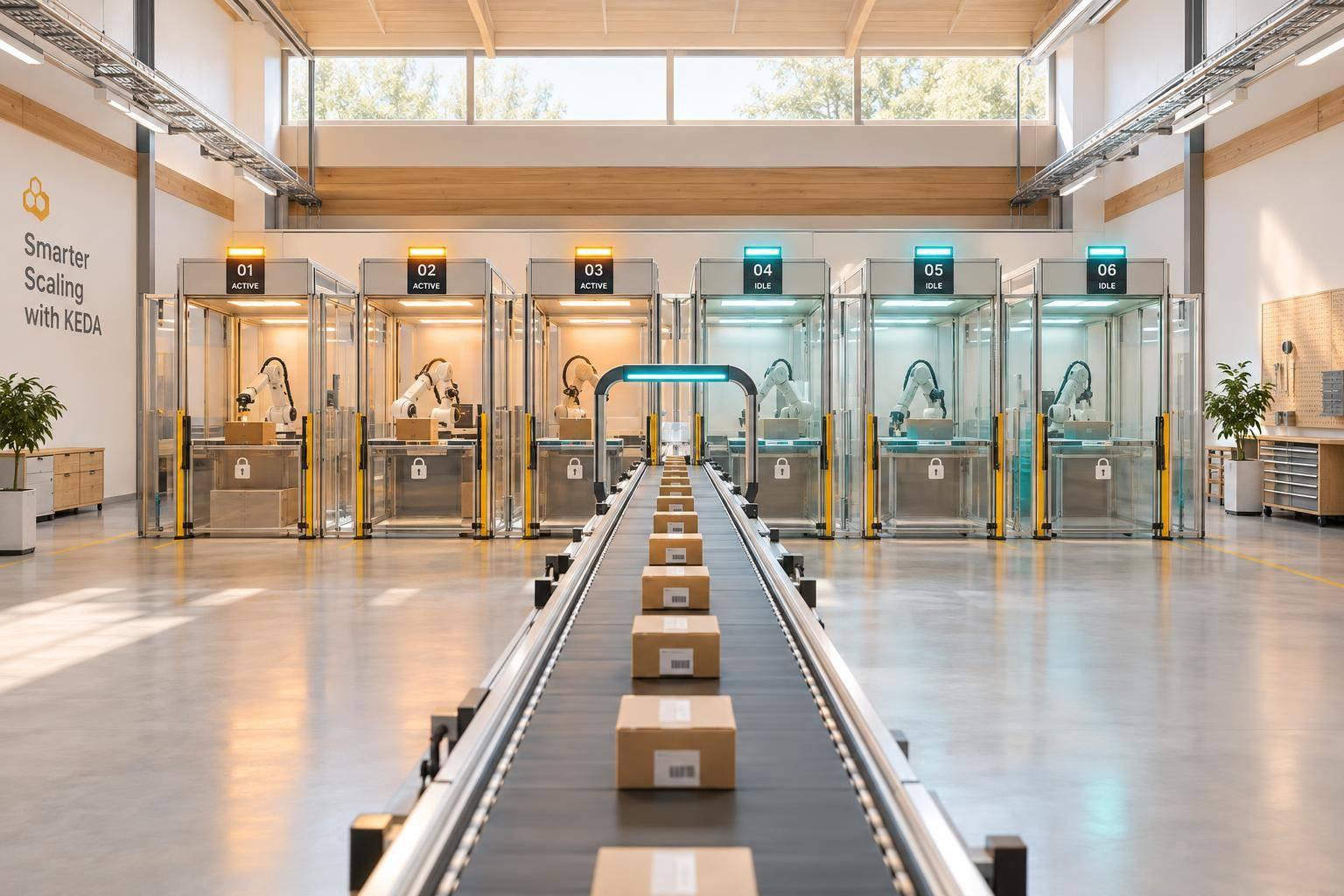
KEDA scales AI workers to match queue demand - from zero idle pods to a set replica limit. Set queueLength as the messages-per-replica target, and keep at least 1 warm replica if cold starts would delay jobs beyond the response-time target.
Safe scaling needs more than a queue trigger. Workers must avoid duplicate side effects, renew message visibility for long tasks and delete messages only after results are saved. SQS’s default 30-second visibility timeout may be too short for multi-step agent jobs.
This guide covers:
- Setting up separate AWS permissions for workers and the scaler.
- Deploying workers with resource limits, bounded concurrency and safe shutdown.
- Configuring KEDA’s SQS trigger, replica limits and scaling delays.
- Testing backlogs, retries, failures and scale-to-zero.
- Checking queue age, downstream quotas, costs and rollback steps before production.
::: @figure 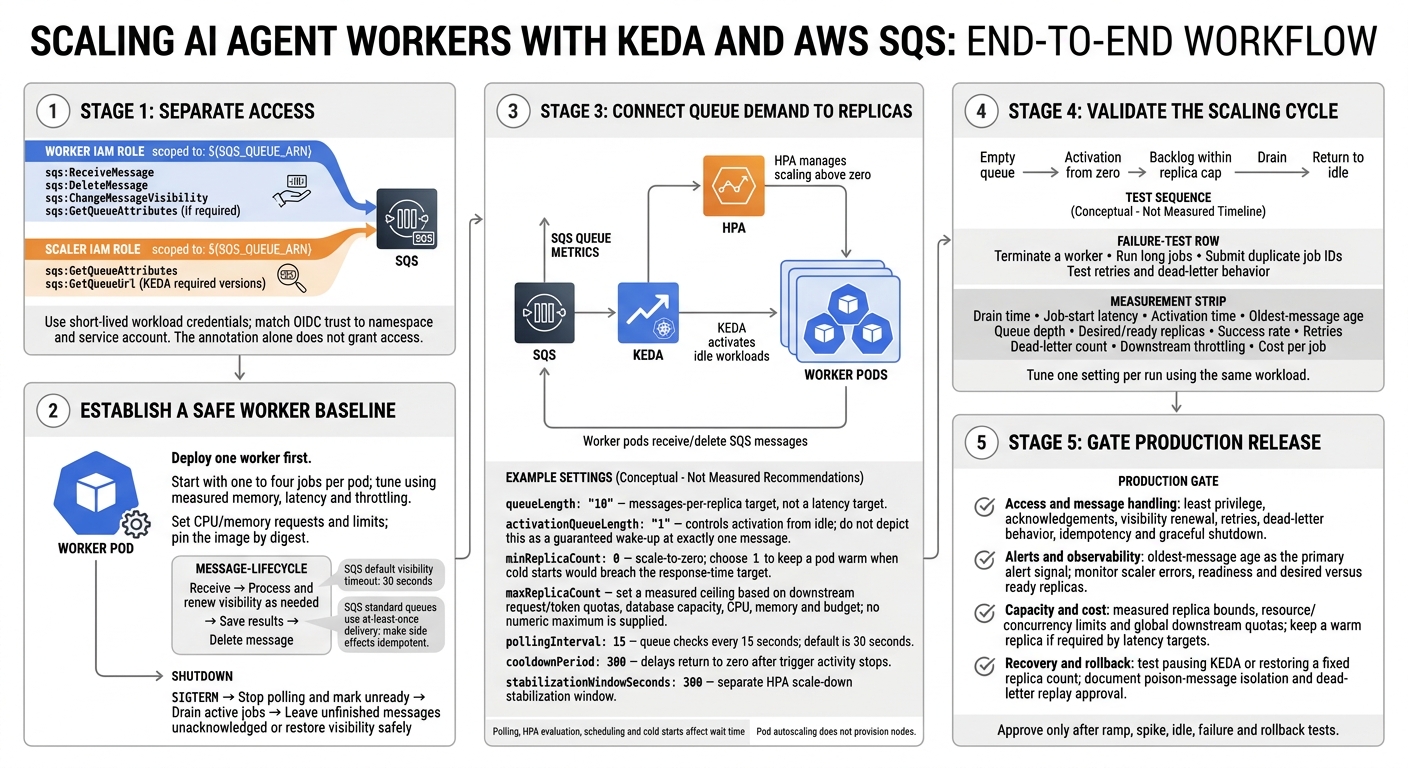 {KEDA AI Worker Scaling: From Queue to Production}
:::
2. Set up queue access and deploy the worker
Configure AWS access for the worker and scaler
With message-handling rules in place, connect the worker and scaler to SQS using separate IAM roles, each scoped to ${SQS_QUEUE_ARN}.
The worker needs sqs:ReceiveMessage, sqs:DeleteMessage, sqs:ChangeMessageVisibility and, if required, sqs:GetQueueAttributes. The scaler needs sqs:GetQueueAttributes, plus sqs:GetQueueUrl only for KEDA versions that require it.
Use short-lived workload credentials. Attach the worker role to its service account and the scaler role to the KEDA operator’s service account. Match each role’s OIDC trust to its namespace and service account: the annotation alone does not grant access.[3][6][7]
# Replace every ${...} value before applying.
apiVersion: v1
kind: Namespace
metadata:
  name: ai-workers
---
apiVersion: v1
kind: ServiceAccount
metadata:
  name: ai-worker-sa
  namespace: ai-workers
  annotations:
    eks.amazonaws.com/role-arn: "${WORKER_IAM_ROLE_ARN}"
---
apiVersion: keda.sh/v1alpha1
kind: TriggerAuthentication
metadata:
  name: sqs-auth
  namespace: ai-workers
spec:
  podIdentity:
    provider: aws
    identityOwner: operator
kubectl annotate serviceaccount "${KEDA_OPERATOR_SERVICE_ACCOUNT}" \ -n "${KEDA_NAMESPACE}" \ eks.amazonaws.com/role-arn="${SCALER_IAM_ROLE_ARN}" --overwrite
Check that provider: aws and identityOwner: operator match your installed KEDA release. Keep TriggerAuthentication, Deployment and ScaledObject in ai-workers. Use ClusterTriggerAuthentication only when you intend to share centrally managed access across namespaces.
If workload identity is unavailable, use a Secret-backed TriggerAuthentication with restricted RBAC, encryption at rest and automated rotation. Keep AWS keys out of YAML and Git. For encrypted queues, add the required KMS permissions and key policy. For private access, check the queue policy, endpoint policy, security groups and DNS.[6][7][8]
Set resource limits and shutdown behaviour
Deploy one worker first. Replace the placeholders with measured resource requests and limits, and use configuration names your application supports. Pin the image by digest.
Memory sizing must cover the runtime, tokeniser, response buffers and concurrent tool results. Resource requests must also fit the available node capacity.
apiVersion: apps/v1
kind: Deployment
metadata:
  name: ai-agent-worker
  namespace: ai-workers
spec:
  replicas: 1
  selector:
    matchLabels:
      app: ai-agent-worker
  template:
    metadata:
      labels:
        app: ai-agent-worker
    spec:
      serviceAccountName: ai-worker-sa
      terminationGracePeriodSeconds: ${TERMINATION_GRACE_SECONDS}
      containers:
        - name: worker
          image: "${IMAGE_REPOSITORY}@${IMAGE_DIGEST}"
          env:
            - name: AWS_REGION
              value: "${AWS_REGION}"
            - name: SQS_QUEUE_URL
              value: "${SQS_QUEUE_URL}"
            - name: MODEL_API_ENDPOINT
              value: "${MODEL_API_ENDPOINT}"
            - name: WORKER_CONCURRENCY
              value: "${WORKER_CONCURRENCY}"
            - name: REQUEST_TIMEOUT_SECONDS
              value: "${REQUEST_TIMEOUT_SECONDS}"
            - name: MAX_RETRIES
              value: "${MAX_RETRIES}"
          resources:
            requests:
              cpu: "${CPU_REQUEST}"
              memory: "${MEMORY_REQUEST}"
            limits:
              cpu: "${CPU_LIMIT}"
              memory: "${MEMORY_LIMIT}"
          ports:
            - name: health
              containerPort: 8080
          readinessProbe:
            httpGet:
              path: /ready
              port: health
            periodSeconds: 5
This baseline keeps worker behaviour predictable before you define KEDA scaling.
On SIGTERM, stop polling, mark the pod unready and drain active jobs. Set the termination grace period to cover bounded model and tool calls. Leave unfinished messages unacknowledged or restore their visibility safely.
Before load testing, inspect kubectl describe triggerauthentication sqs-auth -n ai-workers, the Deployment and pod events. Check queue attributes using the worker’s actual identity, then receive and acknowledge a dedicated test message.
Once the ScaledObject exists, check its status and the operator logs to verify scaler access separately. Investigate region, OIDC trust, endpoint and permission errors without logging credentials or message bodies.
Cap concurrency and downstream requests
Start with one to four jobs per pod, then tune using measured memory, latency and throttling. As replica counts grow, protect downstream services by enforcing model request and token quotas across all replicas - not just per process. Account for tool-call and database capacity too.
Log job ID, attempt, duration and outcome, but never prompts, responses or tokens. Choose zero idle replicas only if the measured cold-start delay meets your latency target. Keeping one warm replica means paying for continuous compute in return for faster first-job handling. Use this single-pod baseline when you define the ScaledObject in the next section.
3. Configure the KEDA ScaledObject
Connect the SQS trigger to queue access
With the worker deployed and queue access configured, define the ScaledObject that turns queue depth into worker replicas.
Save the following as scaledobject.yaml. It targets the existing worker Deployment and references the earlier TriggerAuthentication resource. Replace the namespace, Deployment name, TriggerAuthentication name, queue URL and AWS Region with your own values. Keep credentials out of this manifest.[3]
apiVersion: keda.sh/v1alpha1
kind: ScaledObject
metadata:
  name: <scaled-object-name>
  namespace: <namespace>
spec:
  scaleTargetRef:
    name: <worker-deployment-name>
  minReplicaCount: 0
  maxReplicaCount: <maximum-worker-replicas>
  pollingInterval: 15
  cooldownPeriod: 300
  advanced:
    horizontalPodAutoscalerConfig:
      behavior:
        scaleDown:
          stabilizationWindowSeconds: 300
  triggers:
    - type: aws-sqs-queue
      authenticationRef:
        name: <trigger-authentication-name>
      metadata:
        queueURL: "https://sqs.<aws-region>.amazonaws.com/<aws-account-id>/<queue-name>"
        awsRegion: "<aws-region>"
        queueLength: "10"
        activationQueueLength: "1"
Use the full SQS queue URL, not just the queue name. Only include metadata fields supported by your installed KEDA version, and check accepted values before adding message-counting options.[5][12] KEDA uses queueLength as the per-replica target. activationQueueLength controls when an idle workload becomes active.[3]
Set replica bounds and scaling delays
Test your chosen queueLength under realistic load. It’s a throughput target, not a latency target. Polling, HPA evaluation, cold starts and scheduling still affect how long messages wait.[3][10]
Set minReplicaCount to 0 for scale-to-zero or 1 to keep a pod warm. Treat maxReplicaCount as a ceiling, not a recommended replica count. Match it to downstream request and token quotas, database capacity, available CPU and memory, and your budget. Pod autoscaling does not provision nodes, so allow enough cluster capacity or use a compatible node autoscaler.[10]
pollingInterval: 15 checks the queue every 15 seconds; the default is 30 seconds. cooldownPeriod: 300 delays the return to zero after trigger activity stops. The HPA handles scaling above zero and has its own scale-down stabilisation window. Test both delays under load: longer windows keep capacity running and increase cost.[10][11]
Compare SQS and Azure Queue trigger settings
| Provider | Trigger type | Queue identifier | Auth reference | Target | Checks |
|---|---|---|---|---|---|
| AWS SQS | aws-sqs-queue |
queueURL and awsRegion
|
authenticationRef to AWS identity or credentials configured through KEDA |
queueLength; optionally activationQueueLength
|
Check the installed KEDA version’s supported visibility-state fields, IAM permissions and SQS regional configuration.[3] |
| Azure Storage Queue | azure-queue |
queueName; accountName where needed |
Azure Workload Identity or a supported connection-string/secret method |
queueLength; optionally activationQueueLength
|
Field names, identity requirements and counting strategy vary by KEDA version and Azure cloud; check the installed scaler documentation.[9] |
Apply the manifest next, then check that the scaler responds correctly under load.
4. Apply resources and test scaling
Apply resources and check status
Apply the manifests and check that KEDA controls scaling. Start with the namespace, identity and credentials, then apply the worker, TriggerAuthentication and ScaledObject. Remove any manually configured HPA targeting the Deployment. Once KEDA controls scaling, remove spec.replicas from the Deployment manifests. Replace agents and agent-worker with your names.
kubectl apply -f namespace.yaml
kubectl apply -f identity.yaml
kubectl apply -f credentials.yaml
kubectl apply -f deployment.yaml
kubectl apply -f trigger-authentication.yaml
kubectl apply -f scaledobject.yaml

kubectl rollout status deployment/agent-worker -n agents
kubectl get deployment agent-worker -n agents -o wide
kubectl get pods -n agents
kubectl logs deployment/agent-worker -n agents --tail=200
kubectl get triggerauthentication -n agents
kubectl get scaledobject -n agents
kubectl describe scaledobject agent-worker -n agents
kubectl get hpa -n agents -o wide
kubectl describe hpa keda-hpa-agent-worker -n agents
kubectl get events -n agents --sort-by=.lastTimestamp
kubectl logs -n keda deployment/keda-operator --tail=200
kubectl logs -n keda deployment/keda-operator-metrics-apiserver --tail=200
In the describe commands, use the ScaledObject and HPA names if they differ from the Deployment name. Adjust the HPA name if you’ve customised it, and check that the KEDA namespace and deployment names match your installation.
Look for a Ready ScaledObject, a generated HPA, healthy pods and no authentication, permission or image-pull errors. READY=False usually points to authentication or metrics access problems. By contrast, ACTIVE=False can simply mean the queue is below its activation threshold. If the status output doesn’t explain the issue, check the KEDA operator and metrics-apiserver logs.
Once KEDA is healthy, load the queue and measure the worker’s response.
Test queue backlogs and failure handling
Use an isolated queue and a run identifier that isn’t reused. Run a fixed mix of short, long, failing, retried and tool-using jobs. Restrict tools to mocks, sandboxes or allow-listed read-only calls.
Set pass/fail criteria before testing, and separate successful jobs from expected failures. Record drain time, start latency, activation time and downstream throttling. Track queue depth and age, replica count, success rate, retries, dead-letter count and cost per job. Use CPU, memory and restarts as validation signals.
First, check the empty queue’s idle minimum. Then test activation from zero and confirm that replicas stay within the cap under backlog. Let the queue drain and check that it returns to idle within the agreed service-level target.
During processing, terminate a worker. Confirm that it stops taking new jobs, finishes or safely requeues its current work, and deletes messages only after success. Test visibility renewal for long jobs, and submit duplicate job identifiers to check deduplication.
SQS standard queues use at-least-once delivery. A message can become visible again while its first worker is still processing it. Long jobs should renew visibility when needed: repeated visibility expiry can trigger retries until the message reaches the dead-letter queue.
Use the results to tune one setting at a time.
Tune scaling and troubleshoot failures
Change one setting per run: queue target, polling interval, concurrency, resource requests, maximum replicas or cooldown. Repeat the same workload and compare queue-drain time, job-start latency, reliability, downstream usage and cost - not just peak replicas.
| Symptom | Inspect | Corrective action |
|---|---|---|
| Access or authentication failure | ScaledObject conditions, TriggerAuthentication, events and KEDA operator logs | Correct the secret reference, IAM or workload-identity binding, queue URL, region or permissions. |
| No scale-up | Queue depth, ScaledObject conditions, HPA status, KEDA logs and queue metrics | Confirm the correct queue and restore metric collection before increasing replica limits. |
| Excessive scale-up | Queue depth, target value, polling interval, concurrency and duplicate deliveries | Check visibility timeout first; then increase the target or per-pod concurrency. |
Pods stay Pending
|
Pod description, scheduling events, node capacity, taints, affinity and resource requests | Add capacity, adjust requests, correct tolerations or revise maximum replicas; this is not a KEDA metric failure. |
| Slow scale-down | HPA conditions, cooldown settings, in-flight work and queue visibility metrics | Allow jobs to finish, configure graceful shutdown and avoid scaling down while work is active. |
| Messages stay stuck or reappear | Visibility timeout, lease renewal, worker acknowledgements, retries and dead-letter policy | Set visibility protection beyond the maximum processing interval, renew leases for long jobs and make processing idempotent. |
| Out-of-memory restarts |
OOMKilled, memory use, container limits and job payload size |
Reduce concurrency, increase memory appropriately, stream large inputs and investigate leaks. |
| API throttling | Provider response codes, latency, concurrency, retry rates and per-minute quotas | Add bounded concurrency, exponential backoff and rate limiting; increasing replicas may worsen the bottleneck. |
KEDA in Kubernetes: Event-Driven Autoscaling with SQS on AWS EKS #aws #eks #autoscaling
5. Conclusion: check production readiness
Approve production only after testing the deployed worker, SQS trigger and KEDA settings through ramp, spike, idle, failure and rollback scenarios.
Use this checklist as the release gate before switching on live traffic:
- Access and message handling: confirm that worker and scaler identities have least-privilege access through workload identity or another short-lived credential method. Check acknowledgement, retry, visibility timeout and dead-letter behaviour. Verify that message handling is idempotent and graceful shutdown does not duplicate side effects.
- Alerts and observability: make oldest-message age the primary alert signal. Monitor queue depth, dead-letter growth, scaler errors, worker readiness and desired versus ready replicas to spot scaling shortfalls. Link telemetry through message IDs, and assign owners for alerts and runbooks.
- Capacity and cost: set
minReplicaCountandmaxReplicaCountusing measured throughput and queue-age targets. Enforce resource, concurrency and downstream request limits. Keep warm replicas if cold starts breach the service objective. Store tested manifests, the last known-good replica bounds and scaling values in version control. - Recovery and rollback: document who can pause KEDA, stop intake, cut concurrency, isolate poison messages and approve dead-letter replay. Test using
autoscaling.keda.sh/paused-replicasor restoring a fixed replica count before switching autoscaling back on. Confirm that the worker, queue and scaler behave predictably under real load before release.
FAQs
How do I calculate queueLength for variable-duration AI jobs?
Base queueLength on acceptable waiting time, not peak demand. Use Little’s Law, N = X × R: average in-flight work equals throughput multiplied by response time. Test typical workloads to find a backlog level that keeps latency within your targets.
For AI inference, a common scale-up threshold is 10–25 queued requests sustained for 30–60 seconds. Track execution time and queue-wait time separately so differences in request duration don’t hide capacity issues.
How can I prevent duplicate tool calls across workers?
Use idempotent handlers and atomically claim each task before running it. This prevents retries or duplicate callbacks from triggering the same action twice. For operations with side effects, use idempotency keys and deduplication checks to keep results consistent when processing repeats.
Make worker releases idempotent too, so retries or race conditions cannot inflate capacity. Thoroughly test failure paths and duplicate events before rolling out to production.
How do I enforce model API quotas across replicas?
Local semaphores only limit individual pods. Use a shared semaphore or partitioned budget to keep total agent fan-out and concurrent tasks within cluster-wide model quotas and budget caps [1].
Run the same reservation checks in every worker’s admission path before execution [1]. Back these checks with Kubernetes resource quotas and maxReplicaCount in your ScaledObject as an infrastructure safety net [2][3][4].