
If you use Kubernetes, you need both SBOM and KBOM. SBOM tells me what is inside an image or artefact. KBOM tells me what is live in the cluster, where it runs, and which rules apply to it.
Here’s the short version:
- SBOM = build-time software parts, versions, licences, hashes, and provenance
- KBOM = cluster-time workloads, nodes, namespaces, add-ons, CRDs, and policy links
- SBOM helps with CVE checks per image, licence reviews, and supplier assurance
- KBOM helps with cluster inventory, policy checks, and blast-radius review
- The link between them is usually the image digest
- You need both if you want audit proof and incident triage to work well together
One stat stands out: 29% of respondents in a Kubernetes security report named lack of SBOM or provenance as a top concern, while 90% said they had faced at least one security incident in the past 12 months. To me, that says one thing: knowing the software parts is not enough if you can’t see where they are running.
::: @figure 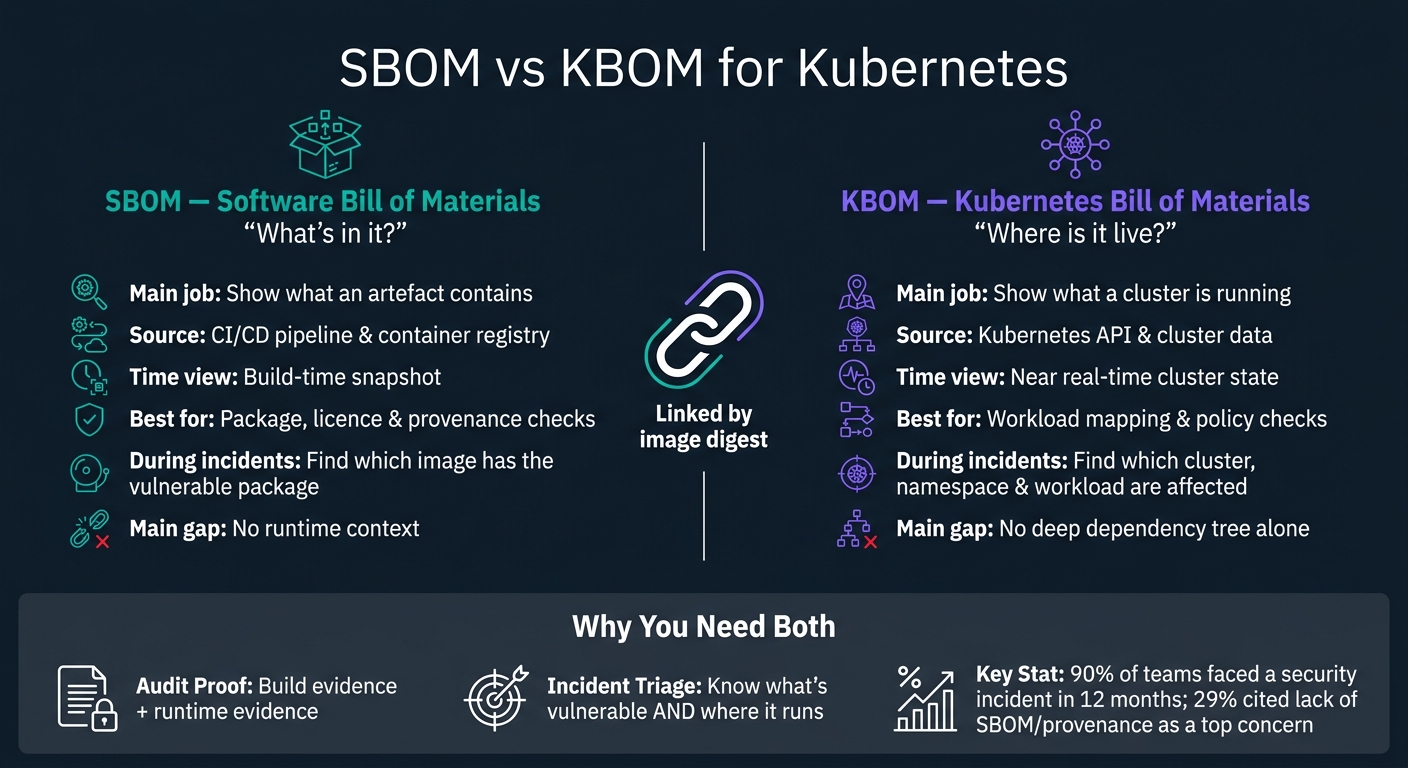 {SBOM vs KBOM for Kubernetes: Side-by-Side Comparison}
:::
{SBOM vs KBOM for Kubernetes: Side-by-Side Comparison}
:::
Kubernetes Bill of Materials (KBOM) -- Everything you need to know
Quick Comparison
| Check | SBOM | KBOM |
|---|---|---|
| Main job | Show what an artefact contains | Show what a cluster is running |
| Source | CI/CD and registry | Kubernetes API and cluster data |
| Time view | Build-time snapshot | Near real-time state |
| Best use | Package, licence, and provenance checks | Workload mapping and policy view |
| During incidents | Find which image has the weak package | Find which cluster, namespace, and workload use it |
| Main gap | No runtime context | No deep dependency tree on its own |
If I had to put it in one line, it would be this: SBOM answers “what’s in it?” and KBOM answers “where is it live?”.
SBOM for Kubernetes artefacts
For Kubernetes teams, SBOM coverage should map to the things they ship: container images, application binaries, Helm charts, Kustomize overlays, and operators. It tells you what was built, not where it runs. That build-time view matters, but it only shows one side of the story.
What data SBOM captures and where it comes from
For each component inside an artefact, a well-formed SBOM records the name, version, supplier, licence, hashes, and build provenance. Dependency links turn the SBOM into a graph, not a flat list.[1][2][3][4]
SPDX and CycloneDX are the main formats. Both record component identity, licence, hashes, and dependency links. Both also fit UK procurement and assurance requirements.[1][2][3][4]
The best time to generate the SBOM is in CI, right after dependency resolution. Then sign it and attach it to the image digest in the registry.[9][10][11][12][13]
The big problem is drift. If an image gets rebuilt and the SBOM is not regenerated, the inventory no longer matches the shipped artefact. At that point, the record looks fine on paper but tells the wrong story. Making SBOM generation a required CI step, then blocking promotion to production unless a current SBOM is attached, keeps the data lined up with what is actually being deployed.[8][9][14]
Where SBOM adds the most value: audits, compliance, and vulnerable package tracking
This structure makes SBOM useful for fast, package-level queries. It can answer a plain but urgent question: which images or charts include a vulnerable package or a restricted licence? Because SBOMs are tied to exact image digests and chart versions, teams can run these checks against a central catalogue instead of inspecting each workload by hand.[5][6][7]
For UK organisations in regulated sectors such as finance, healthcare, and the public sector, SBOMs give auditors and procurement teams the machine-readable software inventory they now expect. On its own, though, SBOM stops at the artefact boundary. KBOM adds the missing runtime context: cluster, namespace, and policy.
KBOM supplies the runtime view that SBOM cannot.
KBOM for Kubernetes clusters and workloads
A Kubernetes Bill of Materials (KBOM) gives you a cluster-level view of what is running, where it is running, and which policies apply to it. The point is simple: it joins live cluster data with workload and policy mapping, so teams can see the full picture instead of piecing it together by hand.
What data KBOM captures and how it maps workloads
KBOM data comes from the Kubernetes API. In managed setups like AKS, EKS, and GKE, cloud provider APIs can add extra detail. The result is a live view of cluster state, plus the links between parts that usually sit in separate tools.
A KBOM should capture:
- Control plane and nodes: API server, scheduler, and controller manager versions, along with node names, kubelet versions, OS images, taints, and labels. This helps flag old or exposed cluster versions.
- Add-ons and CRDs: ingress controllers, service meshes, CNI plugins, CSI drivers, GitOps operators, and Custom Resource Definitions.
- Namespaces and workload objects: namespaces, Deployments, StatefulSets, DaemonSets, Jobs, and CronJobs, each tied back to pod templates, container specs, and image references.
- Policies: RBAC roles and bindings, NetworkPolicies, PodSecurity settings, and admission controller configurations.
These fields matter because they support audits, policy checks, and faster containment when something goes wrong.
The main strength of KBOM is that it ties workload, identity, policy, and node into one record. That connection is where the useful detail lives.
For fresh and reliable inventories, many teams use a cluster-resident agent with watch API access that streams changes to a central KBOM store as they happen. Polling on its own can miss fast rollouts and policy changes.
Where KBOM adds the most value: governance, live inventory, and blast-radius analysis
KBOM is most useful in three areas: governance, day-to-day visibility, and incident response.
For governance, KBOM lets teams define and continuously check policy baselines, such as supported cluster versions and least-privilege service accounts. Because KBOM includes RBAC, NetworkPolicies, and admission controls, these checks can run automatically instead of relying on manual audits. For UK organisations working under FCA operational resilience requirements or NHS DSPT, KBOM snapshots taken before and after major changes can help show that controls stayed in place.
As a live inventory, KBOM turns a fast-moving cluster estate into something teams can actually use. Platform teams can track new namespaces, CRD installs, and image rollouts as they appear, then match them against change tickets. If an unauthorised operator shows up in a cluster, KBOM can bring it to light fast, instead of leaving someone to do a manual kubectl sweep.
That same mapping becomes especially useful during incidents.
Blast-radius analysis is one of the main KBOM use cases. If a CVE is disclosed for a specific image, KBOM can show which clusters, namespaces, workloads, and nodes are affected. It can also show whether those workloads sit behind restrictive NetworkPolicies or have elevated RBAC permissions, which helps teams decide what needs attention first. Some security tools now generate KBOMs to connect vulnerabilities to the live workloads carrying them.
SBOM vs KBOM: direct comparison for audits, governance, and incident response
SBOM shows what’s inside an artefact. KBOM shows what’s running, where it’s running, and how it’s set up. Put simply: use SBOM for build evidence, and use KBOM for live exposure. If teams blur the line between the two, gaps tend to surface at the worst moment - during an audit or in the middle of an incident.
Scope, data sources, and freshness
SBOM data starts in the build pipeline. Build tools scan image layers and dependency files, then produce a CycloneDX or SPDX snapshot at build time. That snapshot stays fixed until the image is rebuilt or scanned again. So if a new CVE is disclosed in a library already baked into an image, the SBOM itself does not change.
KBOM data comes from live cluster data, not build artefacts. It reflects the cluster as it exists now, including workloads, nodes, namespaces, services, ingress, ConfigMaps, Secrets, and linked artefacts. In busy clusters, freshness matters because it tells you which workloads are exposed right now.
The table below shows the split more clearly.
| Aspect | SBOM | KBOM |
|---|---|---|
| Scope | Single artefact, such as an image, chart, or operator | Cluster state, including nodes, namespaces, workloads, services, ingress, ConfigMaps, Secrets, and related artefacts |
| Primary data source | Build pipeline and container registry | Kubernetes API, cluster configuration sources, and runtime or observability platforms |
| Freshness | Build-time snapshot | Near real-time cluster state |
| Component depth | Full dependency tree, licences, and provenance | Cluster context and workload mapping; no transitive dependency detail without SBOM linkage |
| Best for audits | Licence compliance, secure build evidence, and CVE tracking per artefact | Policy enforcement evidence, workload placement, and environment segmentation |
| Best for incidents | Confirming which artefacts contain a vulnerable component | Locating affected workloads, assessing exposure, and prioritising remediation |
Cluster context, workload mapping, and response value
SBOM is the better fit for component-level compliance evidence. It helps show approved sources, pinned dependencies, repeatable builds, and signed artefacts. That matters when you need to prove supply chain controls, not just talk about them.
KBOM is the better fit for runtime governance and impact assessment. It shows which workloads run in which namespaces, which business functions or data classifications they support, and where network policies and Pod Security Standards are in place. When a critical CVE drops, this is where KBOM earns its keep. SBOM can tell you what contains the weak component. KBOM tells you where it is live and how exposed it is.
A Kubernetes security report found that 29% of respondents cited lack of SBOM or provenance as a top concern and 90% had experienced at least one security incident in the past 12 months[15]. Those two figures sit side by side for a reason: knowing what components exist is not the same as knowing where they are deployed.
Why most teams need both models
Used together, SBOM and KBOM close different gaps. If you lean on SBOM alone, you get operational blind spots. You may know a component is vulnerable, but still struggle to find every place it’s running. If you lean on KBOM alone, you get supply-chain blind spots. You can see the workloads, but you do not have the dependency detail needed to check whether a patch fixes the issue or whether licence duties are covered.
The practical link between the two is the image digest. Kubernetes pod specs can point to images by digest, and SBOMs can be indexed against those same digests. Once that link is in place, a combined store can answer questions like: Show all production pods in cluster running images with unresolved critical CVEs.
That’s the point where two separate inventories stop being static records and start becoming a security and governance system teams can actually use.
Conclusion: when to use SBOM, KBOM, or both
The choice comes down to the question in front of you. SBOM is the right fit when you need to know what is inside an artefact - packages, libraries, licences, and provenance. KBOM is the right fit when you need to know what is running in your cluster - workloads, namespaces, nodes, and runtime relationships. Used together, they tie supply chain risk to what is happening in the cluster.
For most teams, that means using both. Build-time evidence tells one part of the story. Live exposure tells the other. For UK Kubernetes teams, knowing what software contains is only half the job. Without cluster context, you cannot work out exposure fast or decide what to fix first when something goes wrong.
That leaves a simple rule: pick the inventory that matches the decision you need to make.
Key takeaways for decision-makers
- Use SBOM for software composition: CVE tracking per image, licence compliance, supply-chain evidence, and release provenance.
- Use KBOM for runtime context: which workloads are running, how they are configured, and how far an incident can spread.
- Use both when audit, governance, and incident response need to work together - and, in day-to-day work, that is often the case.
The link between the two is simple. Generate SBOMs in your CI/CD pipeline and refresh KBOM data from the Kubernetes control plane. Connect them through shared image digests and workload labels, and triage gets faster while audit evidence gets stronger.
Hokstad Consulting helps UK organisations design SBOM and KBOM workflows that fit existing pipelines and governance processes.
FAQs
How do SBOM and KBOM work together?
SBOMs and KBOMs work side by side to give you a layered view of your setup. The Software Bill of Materials shows the software components and dependencies in play. The Kubernetes Bill of Materials adds cluster context and shows where those applications run.
Put them together, and you get a clearer picture of both application security and the infrastructure around it. That helps with compliance, incident response, governance, and auditing workflows.
When should a team use KBOM instead of SBOM?
Teams should prioritise a KBOM when they need a clear view of cluster context that an SBOM just doesn’t show.
An SBOM is useful for tracking software components during audits. A KBOM, on the other hand, is better suited to mapping workload relationships, keeping an eye on cluster-wide configuration, and managing state across federated environments.
That matters most when the risk sits at the infrastructure layer, such as configuration drift, network exposure, or RBAC roles.
What links an SBOM to live Kubernetes workloads?
An SBOM connects directly to live Kubernetes workloads through the container images running in your pods. Tools such as Trivy use the software bill of materials to spot components, dependencies and known vulnerabilities.
When you add these checks to your CI/CD pipeline, you can validate images as pods are created and keep a clear view of your cluster inventory against security and governance requirements.