
SageMaker scale-to-zero stops idle inference compute charges - not the whole AWS bill. Choose the right mode, set its recovery trigger and test how long requests wait when capacity restarts.
- Serverless Inference: scales to zero automatically for intermittent, synchronous requests. Cold starts can add seconds.
- Asynchronous Inference: supports zero instances and queues requests while capacity starts. Recovery can take minutes.
- Inference Components: supported setups can scale model copies and hosts to zero. Zero copies alone does not stop host charges.
The savings depend on idle time, restart time and charges that remain, including storage, logging and networking. At an assumed £2.00 per instance-hour, cutting a 30-minute idle period to eight billed minutes saves about £0.73, before other charges.
Before release, check London pricing and account quotas, test shutdown and recovery, and compare measured usage with AWS billing data. Keep warm capacity if cold starts miss the response-time target, and show UK cost estimates in GBP, excluding VAT.
::: @figure 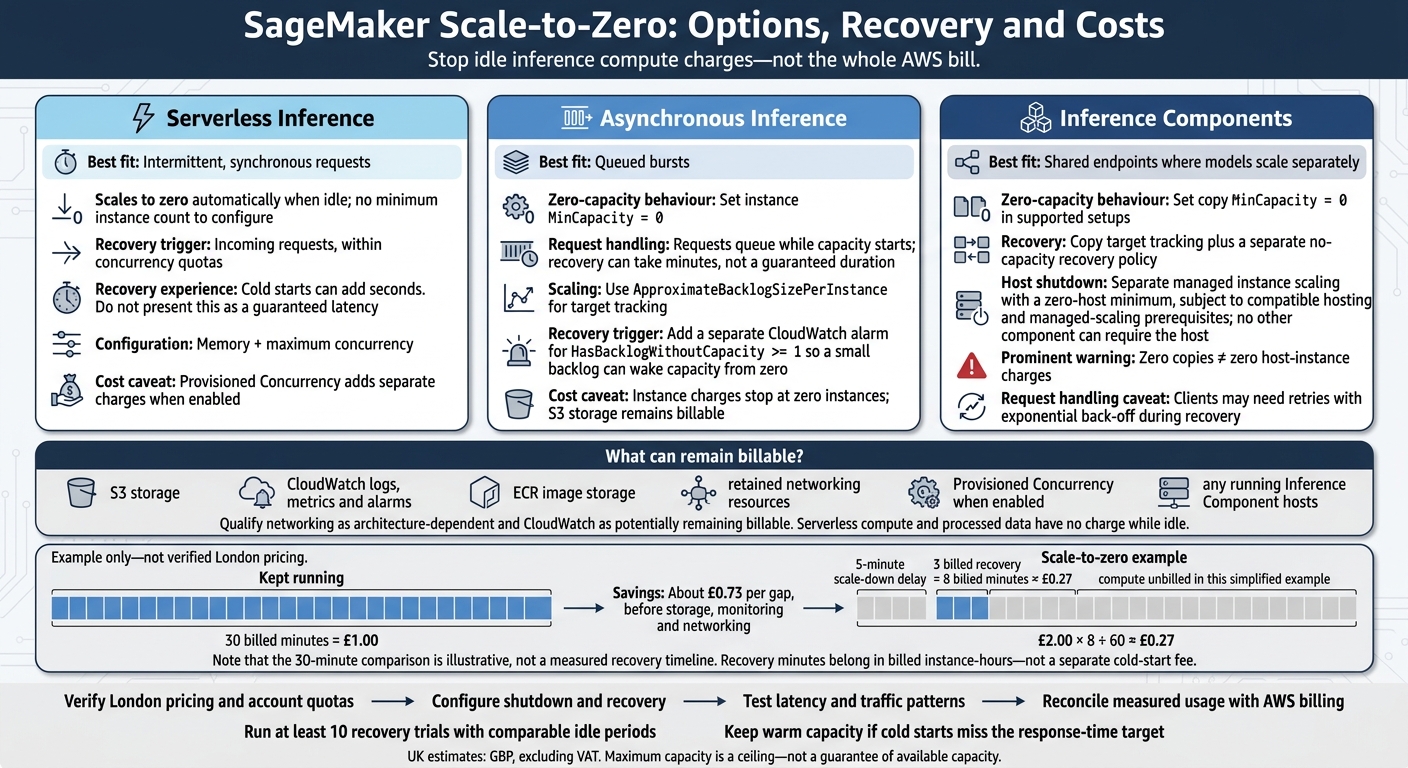 {SageMaker Scale-to-Zero: Options, Recovery and Costs}
:::
Which SageMaker inference options can scale to zero?
Match each option to your latency needs, queueing requirements and recovery behaviour.
| Inference option | Zero-capacity support | Request handling and scale-up trigger | Trade-offs and remaining charges |
|---|---|---|---|
| Serverless Inference | Shuts down automatically when idle; no minimum instance setting | Incoming requests trigger capacity within concurrency quotas | Cold starts and serverless limits apply. Compute charges depend on usage and configured memory. Data processed and Provisioned Concurrency have separate charges.[7][10] |
| Asynchronous Inference | Set instance MinCapacity to 0
|
Requests enter a queue; backlog policies provision instances | Requests wait rather than receive an immediate response. Instance charges resume when capacity is provisioned, and S3 storage remains billable.[9][14] |
| Inference Components | Set copy MinCapacity to 0; eligible managed deployments can also remove hosts |
Copy scaling handles demand; a separate policy restores capacity from zero | Requires compatible hosting and managed-scaling settings. Any running host still incurs charges.[6][12] |
The next three sections show the configuration patterns for each option.
Serverless Inference: automatic scaling to zero
Set memory and maximum concurrency - there’s no minimum instance count to configure. Use this CLI template with your model, configuration and endpoint names. Provisioned Concurrency is optional and adds separate charges when enabled.[10]
aws sagemaker create-endpoint-config \
  --endpoint-config-name "$CONFIG_NAME" \
  --production-variants \
  "[{\"VariantName\":\"AllTraffic\",\"ModelName\":\"$MODEL_NAME\",\"ServerlessConfig\":{\"MemorySizeInMB\":2048,\"MaxConcurrency\":10}}]"

aws sagemaker create-endpoint \
  --endpoint-name "$ENDPOINT_NAME" \
  --endpoint-config-name "$CONFIG_NAME"
Before deployment, check model compatibility, supported memory settings, payload limits and current Region quotas. AWS documents a 4 MB payload limit, up to 200 concurrent invocations per endpoint and a 50-endpoint regional quota. Check Europe (London)’s account concurrency quota separately; don’t assume Ireland’s allowance applies.[7][11]
If you need requests to wait in a queue rather than face an immediate cold start, use asynchronous inference instead.
Asynchronous Inference: queue requests at zero instances
Create the endpoint configuration with AsyncInferenceConfig and S3 input/output locations, then submit requests from S3 objects. Register the variant with Application Auto Scaling using sagemaker:variant:DesiredInstanceCount. Set MinCapacity to 0 and choose an explicit MaxCapacity.
Use ApproximateBacklogSizePerInstance for target tracking. Then add a separate CloudWatch alarm for HasBacklogWithoutCapacity >= 1 so even a small backlog can wake the endpoint from zero. Set alarm evaluation periods and cooldowns based on measured provisioning time.[9][15]
aws application-autoscaling register-scalable-target \
  --service-namespace sagemaker \
  --resource-id "endpoint/$ENDPOINT_NAME/variant/AllTraffic" \
  --scalable-dimension sagemaker:variant:DesiredInstanceCount \
  --min-capacity 0 \
  --max-capacity 3
Requests can contain up to 1 GB, processing can take up to 60 minutes, and queued requests expire after six hours. Account for both provisioning delay and processing time when checking whether queued work can finish before expiry.[15]
Inference Components: scale copies and host instances to zero
Register the component’s copy count on a supported endpoint. Add target tracking for normal demand, plus the no-capacity recovery metric with step scaling.
Scaling copies to zero does not, by itself, stop host charges. To shut down hosts, configure separate managed instance scaling with a zero-host minimum. No other component can require the host.
Before deployment, check AWS’s current Region, instance, endpoint and shared-component prerequisites. Clients may need retries with exponential back-off while capacity recovers.[6][12]
aws application-autoscaling register-scalable-target \
  --service-namespace sagemaker \
  --resource-id "inference-component/$COMPONENT_NAME" \
  --scalable-dimension sagemaker:inference-component:DesiredCopyCount \
  --min-capacity 0 \
  --max-capacity 3
Costs, scaling policies and endpoint limits
Which charges remain at zero capacity?
Zero capacity stops inference compute costs - not every AWS charge. Once an endpoint is idle, storage, monitoring, networking and Provisioned Concurrency can still appear on your bill.[7][13]
| Charge | Remains while idle? | Billing basis | Where to check |
|---|---|---|---|
| Inference Component hosts | Yes, if the host stays running | Host-instance usage | SageMaker usage and cost categories |
| Provisioned Concurrency | Yes, while enabled | Memory, concurrency and provisioned duration | SageMaker Provisioned Concurrency usage |
| S3 model artefacts and input/output objects | Yes | Retained storage; requests, retrieval and transfer charges apply when used | Amazon S3 bill |
| CloudWatch | Can remain | Log storage, metrics and alarms; ingestion charges apply when logs arrive | Amazon CloudWatch bill |
| Container-image storage | Yes | Retained image storage | Amazon ECR bill |
| Networking | May remain, depending on architecture | Hourly charges for NAT gateways, interface VPC endpoints and other retained resources | VPC and related networking line items |
Serverless compute and processed data have no charge while idle. Asynchronous instance charges stop when all instances reach zero. Linked services charge for data transfer again when data moves.
In Cost Explorer, check Service and Usage type rather than looking for a single billing label. Region prefixes and configurations vary. Track shared networking separately, too: another workload’s traffic should not count against an idle endpoint.
The next question is how fast that endpoint returns when requests arrive.
Set scaling targets, recovery triggers and quotas
Maximum capacity is a ceiling, not a promise of available capacity. Set backlog targets, scale-out steps and cooldowns using measured start-up time and the queue delay you can accept. Use target tracking for steady workloads and step scaling for sudden bursts. Long scale-in cooldowns increase idle spend; short ones can cause repeated restarts.[9][16]
| Symptom | Signal to inspect | Likely issue and action |
|---|---|---|
| Capacity never reaches zero | Desired capacity or instance count stays above 0 | Check minimum capacity, conflicting policies and unfinished work |
| Queue grows after recovery |
ApproximateBacklogSizePerInstance and age of oldest request |
Lower the backlog target or increase the tested maximum, subject to quotas |
| No recovery from zero | CloudWatch alarm state and scaling activity | Check the alarm, scaling policy and permissions |
| Repeated scale-in and scale-out | Capacity and backlog oscillation | Lengthen cooldowns or adjust the target |
| Burst requests are throttled | Throttles, invocation errors and quota usage | Check endpoint and regional concurrency limits; request increases before release |
Record the Region, configuration, maximum capacity, expected concurrency and backlog. Check the SageMaker AI Service Quotas console, request-size and queue-retention limits, and Application Auto Scaling limits. Published quotas are limits to test against - not capacity you can assume. Check the selected account and Region instead of copying limits from another deployment.[17]
Use measured start-up time and verified London rates to turn these settings into a monthly forecast.
Estimate monthly costs for a UK workload
Check London pricing and Service Quotas before using the worksheet below. Enter verified GBP rates directly. If converting from USD, record the exchange-rate source and date. Show totals excluding VAT, adding UK VAT only where the scenario requires it.
| Scenario | Explicit assumptions | Monthly calculation in GBP, excluding VAT |
|---|---|---|
| Serverless, intermittent |
eu-west-2; supported memory tier; 100,000 requests; measured billed duration; long idle gaps; Provisioned Concurrency disabled |
Memory-duration charge + processed-data charge + retained resources |
| Asynchronous, bursty |
eu-west-2; approved instance; minimum zero; tested maximum; daily batches; measured start-up, processing and scale-in time |
Total running instance-hours × verified £/hour + retained resources |
| Serverless with warm capacity | Same request workload; explicitly recorded provisioned concurrency and enabled hours | Applicable request charges + Provisioned Concurrency charge + retained resources |
Example only: at an assumed £2.00 per instance-hour, a 30-minute idle gap costs £1.00 if capacity stays running. A five-minute scale-down delay plus three billed recovery minutes costs £0.27:
£2.00 × 8 ÷ 60. That saves about £0.73 per gap, before storage, monitoring and networking. Include those billed minutes in monthly instance-hours, not as a separate “cold-start fee”.
Pre-deployment checklist: test scaling and costs
Make test evidence a release requirement. Use the minimum-capacity and recovery settings defined earlier. Record the model version, container image, Region, endpoint config, payload sizes, concurrency, traffic script, test duration and UTC timestamps. Before testing, also record scaling policies, capacity limits, quotas and acceptance thresholds.
Test idle shutdown and recovery from zero
Stop traffic for longer than the configured scale-in window. Each mode needs its own recovery check.
For Asynchronous Inference, confirm capacity has reached its intended minimum. Check ApproximateBacklogSize, ApproximateBacklogSizePerInstance and HasBacklogWithoutCapacity. The last metric shows whether requests are queued while capacity is zero.[18]
For inference components, check component copies and host instances using SageMaker and CloudWatch capacity data. Treat the endpoint as fully shut down only when every component is at zero or deleted.[4]
For Serverless Inference, check recovery through invocation metrics rather than host visibility. Use OverheadLatency, ModelSetupTime, Invocations5XXErrors and concurrency utilisation.[19]
Run at least 10 recovery trials with comparable idle periods. Record request timestamps, time to first successful response, queue time, scale-out duration, capacity reached, backlog, errors and timeouts. Record p50, p95 and p99 latency too. Investigate any NoCapacityInvocationFailures during recovery, then check that capacity returns to its intended idle state.[21]
Once recovery is stable, test the traffic patterns that trigger scale-out.
Test traffic patterns and define release thresholds
Run no-traffic, intermittent-request, sudden-burst and sustained-load tests with representative payloads. Set clear limits for latency, errors, oldest-queue age, request expiry, retry rate and backlog clearance.
Test peak demand against capacity caps and service quotas. Record whether excess requests queue, fail or time out. Test alarms and rollback, including traffic shedding. If cold starts breach the target, keep warm capacity enabled.
Check estimates against AWS billing data
After behavioural testing, compare measured usage with AWS billing data. Activate cost-allocation tags before testing.[22] Reconcile Cost Explorer and billing exports against the measured run.[20]
Check compute, data processing, storage, monitoring, Provisioned Concurrency where applicable, and allocated shared-resource costs. Separate test-only costs from recurring spend, allow for billing-data delays and keep the billing comparison in GBP.
Retain metric exports, error logs, billing evidence and named approver sign-off. Release only when every latency, reliability and cost threshold has passed or has an explicitly approved exception.
Conclusion: choose zero capacity to suit your workload
Testing points to a workload-based choice: Serverless Inference for intermittent synchronous traffic, Asynchronous Inference for queued bursts, and Inference Components for shared endpoints where models need to scale separately.[8][14][23]
Check how host capacity is released, too. Zero copies doesn’t mean zero host-instance charges; managed instance scaling is needed to remove those charges.[5][24]
Approve zero capacity only once recovery triggers work, capacity limits are set, cold-start latency is acceptable, and measured savings stand up against actual pricing - including any remaining charges.[8]
FAQs
How long must my endpoint sit idle to make scaling to zero worthwhile?
Your break-even point depends on idle time, model loading time and your latency budget. You only save money when the idle-capacity costs you avoid exceed activation costs and the cost of services you keep running [1].
For example, at £2.00 per hour, a five-minute scale-down delay and a three-minute restart may put the break-even idle gap at eight minutes [1]. Check your provider’s billing intervals, too: ending instances early may not stop charges if a minimum billing duration applies [1][2].
How can I retry requests without processing them twice?
Make your application logic idempotent, so processing the same request more than once doesn’t repeat its effects. When scaling down to zero, the activator may queue requests while the endpoint is inactive. If a client times out and retries, the original request may still reach the endpoint once it activates.
Use unique request identifiers or transaction tokens, checked against a database or cache, to detect and ignore requests you’ve already processed - even if the first attempt appeared to time out.
How can I detect unexpected charges after scaling to zero?
Use detailed resource labels to track costs and assign them to the right resources. Pair these with anomaly dashboards to spot unexpected changes [1]. Review cost trends regularly and set budget alerts to flag spending limits [2].
Monitor the node-retention gap: the time between a pod terminating and its underlying node being released. This helps you check whether charges continue after the pod has stopped [3]. Before deployment, use simulation modes to estimate the effect on your budget [1].