
In software deployment, choosing the right strategy is critical to balancing downtime, cost, and risk. The three main approaches - rolling, blue-green, and canary - each offer distinct benefits and trade-offs:
- Rolling Deployments: Updates are applied incrementally, server by server, keeping part of the system live. It's cost-efficient but slower and requires backward compatibility.
- Blue-Green Deployments: Two identical environments allow for instant traffic switching, ensuring zero downtime. However, it doubles infrastructure costs.
- Canary Deployments: A small percentage of users experience the new version first, minimising risk. It requires advanced tools for traffic control and monitoring.
Quick Comparison
| Feature | Rolling | Blue-Green | Canary |
|---|---|---|---|
| Rollout Approach | Incremental | Instant Switch | Gradual |
| Downtime | Minimal | None | None |
| Resource Cost | Low | High | Low-Medium |
| Rollback Speed | Slow (5–15 min) | Instant (<1 min) | Fast (<30 sec) |
| Risk Exposure | Medium | Medium | Low |
| Best Use Case | Frequent updates | High-stakes releases | Testing new features |
Each strategy fits different needs. Rolling is ideal for budget-conscious teams handling small updates. Blue-green suits critical updates where instant rollback is key. Canary is best for cautious rollouts with advanced monitoring. Match your choice to your application's architecture, budget, and risk tolerance.
::: @figure 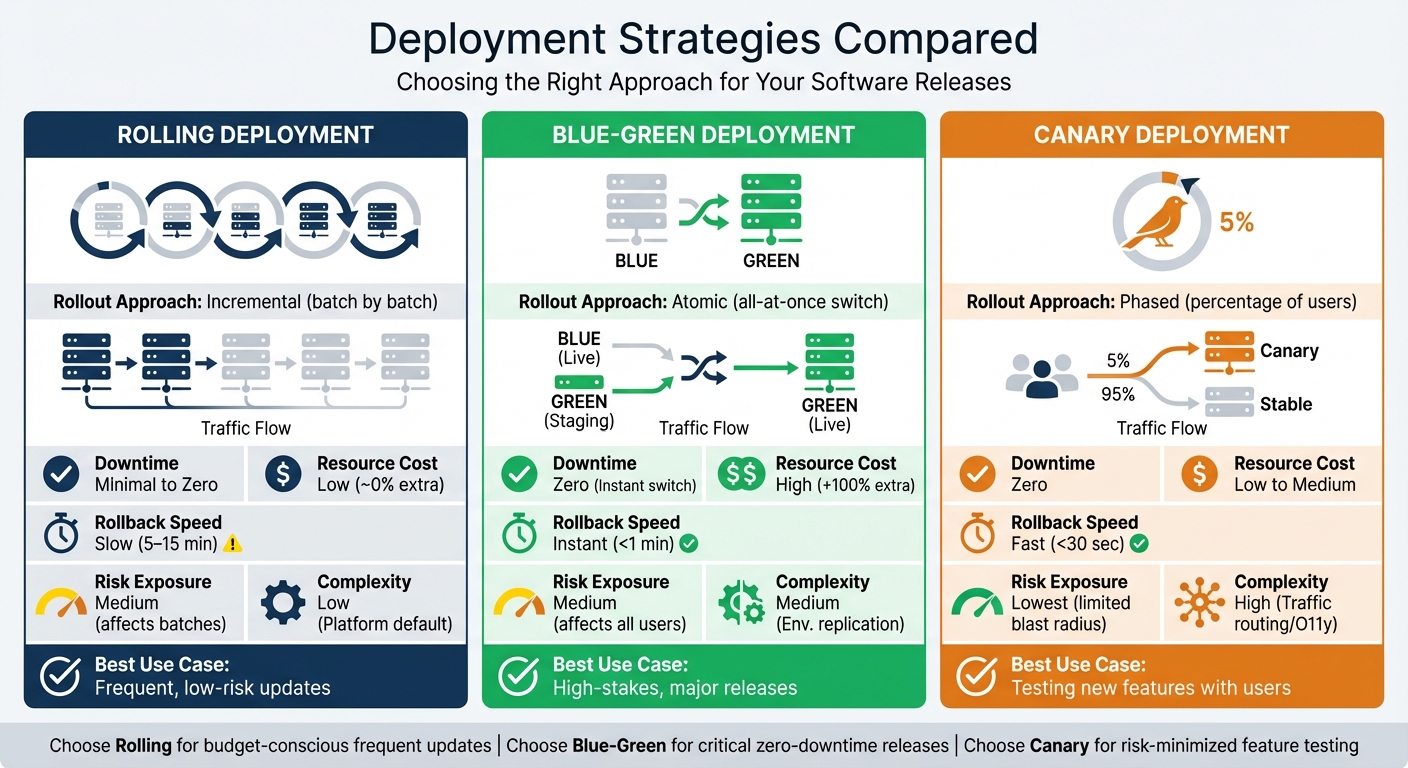 {Rolling vs Blue-Green vs Canary Deployment Strategies Comparison}
:::
{Rolling vs Blue-Green vs Canary Deployment Strategies Comparison}
:::
Rolling Deployment Strategy
How Rolling Deployment Works
Rolling deployments update your application step-by-step, one instance at a time. This approach ensures that part of the application stays live while updates are applied to other instances. During this process, the load balancer plays a key role by halting new requests to instances being updated, allowing any ongoing connections to finish naturally before the instance is removed for updates. Once updated, the instance undergoes automated health checks to confirm it's ready to rejoin the system [8][9].
Mark Harrison, Senior Developer Content Producer at Octopus Deploy, explains:
A rolling deployment is a deployment pattern... where new software is delivered, usually to one or more deployment targets at a time, until all of the targets have the updated version of the software rolled out.[8]
One defining feature of rolling deployments is the temporary coexistence of multiple software versions. For example, while some servers may still run version 1.0, others might already be running version 1.1. This makes backward compatibility a must, especially when it comes to database changes. Teams often use the expand-contract
pattern to manage this - first expanding the schema to support both versions, then contracting it after the deployment is fully complete [3][7]. Kubernetes adopts rolling deployments as its default strategy, ensuring that at least 75% of the desired pods remain operational during updates [8][10].
While this method offers a structured way to update applications, it comes with its own set of trade-offs.
Advantages and Disadvantages
| Advantages | Disadvantages |
|---|---|
| Low infrastructure cost – updates are performed on existing servers | Slower rollout – updating in batches takes longer than a single switch |
| Minimal downtime – some instances remain online throughout the process | Complex rollbacks – reverting updates instance by instance can be time-consuming |
| Built-in support – default strategy for Kubernetes and Amazon ECS | Backward compatibility is mandatory – multiple versions must work together temporarily |
| Gradual risk exposure – issues emerge incrementally, reducing overall impact | Version skew – managing and monitoring different versions can become challenging |
When to Use Rolling Deployment
Rolling deployments work best for scenarios involving frequent, smaller updates rather than sweeping changes [11]. They are particularly appealing for organisations with tight infrastructure budgets, as there's no need to maintain duplicate environments. This approach is also ideal for mission-critical services, like online retail platforms or streaming sites, where even a few minutes of downtime could be a major issue. However, you'll need enough infrastructure capacity to temporarily take some servers offline without affecting performance.
Derek Hutson, a software engineer, highlights:
Rolling deployments are best for an architecture that have a smaller number of nodes.[12]
To make this strategy effective, it's essential to set clear success criteria, such as acceptable error rates or response time thresholds, to validate each batch of updates [9]. Additionally, carefully managing batch size is critical. Smaller batches minimise risk but take longer to complete, while larger batches speed up the process but increase the potential for issues [9].
Blue-Green Deployment Strategy
How Blue-Green Deployment Works
Blue-green deployment relies on two identical production environments: one called blue
, which handles live traffic, and another called green
, used to deploy and test the new version. Once the green environment passes all tests and health checks, the load balancer redirects all user traffic from blue to green [4][7]. This clear separation makes testing and rollback processes much simpler.
Unlike rolling deployments, this approach avoids mixing different software versions. As DevOps Daily puts it:
The beauty of blue-green deployment lies in its simplicity and safety. You're not mixing versions or gradually shifting traffic, you're making a clean, atomic switch.[3]
The Harness Team also praises its practicality:
Blue-green deployment is particularly effective in reducing downtime and risk as it provides a straightforward way to switch between different versions.[7]
Some teams take it a step further with traffic shadowing, where real-world production traffic is mirrored from the blue environment to the green one before the final switch. This allows performance testing under authentic conditions without impacting users [13].
Advantages and Disadvantages
| Advantages | Disadvantages |
|---|---|
| Zero downtime – traffic is switched instantly without interrupting services [4] | High infrastructure costs – requires maintaining duplicate environments (100% overhead) [4] |
| Quick rollback – previous version can be restored in under a minute [4] | Data synchronisation challenges – especially difficult for stateful applications [7][1] |
| Full environment isolation – the new version is thoroughly tested before going live | Not ideal for gradual testing – all users are moved to the new version at once |
When to Use Blue-Green Deployment
Blue-green deployment is ideal for situations where avoiding downtime is critical. It's particularly useful during major updates like server migrations, networking changes, or database upgrades that demand seamless transitions [2][4].
This strategy works best when the budget allows for duplicate environments and when complete isolation is required for final testing [4]. For stateful applications such as databases, you might need to use the expand-contract pattern during schema migrations to ensure data consistency across both environments [2][7].
Canary Deployment Strategy
How Canary Deployment Works
Canary deployments involve introducing a new version of software by gradually directing a small percentage - typically 1–5% - of live traffic to it, while the majority continues using the stable version. The name canary
comes from the historical use of canaries in coal mines to detect toxic gases before they harmed workers [4][14][15].
The process starts with deploying the updated version alongside the current one. Tools like load balancers or service meshes (e.g., Istio or Linkerd) are then used to route a small portion of real user traffic to the new version [3][14]. As metrics such as error rates and response times are monitored and found acceptable, traffic to the canary version is gradually increased. If any issues arise, traffic can be quickly rerouted back to the stable version, often within 30 seconds [4].
Steve Fenton, Principal DevEx Researcher at Octopus Deploy, highlights the key benefit:
The canary deployment serves as an early warning indicator that impacts fewer end users when something goes wrong.[14]
This phased approach reduces risk and allows for performance evaluation before rolling out the update to all users.
Advantages and Disadvantages
| Advantages | Disadvantages |
|---|---|
| Limits risk – only a small group of users is exposed to the new version initially [4] | High setup complexity – requires advanced tools like service meshes for traffic routing [14] |
| Real-world feedback – tests the update in a live environment, not just in staging [1][3] | Slower rollout – can take 30 minutes to 3 hours compared to instantaneous deployment [4] |
| Cost-efficient – avoids the need for duplicate infrastructure, unlike blue-green deployments [4] | Database challenges – updates must accommodate multiple software versions simultaneously [1][3] |
| Quick rollback – traffic can be redirected to the stable version in under 30 seconds [4] | Requires extensive monitoring – demands tracking metrics like error rates, resource usage, and user impact [3][14] |
When to Use Canary Deployment
Canary deployments are ideal for high-traffic, user-facing applications where reducing risk is critical [3]. They're especially useful for rolling out major features, making significant architectural changes, or deploying updates with uncertain user impact. Organisations with advanced DevOps workflows and strong monitoring systems are best positioned to use this strategy effectively.
To optimise the process, automation can be employed to pause or roll back deployments when error thresholds are exceeded. Additionally, session affinity can ensure users remain on the same version throughout their session [3][14]. For an even more controlled rollout, traffic can initially be directed from internal users or specific regions before expanding to a broader audience [3][15].
Comparing the Three Strategies
Side-by-Side Comparison
Now that we've broken down each deployment strategy, let's compare them directly to help you weigh the options. Each approach balances speed, cost, and risk differently.
| Feature | Rolling Deployment | Blue-Green Deployment | Canary Deployment |
|---|---|---|---|
| Rollout Approach | Incremental (batch by batch) | Atomic (all-at-once switch) | Phased (percentage of users) |
| Downtime | Minimal to Zero [4] | Zero (Instant switch) [4] | Zero [4] |
| Resource Cost | Low (~0% extra) [4] | High (+100% extra) [4] | Low to Medium [3][4] |
| Rollback Speed | Slow (5–15 min) [4] | Instant (<1 min) [4] | Fast (<30 sec) [4] |
| Risk Exposure | Medium (affects batches) | Medium (affects all users) | Lowest (limited blast radius) [4] |
| Complexity | Low (Platform default) [3] | Medium (Env. replication) [3] | High (Traffic routing/O11y) [3] |
| Best Use Case | Frequent, low-risk updates | High-stakes, major releases | Testing new features with users |
Rolling deployments are a steady, batch-by-batch update method often built into platforms like Kubernetes and ECS [3][4][10]. While resource-efficient, rollbacks can take a bit longer - anywhere from 5 to 15 minutes [4]. Blue-green deployments, on the other hand, rely on two identical environments, enabling an instant traffic switch through a load balancer in under a minute. However, this convenience comes at the cost of doubling infrastructure requirements [4]. Canary deployments take a more cautious approach, exposing only 1–5% of users to the new version initially. This limits potential issues to a small group and allows rollbacks in under 30 seconds [4].
No matter the strategy, backward-compatible state management is essential. Techniques like the expand-contract pattern ensure smooth transitions [3][2]. Some teams even combine strategies, such as running a canary test within a blue-green setup to validate the Green
version before a full switch [3][4].
This comparison outlines the key trade-offs, helping you align the strategy with your specific goals.
Choosing the Right Strategy
Hokstad Consulting emphasises the importance of tailoring deployment strategies to your business needs. Risk tolerance is a critical factor. For example, canary deployments are great for user-facing applications because they limit exposure to potential bugs, ensuring only a small percentage of users encounter issues early on [3][5]. On the other hand, blue-green deployments work best for high-stakes releases where instant rollback capability is worth the added infrastructure expense.
Budget constraints are another major consideration. Rolling and canary deployments avoid the 100% infrastructure overhead that comes with blue-green setups [3][4]. If maintaining duplicate environments isn't financially viable, these alternatives still offer zero-downtime updates without the extra cost. Team expertise also plays a role. Rolling deployments are straightforward, often integrated into existing platforms [3]. In contrast, canary deployments require more advanced tools for traffic routing and monitoring [3].
For teams handling frequent updates, automating deployments via CI/CD pipelines can reduce errors by up to 90% [16]. If you're using rolling deployments, ensure your application can handle mixed-version traffic, as old and new versions coexist during the process [3][1]. High-traffic applications should prioritise zero-downtime strategies to maintain reliability and avoid disruptions [16].
For further insights, Hokstad Consulting offers expert advice to help you choose the most suitable approach for your business.
Deployment Strategies Explained: Blue-Green, Canary, Rolling & Shadow Deployments | DevOps Guide
Conclusion
Pick a deployment strategy that aligns with your specific goals and constraints. Rolling deployments are a budget-friendly choice for frequent, low-risk updates. On the other hand, blue-green deployments allow for immediate rollback during critical releases but come with the trade-off of doubling infrastructure costs. If you're looking to minimise risk, canary deployments expose only 1–5% of users initially, though they require more operational effort to manage [4].
Deployment strategies are not just technical methods - they define your team's reliability culture.- Shelby, IntelligenceX [6]
Ultimately, your decision boils down to balancing cost, speed, and risk. Consider factors like your infrastructure budget, tolerance for risk, monitoring capabilities, and the architecture of your application [13]. For example, a fintech platform dealing with sensitive transactions might find the £5,000–£20,000 monthly expense of blue-green deployments worthwhile for the peace of mind that comes with instant rollback. Meanwhile, a content management system with frequent updates could save money by opting for rolling deployments, which typically cost between £500 and £2,000 per month. Whichever strategy you choose, ensure that all database changes are backward-compatible, especially during periods where multiple application versions are live [1][3].
For tailored advice on streamlining deployment workflows and cutting costs, check out Hokstad Consulting.
FAQs
How do I choose between rolling, blue-green and canary for my app?
When deciding between rolling, blue-green, and canary deployments, it all comes down to your app's requirements, risk tolerance, and available infrastructure.
- Blue-green deployments offer zero downtime and make rollbacks quick and simple. However, they require maintaining two separate environments, which can be resource-intensive.
- Canary deployments roll out updates gradually, giving you real-time feedback to catch issues early. This approach works well if you prefer a cautious, step-by-step update process.
- Rolling deployments update your app incrementally, ensuring continuous availability. While effective, they can be slower for substantial changes.
The best choice depends on how often you update your app and how much risk you're willing to take during deployment.
How do you handle database changes during zero-downtime deployments?
Managing database changes during zero-downtime deployments demands thoughtful planning to maintain both consistency and availability. Some effective strategies include implementing backward-compatible schema updates, rolling out changes in small, manageable steps, and synchronising updates with feature flags to control feature access dynamically.
Techniques like blue-green deployments are particularly useful. This approach involves maintaining two identical database environments, allowing for seamless transitions and easy rollbacks if needed. These practices ensure data integrity is preserved while reducing the risk of downtime or disruptions during the deployment process.
What tooling do I need for safe canary traffic splitting and monitoring?
To manage canary traffic splitting safely and effectively, you’ll need the right tools for routing, health checks, and monitoring. The essentials include:
- A Kubernetes cluster to orchestrate deployments.
-
kubectlto handle deployments and manage cluster resources. - An ingress controller to direct traffic and manage routing.
- Monitoring tools like Prometheus and Grafana for tracking performance and system health.
These tools work together to allow gradual traffic shifts, provide real-time health insights, and enable rapid rollbacks when necessary. This setup helps maintain stability and reduces the risks associated with deployments.