
Reserved Instances (RIs) can save you up to 75% on cloud costs, but only if managed effectively. Poor tracking leads to wasted spend on unused capacity. To optimise your RI strategy:
- Key Metrics: Monitor Utilisation Rate (used RI hours) and Coverage Percentage (instances covered by RIs). Aim for 80–90% utilisation and coverage to avoid waste.
- Tools: Use AWS Cost Explorer for insights, AWS Budgets for alerts, and Cost and Usage Report (CUR) for detailed data.
- Management: Regularly review RIs, sell unused capacity, and stagger purchases to match demand.
- Centralised Approach: Manage RIs centrally via AWS Organisations to share discounts across accounts.
Start by auditing your RI usage, setting alerts for anomalies, and training teams to align workloads with RI commitments. Effective reporting ensures cost savings and reduces unnecessary expenses.
How do I view my Reserved Instance utilization and coverage reports and what data do they display?
Need help optimizing your cloud costs?
Get expert advice on how to reduce your cloud expenses without sacrificing performance.
Key Metrics for Reserved Instance Reporting
::: @figure 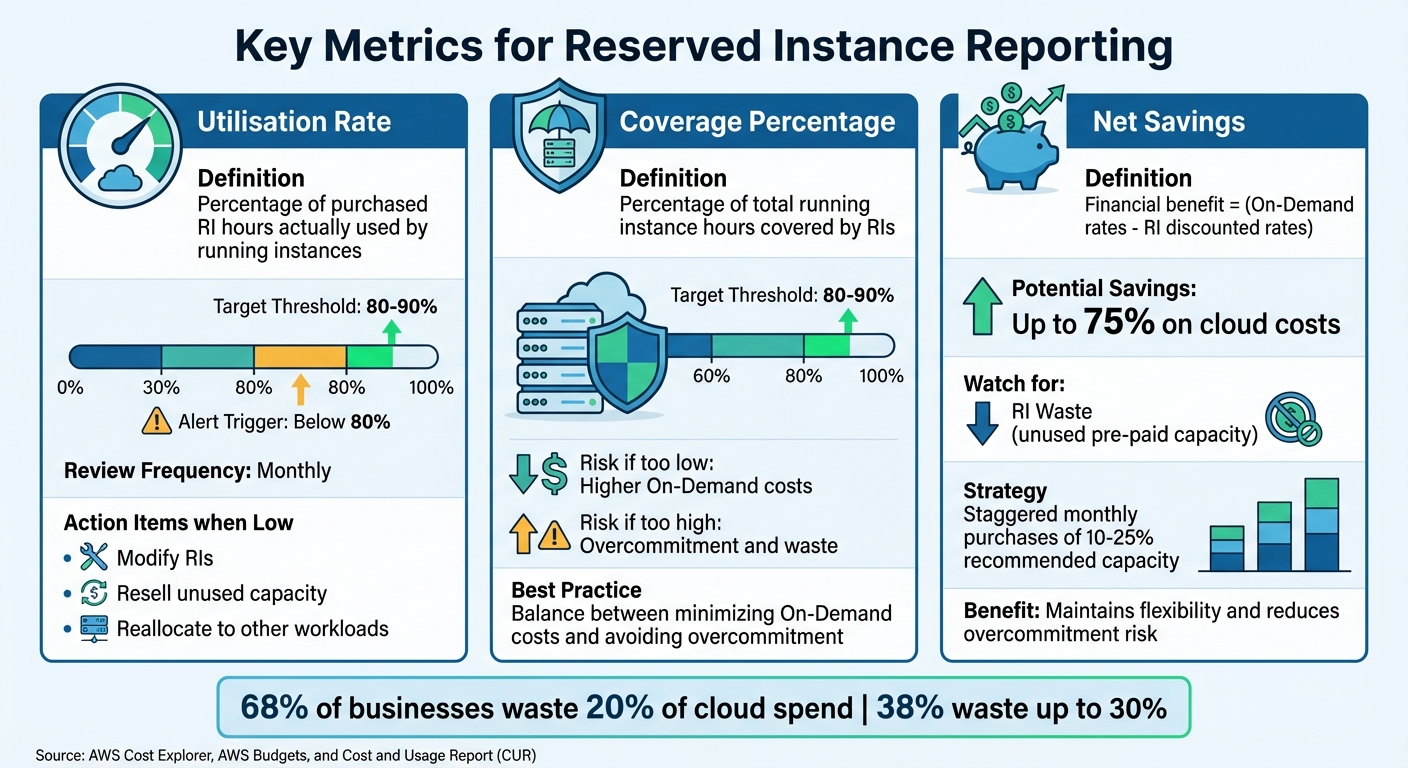 {Reserved Instance Key Metrics and Target Thresholds}
:::
{Reserved Instance Key Metrics and Target Thresholds}
:::
To evaluate whether your Reserved Instances (RIs) are saving you money or leading to unnecessary expenses, focus on three critical metrics: Utilisation Rate, Coverage Percentage, and Net Savings. Together, these metrics offer a clear view of how well your RIs are performing, highlighting areas of potential waste, excessive On-Demand spending, and your overall return on investment. Here's a closer look at each one.
Utilisation Rate
High utilisation is essential for getting the most out of your RIs. This metric measures the percentage of RI hours you've purchased that are actually being used by running instances [1][2]. When utilisation is high, it indicates that your RIs align well with your workloads. On the other hand, low utilisation points to wasted spend. Regularly reviewing this metric - ideally on a monthly basis - can help you spot underused RIs that might need modification, resale, or reallocation [1].
Custom thresholds, such as 80% or 90%, can be set in AWS Cost Explorer to generate visual alerts when utilisation falls below a certain level [2]. These alerts allow you to adjust your RI strategy promptly, ensuring that your reserved capacity is being used effectively and cost-efficiently. The goal is simple: maximise the use of every reserved hour.
Coverage Percentage
Striking the right balance between coverage and commitment is key to cost optimisation. Coverage Percentage tracks how much of your total running instance hours are covered by RIs [1][2]. If your coverage is too low, you risk paying higher On-Demand rates. Too high, and you might overcommit, leading to low utilisation and wasted funds [2][3]. Most organisations aim for 80–90% coverage to maintain a balance between minimising On-Demand costs and avoiding overcommitment.
Using detailed filters in reporting tools - such as by account, instance family, region, or cost allocation tags - can help you identify specific teams or applications responsible for coverage gaps [1]. Coverage reports are especially valuable during migrations, as they confirm whether your current reservations will apply to new instance types or availability zones [1]. Regular monitoring ensures your RI strategy remains aligned with your infrastructure needs.
Net Savings
This metric measures the financial benefits of your RI strategy by calculating the difference between On-Demand rates and discounted RI rates [2]. Net Savings reflects the return on your investment in RIs, helping you understand whether your strategy is delivering the expected cost reductions. To further cut costs, keep an eye on RI Waste - the value of pre-paid capacity that remains unused [3]. In AWS billing reports, this information is often found under the Unblended Cost
of Injected Line Items
[3].
Instead of making a single large annual purchase, many organisations adopt a monthly purchasing strategy, acquiring 10% to 25% of their recommended RI capacity at a time [3]. This staggered approach keeps your RI portfolio flexible, allowing it to adapt to changing infrastructure demands and reducing the risk of overcommitting to unused capacity.
AWS Tools for Reserved Instance Reporting
To help you manage Reserved Instances (RIs) effectively, AWS offers a range of tools designed to simplify reporting and analysis. These tools focus on key metrics like utilisation, coverage, and net savings. From interactive dashboards to detailed reports, each tool serves a specific purpose, ensuring you can monitor RIs without unnecessary complications.
AWS Cost Explorer
AWS Cost Explorer provides detailed RI Utilisation and Coverage reports, offering up to 13 months of historical data [6]. You can set utilisation targets (e.g., 80%), and the system flags underperforming reservations for review. With daily updates, it also forecasts spending for the next 18 months based on past trends [6]. If an RI is falling short, you can drill down by account, region, or instance type to pinpoint the issue [8]. While the interface is free, API requests cost approximately £0.01 per paginated call [6].
AWS Budgets
AWS Budgets acts as an alert system for RI metrics, notifying you when utilisation or coverage drops below your set thresholds [4]. You can configure Reservation Budgets to monitor these metrics and send alerts to up to 10 recipients [10]. Notifications can be routed via Amazon SNS or AWS Chatbot, allowing integration with platforms like Slack or Amazon Chime [10]. However, RI metrics in AWS Budgets may take up to 48 hours to update, so it’s wise to set alerts well in advance of critical deadlines. Expiration alerts are also available, triggering notifications 7, 30, or 60 days before an RI expires, helping you avoid unplanned On-Demand costs [7].
AWS Cost and Usage Report (CUR)
For detailed, line-item data, the AWS Cost and Usage Report (CUR) is your go-to tool. It updates up to three times daily and provides granular details such as ARNs, reservation units, and discount allocations, making it ideal for financial audits [5]. CUR 2.0 introduces advanced options like enabling Resource IDs
for tracking specific resources and Split cost allocation data
for shared environments like ECS or EKS [9]. You can export CUR data to Amazon S3 and integrate it with tools like Amazon Athena or Amazon QuickSight for custom SQL-based analysis [9]. To capture finer usage patterns, configure CUR with Hourly
granularity [9]. While storing CUR files in S3 incurs standard storage fees, costs can be reduced by overwriting old reports instead of saving new ones [9].
How to Manage Reserved Instances
Managing Reserved Instances (RIs) effectively is all about planning, monitoring, and adapting. The aim is to ensure your RI portfolio aligns with your workload patterns while keeping flexibility to adjust as your infrastructure evolves.
Planning Before Purchase
Before committing to any RIs, take a close look at 60 days of historical data to establish your baseline needs. This step helps avoid over-provisioning, which is a common issue - studies show 68% of businesses waste 20% of their cloud spend, with 38% wasting up to 30%. Tools like AWS Cost Explorer can provide recommendations based on your past usage patterns [12].
Follow the right-size then reserve
approach. Start by choosing the most efficient instance type for your workload. Once you've done that, aim for a coverage target of 80–90% instead of going for full coverage. This approach accounts for the natural fluctuations in cloud environments, helping to reduce waste [13].
It’s also smart to stagger your RI purchases. For example, Standard RIs offer discounts of up to 72% but lock you into specific instance families, while Convertible RIs provide up to 66% discounts with the option to exchange for other types [11]. UK businesses should keep in mind the 20% VAT applied to RI purchases, which can affect cash flow, especially with All Upfront
payments.
The work doesn’t stop after the purchase. Continuous monitoring is essential to ensure your RIs are being fully utilised.
Monitoring After Purchase
If your monitoring shows persistent underutilisation, it’s time to take action. Selling surplus capacity is an option, but ideally, you should aim for a utilisation rate of at least 90%. On the other hand, if your utilisation consistently hits 100%, consider purchasing additional reservations. Setting up alerts to flag anomalies early can help you respond proactively. These steps tie into the RI Utilisation and Coverage metrics mentioned earlier.
Make it a habit to review your RI coverage every quarter. This ensures your commitments still align with your workload. For example, Regional RIs allow flexibility in instance sizes (e.g., one m5.2xlarge reservation can cover two m5.xlarge instances), while Zonal RIs lock in physical capacity within a specific Availability Zone. Understanding these nuances can help you get the most out of your reservations.
Selling Unused Capacity
If underutilisation persists, selling unused RIs can help recover costs. AWS’s Reserved Instance Marketplace lets you sell unused Standard RIs - though this option isn’t available for Savings Plans or Convertible RIs. Before listing, you can modify Standard RIs by adjusting the Availability Zone, changing the instance size (for Linux), or switching from Zonal
to Regional
to make them more marketable [14][15].
The biggest Reserved Instance mistake is not buying them. The second biggest is buying them without understanding your workload patterns first.– Nawaz Dhandala, Author, OneUptime [15]
Set up CloudWatch alerts to notify your team when utilisation drops below 80% for several consecutive days [14][15]. These alerts give you time to modify or sell your reservations before unnecessary costs pile up. Selling unused capacity is a key part of keeping your cloud spending efficient and aligned with your needs.
For UK businesses looking for tailored advice, experts like Hokstad Consulting can provide strategies to help you optimise your RI portfolio and manage costs effectively.
Setting Up Reserved Instance Reporting Across Your Organisation
Getting Reserved Instance (RI) reporting right means having clear processes, shared responsibilities, and well-aligned practices. Without this, you could end up with duplicate purchases, missed savings, or confusion about accountability.
Centralised Management and RI Sharing
A centralised purchasing model, managed through AWS Organisations, is a smart way to handle RIs. Using this setup, you can buy RIs from a management account and automatically share the discounts across all linked accounts. If one team's workload decreases and its RI goes unused, the capacity can automatically benefit another team's eligible instances - no manual effort required [12][15].
To make this work smoothly, ensure linked accounts have the right IAM permissions. Teams need ViewBilling and ViewAccount permissions to access Cost Explorer and check their reservation recommendations [17]. Additionally, Regional RIs provide automatic coverage across Availability Zones, which adds flexibility [15].
Once centralised management is in place, the next step is to establish a clear reporting strategy.
Creating a Reporting Strategy
Formalising your RI strategy is key. Start by setting target coverage ratios: aim for 70–80% coverage for stable production workloads, and 50–60% for development or staging environments where usage is less predictable [15]. Schedule regular reviews - monthly for production utilisation, quarterly for development coverage, and ad-hoc for experimental workloads.
Decide who will manage RIs. You can use a showback model, where monthly cost reports provide visibility, or a chargeback model, which uses automated internal billing to encourage accountability. Begin renewal planning at least 60 days before RIs expire to avoid coverage gaps and potential price hikes [15]. Keep your policy document accessible so all teams understand their targets and responsibilities.
Once your strategy is in place, make sure your teams are equipped with the knowledge they need to manage RIs effectively.
Training Teams on Reserved Instances
Your teams need a solid understanding of how RIs work and how their choices can impact costs. Teach them the trade-offs between Standard and Convertible RIs - Standard RIs offer higher discounts but less flexibility, while Convertible RIs allow changes to instance attributes [16]. Highlight that Regional RIs provide automatic coverage across Availability Zones, whereas Zonal RIs are for specific zones and are generally used for stateful applications requiring guaranteed capacity [15].
Make sure they know the financial details too, such as the 20% VAT on All Upfront payments for UK businesses. Encourage regular checks on utilisation and prompt action on underused RIs. For instance, unused Standard RIs can be sold on the AWS Reserved Instance Marketplace to avoid unnecessary costs [16][15].
By training your teams, you empower them to make informed decisions that reduce cloud expenses and prevent wasted capacity.
These practices lay the groundwork for effective RI management and further cost savings. For more advice on optimising cloud infrastructure costs, check out Hokstad Consulting.
Conclusion
Key Takeaways
RI reporting can turn usage data into opportunities for cost savings. Two critical metrics to monitor are Utilisation (how much of your purchased RI capacity is actively used) and Coverage (the share of running instances benefiting from RI discounts) [2][1]. If utilisation dips below 80%, it’s worth investigating for inefficiencies [15]. Similarly, low coverage could mean you’re paying more by relying on on-demand rates.
To optimise, use AWS Cost Explorer for visual insights and purchasing recommendations, AWS Budgets for alerts when performance drops, and the Cost and Usage Report for detailed hourly data [2][1]. Analyse historical data to confirm that your RI commitments match workload needs. If you have unused Standard RIs, sell them on the Marketplace to recover costs [1][15]. Centralised management through AWS Organisations ensures discounts are applied where they’re most needed, while proper training empowers teams to make smarter decisions about instance types and commitments.
These strategies provide a clear roadmap for improving cost efficiency.
Next Steps
Start by auditing your RI reporting to ensure you’re consistently tracking utilisation and coverage. Set up AWS Budgets with threshold alerts to catch potential cost issues early. Use historical data to identify stable workloads that could benefit from RI commitments. Define coverage targets for your production and development environments, and schedule regular reviews to stay on track. For underutilised RIs, explore options like modifications, sharing across accounts, or selling on the Marketplace. Finally, centralise RI management and invest in team training to ensure these practices are effectively implemented. For expert guidance on cloud cost optimisation and infrastructure management, consider consulting with Hokstad Consulting.
FAQs
How do I pick the right RI term and payment option?
When deciding on the best Reserved Instance (RI) term and payment option, it’s crucial to evaluate how predictable and flexible your workload is. If your workloads are consistent and stable, opting for a 1- or 3-year term with upfront payments can deliver the highest cost savings. However, if your workloads tend to fluctuate, convertible RIs or payment plans with more flexibility might be a better match. Take into account your cash flow, usage trends, and how accurately you can forecast your needs to choose the option that aligns best with your circumstances.
When should I choose Standard vs Convertible RIs?
When dealing with predictable and steady workloads, Standard Reserved Instances are your go-to option. They can save you up to 72%, making them the most cost-effective choice. However, keep in mind that they come with limited options for adjustments or modifications.
On the other hand, Convertible Reserved Instances are ideal if you anticipate needing flexibility. They allow you to switch between instance types or families during the term. While the savings aren’t as high as Standard RIs, they offer more room to adapt to changing requirements.
Choose Standard RIs for maximum savings and Convertible RIs if flexibility is a priority.
How can I spot and fix RI waste quickly?
To manage Reserved Instance (RI) waste effectively, it's essential to keep an eye on your RI utilisation and coverage reports in AWS Cost Explorer. These reports are your go-to tools for spotting underused reservations and gaps in coverage.
Steps to Reduce RI Waste
- Identify underused RIs: Look for RIs with low utilisation rates and consider reallocating or modifying them to better fit your needs.
- Refine purchasing strategies: Avoid over-committing by carefully planning your RI purchases based on actual usage patterns.
- Monitor regularly: Make it a habit to review your reports frequently to ensure optimal utilisation and reduce unnecessary spending.
By staying proactive with these steps, you can keep your RI usage efficient and cost-effective.