
If I want one simple answer, it’s this: public cloud automation cuts live usage spend, while private cloud automation helps me get more from fixed capacity. That’s the core split.
For a UK business, the choice often comes down to billing model, workload pattern, team skills, and control needs. In public cloud, I’m dealing with moving monthly bills, idle resources, egress fees, and commitment use. In private cloud, I’m dealing with utilisation, refresh timing, power, licences, labour, and chargeback.
Here’s the article in plain terms:
- Public cloud suits workloads that change often, grow fast, or need built-in cost controls.
- Private cloud suits workloads that stay busy and can justify owned or leased infrastructure.
- Automation is not the same in each model:
- In public cloud, it’s about rightsizing, scaling, anomaly alerts, tagging, and shut-down rules.
- In private cloud, it’s about placement, consolidation, storage lifecycle, backup retention, and capacity planning.
- Visibility is easier in public cloud because billing is tied to usage.
- Cost allocation is harder in private cloud because spend is spread across shared infrastructure.
- Break-even depends on more than monthly spend. I need to include:
- egress
- API charges
- licences
- support
- labour
- depreciation
- refresh cycles
- The article also shows why this matters now:
- 87% of businesses have faced unplanned cloud spend
- 54% cannot track cloud spending well
- public cloud waste often sits around 28–34%
- mature FinOps work has been linked to 26.4% cost reduction
The short version: if demand is spiky, public cloud usually gives me more room to control spend as it happens. If demand is steady and utilisation stays high, private cloud can lower long-run unit cost. Many UK firms will end up using both, with one set of tagging, reporting, and budget rules across the estate.
::: @figure 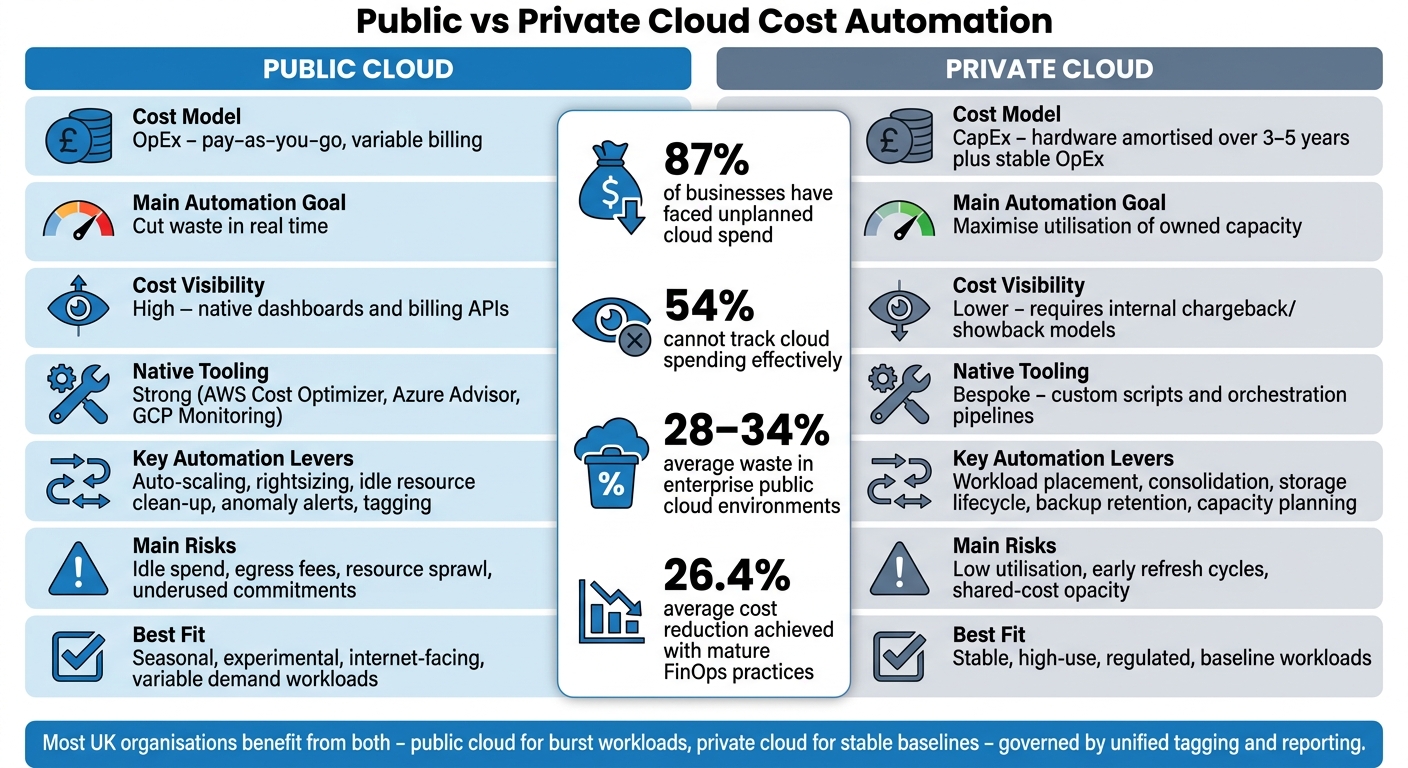 {Public vs Private Cloud Cost Automation: Key Differences at a Glance}
:::
{Public vs Private Cloud Cost Automation: Key Differences at a Glance}
:::
I Broke Down Cloud Strategy for DevOps Teams
Quick Comparison
| Area | Public Cloud | Private Cloud |
|---|---|---|
| Cost base | OpEx, usage-led billing | CapEx plus steady running cost |
| Main automation goal | Cut waste now | Increase utilisation of owned capacity |
| Cost visibility | High | Lower unless I build internal models |
| Native tooling | Strong provider tooling | More custom scripting and platform work |
| Main risks | Idle spend, egress, sprawl, underused commitments | Low utilisation, early refresh, shared-cost opacity |
| Best fit | Seasonal, test, internet-facing, uneven demand | Stable, high-use, regulated, baseline workloads |
If I’m comparing the two, I should judge them on cost model, visibility, automation effort, governance, workload fit, and break-even over time - not just on the latest monthly bill.
Public cloud cost automation: visibility, native tooling and variable spend
Public cloud spend is measured in real time. That gives teams something private cloud often doesn't: the chance to control cost while it's happening, not weeks later.
AWS, Azure and Google Cloud charge for compute, storage, data transfer and managed services. Each resource produces billable metrics that teams can track and act on automatically. Native monitoring tools - AWS CloudWatch, Azure Monitor and Google Cloud Monitoring - collect usage and cost data in near real time, which gives UK engineering and finance teams a live view of current spend.[4] But visibility on its own isn't enough. It has to trigger action.
That's where FinOps workflows come in. They connect engineering choices to finance targets in a way people can use day to day. In practice, that usually means automated monthly reports that show spend per product team in GBP, forecasts based on past usage, and alerts or approval steps when a budget threshold is crossed. Spend should be reported as £ per workload, team or transaction, not as a long list of raw infrastructure charges.[7][9]
Native automation for scaling, rightsizing and idle-resource clean-up
Public cloud platforms come with built-in tools that can cut waste without someone checking everything by hand. Auto-scaling services such as AWS Auto Scaling, Azure Virtual Machine Scale Sets and Google Managed Instance Groups add or remove instances based on actual demand - CPU load, request volume or queue depth - so workloads scale down when traffic drops.
Rightsizing tools take that a step further. AWS Compute Optimizer and Azure Advisor look at past usage and suggest smaller instance types, lower-cost storage tiers or more suitable database SKUs. AWS treats an instance as idle when maximum CPU utilisation is at or below 1%[6], and AWS Cost Optimization Hub brings these recommendations together, noting that stopping idle or unused resources can save up to 100% of their cost.[5]
Idle-resource clean-up goes beyond compute. Orphaned snapshots, unattached disks, unused load balancers and forgotten test environments all push up the monthly bill. Tools such as AWS Instance Scheduler can shut down non-production environments on a schedule, stopping instances outside office hours and starting them again in the morning.[3][8] Teams in the UK can define these rules with infrastructure-as-code and policy-as-code so every new environment starts with sensible defaults, such as:
- non-production instances turned off after 19:00
- auto-scaling switched on
- mandatory tags for owner, environment and application
Public cloud cost risks that automation must address
These controls cut waste, but they don't wipe out every public cloud cost risk.
Data egress charges - fees for moving data out of a provider's region or to the public internet - are easy to miss when people are focused on system design. Later, they can become a major cost for consumer-facing applications. Cross-region and inter-zone transfer charges add another layer, especially when databases are replicated or services are spread across multiple locations.
Commitments such as Reserved Instances and Savings Plans can lower costs for stable workloads. But there's a catch. If a workload is moved, reduced or turned off, those commitments can become underused and lock the business into a higher £-per-unit cost. Resource sprawl adds its own slow drain on budget: abandoned test environments, dormant containers and old snapshots tend to pile up quietly over time.[9]
A sensible response is layered automation. That means budget alerts in GBP sent to both engineering and finance when projected spend is moving towards a threshold, anomaly detection for sudden jumps in data transfer, storage growth or API calls, and scheduled scans that spot resources matching unused
patterns. When those alerts feed straight into collaboration tools - creating tickets, tagging suspected anomalies and requiring approval for costly new services - teams have a much better chance of catching billing shocks before the monthly invoice lands.[9]
| Risk Factor | Impact on Spend | Automation Remedy |
|---|---|---|
| Data egress charges | Can be high for consumer-facing or multi-cloud workloads | Monitor transfer costs by service and alert on spikes |
| Underused commitments | Locked-in cost with no matching workload | Track commitment utilisation; use approval workflows for larger commitment changes |
| Resource sprawl | Steady background waste across accounts | Scheduled scans; auto-delete orphaned resources |
| Pricing changes | Surprise bill increases on existing services | Subscribe to provider pricing change notifications |
| Cross-region transfer | Hidden costs in distributed architectures | Tag and report transfer costs by workload |
Private cloud needs a different control loop because cost is tied to capacity, not usage.
Private cloud cost automation: utilisation, capacity planning and total cost of ownership
Private cloud automation is mostly about capacity, not usage. The job is to make sure owned infrastructure carries enough workload to justify its fixed cost base. After all, those costs keep running whether systems are flat out or sitting idle.
TCO needs to cover the full 3–5-year lifecycle: hardware, energy, licences, support, labour and refresh cycles. A practical formula is TCO = CapEx + OpEx − measurable savings from automation and consolidation.[11][14] Cost should then be normalised by consumed capacity, not provisioned capacity. So instead of looking at what was allocated on paper, look at cost per utilised GHz, GB of RAM or VM. That matters because under-used estates can make the economics look better than they are. Industry guidance points to 60–80% average utilisation for core private cloud clusters, with automation used to keep performance in that range.[14]
Good automation also helps with capacity planning. It looks at historical usage, planned projects and seasonality, then turns that into procurement, refresh timing and cluster expansion decisions. The point is simple: don’t tie up capital in infrastructure that sits there doing nothing.[14] That leads straight to the practical issue: which controls can shift utilisation fast enough to make a difference?
A Dell and Forrester study on private cloud impact reported server and facilities cost savings of US$1,291,240 over three years from consolidation and higher utilisation, with software, storage and networking savings reaching US$2,324,000 by year three.[10]
Automation levers in private cloud environments
The main levers are workload placement, scheduling, storage lifecycle rules, backup retention and energy-aware shutdown.
Placement automation can group low-demand workloads onto fewer physical hosts overnight. That frees up nodes that can be powered down or held back for peak demand. Storage lifecycle rules can move data that’s rarely touched onto lower-cost tiers without manual effort. Backup retention policies help cut duplicate or unneeded copies based on actual compliance needs, instead of letting everything pile up forever.[12][13][15][16]
The aim is straightforward: get more from the infrastructure you already own instead of pulling forward a refresh cycle before it’s needed.
Why private cloud automation is often more bespoke
Most organisations run mixed private-cloud estates. Each one tends to come with its own APIs, policy model and operating constraints. That’s why cost automation often depends on custom scripts, orchestration pipelines and platform-specific policy engines to handle scheduling, placement and compliance in a steady way.
£-per-workload visibility is also harder to produce. Private cloud costs are spread across many applications, so there’s no neat invoice line for each team or service. To build cost data that people can actually use, organisations usually need internal tagging standards, chargeback or showback models, usage metering and allocation rules for shared services like storage, backups and networking. Mixed estates often need specialist support to build chargeback, showback and automation around shared costs - this is where Hokstad Consulting is most useful for organisations managing complex private or hybrid infrastructure.
These levers shape both day-to-day operating cost and later capacity decisions. In practice, they tend to work best when paired with lifecycle rules and demand forecasts.
| TCO Category | What to Include | How Automation Helps |
|---|---|---|
| Hardware & refresh | Servers, storage, networking, planned replacement cycles | Improves utilisation and consolidation ratios, helping delay refresh decisions |
| Facilities & energy | Power, cooling, data centre space | Energy-aware scheduling reduces consumption during off-peak periods |
| Licensing, backup & support | Hypervisor, OS, management tools, backup software, vendor contracts | Reclaiming unused capacity reduces waste in software, backup and support spend |
| Operations & labour | Staff time for provisioning, monitoring, incident response | Orchestration pipelines reduce manual intervention |
| Downtime & risk | Business impact of outages | Better placement and scheduling can reduce downtime and operational risk |
Those private-cloud levers set up the side-by-side comparison next.
Public vs private clouds: cost automation compared side by side
Public and private cloud automation differ most in how they handle spend. Public cloud responds to usage as it happens. Private cloud gets more out of what you already own.
The table below shows where each model cuts costs, where automation gets harder, and where the economics start to change.
| Dimension | Public Cloud | Private Cloud |
|---|---|---|
| Cost model | OpEx: pay-as-you-go, usage charges vary daily or hourly | CapEx: hardware amortised over 3–5 years [18], plus stable OpEx |
| Cost visibility | High: native dashboards, billing APIs and per-tag reporting | Lower: depends on hypervisor reports and internal financial models |
| Native automation | Out-of-the-box: auto-scaling, rightsizing recommendations, anomaly detection and commitment management | Bespoke: orchestration platforms and custom scripts |
| Bespoke engineering effort | Low to moderate: IaC templates and provider APIs reduce build time | High: custom pipelines, monitoring integrations and capacity models required |
| Operational overhead | Lower: provider manages hardware, patching and physical infrastructure | Higher: in-house teams handle hardware lifecycle, patching and capacity planning |
| Governance | Provider-native: IAM policies, budget alerts, tagging standards and multi-account guardrails | Custom: integrates with existing ITIL, change management and procurement processes |
| Best-suited workloads | Seasonal, experimental and internet-facing services | Core systems and regulated workloads |
| Hybrid fit | Most UK organisations use both: public for burst, private for baseline |
That split makes more sense once you look at speed, visibility and control.
Where public cloud has the advantage
Public cloud stands out on speed. Auto-scaling, serverless and managed containers can shift capacity in minutes, so automation reacts to usage straight away.
That matters because it helps tackle the 28–34% average waste seen across enterprise public cloud environments [1]. In plain terms, that waste often comes from idle instances, unattached storage and overprovisioned machines left running after demand drops. Native anomaly detection can spot strange cost spikes within hours, which helps limit the hit from misconfigured services or runaway jobs.
There’s also less heavy lifting for internal teams. Commitment management tools can track usage against reserved instances and savings plans, then suggest changes to improve long-term pricing. No pile of custom scripts needed. Organisations with mature FinOps practices using these built-in tools have shown an average 26.4% cost reduction while also increasing cloud workload volume by 31.8% [17].
Where private cloud has the advantage
Private cloud automation saves money in a different way. Instead of reacting to demand minute by minute, it improves utilisation of fixed assets.
That can mean a lower cost per unit over time for large workloads that run at a steady level. Some studies have found lower TCO than public cloud options in these cases [18][2]. If a workload is busy all year, the maths can start to favour infrastructure you’ve already paid for.
For UK organisations in regulated sectors such as financial services and healthcare, private cloud can also make data residency and audit work simpler. Keeping sensitive data on-premises or in a dedicated environment can make compliance checks and internal control processes easier to handle.
How to assess break-even points
Monthly spend alone won’t tell you which model is cheaper. It’s a bit like comparing the price of a car lease with buying a van outright without looking at fuel, servicing or how often you’ll use it.
Break-even modelling needs to include egress, API calls, licences, support, labour, depreciation and refresh cycles. It also needs to look at one workload across multiple years using actual utilisation, not guesses.
If demand is spiky, seasonal or hard to predict, over-provisioning private infrastructure often costs more than any saving from lower unit rates. In those cases, public cloud tends to make more sense. When demand stays stable and utilisation remains high, private cloud is more likely to pay back fixed costs over time.
Choosing the right automation strategy and next steps
Once break-even is clear, the next move is to turn those numbers into day-to-day rules. The right model comes down to workload shape, operating maturity and the cost target you’re aiming for.
Stable workloads with high utilisation often fit private cloud. Variable or seasonal demand tends to sit better in public cloud. If you’re running a mixed estate, the aim isn’t to let two separate plans drift apart. It’s to run one joined-up approach, with shared tagging rules and governance across both.
Cost automation principles that apply to both models
That choice only works if your cost data is clean and consistent.
Consistent tagging is critical. Every resource should have tags for application, environment, owner, cost centre and compliance. In public cloud, use native tag policies. In private cloud, use matching labels or asset records.
Budget guardrails and CI/CD policy checks help stop waste before it turns into a bigger bill. Set budget guardrails, block untagged deployments and automate clean-up for idle resources. As teams get better at automation, savings can move from 12–15% in the first six months to 25–30% after 18 months [17].
Governance and skills needed to make automation work
These controls only last if finance, platform engineering and operations work from the same reporting model. Central dashboards should bring together spend and utilisation across public and private environments in pounds sterling (£).
Finance sets budget envelopes, reporting needs and the thresholds that trigger action. Platform engineers turn those requirements into tagging rules, guardrails and automated fixes. Operations teams set maintenance windows and service levels so cost-saving steps, such as overnight shutdowns, don’t hurt availability.
A monthly cost review, backed by quarterly adjustments, is usually enough to spot anomalies without turning the process into a chore. Each major application should also have a named owner who is accountable for its cost profile and tag completeness.
The skills gap is real. Good cost automation needs:
- IaC and scripting skills
- FinOps knowledge of pricing models and commitment programmes
- Data analysis to read utilisation trends
- In private cloud, capacity management, performance tuning and infrastructure monitoring
Closing that gap often means a mix of internal training, cross-functional rotations and outside support.
Conclusion: key differences to remember
Public cloud often gives faster, more native automation. Private cloud often needs more bespoke control, but it can pay off when utilisation stays high. The right choice depends on workload shape, governance maturity, team skills and compliance needs.
FAQs
How do I know when public cloud is cheaper?
Public cloud is often more cost-efficient when workloads rise and fall or are hard to predict, because pay-as-you-go pricing ties spend to actual usage.
It also helps you avoid big upfront infrastructure costs and makes scaling much easier. Private clouds can cost less for steady, high-volume workloads, but public cloud is often the cheaper option when flexibility helps cut waste and supports cash flow.
What cloud costs are easiest to miss in a comparison?
The easiest costs to miss are data transfer, or egress fees. These tend to show up when data moves between regions, across availability zones, or out of a provider’s ecosystem.
Teams also miss untagged resources, which make it harder to see what’s running and who owns it. Then there are the steady background costs: maintenance, monitoring, and software upgrades. They don’t always look dramatic on paper, but they add up.
In private clouds, wasted spend often comes from over-provisioning and manual admin work. Put simply, companies pay for more capacity than they use, then spend extra time and money managing it by hand.
How should I automate costs in a hybrid estate?
Move away from manual reviews and shift to policy-led cost control. With mandatory tagging, automated monitoring, and real-time visibility, you can assign spend with far more accuracy instead of piecing it together after the fact.
Use event-driven automation to match capacity to demand. That means scaling when traffic climbs, powering down non-production environments during off-peak hours, and keeping budgets in check with alerts and provisioning limits.
Infrastructure as Code and automated CI/CD pipelines help maintain governance while cutting human error. It also makes day-to-day changes less messy and far easier to track.
Audit data flows regularly, then automate storage lifecycle policies so infrequently accessed data moves to lower-cost tiers instead of sitting in expensive storage for no good reason.