
If cold starts are pushing your Lambda API from ~165 ms to 532 ms at the slow end, provisioned concurrency can cut that delay - but you pay for warm capacity even when traffic is quiet.
If I strip this down to the part that matters most, it comes to this:
- Cold starts hit tail latency, mostly p95 and p99, not just averages.
- Provisioned concurrency keeps Lambda environments ready before requests arrive.
- It works best for user-facing, synchronous workloads like checkout, sign-in, and dashboards.
- It does not cover traffic above the amount you pre-allocate. Extra demand can still hit cold starts.
- You need to size it from requests per second × average duration, then add about 10% headroom.
- The spend can make sense for strict latency targets, but it is often a poor fit for low-traffic tools, batch jobs, or async work.
- Before paying for it, I’d also test smaller packages, less init code, and lighter runtimes.
A few points stand out straight away. Cold starts can range from under 100 ms to more than 1 second. That gap tends to show up after idle periods, during bursts, and after deployments. For UK services, that often means morning logins, lunch-hour demand, and evening shopping peaks.
Here’s the simple decision rule I’d use:
| Situation | My view |
|---|---|
| Public API with tight p95/p99 targets | Provisioned concurrency is often worth testing |
| Heavy runtime or large package | More likely to help |
| Batch or async processing | Usually not worth the extra spend |
| Low, uneven traffic | Use with care or schedule it by time of day |
| Traffic above provisioned level | Expect spillover and some cold starts |
What I like about this approach is that it is easy to verify. I’d point traffic to a version alias, enable provisioned concurrency there, then compare p50, p95, p99, utilisation, and spillover in CloudWatch. If latency drops and the warm pool is used often enough, the maths may work. If not, I’d scale it back or use timed schedules around UK peak hours.
So the short answer is simple: use provisioned concurrency selectively, measure it hard, and pay for it only where lower latency affects revenue, sign-ins, or user trust.
129. Lambda Provisioned Concurrency
Why Cold Starts Happen And Which Workloads Suffer Most
Cold starts hurt most when traffic is bursty, runtimes are heavy, or the init phase does too much work. In plain English, the main causes are runtime boot time, package size, and scale-out spikes.
Runtime, Package Size, And Initialisation Overhead
Runtime choice makes a big difference. JVM-based functions often start more slowly because boot time and class loading add extra overhead. Lighter runtimes tend to initialise faster.
Package size adds to the problem. Larger deployment packages take longer to download and unpack into the execution environment. If a function ships with large frameworks, several SDKs, or other heavy dependencies, it will usually have longer cold starts than a leaner version.
One of the simplest places to cut delay is code outside the handler. Any code that runs there - such as setting up connections, loading configuration, or booting shared libraries - runs on every cold start. More work outside the handler means a longer wait every time a new environment starts.
Concurrency Spikes And Platform Scaling Behaviour
When demand goes past warm capacity, the platform starts new environments, and each one has to pay the full init cost. That tends to happen in bursty, user-facing workloads after idle periods, during traffic spikes, or straight after deployments.
This is where cold starts sting the most: synchronous, user-facing APIs that also depend on large packages, heavy frameworks, or VPC access. It’s a rough mix. More demand arrives, new environments spin up, and each one takes longer than you'd like to get ready.
That’s where provisioned concurrency comes in. It keeps environments ready before requests arrive.
How Provisioned Concurrency Reduces Cold Start Latency
Provisioned concurrency is a direct fix for cold starts. It pre-initialises Lambda environments before traffic arrives. So when requests hit that pool, they skip runtime boot, code loading, and initialisation. The result is steadier latency instead of those awkward spikes you get with cold starts.
Put simply, the work moves from request time to provisioning time. And that’s what removes the cold-start spike.
What Provisioned Concurrency Does In AWS Lambda
The main win comes from taking initialisation off the request path. When you configure provisioned concurrency on a Lambda function, AWS allocates the number of environments you specify and runs your initialisation code at provisioning time - database connections, framework bootstrapping, model loading, and anything else outside the handler[2].
That matters because developer-written initialisation code makes up a large share of cold start latency in production[2]. So if that work happens before live traffic shows up, response times stay much steadier. Instead of unpredictable delays from on-demand cold starts, latency can stay in the tens of milliseconds[4][2].
There’s one catch worth calling out: provisioned concurrency must be attached to a specific function version or alias, not to $LATEST. And if traffic goes past the provisioned amount, AWS spills over to on-demand scaling. Those extra environments are not pre-warmed, so they can still hit cold starts. In other words, provisioned concurrency gives you a warm baseline, not extra spillover capacity.
Provisioned Concurrency Vs Reserved Concurrency
These two features do different jobs. One keeps environments warm. The other puts a limit on concurrency.
| Feature | Provisioned Concurrency | Reserved Concurrency |
|---|---|---|
| Purpose | Pre-initialised, warm environments | Cap concurrency and isolate capacity |
| Latency impact | Reduces cold starts | No direct impact |
| Scaling behaviour | Warm floor; spills to on-demand above it | Hard ceiling; prevents runaway scaling |
| Operational use | Latency-sensitive, user-facing APIs | Multi-tenant isolation, cost control, protecting backends |
In practice, teams often use both together: reserved concurrency as a guardrail so a function always has access to capacity, and provisioned concurrency on the production alias to keep latency low within that allocation.
How To Configure And Run Provisioned Concurrency
Set Up Versions, Aliases, And Infrastructure As Code
Publish a version, point an alias to that version, and attach provisioned concurrency to the alias. Then update integrations like API Gateway, EventBridge rules, and SQS triggers so they invoke the alias instead of the bare function name. After traffic is flowing through the alias, attach provisioned concurrency there. [9]
For production, define the alias and provisioned concurrency in IaC. That keeps sizing logic next to the rest of your infrastructure and avoids console edits that drift over time and are awkward to audit. For scripted changes, use put-provisioned-concurrency-config. [9]
Size Capacity To Match Real Traffic Patterns
Start with this formula: concurrency = requests per second × average duration in seconds. [6][7] AWS recommends adding about a 10% buffer above your normal peak so day-to-day traffic swings don't spill over. [6]
Timing matters, especially for UK traffic. B2B APIs often peak during working hours. Consumer services tend to peak in the evening and during campaign periods. A simple way to handle that is with EventBridge scheduled rules that increase capacity before busy periods and cut it back overnight and at weekends. That keeps provisioned hours tighter and helps control cost. [8]
These settings give you a warm starting point. After that, you need to check whether the configured capacity lines up with what users are doing.
Confirm Results With Metrics And Load Tests
First, make sure your production integrations are invoking the alias that has provisioned concurrency attached, not the unqualified function or some other qualifier. If traffic skips the alias, your warm capacity just sits there doing nothing.
Once routing is confirmed, run a load test that matches UK peak traffic as closely as you can. Ramp from zero to your expected peak requests per second over a few minutes, then hold it there. Record p50, p95, and p99 latency before you enable provisioned concurrency. Then run the same test again afterwards and compare the numbers. Watch the first set of requests at the start of the test, and again after any idle period. That's usually where cold starts show their hand.
In CloudWatch, watch these metrics together: [3][10]
| Metric | What It Tells You |
|---|---|
| ConcurrentExecutions | Total concurrent invocations across provisioned and on-demand capacity |
| ProvisionedConcurrentExecutions | How many provisioned environments are actively processing requests |
| ProvisionedConcurrencyUtilization | Ratio of active to configured provisioned instances |
| ProvisionedConcurrencySpilloverInvocations | Invocations that exceeded provisioned capacity and ran on standard concurrency |
If utilisation stays low for long stretches, you're probably paying for warm environments that aren't being used. If spillover shows up often, capacity is too low and some users are still getting cold starts. The clearest check is to line up spillover windows with p95 and p99 latency spikes and see if they match. [3][11]
Use what you find to judge whether the configured capacity is enough, or whether the latency improvement costs more than it's worth.
Cost, Trade-Offs, And When Provisioned Concurrency Is Worth It
::: @figure 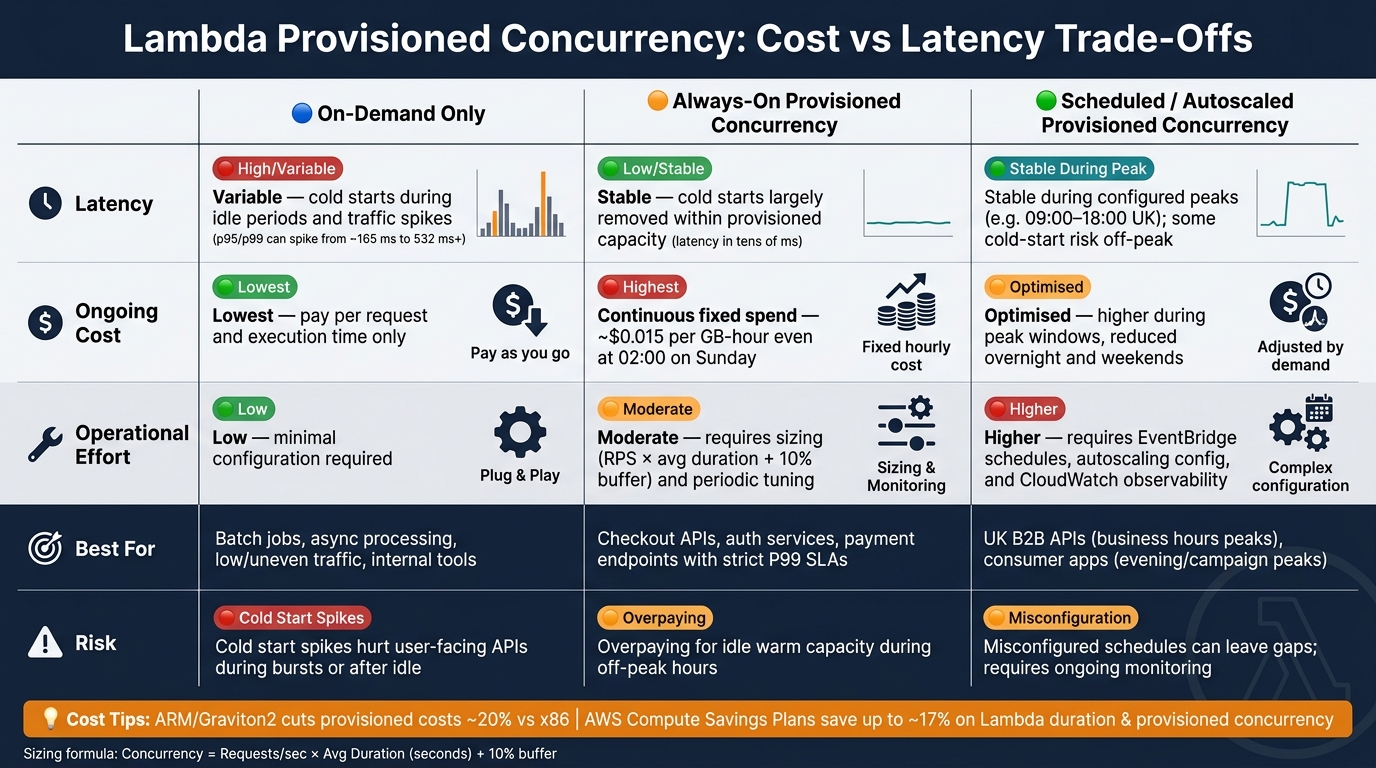 {Provisioned vs On-Demand vs Scheduled Lambda Concurrency: Cost, Latency & Effort}
:::
{Provisioned vs On-Demand vs Scheduled Lambda Concurrency: Cost, Latency & Effort}
:::
How The Pricing Model Affects The Decision
Provisioned concurrency adds a standing charge on top of normal Lambda request and duration costs. In plain English, you pay for warm capacity even when nobody is using it. For x86, that works out at roughly $0.0000041667 per GB-second of provisioned capacity - about $0.015 per GB-hour - plus a lower duration rate of around $0.0000097222 per GB-second when those environments are active.[15][16][18]
That shifts the decision from Can we cut cold starts? to Is the lower tail latency worth the standing spend?
A 1 GB function with 10 provisioned instances keeps building GB-second charges all the time, including at 02:00 on a Sunday when traffic is near zero. For low-traffic internal tools or batch jobs, that fixed spend usually doesn't make sense.[13][16]
When The Latency Benefit Justifies The Cost
Provisioned concurrency makes sense when latency has a direct business impact. Think checkout APIs, payment endpoints, or authentication services with a strict P99 target. In those cases, even a small drop in tail latency on a busy UK e-commerce site can help cut cart abandonment.
It also tends to pay off most for functions with heavy start-up work, such as:
- Large deployment packages
- Database connection pools
- External SDK initialisation
Those functions have the biggest cold-start penalty, so they usually see the biggest gain.
Another strong signal is frequent spillover during peak periods. If traffic keeps pushing beyond the provisioned pool, paying more for extra headroom may be the right call. The trade-off is easier to weigh side by side:
| Approach | Latency | Ongoing cost | Operational effort |
|---|---|---|---|
| On-demand only | Variable; cold starts during idle periods and spikes | Lowest; pay per request and execution time | Low; minimal configuration |
| Always-on provisioned concurrency | Stable; cold starts largely removed within capacity | Continuous fixed monthly spend | Moderate; sizing and periodic tuning |
| Scheduled or autoscaled provisioned concurrency | Stable during configured peaks; some risk off-peak | Optimised; higher during peak windows, lower off-peak | Higher; schedules, autoscaling, and observability |
Scheduled provisioned concurrency is often the sweet spot. For example, you can scale up before 09:00 and scale back down after 18:00 on UK working days. That gives you steadier latency when people are active, without paying for idle capacity overnight.[6][12][14]
There are also a couple of ways to trim the bill:
- ARM/Graviton2 functions can cut provisioned capacity and duration costs by roughly 20% compared with x86.[17][1]
- AWS Compute Savings Plans can reduce Lambda duration and provisioned concurrency costs by up to about 17%.[5]
Conclusion: Apply It Selectively And Measure The Outcome
Use provisioned concurrency where cold-start reduction has a clear business case, not as a default setting. The best results usually come from careful sizing, scheduled scaling that matches UK traffic patterns, and regular checks of CloudWatch concurrency utilisation, error, and latency metrics to see whether the spend is paying off.
If code-level changes might do the job first - smaller packages, lazy initialisation, or faster runtimes - it's worth testing those before taking on standing provisioned concurrency costs. Hokstad Consulting can help assess latency bottlenecks and cloud spend.
FAQs
How do I choose the right provisioned concurrency level?
Start by looking at historical usage data to work out the baseline number of concurrent instances you need for normal traffic.
Then provision enough capacity to handle that baseline, and let standard scaling deal with less predictable peaks.
Use metrics to fine-tune your thresholds. For example, set CPU utilisation around 60–70% and memory around 75% to balance performance and cost.
When is provisioned concurrency not worth the cost?
Provisioned concurrency is usually best for user-facing applications where cutting start-up delay matters. If your workload doesn’t have strict latency demands, it often isn’t worth the extra spend.
The same goes for traffic that’s low and predictable. In that case, keeping instances pre-warmed may not give you any meaningful performance gain.
If your application can live with the odd cold start, paying to keep idle capacity running can turn into an unnecessary drain on your cloud budget.
What metrics should I watch after enabling it?
After you enable provisioned concurrency, focus on P99 latency, error rates, throttle counts, concurrency use, memory use, and total cost.
Use AWS CloudWatch and X-Ray to monitor these metrics and set alerts. Check them on a regular basis so you can right-size your setup, keep performance steady, and control cloud spend.