
Effective logging is critical for maintaining security and meeting compliance standards in private cloud environments. Without proper systems in place, UK organisations risk data breaches, regulatory penalties, and operational blind spots. Here's what you need to know:
- Why Logging Matters: Logs provide visibility into security incidents, user activity, and system health. They support GDPR compliance by documenting how personal data is accessed or altered.
- Key Challenges: Balancing detailed monitoring with privacy requirements under GDPR, managing shared responsibilities with cloud providers, and avoiding excessive or irrelevant logging.
- What to Log: Focus on authentication attempts, security control events, and DNS queries. Avoid logging unnecessary personal data to comply with GDPR's data minimisation principle.
- Retention Guidelines: UK GDPR requires logs for specific actions, while PCI DSS mandates 12 months of retention with 3 months readily accessible. The NCSC recommends 6–13 months for critical systems.
- Centralisation and Automation: Centralised logging simplifies oversight and enhances security. Automating alerts and using AI tools can detect threats faster and reduce false positives.
- Protecting Logs: Use encryption, role-based access controls, and Write-Once-Read-Many (WORM) storage to safeguard logs from tampering or unauthorised access.
DFIR Evidence Collection and Preservation for the Cloud
Defining Logging Requirements and Scope
The real challenge with logging isn't deciding whether to do it - it's figuring out what actually needs logging. Many organisations fall into the trap of logging everything, which not only wastes storage but also makes it harder to spot critical events [6][8]. The key to effective logging lies in asking the right question: What are we logging for?
Adam B, Security Architect at NCSC, puts it perfectly:
I absolutely hate the standard 'it depends' response. So, I've been answering with a question of my own: 'For what?'[6]
To get started, focus on the specific security outcomes your logs need to support. For example, can you confirm who accessed a particular system in the past year? Could you trace whether a device contacted a suspicious domain last month? These kinds of outcome-driven questions are far more effective in defining your logging scope than relying on generic checklists. Tools like threat modelling and attack trees can help identify vulnerable components and the logs that would provide the necessary evidence [4][6]. Additionally, the MITRE ATT&CK framework offers a structured way to map log sources to adversary tactics, such as initial access, persistence, lateral movement, and data exfiltration [6]. By focusing on outcomes, you'll naturally identify the resources that demand the most thorough logging.
Identifying Critical Resources and Data
When deciding what to log, prioritise three essential categories: authentication attempts (e.g., logs from Active Directory, VPNs, and multi-factor authentication), security control events (like firewall rule changes, anti-malware alerts, and intrusion detection), and DNS queries [4]. Systems that are externally accessible or handle sensitive data require a more detailed logging approach. On the other hand, less sensitive workloads might only need minimal logging. For environments managing critical or sensitive data, frameworks such as the NCSC's 14 Cloud Security Principles can provide a solid foundation [10]. Start with detailed logging settings by default, then gradually fine-tune them by removing unnecessary fields to strike a balance between cost and effectiveness [1].
Balancing Compliance and Privacy
Under UK GDPR, data minimisation is a core requirement - logs should only capture what’s necessary to verify lawful processing, maintain system integrity, or support legal investigations [3]. Avoid logging entire objects or payloads that might include personal data, such as email addresses or session tokens [12]. Instead, focus on specific fields and apply field-level access controls to redact sensitive information. It's also crucial to disable DEBUG or TRACE logging in production environments to prevent accidental collection of personally identifiable information (PII) [9][12]. To maintain consistency, standardise your logs by using UTC timestamps and including key details like source/destination IP addresses and account names [1]. Finally, review your logging strategy every 6–12 months to ensure it stays aligned with both current regulatory requirements and changes in technology [1].
Building a Centralised Logging Infrastructure
Once you've determined your logging requirements, the next step is to centralise these logs for better oversight. Scattered logs across multiple servers can create blind spots, making it easier for attackers to cover their tracks and harder to piece together incidents [6][13]. A centralised logging setup addresses this by providing a single source of truth, enabling you to examine events across your environment without needing to access each server individually [6][13].
The structure of your logging system is crucial. Logs should be collected in a dedicated Log Archive
account that is kept separate from your operational workloads [11]. This not only reduces the risk of log tampering but also simplifies managing permissions across different accounts. When transferring logs to a central location, ensure the data is encrypted during transit and enforce one-way flow control to protect the log repository [5][6]. Centralising logs promptly also minimises the risk of attackers deleting evidence [6]. To maintain reliability, set up automated alerts that notify you if logs stop arriving or if a scheduled test event is missed [5]. This proactive monitoring ensures any disruptions to the logging process are quickly identified.
Benefits of Centralised Logging
Centralised logging brings clear advantages, particularly for compliance and security. One key benefit is cross-system correlation. By consolidating logs from firewalls, Active Directory, and cloud services, you can more easily identify patterns or anomalies. For instance, a failed login attempt on your VPN followed by unusual DNS queries from an internal system might go unnoticed if logs remain in separate silos. Centralised systems make it easier to connect these dots.
From a compliance standpoint, centralised logging can reduce audit times by up to 60% through automated tools [2]. On the security side, centralised logs are less vulnerable to tampering. If an attacker breaches a server, they cannot easily erase their tracks once logs are securely stored in a protected repository. Standardising log formats using schemas like the Open Cybersecurity Schema Framework (OCSF) eliminates the need for complicated data transformation processes and simplifies integration with security tools [11][2]. Additionally, features like field-level access controls allow sensitive information, such as personally identifiable data, to be redacted while still enabling effective analysis [9].
Log Retention and Availability
Retention policies must strike a balance between regulatory demands, storage costs, and investigative needs. According to the NCSC, crucial logs should be retained for at least six months, as the average time to detect a data breach is 204 days [5][2]. Different frameworks have varying requirements. For example, PCI-DSS mandates three months of readily accessible logs and a total retention period of 12 months (including archived logs), while production logs typically require 30 days for active use [2].
| Regulation/Framework | Typical Log Retention Requirement |
|---|---|
| PCI-DSS | 3 months easily accessible; 12 months total (archived) [2] |
| Non-Production Logs | Typically 7 days [2] |
| Production Logs | Typically 30 days for active querying [2] |
Your storage strategy should align with how logs are used. Services like Amazon S3 offer cost-effective options for long-term retention and support lifecycle policies to move older logs to cheaper storage tiers automatically [9][8]. For recent logs, consider using tools like Splunk or an ELK stack to enable fast querying for up to 90 days. After this period, transfer logs to S3, where they can still be analysed using tools like Amazon Athena when needed [8][2]. Implement storage roll-over mechanisms to prevent disk space issues, and use regional resources to comply with data residency and latency requirements [9][5]. Google Cloud Logging, for example, allows custom retention periods ranging from 1 to 3,650 days, with costs varying by storage tier and routing destination [9].
Automating Log Monitoring and Analysis
Keeping up with the sheer volume of data generated by modern private cloud environments is a challenge that manual log analysis simply can't meet. These architectures churn out so much information that critical events can easily get lost in the noise, allowing threats to linger undetected for months. In fact, the average time it takes to uncover a cyber attack is a staggering 101 days [1]. Automation flips this reactive model on its head, allowing organisations to spot threats and compliance issues early - before they escalate. It opens the door to real-time monitoring and advanced analytics, creating a far more proactive defence strategy.
Automated monitoring ensures that security policies are properly enforced and that user activities align with regulatory requirements [5]. The National Cyber Security Centre (NCSC) highlights the importance of continuous monitoring for identifying threats and maintaining compliance [5]. This ongoing verification is critical for meeting the demands of frameworks like GDPR, PCI-DSS, and ISO 27001, where proving policy enforcement during audits is non-negotiable.
Real-Time Monitoring and Alerts
Automated alerts are your first line of defence, flagging events that require immediate attention. These might include multiple failed login attempts, changes to security groups, or queries to suspicious domains. The trick is to prioritise: focus on high-priority events that need quick action, while lower-priority ones can be reviewed later [9]. Automated health checks are another essential tool, alerting you if log messages stop arriving at your central repository or if a scheduled test event fails to register [5].
For example, you can configure alerts for unauthorised access attempts or remote logins that occur outside normal working hours. Infrastructure changes, like modifications to firewalls or network access controls, should also trigger alerts. DNS logs can be monitored for queries to newly discovered or suspicious domains, which often signal malware trying to connect with command-and-control servers [6].
| Alert Category | Example Trigger Event | Compliance/Security Benefit |
|---|---|---|
| Authentication | Multiple failed logins or out-of-hours remote access [1] | Detects credential stuffing or compromised accounts [6] |
| Configuration | Changes to Security Groups or Network ACLs [14] | Ensures infrastructure remains within a compliant state [14] |
| Network/DNS | Queries to newly discovered or suspicious domains [6] | Identifies malware phoning home[6] |
| System Health | Log data stops arriving at the central repository [5] | Maintains audit trail integrity for compliance [5] |
These alerts not only strengthen your security posture but also pave the way for integrating AI into enterprise-wide log analysis.
Using AI and Machine Learning for Log Analysis
AI takes log analysis to the next level, shifting the focus from reacting to incidents to predicting and preventing them. By analysing historical data, AI tools can identify potential attack patterns before they unfold [15]. Unlike traditional methods that rely on predefined attack signatures, AI uses behavioural analysis to understand normal network and cloud activity. This helps pinpoint subtle anomalies that could indicate a breach [15], all while cutting down on false alarms. For instance, in November 2024, Legit Security reported an 86% reduction in false positives in their code scanner by deploying a machine learning model tailored to detect secrets
, all while maintaining accurate true-positive rates [15].
AI tools also make technical findings easier to digest, offering clear summaries and supporting natural language queries to help non-technical stakeholders understand audit data [11]. Some platforms even go a step further, providing autonomous responses to contain threats immediately - like halting an attack before it spreads across your private cloud [15]. When choosing a monitoring solution, look for options that use heuristic analysis to detect unusual system behaviour, rather than relying solely on signature-based methods [5]. Standardising log data with frameworks like the Open Cybersecurity Schema Framework (OCSF) can also streamline the process of analysing information from various sources [11].
Securing Logs and Controlling Access
Once you've automated your log monitoring, the next crucial step is protecting those logs from unauthorised access. If attackers gain access to your logging infrastructure, they could erase evidence of their activities or steal sensitive data. As the NCSC highlights, An attacker may well target the logging service in a bid to remove evidence of their actions
[1]. This makes securing logs as important as collecting them. Your logging setup should be designed to prevent unauthorised access and ensure no tampering occurs. This is not only essential for maintaining integrity but also for meeting UK GDPR, ISO 27001, and the NCSC's Cyber Assessment Framework requirements.
Logs often contain sensitive details like API keys, IP addresses, and email addresses - data that attackers could exploit. At the same time, authorised personnel need quick access to logs during incidents. Balancing these needs requires a combination of strict access controls and strong encryption, both of which are key to complying with UK regulations.
Role-Based Access Controls
Your logging strategy should be grounded in the principle of least privilege. This means users are granted only the permissions they need for their specific tasks, and non-essential users are removed from access lists. This approach limits potential damage from attackers and helps preserve the integrity of your audit trails [9].
A practical method is separating duties and accounts. Store logs in a dedicated Log Archive
account, entirely separate from production systems, and use a different Security Tooling
account for analysis tools. This separation ensures that even if a production system is compromised, logs cannot be easily erased [9]. Cross-account IAM roles can further enhance security by allowing the security team to analyse logs without direct access to production environments.
For even more control, implement granular access measures like Log Views.
These allow you to specify which subsets of logs are visible to specific users. For example, a development team might only see logs from their own application. Field-level access controls can also redact sensitive information - ensuring general analysts see only high-level details, while lead investigators have access to specifics like email addresses or IPs [9].
| Access Control Level | Description | Use Case |
|---|---|---|
| Log Views | Define which logs users can access within a storage bucket. | Restricting teams to their own application logs. |
| Account Separation | Store logs in an isolated cloud account. | Prevent tampering if production systems are breached. |
It's equally important to restrict write and delete permissions. Only those analysing logs should have access, and any modifications must be traceable. Regular automated reviews - every 6 to 12 months - help ensure permissions stay aligned with changes in personnel or infrastructure [9].
Encrypting Log Data
Access controls limit who can view logs, but encryption ensures the data remains secure both in transit and at rest. Encrypting logs protects them from unauthorised access and is a cornerstone of compliance. The NCSC advises using Transport Layer Security (TLS) to safeguard logs during transfer to central repositories [6].
Ensure that the logs arrive with assertions of integrity and confidentiality - for example, by cryptographically verifying logs, or moving them using Transport Layer Security (TLS).- NCSC [6]
For data at rest, default cloud encryption using AES-256 provides solid protection. However, for more stringent compliance needs - like GDPR or ISO 27001 - Customer-Managed Encryption Keys (CMEK) offer better control, allowing organisations to manage their own encryption keys rather than relying on cloud providers [9].
When transferring logs across trust boundaries (e.g., from a production environment to a separate security account), use one-way flow controls like data diodes or specific UDP configurations. These measures prevent attackers from altering stored logs at the source [5]. Adding cryptographic verification, such as hashing, ensures logs remain unchanged after creation [6].
| Encryption State | Recommended Method/Standard | Purpose |
|---|---|---|
| In Transit | Transport Layer Security (TLS) | Protects logs during transfer [6]. |
| In Transit | One-way flow controls (e.g., data diodes) | Prevents tampering when crossing trust boundaries [5][1]. |
| At Rest | Default Cloud Encryption (AES-256) | Standard protection for stored data [9]. |
| At Rest | Customer-Managed Encryption Keys (CMEK) | Allows full control over encryption keys for compliance [9]. |
| Integrity | Cryptographic Verification/Hashing | Ensures logs are unaltered after creation [6]. |
To further safeguard logs, consider using Write-Once-Read-Many (WORM) storage. WORM solutions ensure logs cannot be altered or deleted after being written, which is particularly valuable for maintaining audit trail integrity and meeting regulatory requirements [7]. Combining WORM storage with encryption and access controls creates a robust defence, ensuring your logs remain a reliable source of truth - even if other parts of your infrastructure are compromised.
Meeting Compliance Framework Requirements
::: @figure 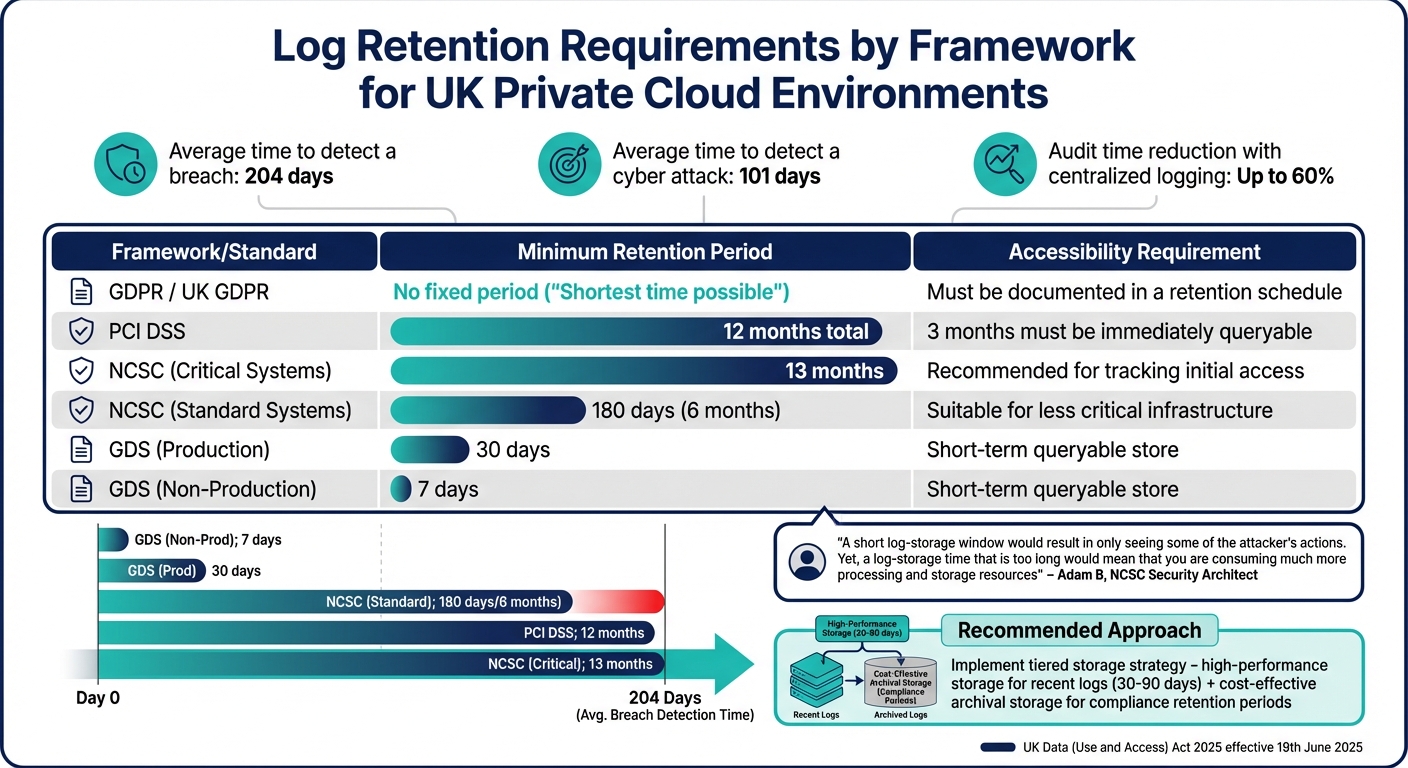 {UK Private Cloud Logging Compliance: Retention Requirements by Framework}
:::
{UK Private Cloud Logging Compliance: Retention Requirements by Framework}
:::
To meet compliance framework requirements, secure logs must adhere to specific retention and documentation obligations. This is crucial not only for passing audits but also for demonstrating accountability in the event of a breach.
In the UK, organisations must navigate several frameworks. For instance, GDPR (including UK GDPR) requires data to be retained only for the shortest time possible
, without specifying an exact period [18]. Meanwhile, PCI DSS mandates 12 months of log retention, with at least 3 months readily accessible for analysis [2]. For critical systems, the NCSC recommends a 13-month retention period, aligning with the average breach detection time of 204 days, whereas 180 days is considered sufficient for less critical systems [6]. These variations underscore the importance of having a structured log retention policy.
Additionally, starting 19th June 2025, UK businesses must comply with the UK Data (Use and Access) Act 2025, which strengthens the need for well-documented retention schedules and clearly justified policies [16][17].
Log Retention Policies by Framework
Different compliance frameworks have distinct log retention requirements. The table below breaks down the key details:
| Framework/Standard | Minimum Retention Period | Accessibility Requirement |
|---|---|---|
| GDPR / UK GDPR | No fixed period (Shortest time possible) |
Must be documented in a retention schedule [18] |
| PCI DSS | 12 months total | 3 months must be immediately queryable [2] |
| NCSC (Critical) | 13 months | Recommended for tracking initial access [6] |
| NCSC (Standard) | 180 days | Suitable for less critical infrastructure [6] |
| GDS (Production) | 30 days | Short-term queryable store [2] |
| GDS (Non-Prod) | 7 days | Short-term queryable store [2] |
Adam B, Security Architect and LME Technical Lead at NCSC, summarised the balancing act:
A short log-storage window would result in only seeing some of the attacker's actions. Yet, a log-storage time that is too long would mean that you are consuming much more processing and storage resources[6].
To achieve both compliance and operational efficiency, a tiered storage strategy is recommended. Use high-performance storage for recent logs that need to be quickly accessible, while archiving older logs in cost-effective long-term storage. For GDPR compliance, ensure that personally identifiable information (PII) is filtered out before logs are moved to long-term storage [2]. Automating this process with tagging systems can simplify retention management, triggering deletion or anonymisation once the retention period expires [16].
Documenting Logging Processes for Audits
Auditors expect clear evidence that your logging processes are well-designed and effective. A formal log management policy should detail what data is captured, how long it is stored, and who has access [7].
Develop a retention schedule that specifies each log category, its legal or business justification, and the actions to be taken - whether deletion, anonymisation, or archiving [16]. Regular updates to this schedule are essential to account for changes in your infrastructure.
Under UK GDPR Article 33(6), organisations must also maintain a breach log, documenting the details of any personal data breach, its impact, and the steps taken to address it [17]. The Information Commissioner's Office (ICO) highlights the significance of logs:
Logs act as digital footprints and automatically record the actions of users in automated processing systems[3].
To meet audit requirements, protect your logs from tampering by using Write-Once-Read-Many (WORM) technology, strong encryption, and stringent access controls [7][5]. Auditors also expect clear segregation of duties - ensuring that those with access to logs do not have administrative rights over the systems generating them [7]. Storing logs in a standardised, human-readable format can further streamline internal reviews and regulatory inspections [3][2]. Frameworks like MITRE ATT&CK can help justify your logging choices, providing structure and rationale for your log management policy [6][4].
As Fortra notes:
In potential litigation scenarios, audit logs can serve as a form of protection, offering documented proof of an organisation's due diligence in maintaining the security and integrity of its systems[7].
Using Logs for Incident Response
Logs are like a digital diary for your private cloud, capturing events that help detect breaches, piece together timelines, and confirm remediation efforts [1]. Without a thorough logging system, security teams are left in the dark - unable to determine what happened, who was impacted, or whether the threat has been completely neutralised.
The average time it takes to detect a cyber attack is a staggering 101 days [1]. That’s more than enough time for attackers to roam your network, escalate privileges, and siphon off data. To combat this, logs need to be actively monitored and stored long enough to support investigations. According to the NCSC, critical logs should be retained for at least 6 months, and 13 months for critical systems [1].
Detecting Incidents Through Logs
Active log monitoring can shift your security approach from reactive to proactive. By keeping an eye on authentication logs, DNS queries, and network traffic, security teams can catch suspicious activity in real time. This might include brute-force login attempts, remote access during unusual hours, or DNS queries to newly discovered domains [4].
Centralising logs from various sources - applications, hosts, network devices, and cloud APIs - into one standardised system is key for effective event correlation [4]. This centralisation makes it easier to spot complex attack patterns. For instance, if a single user account logs into multiple machines at once, it’s a clear sign of compromise [4].
Automated alerts are another must-have. Set up notifications for critical red flags like failed logins on internet-facing services, changes to security configurations, or the use of Living off the Land Binaries
(LOLBINs) - tools like PowerShell that attackers often misuse [4].
Equally important is protecting the integrity of your logs. Store them in a secure, restricted-access archive or use Write-Once-Read-Many (WORM) solutions to prevent tampering [7]. One-way flow controls, like data diodes, can stop attackers from altering or deleting log data. Additionally, separate roles so those with access to logs don’t have administrative rights to the systems they monitor [7]. Standardising all logs with UTC timestamps ensures accurate event correlation across systems [1].
These real-time practices not only help during an attack but also lay the groundwork for thorough post-incident analysis.
Post-Incident Analysis and Improvement
Once an incident occurs, having a solid logging system in place allows you to reconstruct events with precision. Logs help investigators answer key questions: How did the attacker get in? Which systems were affected? What data was accessed or stolen? Were the security measures effective? [7]
In the event of a security incident, audit logs can provide crucial information that aids investigations. They act as a 'black box,' providing investigators with detailed information about the event[7]
Logs like DNS records and firewall data can reveal whether your systems communicated with suspicious external IP addresses, while Active Directory logs might show signs of lateral movement [1].
To make sure your logs capture the detail you need, include critical fields such as source and destination IPs, account names, UTC timestamps, and process execution details (like parent process, user, and machine information) [1]. Adopting standardised formats, such as the Open Cybersecurity Schema Framework (OCSF), simplifies the process of correlating data from different systems [11].
Regular reviews are crucial. Every 6 to 12 months, check that your logging strategy is functioning as intended and that storage systems are reliable [1]. Including log analysis in incident response drills can highlight gaps in your current setup and ensure you’re prepared to answer the essential who, what, and when
questions [5]. Mapping your logging approach to specific adversary tactics, such as privilege escalation or data exfiltration, using frameworks like MITRE ATT&CK ensures nothing slips through the cracks [6].
An attacker only needs to win once. Defenders need to win all the time[6]
By treating logs as a vital tool for both detection and post-incident learning, you gain a significant edge in the ongoing battle against cyber threats.
For organisations aiming to strengthen their incident response in private cloud environments, Hokstad Consulting offers expert advice on building robust logging strategies that align with compliance needs. Learn more at Hokstad Consulting.
Conclusion
Effective logging plays a critical role in maintaining security and ensuring compliance within private cloud environments. Without a detailed audit trail, organisations face significant challenges in identifying breaches, investigating security incidents, and proving regulatory compliance. The National Cyber Security Centre (NCSC) highlights this importance:
Logging is retrospective, providing a comprehensive audit trail that can be used for troubleshooting, forensic analysis, compliance audits, and incident response[19].
Centralised and automated logging not only simplifies compliance efforts but also reduces the time needed for audits, all while helping to prevent unauthorised access. By transitioning from a reactive approach to proactive security monitoring, organisations gain an extra layer of protection, enabling them to detect threats earlier and limit potential damage.
To meet compliance requirements effectively, organisations need a well-aligned logging strategy. Tailoring this strategy to UK-specific frameworks, such as UK GDPR, the NHS Data Security Toolkit, or PCI DSS, ensures adherence to data retention rules, safeguards sensitive information, and enhances audit readiness. Standardising log formats - whether through JSON or schemas like OCSF - and synchronising timestamps to UTC can streamline cross-platform analysis and accelerate incident response efforts.
Given that breaches often go undetected for months, prioritising logging is not optional. As the NCSC aptly states:
If you can't see your entire operational technology environment, you can't defend it[5].
FAQs
How can organisations ensure detailed logging while staying compliant with GDPR?
To align detailed logging practices with GDPR compliance, organisations should prioritise data minimisation. This means logging only the information necessary for security and operational needs. Avoid capturing full request bodies or any user-identifiable data unless it’s absolutely essential. If personal data must be logged, ensure it is either pseudonymised or encrypted when stored, and mask sensitive details in analytics pipelines.
Introduce role-based access control (RBAC) to restrict log access to authorised personnel only. Every instance of log access should also be logged for auditing purposes. Automated retention policies are crucial - logs should be deleted or anonymised after the lawful retention period, which is generally between 30 and 90 days for operational data.
Embedding logging standards as policy as code within CI/CD pipelines can significantly reduce the risk of insecure logging during development. Configure tools to focus on essential log categories while ensuring that sensitive fields are encrypted and stored in locations with restricted access. Regularly reviewing log schemas against GDPR’s definitions of sensitive data is another important step to ensure ongoing compliance.
For UK organisations, Hokstad Consulting offers tailored support in creating GDPR-compliant logging frameworks. Their expertise includes pseudonymisation, encrypted storage, automated retention policies, and policy-as-code governance, all while maintaining the visibility required for private cloud security and audits.
What are the key advantages of using centralised logging in a private cloud environment?
Centralised logging provides a single, comprehensive view of all activities within your private cloud, enabling quicker detection of potential threats and more efficient responses. By keeping consistent and easily accessible records, it also simplifies audits and ensures compliance with regulatory requirements.
On top of that, it cuts down the time and expense involved in incident response by delivering clear, consolidated information. This approach also ensures uniform application of security policies throughout the environment, improving both reliability and control.
How does automated log monitoring improve security and ensure compliance?
Automated log monitoring processes log data as it’s generated, delivering immediate alerts and maintaining secure audit trails. This means security incidents can be identified and addressed more quickly, cutting down on downtime and lowering the expenses tied to potential breaches.
Additionally, it eases compliance efforts by providing thorough, easily accessible records for audits and regulatory checks. This helps organisations uphold strong security measures while adhering to legal requirements.