
The short answer: the cheapest VM is not always the cheapest render. If you need 1,000 frames by 06:00 on 01/10/2026, your true cost comes from finished frames delivered on time - not the headline up to 90% or up to 91% discount.
I’d boil the article down to this:
- Small bursts can look cheap, but boot time, staging, and retries can eat the saving.
- Daily batch runs usually make better use of preemptible capacity because fixed overhead is spread across more work.
- Overnight renders add deadline risk, so missed-delivery cost can outweigh lower VM rates.
- Hybrid pools trade some savings for more deadline cover by mixing preemptible and on-demand workers.
- Reserved fallback capacity costs more, but it protects the frames that cannot slip.
The key measure is simple:
All-in cost per completed frame = compute + retries + storage + transfer + orchestration + fallback + licensing
So if you’re choosing between these five models, I’d focus on four things first:
- utilisation
- retry rate
- deadline risk
- idle fallback cost
::: @figure 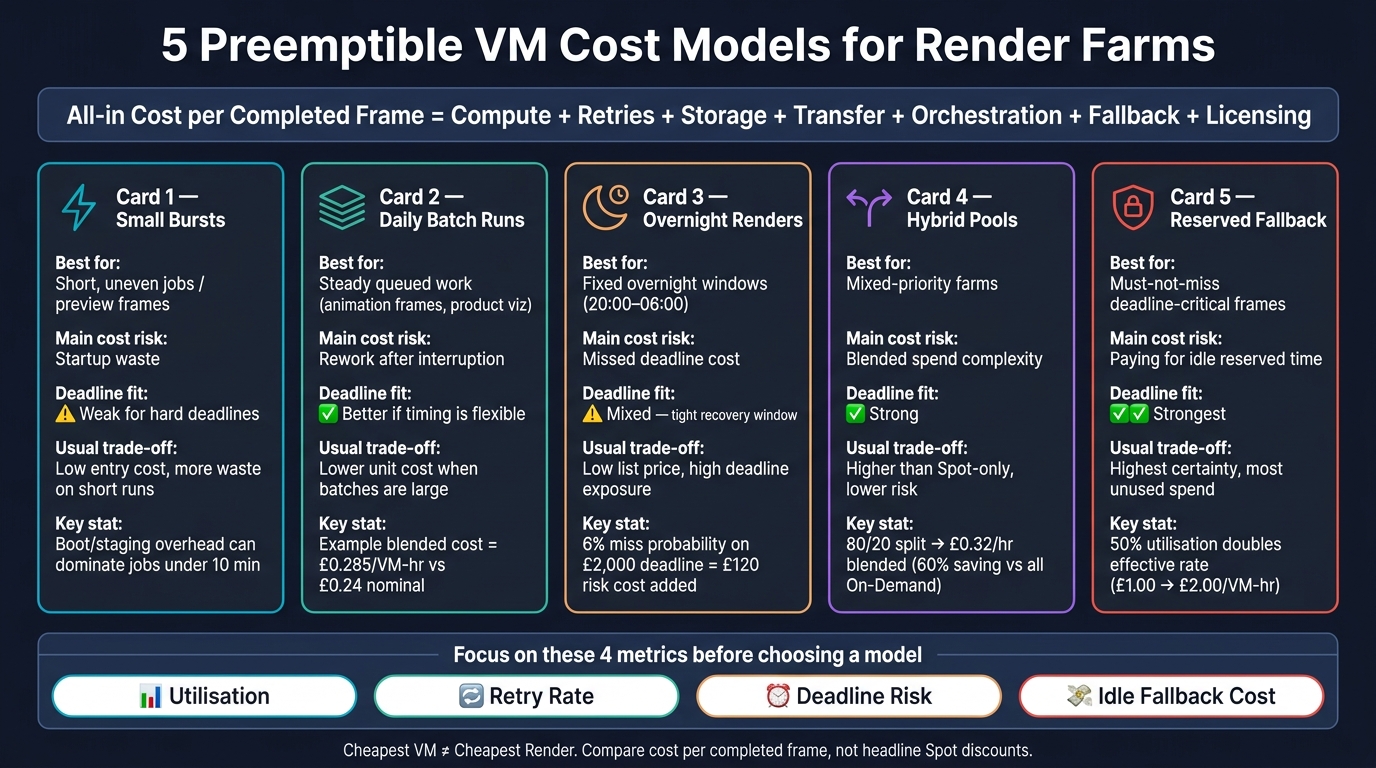 {5 Preemptible VM Cost Models for Render Farms: At a Glance}
:::
{5 Preemptible VM Cost Models for Render Farms: At a Glance}
:::
Spot Instances Explained: Save Up to 90% on Cloud Costs | Preemptible VMs Guide
Quick Comparison
| Model | Best for | Main cost risk | Deadline fit | Usual trade-off |
|---|---|---|---|---|
| Small bursts | Short, uneven jobs | Startup waste | Weak for hard deadlines | Low entry cost, more waste on short runs |
| Daily batch runs | Steady queued work | Rework after interruption | Better if timing is flexible | Lower unit cost if batches are large |
| Overnight renders | Fixed overnight windows | Missed deadline cost | Mixed | Low list price, tighter recovery window |
| Hybrid pools | Mixed-priority farms | More moving parts and blended spend | Strong | Higher cost than Spot-only, lower risk |
| Reserved fallback capacity | Must-not-miss frames | Paying for idle reserved time | Strongest | Highest certainty, more unused spend |
If I were reading the full piece for one reason, it would be this: don’t compare VM prices in isolation. Compare what each model costs to finish the queue by the deadline.
1. Small Bursts
A small burst is for short, uneven bits of work: a few preview frames, a last-minute revision, or a one-off shot outside the main schedule. The idea is simple. Spin up preemptible VMs, render the frames, shut them down, and pay only for the compute and support services you used.
The catch is utilisation.
Burst utilisation = (active render hours ÷ total provisioned hours) × 100
That should be the first number you track. If 20 VMs run for 30 minutes, that equals 10 VM-hours. If 8.5 VM-hours are spent rendering, utilisation is 85%. The other 15% still costs money. Boot time, image pulls, asset downloads, licence registration, and queue delays are all billed. On a short burst, that idle slice can eat a big chunk of the total time.
A smaller example makes the point fast. Say you need to render 120 frames, and each frame takes six minutes on one VM. That adds up to 12 VM-hours. If you use 24 VMs, the job could finish in 30 minutes. But at 75% productive utilisation, you would need about 16 provisioned VM-hours. At a sample on-demand price of £0.80 per VM-hour, the starting cost is £12.80. With a 70% Spot discount, compute drops to about £3.84. Then retries change the maths. A 10% interruption-related retry rate adds about 1.6 VM-hours, which pushes compute to roughly £4.22 before storage, data transfer, and orchestration.
The biggest risk is deadline reliability. A short interruption warning does not mean replacement capacity will appear when you need it. In a small burst, losing even one or two VMs can wipe out a large share of your total render power. That is why short runs need tighter scheduling and faster recovery than longer jobs. Spread work across multiple VM types and availability zones, and leave a real recovery buffer in the deadline. If the delivery is commercially time-sensitive and there is no room to recover, a small on-demand fallback may still make sense.
A dependable setup needs a few things working together:
- interruption detection
- automatic re-queuing
- idempotent jobs
- completed outputs written to object storage
- cost monitoring
It also needs a pre-start cost threshold. If a VM usually spends eight minutes booting and loading assets, using it for a five-minute render run is almost certainly poor value. Once bursts happen more often, that fixed overhead spreads out better, and the cost model starts to shift.
| Cost component | Why it matters in a small burst |
|---|---|
| Preemptible VM runtime | Main discounted compute charge |
| Boot and image preparation | Can dominate very short jobs |
| Storage and snapshots | May continue after eviction or while instances are stopped |
| Asset upload and download | Reduces productive utilisation |
| Retries after interruption | Converts nominal savings into effective spend |
| Renderer or plug-in licence | May be charged per active VM or concurrent worker |
| On-demand fallback | Pushes up blended cost but helps protect deadlines |
2. Daily Batch Runs
Daily batches work well because they spread startup time, queueing, and orchestration across a bigger pile of work. That makes preemptible capacity far more sensible than it is for short bursts. Put simply, when fixed overhead is shared across more VM-hours, interruptions sting less.
This setup fits jobs that arrive in a steady bundle once a day, or a few times a day. Think animation frames, product visualisations, visual-effects shots, or automated preview generation. Jobs are queued and sent across a pool of preemptible or Spot VMs, with each frame or task handled as something that can be retried on its own. AWS identifies Spot Instances as a fit for batch processing and non-interactive jobs, and Google Cloud says Spot VMs suit batch jobs that can continue at a slower pace if some machines stop.[10][5]
For costing, use blended cost per completed VM-hour. The formula is r ÷ (1 - p), where r is the nominal preemptible hourly rate and p is the share of work lost to interruptions. That number should also include storage, data transfer, orchestration, licensing, and idle capacity. And yes, the live UK-region rate matters, so check the current price for the chosen family, OS, GPU, and provider.[8][2][6]
Here’s a simple example. Say you have a daily batch of 1,200 frames that needs 600 successful VM-hours. The nominal preemptible rate is £0.24 per VM-hour, rework from interruptions is 6%, and daily orchestration plus storage comes to £18.
- Nominal compute cost: £144
- Compute cost after lost work: about £153.19
- Daily total with overhead: about £171.19
- Blended cost per successfully completed VM-hour: about £0.285
That final figure is the one that matters. Not the headline VM price.
Once you know the blended cost, the next issue is timing. AWS gives a two-minute interruption warning for Spot Instances. Google Cloud gives about 30 seconds for Spot VMs.[6][1] That warning helps, but it does not mean replacement capacity will appear straight away. So if a batch should take six hours, don’t give it exactly six hours. A 25–50% time buffer may make sense, based on past interruption rates and queue data. It also helps to track on-time completion rate, p95 and p99 finish times, queue delay, wait time for replacement machines, and tasks that need several retries.[6][9]
The operating model needs to be built for failure. Use idempotent tasks, checkpointed output, automatic retries, and durable storage. When an interruption event lands, the system should checkpoint progress, shut down cleanly if the renderer allows it, and re-queue the task.[9][11]
As for workload fit, daily batches suit independent frames, transcoding, post-processing, and preview builds. They fall apart when deadlines are fixed to the minute or tasks depend heavily on one another. If the delivery cutoff cannot move, a safer setup is to run preemptible workers with a small on-demand buffer to finish anything still left near the deadline.
3. Overnight Renders
Overnight renders don't give you much room to recover. If something breaks, the clock keeps ticking.
That’s why preemptible VMs can look cheap at first glance - and still end up costing more than expected. The usual render window is 20:00–06:00. AWS Spot Instances can be up to 90% cheaper than On-Demand, and Google Cloud Spot VMs list discounts of up to 91% for many machine types and GPUs.[10][2] On paper, that looks hard to beat.
But a 06:00 delivery deadline changes the maths. An interruption isn’t just an annoyance. It can turn into a direct cost hit.
Use deadline-risk costing, not a simple hourly price check. The formula is:
Effective overnight cost = preemptible compute cost + storage and data-transfer cost + orchestration cost + recovery cost + (probability of deadline failure × cost of failure)
Here’s what that looks like in practice. Say your preemptible compute bill is £240.00 and there’s a 6% chance of missing a £2,000.00 deadline. Your risk-adjusted compute cost jumps to £360.00 before you even add storage or operator time. That’s a long way from the headline Spot rate.
The part many teams fail to measure well is when the interruption happens. AWS gives you a two-minute warning before a Spot Instance is reclaimed.[6] That may sound helpful, but it doesn’t save much if a frame takes 45 minutes and can’t checkpoint halfway through. If the instance disappears near the end, you can lose almost the whole frame’s compute time.
That’s why frame-level tasks matter. One interruption should cost you one frame, not a chunk of the whole job.
It also helps to change strategy as the deadline gets closer. If there are less than two hours left and the queue is still open, move the remaining work to On-Demand. Historical interruption rates have been under 5% on average, but they can swing a lot by region and instance type.[4] In plain terms: yesterday’s calm pool can become tonight’s problem.
Spreading workers across two or more compatible Spot pools or instance sizes can improve your chances of getting replacement capacity fast. That’s the logic behind the range of options below, from Spot-only to a reserved backup plan.
The comparison below shows how each setup balances spend against deadline safety.
| Overnight approach | Effective cost profile | Deadline reliability | Interruption overhead | Operational complexity |
|---|---|---|---|---|
| Spot-only, one capacity pool | Lowest nominal spend; high expected re-render risk | Low to medium | High | Medium |
| Spot across several pools | Low spend with better capacity access | Medium to high | Medium | High |
| Spot with frame-level checkpointing | Usually low; reduces wasted computation | Medium to high | Low to medium | High initially, lower after automation |
| Spot early, On-Demand near deadline | Higher planned spend; limits deadline exposure | High | Medium | Medium |
| On-Demand or reserved overnight capacity | Highest compute cost; predictable execution | Highest | Low | Low to medium |
Track a small set of numbers that show what’s actually happening:
- Cost per completed frame
- Retry rate
- Compute lost per interruption
- Replacement time
- On-time completion rate
Those figures tell you far more than the advertised Spot discount ever will.
4. Hybrid Preemptible and On-Demand Pools
When overnight renders leave room for retries, you can recover later. Hybrid pools take a different route: they build that recovery into the pool from day one. Most frames run on preemptible VMs, while On-Demand workers are held back for frames that must land before the deadline. That On-Demand layer acts as a reliability buffer, not just extra muscle.
The first thing to work out is the blended hourly rate:
Blended rate = (preemptible rate × preemptible proportion) + (On-Demand rate × On-Demand proportion)
Say your preemptible VMs cost £0.20 per hour and On-Demand costs £0.80 per hour. With an 80/20 split, your blended rate comes to £0.32 per compute hour. Move to 70/30, and that climbs to £0.38, but you get more deadline cover in return.
| Pool composition | Preemptible rate | On-Demand rate | Blended rate | Saving vs all On-Demand |
|---|---|---|---|---|
| 50% / 50% | £0.20/hr | £0.80/hr | £0.50/hr | 37.5% |
| 70% / 30% | £0.20/hr | £0.80/hr | £0.38/hr | 52.5% |
| 80% / 20% | £0.20/hr | £0.80/hr | £0.32/hr | 60.0% |
That blended rate is only a forecast. Your actual cost still needs to cover retries, storage, transfer, licensing, orchestration, monitoring, and idle reserve capacity. In a hybrid pool, the metric that matters is cost per frame delivered on time. That’s why this setup sits between all-in Spot use and a full fallback model.
The biggest place teams get this wrong is sizing the On-Demand floor. A 20% On-Demand floor can work well for highly parallel frame queues. It tends to fall short when jobs are long, stateful, or hard to checkpoint. If frames run for a long time, checkpointing is weak, or queue age is already pressing up against the deadline, you’ll want a larger On-Demand floor. Your own interruption data should drive that decision, not some off-the-shelf average.
From an operations point of view, this setup asks more of you than a pure preemptible or pure On-Demand pool. You need separate autoscaling, interruption handling, queue priority, and checkpointing across both pools. Keep worker images identical so jobs can shift between capacity types without needing environment changes. And when interruption rate or queue age passes a set threshold, promote work to On-Demand automatically. If that still doesn’t give you enough room on hard deadlines, the next step is to hold explicit fallback capacity instead of leaning on the On-Demand floor alone.
5. Reserved Fallback Capacity
If blending still leaves you exposed to missed deadlines, set aside a fixed fallback block. Put the frames that cannot miss on reserved, non-interruptible capacity, and run everything else on preemptible VMs. The trade-off is simple: you pay more for idle time, but you get certainty where it counts.
The main number to watch is the effective cost per used VM-hour:
Effective fallback rate = reserved spend ÷ used hours
Here, reserved spend is the reserved rate per VM-hour multiplied by total committed hours. Used hours is only the portion you actually consume. So the pain doesn’t come from the list price. It comes from poor utilisation.
Underuse pushes the real rate up fast. At 50% usage, it doubles. At 25%, it quadruples.
| Fallback utilisation | Effective cost per used VM-hour (base rate: £1.00/hr) |
|---|---|
| 100% | £1.00 |
| 75% | £1.33 |
| 50% | £2.00 |
| 25% | £4.00 |
| 10% | £10.00 |
A quick example makes this clearer. If you hold 20 reserved VMs at £0.80 per VM-hour for a 10-hour overnight window, that costs £160 per night whether those VMs are busy or sitting idle. Test 10%, 25%, 50%, and 75% utilisation against your deadline penalties. Low utilisation only makes sense when it blocks a much larger loss. If an idle reservation costs £80 per night but avoids a £1,000 delivery penalty, the maths can still work in your favour.[14]
Interruption overhead matters too. Don’t just price the VM. Price the mess that comes with losing it: restart work, file transfer, revalidation, re-queuing, and job checks. AWS Spot Instances give a two-minute interruption warning, while Azure Spot VMs give only 30 seconds.[8][6] That gap has a direct effect on how much of a frame you can save before the VM disappears. It should also shape your checkpoint timing and the size of your fallback pool.
Use reserved fallback only for deadline-critical frames. There’s an extra wrinkle here: a Savings Plan can cut the cost of committed usage, but AWS states that it does not reserve capacity.[13] And if the reservation doesn’t line up with the instance family, region, Availability Zone, operating system, or size your scheduler needs, that capacity may be useless when you need it most.[12][10]
So don’t size the fallback pool from peak demand. Size it from your actual deadline exposure: the frames that must finish inside the final recovery window.
Use this model when deadline certainty matters more than keeping idle capacity close to zero.
Trade-offs, Tables, and Pros and Cons
These five models balance one simple tension: bigger discounts often come with more risk. The cheaper the compute looks on paper, the more you may pay back through retries, deadline pressure, or machines sitting idle.
And that’s the key point here: headline discounts are ceilings, not realised savings. What matters is cost per completed frame.
Table 1: Spend, Scalability, and Deadline Fit
| Cost model | Fixed spend | Scalability | Interruption exposure | Deadline suitability | Cost predictability |
|---|---|---|---|---|---|
| 1. Small bursts | Low | Rapid scale-up | High | Good for non-urgent bursts; weak for hard deadlines | Low to medium |
| 2. Daily batch runs | Low to medium | Rapid scale-up during scheduled windows | High | Suitable when work can be retried or rescheduled | Medium |
| 3. Overnight renders | Low to medium | Rapid scale-up overnight | High, with limited recovery time before morning | Best when the queue clears before morning | Medium |
| 4. Hybrid preemptible and on-demand pools | Medium | Rapid scale-up | Medium overall; critical work can avoid interruption | Strong fit for mixed priorities and firm deadlines | Medium to high |
| 5. Reserved fallback capacity | Medium to high | Medium to high | Low for protected capacity; preemptible work remains exposed | Strongest deadline protection | High, although unused fallback capacity creates waste |
Table 2: Main Overspend Drivers
The overspend drivers below show why the discount shown at purchase time often fails to match the final bill.
| Main cost leak | How cost rises in practice | Models most affected | Practical control |
|---|---|---|---|
| Startup waste | Short jobs spend a large share of runtime booting, pulling images, and staging assets | Small bursts; daily batches | Use reusable images, warm workers, larger task batches, and minimum job-duration thresholds |
| Idle guaranteed capacity | Reserved or on-demand workers continue accruing charges while the queue is empty | Reserved fallback; hybrid pools | Scale protected capacity to a measured baseline and release unused nodes promptly |
| Repeated frames | Eviction, application failure, or lost checkpoints causes a frame to render again | All preemptible-heavy models | Save checkpoints, make tasks idempotent, use smaller frame chunks, and retry only failed work |
| Scheduler overhead | Controller, queue, monitoring, autoscaling, and licence-server costs increase with many short-lived workers | Small bursts; daily batches | Batch tasks, consolidate queues, and measure controller cost per completed frame |
| Emergency fallback use | A deadline forces expensive on-demand or reserved capacity after preemptible capacity fails | Overnight; hybrid; reserved fallback | Define escalation thresholds and reserve fallback only for critical frames or remaining queue depth |
| Storage and data transfer | Repeated asset downloads, retained disks, and output movement add non-compute charges; EBS volumes and managed disks can continue to accrue charges after an instance is interrupted or stopped[7][3] | All models, especially geographically distributed pools | Cache assets locally, choose a suitable region, delete temporary disks, and keep outputs near workers |
| Licence under-utilisation | Paid renderer or plug-in licences sit idle while workers wait for assets or capacity | Daily batches; hybrid pools | Align VM scaling with licence availability and report licence utilisation separately |
Pros and Cons by Model
The summaries below turn those cost leaks into day-to-day trade-offs.
Small bursts are easy to fire up and can scale fast for occasional demand. The catch is that short jobs often spend too much time starting up, pulling images, and staging scenes. If retries increase or replacement capacity shows up unevenly, cost forecasts can drift.
Daily batch runs work well for queues that arrive on a steady schedule. A larger block of work helps spread startup and control-plane overhead across more frames. The weak spots are queue spikes and the cost of rendering the same frame again after failure or eviction.
Overnight renders can make good use of lower overnight demand and planned scheduling windows. But once the clock moves towards morning, the room for recovery gets tight. In this model, the main question isn’t just price. It’s whether the queue finishes before the deadline.
Hybrid pools split work by priority. Retry-tolerant frames go to preemptible workers, while urgent jobs use on-demand capacity. That lowers interruption risk for the work that matters most, but it also adds more moving parts: two pools to watch, routing rules to manage, and queues to classify properly.
Reserved fallback capacity makes sense when missing delivery costs more than keeping spare protected capacity on hand. Still, there’s no point sizing that pool for the whole farm if only part of the queue is deadline-critical. The better target is the observed depth of the work that must finish on time.
Conclusion
Across all five models, the metric that decides the winner is cost per finished frame, not the VM-hour price.
Which Model Fits Which Render Pattern
Pick the model based on how predictable demand is, how much interruption the work can take, and what it costs you if a deadline slips.
| Render pattern | Best-fit model |
|---|---|
| Irregular previews and short one-off jobs | Small bursts |
| Repeatable non-urgent pipelines | Daily batch runs |
| Work that must finish within a fixed overnight window | Overnight renders |
| Mixed-priority farms with some urgent shots | Hybrid preemptible and on-demand pools |
| Strict client or delivery commitments | Reserved fallback capacity |
A good default is simple: send non-urgent frames to preemptible workers, and keep on-demand capacity for final frames, shots blocked by upstream work, and anything inside the last deadline window.
What to Measure Before Choosing
Run a pilot before you pick a model. Use real scenes, not test jobs that look neat on paper but behave nothing like production. Then track interruption rate by VM type and region, utilisation, queue wait time, storage, data transfer, orchestration, licensing, fallback usage, and deadline hit rate. Interruption behaviour and capacity availability vary by instance family, region, operating system, and time of day.[15][16]
Here’s the part that matters: if 1,000 successful frame-hours need 180 extra frame-hours because of interruptions, the retry overhead is 18% and the effective workload becomes 1,180 hours.[17] That number, not the headline VM rate, is what pushes the bill up.
Use those figures to work out cost per completed frame. Then choose the cheapest model that still hits the deadline.
Final Verdict on Total Render Cost
The lowest preemptible rate does not always lead to the lowest finished-frame cost. A £0.20 per hour preemptible VM can climb to about £0.33 per successful compute hour if interruptions add 40% more compute, even before storage, transfer, orchestration, and fallback are added in.
The formula that matters is:
All-in cost per successfully completed frame = (preemptible compute + retries + fallback + storage + transfer + orchestration) ÷ successfully completed frames
So the right choice is the model with the lowest cost per successfully delivered frame within the deadline. Preemptible capacity works best for elastic, restartable jobs. Hybrid pools fit mixed-priority farms. Reserved fallback capacity is for deadline-critical work.[5][17]
FAQs
How do I calculate cost per completed frame?
Track total spend against output with one steady unit, such as cost per frame or cost per batch run.
If that number stays flat, the workload is probably running well. If it starts moving around, take a closer look. It may have changed from a burst workload into a steady baseline need.
Include all core cost areas in the calculation:
- compute
- persistent disk storage
- any on-demand fallback costs
Report spend in GBP (£), and compare actual spend with the on-demand equivalent. That gives you a clear view of the savings.
When should I use a hybrid pool instead of Spot-only?
Use a hybrid pool when you need both lower costs and steadier uptime. Spot instances can cut spend, but they may be interrupted and they don't come with service-level agreements.
A hybrid pool keeps on-demand instances in place for mission-critical or time-sensitive renders, while using Spot for non-critical, fault-tolerant batch jobs. That gives you a safety net if Spot capacity becomes unavailable.
How much fallback capacity should I reserve?
It comes down to how critical the workload is and how much disruption you can live with.
For general production workloads, keeping 10–20% as on-demand capacity can help keep things steady during mass eviction events.
For batch processing, 90% spot and 10% reserved is a common mix. In many cases, that removes the need for on-demand fallback. Use on-demand mainly for work that’s essential and time-sensitive.