
Want to save on cloud costs? The choice between Pay-As-You-Go (PAYG) and Reserved Pricing could make a big difference. Here's a quick breakdown:
- PAYG: Flexible, no commitments, but higher costs (up to 75% more). Ideal for short-term or unpredictable workloads like testing or seasonal spikes.
- Reserved Pricing: Commit to 1-3 years and save up to 72%. Best for steady workloads like production databases or 24/7 applications.
Key Tip: Use the 7-month rule
- if a workload runs more than 7-10 months a year, a 1-year reservation often saves money. Many businesses combine both models, reserving for predictable needs and using PAYG for variable ones.
Quick Comparison:
| Feature | Pay-As-You-Go | Reserved Pricing |
|---|---|---|
| Flexibility | High | Low to Moderate |
| Cost Structure | Variable | Fixed, discounted |
| Best For | Unpredictable needs | Consistent workloads |
| Savings Potential | Lower | Up to 72% |
Pro Tip: Start with PAYG to assess needs, then transition predictable workloads to reserved pricing for savings.
::: @figure 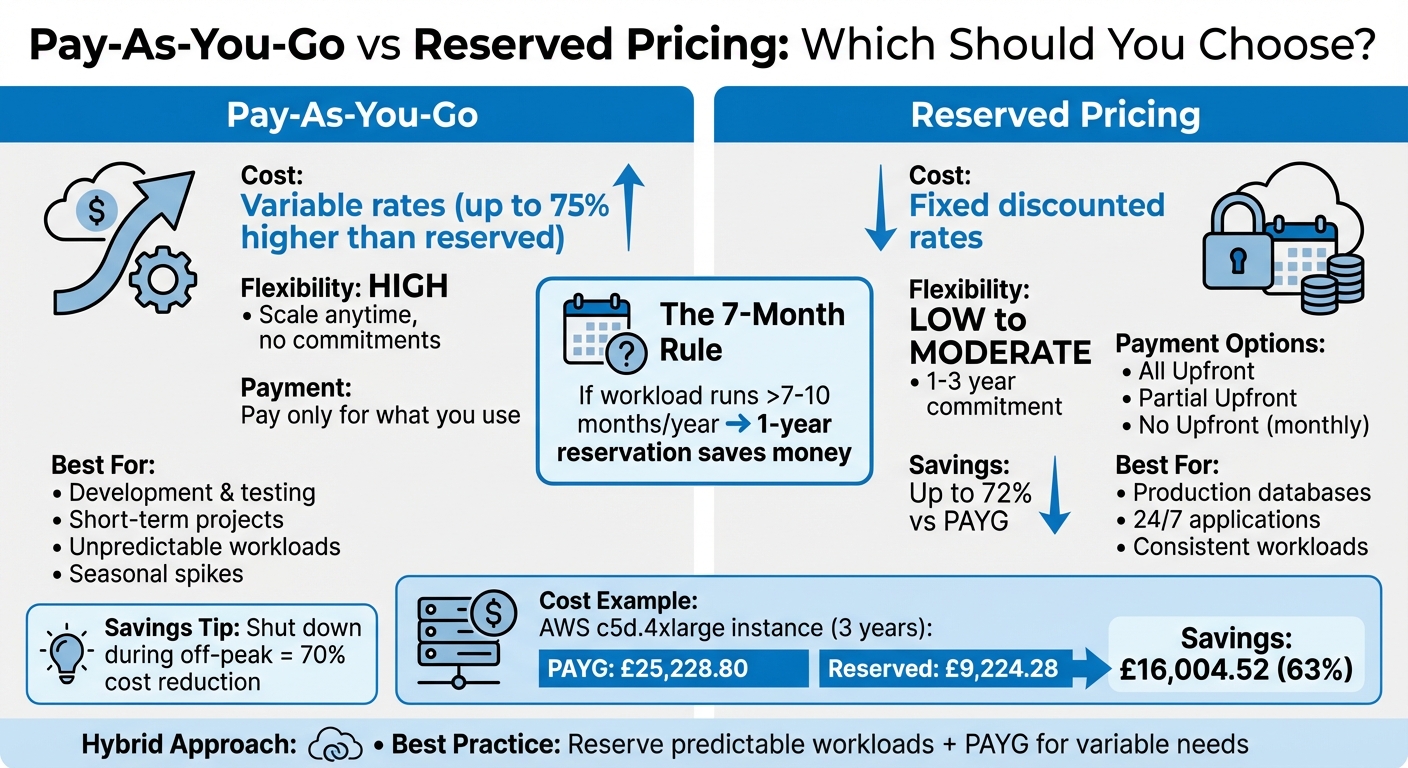 {Pay-As-You-Go vs Reserved Pricing Comparison Chart}
:::
{Pay-As-You-Go vs Reserved Pricing Comparison Chart}
:::
1. Pay-As-You-Go Pricing
How Pay-As-You-Go Works
Pay-as-you-go (PAYG), also called on-demand pricing, charges based on how much you use, with no upfront payments or long-term commitments [2] [8]. Modern cloud services bill usage in one-second increments after an initial 60-second minimum. This setup allows you to adjust resources as needed - scaling up, scaling down, or even turning them off entirely when they’re not needed [2].
Cost Flexibility and Resource Optimisation
The standout feature of PAYG is its flexibility. For instance, shutting down instances during off-peak hours can slash costs by over 70% compared to running them continuously [8]. This makes it a smart choice for workloads that don’t need to be operational all the time. Providers like Azure and AWS offer PAYG rates that are comparable, with the added benefit of no cancellation penalties [4] [7].
Ideal Workloads for Pay-As-You-Go
On-Demand Instances are preferred when workloads are subject to unpredictable fluctuations, or when large jobs run.– AWS [9]
PAYG works well for specific scenarios, such as development and testing environments, short-term projects like batch processing, or benchmarking tasks to determine resource needs before committing to reserved capacity [8] [9]. It's also a practical option for stateless web servers and fault-tolerant workloads that can handle occasional disruptions. For new applications with uncertain usage patterns, starting with PAYG helps establish a baseline for future planning [9].
That said, the flexibility of PAYG comes with a drawback - its cost unpredictability.
Budget Predictability Challenges
While PAYG offers unmatched flexibility, it also comes with the highest per-unit cost - up to 72–75% more expensive than reserved pricing [8] [9]. For workloads that run continuously, these costs can add up quickly. Without a long-term commitment, organisations may face unexpected cost spikes as usage increases, making it harder to predict budgets accurately.
For businesses aiming to optimise their cloud spending, expert advice can make a big difference. Hokstad Consulting provides tailored solutions to help you maximise cost efficiency in your cloud setup. Understanding PAYG pricing is just the first step - stay tuned for a comparison with reserved pricing in upcoming sections.
2. Reserved Pricing
Unlike the fluctuating costs of pay-as-you-go (PAYG) models, reserved pricing provides predictable, lower rates when you commit to a fixed term.
How Reserved Pricing Works
Reserved pricing offers discounts on on-demand resources in exchange for a one- or three-year commitment. The discount depends on factors like the instance family, region, operating system, and tenancy [3] [10]. Payment options include:
- All Upfront: Pay the full amount at the start.
- Partial Upfront: Make an initial payment and enjoy a reduced hourly rate.
- No Upfront: Pay monthly at a discounted rate.
There are two types of reservations: Standard reservations, which offer the highest discount but limited flexibility, and Convertible reservations, which allow changes to instance attributes but with slightly smaller discounts [10].
Long-Term Savings Potential
The cost benefits of reserved pricing can be substantial. Savings can reach up to 72% compared to PAYG rates, and for Windows Server workloads, combining reserved pricing with licensing benefits could push savings to as high as 80% [11]. For example, in 2018, ABN AMRO saved over £1 million per month on Azure Virtual Machine costs through reservations. Hans De Kruif, Platform Engineer and Azure Cost Manager, highlighted the impact of this strategy [11]. Additionally, even at 50% utilisation, certain high-specification reserved instances can save over £3,000 compared to on-demand pricing over a three-year term [9].
Budget Predictability Advantages
Reserved pricing locks in fixed costs for the duration of the term, making it easier to budget and forecast compared to the variable nature of PAYG models. For example, Carlsberg Group reported savings of 45–65% on its Windows, SQL Server, and Linux workloads with Azure reservations. Sonal Gupta, Senior Manager of FinOps and Hosting Service Delivery at Carlsberg Group, shared:
The solution promotes financial accountability and cost control. We can budget and forecast, investing in just what we need, without cost spikes[11].
This fixed-cost approach is particularly suited to workloads that run continuously, ensuring predictable expenses.
Ideal Workloads for Reserved Pricing
Reserved pricing is best suited for workloads with consistent demand, such as production databases and always-on web servers [11] [12]. For workloads with evolving requirements, Convertible reservations allow adjustments to instance families or regions while retaining discounts [3] [12]. It’s often recommended to start with on-demand instances to assess your needs before committing and to explore the Reserved Instance Marketplace if your circumstances change [9] [10].
For businesses looking to optimise their cloud spending, Hokstad Consulting provides expert advice to align reserved pricing with long-term goals.
Pros and Cons
When it comes to choosing between pricing models, it’s all about balancing cost and flexibility. Each option comes with its own set of trade-offs, so understanding your workload and usage patterns is key.
Pay-as-you-go (PAYG) is all about flexibility. You can scale resources up or down instantly without penalties, which makes it a great choice for unpredictable workloads, seasonal spikes, or development environments [13]. But that flexibility comes at a price - its per-unit costs are higher, so keeping an eye on usage is essential [13].
On the other hand, reserved pricing offers major savings. By committing to one- or three-year terms, businesses can cut costs by 30% to 72% compared to PAYG rates [13]. For example, running a high-spec AWS instance (c5d.4xlarge) for three years would cost around £25,228.80 at PAYG rates. With a three-year reservation, that drops to about £9,224.28 - saving more than £3,000 even at just 50% utilisation [9]. However, the downside is the lack of flexibility. If your resource needs change mid-term, you might end up paying for unused capacity [1].
Here’s a quick comparison of the two models:
| Feature | Pay-As-You-Go | Reserved Pricing |
|---|---|---|
| Flexibility | High: Scale or cancel anytime without penalty | Low to Moderate: Requires 1- or 3-year commitment |
| Cost Structure | Variable: Based on actual usage | Fixed: Lower rates locked in for the term |
| Workload Suitability | Ideal for unpredictable, seasonal, or short-term needs | Best for steady-state, 24/7 workloads |
| Savings Potential | Higher baseline costs | Up to 72% savings over PAYG [13] |
| Risk | Expensive if usage isn't monitored | Paying for unused capacity if needs change |
Many organisations find that a hybrid approach works best. For instance, you could reserve capacity for consistent, always-on workloads while using PAYG for variable or temporary needs [6]. A production database might run on a reserved instance, while a testing environment uses PAYG and is powered down outside business hours, saving up to 70% [8]. Companies like Hokstad Consulting specialise in helping businesses identify which workloads suit each model, ensuring cost efficiency without sacrificing agility.
To optimise your cloud spending, start with PAYG to understand your workload demands. Once you’ve identified steady-state resources, transition them to reserved pricing [9]. Budget alerts can help you catch overspending in PAYG, while regular audits of reserved capacity ensure you’re not paying for resources you no longer need [13].
Conclusion
Based on the detailed cost breakdown above, the decision between pricing models comes down to aligning their benefits with your workload needs. It’s not a simple either-or choice between pay-as-you-go (PAYG) and reserved pricing - it’s about finding the right fit for each workload. PAYG is ideal for unpredictable, short-term, or experimental projects where flexibility is more important than cost. On the other hand, reserved pricing can offer savings of 30% to 72% for stable, always-on workloads, such as production databases or applications running 24/7 [1]. A good rule of thumb: reserve what you can predict, and rely on PAYG for the rest.
The best approach often combines both models. Start by identifying your top 10 high-cost resources for reserved pricing and keep a close eye on utilisation to avoid paying for unused capacity. One helpful guideline is the 7-month rule
: if a workload runs for more than 7 to 10 months each year, committing to a 1-year reservation usually makes more financial sense. If you're uncertain about long-term needs, begin with shorter commitments, like a 1-year reservation.
Regular audits are key to keeping costs under control. For PAYG workloads, set up automated alerts to flag spending increases of 10% or more, so you can address cost surges early [5]. Simple automation, such as shutting down development instances outside of working hours, can cut PAYG expenses by 20% to 40% [14].
For businesses looking to optimise these decisions, Hokstad Consulting provides expertise in cloud cost engineering and strategic planning. Their approach helps ensure you’re not overpaying for unnecessary flexibility or committing to plans that don’t suit your needs.
FAQs
Which pricing model is better for my business: Pay-As-You-Go or Reserved Pricing?
Choosing between Pay-As-You-Go (PAYG) and Reserved Pricing comes down to understanding your business's needs and how you use resources.
If your workloads are steady and predictable, reserved pricing can help you save money by committing to long-term usage. However, if flexibility is what you need - like the ability to quickly adjust resources as demand changes - PAYG might be the better fit since it avoids upfront commitments.
The key is to evaluate whether your operations are stable enough to take advantage of reserved pricing discounts or if the freedom of PAYG aligns better with your goals. For a more tailored approach, it’s worth seeking advice from professionals who specialise in cloud infrastructure and cost management.
What are the potential financial risks of pay-as-you-go and reserved pricing models?
Pay-as-you-go pricing offers flexibility but comes with a drawback: unpredictable costs. Since charges depend on usage, expenses can spike during busy periods, making it harder to stick to a budget and increasing the chance of overspending.
On the other hand, reserved pricing involves committing to resources upfront. While this can provide cost predictability, it carries the risk of underutilisation. If your needs shift or you overestimate, you might end up paying for capacity you don’t use, leading to unnecessary expenses.
To manage these challenges, it’s crucial to analyse your usage patterns and anticipate future demands. This approach can help you strike the right balance and manage your spending more effectively.
Can I move from pay-as-you-go to reserved pricing if my workload changes?
If your workload becomes more predictable, you can move from pay-as-you-go to reserved pricing. Reserved pricing works well for consistent, long-term usage and can help lower costs when your requirements stabilise.
By keeping an eye on your workload patterns, you can figure out the best time to switch, helping you manage your cloud costs more efficiently.