
Pay-as-you-go (PAYG) pricing helps businesses cut cloud costs by charging only for resources used, avoiding waste from overprovisioning. Unlike fixed pricing models that require upfront commitments and often lead to paying for idle capacity, PAYG ensures spending directly aligns with usage. This model is particularly effective for workloads with fluctuating or unpredictable demand.
Key Takeaways:
- No upfront costs: PAYG eliminates the need for long-term contracts or prepayment.
- Cost control: Charges stop when resources are not in use, reducing waste.
- Flexibility: Ideal for variable workloads, such as seasonal traffic spikes or testing environments.
- Dynamic scaling: Automatically adjusts resources based on demand, preventing overpayment for unused capacity.
- Real savings: Businesses can reduce cloud bills by 15–25% through optimisation techniques like scheduling and auto-scaling.
For organisations struggling with cloud cost management, PAYG offers a more efficient alternative to traditional fixed pricing, ensuring expenses reflect actual resource consumption.
The Problem with Overprovisioning in Fixed Cloud Pricing
What is Overprovisioning?
Overprovisioning happens when organisations allocate more computing resources - like servers, storage, or processing power - than they actually need [2][7]. This just in case
approach ensures peak performance but leaves companies paying for resources that often sit idle.
The AWS Well-Architected Framework highlights the issue:
Design decisions are sometimes directed by haste rather than data, and the temptation always exists to overcompensate
just in caserather than spend time benchmarking for the most cost‐optimal deployment. This might lead to over‐provisioned and under‐optimised deployments [8].
The financial impact of this inefficiency is staggering. For instance, development and test environments, which are typically active for just 40 hours a week, can lead to 75% excess costs if left running 24/7 (168 hours) [8]. By simply shutting down these environments outside working hours (e.g., 08:00 to 18:00), companies could save around 58.33% on compute costs [5]. McKinsey & Company reports that many businesses see their cloud costs rise by 20% to 30% annually, often due to unhealthy
spending caused by overprovisioning [7]. Simple optimisation efforts, such as right-sizing resources and releasing unused capacity, can reduce cloud costs by 15% to 25% [7].
This wastefulness under fixed pricing models highlights a deeper issue with cost misalignments in operational expenditure (OpEx) frameworks.
The Shift from CapEx to OpEx Models
The move from capital expenditure (CapEx) to operational expenditure (OpEx) was intended to address inefficiencies like overprovisioning. OpEx models aim to align costs more closely with actual usage. However, they don't eliminate the problem entirely. For example, lift and shift
migrations often replicate the same overprovisioning mistakes made in on-premises environments [2][7][8].
Fixed pricing models, which often require long-term commitments of one to three years, can exacerbate this issue [2]. Once businesses commit to specific instance sizes or spending levels, they’re stuck. If demand decreases, they can’t scale down without incurring financial penalties [9]. The Government Digital Service explains this clearly:
Where usage is variable or unpredictable, [up‐front payments] are an inefficient way of using cloud services because you must pay for them whether you use them or not [9].
This lock-in
also prevents organisations from benefiting from newer, more cost-effective instance types or upgrades that may become available during their contract period [9]. For example, the UK Home Office managed to cut its cloud bill by 40% by focusing on better provisioning and incorporating cost considerations into its architectural choices [9]. On average, poor resource utilisation leads to a 30% overspend on cloud services [10]. To put it into perspective, for every £1 million saved through billing reviews, an estimated £3 million in waste remains unaddressed due to inefficient engineering practices [11].
How Does Pay-As-You-Go Pricing in Cloud Computing Work? | SecurityFirstCorp News
What is Pay-As-You-Go Pricing?
Pay-as-you-go (PAYG) is a pricing model where businesses are charged only for the cloud services they actually use - no long-term contracts, no upfront fees [6][2]. Think of it like a utility bill: charges stop when usage stops, and there are no penalties for cancelling [6].
Today, more than 94% of large organisations run a significant part of their workloads in the cloud, taking advantage of its flexibility and cost efficiency [2]. As AWS puts it:
The cloud allows you to trade fixed expenses (such as data centres and physical servers) for variable expenses, and only pay for IT as you consume it [14].
Instead of buying physical infrastructure months in advance, businesses can provision resources on demand, scaling up or down based on what they actually need.
How Pay-As-You-Go Works
Cloud providers track usage through metering, monitoring consumption across key areas like compute power, storage, and data transfer. Costs generally come down to three main factors: compute time, storage volume, and data transfer [14].
- Compute resources: Billed by the hour or second. For instance, AWS EC2 offers per-second billing with a 60-second minimum for Linux, Windows, and Ubuntu instances [12][14]. Charges start when the resource is launched and stop when it’s terminated or paused.
- Storage: Charged per GB each month. Services like Amazon S3 often use tiered pricing, where the cost per GB drops as usage increases [6].
- Data transfer: Outbound traffic (data leaving the cloud) typically incurs charges, while inbound traffic is often free [6][14].
For serverless functions like AWS Lambda, billing is based on the number of requests and execution time. If the function isn’t running, there’s no cost [2][5].
This usage-based system ensures costs directly reflect actual resource consumption, making PAYG a flexible alternative to more rigid pricing models like Reserved Instances.
Pay-As-You-Go vs Reserved Instances
Pay-as-you-go offers unmatched flexibility compared to commitment-based models like Reserved Instances or Savings Plans. While Reserved Instances can cut costs by up to 72% with a one- or three-year commitment [12][13][15], they require organisations to lock in specific capacity levels, which might not align with fluctuating demands.
| Feature | Pay-As-You-Go (On-Demand) | Reserved Instances / Savings Plans |
|---|---|---|
| Commitment | None; pay only for what you use | 1 or 3 years |
| Upfront Cost | None [6][12] | Options for No Upfront, Partial, or All Upfront [13] |
| Flexibility | High; scale resources instantly | Limited; tied to specific usage levels |
| Cost per Unit | Higher (standard rates) | Lower (discounts up to 72%) |
| Best For | Unpredictable or short-term workloads | Predictable, steady-state workloads |
Pay-as-you-go is perfect for workloads that are unpredictable or temporary, such as short-term projects, applications with sudden traffic spikes, or pre-production environments that don’t run long enough to benefit from long-term discounts [13]. The ability to cancel anytime without penalties makes it especially useful for businesses with varying demands.
Need help optimizing your cloud costs?
Get expert advice on how to reduce your cloud expenses without sacrificing performance.
How Pay-As-You-Go Reduces Cloud Costs
::: @figure 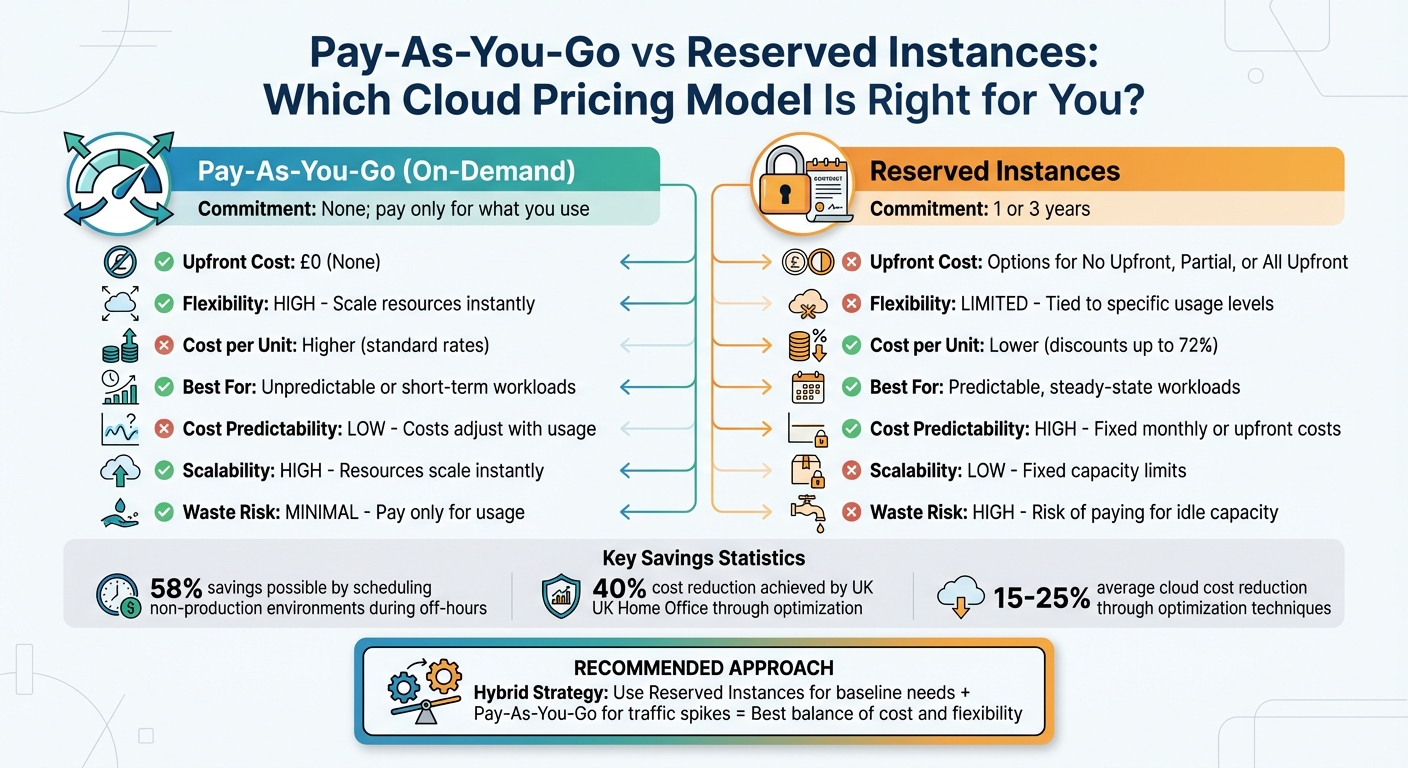 {Pay-As-You-Go vs Reserved Instances: Cloud Pricing Comparison}
:::
{Pay-As-You-Go vs Reserved Instances: Cloud Pricing Comparison}
:::
Dynamic Scaling and Payment for Active Resources
Pay-as-you-go (PAYG) pricing offers a clear advantage over fixed pricing models by allowing businesses to manage costs with precision. Instead of paying for idle resources, you’re charged only for what’s actively in use. For example, servers can be decommissioned when not needed, cutting off charges instantly. This is a stark contrast to traditional data centres, where costs like power, cooling, and maintenance persist even when hardware sits unused.
One of PAYG’s standout features is its elasticity - it automatically adjusts resources to meet current demand. Tools like Kubernetes or native cloud autoscalers monitor metrics such as CPU and memory usage, scaling capacity up during busy times and down during lulls. This flexibility ensures you’re not paying for unused resources.
Another cost-saving strategy involves scheduling non-production environments, such as staging or testing systems, to shut down during off-hours. By doing so, businesses can save as much as 58% on these resources [5]. Automated schedulers can manage this process, ensuring resources are only active when needed.
By only paying for what you use and only using what you need, you can get better value for money in the cloud than you can with a traditional data centre or software model.– Government Digital Service [9]
This ability to adjust resources in real time makes PAYG an effective solution for managing variable workloads efficiently.
Cost Reduction for Variable Workloads
PAYG pricing is particularly suited for businesses with fluctuating demand. For instance, an e-commerce platform might experience traffic spikes during seasonal sales, while school systems see increased activity during morning logins. Similarly, SaaS platforms with unpredictable user activity benefit from matching costs directly to their usage. Instead of paying for peak capacity year-round, organisations only cover the resources they actually need at any given moment.
Serverless functions like AWS Lambda take this a step further by scaling down to zero during inactivity, eliminating costs entirely during quiet periods. Billing is typically based on requests and execution time, ensuring that expenses align closely with business activity.
A real-world example of PAYG’s impact comes from the UK Home Office, which managed to cut its cloud costs by 40% by optimising resource usage and making teams more mindful of the financial implications of their technical decisions [9]. By aligning resource consumption with real-time demand, businesses can significantly reduce unnecessary spending.
Comparison: Pay-As-You-Go vs Reserved Instances
A side-by-side comparison reveals the strengths of PAYG compared to Reserved Instances, particularly for businesses with variable workloads.
| Feature | Pay-As-You-Go | Reserved Instances |
|---|---|---|
| Cost Predictability | Low; costs adjust with usage | High; fixed monthly or upfront costs |
| Scalability | High; resources scale instantly | Low; fixed capacity limits |
| Unit Price | Higher on-demand rates | Lower rates with discounts of up to 72% |
| Commitment | None; pay-per-hour or per-second | 1 or 3 years |
| Flexibility | High; spending stops immediately | Low; locked into specific instance types |
| Best For | Variable, seasonal, or unpredictable workloads | Steady-state, predictable workloads |
| Waste Risk | Minimal; pay only for usage | High; risk of paying for idle capacity |
For unpredictable workloads, PAYG eliminates the risk of paying for unused resources. While Reserved Instances offer discounts for consistent, steady workloads, a hybrid approach - using Reserved Instances for baseline needs and PAYG to handle traffic spikes - can provide the best balance of cost and flexibility [5] [4].
Best Practices for Maximising Pay-As-You-Go Savings
Monitor Usage and Rightsize Resources
Keeping a close eye on your cloud resources is essential. Regularly track key metrics like CPU usage, memory, network activity, and disk I/O to identify underused or idle resources. By rightsizing these resources to match actual workload demands, you can avoid unnecessary costs.
Implementing a strict metadata tagging policy is another effective step. Tags help you allocate costs to specific teams, projects, or departments, creating transparency and encouraging smarter decision-making across your organisation. Additionally, setting budget alerts at multiple thresholds - such as 90%, 100%, and 110% of your budget - can help you detect and manage cost spikes before they spiral out of control [16].
Don’t forget to address orphaned resources. These include unattached storage volumes, idle load balancers, and outdated snapshots, all of which can quietly inflate your cloud bill. Regularly cleaning up these resources ensures better cost management [8][9]. Tools like Azure Advisor, AWS Compute Optimiser, and AWS Trusted Advisor can automate this process by providing recommendations for optimisation [3][5][8]. For a more visual approach, heatmaps can reveal demand patterns over time, helping you identify peak usage periods and specific cost centres [1].
The benefits of rightsizing can be dramatic. For instance, running resources only 40 hours a week instead of 168 can cut costs by as much as 75% [8]. These foundational steps pave the way for more advanced strategies like auto-scaling and scheduling.
Implement Auto-Scaling and Scheduling
Auto-scaling is a powerful way to align your infrastructure with demand, scaling up only when necessary and scaling down as soon as possible [17]. For better precision and reduced waste, configure auto-scaling triggers based on event-driven metrics like message queue lengths, rather than relying solely on CPU or memory usage [1][17].
The goal of cost optimising scaling is to scale up and out at the last responsible moment and to scale down and in as soon as it's practical.– Microsoft Azure Well-Architected Framework [17]
To avoid overcorrections, fine-tune cooldown periods between scaling events. For workloads that are stateless, fault-tolerant, or time-flexible, consider using spot instances. These can offer discounts of up to 90% compared to standard on-demand pricing, though availability will depend on regional supply and demand [5][8]. However, before implementing auto-scaling, make sure your instances are already right-sized. Scaling an oversized instance still results in wasted expenses [1][18].
When internal efforts reach their limits, bringing in expert help can make all the difference.
The Role of Hokstad Consulting in Cloud Cost Reduction

While monitoring tools and automation are essential, navigating the complexities of cloud cost management often requires specialised expertise. Hokstad Consulting focuses on helping UK businesses reduce cloud spending by 30–50% through tailored strategies. Their No Savings, No Fee
model eliminates financial risk, as payment is tied directly to the savings they achieve, with no upfront costs.
Hokstad Consulting offers a range of services, including detailed cloud cost audits, DevOps transformation, strategic migration planning, and custom automation development. Whether you’re working with public, private, hybrid, or managed hosting environments, their expertise can uncover efficiencies that standard tools might miss.
For businesses grappling with rising cloud costs or uncertainty about where to start, partnering with a specialist like Hokstad Consulting can fast-track results and help you avoid costly mistakes. Their combination of deep technical knowledge and practical implementation ensures that the savings they identify translate into tangible financial benefits.
Conclusion
Pay-as-you-go (PAYG) pricing has reshaped how organisations manage cloud spending. Instead of committing to fixed capital expenses, businesses now pay only for the resources they actually use, turning costs into a variable, usage-based model [2]. This shift eliminates overprovisioning and aligns expenses directly with demand.
One of the standout advantages of this model is its ability to dynamically scale resources. During busy periods, resources can automatically expand, and when demand slows, they scale back down. This ensures businesses avoid unnecessary costs tied to idle infrastructure.
However, success with PAYG requires careful oversight. Many organisations struggle with managing these factors internally, as they may lack the necessary expertise [2].
For UK businesses facing rising cloud costs or uncertain about where to start, Hokstad Consulting provides tailored solutions. Their services are designed to maximise the cost-saving potential of PAYG. With offerings like cost audits and DevOps transformation, they’ve helped clients reduce cloud spending by 30–50%. Plus, their No Savings, No Fee
model removes any upfront risk, making their support even more accessible.
Optimising cloud costs is not a one-time effort - it’s an ongoing process. Whether handled in-house or with expert assistance, PAYG offers a flexible and efficient way to manage cloud expenses while supporting business growth.
FAQs
How does Pay-As-You-Go pricing reduce cloud costs and prevent overprovisioning?
Pay-As-You-Go pricing helps cut cloud costs by charging you only for the resources you actually use. This approach removes the guesswork of predicting future capacity needs and spares you the expense of overprovisioning resources that might go unused.
With this setup, businesses can adjust their cloud usage in real time, scaling up or down as demand changes. This adaptability not only keeps budgets in check but also ensures you’re operating efficiently, as you’re never stuck paying for more than what’s necessary.
What are the main advantages of Pay-As-You-Go pricing over Reserved Instances?
Pay-As-You-Go pricing provides flexibility and adaptability that Reserved Instances often can't match. Instead of locking into long-term commitments, businesses are charged only for the resources they actually use, making it easier to control costs and minimise waste.
This model works especially well for organisations dealing with fluctuating workloads or unpredictable demands. It lets them adjust resource usage in real time, ensuring they aren't paying for capacity they don't need. By cutting out overprovisioning, Pay-As-You-Go helps streamline cloud spending and keeps budgets under control.
How can businesses save money with Pay-As-You-Go cloud pricing?
To make the most of Pay-As-You-Go (PAYG) cloud pricing and save money, businesses should prioritise keeping an eye on usage, adjusting resources as needed, and selecting the most suitable pricing models. Using cost management tools to regularly review cloud usage can reveal resources that are either idle or underused, allowing businesses to scale them back or shut them down to avoid wasting money.
For workloads that are predictable, options like reserved instances or savings plans can lead to lower costs. On the other hand, spot instances or other flexible pricing models are ideal for handling variable workloads. By matching resources closely to actual needs and avoiding overprovisioning, companies can keep expenses in check.
Staying proactive is key - scheduling downtime for non-essential resources and continuously analysing usage patterns ensures that cloud spending stays efficient. These steps help businesses maximise the benefits of PAYG pricing while maintaining tight control over their budgets.