Pay-as-you-go cloud pricing means I pay only for the cloud resources I use, but the trade-off is simple: my monthly bill can move up fast if usage climbs.
For a UK business, that usually means charges in £ across four main areas: compute, storage, data transfer, and managed services. PAYG works well for new projects, seasonal demand, and test environments, but it can cost more for steady 24/7 workloads. The key issue is control: studies in the source note that 62% of respondents went over cloud storage budgets in 2024, while 28–34% of cloud spend is often wasted on idle or oversized resources.
If I had to sum it up in a few points:
- PAYG = usage-based billing
- I’m charged by meter, such as per second, per hour, per GB-month, or per GB transferred
- It gives high flexibility but lower cost certainty
- It suits variable and short-term workloads best
- For stable workloads, reserved, committed, or flat-rate pricing may cost less
- To keep costs in check, I need tags, budgets, alerts, rightsizing, and shutdown schedules
Quick comparison
| Model | Commitment | Cost certainty | Best for |
|---|---|---|---|
| Pay-as-you-go | None | Low | Seasonal demand, dev/test, new services |
| Reserved / committed | 1–3 years | Higher | Steady production workloads |
| Flat-rate subscription | Monthly or annual | Highest | Fixed-use services like backup or monitoring |
So, if usage goes up and down, PAYG can make sense. If usage stays flat month after month, I’d usually compare it against a committed option before deciding.
How pay-as-you-go cloud pricing works
With pay-as-you-go pricing, the provider tracks each service you use, multiplies that usage by a unit price, and adds it all to your monthly invoice in £. That’s why the bill is broken down by resource instead of by application.
What gets metered and how charges are calculated
Different resource types use different billing units. Compute - such as virtual machines, containers, and serverless functions - is billed per second or per hour, depending on the service. Storage is usually charged per GB-month, which means the average amount of data stored across the month, not a single snapshot taken at the end. Network egress, or data leaving the cloud for the internet or outside services, is billed per GB transferred. Inbound data is generally free.
The maths stays the same throughout: usage × unit price, added up across the month. The part that shifts is how many meters are running at the same time.
Why monthly bills can include several separate cost lines
Each service has its own meter, so invoices often show several separate charge lines. Even a fairly modest production setup can include compute instances, a managed database, object storage for assets, a load balancer, and logging and monitoring services. Each one is metered on its own.
Once you add microservices, auto-scaling, serverless functions, and multiple environments, the number of line items can climb fast in a single month. It may look messy at first glance, but that detail serves a purpose. It helps teams trace spend back to specific applications or business units, which makes the breakdown useful for budget control, not just accounting.
These mechanics explain both the flexibility and the cost risk that come with this pricing model.
Key features, benefits, and trade-offs
Once usage is metered on its own, the big question is where PAYG helps most - and where it can put pressure on budgets.
Its main strength is flexibility. But that flexibility also puts more control, and more risk, on the buyer. There are no minimum terms, no cancellation fees, and no upfront hardware spend. That makes PAYG a good fit when demand is hard to predict.
Where pay-as-you-go works well
PAYG works best when demand is variable, short-lived, or genuinely uncertain. A UK startup launching a new SaaS product, for example, can get a production stack live without locking itself into a long contract. If the product changes direction, the team can scale back or stop using those resources without being stuck with long-term hardware.
Seasonal retail is another good match. A UK e-commerce business dealing with traffic spikes around Black Friday or Christmas can scale infrastructure up during busy periods and scale it back down after, paying only for the extra capacity used at the peak. Development and test environments also fit this model well. Teams can spin up environments for a sprint or a user-testing cycle, then shut them down when the work is done instead of paying for idle servers.
PAYG can also make testing new ideas less costly. Trying a new managed service, an AI API, or a different architecture does not need a big upfront spend under PAYG. That gives teams more room to improve and test changes without making a large early commitment.
Where pay-as-you-go can become expensive or hard to predict
The flip side is that flexibility can let costs drift. Spikes are a real risk. One misconfigured auto-scaling rule, or one marketing campaign that suddenly takes off, can send a monthly invoice far past expectations. Research from Wasabi Technologies found that 62% of respondents exceeded their cloud storage budgets in 2024, up from 53% the previous year, with around a quarter describing those overruns as significant.[3][4][8]
Idle and oversized resources are the other stubborn problem. Industry analysis of cloud estates shows that organisations waste 28–34% of cloud spend on resources that are unused or far larger than needed.[5][6][7] And for stable, always-on workloads - such as a core production database or a line-of-business API running 24/7 - PAYG can cost more than a committed or reserved model for the same capacity.
PAYG tends to suit variable, seasonal, and experimental workloads best. Stable services often need a different pricing model, which the next section compares. That contrast becomes easier to see when PAYG is set against reserved, committed, and flat-rate pricing.
How pay-as-you-go compares with other cloud pricing models
::: @figure 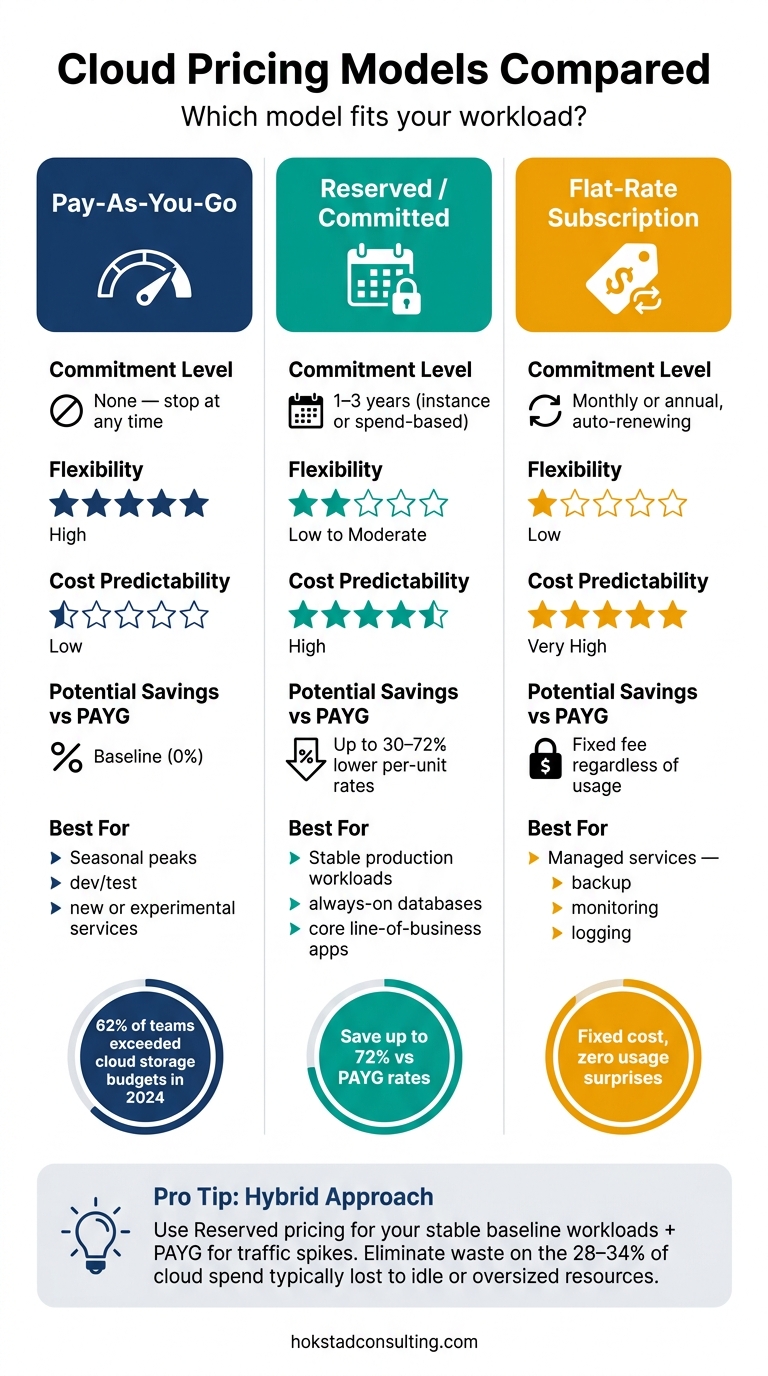 {Cloud Pricing Models Compared: PAYG vs Reserved vs Flat-Rate}
:::
{Cloud Pricing Models Compared: PAYG vs Reserved vs Flat-Rate}
:::
PAYG is one of the main cloud pricing models. It works well when demand moves around. But when a workload stays steady month after month, PAYG’s flexibility matters less than the price you pay per unit. In that case, the better option often comes down to two things: how stable the workload is and how much cost certainty the team wants.
PAYG vs reserved or committed pricing
Reserved or committed pricing trades a 1–3 year usage or spend commitment for lower per-unit rates. For compute, those rates are often 30–72% lower than PAYG [1][2][10]. Some cloud providers also offer spend-based commitment options, such as Savings Plans. These are less rigid than reserved instances because the commitment is based on a minimum hourly compute spend, not a fixed instance family or size [9][11].
The trade-off is simple: you still pay the committed rate even if usage drops [12]. That makes reserved pricing a strong match for steady, always-on production workloads, like a core database, a line-of-business application, or any service that runs near full capacity for most of the month. It’s a poor match for workloads that swing up and down without much warning.
A lot of teams split the difference. They use committed pricing for the baseline and PAYG for spikes.
Use the comparison below to line up each pricing model with the workload pattern it suits best.
| Pricing model | Commitment level | Flexibility | Predictability | Best-fit workload |
|---|---|---|---|---|
| Pay-As-You-Go | None; can stop at any time | High - scale up or down as needed | Low; costs vary with usage | Seasonal peaks, development and test, new or experimental services |
| Reserved / Committed | 1–3 years; tied to instance type or committed spend | Low to moderate; best when usage stays near a baseline | High for the committed portion | Stable production workloads, always-on databases, core line-of-business applications |
| Flat-rate subscription | Monthly or annual subscription, often auto-renewing | Low; fixed bundle of capacity or features | Very high; fixed fee | Predictable managed services such as backup, monitoring, or logging |
PAYG vs flat-rate subscriptions
Flat-rate subscriptions charge a fixed fee for a fixed bundle of capacity or features, whether you use all of it or not. The obvious catch? You can end up paying for capacity that just sits there unused. PAYG only charges for what you consume, so it tends to make more sense when usage is light or changes a lot.
A simple rule of thumb helps here:
- Use flat-rate subscriptions for fixed services like logging, backup, or monitoring.
- Use PAYG when usage goes up and down.
Once the pricing model is in place, the next job is keeping usage and spend under control.
Managing pay-as-you-go costs and what matters most
Cost controls UK teams should put in place
Once you've picked the pricing model, the next job is keeping usage under control. With PAYG, that takes active management. Each cloud service is billed on its own, so each one needs a clear owner and alerting in place.
Start with tagging, budgets, and alerts. Every resource should include tags for environment, owner, project, and cost centre, so each charge maps back to a team and a clear business reason. Set monthly budgets in £ sterling and add alerts at 50%, 75%, and 90% of expected spend. The point is to get warned early enough to act before the month ends. [13][14][15]
That only works if you also watch the technical side. Rightsizing, autoscaling, and shutdown schedules cut some of the most common sources of waste. [16] Oversized instances and idle non-production environments that stay switched on can eat through a monthly bill while doing nothing useful. Storage lifecycle rules matter just as much. Move older data to lower-cost tiers automatically, or delete data that no longer needs to be kept, especially for logs, backups, and archived build artefacts.
Track cost per service, cost per environment, and variance against forecast alongside performance and reliability. Then review the invoice on a regular basis. Compare the current month with the last one, and look for new services, unowned resources, or odd regional charges. That shifts billing from a back-office task into an active control.
Conclusion: when pay-as-you-go is the right model
In practice, PAYG works best when cost ownership is built in from day one. Without tagging, ownership, and active governance, small leaks can pile up fast. Hokstad Consulting helps teams control cloud cost without slowing delivery.
FAQs
How do I know if PAYG is right for my workload?
PAYG makes sense when flexibility matters more than the lower cost that can come with long-term commitments. It works well for workloads that are hard to predict, short-term, or still being tested.
That includes things like:
- development and testing
- batch processing
- apps with seasonal traffic spikes
If your workload is steady and runs 24/7, reserved pricing may cost less. A common approach is to start with PAYG, then shift stable, predictable resources to reserved capacity.
What usually causes PAYG bills to rise unexpectedly?
PAYG bills often go up for a simple reason: resources keep costing money even when no one is using them.
A common example is orphaned or unused resources, like unattached storage volumes or idle IP addresses. They sit there quietly in the background, still adding charges month after month.
Costs can also spike during busy periods. Workloads scale up to handle demand, but if they don’t scale back down afterwards, spending stays high. On top of that, inefficient configurations, overprovisioning, and missed data egress charges can push bills even higher.
Without real-time monitoring and anomaly detection, these problems are easy to miss and can lead to large unplanned costs.
How can I keep PAYG cloud costs under control?
Prioritise real-time monitoring and automated governance. Match resources to actual workload demand, remove orphaned assets like idle storage volumes and outdated snapshots, and use metadata tagging to make cost visibility clearer across projects and departments.
Set automated budget alerts at 80%, 90% and 100% so you spot anomalies early. You can also cut waste by scheduling downtime for non-essential development instances outside UK business hours and using auto-scaling to match real-time traffic.