
I match every tool result to its original call ID - not its finish order or tool name. If three calls finish B, C, A, each result must still reach the right request.
Here’s the process I use:
- Validate first: reject missing or duplicate IDs, then check tool names and arguments.
- Run independent calls together: limit concurrency and keep each success or error linked to its ID.
- Check before sending: submit exactly one outcome per requested ID, using the API’s required format.
- Retry delivery, not completed work: store outcomes so a lost response does not trigger another side effect.
- Test and log both stages: check out-of-order results, failures and retries, while keeping private data out of logs.
The rule I keep throughout: the call ID stays unchanged, even when execution fails or submission needs another attempt.
::: @figure 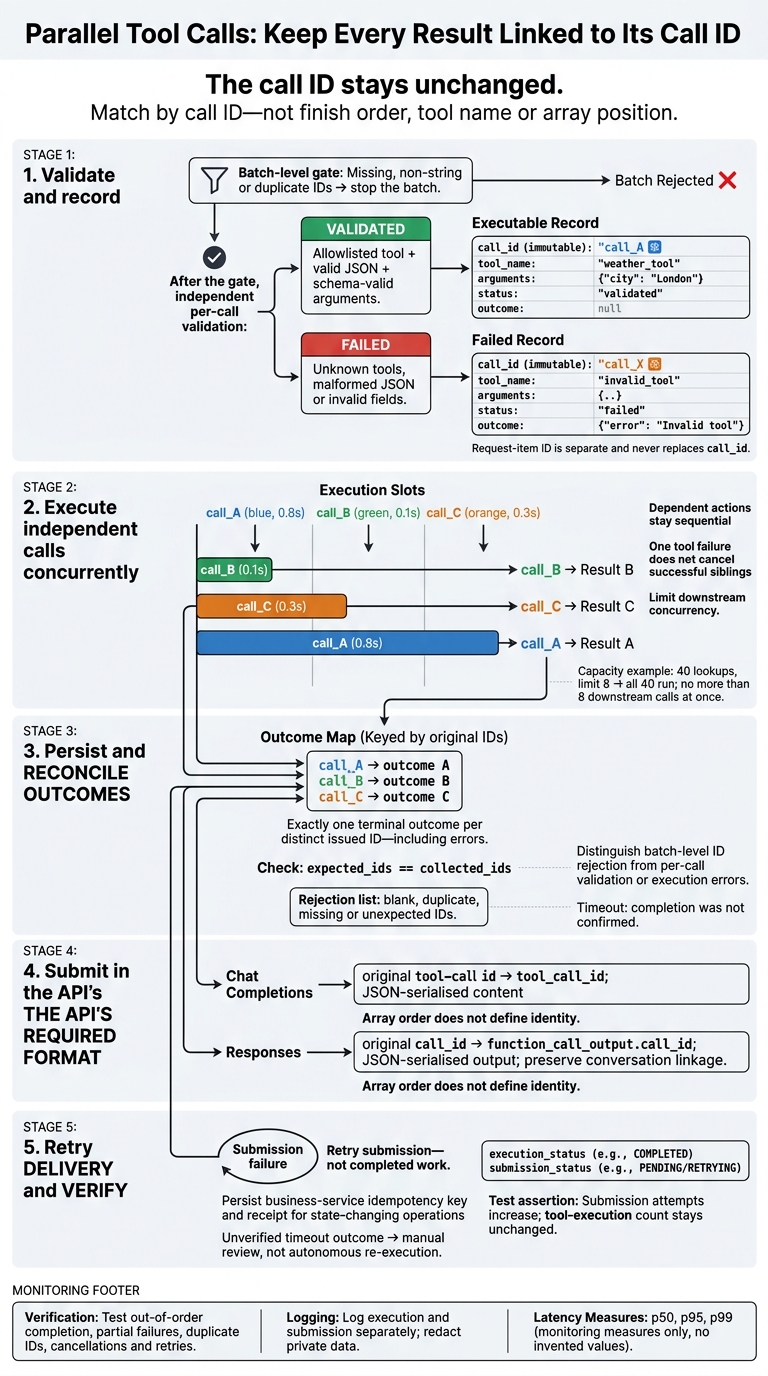 {Parallel Tool Calls: Keep Every Result Linked to Its Call ID}
:::
⚡ Parallel Tool Calls - Let Your AI Agent Use Multiple Tools | Day 4
1. Set Up the Dispatcher and Task Records
Create one task record per accepted call. Register each tool with an input schema, output shape and timeout. Resolve tool names through an explicit allowlist. Never evaluate or import names supplied by the model.[2] These records connect validation to concurrent execution.
Parse Tool Calls and Validate Arguments
Extract call_id, name and JSON arguments. Before dispatch, reject missing, non-string or duplicate IDs and stop the batch. Duplicate IDs can overwrite task records.
Once the batch passes these ID checks, validate each call independently. Check decoded arguments against the selected tool’s schema, reject unexpected properties and fail invalid calls without invoking the function.[4][7]
For an unknown tool, malformed JSON or an invalid field, create a failed record under the issued call_id. Include a stable error code and a safe error message. Keep these per-call failures separate from batch-level ID failures.
Use the task store as the source of truth for later result submission.
Store the Original Call IDs
Each task record must store call_id, tool_name, validated arguments, status and outcome. Executable tasks start as validated with outcome: null. Validation failures start as failed with an error outcome.
Store any request-item ID separately. It never replaces call_id.[2][6]
| Request field | Task-record field | Result field |
|---|---|---|
Issued call_id
|
Immutable call_id
|
tool_call_id or protocol-required call_id
|
Tool name
|
tool_name |
name for logging, if supported |
JSON arguments
|
Validated arguments
|
Omit unless required by the protocol |
| Validation or execution outcome |
status, outcome
|
Success or error payload |
Update the status as work progresses, but copy the issued call_id exactly into the submission field. Never rebuild it from a SKU, tool name or array position.[2][6] The executor updates the record; the submitter reads it back with its call_id unchanged.
2. Run Independent Tool Calls Concurrently
Run tool calls in parallel only when they are independent. Keep dependent actions sequential. Stock checks and delivery estimates can run together, for example, but reservation and booking cannot.
Limit Concurrency and Handle Failures
Use a semaphore to limit access to the downstream request, not the whole workflow. With 40 lookups and a limit of eight, all 40 calls still run - but no more than eight enter the downstream call at once. Choose a limit that fits downstream capacity and expected latency.
import asyncio

async def run_one(call, limit):
    async with limit:
        try:
            async with asyncio.timeout(5):
                value = await invoke_tool(call["name"], call["arguments"])
            return call["call_id"], {"ok": True, "value": value}
        except asyncio.TimeoutError:
            return call["call_id"], {"ok": False, "error": "timeout"}
        except Exception:
            return call["call_id"], {"ok": False, "error": "tool_failed"}

async def run_parallel(calls):
    limit = asyncio.Semaphore(8)
    tasks = [asyncio.create_task(run_one(call, limit)) for call in calls]
    outcomes = {}

    try:
        for task in asyncio.as_completed(tasks):
            call_id, outcome = await task
            outcomes[call_id] = outcome
    except asyncio.CancelledError:
        for task in tasks:
            task.cancel()
        await asyncio.gather(*tasks, return_exceptions=True)
        raise

    return outcomes
One failed tool returns one error outcome; successful sibling calls continue. If you use TaskGroup, catch exceptions for each tool, or one failure can cancel its siblings.
On cancellation, cancel outstanding tasks, await them, then re-raise CancelledError.
As results arrive, match them only by call_id.
Match Outcomes by Call ID
For a deterministic check, set three mock lookups to 0.8, 0.1 and 0.3 seconds with at least three slots. The completion order will be B, C, A. Each worker returns its
call_idwith the outcome, so the dispatcher can index the result map directly.
| Matching method | Correctness risk | Recommended use |
|---|---|---|
Original call_id
|
Low: identifies the specific model-issued call, even when names and arguments repeat | Use for every result and submission |
| List position | High: out-of-order completion, filtering or retries can link a result to the wrong request | Use only for temporary display ordering, never for identity |
| Tool name | High: multiple calls may invoke the same tool with different arguments | Use for routing, not result matching |
| Argument values | Medium to high: arguments may repeat, be normalised, reordered or fail to distinguish calls | Use for validation and logging, not as the primary key |
Keep the outcome map keyed by call_id; the next step is serialising it for submission.
3. Submit Results and Errors
Key each outcome by call_id, then serialise it in the format your API expects. Include one outcome per distinct call ID, even for validation failures. Compare the model’s expected call IDs with the completed call IDs. Before submission, reject blank, duplicate, missing or unexpected IDs, then check expected_ids == collected_ids. Failed or timed-out calls must also have an error outcome.[8][9]
Use the API’s Required Result Format
Use a stable, documented JSON envelope: {"ok":true,"data":...} for success, or {"ok":false,"error":{"category":"validation_error","code":"INVALID_ARGUMENT","message":"city must be a non-empty string","retryable":false}} for failure.
Keep validation errors, tool errors, timeouts and internal errors separate. Remove credentials, access tokens, personal data, internal stack traces and unbounded binary content. If a tool returns text, keep it as a string inside the envelope. Don’t mix raw logs with machine-readable fields. A timeout message should say completion was not confirmed, not that the action definitely failed.
For OpenAI Chat Completions, retain the original assistant message containing tool_calls. Append one tool message per call, using the original id as tool_call_id and JSON-serialised content. The array order does not indicate completion order.[11]
tool_messages = [
    {
        "role": "tool",
        "tool_call_id": call["id"],
        "content": json.dumps(outcomes[call["id"]], allow_nan=False),
    }
    for call in calls
]
messages = [
    *history,
    original_assistant_message,
    *tool_messages,
]
For OpenAI Responses, submit function_call_output input items with the original call_id and serialised output. Keep the context linked through previous_response_id or the required conversation linkage. Submit the output before requesting the model’s continuation. If execution finishes later, return the output in a later request with the original call_id.[9][1][3]
continuation = {
    "previous_response_id": response.id,
    "input": [
        {
            "type": "function_call_output",
            "call_id": call["call_id"],
            "output": json.dumps(outcomes[call["call_id"]], allow_nan=False),
        }
        for call in calls
    ],
}
Retry Without Repeating Side Effects
Retry submission, not successful tool execution. Track execution, outcome creation and submission as separate states so retries don’t create duplicate outcomes.
Retry transient transport failures, rate limits and temporary service unavailability with bounded exponential back-off and jitter. Don’t retry invalid JSON, unknown call IDs, schema errors or authentication failures. Fix the request or configuration first. When the model issues new calls, track their IDs separately.
For safe resubmission after order updates or other state-changing operations, persist a separate business-service idempotency key and receipt. A lost acknowledgement does not prove failure. If you cannot verify an outcome after a timeout, send it for manual review rather than retrying autonomously.[10]
With submission state separate from execution state, you can test delivery, retries and partial failures independently.
4. Test and Monitor Call-ID Matching
Test Out-of-Order Results and Partial Failures
Once dispatch and submission are separate, test whether call IDs stay intact when calls finish out of order or fail. Use a fixed batch as the test fixture, including repeated calls to the same tool with different arguments. Keep expected inputs separate from observed outputs. Check that reordering preserves the expected ID-to-payload mapping, with exactly one terminal outcome per distinct issued ID. Every tool output must carry its originating call ID.[2][3]
Use deterministic test doubles for
weather_call_1,weather_call_2andcurrency_call_1, with simulated delays of 300 ms, 50 ms and 150 ms. Completion order will be weather 2, currency, weather 1. Assert that each submitted payload matches its originating ID. Repeat with randomised delays; the submitted ID-to-payload mapping must remain unchanged.[2][3]
Inject timeouts, exceptions, malformed JSON, unknown tools, unserialisable outputs, cancellations at each stage and exhausted retries. Check that successful sibling outcomes remain available. Reject duplicate IDs before they overwrite task records. Also test duplicate execution of a valid ID: an idempotency guard must prevent a second side effect. Verify that the submitted map still matches the fixture and includes every outcome the API protocol requires.[5][6]
Log Execution and Submission Separately
Use the same harness to check logging as well as functional outcomes. Record the batch or response ID, call ID, tool name, start and completion times, execution_status, submission_status, attempt number and a sanitised error category. Include trace and span IDs to link asynchronous events.[13] Keep raw arguments, credentials, personal data and internal exception text out of logs. Use allow-listed metadata and redaction rules instead.[12]
Track mismatched, duplicate, missing and unknown IDs, plus execution and submission failure rates, retry counts and cancellation counts. Measure execution and submission latency separately at p50, p95 and p99. Set alerts for unknown IDs, duplicate accepted outcomes and missing outcomes in completed batches.
Prove that submission retries do not rerun tools: simulate a submission transport failure in the harness. Check that submission attempts increase while the tool-execution count stays unchanged.
Conclusion: Keep Call IDs Through Submission
Completion order never determines result mapping. Validate tool names and arguments, keep the original call IDs, run calls concurrently only when they’re independent, and collect every outcome by ID.
After execution, check that each requested call ID has exactly one terminal outcome, with no missing, duplicate or unknown IDs. Submit each outcome in the API’s required format - never map results by array position.
If delivery fails, reload the stored outcome and resubmit it with its original identifiers. Retry the submission only; never rerun the tool.
FAQs
How can I tell which tool calls are independent?
Before coding, map out business dependencies and possible failure points. Independent calls don’t share state, compete for resources or depend on other calls’ outputs. Check whether calls could modify shared globals, singletons or caches at the same time.
Tests that pass on their own but fail in parallel often point to race conditions or resource conflicts. Check conditions and dependencies before batching calls, so only those that are ready and self-contained run together.
How do I recover pending results after a crash?
Before any pause or hand-off, save the agent’s call plan and state in a durable checkpoint or event history. Include call IDs, statuses, dependencies and recorded results.
If a worker crashes, the replacement worker should reload that state and replay recorded results, rather than generate the calls again. This keeps outputs tied to their original call IDs, prevents duplicate external side effects and keeps tracking consistent across the restart.
How do I handle a tool that finishes after timing out?
A timeout means the outcome is unknown - not that the request failed. Before taking action, check the tool’s external status using the operation ID or business reference. If completion is confirmed, record the receipt and successful result. Do not repeat the request.
If the outcome is still uncertain, do not retry. Quarantine the transaction for manual review to prevent duplicate side effects. If a retry is needed, always reuse the original idempotency key.