
Optimising data analytics with spot instances can save you up to 90% on cloud costs by using discounted, surplus computing capacity. These instances are perfect for workloads that can handle interruptions, such as batch processing, machine learning training, and exploratory analytics. While spot instances are cheaper, they come with the trade-off of potential interruptions, often with just a two-minute warning.
Key benefits include:
- Massive cost savings: Scale compute resources by up to 10x within the same budget.
- Flexibility for fault-tolerant tasks: Frameworks like Apache Spark and Hadoop handle interruptions well.
- Scalability: Use multiple instance types and availability zones to minimise disruptions.
To get started:
- Use spot instances for non-critical worker tasks while keeping critical components on on-demand instances.
- Store data externally (e.g., Amazon S3) to protect against interruptions.
- Diversify instance types and zones to reduce risks.
Spot instances work across major cloud providers like AWS, Azure, and Google Cloud. By combining cost-effective strategies with proper monitoring tools, you can optimise your data analytics workloads while keeping expenses low.
::: @figure 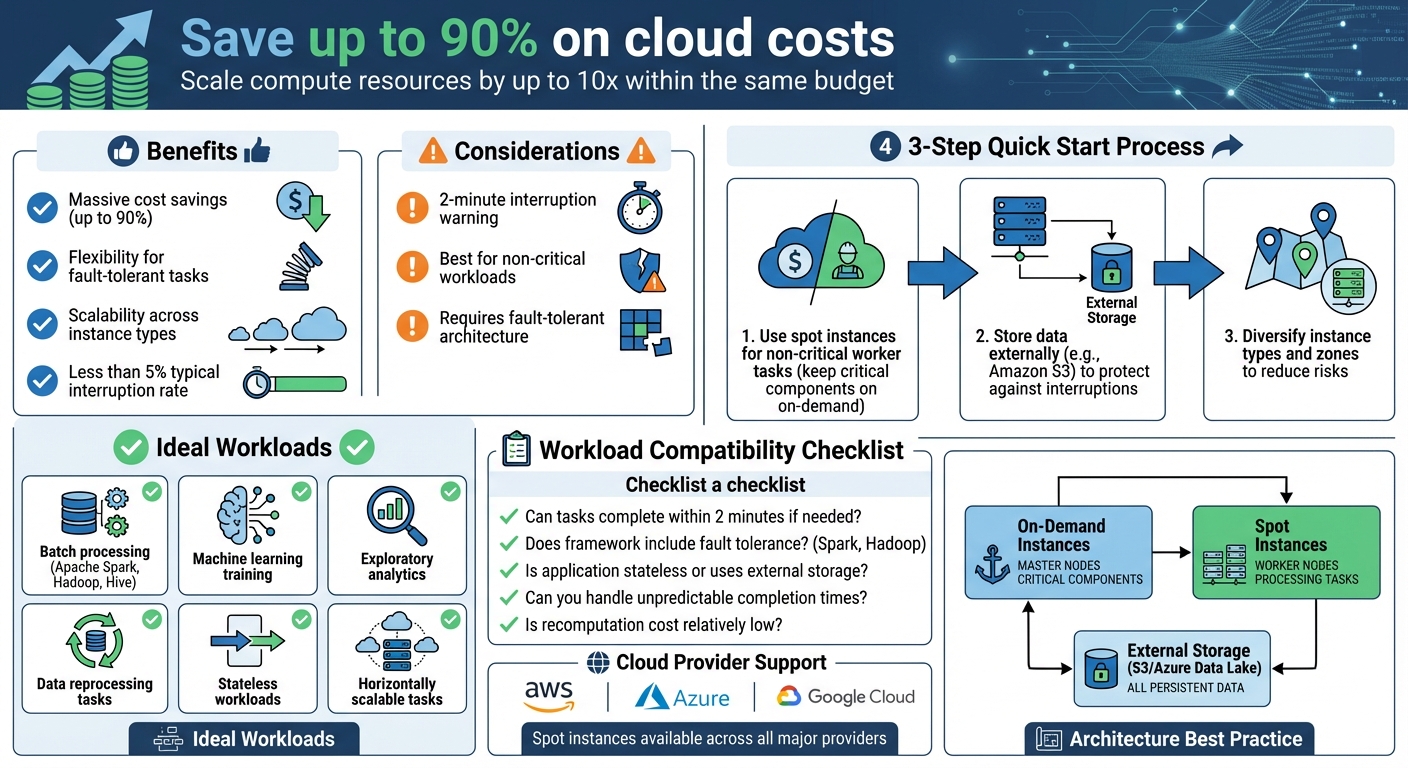 {Spot Instances vs On-Demand: Cost Savings and Workload Compatibility Guide}
:::
{Spot Instances vs On-Demand: Cost Savings and Workload Compatibility Guide}
:::
Optimizing Trino using spot instances with Zillow

Identifying Suitable Data Analytics Workloads
When considering the cost and scalability benefits of spot instances, it's essential to focus on workloads that can handle interruptions. Not every analytics task is a good fit. For example, fault-tolerant batch processing jobs - like those running on Apache Spark, Hive, or Hadoop - are excellent candidates. These frameworks are built to recover from node failures by simply reassigning tasks to other nodes [6]. Similarly, machine learning training workloads work well when checkpointing is used to save progress to external storage like Amazon S3 [10]. Data reprocessing tasks are another great match since they can be rerun without causing any adverse effects.
Stateless workloads or those that separate compute from storage are particularly suited for spot instances. If your application stores intermediate data in external storage like Amazon S3 or a database instead of relying on local instance storage, it is well-prepared for potential interruptions [10]. Additionally, workloads that scale horizontally - where you can add or remove nodes without affecting the overall process - are ideal [5]. However, tightly coupled workloads, where a single node failure could disrupt the entire system, are better suited for on-demand instances [4].
Workload Characteristics That Suit Spot Instances
Certain traits make workloads more compatible with spot instances. Flexibility around completion times is key - strict SLAs or time-sensitive deadlines might not align well with the uncertainty spot instances can bring [1]. Workloads should also be able to handle the two-minute interruption warning by either completing tasks quickly or checkpointing progress [10]. Breaking larger jobs into smaller, independent tasks can help spread the workload across a diverse fleet of instances, reducing the impact of individual interruptions [8].
Interestingly, less than 5% of spot instances are typically interrupted, meaning most tasks proceed without issues [8]. For example, certain instance types like the r4.2xlarge in specific regions have shown interruption rates of under 5% over a 30-day period [8]. This level of reliability often surprises organisations and expands the range of workloads that can effectively use spot instances.
Workload Compatibility Checklist
To quickly evaluate if your workload is ready for spot instances, consider the following:
- Can tasks be completed within two minutes if needed?
- Does your framework (e.g., Spark, Hadoop) include fault tolerance features?
- Is the application stateless or does it rely on external persistent storage?
- Can you handle unpredictable completion times?
- Is the cost of recomputing failed tasks relatively low?
For big data frameworks like Amazon EMR, a practical strategy is to use spot instances for task nodes, which process data without storing HDFS data. Meanwhile, keep primary and core nodes on on-demand instances to ensure the cluster remains stable [6]. This approach protects critical processes, like the application master, from interruptions that could derail the entire job. Frequent checkpointing and optimising Spark task sizes to fit within the interruption warning window can also reduce recomputation needs [6].
Matching Workloads to Cloud Services
Modern analytics platforms are designed to work seamlessly with spot instances. For example, AWS EMR uses instance fleets
to automatically replenish capacity from different spot pools in case of interruptions, ensuring cluster resilience [9]. Amazon EMR also allows you to specify up to 15 instance types within a task instance fleet, increasing diversification and reducing the likelihood of interruptions [11]. Other services, like Azure Databricks and Google Dataproc, also support running analytics workloads on spot capacity, managing node replacements transparently.
Once you've confirmed that your workloads are compatible, the next step is to design architectures that can mitigate interruptions effectively.
Building Architectures That Handle Interruptions
Design systems that can withstand interruptions by separating compute and storage while diversifying instance types and zones.
Separating Compute from Storage and State
Always store persistent data externally. Local storage on instances is temporary and gets wiped when an instance is interrupted. To avoid data loss, ensure all input data, output results, and intermediate states are stored in external services like Amazon S3, Azure Data Lake Storage, or DynamoDB [12]. This approach ensures your compute nodes are disposable - any instance can be terminated and replaced without affecting the system's overall state, as the critical data is safely stored elsewhere [7].
Checkpointing plays a crucial role here. For machine learning training workloads, save progress periodically to external storage like S3 [10]. This way, if a spot instance is interrupted, a replacement can pick up right where the last checkpoint left off, eliminating the need to start from scratch.
By enabling checkpointing, you ensure that your workload is resilient to any interruptions that occur. Checkpointing can help to minimise data loss and the impact of an interruption on your workload by saving state and recovering from a saved state– Scott Horsfield, Sr. Specialist Solutions Architect for EC2 Spot [10]
When the two-minute interruption notice arrives, use it to trigger scripts that cleanly shut down the node [4]. This might involve transferring active data streams to other nodes, draining connections, or pushing logs to centralised storage. For Apache Spark users, enabling spark.decommission.enabled ensures executors automatically migrate their data to S3 or other executors when an interruption warning is received [7].
By separating compute from storage, you create a system that balances cost efficiency with reliability, making it easier to handle interruptions gracefully.
Mixing On-Demand and Spot Instances
Once your data is securely stored externally, you can optimise costs by combining on-demand and spot instances. This hybrid strategy works by assigning on-demand instances to critical components and using spot instances for worker nodes. For distributed systems like Hadoop or Spark, keep essential roles - such as master nodes, YARN application masters, or Spark drivers - on on-demand instances to ensure cluster stability [6]. Meanwhile, spot instances can handle worker tasks like data processing [7]. If a worker node is interrupted, the framework can reassign its tasks to other available nodes.
To further optimise this setup, you can configure YARN node labels to ensure that only on-demand nodes handle application management, while worker tasks run on spot instances. For workloads with strict service requirements, you can set a provisioning timeout. For example, if spot capacity isn’t secured within 60 minutes, the system can automatically fall back to on-demand instances [6].
Using Multiple Instance Types and Zones
Diversifying your resources is one of the best ways to minimise the impact of interruptions. Use at least 10 different instance types for each workload [4]. Spreading your fleet across multiple instance families and availability zones reduces the risk of simultaneous interruptions [4]. If one spot pool becomes unavailable due to high demand, your workload can continue running on instances from other pools.
Modern allocation strategies, like price-capacity-optimised
, can help by automatically selecting instances from pools with the highest capacity availability and the lowest interruption risk [3][4]. This approach ensures your system remains resilient, even in fluctuating demand conditions.
Need help optimizing your cloud costs?
Get expert advice on how to reduce your cloud expenses without sacrificing performance.
Setting Up Spot Instances by Cloud Provider
Now that we've discussed some architectural strategies, it’s time to dive into the practical setup for spot instances across different cloud providers. While each provider has its own configuration methods, the basic idea stays consistent: you’re tapping into spare capacity at a lower cost, with the trade-off being potential interruptions.
AWS Setup for Spot Instances
AWS offers tools like EC2 Auto Scaling groups and EC2 Fleet to manage spot capacity effectively [4][13]. When setting up your allocation strategy, selecting the price-capacity-optimised
option is a smart move. This strategy identifies spot pools with high availability and low costs, which can help minimise interruptions [4][3].
For Amazon EMR clusters, you can use Instance Fleets to define up to 30 different instance types and families [5][6]. To protect your jobs from failing if a spot node is reclaimed, configure YARN Application Masters to run only on on-demand core nodes using node labels [5][6]. Don’t forget to set the maximum price to match the on-demand rate for better predictability [13][6].
Before choosing instance types, it’s worth checking the EC2 Spot Instance Advisor. This tool provides insights into average interruption rates for different instance types within your target region [2]. For Spark on EKS, consider running drivers on on-demand instances while using spot instances for executors. Use PodTemplates and NodeSelectors for this setup, and enable node decommissioning (available in EMR 6.3+) to smoothly handle RDD and shuffle file migrations during rebalancing [7].
Azure Setup for Spot Virtual Machines
Azure offers its own approach to spot capacity through Azure Spot VMs, which integrate seamlessly with services like Databricks, HDInsight, and Azure Kubernetes Service (AKS). When creating a spot VM, you’ll need to set an eviction policy: either Deallocate
(which stops the VM but keeps the disk intact) or Delete
(which removes the VM entirely). To control costs, set the maximum price to -1
, allowing you to pay the current spot rate up to the on-demand price. This ensures evictions happen only when capacity is required elsewhere.
For Azure Databricks, you can configure worker nodes as spot VMs while keeping the driver node on a standard VM. This hybrid approach balances cost savings with reliability. Similarly, in HDInsight clusters, assign spot VMs to worker nodes, but keep head nodes and ZooKeeper nodes on standard instances to maintain stability. To ensure everything runs smoothly, monitor metrics like CPU, memory, disk I/O, and network throughput for proper VM sizing [14].
Google Cloud Setup for Spot and Preemptible VMs
Google Cloud offers some of the steepest discounts on spot VMs, with savings ranging from 60% to 91% compared to on-demand pricing. However, keep in mind that interruptions come with just a 30-second notice. For Dataproc clusters, you can enable the spot or preemptible option directly in the cluster settings. Managed Instance Groups (MIGs) are a great way to handle peak loads and replace reclaimed instances automatically [16].
For containerised workloads on GKE, create separate node pools for spot VMs and use node selectors to route pods accordingly. Scheduling non-critical batch jobs during off-peak hours, when there’s more spare capacity, can also help reduce interruptions [3]. To further lower the risk of interruptions, consider using less popular instance types or sizes [15].
It’s a good idea to automate the monitoring of spot lifecycle events. This allows you to shift workloads to on-demand instances if spot capacity becomes unavailable [15]. For large-scale AI or machine learning tasks, you can even configure Cloud TPUs as preemptible resources to cut costs.
Measuring Costs and Implementation Tips
When you start using spot instances, keeping track of your savings and fine-tuning your strategy is crucial. Most cloud providers offer tools to help with this. For example, AWS provides Cost Explorer, which lets you filter by Purchase Option
to see how your spot spending changes over time [18]. For a more detailed breakdown, the Cost and Usage Reports (CUR) give granular data at the resource level, while the Spot Instance data feed sends hourly, tab-delimited files to an S3 bucket with detailed usage and pricing information [17]. Similarly, Azure Cost Management and Google Cloud Billing reports allow you to compare spending on spot instances versus on-demand instances. These tools are essential for managing costs effectively and adopting spot instances strategically, as we’ll explore further.
Monitoring and Comparing Costs
To understand your savings better, use cost allocation tags (like application names or 'createdBy') to categorise expenses in your billing reports [18]. AWS also offers insights into estimated savings through the Amazon EC2 console, where you can view savings for a Spot Fleet or all spot instances over the past hour or three days [1]. For a more visual approach, deploy Cloud Intelligence Dashboards, which come with prebuilt charts showing cost and usage data [18].
Gradual Spot Instance Adoption
Switching to spot instances doesn’t have to happen all at once. Start small by testing them in development or testing environments. This allows you to gauge how well your workloads handle interruptions and assess how often they occur before moving on to production environments [18]. AWS’s Fault Injection Simulator (FIS) is a valuable tool for stress-testing your applications to see how they cope with spot interruptions [3]. Once you’re confident, you can expand their use to low-risk tasks like batch processing. Tools like the EC2 Spot Interruption Dashboard can help you track and analyse how often interruptions occur [18].
The only difference between an On-Demand Instance and a Spot Instance is that a Spot Instance can be interrupted by Amazon EC2 with two minutes of notification when EC2 needs the capacity back.– Scott Horsfield, Sr. Specialist Solutions Architect at AWS [10]
Setting Up Monitoring and Alerts
Effective monitoring is key to managing spot instances. Use Amazon EventBridge rules to capture signals like 'rebalance recommendations' and 'interruption notices,' which allow you to adjust workloads proactively [4]. Rebalance recommendations often arrive before the two-minute interruption notice, giving you time to shift tasks. AWS’s Spot placement scores (rated 1 to 10) can guide you to regions or availability zones where capacity is more readily available [4][19]. For a deeper analysis, query spot instance data feeds using Amazon Athena to visualise long-term trends in usage and cost efficiency [18]. It’s also a good idea to set up alerts for interruption thresholds and keep an eye on job completion times to ensure your workloads stay resilient and efficient.
For more tailored advice on optimising your data analytics workloads with spot instances, check out Hokstad Consulting for expert cloud cost engineering solutions.
Conclusion
Spot instances can cut cloud costs by up to 90% while still delivering the performance needed for data analytics workloads like Spark, Hadoop, and EMR processing [2][3]. By tapping into spare compute capacity, organisations can significantly boost their throughput without going over budget [2]. Many industries have already seen substantial savings through real-world implementations.
These cost reductions highlight the importance of building systems that can handle spot interruptions effectively. A resilient and cost-efficient architecture often involves a mix of strategies: using on-demand instances for critical components like master nodes, assigning spot instances to worker nodes, distributing workloads across multiple instance types and availability zones, and maintaining proactive monitoring. Together, these practices create a strong foundation for managing spot instances.
Spot Instances let you save up to 90% on big data, containers, CI/CD, HPC and other fault-tolerant workloads. Or, scale your workload throughput by up to 10x and stay within the existing budget.– Amazon Web Services [2]
That said, implementing spot instances comes with challenges. From choosing the right allocation strategies to setting up graceful decommissioning for Spark executors, the process can be complex. Expert guidance can make a big difference here. Hokstad Consulting offers cloud cost engineering services designed to optimise analytics workloads. Their tailored strategies can reduce cloud expenses by 30–50% while ensuring operational resilience.
Whether you're just starting with spot instances or looking to fine-tune your approach, combining flexible architecture, diverse resource usage, and expert advice can help you maximise savings and maintain reliability. With these strategies in place, your data analytics operations can achieve both cost efficiency and high performance.
FAQs
What are the cost and reliability differences between spot instances and on-demand instances?
Spot instances offer a fantastic way to cut costs - up to 90% compared to on-demand instances. This makes them a smart option for workloads where saving money is a priority. The catch? They can be interrupted with as little as two minutes’ notice, so they’re not suited for every scenario.
On the other hand, on-demand instances, though much pricier, guarantee availability and uninterrupted performance. That reliability makes them the go-to choice for critical or time-sensitive tasks. Deciding between the two boils down to how much interruption your workload can handle versus how much you’re looking to save.
How can I minimise disruptions when using Spot Instances for data analytics?
To minimise disruptions when working with Spot Instances, it's essential to focus on strategies that balance resilience with cost savings. Start by leveraging Auto Scaling groups or EC2 Fleet to automatically replace interrupted instances. Ensure a mix of instance types and Availability Zones for flexibility. Select the most suitable interruption behaviour for your workload: use stop for stateful tasks, hibernate to retain in-memory data, or terminate for stateless processes.
Store data on reliable options like Amazon S3 or EBS, and implement frequent checkpoints to enable smooth job resumption after interruptions. Additionally, set up a script to handle the two-minute interruption notice, allowing for an orderly shutdown and preservation of critical data. For extra stability, consider combining Spot Instances with on-demand capacity to maintain a consistent baseline of resources.
These strategies can help UK organisations achieve substantial cost savings - up to 90% - while ensuring analytics workflows remain dependable and meet key deadlines. Hokstad Consulting offers tailored solutions to optimise your cloud infrastructure for both performance and cost efficiency.
What types of data analytics workloads work best with spot instances?
Spot instances work perfectly for fault-tolerant and interruptible data analytics tasks. These tasks include batch ETL pipelines, large-scale data analysis, and Spark-based workloads like streaming, querying, machine learning, and graph processing.
Because spot instances can be interrupted, they’re best suited for jobs that can pause and pick up again without causing major disruptions. Using these instances allows you to cut costs while keeping performance steady for scalable workloads that aren't time-sensitive.