
If you use AWS, Azure and Google Cloud, cloud spend can get out of hand fast. In most cases, the fix comes down to three things: put billing data into one GBP view, enforce the same tags and ownership rules everywhere, and review commitments and data transfer costs on a set cycle.
I’d boil the article down like this:
- Visibility comes first. If billing data sits in three formats, finance and engineering will not agree on spend.
- Tagging and ownership cut “unknown” cost. Many firms have 10–30% of spend that no team can assign with confidence.
- Waste often hides in idle resources. Stopped instances, old disks, snapshots and test estates can eat 10–15% of a monthly bill.
- Rightsizing helps when it runs on a schedule. Regular reviews and autoscaling can trim compute waste by 25–35%.
- Commitments need workload matching. Stable workloads suit longer deals; variable ones often do not.
- Network charges matter. Cross-cloud and cross-region traffic can wipe out savings from compute discounts.
- Cadence matters. Weekly checks, monthly reviews and quarterly reviews stop cost drift before month-end.
::: @figure 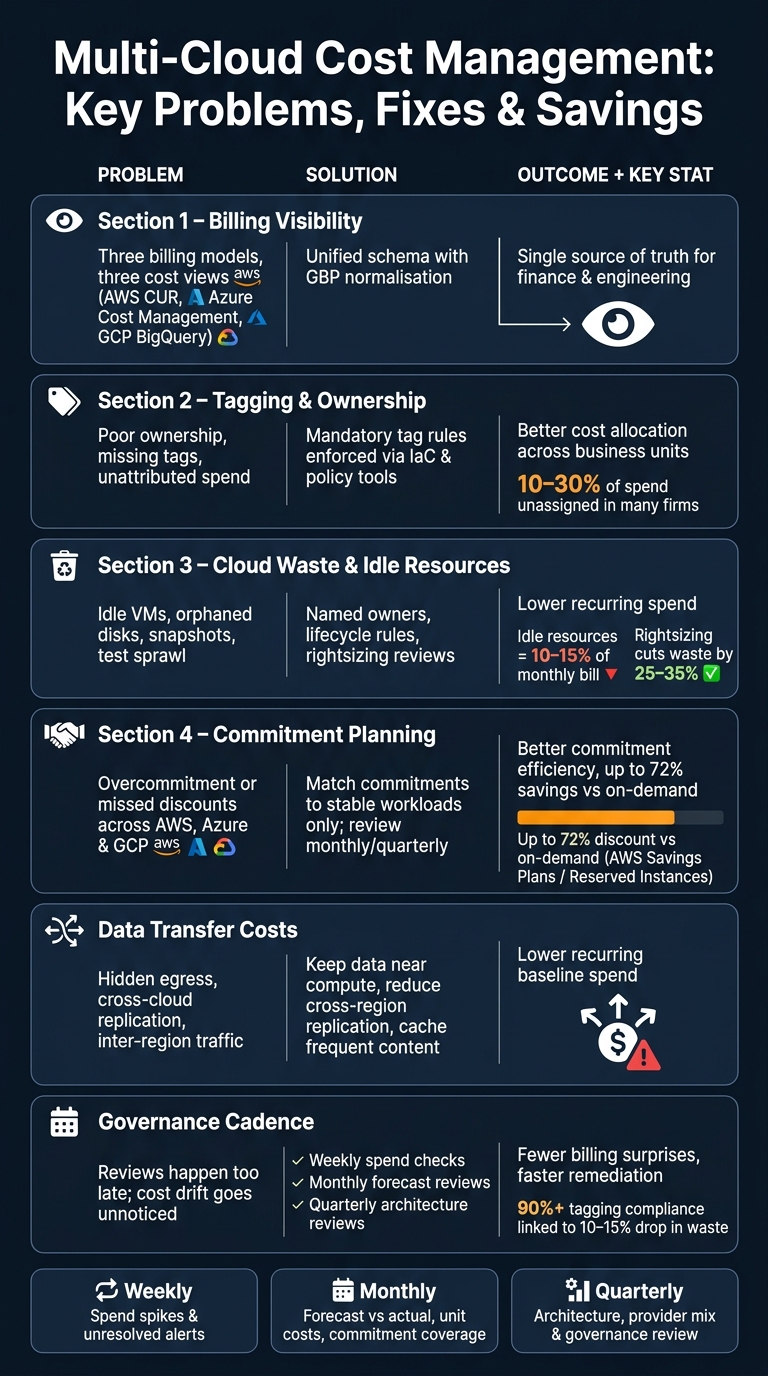 {Multi-Cloud Cost Management: Key Problems, Fixes & Savings by Area}
:::
{Multi-Cloud Cost Management: Key Problems, Fixes & Savings by Area}
:::
FinOps Mastery: Governing Multi-Cloud Cost, Performance & Financial Efficiency | Uplatz
Need help optimizing your cloud costs?
Get expert advice on how to reduce your cloud expenses without sacrificing performance.
Quick comparison
| Area | Main problem | Main fix | What you get |
|---|---|---|---|
| Billing visibility | Three billing models, three cost views | One shared schema with £ GBP normalisation | One source of truth |
| Tagging and allocation | Poor ownership and missing tags | Mandatory tag rules in IaC and policy tools | Better cost allocation |
| Cloud waste | Idle resources and sprawl | Named owners, lifecycle rules, rightsizing | Lower repeat spend |
| Commitments | Overbuying or poor discount use | Match deals to stable demand only | Better coverage and less waste |
| Data transfer | Hidden egress and replication charges | Keep data near compute and trim cross-cloud traffic | Lower baseline cost |
| Governance | Reviews happen too late | Weekly, monthly and quarterly cost reviews | Fewer billing surprises |
If I were starting today, I’d begin with billing exports, tag rules, owner mapping and budget alerts. That gives you a clean view of where money goes before you make bigger buying or architecture decisions.
Problem 1: fragmented visibility and inconsistent billing data
AWS, Azure and Google Cloud report spend in different ways. That creates a simple but painful problem: finance can't reconcile cloud costs properly unless the data is normalised.
AWS structures costs as line-item billing through Cost and Usage Reports (CUR), with spend split by service, account, region and user-defined tags. Azure shows spend at subscription and resource-group level through Azure Cost Management + Billing. Google Cloud uses a project-based model, with billing organised by projects and folders. Same goal, three billing models, and no shared view out of the box.
How billing models differ across AWS, Azure and Google Cloud
Discounts make this even messier.
AWS Savings Plans are commitment-based and tracked through Cost Explorer's utilisation and coverage views. Azure Hybrid Benefit lets organisations use existing Windows Server or SQL Server licences to cut compute costs. Google Cloud sustained use discounts apply automatically when usage stays steady over time, with no commitment needed.
Each provider reports discounts in its own way. Each uses different utilisation metrics. Each needs its own reading. On top of that, AWS cost views can shift depending on the metric you choose, so mixing views can skew actual spend and savings. Without normalised reporting, teams can under-report the cost of commitments or fail to spot discounts that aren't being used well.
Solution: standardise tags, labels and reporting across all clouds
Start with one taxonomy. Then export billing data from every cloud into one shared model.
Use the same tag taxonomy across all providers:
-
environment -
team -
product_or_service -
owner -
cost_centre -
managed_by
In AWS, these become resource and cost-allocation tags that feed into CUR and Cost Explorer. In Azure, they are tags applied at resource and resource-group level. In Google Cloud, they map to labels on resources and project naming conventions, then show up in Billing reports and BigQuery exports.
Build the taxonomy around the strictest provider limits. That way, the same structure works across every platform without messy exceptions later.
Build a unified cost view for finance and engineering teams
Once tags line up, native exports can feed one reporting layer.
AWS CUR can be exported for analysis. Azure Cost Management can feed subscription and resource-group data into a central reporting layer. Google Cloud billing data can be exported to BigQuery. From there, a central warehouse or BI layer can map provider fields to shared dimensions such as environment, team, product, cost_centre, provider and region, with FX conversion to GBP for UK reporting.
| Feature | AWS | Azure | Google Cloud |
|---|---|---|---|
| Native visibility tool | Cost Explorer + CUR | Azure Cost Management + Billing | Billing reports + BigQuery export |
| Primary billing unit | Account / line-item | Subscription / resource group | Project / folder |
| Discount visibility | Savings Plans and Reserved Instances | Reserved Instances and Hybrid Benefit | Committed Use Discounts and sustained use discounts |
| Export format | CUR export | Cost exports | BigQuery export |
| Multi-cloud fit | Strong export and tag-based filtering | Requires external normalisation for cross-cloud use | Strong BigQuery integration and detailed billing analysis |
That shared dataset can serve both sides of the house without forcing either team to bend around the other. Finance wants costs in GBP by cost centre. Engineering wants spend by environment, service and workload. One reporting layer can do both.
Specialist support can also help with schema design, ETL and FinOps dashboards. Once billing data is normalised, the next leak usually comes from unused resources and weak ownership.
Problem 2: waste from cloud sprawl, idle resources and weak governance
In most multi-cloud estates, a big slice of spend adds little business value. Enterprise cloud estates often waste about a third of their cloud spend, mostly because of idle resources and weak controls [1][2][4]. The usual causes are simple: weak ownership, idle resources and missing controls. In a multi-cloud setup, this is harder to spot because governance is split across providers.
Where unnecessary cloud spend usually appears
Waste tends to creep in quietly.
An engineer spins up a test environment for a proof of concept. The project ends, but the environment keeps running because no one is clearly responsible for shutting it down. A virtual machine gets decommissioned, yet its attached disks, snapshots and backups stay behind because retention policies were never enforced.
Idle or stopped resources can make up around 10–15% of a typical monthly cloud bill [1]. Instances with persistently low utilisation are also common candidates for review or removal. Then there are unsanctioned accounts and projects. Business units launch their own cloud accounts for pilots, analytics work or vendor integrations, often outside central control.
On their own, these projects may not look expensive. Put together, though, the spend can add up fast. And because these resources are often tagged badly, finance and engineering can’t see them until someone goes looking on purpose.
The answer is governance, not the odd clean-up sprint.
Solution: FinOps governance with clear ownership and automated controls
The main fix is straightforward: give every environment, account and application a named owner linked to a cost centre. Without that, no one feels direct responsibility for removing unused resources, and the default is to leave things running.
Good governance also means enforcing a mandatory tag set - Environment, Owner, CostCentre, Application, SunsetDate for temporary environments - through policy tools instead of relying on good intentions. AWS Config Rules, Azure Policy and GCP Organisation Policy can reject or flag non-compliant resources at deployment time. That works far better than a weekly manual audit.
Rightsizing reviews should also happen on a set schedule:
- Monthly for non-production
- Quarterly for production
Use AWS Trusted Advisor, Azure Advisor and Google Cloud Recommender to flag instances running below 40% average utilisation as candidates for downsizing or consolidation [3]. When rightsizing and autoscaling are applied in a disciplined way, they cut compute waste by 25–35% [1][4].
Set guardrails that engineering teams will actually follow
Governance breaks down when it creates friction but doesn’t cut waste. The controls that work best are built into deployment workflows from the start. Think IaC templates that apply naming rules and tags by default, budget alerts sent straight to the owner, and lifecycle rules that remove unused disks and old snapshots after a set grace period.
These controls map neatly across AWS, Azure and Google Cloud:
| Capability | AWS | Azure | Google Cloud |
|---|---|---|---|
| Policy enforcement | AWS Config Rules | Azure Policy | Organisation Policy, Config Validator |
| Budget alerts | AWS Budgets | Azure Cost Management budgets | GCP Budgets and alerts |
| Rightsizing recommendations | Trusted Advisor | Azure Advisor | Google Cloud Recommender |
Tagging compliance at 90% or more is linked to a 10–15% drop in waste, driven by the simple fact that people act differently when ownership is clear [1][3]. That level is achievable, but only if enforcement happens at deployment time instead of through after-the-fact clean-up campaigns.
Specialist support can help speed up audits, policy automation and pipeline integration. Once these controls are in place, the harder issue is commitment planning and network charges.
Problem 3: complex commitments, discount schemes and data transfer charges
Once you’ve got visibility and governance in place, the next headache is commitment planning. This is where multi-cloud spending can go sideways fast.
Each provider has its own way of doing discounts, and those schemes don’t line up neatly. So if a team tries to use one buying approach across AWS, Azure and Google Cloud, it can end up locking budget into capacity that never gets used.
Why one discount model does not work across every cloud
AWS gives buyers two main options: Savings Plans and Reserved Instances. Savings Plans commit you to a spend per hour for one or three years, and they apply on their own across eligible usage. They’re more flexible than Reserved Instances, which are tied to given instance families, regions and tenancy. AWS says both can cut costs by up to 72% against on-demand pricing [6][10][12].
Azure takes a different route. Reserved VM Instances lower compute costs for steady workloads, while Azure Hybrid Benefit lets firms use existing Windows Server or SQL Server licences on Azure VMs. That means licence and compute discounts need to be treated as one buying choice, not two separate ones, because the cheapest VM price is not always the cheapest workload cost [13].
Google Cloud works differently again. Committed Use Discounts need a set spend or resource commitment for a fixed term, while sustained use discounts happen automatically and reward workloads that run for longer without any upfront commitment [5]. Some savings come through with no action at all. But the biggest discounts still depend on getting your baseline forecast right.
The risk that shows up in all three clouds is simple: overcommitment.
A better way is to split workloads by how steady they are:
- Stable workloads, such as always-on production services and baseline databases, are a better fit for longer-term commitments.
- Moderate-variance workloads need a bit more care, because usage can drift over time.
- Highly variable workloads, such as batch jobs, test environments and seasonal traffic, are often better left on flexible or on-demand pricing [6][10][12].
In plain terms, only commit to the slice of demand that has stayed steady across several billing cycles. Then check coverage every month or quarter, not just once a year. If you wait that long, waste can build up quietly.
Solution: match commitments to workloads and cut needless data transfer costs
Commitments only save money if network charges don’t eat those savings away. That’s the other part people miss.
Data transfer is one of the easiest cloud costs to underestimate. It tends to grow in the background because it comes from architecture choices, not just from visible compute usage. A bill can look fine at first glance, while egress charges keep climbing underneath it.
Common causes include cross-cloud backups, analytics pipelines pulling data from more than one cloud, and frequent synchronisation between replicated datasets. The fix is often less about finance and more about system design:
- Keep data close to the compute that uses it.
- Reduce cross-region replication where it isn’t needed.
- Cache content that gets accessed often.
It helps to treat cross-cloud traffic as a design problem, not something to deal with later when the invoice lands. A network layout can wipe out the savings from compute discounts faster than most teams expect [7][11][13].
Compare commitment options and data transfer cost risks by provider
| Provider | Commitment instruments | Flexibility & utilisation risk | Common transfer-cost pitfalls |
|---|---|---|---|
| AWS | Savings Plans, EC2 Reserved Instances | Compute Savings Plans are most flexible; EC2 Instance Savings Plans and Reserved Instances offer higher savings but less flexibility [6][9][10][12] | Inbound transfer is generally free; outbound transfer is billed; some intra-region service traffic is free, with exceptions [7][8] |
| Azure | Reserved VM Instances, Azure Hybrid Benefit | Fixed-term reservations; Hybrid Benefit reduces licence-related costs but must be assessed alongside compute [13] | Egress is charged; ingress is free; inter-zone and inter-region transfers can add up quickly [13] |
| Google Cloud | Committed Use Discounts, sustained use discounts | CUDs require explicit commitment; sustained use discounts are automatic and lower-risk for variable workloads [5] | Inter-region and internet egress can become major cost drivers as an estate grows [5] |
Aligning commitment decisions with budget cycles and roadmap changes is where many teams struggle most.
Building a multi-cloud FinOps operating model: key steps and actions
Fixes only stick when everyone works from the same model, with shared ownership, reporting and review cycles. Once visibility, governance and commitments are in place, the next move is simple: run all of it through one operating model.
Create shared metrics, dashboards and cost feedback loops
Start with centralised billing exports from AWS, Azure and Google Cloud. Then normalise that data into one shared schema by mapping each provider’s account, subscription or project fields into the same set of dimensions: cloud, environment, team, cost centre and service. Convert all costs into GBP (£) using one consistent daily exchange rate, and keep both the native currency and GBP values for audit.
That shared dataset should support different teams in different ways.
Finance needs to see spend against budget, forecast variance and commitment coverage in GBP, lined up with business units or products. Engineering needs workload-level detail, such as idle resources, storage growth, data transfer charges and cost by environment. Leadership needs spend trends, main cost drivers and unit economics, including metrics like cost per active user or cost per transaction. Those numbers show whether growth is getting more or less efficient over time [14][15][19].
Cost checks also need to happen during delivery, not only in a monthly report. Add cost-estimation tooling to CI/CD pipelines so developers can see the impact of infrastructure changes before code is merged. Set alert thresholds at 70% of monthly budget, 85%, and forecast breach before month-end. Each alert should go to the named owner with a clear next step to fix it [14][16][17].
The model works best when teams review it on a fixed cadence:
- Weekly: spend spikes and unresolved alerts
- Monthly: forecast versus actual, unit-cost trends, commitment coverage
- Quarterly: architecture, provider mix and governance review [14][18][19]
Where specialist support can speed up results
Teams often need help connecting these controls to billing pipelines and delivery workflows. Hokstad Consulting covers the exact steps in this section: billing pipeline design, tagging enforcement, CI/CD cost checks, governance automation and AI-driven anomaly detection, without manual review.
Conclusion: the core fixes that cut multi-cloud overspend
Use this summary to turn the model into action.
| Problem | Solution | Outcome |
|---|---|---|
| Fragmented billing data | Centralised exports, unified schema, GBP normalisation | Single source of truth for finance and engineering |
| Unattributed costs | Mandatory tagging enforced via IaC and CI/CD policy checks | Higher allocation accuracy across business units |
| Cloud sprawl and idle resources | FinOps governance with named ownership, automated rightsizing and idle resource shutdown | Lower recurring spend |
| Budget surprises | Tiered budget alerts, anomaly detection, deployment-stage cost checks | Fewer billing shocks, improved forecast accuracy |
| Overcommitment or missed discounts | Workload-based commitment planning reviewed monthly or quarterly | Better commitment efficiency |
| Excessive data transfer costs | Architecture review to reduce cross-region replication and keep data close to compute | Lower recurring baseline spend |
| No shared operating cadence | Weekly, monthly and quarterly review cycles with named owners and clear escalation paths | Faster remediation, better collaboration between finance and engineering |
FAQs
Where should we start with multi-cloud cost control?
Start with visibility and governance.
Set up one tagging approach across your estate with 5 to 7 core tags. Good examples include cost-centre, environment, project, owner and managed-by. Keep tag keys and values consistent. A simple rule helps here: use lowercase and hyphens every time.
Next, bring billing data into one format, such as FOCUS, so you can review spend across environments in GBP without jumping between mismatched reports. At the same time, use cloud-native governance tools to enforce tagging rules and block untagged resources before they slip through.
How often should we review multi-cloud spend?
Don’t rely on reactive monthly or quarterly manual audits alone. They can let overspending run on for far too long. Use automated monitoring with real-time visibility and hourly data refreshes so you can spot anomalies as they happen.
Keep formal reviews aligned with business cycles, but make continuous automated governance and daily dashboard visibility the standard if you want to keep budgets on track.
How do we avoid overcommitting on cloud discounts?
Keep coverage between 60% and 85%. That usually gives you a sensible balance between lower spend from Reserved Instances or Savings Plans and enough room to handle demand that shifts over time.
At the same time, aim for 90% or higher utilisation on those commitments. If utilisation drops, you’re paying for capacity you’re not using, which is money left on the table.
This only works if you check it often. Track coverage and utilisation on a regular basis, and use tools that amortise savings so teams can see the true cost per unit instead of a distorted headline number.