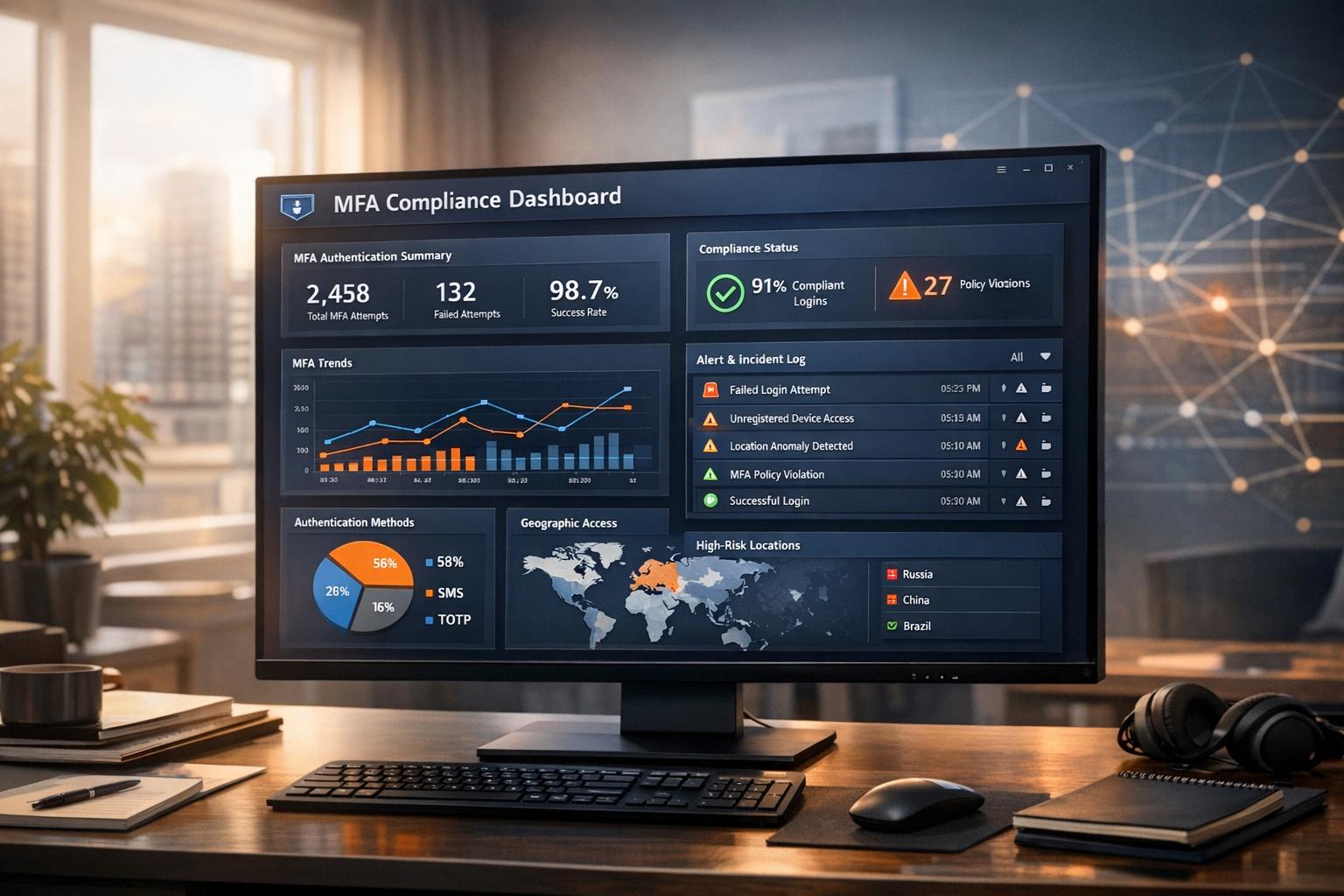
Multi-Factor Authentication (MFA) is critical for securing cloud services, but implementation alone isn’t enough. Without proper monitoring, compliance gaps and vulnerabilities can expose organisations to risks, as seen in notable breaches in 2024. Here’s what you need to know:
- Why Monitoring Matters: Continuous oversight ensures compliance with standards like GDPR, PCI DSS, HIPAA, and NIST SP 800-63b. It also helps detect threats such as MFA fatigue attacks and identity misuse.
- Set a Baseline: Identify high-risk accounts (e.g., privileged users) and document existing MFA methods. Use classifications like NIST’s AAL levels to assess security strength.
- Enable Logging: Ensure all authentication events are logged and stored securely for long-term analysis. Tools like Microsoft Entra ID and AWS CloudTrail can provide detailed sign-in data.
- Detect Suspicious Activity: Watch for anomalies like
impossible travel
, multiple failed attempts, or unusual device registrations. Use metadata like risk levels to flag high-risk events. - Respond Dynamically: Employ risk-based policies to adjust security measures in real time. For example, require additional verification for unfamiliar locations or enforce phishing-resistant methods like FIDO2 tokens.
- Maintain Compliance: Regularly review MFA policies, address exceptions, and ensure audit trails meet regulatory requirements. Use compliance reports to track progress and refine security measures.
MFA monitoring is an ongoing process that requires vigilance, robust logging, and adaptive responses to safeguard sensitive data and meet compliance standards.
Okta MFA Authentication Policy | Step-by-Step Admin Guide
Compliance Requirements for MFA
::: @figure 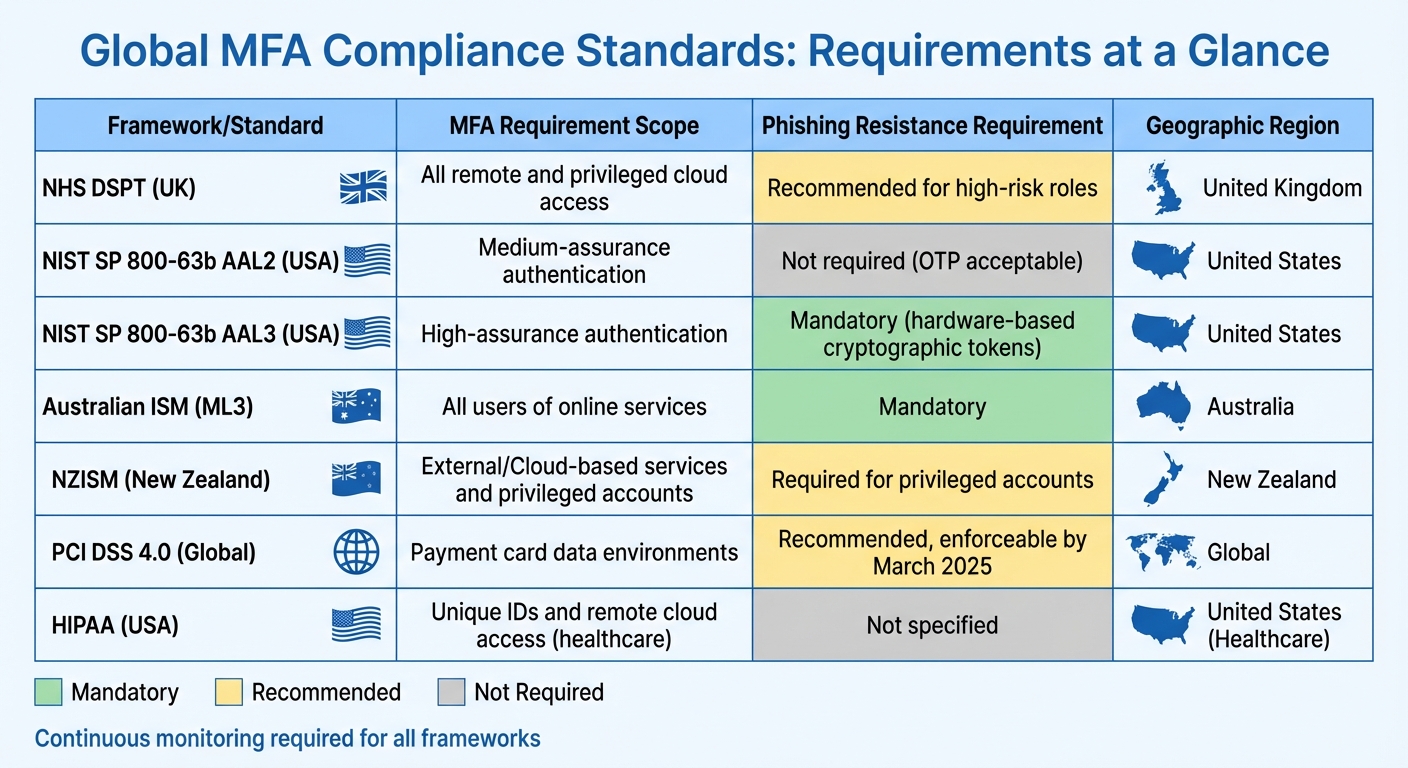 {Global MFA Compliance Standards Comparison Chart}
:::
{Global MFA Compliance Standards Comparison Chart}
:::
Major Compliance Standards
Different industries are subject to specific mandates when it comes to Multi-Factor Authentication (MFA). For example, healthcare organisations in the United States must comply with HIPAA, which requires MFA for unique IDs and remote cloud access. Additionally, they must retain risk assessments and MFA attestations for six years [8].
In the UK, the NHS Data Security and Protection Toolkit (DSPT) sets clear guidelines:
The policy requires that MFA: must be enforced on all remote user access to all systems; and must be enforced on all privileged user access to externally-hosted systems [1].
Similarly, operators of essential health services are obligated to comply with the NIS Regulations 2018 [1].
Globally, many organisations look to NIST SP 800-63b, which defines different Authenticator Assurance Levels (AAL). For instance:
- AAL2: Requires combining a memorised secret with a second factor, such as a one-time password or cryptographic device.
- AAL3: Takes it further by mandating phishing-resistant, hardware-based cryptographic tokens [2].
New Zealand's Information Security Manual (NZISM) aligns with this approach. For example, Control 16.7.42.C.01 specifies:
Agencies MUST use two-factor or Multi-Factor Authentication to allow access to privileged accounts [9].
Australia follows suit with its Information Security Manual (ISM), which requires MFA for all users accessing an organisation's online services (ISM-1504). For organisations aiming for higher maturity levels, the guidelines demand:
Multifactor authentication used for authenticating users of online services is phishing-resistant [11].
This global emphasis on stronger, phishing-resistant authentication reflects the growing need to protect against sophisticated cyber threats [10].
| Framework/Standard | MFA Requirement Scope | Phishing Resistance Requirement |
|---|---|---|
| NHS DSPT | All remote and privileged cloud access | Recommended for high-risk roles [1] |
| NIST AAL3 | High-assurance authentication | Mandatory (Phishing-resistant) [2] |
| Australian ISM (ML3) | All users of online services | Mandatory (Phishing-resistant) [11] |
| NZISM | External/Cloud-based services | Required for privileged accounts [9] |
These frameworks highlight the importance of continuous MFA monitoring to ensure compliance. The emphasis is not just on initial implementation but on maintaining robust, ongoing oversight.
Why Continuous MFA Monitoring Matters
Adhering to rigorous compliance standards makes real-time MFA monitoring a necessity. Continuous monitoring plays a critical role in identifying and addressing potential vulnerabilities. As David Januchowski, Senior Solutions Architect at Okta, notes:
Effective security is not a one-and-done task; it's an ongoing practice [12].
This mindset aligns with PCI DSS 4.0, which took effect in March 2024, with most requirements enforceable by 31 March 2025. The framework stresses that security must be treated as a continuous process [12].
Active monitoring helps uncover issues like identity sprawl and misconfigured MFA settings [12]. It also addresses newer challenges, such as MFA fatigue, by triggering immediate countermeasures when suspicious authentication attempts are detected [6][7][3]. For example, Australia’s Essential Eight framework mandates active monitoring and investigation of cybersecurity events, particularly at higher maturity levels (2 and 3) [3].
In cases where implementing MFA isn’t technically feasible, organisations are required to document these exceptions, conduct risk assessments, and obtain internal approval at the board level. These exceptions must be reviewed annually [1]. This underscores that compliance is not just about deploying MFA but also about continuously evaluating and improving security measures.
Setting Up a Baseline for MFA Monitoring
Identifying High-Risk Systems and Accounts
The first step in configuring a baseline for monitoring multi-factor authentication (MFA) is identifying the accounts and systems that require extra attention. Privileged accounts are often the most attractive targets for attackers. As Mandiant explains:
A privileged account is any human or non-human identity whose entitlements can change system state, alter security policy, or reach sensitive data beyond a normal role. [14]
Start by categorising accounts into tiers based on the potential impact of a breach. Tier 0 includes the most critical assets, such as domain controllers, identity providers, and the infrastructure supporting them. Tier 1 covers management interfaces, jump servers, and CI/CD pipelines. Tier 2 includes standard user workstations and business applications [14]. This tiering system ensures monitoring resources are allocated effectively.
Don’t overlook shadow admins - accounts that hold hidden but powerful privileges over Group Policy Objects or Domain Controllers. Auditing resource permissions can help uncover these hidden vulnerabilities. With stolen credentials contributing to 16% of intrusions in 2024 and a global median dwell time of 11 days [14], early identification of these accounts is critical for reducing risk.
Non-human accounts and API keys should also be part of your risk assessments. NHS England highlights that securing privileged internal access with MFA significantly limits an attacker’s ability to exploit your network [1].
After identifying high-risk accounts, the next step is to document your existing MFA methods to identify any coverage gaps.
Documenting Current Authentication Methods
Once high-risk accounts are identified, it’s time to evaluate your current MFA setup. Start by cataloguing all existing MFA implementations. Most identity platforms offer built-in compliance reports, which can provide a detailed list of configured applications, authentication profiles, and required factors for each user role [13]. This gives you a clear overview of your organisation’s MFA coverage.
To assess your methods, use the NIST SP 800-63b classification system:
- AAL1: Single-factor authentication, such as passwords or SMS.
- AAL2: Requires a password combined with an OTP.
- AAL3: Phishing-resistant methods, like hardware tokens [13].
This classification helps pinpoint any security weaknesses in your current setup.
Document the specific MFA factors in use across your organisation, such as FIDO2 credentials, challenge-based apps, OTP generators, or SMS and email-based methods [6]. Keep in mind that FIDO2 is resistant to phishing, while SMS remains vulnerable to SIM-swapping attacks [1].
Finally, ensure any exceptions to MFA are formally registered, complete with documented risk assessments and board approval [1]. This documentation is crucial for audits and serves as a benchmark for tracking progress toward achieving comprehensive MFA coverage across your organisation.
Configuring MFA Logging and Activity Tracking
Enabling Sign-In Logging in Cloud Environments
Once you've established your MFA baseline, it's crucial to set up detailed logging to monitor every authentication event. While most cloud platforms generate sign-in logs automatically, their default retention periods often fall short of meeting compliance standards. For instance, Microsoft Entra ID (previously Azure AD) retains sign-in and audit logs for just 7 to 30 days, depending on your licence [3].
In AWS, the go-to tool for auditing is CloudTrail. To ensure comprehensive coverage, configure a multi-region trail to capture global events [16]. When an IAM user signs in using MFA, CloudTrail logs will include sessionContext attributes. If MFA is used, you'll see the entry mfaAuthenticated: true [17].
Analysis and reporting alone don't facilitate event assignment to the correct resource in a timely fashion. The AWS Well-Architected Framework recommends that you integrate AWS security events and findings into a notification and workflow system.[16]
Centralising logs within a Security Information and Event Management (SIEM) system allows you to correlate authentication events across platforms and respond swiftly to potential threats [16]. Additionally, extend default retention periods by using secure, access-controlled storage. This ensures an immutable audit trail, which is essential for forensic investigations [16].
With your logs securely stored and centralised, the next step involves analysing authentication events to identify suspicious patterns.
Analysing Authentication Logs and User Behaviour
The logging setup from earlier lays the foundation for effective analysis. Modern cloud platforms provide detailed insights, such as the specific authentication method used (e.g., SMS, FIDO2, or Microsoft Authenticator), the sequence of methods attempted, and the exact reason for any MFA denials [15].
Avoid relying solely on the MFA requirement
field. Some resource providers may accept prior MFA claims from the same session. Always verify the root authentication method and MFA details for each event [15]. Keep an eye on specific failure codes, such as user declined the authentication
, which could signal an MFA fatigue attack where attackers repeatedly prompt users until they approve. Similarly, entered incorrect code too many times
might indicate brute-force attempts [15].
| Log Category | Key Data Points | Purpose |
|---|---|---|
| Identity | UserPrincipalName, ARN, Source IP, User Agent | Identify the user and their location |
| MFA Detail | MFAUsed (Yes/No), MfaType, Authentication Method | Assess the strength of the second factor |
| Result | Success/Failure, ErrorMessage, Denial Reason | Spot brute-force or credential-stuffing attacks |
| Policy | Conditional Access Policy ID, Authentication Requirement | Ensure compliance with access rules |
Regularly audit user MFA registrations using PowerShell scripts like Get-MgUser to identify users who haven't set up MFA [15]. Pay attention to MFA skipped
events, which occur when authentication is bypassed due to remembered device
or trusted location
settings. Ensure these exceptions align with your compliance policies [15]. Enabling Identity Protection policies in Azure or Amazon Cognito advanced security can further help by automatically detecting unusual sign-in behaviour, such as access attempts from unfamiliar locations or devices [3][4].
Need help optimizing your cloud costs?
Get expert advice on how to reduce your cloud expenses without sacrificing performance.
Detecting and Responding to Anomalies
Signs of Suspicious Activity
After analysing logs in detail, the next step is identifying anomalies that could signal potential threats. Authentication logs are particularly telling when it comes to detecting breaches. For instance, unusual sign-ins from unfamiliar locations or IP addresses with poor reputations often warrant further investigation [18]. A classic example is the impossible travel
scenario, where a user appears to log in from two far-apart locations within an unrealistically short time frame [37, 11].
Another red flag is a pattern of repeated failures in authentication logs. Messages like entered incorrect code too many times
or user declined the authentication
might indicate that an attacker has valid credentials but is being stopped by multi-factor authentication (MFA) [15]. MFA fatigue attacks - where attackers bombard users with repeated MFA prompts to trick them into approval - can also be spotted through a sudden surge in these requests [5].
Be vigilant about new device registrations, especially on accounts that were previously inactive, as they could signify an attacker’s initial move [27, 11]. Similarly, attempts to use outdated protocols in the logs may point to exploitation of weaker authentication methods [15]. To make things easier, many modern identity providers tag risky events with metadata like riskLevelDuringSignIn, riskState, or riskDetail (e.g., anonymous IP address
or atypical travel
), which act as immediate warning signs [15].
When such anomalies are detected, it’s crucial to act quickly by applying adaptive security measures.
Using Adaptive Authentication for Risk Mitigation
Once anomalies are flagged, security measures should be adjusted dynamically to counter the identified risks. Adaptive authentication allows systems to respond to potential threats based on their severity, rather than treating all login attempts the same. For instance, if a login attempt comes from an unfamiliar location or an unrecognised device, the system can automatically require additional authentication steps or even block the attempt outright [10, 9]. Tools like Microsoft Entra Identity Protection can streamline this process by using risk-based conditional access policies to detect and respond to threats automatically [9, 23].
It’s important to tailor responses to the level of risk. For example, in cases of impossible travel or suspected credential theft, policies can enforce re-authentication or block access entirely [11, 9]. To combat MFA fatigue attacks, features like number matching - where users must input a specific number displayed on their screen rather than simply approving a notification - can be highly effective. Additionally, limit the number of MFA prompts allowed within a set timeframe to reduce vulnerability [11, 7]. Blocking sign-ins from regions where your organisation has no business operations using Named Locations is another effective strategy [37, 23].
For the most serious risks, consider requiring phishing-resistant authenticators like FIDO2 security keys or Windows Hello for Business [12, 38]. Also, ensure your MFA solution denies access during system errors and integrates with your SIEM (Security Information and Event Management) system. This setup enables automated alerts for repeated failed codes or suspicious device activities, providing an additional layer of protection [11, 23].
Maintaining Continuous Compliance and Reporting
Setting Up Regular Review and Reporting Cycles
Ensuring compliance is not a one-time task - it requires ongoing monitoring and well-organised reporting. To stay on track with regulatory standards, reports should focus on key metrics like 'Configured MFA for Applications', 'Required Authentication Factors by User', and 'Users in Administrative Roles'. These metrics act as a baseline for assessing and improving your Multi-Factor Authentication (MFA) configurations.
To evaluate the strength of your authentication methods, incorporate Authenticator Assurance Level (AAL) tracking, as outlined in NIST SP 800-63b. AAL scores range from AAL1 (basic single-factor methods like passwords or SMS) to AAL3, which involves phishing-resistant options such as FIDO2 hardware tokens. By designing your reports to reflect these levels, you can pinpoint whether users are relying on weaker methods or transitioning to stronger, compliance-ready factors [13].
While Microsoft Entra ID typically retains logs for 7 to 30 days, many regulations require much longer retention periods. To meet these demands, configure long-term archival to storage accounts for multi-year retention. You can also use tools like PowerShell (Get-MgUser with filters like StrongAuthenticationMethods) to quickly generate compliance reports and ensure you're staying ahead of requirements [3][15].
Improving MFA Policies Based on Monitoring Data
The data gathered from continuous monitoring isn't just for show - it’s your roadmap for refining MFA policies. Dive into your compliance reports to uncover any weak spots. For example, review AAL scores to see if users are still relying on less secure methods like SMS codes. This can guide you towards adopting passwordless options, such as FIDO2 keys or mobile authenticators, which are both more secure and user-friendly [13].
Pay close attention to any MFA exceptions, as they can create gaps in your compliance framework. Each exception should be thoroughly documented, assessed for risk, and approved at the board level. NHS England’s Data Security and Protection Toolkit (DSPT) offers valuable advice here:
The policy is not intended to create enforcement traps, but rather to motivate collective effort towards better authentication [1].
Make it a priority to review these exceptions annually. Over time, aim to phase them out through system upgrades or process improvements. Your compliance reports should include a summary of these exceptions and outline actionable steps for addressing them [1].
Conclusion
Key Takeaways for MFA Monitoring
MFA monitoring isn’t just a one-time task - it’s an ongoing defence against ever-evolving attacks. While MFA significantly reduces the risk of unauthorised access [1], poor monitoring contributed to 16% of intrusions in 2024 [14].
To strengthen your monitoring strategy, focus on centralised logging for all MFA events - both successful and failed. Pay special attention to critical Tier-0
assets like domain controllers and cloud control planes [11][14]. Upgrade from weaker methods, such as SMS, to phishing-resistant authenticators like FIDO2 hardware tokens. These tokens use cryptographic methods to ensure sessions are securely tied to the authenticator [19][10]. Microsoft underscores this point:
The result is that any authenticator that doesn't cryptographically verify that the sign in server is who it says it is, can be phished [19].
Automated detection is essential for identity-based threats, such as MFA fatigue
attacks, where users are overwhelmed with prompts until they mistakenly approve one. With attackers maintaining a global median dwell time of 11 days in 2024 [14], continuous monitoring acts as a crucial early warning system. Additionally, short log retention periods highlight the importance of having a long-term archival strategy [3].
These points underscore the need for vigilance and consistency in refining your MFA approach.
How Hokstad Consulting Can Support Your Compliance Goals

Continuous MFA monitoring is central to maintaining strong cloud security and meeting regulatory requirements. As highlighted, expert guidance can simplify this complex process and ensure your compliance efforts are effective.
Hokstad Consulting brings expertise in cloud architecture, compliance, and automation to help you build a secure, compliant infrastructure. By integrating MFA and access controls from the start, they eliminate the need for expensive retrofitting down the line.
Their services include implementing Compliance as Code (CaC) with tools like AWS Config and Open Policy Agent, allowing you to codify MFA policies and detect configuration drifts in real time. They also create a compliance matrix that maps your MFA requirements to major standards - whether it’s GDPR, ISO 27001, SOC 2, or the NHS Data Security and Protection Toolkit. By automating compliance checks and maintaining a versioned audit trail, they reduce your security workload and make audits more efficient.
To explore their cloud infrastructure and compliance solutions, visit hokstadconsulting.com.
FAQs
Which compliance standards require monitoring of MFA?
Several important compliance standards require organisations to monitor multi-factor authentication (MFA) as part of their security measures and regulatory obligations. These include the UK Data Security and Protection Toolkit (DSPT), the Network and Information Systems (NIS) Regulations 2018, GDPR, ISO 27001, PCI DSS, and the NIST digital identity guidelines (SP 800-63-3).
Keeping an eye on MFA usage is crucial for safeguarding sensitive information, blocking unauthorised access, and proving compliance with these regulations. Conducting regular reviews and audits of MFA systems is particularly vital, especially when operating in cloud-based environments, to ensure both legal and industry-specific standards are consistently met.
How can organisations identify and respond to MFA fatigue attacks?
Organisations can spot MFA fatigue attacks by keeping a close eye on Azure AD sign-in and audit logs. Look out for odd patterns, like an unusually high number of MFA push notifications or repeated failed login attempts. Setting up alerts or analytic rules to catch these behaviours early can make a big difference.
To tackle such incidents, implement conditional access policies that either block suspicious logins or demand extra verification steps. If credentials have been compromised, reset them immediately to stop any further unauthorised access. Regularly updating and fine-tuning your security policies is another smart move to reduce risks over time.
Why is it important to continuously monitor MFA for security compliance?
Keeping a close eye on your Multi-Factor Authentication (MFA) setup is crucial for ensuring that your security measures stay effective and meet UK regulations like GDPR and ISO 27001. Regular monitoring helps uncover misconfigurations, spot potential bypass attempts, and maintain strong safeguards for your sensitive systems and data.
By routinely auditing MFA activity, you can reduce risks, show compliance during inspections, and steer clear of hefty fines. This proactive strategy not only bolsters your organisation’s security but also ensures you stay aligned with regulatory standards.